change wheel CADILLAC STS 2009 1.G User Guide
[x] Cancel search | Manufacturer: CADILLAC, Model Year: 2009, Model line: STS, Model: CADILLAC STS 2009 1.GPages: 514, PDF Size: 2.73 MB
Page 271 of 514
Bluetooth Controls
Use the buttons located on the steering wheel to
operate the in-vehicle Bluetooth system. SeeAudio
Steering Wheel Controls on page 3-131for more
information.
bg(Push To Talk):Press to answer incoming calls,
to conrm system information, and to start speech
recognition.
Pairing
A Bluetooth enabled cell phone must be paired to the
in-vehicle Bluetooth system rst and then connected to
the vehicle before it can be used. See the cell phone
manufacturers user guide for Bluetooth functions before
pairing the cell phone. If a Bluetooth phone is not
connected, calls will be made using OnStar
®Hands-Free
Calling, if available. Refer to the OnStar owner’s guide for
more information.Pairing Information:
Up to ve cell phones can be paired to the in-vehicle
Bluetooth system.
The pairing process is disabled when the vehicle is
moving.
The in-vehicle Bluetooth system automatically links
with the rst available paired cell phone in the
order the phone was paired.
Only one paired cell phone can be connected to the
in-vehicle Bluetooth system at a time.
Pairing should only need to be completed once,
unless changes to the pairing information have
been made or the phone is deleted.
To link to a different paired phone, see Linking to a
Different Phone later in this section.
3-117
Page 293 of 514
ABS can change the brake pressure to each wheel, as
required, faster than any driver could. This can help
you steer around the obstacle while braking hard.
As you brake, the computer keeps receiving updates on
wheel speed and controls braking pressure accordingly.
Remember: ABS does not change the time you need to
get your foot up to the brake pedal or always decrease
stopping distance. If you get too close to the vehicle in
front of you, you will not have time to apply the brakes
if that vehicle suddenly slows or stops. Always leave
enough room up ahead to stop, even though you
have ABS.
Using ABS
Do not pump the brakes. Just hold the brake pedal
down rmly and let antilock work for you. You might
hear the antilock pump or motor operate, and feel the
brake pedal pulsate, but this is normal.
Braking in Emergencies
With ABS, you can steer and brake at the same time.
In many emergencies, steering can help more than even
the very best braking.
Brake Assist
This vehicle has a Brake Assist feature designed to
assist the driver in stopping or decreasing vehicle speed
in emergency driving conditions. This feature uses the
stability system hydraulic brake control module to
supplement the power brake system under conditions
where the driver has quickly and forcefully applied the
brake pedal in an attempt to quickly stop or slow down
the vehicle. The stability system hydraulic brake control
module increases brake pressure at each corner of the
vehicle until the ABS activates. Minor brake pedal
pulsations or pedal movement during this time is normal
and the driver should continue to apply the brake pedal
as the driving situation dictates The Brake Assist feature
will automatically disengage when the brake pedal is
released or brake pedal pressure is quickly decreased.
4-5
Page 295 of 514
Stability control activates when the computer senses a
difference between the intended path and the direction
the vehicle is actually traveling. Stability control
automatically adjusts the front road wheel steering
angle, modies the suspension stiffness, and selectively
applies braking pressure at any one of the vehicle’s
brakes to help maintain directional control of the vehicle.
When the system activates, a STABILITY SYS
ACTIVE message displays on the Driver Information
Center (DIC). SeeDIC Warnings and Messages
on page 3-79. It is normal to hear a noise or feel
vibration in the brake pedal when the system is working.
Continue to steer the vehicle in the intended direction.
If cruise control is engaged when Enhanced StabiliTrak
activates, the cruise control will automatically disengage.
Cruise Control may be re-engaged when road conditions
allow. SeeCruise Control on page 3-16,orAdaptive
Cruise Control on page 3-20for more information.
Enhanced StabiliTrak comes on automatically in the
Stability Touring Mode, when the vehicle is started.
The Stability Touring Mode is recommended for normal
driving. Enhanced StabiliTrak also has Stability
Competitive Mode that is turned on by pressing the
Traction Control (TC) button twice quickly. This mode is
designed to be used by the performance consciousdriver who desires less stability control intervention.
SeeCompetitive Driving Mode on page 4-11. When the
Stability Control Competitive Mode has been activated,
traction control operates in competitive mode and
cannot be turned off. The STABILITY COMPETITIVE
MODE message will be displayed on the DIC.
SeeDIC Warnings and Messages on page 3-79.
When operating the vehicle in the Stability Competitive
Mode, the system provides less stability control
intervention. Driving should be adjusted accordingly.
When the Stability Competitive Mode has been selected,
the Active Steering and Magnetic Ride Control Touring
Mode is not available. These systems are automatically
changed to the Performance Mode, providing more
response to road conditions and quicker steering
response. For more information, see “Active Steering
and Magnetic Ride Control Mode” in the Index of
the vehicle’s Navigation Manual.
To assist with directional control of the vehicle, always
leave the system on. Stability control can be turned
off however, by using the TC button. SeeTraction
Control System (TCS) on page 4-10. The STABILITY
SYS OFF message will be displayed on the DIC.
SeeDIC Warnings and Messages on page 3-79.
4-7
Page 296 of 514
If there is a problem detected with Enhanced StabiliTrak,
the SERVICE STABILITY SYS message will be
displayed on the DIC. SeeDIC Warnings and Messages
on page 3-79. When this message is displayed, the
system is not operating. Driving should be adjusted
accordingly.
When certain faults or vehicle conditions are detected,
the Stability control will automatically go into a secure
mode and the STABILITY SECURE MODE message will
be displayed on the DIC. When the Stability Secure
Mode is activated, the stability control system will
not respond to driver requests to change the stability
mode until the next ignition cycle or until the vehicle
condition or fault is returned to normal. When the
Stability Secure Mode is activated, other messages
may be displayed, such as SERVICE STEERING SYS,
SERVICE SUSPENSION SYS or CHECK TIRE
PRESSURE on the DIC. When the Stability Secure
Mode is activated, a larger degree of steering wheel
input at low vehicle speeds and a smaller degree
of steering wheel input at high vehicle speeds may be
required. Stability Secure Mode will be activated if
a compact spare tire is being used. SeeDIC Warnings
and Messages on page 3-79andCompact Spare
Tire on page 5-114.Persistent operation of the vehicle in the STABILITY
SECURE MODE may be an indication that the vehicle
needs to be serviced by your dealer/retailer.
When certain faults are present, the vehicle’s speed
may be limited and the SPEED LIMITED TO XXX
message will be displayed on the DIC. SeeDIC
Warnings and Messages on page 3-79. When the
vehicle’s speed is limited, other messages may
be displayed, such as SERVICE STABILITY SYS,
SERVICE STEERING SYS or SERVICE SUSPENSION
SYS on the DIC. Have the vehicle serviced by your
dealer/retailer.
Enhanced StabiliTrak and Traction Control
Mode Selection
Enhanced StabiliTrak can be operated in Touring Mode
or Competitive Mode. It can also be turned off. The
TC button is used to change stability control modes
(Touring, Competitive or Off) as well as to turn traction
control on or off. SeeTraction Control System (TCS)
on page 4-10. The following information describes
the operation of the TC button for changing Traction
Control and Stability Control Modes.
4-8
Page 301 of 514
During some operating conditions, the active steering
might deactivate to protect the system from damage. You
might notice that the center position of the steering wheel
is changed. Unless there is a SERVICE STEERING SYS
message, the system will return to normal operation as
soon as the condition ceases, usually within a very short
period of time.
At low speeds, the active steering system requires less
movement of the steering wheel to change vehicle
direction than the normal power steering system.
Adjust your driving accordingly.
When certain steering faults are present, the active
steering deactivates and vehicle speed might be limited.
The SERVICE STEERING SYS and SPEED LIMITED
TO XXX messages will be displayed. SeeDIC Warnings
and Messages on page 3-79. The normal power steering
system is still operational. You might notice that the
center position of the steering wheel is changed and that
more steering effort at low speeds and less steering effort
at high speeds is required. You can continue to drive your
vehicle with normal power steering but you should have
your dealer/retailer inspect the steering system as soon
as possible in order to have the problem corrected and
the steering wheel position centered.
When stability control activates, the system
automatically adjusts the front road wheel steering
angle, modies the suspension stiffness, and selectivelyapplies braking pressure at any one of the vehicle’s
brakes to help maintain directional control of the vehicle.
Adjustments to the steering will not be felt in the
steering wheel. SeeEnhanced StabiliTrak
®on page 4-6.
It is recommended that the battery not be disconnected
when the steering wheel is turned from the center
position. If this occurs, the center position of the steering
wheel could be temporarily changed a small amount.
You can continue to operate your vehicle and, after
a short time, the center position of the steering wheel
will return to normal.
Steering Tips
It is important to take curves at a reasonable speed.
Traction in a curve depends on the condition of the tires
and the road surface, the angle at which the curve is
banked, and your speed. While in a curve, speed is the
one factor you can control.
If you need to reduce speed, do it before you enter the
curve, while the front wheels are straight ahead.
Try to adjust the speed so you can drive through the
curve. Maintain a reasonable, steady speed. Wait
to accelerate until you are out of the curve, and then
accelerate gently into the straightaway.
4-13
Page 302 of 514
To help you steer in the direction you want to go, during
certain sharp or sudden cornering maneuvers, gear
selection is controlled. This will maximize the available
drive wheel torque and minimize the transmission
response time and shift activity. During this kind of
maneuver, the transmission shifts automatically
as vehicle speed changes.
Steering in Emergencies
There are times when steering can be more effective
than braking. For example, you come over a hill and nd
a truck stopped in your lane, or a car suddenly pulls out
from nowhere, or a child darts out from between parked
cars and stops right in front of you. You can avoid these
problems by braking — if you can stop in time. But
sometimes you cannot; there is not room. That is the
time for evasive action — steering around the problem.
Your vehicle can perform very well in emergencies like
these. First apply the brakes. SeeBraking on page 4-3.
It is better to remove as much speed as you can from a
possible collision. Then steer around the problem, to the
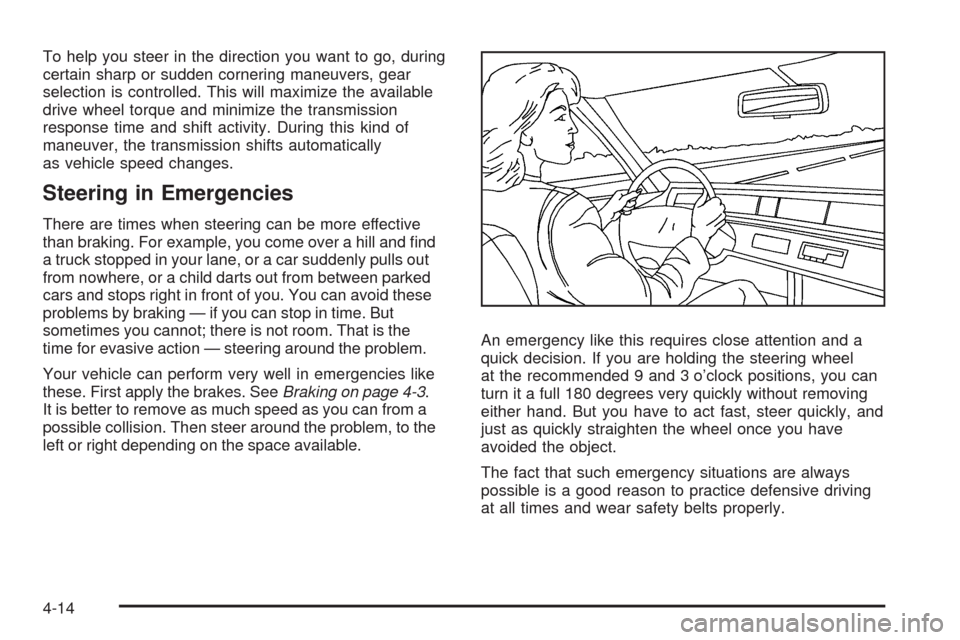
left or right depending on the space available.An emergency like this requires close attention and a
quick decision. If you are holding the steering wheel
at the recommended 9 and 3 o’clock positions, you can
turn it a full 180 degrees very quickly without removing
either hand. But you have to act fast, steer quickly, and
just as quickly straighten the wheel once you have
avoided the object.
The fact that such emergency situations are always
possible is a good reason to practice defensive driving
at all times and wear safety belts properly.
4-14
Page 304 of 514
Skidding
In a skid, a driver can lose control of the vehicle.
Defensive drivers avoid most skids by taking reasonable
care suited to existing conditions, and by not overdriving
those conditions. But skids are always possible.
The three types of skids correspond to your vehicle’s
three control systems. In the braking skid, the wheels
are not rolling. In the steering or cornering skid, too
much speed or steering in a curve causes tires to slip
and lose cornering force. And in the acceleration
skid, too much throttle causes the driving wheels
to spin.
Remember: Any traction control system helps avoid
only the acceleration skid. If your traction control system
is off, then an acceleration skid is best handled by
easing your foot off the accelerator pedal.
If your vehicle starts to slide, ease your foot off the
accelerator pedal and quickly steer the way you want
the vehicle to go. If you start steering quickly enough,
your vehicle may straighten out. Always be ready
for a second skid if it occurs.You might see the STABILITY SYS ACTIVE message
on the Driver Information Center. SeeDIC Warnings and
Messages on page 3-79andStabiliTrak®System on
page 4-6orEnhanced StabiliTrak®on page 4-6.
Of course, traction is reduced when water, snow, ice,
gravel, or other material is on the road. For safety,
you will want to slow down and adjust your driving to
these conditions. It is important to slow down on slippery
surfaces because stopping distance will be longer and
vehicle control more limited.
While driving on a surface with reduced traction, try your
best to avoid sudden steering, acceleration, or braking,
including reducing vehicle speed by shifting to a lower
gear. Any sudden changes could cause the tires to
slide. You may not realize the surface is slippery until
your vehicle is skidding. Learn to recognize warning
clues — such as enough water, ice, or packed snow on
the road to make a mirrored surface — and slow down
when you have any doubt.
Remember: Any Antilock Brake System (ABS) helps
avoid only the braking skid.
4-16
Page 312 of 514
Rocking Your Vehicle to Get It Out
Turn the steering wheel left and right to clear the area
around the front wheels. Turn off any traction or stability
system. Shift back and forth between R (Reverse) and a
forward gear, spinning the wheels as little as possible.
To prevent transmission wear, wait until the wheels stop
spinning before shifting gears. Release the accelerator
pedal while shifting, and press lightly on the accelerator
pedal when the transmission is in gear. Slowly spinning
the wheels in the forward and reverse directions causes a
rocking motion that could free the vehicle. If that does not
get the vehicle out after a few tries, it might need to be
towed out. If the vehicle does need to be towed out,
seeTowing Your Vehicle on page 4-29.
Loading the Vehicle
It is very important to know how much weight
your vehicle can carry. This weight is called the
vehicle capacity weight and includes the weight of
all occupants, cargo, and all nonfactory-installed
options. Two labels on your vehicle show how
much weight it may properly carry, the Tire and
Loading Information label, and the Certication
label.
{CAUTION:
Do not load the vehicle any heavier than the
Gross Vehicle Weight Rating (GVWR), or
either the maximum front or rear Gross Axle
Weight Rating (GAWR). If you do, parts on the
vehicle can break, and it can change the way
your vehicle handles. These could cause you
to lose control and crash. Also, overloading
can shorten the life of the vehicle.
4-24
Page 320 of 514
Towing a Trailer (Vehicles With
Heavy Duty Cooling)
{CAUTION:
The driver can lose control when pulling a trailer if
the correct equipment is not used or the vehicle is
not driven properly. For example, if the trailer is
too heavy, the brakes may not work well — or
even at all. The driver and passengers could
be seriously injured. The vehicle may also be
damaged; the resulting repairs would not be
covered by the vehicle warranty. Pull a trailer only
if all the steps in this section have been followed.
Ask your dealer/retailer for advice and information
about towing a trailer with the vehicle.
Vehicles with heavy duty cooling can tow a trailer if
equipped with the proper trailer towing equipment.To identify the trailering capacity of the vehicle, read
the information in “Weight of the Trailer” that appears
later in this section.
Trailering is different than just driving the vehicle
by itself. Trailering means changes in handling,
acceleration, braking, durability and fuel economy.
Successful, safe trailering takes correct equipment,
and it has to be used properly.
The following information has many time-tested,
important trailering tips and safety rules. Many of these
are important for your safety and that of your passengers.
So please read this section carefully before pulling a
trailer.
Load-pulling components such as the engine,
transmission, rear axle, wheel assemblies and tires are
forced to work harder against the drag of the added
weight. The engine is required to operate at relatively
higher speeds and under greater loads, generating
extra heat. The trailer also adds considerably to wind
resistance, increasing the pulling requirements.
4-32
Page 367 of 514
{CAUTION:
The brake wear warning sound means that soon
the brakes will not work well. That could lead to an
accident. When the brake wear warning sound is
heard, have the vehicle serviced.
Notice:Continuing to drive with worn-out brake
pads could result in costly brake repair.
Some driving conditions or climates can cause a brake
squeal when the brakes are rst applied or lightly
applied. This does not mean something is wrong
with the brakes.
Properly torqued wheel nuts are necessary to help
prevent brake pulsation. When tires are rotated, inspect
brake pads for wear and evenly tighten wheel nuts
in the proper sequence to torque specications
inCapacities and Specifications on page 5-134.
Brake linings should always be replaced as complete
axle sets.
Brake Pedal Travel
See your dealer/retailer if the brake pedal does not
return to normal height, or if there is a rapid increase in
pedal travel. This could be a sign that brake service
might be required.
Brake Adjustment
Every time the brakes are applied, with or without the
vehicle moving, the brakes adjust for wear.
Replacing Brake System Parts
The braking system on a vehicle is complex. Its many
parts have to be of top quality and work well together if
the vehicle is to have really good braking. The vehicle
was designed and tested with top-quality brake parts.
When parts of the braking system are replaced — for
example, when the brake linings wear down and new
ones are installed — be sure to get new approved
replacement parts. If this is not done, the brakes might
not work properly. For example, if someone puts in
brake linings that are wrong for the vehicle, the balance
between the front and rear brakes can change — for the
worse. The braking performance expected can change
in many other ways if the wrong replacement brake parts
are installed.
5-41