mirror CADILLAC STS 2009 1.G User Guide
[x] Cancel search | Manufacturer: CADILLAC, Model Year: 2009, Model line: STS, Model: CADILLAC STS 2009 1.GPages: 514, PDF Size: 2.73 MB
Page 114 of 514

Object Detection Systems
Ultrasonic Rear Parking
Assist (URPA)
For vehicles with the URPA system, it operates at
speeds less than 3 mph (5 km/h), and assists the driver
with parking and avoiding objects while in R (Reverse).
The sensors on the rear bumper are used to detect
the distance to an object up to 5 feet (1.5 m) behind
the vehicle and at least 10 inches (25.4 cm) off
the ground.
{CAUTION:
The Ultrasonic Rear Parking Assist (URPA)
system does not replace driver vision. It cannot
detect:
objects that are below the bumper,
underneath the vehicle, or if they are
too close or far from the vehicle
children, pedestrians, bicyclists, or pets.
CAUTION: (Continued)
CAUTION: (Continued)
If you do not use proper care before and while
backing; vehicle damage, injury, or death could
occur. Even with URPA, always check behind the
vehicle before backing up. While backing, be sure
to look for objects and check the vehicle’s mirrors.
The display is located in
the dome lamp and can
be seen by looking over
your right shoulder.
URPA uses three color-coded lights to provide distance
and system information.
2-42
Page 117 of 514

{CAUTION:
SBZA is only a lane changing aid and does not
replace driver vision. SBZA does not detect:
Vehicles outside the side blind zones which
may be rapidly approaching.
Pedestrians, bicyclists, or animals.
Failure to use proper care when changing lanes
may result in damage to the vehicle, injury, or
death. Always check the outside and rearview
mirrors, glance over your shoulder, and use the
turn signal before changing lanes.
The SBZA system is an aid that may help you avoid
lane change crashes with vehicles in the side blind spots
(zones). When the system detects a vehicle in the side
blind zone, amber SBZA displays will light up in the side
mirrors. This indicates that it may be unsafe to change
lanes. Before making a lane change, always check the
SBZA display, the outside and rearview mirrors, look
over your shoulder for vehicles and hazards, and use
the turn signal.
SBZA Detection Zones
The SBZA sensor covers a zone of approximately one
lane over from both sides of the vehicle, 11 ft. or 3.5 m.
This zone starts at each side mirror and goes back
approximately 16 ft. (5.0 m). The height of the zone is
approximately between 1.5 ft. (0.5 m) and 6 ft. (2.0 m)
off the ground.
The SBZA detection zones do not change if the vehicle
is towing a trailer. So be extra careful when changing
lanes while towing a trailer.
2-45
Page 118 of 514
How the System Works
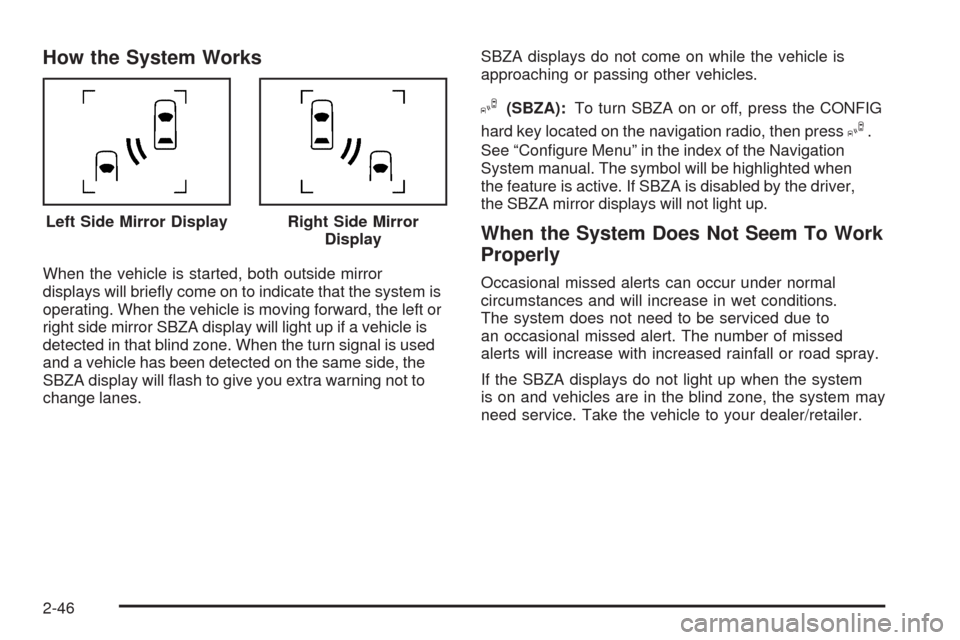
When the vehicle is started, both outside mirror
displays will briey come on to indicate that the system is
operating. When the vehicle is moving forward, the left or
right side mirror SBZA display will light up if a vehicle is
detected in that blind zone. When the turn signal is used
and a vehicle has been detected on the same side, the
SBZA display will ash to give you extra warning not to
change lanes.SBZA displays do not come on while the vehicle is
approaching or passing other vehicles.
I(SBZA):To turn SBZA on or off, press the CONFIG
hard key located on the navigation radio, then press
I.
See “Congure Menu” in the index of the Navigation
System manual. The symbol will be highlighted when
the feature is active. If SBZA is disabled by the driver,
the SBZA mirror displays will not light up.
When the System Does Not Seem To Work
Properly
Occasional missed alerts can occur under normal
circumstances and will increase in wet conditions.
The system does not need to be serviced due to
an occasional missed alert. The number of missed
alerts will increase with increased rainfall or road spray.
If the SBZA displays do not light up when the system
is on and vehicles are in the blind zone, the system may
need service. Take the vehicle to your dealer/retailer. Left Side Mirror Display
Right Side Mirror
Display
2-46
Page 120 of 514
Lane Departure Warning (LDW)
If the vehicle has the LDW system. Read this entire
section before using the system.
{CAUTION:
The Lane Departure Warning (LDW) system does
not steer the vehicle and is only an aid to help you
stay in your driving lane. The LDW system may not:
Provide you with enough time to avoid a lane
change collision.
Be loud enough for you to hear the warning
beeps.
Work properly under bad weather conditions or
if the windshield is not kept clean.
Detect lane markings and will not detect road
edges.
Warn you that your vehicle is crossing a lane
marking if the system does not detect the lane
marking.
CAUTION: (Continued)
CAUTION: (Continued)
LDW will indicate the system is working whenever
it detects either the left or right lane marking. So if
you depart on the side of the lane that LDW is not
detecting, LDW will not warn you.
If you do not carefully maintain your vehicle position
within the lane, vehicle damage, injury, or death
could occur. Even with LDW, always keep your
attention on the road and maintain proper vehicle
position within the lane. Always keep the windshield
clean and do not use LDW in bad weather
conditions.
When the vehicle crosses a detected lane marking, the
LDW symbol will ash and you will hear three beeps.
LDW will not warn you if the turn signal is on or if
the vehicle makes a sharp maneuver. Before making
a lane change, check the vehicle’s mirrors, glance over
your shoulder for vehicles and hazards, and turn on
the turn signal before changing lanes.
2-48
Page 121 of 514
How the System Works
LDW uses a camera located between the inside
rearview mirror and the windshield to detect the
lane markings.
@(Lane Departure Warning):To turn LDW on or off,
press the CONFIG hard key located on the navigation
radio, then press
@. See “Congure Menu” in the index
of the Navigation System manual. The symbol will be
highlighted when the feature is active.
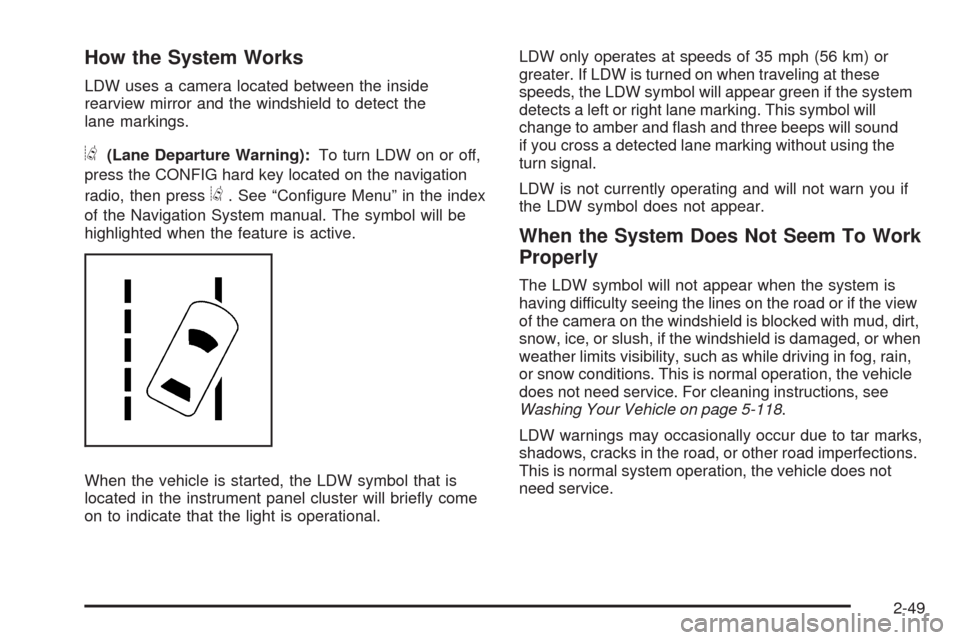
When the vehicle is started, the LDW symbol that is
located in the instrument panel cluster will briey come
on to indicate that the light is operational.LDW only operates at speeds of 35 mph (56 km) or
greater. If LDW is turned on when traveling at these
speeds, the LDW symbol will appear green if the system
detects a left or right lane marking. This symbol will
change to amber and ash and three beeps will sound
if you cross a detected lane marking without using the
turn signal.
LDW is not currently operating and will not warn you if
the LDW symbol does not appear.
When the System Does Not Seem To Work
Properly
The LDW symbol will not appear when the system is
having difficulty seeing the lines on the road or if the view
of the camera on the windshield is blocked with mud, dirt,
snow, ice, or slush, if the windshield is damaged, or when
weather limits visibility, such as while driving in fog, rain,
or snow conditions. This is normal operation, the vehicle
does not need service. For cleaning instructions, see
Washing Your Vehicle on page 5-118.
LDW warnings may occasionally occur due to tar marks,
shadows, cracks in the road, or other road imperfections.
This is normal system operation, the vehicle does not
need service.
2-49
Page 133 of 514
Vent Open:To open the power sunroof to the vent
position from the closed position, press and hold the
passenger’s side sunroof switch forward. The rear of
the sunroof panel will tilt upward to the full vent position.
The sunshade must be opened manually.
Express Close:The express close feature will operate
from the open or partially open position. To express close
the power sunroof, fully press the driver’s side switch
forward once. To stop the sunroof glass in a desired
position other than closed, press the switch again in
either direction. The sunshade must be closed manually.
Close:To close the power sunroof, operate the controls
according to one of the following:
From the open position, press and hold the driver’s
side sunroof switch forward. The sunshade must be
closed manually.
From the vent position, press and hold the
passenger’s side sunroof switch rearward.
Anti-Pinch:If an object is in the path of the sunroof
while it is closing, the anti-pinch feature will detect the
object and stop the sunroof from closing at the point
of the obstruction. The sunroof will then return to the
full-open or vent position. To close the sunroof once
it has re-opened, refer to the two options previously
described under the “Close” feature instructions.Do not keep the sunroof open for long periods of time
while the vehicle is not in use. Debris can collect in the
tracks and possibly damage the sunroof operation or
plug the water draining system.
Vehicle Personalization
The vehicle has personalization that allows you to
program certain features to a preferred setting for up to
two drivers. The back of the keyless access transmitters
are labelled 1 or 2. Additional keyless access transmitters
programmed to the vehicle, as 3 and/or 4, do not have
a number on the back and are not capable of being
personalized. The number of programmable features
varies depending upon which vehicle options are
purchased.
On all vehicles, features such as climate control settings,
radio and XM™ preset settings, exterior lighting at unlock
and remote lock unlock conrmation, and language have
already been programmed. Your vehicle also has an
automatic door locking feature that is always on. You
cannot turn the automatic door locking feature off. See
Programmable Automatic Door Locks on page 2-14.
Some vehicles have additional features that can be
programmed including the seat, steering column, and
outside rearview mirror position.
If your vehicle has the base audio system, the following
information explains the vehicle personalization on your
vehicle.
2-61
Page 138 of 514
REMOTE RECALL MEMORY
If your vehicle has the optional memory package, you
will have this feature. When this feature is turned on, you
can recall any previously programmed seat position and
mirror position when the unlock button on the keyless
access transmitter is pressed.
Programmable Modes
Mode 1:ON
Mode 2:OFF (default)
The exception to the default is the recall seat to driver
position which is on.
To program the vehicle to a different mode:
1. Enter the PERSONAL SETTINGS MENU by
following the instructions listed previously under
“Entering the Personal Settings Menu.”
2. Turn the tune/select knob until REMOTE RECALL
MEMORY is highlighted.
3. Press the tune/select knob to switch back and forth
between on and off.
When the mode is turned on, a check mark will
appear next to the feature name.
If this feature is selected, START BUTTON RECALL
cannot be selected.
The mode you selected is now set. You can either exit the
programming mode by following the instructions later in
this section or program the next feature available on your
vehicle.
START BUTTON RECALL
If your vehicle has the optional memory package, you
will have this feature. When this feature is turned on, you
can recall any previously programmed seat, mirror, and
steering column position when the start button on the
ignition is pressed.
Programmable Modes
Mode 1:ON
Mode 2:OFF (default)
To program the vehicle to a different mode:
1. Enter the PERSONAL SETTINGS MENU by
following the instructions listed previously under
“Entering the Personal Settings Menu.”
2. Turn the tune/select knob until START BUTTON
RECALL is highlighted.
3. Press the tune/select knob to switch back and forth
between on and off.
When the mode is turned on, a check mark will
appear next to the feature name.
If this feature is selected, REMOTE RECALL MEMORY
cannot be selected.
The mode you selected is now set. You can either exit
the programming mode by following the instructions
later in this section or program the next feature available
on your vehicle.
2-66
Page 149 of 514
SUSPENSION MODE
If your vehicle has this feature, you can select between
performance or touring modes. Performance mode is
used where road conditions or personal preference
demand more control. Touring mode is used for normal
city and highway driving.
Programmable Modes
Mode 1:PERFORMANCE
Mode 2:TOURING (default)
To program the vehicle to a different mode:
1. Enter the PERSONAL SETTINGS MENU by
following the instructions listed previously under
“Entering the Personal Settings Menu.”
2. Turn the tune/select knob until SUSPENSION
MODE is highlighted.
3. Press the tune/select knob to enter the
SUSPENSION MODE submenu.
4. Turn the tune/select knob to highlight TOURING or
PERFORMANCE.
5. Press the tune/select knob to select the setting.
The mode you selected is now set. You can either exit
the programming mode by following the instructions
later in this section or program the next feature available
on your vehicle by pressing the F6 (BACK) button,
located on the radio, to return to the PERSONAL
SETTINGS MENU.
Exiting the Personal Settings Menu
Once you have nished making your selections on the
base audio system, you will automatically return to
the main audio screen after 15 seconds. You can also
press the F6 (BACK) button, located on the radio,
to return to the main audio screen.
Memory Seat, Mirrors and Steering
Wheel
If the vehicle has the memory feature, you can program
and recall memory settings for the following features
for up to two drivers:
The driver’s seat position
The outside rearview mirrors position
The power tilt wheel and telescopic steering column
position
The following settings and presets are set automatically:
The language, radio and XM™ presets, tone,
volume, playback mode (AM/FM or CD), last
displayed stations, and compact disc position
The last climate control setting
The Head-Up Display (HUD) position, if your
vehicle has this feature
Other personalization settings, for example, remote
start settings
SeeVehicle Personalization on page 2-61.
2-77
Page 151 of 514

Driver Selection Submenu Items
DRIVER 1/DRIVER 2
The numbers on the back of each keyless access
transmitter correspond to DRIVER 1 and DRIVER 2.
If you would like to recall or store driver settings for
the driver that does not correspond to the number on
the back of the keyless access transmitter that you
are using:
1. Enter the memory programming mode for your
driver settings by following the instructions listed
previously under “Entering the Driver Selection
Submenu.”
2. From the DRIVER SELECTION submenu, turn the
tune/select knob to highlight the driver number that
you want, either DRIVER 1 or DRIVER 2.
3. Set your choice by pressing in the tune/select knob.
If you would like to recall or store driver settings for
the selected driver, see “RECALL DRIVER SETTINGS”
or “STORE DRIVER SETTINGS” later in this section.
If you would like to recall or store exit settings for
the selected driver, see “RECALL EXIT SETTINGS”
or “STORE EXIT SETTINGS” later in this section.
RECALL DRIVER SETTINGS
To recall driver settings:
1. Enter the memory programming mode for your
driver settings by following the instructions listed
previously under “Entering the Driver Selection
Submenu.”
2. From the DRIVER SELECTION submenu, turn the
tune/select knob to scroll to RECALL DRIVER
SETTINGS and press in the knob.
If the vehicle is in P (Park), one beep will sound
and your previously saved driving position will then
be recalled.
If the vehicle is not in P (Park), three beeps will
sound and your previously saved driving position
will not be recalled.
A memory recall can be stopped by pressing any
memory seat or mirror position button.
If you would like the stored driving positions to be
recalled when unlocking your vehicle with the keyless
access transmitter or when starting your vehicle, see
“REMOTE RECALL MEMORY” or “START BUTTON
RECALL” underVehicle Personalization on page 2-61.
2-79
Page 152 of 514
STORE DRIVER SETTINGS
To store driver settings:
1. Adjust your settings for the driver’s seat, the outside
rearview mirrors, and the steering column to a
comfortable driving position.
2. Enter the memory programming mode for your
driver settings by following the instructions listed
previously under “Entering the Driver Selection
Submenu.”
3. From the DRIVER SELECTION submenu, turn
the tune/select knob to scroll to STORE DRIVER
SETTINGS and press in the knob. Two beeps
will sound to conrm that your driver settings
are saved.
4. Set the HUD position, if your vehicle has this
feature, the climate control temperature, fan
speed and mode settings, the radio presets, tone,
volume, playback mode (AM/FM, XM™, or CD),
and compact disc position.
Your memory settings are now programmed.
Any changes that are made to the HUD, audio
system, and climate controls while driving will be
automatically stored when the ignition is turned off.
5. Repeat the procedure for a second driver by
programming the other driver number.
Entering the Driver Exit Settings
Submenu
To enter the memory programming mode for your exit
settings:
1. The ignition must be either on, in ACCESSORY, or
in RAP and the transmission in P (Park) or the
vehicle speed less than 6 mph (9 km/h).
2. Press any button on the appropriate keyless access
transmitter to identify yourself as Driver 1 or Driver 2.
3. Turn on the radio by pressing the power/
volume knob.
4. Press the CNFG radio button to enter the main
menu of the radio.
5. Turn the tune/select knob and scroll to SETUP.
6. Press the tune/select knob to enter the
SETUP menu.
7. Turn the tune/select knob and scroll to DRIVER
EXIT SETTINGS.
8. Press the tune/select knob to enter the DRIVER
EXIT SETTINGS submenu. The following items
will appear:
RECALL EXIT SETTINGS
STORE EXIT SETTINGS
2-80