radio CADILLAC STS 2009 1.G User Guide
[x] Cancel search | Manufacturer: CADILLAC, Model Year: 2009, Model line: STS, Model: CADILLAC STS 2009 1.GPages: 514, PDF Size: 2.73 MB
Page 136 of 514
The name or greeting you programmed is now set.
You can either exit the programming mode by following
the instructions later in this section or program the
next feature available on your vehicle by pressing the
F6 (BACK) button, located on the radio, to return to
the PERSONAL SETTINGS MENU. You will now see
a check mark next to the driver greeting menu item,
which means that the driver greeting feature is on
and a customized driver greeting is being used.
To turn off the customized driver greeting, and go back
to displaying either Driver 1 or Driver 2:
1. Enter the PERSONAL SETTINGS MENU by
following the instructions listed previously under
“Entering the Personal Settings Menu.”
2. Turn the tune/select knob until DRIVER GREETING
is highlighted.
3. Press the tune/select knob to turn on the DRIVER
GREETING feature. The check mark will be cleared
and the customized driver greeting is off.
To change a customized driver greeting after exiting
the screen to spell the name, turn the driver greeting
feature off, and then back on.KEY FOB REMINDER
This feature sounds the horn three times when the
driver’s door is closed and there is a keyless access
transmitter left inside of the vehicle. This will only occur
when the vehicle is off.
Programmable Modes
Mode 1:ON (default)
Mode 2:OFF
To program the vehicle to a different mode:
1. Enter the PERSONAL SETTINGS MENU by
following the instructions listed previously under
“Entering the Personal Settings Menu.”
2. Turn the tune/select knob until KEY FOB
REMINDER is highlighted.
3. Press the tune/select knob to switch back and forth
between on and off.
When the mode is turned on, a check mark will
appear next to the feature name.
The mode you selected is now set. You can either exit
the programming mode by following the instructions
later in this section or program the next feature available
on your vehicle.
2-64
Page 137 of 514
REMOTE START
With remote start you can choose which features are
activated when the vehicle is started remotely. These
features include the climate control system, the rear
defogger, and the seat temperature, if your vehicle has
this feature. SeeRemote Vehicle Start on page 2-11
for more information.
Mode 1:ON (default)
Mode 2:OFF
To program the vehicle to a different mode:
1. Enter the PERSONAL SETTINGS MENU by
following the instructions listed previously under
“Entering the Personal Settings Menu.”
2. Turn the tune/select knob until REMOTE START is
highlighted.
3. Press the tune/select knob to switch back and forth
between on and off.
When REMOTE START is on, a check mark will
appear next to the feature name. You can then choose
to activate any or all of the following features by turning
the tune/select knob to highlight the feature, then
pressing the knob to turn it on.CLIMATE CONTROL:The climate control system will
engage when the vehicle is started using the remote start
feature. It will be at the same climate control setting that
was last used by the driver using that keyless entry
transmitter.
REAR WINDOW DEFOG:If this feature is active, the
rear defogger will engage when the vehicle is started
using the remote start feature.
SEAT TEMP (Temperature) CONTROL:If your vehicle
has this feature and this feature is active, the seats
will be heated or cooled when the vehicle is started
using the remote start feature.
The mode you selected is now set. You can either
exit the programming mode by following the instructions
later in this section or program the next feature available
on your vehicle by pressing the F6 (BACK) button,
located on the radio, to return to the PERSONAL
SETTINGS MENU.
2-65
Page 149 of 514
SUSPENSION MODE
If your vehicle has this feature, you can select between
performance or touring modes. Performance mode is
used where road conditions or personal preference
demand more control. Touring mode is used for normal
city and highway driving.
Programmable Modes
Mode 1:PERFORMANCE
Mode 2:TOURING (default)
To program the vehicle to a different mode:
1. Enter the PERSONAL SETTINGS MENU by
following the instructions listed previously under
“Entering the Personal Settings Menu.”
2. Turn the tune/select knob until SUSPENSION
MODE is highlighted.
3. Press the tune/select knob to enter the
SUSPENSION MODE submenu.
4. Turn the tune/select knob to highlight TOURING or
PERFORMANCE.
5. Press the tune/select knob to select the setting.
The mode you selected is now set. You can either exit
the programming mode by following the instructions
later in this section or program the next feature available
on your vehicle by pressing the F6 (BACK) button,
located on the radio, to return to the PERSONAL
SETTINGS MENU.
Exiting the Personal Settings Menu
Once you have nished making your selections on the
base audio system, you will automatically return to
the main audio screen after 15 seconds. You can also
press the F6 (BACK) button, located on the radio,
to return to the main audio screen.
Memory Seat, Mirrors and Steering
Wheel
If the vehicle has the memory feature, you can program
and recall memory settings for the following features
for up to two drivers:
The driver’s seat position
The outside rearview mirrors position
The power tilt wheel and telescopic steering column
position
The following settings and presets are set automatically:
The language, radio and XM™ presets, tone,
volume, playback mode (AM/FM or CD), last
displayed stations, and compact disc position
The last climate control setting
The Head-Up Display (HUD) position, if your
vehicle has this feature
Other personalization settings, for example, remote
start settings
SeeVehicle Personalization on page 2-61.
2-77
Page 150 of 514
For vehicles with the base audio system, memory
features are programmed and recalled through the
radio from the DRIVER SELECTION and the DRIVER
EXIT SETTINGS submenus. See “Entering the Driver
Selection Submenu” and “Entering the Driver Exit
Settings Submenu” later in this section for more
information on recalling and programming the
memory settings using the base audio system.
For vehicles with the Navigation system, memory
features are programmed and recalled through the
navigation display. See “Personalization” in the Index
of the Navigation System manual for more information
on programming and recalling the memory settings using
the Navigation system.
For vehicles with the Navigation system, you can also
recall the memory features by using voice recognition,
if your vehicle has this feature. See “Voice Recognition”
in the Index of the Navigation System manual for
more information.Entering the Driver Selection Submenu
To enter the memory programming mode for your
driver settings:
1. The ignition must be either on, in ACCESSORY, or
in RAP and the transmission in P (Park) or the
vehicle speed less than 6 mph (9 km/h).
2. Press any button on the appropriate keyless access
transmitter to identify yourself as Driver 1 or Driver 2.
3. Turn on the radio by pressing the power/
volume knob.
4. Press the CNFG radio button to enter the main
menu of the radio.
5. Turn the tune/select knob and scroll to SETUP.
6. Press the tune/select knob to enter the
SETUP menu.
7. Turn the tune/select knob and scroll to DRIVER
SELECTION.
8. Press the tune/select knob to enter the DRIVER
SELECTION submenu. The following items will
appear:
DRIVER 1
DRIVER 2
RECALL DRIVER SETTINGS
STORE DRIVER SETTINGS
2-78
Page 152 of 514
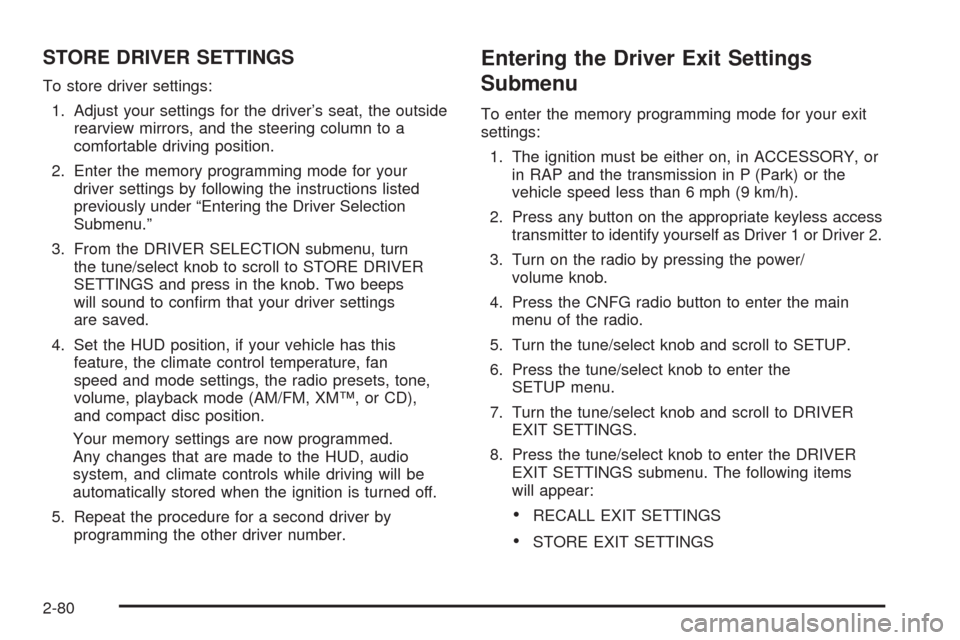
STORE DRIVER SETTINGS
To store driver settings:
1. Adjust your settings for the driver’s seat, the outside
rearview mirrors, and the steering column to a
comfortable driving position.
2. Enter the memory programming mode for your
driver settings by following the instructions listed
previously under “Entering the Driver Selection
Submenu.”
3. From the DRIVER SELECTION submenu, turn
the tune/select knob to scroll to STORE DRIVER
SETTINGS and press in the knob. Two beeps
will sound to conrm that your driver settings
are saved.
4. Set the HUD position, if your vehicle has this
feature, the climate control temperature, fan
speed and mode settings, the radio presets, tone,
volume, playback mode (AM/FM, XM™, or CD),
and compact disc position.
Your memory settings are now programmed.
Any changes that are made to the HUD, audio
system, and climate controls while driving will be
automatically stored when the ignition is turned off.
5. Repeat the procedure for a second driver by
programming the other driver number.
Entering the Driver Exit Settings
Submenu
To enter the memory programming mode for your exit
settings:
1. The ignition must be either on, in ACCESSORY, or
in RAP and the transmission in P (Park) or the
vehicle speed less than 6 mph (9 km/h).
2. Press any button on the appropriate keyless access
transmitter to identify yourself as Driver 1 or Driver 2.
3. Turn on the radio by pressing the power/
volume knob.
4. Press the CNFG radio button to enter the main
menu of the radio.
5. Turn the tune/select knob and scroll to SETUP.
6. Press the tune/select knob to enter the
SETUP menu.
7. Turn the tune/select knob and scroll to DRIVER
EXIT SETTINGS.
8. Press the tune/select knob to enter the DRIVER
EXIT SETTINGS submenu. The following items
will appear:
RECALL EXIT SETTINGS
STORE EXIT SETTINGS
2-80
Page 156 of 514
Antilock Brake System (ABS)
Warning Light...........................................3-63
Traction Control System (TCS)
Warning Light...........................................3-63
Lane Departure Warning Light........................3-64
Engine Coolant Temperature
Warning Light...........................................3-64
Engine Coolant Temperature Gage..................3-65
Tire Pressure Light.......................................3-65
Malfunction Indicator Lamp.............................3-66
Oil Pressure Light.........................................3-69
Security Light...............................................3-69
Fog Lamp Light............................................3-70
Lights On Reminder......................................3-70
Cruise Control Light......................................3-70
Highbeam On Light.......................................3-70
Fuel Gage...................................................3-71Driver Information Center (DIC).......................3-72
DIC Operation and Displays...........................3-72
DIC Warnings and Messages.........................3-79
Other Messages...........................................3-96
Audio System(s).............................................3-97
Setting the Clock..........................................3-98
Radio(s)......................................................3-98
Using an MP3............................................3-111
XM Radio Messages...................................3-114
Navigation/Radio System..............................3-116
Bluetooth
®.................................................3-116
Radio Personalization..................................3-126
Theft-Deterrent Feature................................3-130
Audio Steering Wheel Controls......................3-131
Radio Reception.........................................3-133
Backglass Antenna......................................3-134
XM™ Satellite Radio Antenna System............3-134
Section 3 Instrument Panel
3-2
Page 159 of 514
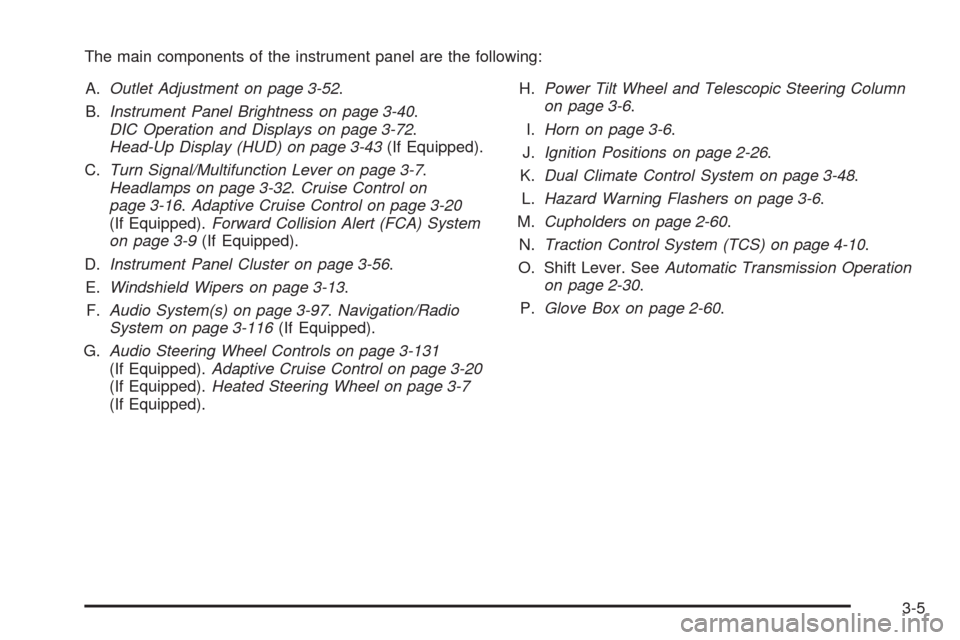
The main components of the instrument panel are the following:
A.Outlet Adjustment on page 3-52.
B.Instrument Panel Brightness on page 3-40.
DIC Operation and Displays on page 3-72.
Head-Up Display (HUD) on page 3-43(If Equipped).
C.Turn Signal/Multifunction Lever on page 3-7.
Headlamps on page 3-32.Cruise Control on
page 3-16.Adaptive Cruise Control on page 3-20
(If Equipped).Forward Collision Alert (FCA) System
on page 3-9(If Equipped).
D.Instrument Panel Cluster on page 3-56.
E.Windshield Wipers on page 3-13.
F.Audio System(s) on page 3-97.Navigation/Radio
System on page 3-116(If Equipped).
G.Audio Steering Wheel Controls on page 3-131
(If Equipped).Adaptive Cruise Control on page 3-20
(If Equipped).Heated Steering Wheel on page 3-7
(If Equipped).H.Power Tilt Wheel and Telescopic Steering Column
on page 3-6.
I.Horn on page 3-6.
J.Ignition Positions on page 2-26.
K.Dual Climate Control System on page 3-48.
L.Hazard Warning Flashers on page 3-6.
M.Cupholders on page 2-60.
N.Traction Control System (TCS) on page 4-10.
O. Shift Lever. SeeAutomatic Transmission Operation
on page 2-30.
P.Glove Box on page 2-60.
3-5
Page 163 of 514

Headlamp High/Low-Beam Changer
Push forward on the turn signal/multifunction lever
to change the headlamps from low to high beam.
Pull the lever back and then release it to change
from high to low beam.
If you turn the vehicle off with the high beams on, the
next time you start your vehicle the low beams will
be on.
To re-activate high beams, pull lever toward you and
then push it forward again.
This light on the instrument
panel cluster will be on,
indicating high-beam
usage.
Forward Collision Alert (FCA)
System
If the vehicle has this system, read this entire section
before using it.
The system operates on a radio frequency subject to
Federal Communications Commission (FCC) Rules and
with Industry Canada.
This device complies with Part 15 of the FCC Rules.
Operation is subject to the following two conditions:
1. This device may not cause interference, and
2. This device must accept any interference received,
including interference that may cause undesired
operation of the device.
This device complies with RSS-210 of Industry Canada.
Operation is subject to the following two conditions:
1. This device may not cause interference, and
2. This device must accept any interference received,
including interference that may cause undesired
operation of the device.
Changes or modications to this system by other than
an authorized service facility could void authorization to
use this equipment.
3-9
Page 174 of 514
Adaptive Cruise Control
If the vehicle has adaptive cruise control, read this
entire section before using this feature.
The system operates on a radio frequency subject to
Federal Communications Commission (FCC) Rules and
with Industry Canada.
This device complies with Part 15 of the FCC Rules.
Operation is subject to the following two conditions:
1. This device may not cause interference.
2. This device must accept any interference received,
including interference that may cause undesired
operation of the device.
This device complies with RSS-210 of Industry Canada.
Operation is subject to the following two conditions:
1. This device may not cause interference.
2. This device must accept any interference received,
including interference that may cause undesired
operation of the device.
Changes or modications to this system by other than
an authorized service facility could void authorization to
use this equipment.
Adaptive Cruise Control is an enhancement to traditional
cruise control and is not a safety system. It allows
you to keep cruise control engaged in moderate traffic
conditions without having to constantly be reset.Adaptive Cruise Control uses radar to detect a
vehicle directly ahead in your path, within a distance
of 328 ft (100 m), and operates at speeds above
30 mph (48 km/h). When it is engaged by the driver,
the system can apply limited braking or acceleration
of the vehicle, automatically, to maintain a selected
following distance to the vehicle ahead. The vehicle’s
braking during Adaptive Cruise Control is comparable
to a person applying moderate pressure to the vehicle’s
brake pedal. To disengage Adaptive Cruise Control,
apply the brake. If no vehicle is in your path, your
vehicle will react like traditional cruise control.
{CAUTION:
Adaptive Cruise Control will not apply hard braking
or bring the vehicle to a complete stop. It will not
respond to stopped vehicles, pedestrians or
animals. When you are approaching a vehicle or
object, Adaptive Cruise Control may not have time
to slow your vehicle enough to avoid a collision.
Your complete attention is always required while
driving and you should be ready to take action
and apply the brakes. For more information,
seeDefensive Driving on page 4-2.
3-20
Page 197 of 514
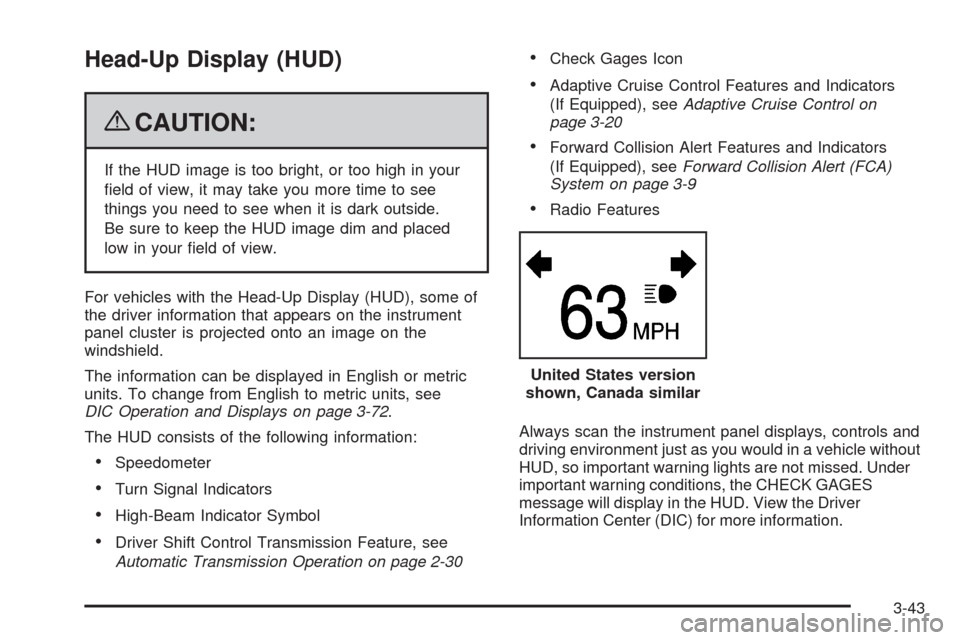
Head-Up Display (HUD)
{CAUTION:
If the HUD image is too bright, or too high in your
eld of view, it may take you more time to see
things you need to see when it is dark outside.
Be sure to keep the HUD image dim and placed
low in your eld of view.
For vehicles with the Head-Up Display (HUD), some of
the driver information that appears on the instrument
panel cluster is projected onto an image on the
windshield.
The information can be displayed in English or metric
units. To change from English to metric units, see
DIC Operation and Displays on page 3-72.
The HUD consists of the following information:
Speedometer
Turn Signal Indicators
High-Beam Indicator Symbol
Driver Shift Control Transmission Feature, see
Automatic Transmission Operation on page 2-30
Check Gages Icon
Adaptive Cruise Control Features and Indicators
(If Equipped), seeAdaptive Cruise Control on
page 3-20
Forward Collision Alert Features and Indicators
(If Equipped), seeForward Collision Alert (FCA)
System on page 3-9
Radio Features
Always scan the instrument panel displays, controls and
driving environment just as you would in a vehicle without
HUD, so important warning lights are not missed. Under
important warning conditions, the CHECK GAGES
message will display in the HUD. View the Driver
Information Center (DIC) for more information.United States version
shown, Canada similar
3-43