display CADILLAC STS 2009 1.G Service Manual
[x] Cancel search | Manufacturer: CADILLAC, Model Year: 2009, Model line: STS, Model: CADILLAC STS 2009 1.GPages: 514, PDF Size: 2.73 MB
Page 198 of 514
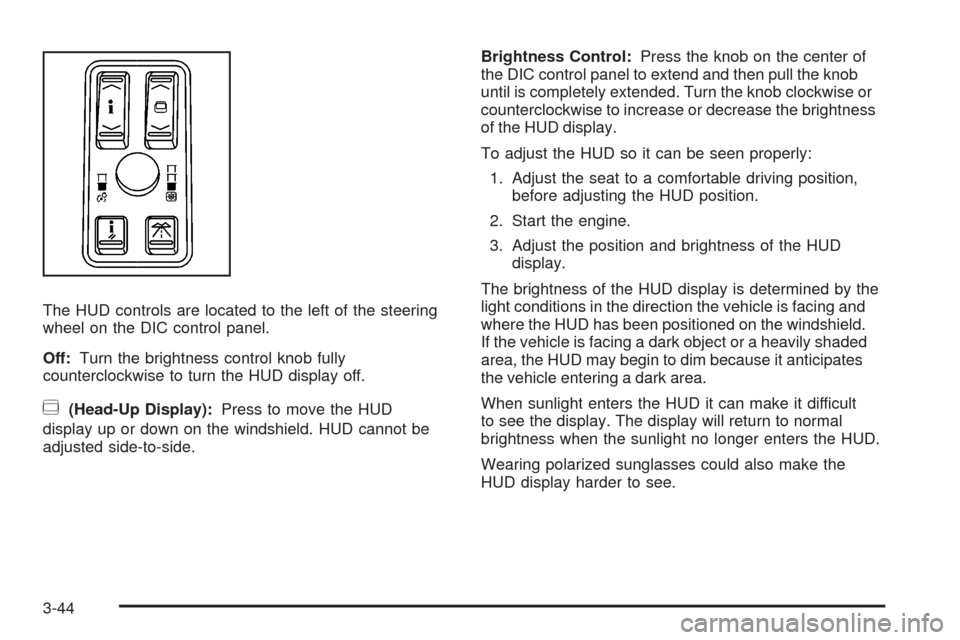
The HUD controls are located to the left of the steering
wheel on the DIC control panel.
Off:Turn the brightness control knob fully
counterclockwise to turn the HUD display off.
~(Head-Up Display):Press to move the HUD
display up or down on the windshield. HUD cannot be
adjusted side-to-side.Brightness Control:Press the knob on the center of
the DIC control panel to extend and then pull the knob
until is completely extended. Turn the knob clockwise or
counterclockwise to increase or decrease the brightness
of the HUD display.
To adjust the HUD so it can be seen properly:
1. Adjust the seat to a comfortable driving position,
before adjusting the HUD position.
2. Start the engine.
3. Adjust the position and brightness of the HUD
display.
The brightness of the HUD display is determined by the
light conditions in the direction the vehicle is facing and
where the HUD has been positioned on the windshield.
If the vehicle is facing a dark object or a heavily shaded
area, the HUD may begin to dim because it anticipates
the vehicle entering a dark area.
When sunlight enters the HUD it can make it difficult
to see the display. The display will return to normal
brightness when the sunlight no longer enters the HUD.
Wearing polarized sunglasses could also make the
HUD display harder to see.
3-44
Page 199 of 514
The Ignition is On and the HUD Image
Cannot Be Seen
Check to see if:
The HUD unit is covered.
The brightness is adjusted properly.
The HUD display is adjusted to the proper height.
Ambient light in the direction the vehicle is facing
is low.
A fuse is blown. SeeFuses and Circuit Breakers on
page 5-123.
The windshield is part of the HUD system.
SeeWindshield Replacement on page 5-52.
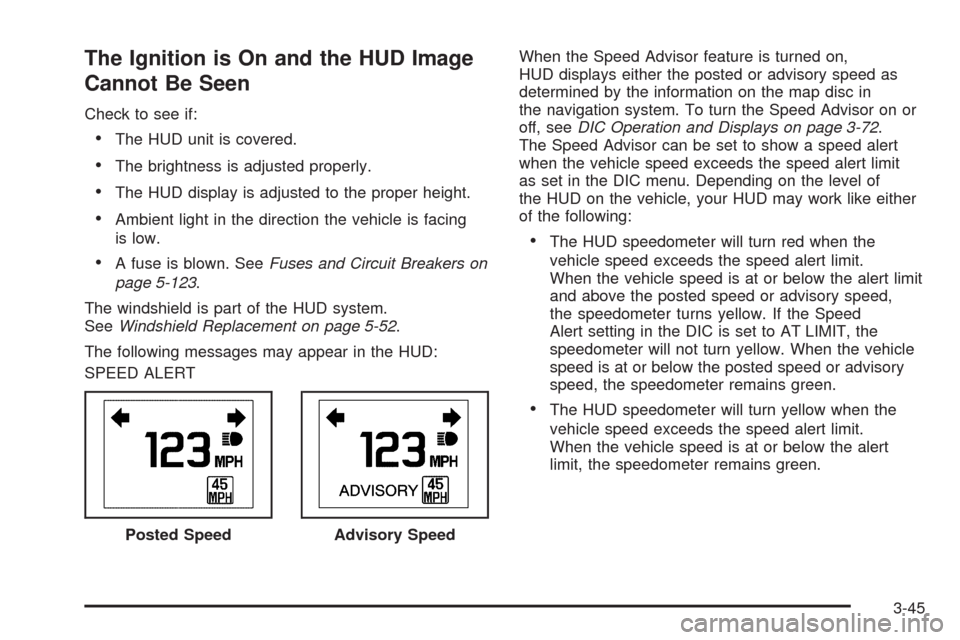
The following messages may appear in the HUD:
SPEED ALERTWhen the Speed Advisor feature is turned on,
HUD displays either the posted or advisory speed as
determined by the information on the map disc in
the navigation system. To turn the Speed Advisor on or
off, seeDIC Operation and Displays on page 3-72.
The Speed Advisor can be set to show a speed alert
when the vehicle speed exceeds the speed alert limit
as set in the DIC menu. Depending on the level of
the HUD on the vehicle, your HUD may work like either
of the following:
The HUD speedometer will turn red when the
vehicle speed exceeds the speed alert limit.
When the vehicle speed is at or below the alert limit
and above the posted speed or advisory speed,
the speedometer turns yellow. If the Speed
Alert setting in the DIC is set to AT LIMIT, the
speedometer will not turn yellow. When the vehicle
speed is at or below the posted speed or advisory
speed, the speedometer remains green.
The HUD speedometer will turn yellow when the
vehicle speed exceeds the speed alert limit.
When the vehicle speed is at or below the alert
limit, the speedometer remains green.
Posted Speed
Advisory Speed
3-45
Page 200 of 514
PEDAL APPLIED ACC OVERRIDE
When the PEDAL APPLIED ACC OVERRIDE message
displays, the accelerator pedal is being pressed and
the Adaptive Cruise Control is overridden and cannot
automatically apply the brakes. Once the accelerator
pedal is released, the Adaptive Cruise Control will return
to normal operation and be able to apply the brakes,
if needed.
An Adaptive Cruise Control active symbol, alert symbol
or vehicle ahead symbol may also appear. SeeAdaptive
Cruise Control on page 3-20for more information.
Care of the HUD
Clean the inside of the windshield as needed to remove
any dirt or lm that reduces the sharpness or clarity
of the HUD display.
To clean the HUD, spray household glass cleaner on a
soft, clean cloth. Wipe the HUD lens gently, then dry.
Notice:When cleaning, be careful not to scratch
the HUD or camera lenses. Do not spray glass
cleaner directly on the HUD lens because the cleaner
could leak inside the unit and cause damage.
Accessory Power Outlet(s)
Accessory power outlets can be used to plug in electrical
equipment, such as a cellular telephone.
The vehicle has one outlet in front of the center console,
one in the center console lid and there may be an
additional outlet in the rear of the center console.
The vehicle may have a small cap that must be
removed to access the accessory power outlet.
Be sure to cover the outlet with the protective cap
when it is not in use.
Notice:Leaving electrical equipment plugged in for
an extended period of time while the vehicle is off
will drain the battery. Power is always supplied
to the outlets. Always unplug electrical equipment
when not in use and do not plug in equipment
that exceeds the maximum 20 ampere rating.
Certain accessory power plugs may not be compatible
to the accessory power outlet and could result in
blown vehicle or adapter fuses. If you experience a
problem, see your dealer for additional information
on the accessory power outlets.
Notice:Adding any electrical equipment to the
vehicle can damage it or keep other components
from working as they should. The repairs would
not be covered by the vehicle warranty. Do not
3-46
Page 202 of 514
Climate Controls
Dual Climate Control System
The heating, cooling, and ventilation can be controlled
for the vehicle with this system.
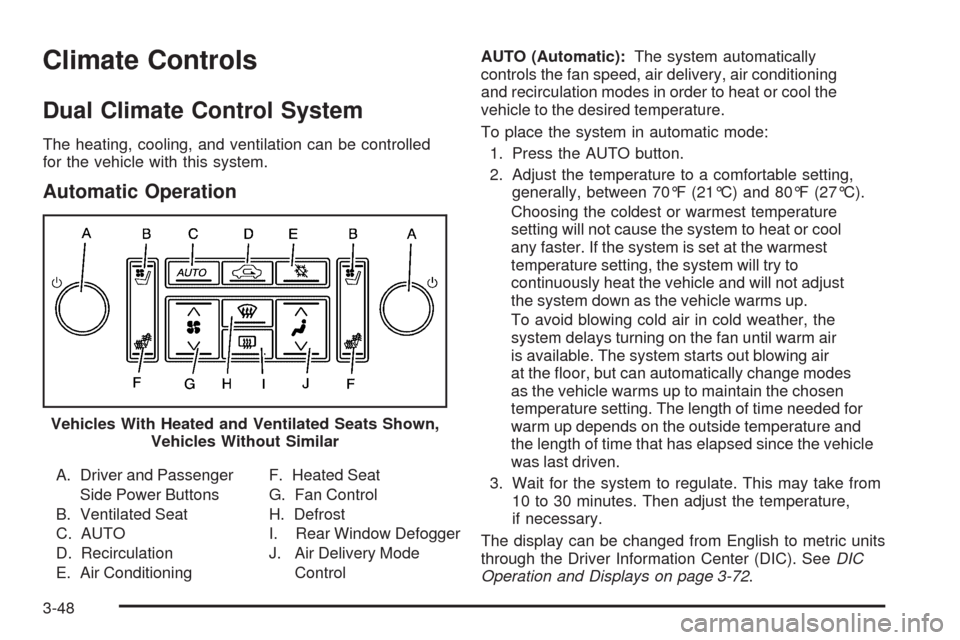
Automatic Operation
A. Driver and Passenger
Side Power Buttons
B. Ventilated Seat
C. AUTO
D. Recirculation
E. Air ConditioningF. Heated Seat
G. Fan Control
H. Defrost
I. Rear Window Defogger
J. Air Delivery Mode
ControlAUTO (Automatic):The system automatically
controls the fan speed, air delivery, air conditioning
and recirculation modes in order to heat or cool the
vehicle to the desired temperature.
To place the system in automatic mode:
1. Press the AUTO button.
2. Adjust the temperature to a comfortable setting,
generally, between 70°F (21°C) and 80°F (27°C).
Choosing the coldest or warmest temperature
setting will not cause the system to heat or cool
any faster. If the system is set at the warmest
temperature setting, the system will try to
continuously heat the vehicle and will not adjust
the system down as the vehicle warms up.
To avoid blowing cold air in cold weather, the
system delays turning on the fan until warm air
is available. The system starts out blowing air
at the oor, but can automatically change modes
as the vehicle warms up to maintain the chosen
temperature setting. The length of time needed for
warm up depends on the outside temperature and
the length of time that has elapsed since the vehicle
was last driven.
3. Wait for the system to regulate. This may take from
10 to 30 minutes. Then adjust the temperature,
if necessary.
The display can be changed from English to metric units
through the Driver Information Center (DIC). SeeDIC
Operation and Displays on page 3-72. Vehicles With Heated and Ventilated Seats Shown,
Vehicles Without Similar
3-48
Page 211 of 514

Speedometer and Odometer
The speedometer shows the speed in both miles
per hour (mph) and kilometers per hour (km/h).
See “MPH (km)” underDIC Operation and Displays
on page 3-72for more information.
The odometer mileage can be checked without the
vehicle running. The vehicle’s odometer works together
with the driver information center. The odometer can
be set for a Trip A and a Trip B. See “Trip Information”
underDIC Operation and Displays on page 3-72for
more information.
If the vehicle ever needs a new odometer installed,
the new one will be set to the correct mileage total
of the old odometer.
Tachometer
This gage indicates the engine speed in revolutions
per minute (rpm).
Safety Belt Reminders
Driver Safety Belt Reminder Light
When the engine is started, a chime sounds for
several seconds to remind the driver to fasten the safety
belt, unless the driver’s safety belt is already buckled.
The driver safety belt light
comes on and stays on
for several seconds,
then ashes for
several more.
This chime and light are repeated if the driver remains
unbuckled and the vehicle is in motion. If the driver’s
safety belt is already buckled, neither the chime nor
the light comes on.
3-57
Page 226 of 514
Driver Information Center (DIC)
The Driver Information Center (DIC) gives you the status
of many of your vehicle’s systems. The DIC is also used
to display warning/status messages. All messages will
appear in the DIC display located at the bottom of the
instrument panel cluster, below the tachometer and
speedometer. The DIC buttons are located on the
instrument panel, to the left of the steering wheel.
The DIC comes on when the ignition is on. After a short
delay, the DIC will display the current driver and the
information that was last displayed before the engine
was turned off.
The top line of the DIC display shows the vehicle
system information and the warning/status messages.
The bottom line of the DIC display shows either the
odometer, the trip odometer A or the trip odometer B
information on the left side. Only one odometer can
appear at a time. See “Trip Information” underDIC
Operation and Displays on page 3-72for information
on changing the display to show the odometer or trip
odometer information. The bottom line of the DIC display
also shows the outside temperature on the right side
and the shift lever position indicator in the center.
SeeAutomatic Transmission Operation on page 2-30
for more information on the shift lever positions.When the sport mode is active, an S will appear next
to the shift position indicator on the center of the DIC
display. When the manual mode is active, an M will
appear on the DIC display. When the normal mode is
active, only the shift position indicator will appear. While
the Driver Shift Control (DSC) feature is active, the DIC
will change to show the selected gear. See “Driver Shift
Control (DSC)” underAutomatic Transmission Operation
on page 2-30for more information.
If a problem is detected, a warning message will appear
on the display. Be sure to take any message that
appears on the display seriously and remember that
clearing the message will only make the message
disappear, not correct the problem.
DIC Operation and Displays
The Driver Information Center (DIC) has different modes
which can be accessed by pressing the four DIC buttons
located on the instrument panel, to the left of the steering
wheel.
3-72
Page 227 of 514
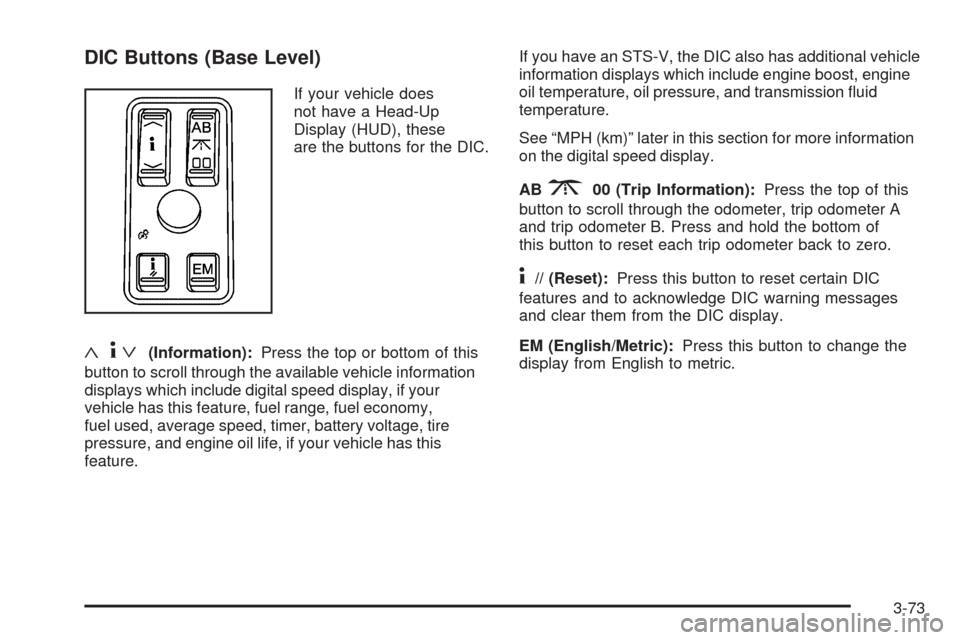
DIC Buttons (Base Level)
If your vehicle does
not have a Head-Up
Display (HUD), these
are the buttons for the DIC.
«4ª(Information):Press the top or bottom of this
button to scroll through the available vehicle information
displays which include digital speed display, if your
vehicle has this feature, fuel range, fuel economy,
fuel used, average speed, timer, battery voltage, tire
pressure, and engine oil life, if your vehicle has this
feature.If you have an STS-V, the DIC also has additional vehicle
information displays which include engine boost, engine
oil temperature, oil pressure, and transmission uid
temperature.
See “MPH (km)” later in this section for more information
on the digital speed display.
AB
300 (Trip Information):Press the top of this
button to scroll through the odometer, trip odometer A
and trip odometer B. Press and hold the bottom of
this button to reset each trip odometer back to zero.
4// (Reset):Press this button to reset certain DIC
features and to acknowledge DIC warning messages
and clear them from the DIC display.
EM (English/Metric):Press this button to change the
display from English to metric.
3-73
Page 228 of 514
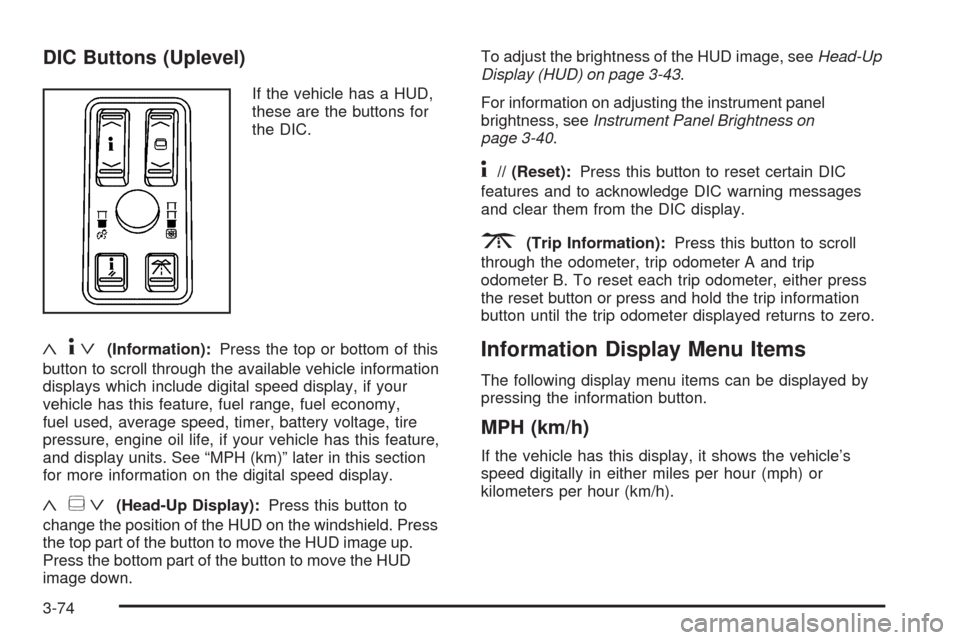
DIC Buttons (Uplevel)
If the vehicle has a HUD,
these are the buttons for
the DIC.
«4ª(Information):Press the top or bottom of this
button to scroll through the available vehicle information
displays which include digital speed display, if your
vehicle has this feature, fuel range, fuel economy,
fuel used, average speed, timer, battery voltage, tire
pressure, engine oil life, if your vehicle has this feature,
and display units. See “MPH (km)” later in this section
for more information on the digital speed display.
«~ª(Head-Up Display):Press this button to
change the position of the HUD on the windshield. Press
the top part of the button to move the HUD image up.
Press the bottom part of the button to move the HUD
image down.To adjust the brightness of the HUD image, seeHead-Up
Display (HUD) on page 3-43.
For information on adjusting the instrument panel
brightness, seeInstrument Panel Brightness on
page 3-40.
4// (Reset):Press this button to reset certain DIC
features and to acknowledge DIC warning messages
and clear them from the DIC display.
3(Trip Information):Press this button to scroll
through the odometer, trip odometer A and trip
odometer B. To reset each trip odometer, either press
the reset button or press and hold the trip information
button until the trip odometer displayed returns to zero.
Information Display Menu Items
The following display menu items can be displayed by
pressing the information button.
MPH (km/h)
If the vehicle has this display, it shows the vehicle’s
speed digitally in either miles per hour (mph) or
kilometers per hour (km/h).
3-74
Page 229 of 514
MILES RANGE (km RANGE)
This display shows the approximate number of
remaining miles (mi) or kilometers (km) you can drive
without relling the fuel tank. This estimate is based
on the current driving conditions and will change if the
driving conditions change. For example, if you are driving
in traffic making frequent stops, the display may read one
number, but if you enter the freeway, the number may
change even though you still have the same amount of
fuel in the fuel tank. This is because different driving
conditions produce different fuel economies. Generally,
freeway driving produces better fuel economy than city
driving.
Once the range drops below about 40 miles (64 km)
remaining, the display will show LOW RANGE.
If your vehicle is low on fuel, the Fuel Level Low
message will be displayed. See “Fuel Level Low”
underDIC Warnings and Messages on page 3-79
for more information.
MPG AVG (L/100 km AVG)
This display shows the approximate average miles per
gallon (mpg) or liters per 100 kilometers (L/100 km).
This number is calculated based on the number of
mpg (L/100 km) recorded since the last time this display
was reset. To reset MPG AVG, press the reset button.
The display will return to zero.
MPG INST (L/100 km INST)
This display shows the current fuel economy. This
number reects only the fuel economy that the vehicle
has right now and will change frequently as driving
conditions change. Unlike average fuel economy, this
display cannot be reset.
GAL FUEL USED (L FUEL USED)
This display shows the number of gallons (gal) or
liters (L) of fuel used since the last reset of this display.
To reset GAL FUEL USED, press the reset button.
The display will return to zero.
AVG MPH (AVG km/h)
This display shows the average speed of the vehicle
in miles per hour (mph) or kilometers per hour (km/h).
This average is calculated based on the various vehicle
speeds recorded since the last reset of this display.
To reset AVG MPH, press the reset button. The display
will return to zero.
HUD Speed Advisor ON/OFF
(On Vehicles with HUD)
If the vehicle has HUD, you can choose to have the
Speed Limit/Speed Advisory display appear in the HUD.
The DIC will toggle between ON and OFF. Press the
reset button to make your selection. SeeHead-Up
Display (HUD) on page 3-43for more information.
3-75
Page 230 of 514

SPEED LIMIT: XXX MPH (SPEED LIMIT:
XXX Km/h) or ADVISORY: XXX MPH
(ADVISORY: XXX Km/h)
(On Vehicles without HUD)
This display will show the speed limit or the advised
speed as determined by the information on the map
disc in the navigation system. If there is no map disc in
the navigation system, this display will not be available.
The speed limit and speed advisory displays on the
DIC and the HUD, if equipped, are for reference only.
There may be segments of road where speed data
has not been captured or times where incorrect speed
data, or no speed data, will be displayed by the DIC and
the HUD due to the navigation system not correctly
matching the vehicle’s position to the actual road.
Be aware of this and obey posted speed limits
wherever you drive.
SPEED ALERT
This display will allow you to customize the speed alert
warning. You can choose to have no warning display,
or to have it display at the limit, at 5 mph (km/h) over
the limit, or at 10 mph (km/h) over the limit. The DIC
will toggle between OFF, AT LIMIT, +5, +10 (MPH
or Km/h). Press the reset button to make your selection.
TIMER OFF
This display can be used like a stopwatch. You can
record the time it takes to travel from one point to
another. To access the timer, press the information
button until 00:00:00 TIMER OFF displays. To turn on
the timer, press the reset button until TIMER ON displays.
The timer will then start. To turn off the timer, press the
reset button again until TIMER OFF displays. The timer
will stop and display the end timing value. To reset the
timer, press and hold the reset button after the timer has
been stopped. The display will return to zero.
BATTERY VOLTS
This display shows the current battery voltage. If the
voltage is in the normal range, the value will display.
For example, the display may read 13.2 BATTERY
VOLTS. If the voltage is low, the display will have LOW
after it. If the voltage is high, the display will have HIGH
after it. Your vehicle’s charging system regulates voltage
based on the state of the battery. The battery voltage
may uctuate when viewing this information on the DIC.
This is normal. SeeCharging System Light on page 3-61
for more information.
If there is a problem with the battery charging system,
the DIC may display a message. SeeDIC Warnings
and Messages on page 3-79andElectric Power
Management on page 3-42for more information.
3-76