display CADILLAC STS 2009 1.G Owner's Guide
[x] Cancel search | Manufacturer: CADILLAC, Model Year: 2009, Model line: STS, Model: CADILLAC STS 2009 1.GPages: 514, PDF Size: 2.73 MB
Page 164 of 514
The Forward Collision Alert (FCA) system provides an
audible and visual warning if you approach a vehicle
too rapidly. FCA also provides a visual warning with no
audible warning if you are following another vehicle much
too closely. FCA uses the Adaptive Cruise Control radar
to detect a vehicle directly ahead, in your path, within a
distance of 328 ft (100 m) and operates at speeds above
20 mph (32 km/h).
{CAUTION:
FCA is only a warning system and does not apply
the brakes. When you are approaching a vehicle
or object too rapidly or when you are following a
vehicle too closely that is ahead of you, FCA may
not provide you with enough time to avoid a
collision. FCA is not designed to warn the driver
of pedestrians or animals. Your complete attention
is always required while driving and you should
be ready to take action and apply the brakes.
For more information, seeDefensive Driving
on page 4-2.The Forward Collision
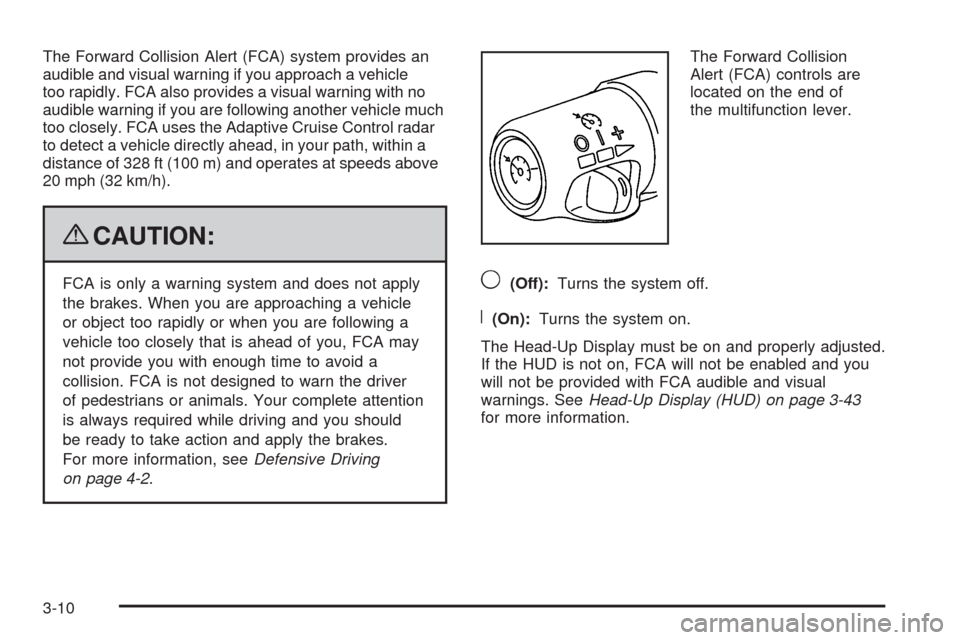
Alert (FCA) controls are
located on the end of
the multifunction lever.9(Off):Turns the system off.
R(On):Turns the system on.
The Head-Up Display must be on and properly adjusted.
If the HUD is not on, FCA will not be enabled and you
will not be provided with FCA audible and visual
warnings. SeeHead-Up Display (HUD) on page 3-43
for more information.
3-10
Page 169 of 514
Notice:Going through an automatic car wash with
the wipers on can damage them. Turn the wipers
off when going through an automatic car wash.
The mist and wash cycles operate as normal and are
not affected by the Rainsense function. The Rainsense
system can be overridden at any time by manually
turning the wiper band to low or high speed.
When Rainsense is active, the headlamps turn on
automatically. The headlamps will turn off again once
the wipers turn off if it is light enough outside. If it
is dark, they will remain on. SeeWiper Activated
Headlamps on page 3-36.
Notice:Do not place stickers or other items on
the exterior glass surface directly in front of
the moisture sensor. Doing this could cause
the moisture sensor to malfunction.
Windshield Washer
The windshield washer button is located at the end
of the windshield wiper lever on the right side of
the steering column.
K(Washer Fluid):Press and hold to spray
windshield washer uid on the windshield. The washer
will spray until the button is released. The wipers will
continue to clear the window for about six seconds after
the button is released and then stop or return to the
preset speed.
{CAUTION:
In freezing weather, do not use your washer until
the windshield is warmed. Otherwise the washer
uid can form ice on the windshield, blocking your
vision.
If the uid in the windshield washer uid reservoir is
low, the message CHECK WASHER FLUID will appear
on the Driver Information Center (DIC) display. It will
take 60 seconds after the bottle is relled for this
message to turn off. For information on the correct
washer uid mixture to use, seeWindshield Washer
Fluid on page 5-38andRecommended Fluids and
Lubricants on page 6-13.
3-15
Page 176 of 514
The Adaptive Cruise controls are located on the left side
of the steering wheel.
9(Off):Turns the system off.
R(On):Turns the system on.
S(Resume/Increase):Use this position to make the
vehicle resume a previously set speed or increase the set
speed when Adaptive Cruise Control is already active.
T(Set/Decrease):Press to set the speed or to
decrease the set speed when Adaptive Cruise Control
is already active.
[(Cancel):Press this button located on the steering
wheel to cancel adaptive cruise control.
Engaging Adaptive Cruise Control With
the Set Button
{CAUTION:
If you leave your Adaptive Cruise Control switch
on when you are not using cruise, you might hit a
button and go into cruise when you do not want
to. You could be startled and even lose control.
Keep the Adaptive Cruise Control switch off until
you want to use cruise control.
{CAUTION:
If you operate Adaptive Cruise Control without
your Head-up Display (HUD) properly adjusted,
your Adaptive Cruise Control settings may not be
visible. You could forget your settings and be
startled by Adaptive Cruise Control response and
even lose control. Keep your HUD on and properly
adjusted when using Adaptive Cruise Control.
3-22
Page 177 of 514
The set speed is selected by the driver. This is the
speed you will travel if there is no vehicle detected in
your path.
To set Adaptive Cruise Control, do the following:
1. Make sure the Head-Up Display (HUD) is on and
properly adjusted. You cannot engage Adaptive
Cruise Control unless the HUD is on. SeeHead-Up
Display (HUD) on page 3-43for more information.
2. Move the switch to on.
3. Get up to the desired speed.
4. Press
Tat the end of the lever and release the
button.
5. Take your foot off the accelerator pedal.
Once Adaptive Cruise Control is set, it might
immediately apply the brakes if it detects a vehicle
ahead that is too close or moving slower than your
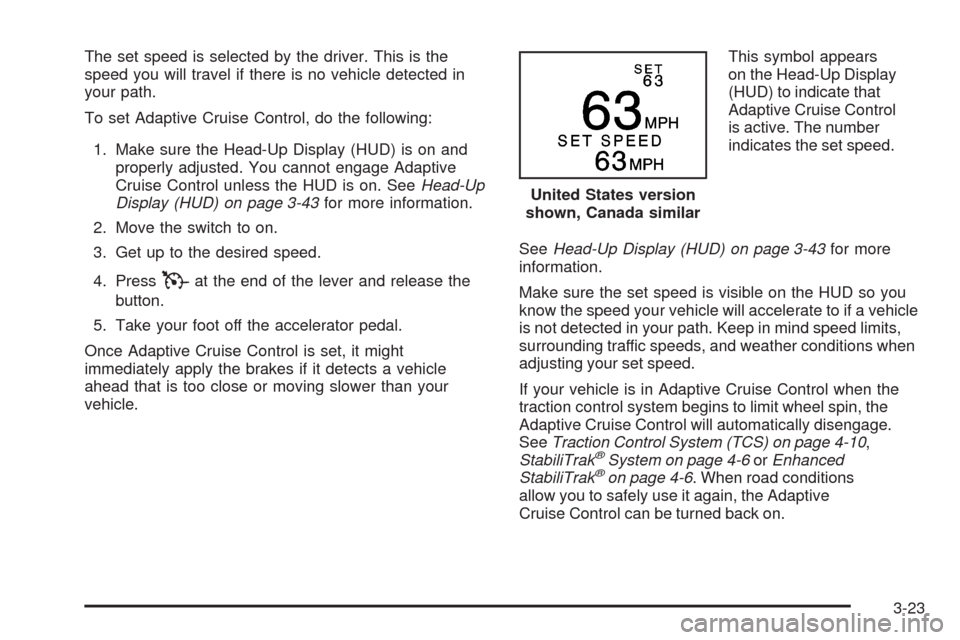
vehicle.This symbol appears
on the Head-Up Display
(HUD) to indicate that
Adaptive Cruise Control
is active. The number
indicates the set speed.
SeeHead-Up Display (HUD) on page 3-43for more
information.
Make sure the set speed is visible on the HUD so you
know the speed your vehicle will accelerate to if a vehicle
is not detected in your path. Keep in mind speed limits,
surrounding traffic speeds, and weather conditions when
adjusting your set speed.
If your vehicle is in Adaptive Cruise Control when the
traction control system begins to limit wheel spin, the
Adaptive Cruise Control will automatically disengage.
SeeTraction Control System (TCS) on page 4-10,
StabiliTrak
®System on page 4-6orEnhanced
StabiliTrak®on page 4-6. When road conditions
allow you to safely use it again, the Adaptive
Cruise Control can be turned back on.United States version
shown, Canada similar
3-23
Page 178 of 514
Increasing Set Speed While Using Adaptive
Cruise Control
There are two ways to increase the set speed:
Use the accelerator to get to the higher speed.
Press
Tat the end of the lever, then release
the button and the accelerator pedal. The vehicle
will now cruise at the higher speed.
Move the Adaptive Cruise Control switch from
RtoS. Hold it there until the desired set speed is
displayed in the HUD, then release the switch.
To increase the set speed in small amounts, move
the switch briey to resume/increase. Each time this
is done, the vehicle set speed increases by about
1 mph (1.6 km/h).
Your vehicle will not reach the set speed until the
system determines there is no vehicle in front of you.
At that point, your vehicle speed will increase to the
set speed.
Decreasing Set Speed While Using
Adaptive Cruise Control
PressTat the end of the lever until the lower speed
desired is reached, then release the button.
To slow down in small amounts, briey press
T.
Each this is done, the set speed will be 1 mph (1.6 km/h)
slower.
Resuming a Set Speed
If the brakes are applied while the Adaptive Cruise
Control is at a set speed, this disengages the Adaptive
Cruise Control. But it does not need to be reset.
Once the vehicle reaches about 30 mph (48 km/h)
or more, move the Adaptive Cruise Control switch briey
from
RtoS. Adaptive Cruise Control will be engaged
with the speed previously selected.
3-24
Page 182 of 514
Low-Speed Deactivation
If your speed falls below 25 mph (40 km/h) while
following a vehicle ahead, Adaptive Cruise Control will
begin to disengage. The driver alert symbol on the HUD
will ash and the warning beep will sound. The driver
must take action since Adaptive Cruise Control will
not slow the vehicle to a stop.
Deactivation When Head-Up Display is
Turned Off
If the HUD is turned off when Adaptive Cruise Control
is engaged, it will begin to disengage. A warning beep
sounds and the message RADAR CRUISE NOT READY
appears on the Driver Information Center (DIC). SeeDIC
Warnings and Messages on page 3-79for additional
information. If Adaptive Cruise Control was braking when
the HUD is turned off, the braking will continue briey.
Passing a Vehicle/Adaptive Cruise Control
Override
To increase speed to pass a vehicle, use the
accelerator pedal. While you are doing this, the
system will not automatically apply the brakes.
A PEDAL APPLIED ACC OVERRIDE message will
appear on the HUD. SeeHead-Up Display (HUD) on
page 3-43for additional information. Once you pass
the vehicle and remove your foot from the accelerator
pedal, Adaptive Cruise Control returns to normal
operation and the brakes can be applied, if needed.
{CAUTION:
If you rest your foot on the accelerator pedal, the
system will not automatically apply the brakes.
You could crash into a vehicle ahead of you.
Do not rest your foot on the accelerator pedal
when using Adaptive Cruise Control.
3-28
Page 188 of 514

Driving with IntelliBeam
IntelliBeam only activates the high-beams when driving
over 20 mph (32 km/h).
The high-beam headlamps remain on, under the control
of IntelliBeam, until any of the following situations occur:
The system detects an approaching vehicle’s
headlamps.
The system detects a preceding vehicle’s taillamps.
The outside light is bright enough that high-beam
headlamps are not required.
The high-beam headlamps are manually turned on
or you use the ash-to-pass feature. SeeHeadlamp
High/Low-Beam Changer on page 3-9and
Flash-to-Pass on page 3-13.
When either of these conditions occur, the IntelliBeam
feature is temporarily disabled until the high-beam
stalk is returned to its starting position. If either of
these conditions occur and IntelliBeam already has
the high-beam headlamps on, the feature is disabled
and the light in the mirror turns off.
The exterior lamp control is turned to any setting
except AUTO.
When this occurs, IntelliBeam is disabled until the
control is turned back to the AUTO position and the
AUTOMATIC LIGHTS ON message displays on
the DIC.
The IntelliBeam system is turned off at the inside
rearview mirror.
The vehicle’s speed drops below 15 mph (24 km/h).
IntelliBeam may not turn off the high-beams if the
system cannot detect other vehicle’s lamps because
of any of the following:
The others vehicle’s lamp(s) are missing, damaged,
obstructed from view, or otherwise undetected.
The other vehicle’s lamp(s) are covered with dirt,
snow and/or road spray.
The other vehicle’s lamp(s) cannot be detected due
to dense exhaust, smoke, fog, snow, road spray,
mist, or other airborne obstructions.
Your vehicle’s windshield is dirty, cracked, or
obstructed by something that blocks the view of
the IntelliBeam light sensor.
Your vehicle’s windshield is covered with ice, dirt,
haze, or other obstructions.
Your vehicle is loaded such that the front end of
the vehicle points upward, causing the IntelliBeam
sensor to aim high and not detect headlamps
and taillamps.
You are driving on winding or hilly roads.
You might need to manually disable or cancel the
high-beam headlamps by turning the low-beam
headlamps on, if any of the above conditions exist.
3-34
Page 195 of 514

Entry Lighting
The entry lighting system turns on the reading and
dome lamps and the backlighting to the exterior lamp
control when a door is opened or if you press the remote
keyless entry transmitter unlock button. If activated by
the transmitter, the lighting will remain active for about
25 seconds. The entry lighting system uses the light
sensor; it must be dark outside in order for the lamps to
turn on. The lamps turn off about 25 seconds after the
last door is closed. They will dim to off if the ignition is
on, or immediately deactivate if the power locks are
activated.
Parade Dimming
This feature prohibits dimming of the instrument panel
displays and backlighting during daylight hours when
the key is in the ignition and the headlamps are on.
This feature operates with the light sensor and is fully
automatic. When the light sensor reads darkness outside
and the parking lamps are active, the instrument panel
displays can be adjusted by turning the instrument panel
brightness knob. SeeInstrument Panel Brightness on
page 3-40for additional information.
Reading Lamps
The reading lamps are located on the overhead console.
These lamps come on automatically when any door is
opened.
For manual operation, press the button next to each
lamp to turn it on or off.
If the reading lamps are left on, they automatically shut
off 10 minutes after the ignition has been turned off.
Battery Load Management
The battery load management feature is designed to
monitor the vehicle’s electrical load and determine when
the battery is in a heavy discharge condition. During
times of high electrical loading, the engine may idle at a
higher revolutions per minute (rpm) setting than normal to
make sure the battery charges. High electrical loads may
occur when several of the following are on: headlamps,
high beams, fog lamps, rear window defogger, the
climate control fan at high speeds, heated seats and
engine cooling fans.
If the battery continues to discharge, even with the
engine idling at a higher rpm setting, some electrical
loads will automatically be reduced. When this occurs,
the rear window defogger may take slightly longer to clear
the glass and the fan may cut back to a lower speed.
For more battery saving information, see “Battery Saver
Active Message” underDIC Warnings and Messages on
page 3-79.
3-41
Page 196 of 514

Electric Power Management
The vehicle has Electric Power Management (EPM) that
estimates the battery’s temperature and state of charge.
It then adjusts the voltage for best performance and
extended life of the battery.
When the battery’s state of charge is low, the voltage is
raised slightly to quickly bring the charge back up. When
the state of charge is high, the voltage is lowered slightly
to prevent overcharging. If the vehicle has a voltmeter
gage or a voltage display on the Driver Information
Center (DIC), you may see the voltage move up or
down. This is normal. If there is a problem, an alert
will be displayed.
The battery can be discharged at idle if the electrical
loads are very high. This is true for all vehicles. This is
because the generator (alternator) may not be spinning
fast enough at idle to produce all the power that is
needed for very high electrical loads.
A high electrical load occurs when several of the
following are on: headlamps, high beams, fog lamps,
rear window defogger, climate control fan at high speed,
heated seats, engine cooling fans, trailer loads, and
loads plugged into accessory power outlets.EPM works to prevent excessive discharge of the
battery. It does this by balancing the generator’s output
and the vehicle’s electrical needs. It can increase
engine idle speed to generate more power, whenever
needed. It can temporarily reduce the power demands
of some accessories.
Normally, these actions occur in steps or levels, without
being noticeable. In rare cases at the highest levels of
corrective action, this action may be noticeable to the
driver. If so, a Driver Information Center (DIC) message
might be displayed, such as Battery Saver Active or
Service Battery Charging System. If this message is
displayed, it is recommended that the driver reduce the
electrical loads as much as possible. SeeDIC Warnings
and Messages on page 3-79.
Inadvertent Power Battery Saver
This feature is designed to protect the vehicle’s battery
against drainage from the interior lamps, trunk lamp,
glove box lamp, or the garage door opener. When the
ignition is turned off, the power to these features will
automatically turn off after 10 minutes (three minutes
if a new car has 15 miles (24 km) or less). Power will
be restored for an additional 10 minutes if any door
is opened, the trunk is opened or the courtesy lamp
switch is turned on.
3-42
Page 197 of 514
Head-Up Display (HUD)
{CAUTION:
If the HUD image is too bright, or too high in your
eld of view, it may take you more time to see
things you need to see when it is dark outside.
Be sure to keep the HUD image dim and placed
low in your eld of view.
For vehicles with the Head-Up Display (HUD), some of
the driver information that appears on the instrument
panel cluster is projected onto an image on the
windshield.
The information can be displayed in English or metric
units. To change from English to metric units, see
DIC Operation and Displays on page 3-72.
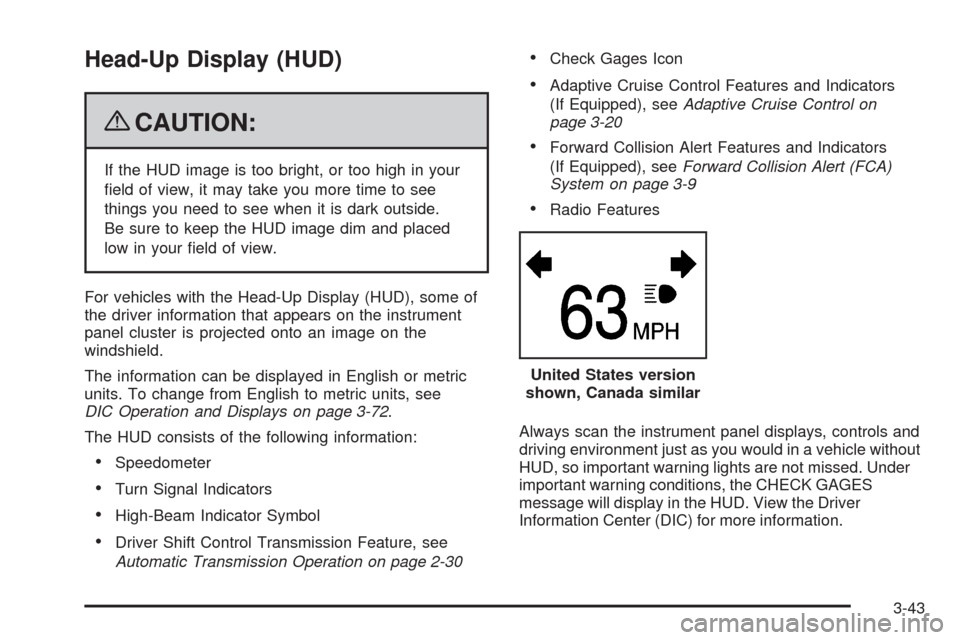
The HUD consists of the following information:
Speedometer
Turn Signal Indicators
High-Beam Indicator Symbol
Driver Shift Control Transmission Feature, see
Automatic Transmission Operation on page 2-30
Check Gages Icon
Adaptive Cruise Control Features and Indicators
(If Equipped), seeAdaptive Cruise Control on
page 3-20
Forward Collision Alert Features and Indicators
(If Equipped), seeForward Collision Alert (FCA)
System on page 3-9
Radio Features
Always scan the instrument panel displays, controls and
driving environment just as you would in a vehicle without
HUD, so important warning lights are not missed. Under
important warning conditions, the CHECK GAGES
message will display in the HUD. View the Driver
Information Center (DIC) for more information.United States version
shown, Canada similar
3-43