buttons CADILLAC STS 2011 1.G User Guide
[x] Cancel search | Manufacturer: CADILLAC, Model Year: 2011, Model line: STS, Model: CADILLAC STS 2011 1.GPages: 528, PDF Size: 4.96 MB
Page 114 of 528
Black plate (8,1)Cadillac STS Owner Manual - 2011
7. A beep sounds once programming in complete.The DIC displays READY FOR 3 or 4, or MAX #
FOBS LEARNED.
8. Remove the transmitter from the transmitter pocket and press
Ktwice on each newly programmed
transmitter to complete the process.
9. To program additional transmitters, repeat Step 6. Press Acc. on the ignition switch if programming is
complete.
Programming without a Recognized
Transmitter
This procedure requires three ten minutes cycles to
complete the programming process. United States
owners are permitted to program a new transmitter to
their vehicle when a recognized transmitter is not
available. The Canadian immobilizer standard requires
that Canadian owners see their dealer for programming
new transmitters when two recognized transmitters are
not available.
1. The vehicle must be off.
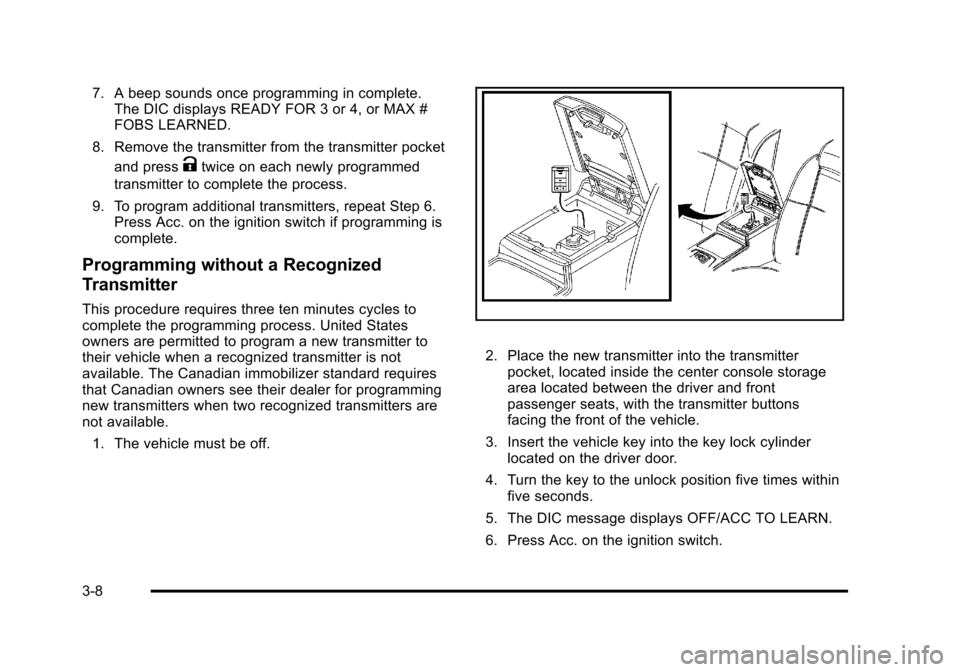
2. Place the new transmitter into the transmitter pocket, located inside the center console storage
area located between the driver and front
passenger seats, with the transmitter buttons
facing the front of the vehicle.
3. Insert the vehicle key into the key lock cylinder located on the driver door.
4. Turn the key to the unlock position five times within five seconds.
5. The DIC message displays OFF/ACC TO LEARN.
6. Press Acc. on the ignition switch.
3-8
Page 115 of 528
Black plate (9,1)Cadillac STS Owner Manual - 2011
7. The DIC reads WAIT 10 MINUTES and countsdown to zero.
8. The DIC displays OFF/ACC TO LEARN again.
9. Press Acc. on the ignition switch.
10. Steps 7, 8 and 9 will be repeated two more times. 11. A beep sounds and the DIC reads READY FOR FOB 1. All previously known transmitter
programming has been erased.
12. A beep sounds once programming in complete. The DIC displays READY FOR FOB #2.
13. To program additional transmitters, take transmitter 1 out of the transmitter pocket and place
transmitter 2 in the pocket. Up to four transmitters
can be programmed. The DIC will then display
MAX # FOBS LEARNED and will exit the
programming mode.
14. Remove the transmitter from the transmitter pocket and press
Ktwice on each newly programmed
transmitter to complete the process.
Starting the Vehicle with a Low
Transmitter Battery
If the transmitter battery is weak, the DIC may display
NO FOBS DETECTED when trying to start the vehicle.
To start the vehicle, place the transmitter in the center
console storage area transmitter pocket with the
buttons facing to the front of the vehicle. Then, with
the vehicle in P (Park) OR N (Neutral), press the brake
pedal and
/. Replace the transmitter battery as soon
as possible. Change the transmitter battery if the DIC
displays KEY FOB BATTERY LOW.
3-9
Page 155 of 528
Black plate (49,1)Cadillac STS Owner Manual - 2011
LDW Error Message
SERVICE LANE DEPARTURE SYSTEM:This
message may appear in the DIC to indicate that LDW is
not working properly. If this message remains on after
continued driving, the system needs service. Take the
vehicle to your dealer. See DIC Warnings and
Messages
on page 4‑76for more information.
LANE DEPARTURE SYSTEM UNAVAILABLE : This
message may appear in the DIC if LDW does not
activate due to a temporary condition. See DIC
Warnings and Messages
on page 4‑76for more
information.
Universal Home Remote
System
See Radio Frequency Statementon page 8‑20for
information regarding Part 15 of the Federal
Communications Commission (FCC) rules and
Industry Canada Standards RSS-210/220/310.
Universal Home Remote System
Operation (With Three Round LED)
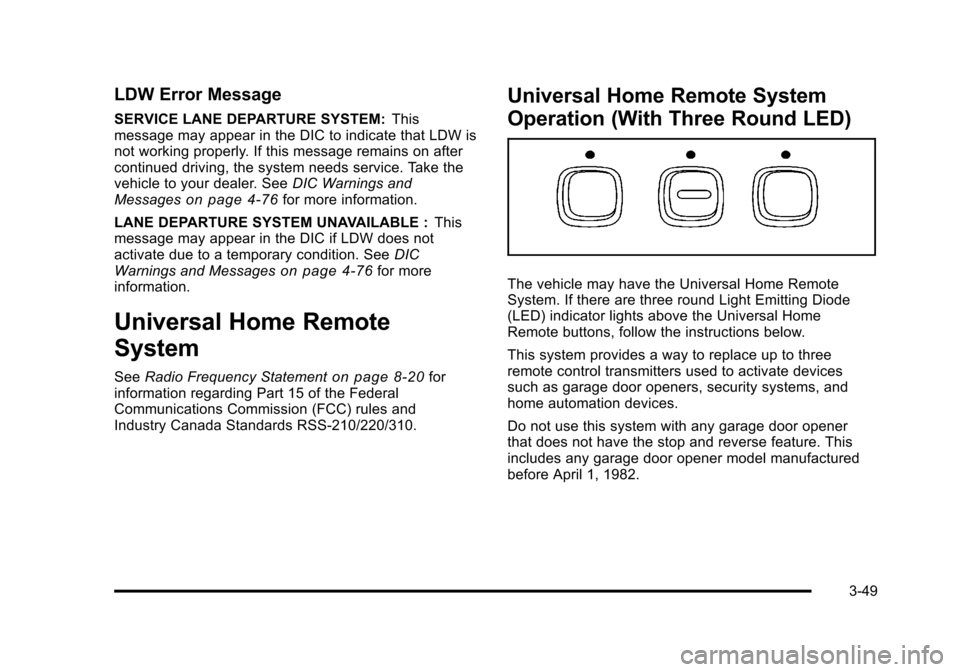
The vehicle may have the Universal Home Remote
System. If there are three round Light Emitting Diode
(LED) indicator lights above the Universal Home
Remote buttons, follow the instructions below.
This system provides a way to replace up to three
remote control transmitters used to activate devices
such as garage door openers, security systems, and
home automation devices.
Do not use this system with any garage door opener
that does not have the stop and reverse feature. This
includes any garage door opener model manufactured
before April 1, 1982.
3-49
Page 156 of 528
Black plate (50,1)Cadillac STS Owner Manual - 2011
Read the instructions completely before attempting to
program the transmitter. Because of the steps involved,
it may be helpful to have another person available to
assist you in programming the transmitter.
Be sure to keep the original remote control transmitter
for use in other vehicles, as well as, for future
programming. Only the original remote control
transmitter is needed for Fixed Code programming.
The programmed buttons should be erased when the
vehicle is sold or the lease ends. See“Erasing
Universal Home Remote Buttons” later in this section.
Park the vehicle outside of the garage when
programming a garage door. Be sure that people and
objects are clear of the garage door or gate that is
being programmed.Programming Universal Home
Remote —Rolling Code
For questions or help programming the Universal Home
Remote System, call 1-866-572-2728 or go to
learcar2u.com.
Most garage door openers sold after 1996 are Rolling
Code units.
Programming a garage door opener involves
time-sensitive actions, so read the entire procedure
before starting. Otherwise, the device will time out and
the procedure will have to be repeated.
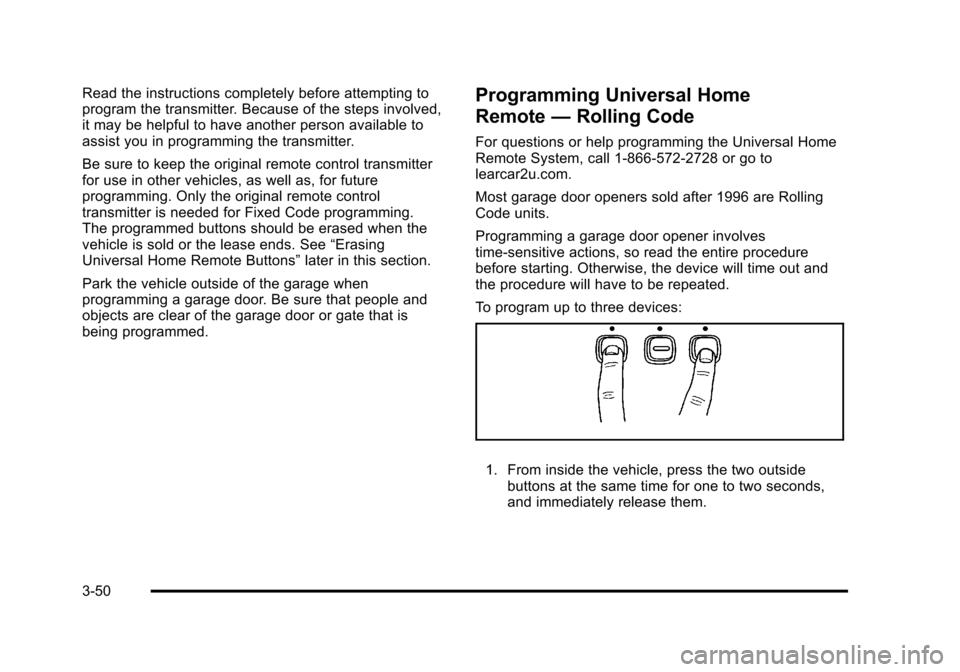
To program up to three devices:
1. From inside the vehicle, press the two outside
buttons at the same time for one to two seconds,
and immediately release them.
3-50
Page 160 of 528

Black plate (54,1)Cadillac STS Owner Manual - 2011
Example of Eight Dip Switches with Three PositionsThe panel of switches might not appear exactly as
they do in the examples above, but they should be
similar.
The switch positions on your hand-held transmitter
could be labeled, as follows:
.A switch in the up position could be labeled as
“Up,” “+,” or“On.”
.A switch in the down position could be labeled
as “Down,” “−,” or“Off.”
.A switch in the middle position could be labeled
as “Middle,” “0,” or“Neutral.” 2. Write down the eight to 12 switch settings from left
to right as follows:
.When a switch is in the up position, write “Left.”
.When a switch is in the down position, write
“Right.”
.If a switch is set between the up and down
position, write“Middle.”
The switch settings written down in Step 2 will
now become the button strokes to be entered
into the Universal Home Remote in Step 4. Be
sure to enter the switch settings written down
in Step 2, in order from left to right, into the
Universal Home Remote, when completing
Step 4.
3. From inside your vehicle, first firmly press all three buttons at the same time for about three seconds.
Release the buttons to put the Universal Home
Remote into programming mode.
3-54
Page 161 of 528
Black plate (55,1)Cadillac STS Owner Manual - 2011
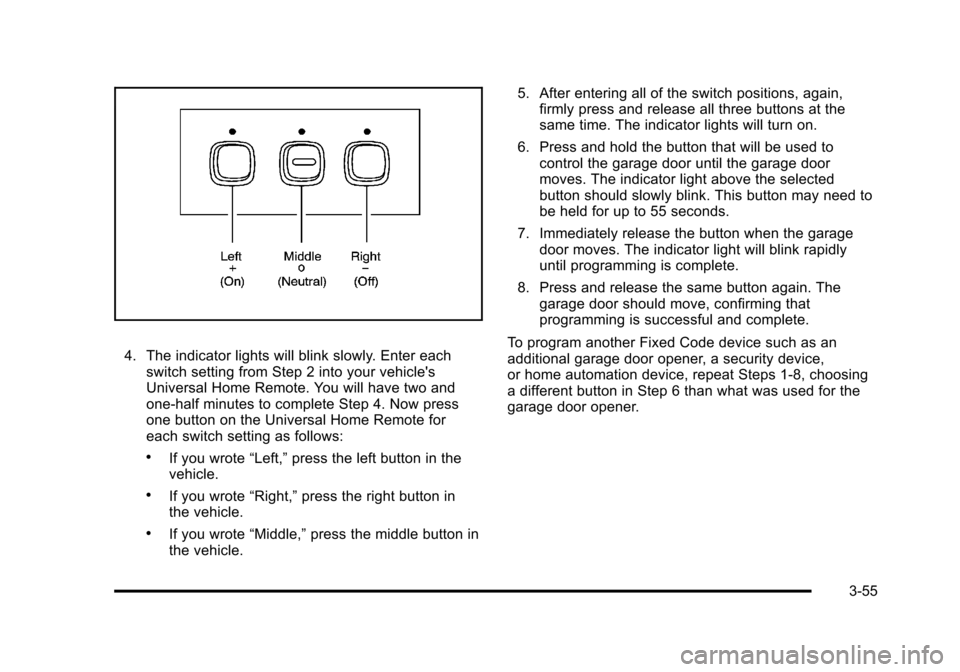
4. The indicator lights will blink slowly. Enter eachswitch setting from Step 2 into your vehicle's
Universal Home Remote. You will have two and
one-half minutes to complete Step 4. Now press
one button on the Universal Home Remote for
each switch setting as follows:
.If you wrote “Left,”press the left button in the
vehicle.
.If you wrote “Right,”press the right button in
the vehicle.
.If you wrote “Middle,”press the middle button in
the vehicle. 5. After entering all of the switch positions, again,
firmly press and release all three buttons at the
same time. The indicator lights will turn on.
6. Press and hold the button that will be used to control the garage door until the garage door
moves. The indicator light above the selected
button should slowly blink. This button may need to
be held for up to 55 seconds.
7. Immediately release the button when the garage door moves. The indicator light will blink rapidly
until programming is complete.
8. Press and release the same button again. The garage door should move, confirming that
programming is successful and complete.
To program another Fixed Code device such as an
additional garage door opener, a security device,
or home automation device, repeat Steps 1-8, choosing
a different button in Step 6 than what was used for the
garage door opener.
3-55
Page 162 of 528
Black plate (56,1)Cadillac STS Owner Manual - 2011
Using Universal Home Remote
Press and hold the appropriate button for at least half of
a second. The indicator light will come on while the
signal is being transmitted.
Reprogramming Universal Home
Remote Buttons
Any of the three buttons can be reprogrammed by
repeating the instructions.
Erasing Universal Home Remote
Buttons
The programmed buttons should be erased when the
vehicle is sold or the lease ends.
To erase either Rolling Code or Fixed Code on the
Universal Home Remote device:1. Press and hold the two outside buttons at the same time for approximately 20 seconds, until the
indicator lights, located directly above the buttons,
begin to blink rapidly.
2. Once the indicator lights begin to blink, release both buttons. The codes from all buttons will be
erased.
For help or information on the Universal Home Remote
System, call the customer assistance phone number
under Customer Assistance Offices on page 8‑6.
Storage Areas
Glove Box
Lift up on the glove box lever to open it.
Cupholders
The vehicle has two cupholders in the center
console area.
Center Console Storage
The vehicle has a center console storage area located
between the front seats. It includes storage areas, and
accessory power outlet(s) on the rear of the console.
Floor Mats
{WARNING:
If a floor mat is the wrong size or is not properly
installed, it can interfere with the accelerator pedal
and/or brake pedal. Interference with the pedals
can cause unintended acceleration and/or
(Continued)
3-56
Page 193 of 528
Black plate (7,1)Cadillac STS Owner Manual - 2011
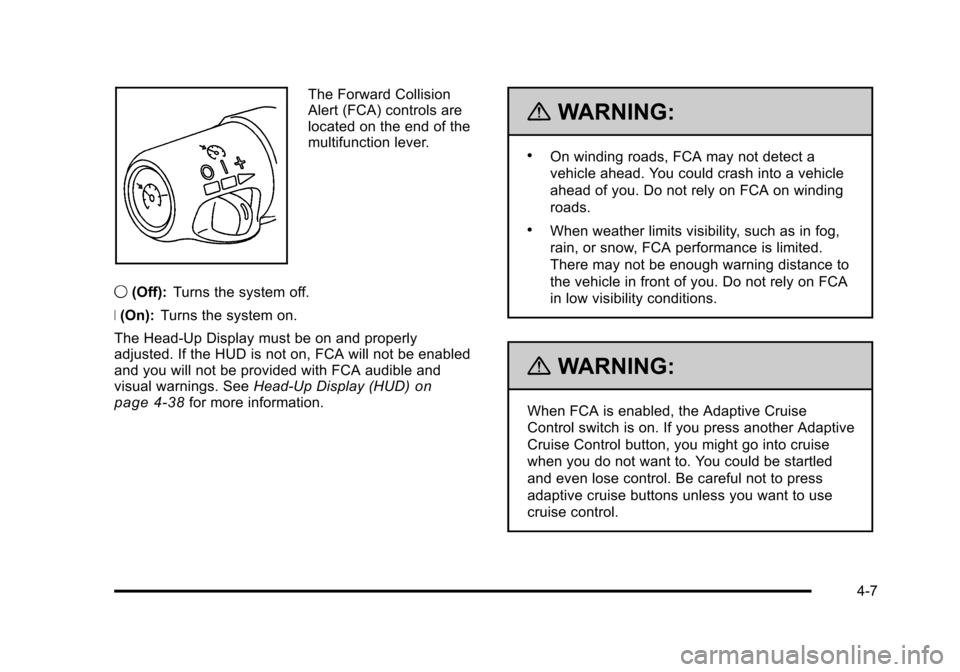
The Forward Collision
Alert (FCA) controls are
located on the end of the
multifunction lever.
9 (Off): Turns the system off.
R (On): Turns the system on.
The Head-Up Display must be on and properly
adjusted. If the HUD is not on, FCA will not be enabled
and you will not be provided with FCA audible and
visual warnings. See Head-Up Display (HUD)
on
page 4‑38for more information.
{WARNING:
.On winding roads, FCA may not detect a
vehicle ahead. You could crash into a vehicle
ahead of you. Do not rely on FCA on winding
roads.
.When weather limits visibility, such as in fog,
rain, or snow, FCA performance is limited.
There may not be enough warning distance to
the vehicle in front of you. Do not rely on FCA
in low visibility conditions.
{WARNING:
When FCA is enabled, the Adaptive Cruise
Control switch is on. If you press another Adaptive
Cruise Control button, you might go into cruise
when you do not want to. You could be startled
and even lose control. Be careful not to press
adaptive cruise buttons unless you want to use
cruise control.
4-7
Page 229 of 528
Black plate (43,1)Cadillac STS Owner Manual - 2011
Climate Controls
Dual Climate Control System
The heating, cooling, and ventilation can be controlled
for the vehicle with this system.
Automatic Operation
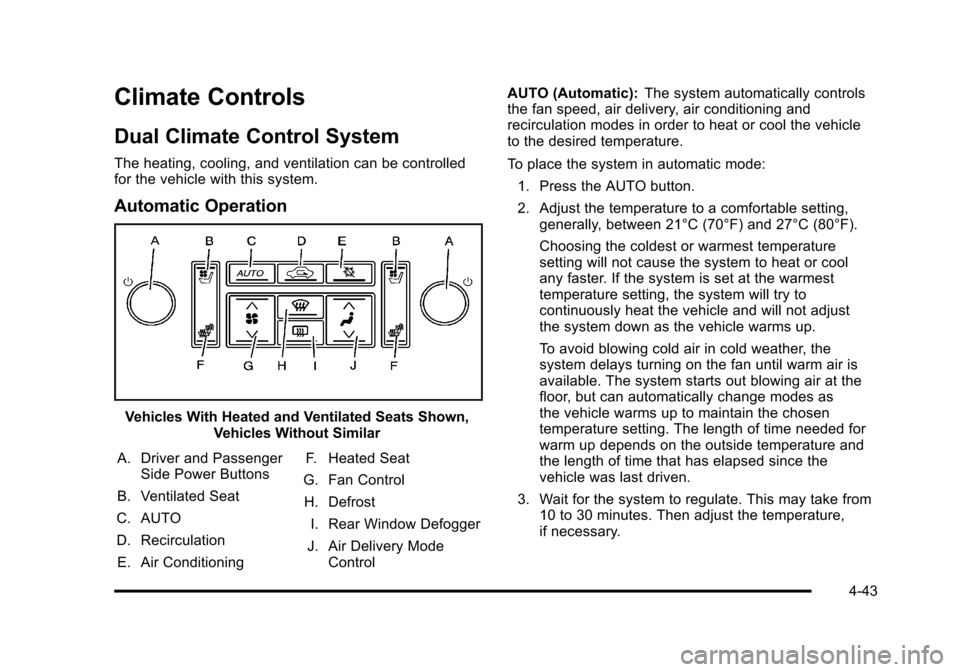
Vehicles With Heated and Ventilated Seats Shown,Vehicles Without Similar
A. Driver and Passenger Side Power Buttons
B. Ventilated Seat
C. AUTO
D. Recirculation E. Air Conditioning F. Heated Seat
G. Fan Control H. Defrost I. Rear Window Defogger
J. Air Delivery Mode Control AUTO (Automatic):
The system automatically controls
the fan speed, air delivery, air conditioning and
recirculation modes in order to heat or cool the vehicle
to the desired temperature.
To place the system in automatic mode:
1. Press the AUTO button.
2. Adjust the temperature to a comfortable setting, generally, between 21°C (70°F) and 27°C (80°F).
Choosing the coldest or warmest temperature
setting will not cause the system to heat or cool
any faster. If the system is set at the warmest
temperature setting, the system will try to
continuously heat the vehicle and will not adjust
the system down as the vehicle warms up.
To avoid blowing cold air in cold weather, the
system delays turning on the fan until warm air is
available. The system starts out blowing air at the
floor, but can automatically change modes as
the vehicle warms up to maintain the chosen
temperature setting. The length of time needed for
warm up depends on the outside temperature and
the length of time that has elapsed since the
vehicle was last driven.
3. Wait for the system to regulate. This may take from 10 to 30 minutes. Then adjust the temperature,
if necessary.
4-43
Page 235 of 528
Black plate (49,1)Cadillac STS Owner Manual - 2011
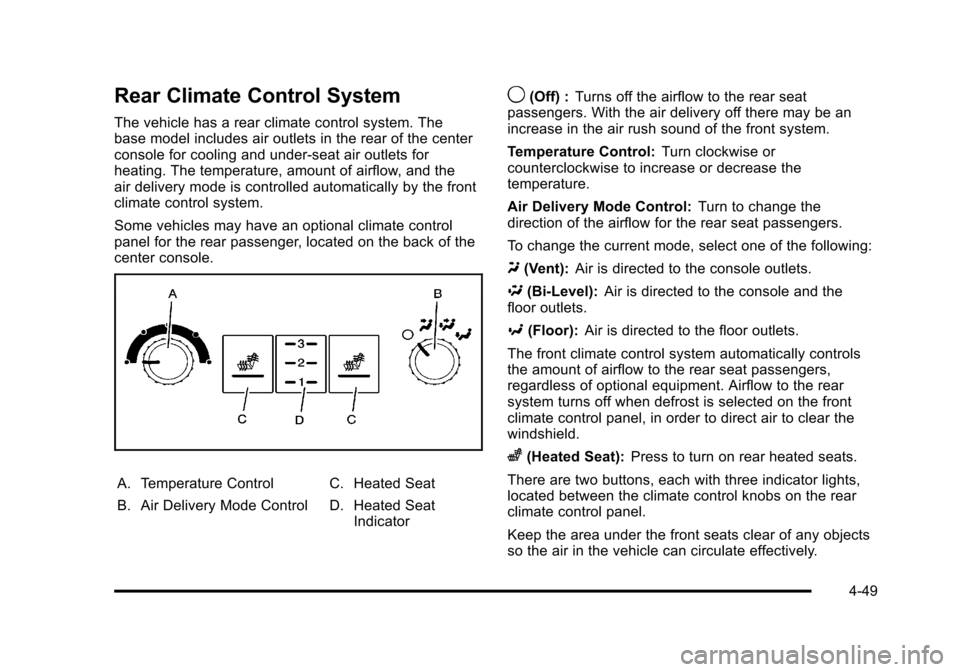
Rear Climate Control System
The vehicle has a rear climate control system. The
base model includes air outlets in the rear of the center
console for cooling and under-seat air outlets for
heating. The temperature, amount of airflow, and the
air delivery mode is controlled automatically by the front
climate control system.
Some vehicles may have an optional climate control
panel for the rear passenger, located on the back of the
center console.
A. Temperature Control
B. Air Delivery Mode ControlC. Heated Seat
D. Heated Seat
Indicator
9(Off) : Turns off the airflow to the rear seat
passengers. With the air delivery off there may be an
increase in the air rush sound of the front system.
Temperature Control: Turn clockwise or
counterclockwise to increase or decrease the
temperature.
Air Delivery Mode Control: Turn to change the
direction of the airflow for the rear seat passengers.
To change the current mode, select one of the following:
Y (Vent): Air is directed to the console outlets.
\ (Bi-Level): Air is directed to the console and the
floor outlets.
[ (Floor): Air is directed to the floor outlets.
The front climate control system automatically controls
the amount of airflow to the rear seat passengers,
regardless of optional equipment. Airflow to the rear
system turns off when defrost is selected on the front
climate control panel, in order to direct air to clear the
windshield.
z(Heated Seat): Press to turn on rear heated seats.
There are two buttons, each with three indicator lights,
located between the climate control knobs on the rear
climate control panel.
Keep the area under the front seats clear of any objects
so the air in the vehicle can circulate effectively.
4-49