battery CADILLAC STS 2011 1.G Owner's Manual
[x] Cancel search | Manufacturer: CADILLAC, Model Year: 2011, Model line: STS, Model: CADILLAC STS 2011 1.GPages: 528, PDF Size: 4.96 MB
Page 257 of 528
Black plate (71,1)Cadillac STS Owner Manual - 2011
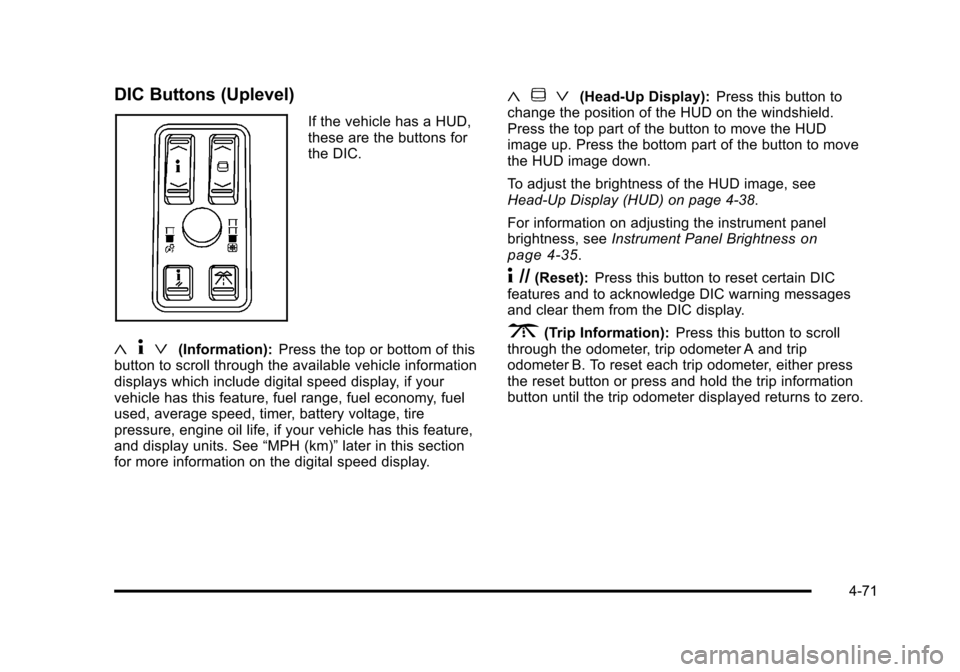
DIC Buttons (Uplevel)
If the vehicle has a HUD,
these are the buttons for
the DIC.
«4ª(Information): Press the top or bottom of this
button to scroll through the available vehicle information
displays which include digital speed display, if your
vehicle has this feature, fuel range, fuel economy, fuel
used, average speed, timer, battery voltage, tire
pressure, engine oil life, if your vehicle has this feature,
and display units. See “MPH (km)”later in this section
for more information on the digital speed display.
« ~ ª(Head-Up Display): Press this button to
change the position of the HUD on the windshield.
Press the top part of the button to move the HUD
image up. Press the bottom part of the button to move
the HUD image down.
To adjust the brightness of the HUD image, see
Head-Up Display (HUD) on page 4‑38.
For information on adjusting the instrument panel
brightness, see Instrument Panel Brightness
on
page 4‑35.
4 //(Reset): Press this button to reset certain DIC
features and to acknowledge DIC warning messages
and clear them from the DIC display.
3(Trip Information): Press this button to scroll
through the odometer, trip odometer A and trip
odometer B. To reset each trip odometer, either press
the reset button or press and hold the trip information
button until the trip odometer displayed returns to zero.
4-71
Page 260 of 528
Black plate (74,1)Cadillac STS Owner Manual - 2011
BATTERY VOLTS
This display shows the current battery voltage. If the
voltage is in the normal range, the value will display.
For example, the display may read 13.2 BATTERY
VOLTS. If the voltage is low, the display will have
LOW after it. If the voltage is high, the display will have
HIGH after it. Your vehicle's charging system regulates
voltage based on the state of the battery. The battery
voltage may fluctuate when viewing this information
on the DIC. This is normal. SeeCharging System Light
on page 4‑57for more information.
If there is a problem with the battery charging system,
the DIC may display a message. See DIC Warnings
and Messages
on page 4‑76and Electric Power
Managementon page 4‑37for more information.
Tire Pressure
This display shows the pressure for each tire in either
pounds per square inch (psi) or kilopascals (kPa). If the
tire pressure is normal, the value will display. If the tire
pressure is low, LOW will appear on the display with the
value. See Inflation - Tire Pressure
on page 6‑58and
DIC Warnings and Messageson page 4‑76for more
information. Press the information button to scroll
through the following displays:
LF TIRE: This display shows the pressure in the driver
side front tire. RF TIRE:
This display shows the pressure in the
passenger side front tire.
LR TIRE: This display shows the pressure in the driver
side rear tire.
RR TIRE: This display shows the pressure in the
passenger side rear tire.
If the tire pressure display shows dashes instead of a
value, there may be a problem with your vehicle. If this
consistently occurs, see your dealer for service.
ENGINE OIL LIFE
If your vehicle has this display, it shows the estimated
oil life remaining. If you see 99% ENGINE OIL LIFE on
the display, that means that 99% of the current oil life
remains.
When the oil life is depleted, the CHANGE ENGINE OIL
SOON message will appear on the display. Change the
oil as soon as possible. In addition to the engine oil life
system monitoring the oil life, additional maintenance is
recommended in the Maintenance Schedule in this
manual. See Scheduled Maintenance
on page 7‑3andEngine Oil on page 6‑16.
After an oil change, reset the ENGINE OIL LIFE display.
To reset, see Engine Oil Life System
on page 6‑20.
The display will show 100% ENGINE OIL LIFE after it
has been reset. Also clear the CHANGE ENGINE OIL
SOON message from the display.
4-74
Page 263 of 528
Black plate (77,1)Cadillac STS Owner Manual - 2011
BATTERY NOT CHARGING SERVICE
CHARGING SYS (System)
This symbol appears
with this message.
This message displays when a problem with the
charging system has been detected. Have your vehicle
serviced by your dealer.
BATTERY SAVER ACTIVE
This message displays when the system detects that
the battery voltage is dropping beyond a reasonable
level. The battery saver system starts reducing certain
features of the vehicle that may be noticeable. At the
point that the features are disabled, this message is
displayed. It means that the vehicle is trying to save the
charge in the battery.
Turn off all unnecessary accessories to allow the
battery to recharge.
The normal battery voltage range is 11.5 to 15.5 volts.
To monitor battery voltage on the DIC, press the
information button until BATTERY VOLTS displays.
BATTERY VOLTAGE HIGH
This symbol appears
with this message.
This message displays when the electrical charging
system is overcharging the battery. When the system
detects that the battery voltage is above an estimated
16 volts, this message displays.
To reduce the charging overload, use the vehicle's
accessories:
.Turn on the exterior lamps and radio.
.Set the climate control on AUTO and the fan speed
on the highest setting.
.Turn the rear window defogger on.
The normal battery voltage range is 11.5 to 15.5 volts
when the engine is running. To monitor battery voltage
on the DIC, press the information button until BATTERY
VOLTS displays.
4-77
Page 264 of 528
Black plate (78,1)Cadillac STS Owner Manual - 2011
BATTERY VOLTAGE LOW
This symbol appears
with this message.
This message displays when the electrical system is
charging less than 10 volts or the battery has been
drained.
If this message appears immediately after starting
the engine, it is possible that the generator can still
recharge the battery. The battery should recharge while
driving, but may take a few hours to do so. Consider
using an auxiliary charger to boost the battery after
returning home or to a final destination. Follow the
manufacturer's instructions.
If this message appears while driving or after starting
your vehicle and stays on, have it checked immediately
to determine the cause of this problem.
To help the generator recharge the battery quickly,
reduce the load on the electrical system by turning
off the accessories. The normal battery voltage range is 11.5 to 15.5 volts.
To monitor battery voltage on the DIC, press the
information button until BATTERY VOLTS displays.
CHANGE ENGINE OIL SOON
This message displays when the engine oil needs
to be changed. See your dealer. See
Engine Oilon
page 6‑16and Scheduled Maintenanceon page 7‑3for more information.
After resetting the CHANGE ENGINE OIL SOON
message by clearing it from the display, reset the
engine oil life system separately. For more information
on resetting the engine oil life system, see Engine Oil
Life System on page 6‑20.
CHECK BRAKE FLUID
This message displays if the ignition is on to inform the
driver that the brake fluid level is low. Have the brake
system serviced by your dealer as soon as possible.
See Brake System Warning Light
on page 4‑58for
more information.
CHECK GAS CAP
This message displays when the fuel cap has not been
fully tightened. Recheck the fuel cap to ensure that it is
on and tightened properly.
4-78
Page 268 of 528
Black plate (82,1)Cadillac STS Owner Manual - 2011
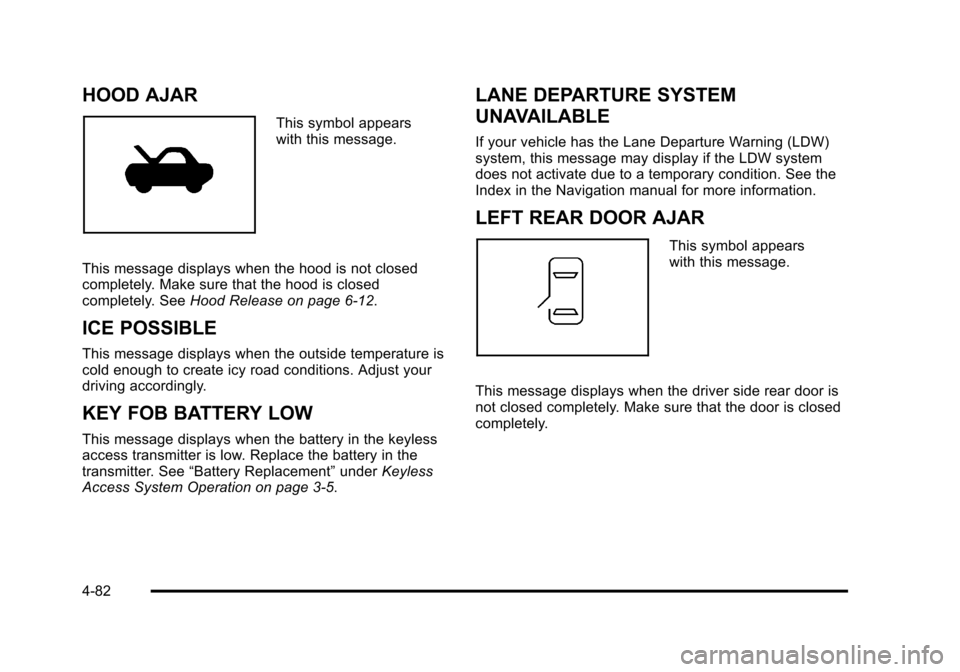
HOOD AJAR
This symbol appears
with this message.
This message displays when the hood is not closed
completely. Make sure that the hood is closed
completely. See Hood Release on page 6‑12.
ICE POSSIBLE
This message displays when the outside temperature is
cold enough to create icy road conditions. Adjust your
driving accordingly.
KEY FOB BATTERY LOW
This message displays when the battery in the keyless
access transmitter is low. Replace the battery in the
transmitter. See“Battery Replacement” underKeyless
Access System Operation on page 3‑5.
LANE DEPARTURE SYSTEM
UNAVAILABLE
If your vehicle has the Lane Departure Warning (LDW)
system, this message may display if the LDW system
does not activate due to a temporary condition. See the
Index in the Navigation manual for more information.
LEFT REAR DOOR AJAR
This symbol appears
with this message.
This message displays when the driver side rear door is
not closed completely. Make sure that the door is closed
completely.
4-82
Page 269 of 528
Black plate (83,1)Cadillac STS Owner Manual - 2011
NO FOBS DETECTED
This message displays if the vehicle does not detect the
presence of a keyless access transmitter when you
have attempted to start the vehicle or a vehicle door
has just closed. The following conditions may cause this
message to appear:
.Driver-added equipment plugged into the
accessory power outlet on the center console
is causing interference. Examples of these
devices are cell phones and cell phone chargers,
two-way radios, power inverters, or similar items.
Try moving the keyless access transmitter away
from these devices when starting the vehicle. In
addition, PDA devices and remote garage and
gate openers may also generate Electromagnetic
Interference (EMI) that may interfere with the
keyless access transmitter. Do not carry the
keyless access transmitter in the same pocket
or bag as these devices.
.The vehicle is experiencing Electromagnetic
Interference (EMI). Some locations, such as
airports, automatic toll booths, and some gas
stations, have EMI fields which may interfere
with the keyless access transmitter.
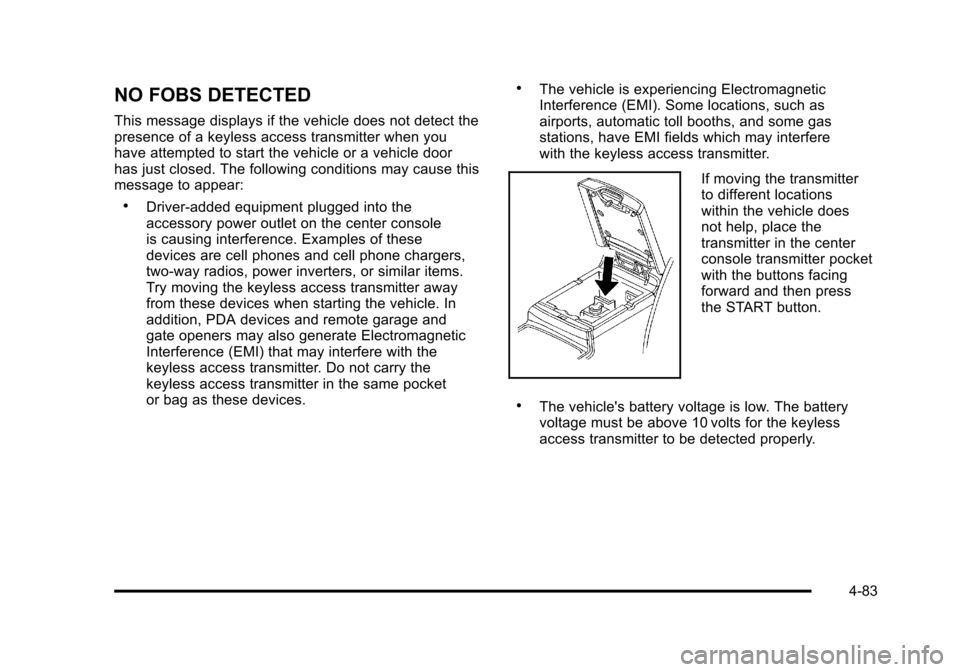
If moving the transmitter
to different locations
within the vehicle does
not help, place the
transmitter in the center
console transmitter pocket
with the buttons facing
forward and then press
the START button.
.The vehicle's battery voltage is low. The battery
voltage must be above 10 volts for the keyless
access transmitter to be detected properly.
4-83
Page 284 of 528
Black plate (98,1)Cadillac STS Owner Manual - 2011
Setting Preset Stations
Up to 30 stations (six FM1, six FM2, six AM, six XM1 and
six XM2), can be programmed on the six numbered
pushbuttons.
To program preset stations:1. Tune to a station and select the equalization, DSP, or PTY (program type) setting if desired.
2. Press and hold one of the six numbered pushbuttons for two seconds until a beep sounds.
The set preset station number displays above the
set pushbutton. If the numbered pushbutton is
pressed for less then two seconds, the radio tunes
to the station set to that pushbutton.
3. Repeat the steps for each pushbutton.
AUTOSTORE PRESETS: When Autostore is used, the
radio automatically searches the selected band and
stores the six radio stations with the strongest signal.
The stations are stored by signal strength, not
sequential order. This feature does not function with
XM radio stations.
To program autostore presets:
1. Press
wto enter the main menu.
2. Turn
wuntil AUTOSTORE PRESETS displays. 3. Press
wto select AUTOSTORE PRESETS. The
radio begins searching and AUTOSTORE displays.
4. Press F6 to exit the display. To return to the original display, repeatedly press F6 or wait for the
display to time out.
The radio presets do not have to be reset when the
vehicle is started, or when the battery power is
removed.
PRESETS HOME/AWAY: This feature stores two
different kinds of station presets. HOME can be used for
local stations and AWAY for stations outside of the local
broadcasting area. This feature does not function with
the XM radio stations.
To set preset stations for home and away:
1. Press
wto enter the main menu.
2. Turn
wuntil PRESETS HOME/AWAY displays.
3. Press
wto select HOME or AWAY.
4. Press F6 to exit the display. To return to the original display, repeatedly press F6 or wait for the
display to time out.
5. Follow the steps for programming presets or autostore presets.
4-98
Page 312 of 528
Black plate (126,1)Cadillac STS Owner Manual - 2011
XM™Satellite Radio Service
XM Satellite Radio Service gives digital radio reception
from coast-to-coast in the 48 contiguous United States,
and in Canada. Just as with FM, tall buildings or hills
can interfere with satellite radio signals, causing the
sound to fade in and out. In addition, traveling or
standing under heavy foliage, bridges, garages,
or tunnels may cause loss of the XM signal for a
period of time.
Cellular Phone Usage
Cellular phone usage may cause interference with
the vehicle's radio. This interference may occur
when making or receiving phone calls, charging the
phone's battery, or simply having the phone on. This
interference causes an increased level of static while
listening to the radio. If static is received while listening
to the radio, unplug the cellular phone and turn it off.
Backglass Antenna
The AM-FM antenna is integrated with the rear window
defogger, located in the rear window. Make sure that the
inside surface of the rear window is not scratched and
that the lines on the glass are not damaged. If the
inside surface is damaged, it could interfere with radio
reception. For proper radio reception, the antenna
connector needs to be properly attached to the post on
the glass. If a cellular telephone antenna needs to be attached to
the glass, make sure that the grid lines for the AM-FM
antenna are not damaged. There is enough space
between the grid lines to attach a cellular telephone
antenna without interfering with radio reception.
Notice:
Using a razor blade or sharp object to clear
the inside rear window can damage the rear window
antenna and/or the rear window defogger. Repairs
would not be covered by the vehicle warranty. Do
not clear the inside rear window with sharp objects.
Notice: Do not apply aftermarket glass tinting
with metallic film. The metallic film in some tinting
materials will interfere with or distort the incoming
radio reception. Any damage caused to your
backglass antenna due to metallic tinting materials
will not be covered by the vehicle warranty.
XM™ Satellite Radio Antenna
System
The XM Satellite Radio antenna is located on the roof
or the rear of the vehicle. Keep the antenna clear of
obstructions for clear radio reception.
4-126
Page 324 of 528
Black plate (12,1)Cadillac STS Owner Manual - 2011
SeeDIC Warnings and Messageson page 4‑76. The
normal power steering system is still operational. You
might notice that the center position of the steering
wheel is changed and that more steering effort at low
speeds and less steering effort at high speeds is
required. You can continue to drive the vehicle with
normal power steering but you should have your dealer
inspect the steering system as soon as possible in
order to have the problem corrected and the steering
wheel position centered.
When stability control activates, the system
automatically adjusts the front road wheel steering
angle, modifies the suspension stiffness, and selectively
applies braking pressure at any one of the vehicle's
brakes to help maintain directional control of the
vehicle. Adjustments to the steering will not be felt in
the steering wheel. See Enhanced StabiliTrak
®on
page 5‑7.
It is recommended that the battery not be disconnected
when the steering wheel is turned from the center
position. If this occurs, the center position of the
steering wheel could be temporarily changed a small
amount. You can continue to operate the vehicle and,
after a short time, the center position of the steering
wheel will return to normal.
Steering Tips
It is important to take curves at a reasonable speed.
Traction in a curve depends on the condition of the tires
and the road surface, the angle at which the curve is
banked, and vehicle speed. While in a curve, speed is
the one factor that can be controlled.
If there is a need to reduce speed, do it before entering
the curve, while the front wheels are straight.
Try to adjust the speed so you can drive through the
curve. Maintain a reasonable, steady speed. Wait to
accelerate until out of the curve, and then accelerate
gently into the straightaway.
To help you steer in the direction you want to go, during
certain sharp or sudden cornering maneuvers, gear
selection is controlled. This will maximize the available
drive wheel torque and minimize the transmission
response time and shift activity. During this kind of
maneuver, the transmission shifts automatically as
vehicle speed changes.
5-12
Page 334 of 528
Black plate (22,1)Cadillac STS Owner Manual - 2011
To save fuel, run the engine for only short periods as
needed to warm the vehicle and then shut the engine
off and close the window most of the way to save heat.
Repeat this until help arrives but only when you feel
really uncomfortable from the cold. Moving about to
keep warm also helps.
If it takes some time for help to arrive, now and then
when you run the engine, push the accelerator pedal
slightly so the engine runs faster than the idle speed.
This keeps the battery charged to restart the vehicle
and to signal for help with the headlamps. Do this as
little as possible to save fuel.
If Your Vehicle is Stuck in Sand,
Mud, Ice, or Snow
Slowly and cautiously spin the wheels to free the
vehicle when stuck in sand, mud, ice, or snow. See
Rocking Your Vehicle to Get It Out on page 5‑23.If the vehicle has a traction system, it can often help
to free a stuck vehicle. Refer to the vehicle's traction
system in the Index. If stuck too severely for the traction
system to free the vehicle, turn the traction system off
and use the rocking method.
{WARNING:
If the vehicle's tires spin at high speed, they
can explode, and you or others could be injured.
The vehicle can overheat, causing an engine
compartment fire or other damage. Spin the
wheels as little as possible and avoid going above
55 km/h (35 mph) as shown on the speedometer.
For information about using tire chains on the vehicle,
see Tire Chains on page 6‑74.
5-22