battery CADILLAC STS 2011 1.G User Guide
[x] Cancel search | Manufacturer: CADILLAC, Model Year: 2011, Model line: STS, Model: CADILLAC STS 2011 1.GPages: 528, PDF Size: 4.96 MB
Page 141 of 528
Black plate (35,1)Cadillac STS Owner Manual - 2011
Torque Lock
Torque lock is when the weight of the vehicle puts too
much force on the parking pawl in the transmission.
This happens when parking on a hill and shifting the
transmission into P (Park) is not done properly and then
it is difficult to shift out of P (Park). To prevent torque
lock, set the parking brake and then shift into P (Park).
To find out how, see“Shifting Into P (Park)” listed
previously.
If torque lock does occur, your vehicle may need to be
pushed uphill by another vehicle to relieve the parking
pawl pressure, so you can shift out of P (Park).
Shifting Out of Park
Shift lock release prevents shifting out of P (Park)
unless the vehicle is running or in Accessory mode and
the brake pedal is applied.
The shift lock release is always functional except in the
case of an uncharged or low voltage (less than 9‐volt)
battery. See Jump Starting
on page 6‑38for more
information. To shift out of P (Park) use the following:
1. Apply the brake pedal.
2. Press the shift lever button.
3. Move the shift lever to the desired position.
If you still are unable to shift out of P (Park): 1. Fully release the shift lever button.
2. While holding down the brake pedal, press the shift lever button again.
3. Move the shift lever to the desired position.
If you still cannot move the shift lever from P (Park),
consult your dealer or a professional towing service.
Parking Over Things That Burn
{WARNING:
Things that can burn could touch hot exhaust
parts under the vehicle and ignite. Do not park
over papers, leaves, dry grass, or other things that
can burn.
3-35
Page 158 of 528
Black plate (52,1)Cadillac STS Owner Manual - 2011
Programming Universal Home
Remote—Fixed Code
For questions or help programming the Universal Home
Remote System, call 1-866-572-2728 or go to
learcar2u.com.
Most garage door openers sold before 1996 are Fixed
Code units.
Programming a garage door opener involves
time-sensitive actions, so read the entire procedure
before starting. Otherwise, the device will time out and
the procedure will have to be repeated. To program up to three devices:
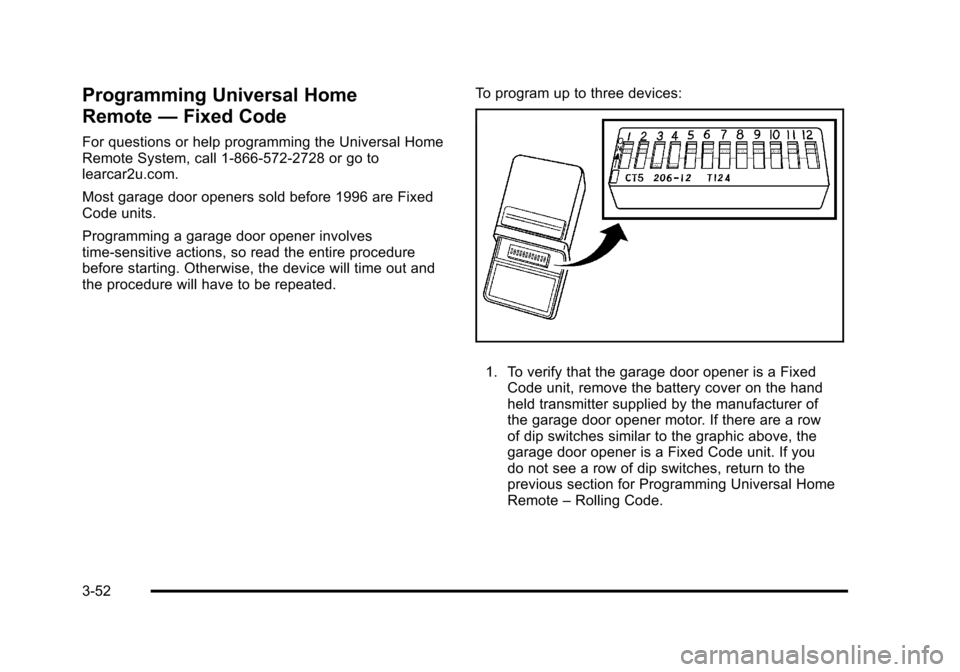
1. To verify that the garage door opener is a Fixed
Code unit, remove the battery cover on the hand
held transmitter supplied by the manufacturer of
the garage door opener motor. If there are a row
of dip switches similar to the graphic above, the
garage door opener is a Fixed Code unit. If you
do not see a row of dip switches, return to the
previous section for Programming Universal Home
Remote –Rolling Code.
3-52
Page 165 of 528
Black plate (59,1)Cadillac STS Owner Manual - 2011
Vehicle Personalization
The vehicle has personalization that allows you to
program certain features to a preferred setting for
up to two drivers. The back of the keyless access
transmitters are labelled 1 or 2. Additional keyless
access transmitters programmed to the vehicle,
as 3 and/or 4, do not have a number on the back and
are not capable of being personalized. The number of
programmable features varies depending upon which
vehicle options are purchased.
On all vehicles, features such as climate control
settings, radio and XM™preset settings, exterior
lighting at unlock and remote lock unlock confirmation,
and language have already been programmed. Your
vehicle also has an automatic door locking feature
that is always on. You cannot turn the automatic door
locking feature off. See Programmable Automatic Door
Locks on page 3‑14.
Some vehicles have additional features that can be
programmed including the seat, steering column, and
outside rearview mirror position.
If your vehicle has the base audio system, the following
information explains the vehicle personalization on your
vehicle.
If your vehicle has the Navigation system, see
“Personalization” in the Index of the Navigation System
manual for information on vehicle personalization. If your vehicle has the ability to program additional
personalization features, the driver's preferences are
recalled by pressing any button on the keyless access
transmitter, 1 or 2, by selecting Driver 1 or 2 on the radio
display, or when a valid keyless access transmitter is
detected upon opening the driver's door.
If more than one valid keyless access transmitter is
detected upon opening the driver's door, the driver
preferences for the lowest driver number will be
recalled.
Certain features can be programmed not to recall until
the ignition is turned off.
The default settings were preset but may have been
changed.
To change feature preferences, use the following
procedure.
Entering the Personal Settings Menu
To enter the feature programming mode:
1. The ignition must be either on, in ACCESSORY, or in RAP and the transmission in P (Park) or the
vehicle speed less than 6 mph (9 km/h).
To avoid excessive drain on the battery, it is
recommended that the headlamps are turned off.
2. Press any button on the appropriate keyless access transmitter to identify yourself as Driver 1 or
Driver 2.
3-59
Page 187 of 528

Black plate (1,1)Cadillac STS Owner Manual - 2011
Section 4 Instrument Panel
Instrument Panel Overview. . . . . . . . . . . . . . . . . . . . . . . .4-3
Hazard Warning Flashers . . . . . . . . . . . . . . . . . . . . . . . 4-3
Horn . . . . . . . . . . . . . . . . . . . . . . . . . . . . . . . . . . . . . . . . . . . . 4-3
Power Tilt Wheel and Telescopic Steering Column . . . . . . . . . . . . . . . . . . . . . . . . . . . . . . . . . . . . . . . 4-3
Heated Steering Wheel . . . . . . . . . . . . . . . . . . . . . . . . . 4-4
Turn Signal/Multifunction Lever . . . . . . . . . . . . . . . . . . 4-4
Turn and Lane-Change Signals . . . . . . . . . . . . . . . . . 4-4
Headlamp High/Low-Beam Changer . . . . . . . . . . . . 4-5
Forward Collision Alert (FCA) System . . . . . . . . . . . 4-6
Flash-to-Pass . . . . . . . . . . . . . . . . . . . . . . . . . . . . . . . . . . . 4-9
Windshield Wipers . . . . . . . . . . . . . . . . . . . . . . . . . . . . . 4-10
Windshield Washer . . . . . . . . . . . . . . . . . . . . . . . . . . . . 4-11
Headlamp Washer . . . . . . . . . . . . . . . . . . . . . . . . . . . . . 4-11
Cruise Control . . . . . . . . . . . . . . . . . . . . . . . . . . . . . . . . . 4-12
Adaptive Cruise Control . . . . . . . . . . . . . . . . . . . . . . . 4-15
Headlamps . . . . . . . . . . . . . . . . . . . . . . . . . . . . . . . . . . . . 4-27
Wiper Activated Headlamps . . . . . . . . . . . . . . . . . . . 4-31
Headlamps on Reminder . . . . . . . . . . . . . . . . . . . . . . 4-31
Daytime Running Lamps (DRL) . . . . . . . . . . . . . . . . 4-32
Fog Lamps . . . . . . . . . . . . . . . . . . . . . . . . . . . . . . . . . . . . 4-33
Twilight Sentinel
®. . . . . . . . . . . . . . . . . . . . . . . . . . . . . . 4-34
Exterior Lighting Battery Saver . . . . . . . . . . . . . . . . . 4-35
Instrument Panel Brightness . . . . . . . . . . . . . . . . . . . 4-35
Entry Lighting . . . . . . . . . . . . . . . . . . . . . . . . . . . . . . . . . . 4-36
Parade Dimming . . . . . . . . . . . . . . . . . . . . . . . . . . . . . . . 4-36 Reading Lamps . . . . . . . . . . . . . . . . . . . . . . . . . . . . . . . . 4-36
Battery Load Management . . . . . . . . . . . . . . . . . . . . . 4-36
Electric Power Management . . . . . . . . . . . . . . . . . . . 4-37
Inadvertent Power Battery Saver . . . . . . . . . . . . . . . 4-37
Head-Up Display (HUD) . . . . . . . . . . . . . . . . . . . . . . . 4-38
Accessory Power Outlet(s) . . . . . . . . . . . . . . . . . . . . . 4-42
Climate Controls . . . . . . . . . . . . . . . . . . . . . . . . . . . . . . . . . . 4-43
Dual Climate Control System . . . . . . . . . . . . . . . . . . 4-43
Outlet Adjustment . . . . . . . . . . . . . . . . . . . . . . . . . . . . . . 4-48
Rear Climate Control System . . . . . . . . . . . . . . . . . . 4-49
Passenger Compartment Air Filter . . . . . . . . . . . . . 4-50
Warning Lights, Gauges, and Indicators . . . . . . . .4-51
Instrument Panel Cluster . . . . . . . . . . . . . . . . . . . . . . . 4-52
Speedometer and Odometer . . . . . . . . . . . . . . . . . . . 4-53
Tachometer . . . . . . . . . . . . . . . . . . . . . . . . . . . . . . . . . . . . 4-53
Safety Belt Reminders . . . . . . . . . . . . . . . . . . . . . . . . . 4-53
Airbag Readiness Light . . . . . . . . . . . . . . . . . . . . . . . . 4-54
Passenger Airbag Status Indicator . . . . . . . . . . . . . 4-55
Charging System Light . . . . . . . . . . . . . . . . . . . . . . . . 4-57
Brake System Warning Light . . . . . . . . . . . . . . . . . . . 4-58
Antilock Brake System (ABS) Warning Light . . . 4-59
Traction Control System (TCS) Warning Light . . . . . . . . . . . . . . . . . . . . . . . . . . . . . . . . . . . . . . . . . 4-60
Lane Departure Warning (LDW) Light . . . . . . . . . . 4-60
Engine Coolant Temperature Warning Light . . . . 4-61
4-1
Page 221 of 528
Black plate (35,1)Cadillac STS Owner Manual - 2011
Twilight Sentinel also provides exterior illumination as
you leave the vehicle. If Twilight Sentinel has turned on
the lamps when you turn off the ignition, the lamps will
remain on until:
.The exterior lamp switch is moved from off to the
parking lamp position.
.A delay time that you select has elapsed.
See Vehicle Personalization
on page 3‑59to select the
delay time needed. You can also select no delay time.
If the ignition is turned off with the exterior lamp switch
in the parking lamp or headlamp position, the Twilight
Sentinel delay will not occur. The lamps will turn off as
soon as the switch is turned off.
As with any vehicle, the regular headlamp system
should be turned on when needed.
Exterior Lighting Battery Saver
If the parking lamps or headlamps have been left on,
the exterior lamps will turn off about 10 minutes after the
ignition is turned off. This protects against draining the
battery in case you have accidentally left the headlamps
or parking lamps on. The battery saver does not work if
the headlamps are turned on after the ignition is
turned off. If you need to leave the lamps on for more than
10 minutes, use the exterior lamp control to turn the
lamps back on.
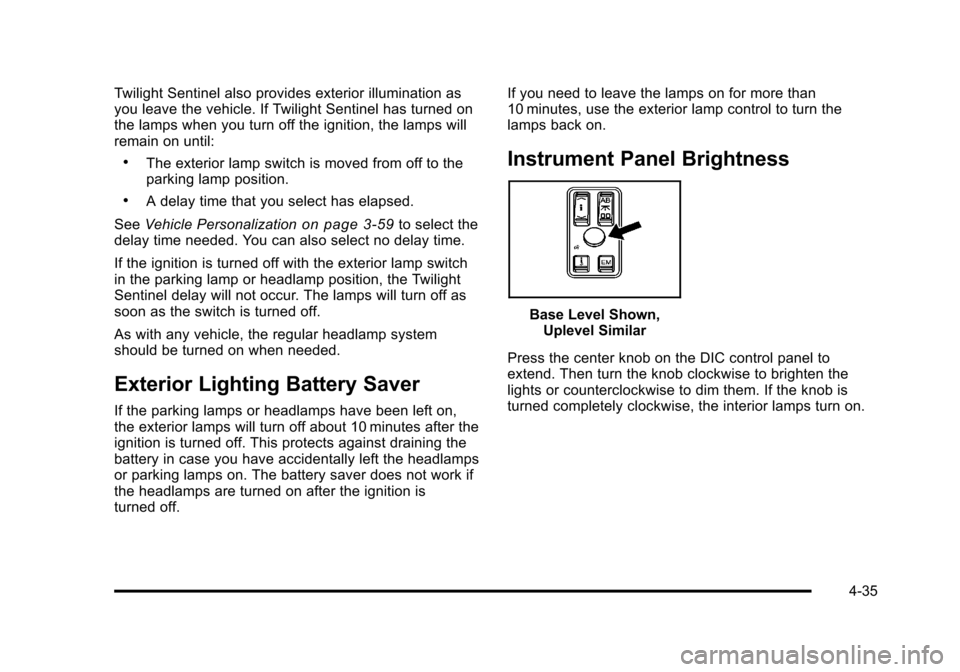
Instrument Panel Brightness
Base Level Shown,
Uplevel Similar
Press the center knob on the DIC control panel to
extend. Then turn the knob clockwise to brighten the
lights or counterclockwise to dim them. If the knob is
turned completely clockwise, the interior lamps turn on.
4-35
Page 222 of 528
Black plate (36,1)Cadillac STS Owner Manual - 2011
Entry Lighting
The entry lighting system turns on the reading and
dome lamps and the backlighting to the exterior lamp
control when a door is opened or if you press the
remote keyless entry transmitter unlock button.
If activated by the transmitter, the lighting will remain
active for about 25 seconds. The entry lighting system
uses the light sensor; it must be dark outside in order
for the lamps to turn on. The lamps turn off about
25 seconds after the last door is closed. They will dim
to off if the ignition is on, or immediately deactivate if
the power locks are activated.
Parade Dimming
This feature prohibits dimming of the instrument panel
displays and backlighting during daylight hours when
the key is in the ignition and the headlamps are on.
This feature operates with the light sensor and is fully
automatic. When the light sensor reads darkness
outside and the parking lamps are active, the
instrument panel displays can be adjusted by turning
the instrument panel brightness knob. SeeInstrument
Panel Brightness
on page 4‑35for additional
information.
Reading Lamps
The reading lamps are located on the overhead
console. These lamps come on automatically when any
door is opened.
For manual operation, press the button next to each
lamp to turn it on or off.
If the reading lamps are left on, they automatically shut
off 10 minutes after the ignition has been turned off.
Battery Load Management
The battery load management feature is designed to
monitor the vehicle's electrical load and determine when
the battery is in a heavy discharge condition. During
times of high electrical loading, the engine may idle at a
higher revolutions per minute (rpm) setting than normal
to make sure the battery charges. High electrical loads
may occur when several of the following are on:
headlamps, high beams, fog lamps, rear window
defogger, the climate control fan at high speeds, heated
seats and engine cooling fans.
If the battery continues to discharge, even with the
engine idling at a higher rpm setting, some electrical
loads will automatically be reduced. When this occurs,
the rear window defogger may take slightly longer to
clear the glass and the fan may cut back to a lower
4-36
Page 223 of 528
Black plate (37,1)Cadillac STS Owner Manual - 2011
speed. For more battery saving information, see
“Battery Saver Active Message”underDIC Warnings
and Messages on page 4‑76.
Electric Power Management
The vehicle has Electric Power Management (EPM) that
estimates the battery's temperature and state of charge.
It then adjusts the voltage for best performance and
extended life of the battery.
When the battery's state of charge is low, the voltage is
raised slightly to quickly bring the charge back up.
When the state of charge is high, the voltage is lowered
slightly to prevent overcharging. If the vehicle has a
voltmeter gauge or a voltage display on the Driver
Information Center (DIC), you may see the voltage
move up or down. This is normal. If there is a problem,
an alert will be displayed.
The battery can be discharged at idle if the electrical
loads are very high. This is true for all vehicles. This is
because the generator (alternator) may not be spinning
fast enough at idle to produce all the power that is
needed for very high electrical loads.
A high electrical load occurs when several of the
following are on, such as: headlamps, high beams, fog
lamps, rear window defogger, climate control fan at high
speed, heated seats, engine cooling fans, trailer loads,
and loads plugged into accessory power outlets. EPM works to prevent excessive discharge of the
battery. It does this by balancing the generator's output
and the vehicle's electrical needs. It can increase
engine idle speed to generate more power, whenever
needed. It can temporarily reduce the power demands
of some accessories.
Normally, these actions occur in steps or levels, without
being noticeable. In rare cases at the highest levels of
corrective action, this action may be noticeable to the
driver. If so, a Driver Information Center (DIC) message
might be displayed, such as BATTERY SAVER ACTIVE
or BATTERY VOLTAGE LOW. If this message is
displayed, it is recommended that the driver reduce the
electrical loads as much as possible. See
DIC Warnings
and Messages on page 4‑76.
Inadvertent Power Battery Saver
This feature is designed to protect the vehicle's battery
against drainage from the interior lamps, trunk lamp,
glove box lamp, or the garage door opener. When the
ignition is turned off, the power to these features will
automatically turn off after 10 minutes (three minutes if a
new car has 24 km (15 miles) or less). Power will be
restored for an additional 10 minutes if any door is
opened, the trunk is opened or the courtesy lamp switch
is turned on.
4-37
Page 228 of 528
Black plate (42,1)Cadillac STS Owner Manual - 2011
Accessory Power Outlet(s)
Accessory power outlets can be used to plug in
electrical equipment, such as a cell phone or MP3
player.
The vehicle has one outlet in front of the center
console, one in the center console lid and there may be
an additional outlet in the rear of the center console.
The vehicle may have a small cap that must be
removed to access the accessory power outlet.
Replace the cap when not in use. use.
{WARNING:
Power is always supplied to the outlets. Do not
leave electrical equipment plugged in when the
vehicle is not in use because the vehicle could
catch fire and cause injury or death.Notice:
Leaving electrical equipment plugged in for
an extended period of time while the vehicle is off
will drain the battery. Always unplug electrical
equipment when not in use and do not plug in
equipment that exceeds the maximum 20 ampere
rating.
Certain accessory power plugs may not be compatible
to the accessory power outlet and could overload
vehicle and adapter fuses. If a problem is experienced,
see your dealer.
When adding electrical equipment, be sure to follow
the proper installation instructions included with the
equipment. See Add-On Electrical Equipment
on
page 6‑114.
Notice: Hanging heavy equipment from the power
outlet can cause damage not covered by the vehicle
warranty. The power outlets are designed for
accessory power plugs only, such as cell phone
charge cords.
4-42
Page 251 of 528
Black plate (65,1)Cadillac STS Owner Manual - 2011
Emissions Inspection and Maintenance
Programs
Some state/provincial and local governments may have
programs to inspect the on-vehicle emission control
equipment For the inspection, the emission system test
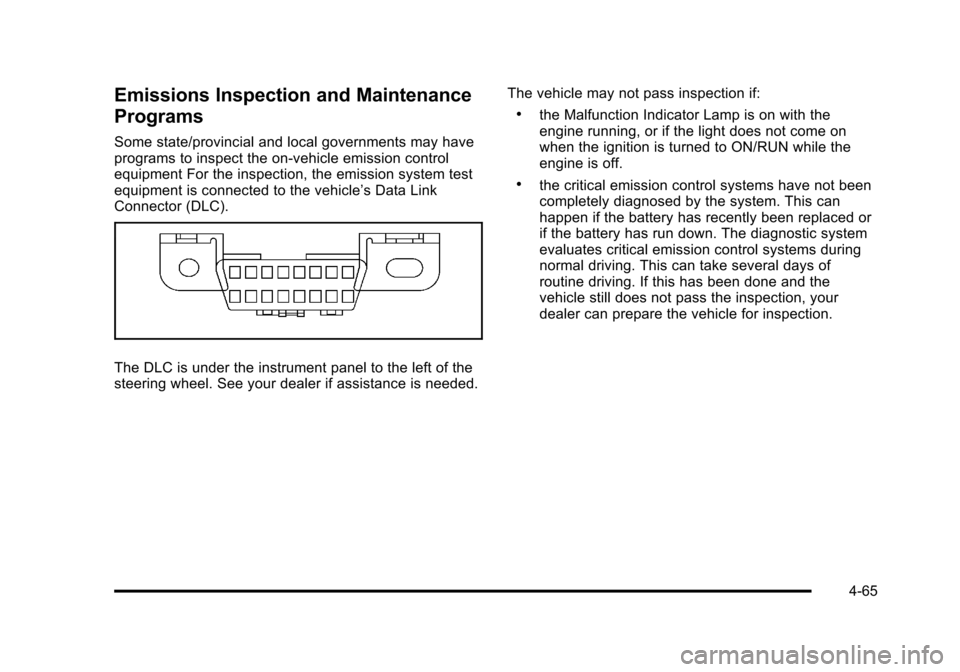
equipment is connected to the vehicle’s Data Link
Connector (DLC).
The DLC is under the instrument panel to the left of the
steering wheel. See your dealer if assistance is needed.The vehicle may not pass inspection if:
.the Malfunction Indicator Lamp is on with the
engine running, or if the light does not come on
when the ignition is turned to ON/RUN while the
engine is off.
.the critical emission control systems have not been
completely diagnosed by the system. This can
happen if the battery has recently been replaced or
if the battery has run down. The diagnostic system
evaluates critical emission control systems during
normal driving. This can take several days of
routine driving. If this has been done and the
vehicle still does not pass the inspection, your
dealer can prepare the vehicle for inspection.
4-65
Page 256 of 528
Black plate (70,1)Cadillac STS Owner Manual - 2011
DIC Operation and Displays
The Driver Information Center (DIC) has different
modes which can be accessed by pressing the four
DIC buttons located on the instrument panel, to the
left of the steering wheel.
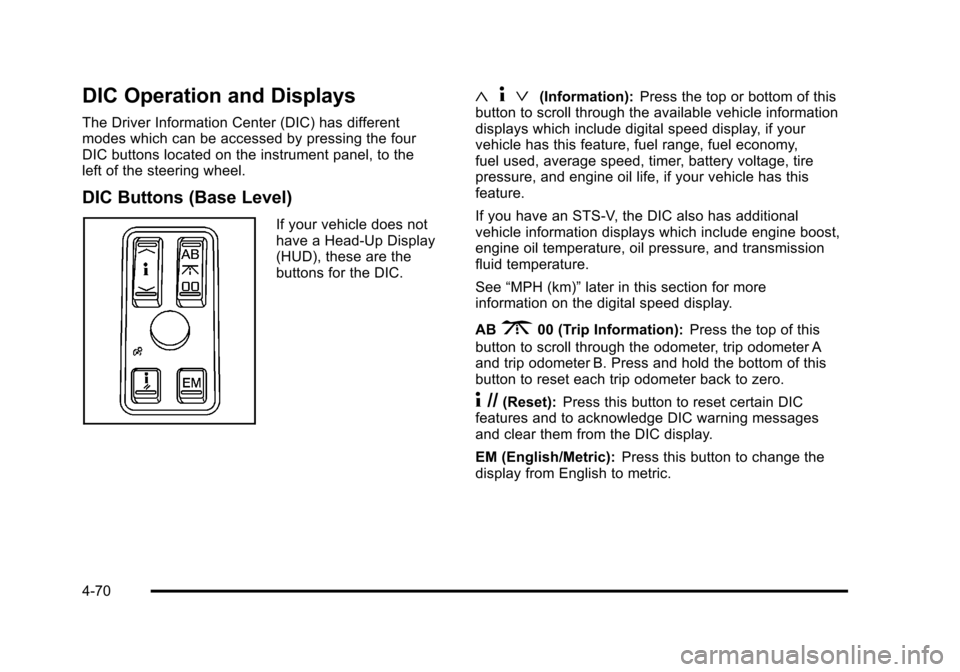
DIC Buttons (Base Level)
If your vehicle does not
have a Head-Up Display
(HUD), these are the
buttons for the DIC.
«4ª(Information): Press the top or bottom of this
button to scroll through the available vehicle information
displays which include digital speed display, if your
vehicle has this feature, fuel range, fuel economy,
fuel used, average speed, timer, battery voltage, tire
pressure, and engine oil life, if your vehicle has this
feature.
If you have an STS-V, the DIC also has additional
vehicle information displays which include engine boost,
engine oil temperature, oil pressure, and transmission
fluid temperature.
See “MPH (km)” later in this section for more
information on the digital speed display.
AB
300 (Trip Information): Press the top of this
button to scroll through the odometer, trip odometer A
and trip odometer B. Press and hold the bottom of this
button to reset each trip odometer back to zero.
4 //(Reset): Press this button to reset certain DIC
features and to acknowledge DIC warning messages
and clear them from the DIC display.
EM (English/Metric): Press this button to change the
display from English to metric.
4-70