lights CADILLAC STS 2011 1.G Owner's Manual
[x] Cancel search | Manufacturer: CADILLAC, Model Year: 2011, Model line: STS, Model: CADILLAC STS 2011 1.GPages: 528, PDF Size: 4.96 MB
Page 215 of 528
Black plate (29,1)Cadillac STS Owner Manual - 2011
been turned on, it remains on each time the vehicle is
started. Additionally, the IntelliBeam system must be
enabled.
To enable the System, turn the exterior lamp control to
AUTO, with the turn signal/multifunction lever in its
starting position. The High-Beam On Light appears on
the instrument panel cluster when the high-beams are
on. SeeHighbeam On Light
on page 4‑68. The vehicle
has variable intensity high-beams. The high-beam
indicator on the instrument panel cluster comes on as
soon as the high-beams start to come on, and remains
on until the high-beams have completely turned off.
Vehicles with IntelliBeam quickly turn off the
high-beams if the system detects the sudden presence
of vehicle lights ahead.
Driving with IntelliBeam
IntelliBeam only activates the high-beams when driving
over 32 km/h (20 mph).
The high-beam headlamps remain on, under the control
of IntelliBeam, until any of the following situations occur:
.The system detects an approaching vehicle's
headlamps.
.The system detects a preceding vehicle's
taillamps.
.The outside light is bright enough that high-beam
headlamps are not required.
.The high-beam headlamps are manually turned
on or you use the flash-to-pass feature. See
Headlamp High/Low-Beam Changer
on page 4‑5and Flash-to-Passon page 4‑9.
When either of these conditions occur, the
IntelliBeam feature is temporarily disabled until the
high-beam stalk is returned to its starting position.
If either of these conditions occur and IntelliBeam
already has the high-beam headlamps on, the
feature is disabled and the light in the mirror
turns off.
.The exterior lamp control is turned to any setting
except AUTO.
When this occurs, IntelliBeam is disabled until the
control is turned back to the AUTO position and
the AUTOMATIC LIGHTS ON message displays
on the DIC.
.The IntelliBeam system is turned off at the inside
rearview mirror.
.The vehicle's speed drops below 24 km/h
(15 mph).
4-29
Page 217 of 528
Black plate (31,1)Cadillac STS Owner Manual - 2011
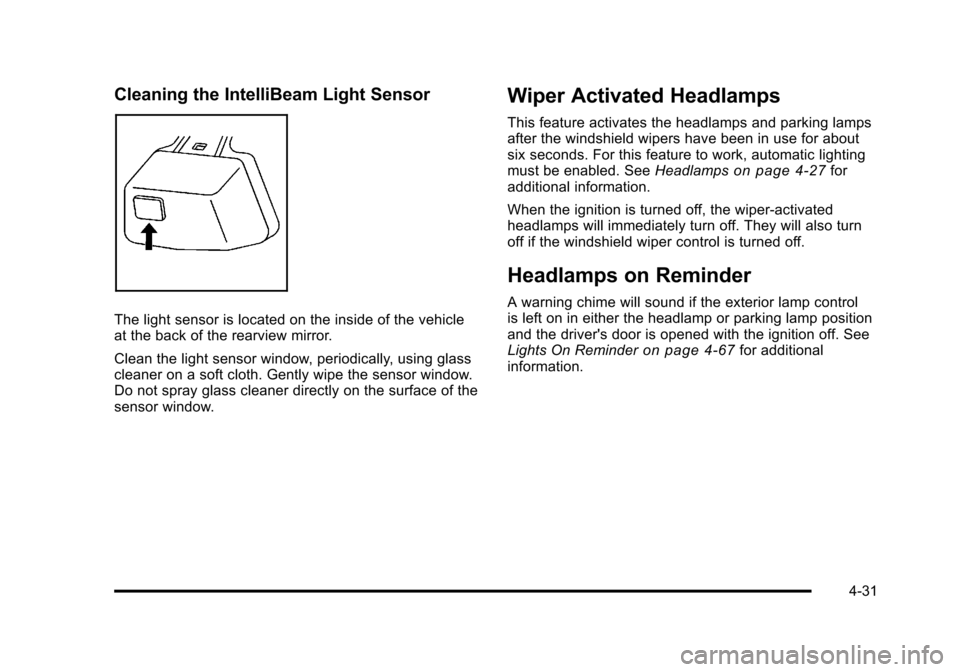
Cleaning the IntelliBeam Light Sensor
The light sensor is located on the inside of the vehicle
at the back of the rearview mirror.
Clean the light sensor window, periodically, using glass
cleaner on a soft cloth. Gently wipe the sensor window.
Do not spray glass cleaner directly on the surface of the
sensor window.
Wiper Activated Headlamps
This feature activates the headlamps and parking lamps
after the windshield wipers have been in use for about
six seconds. For this feature to work, automatic lighting
must be enabled. SeeHeadlamps
on page 4‑27for
additional information.
When the ignition is turned off, the wiper-activated
headlamps will immediately turn off. They will also turn
off if the windshield wiper control is turned off.
Headlamps on Reminder
A warning chime will sound if the exterior lamp control
is left on in either the headlamp or parking lamp position
and the driver's door is opened with the ignition off. See
Lights On Reminder
on page 4‑67for additional
information.
4-31
Page 218 of 528
Black plate (32,1)Cadillac STS Owner Manual - 2011
Daytime Running Lamps (DRL)
Daytime Running Lamps (DRL) can make it easier for
others to see the front of your vehicle during the day.
Fully functional daytime running lamps are required on
all vehicles first sold in Canada.
The DRL system comes on when the following
conditions are met:
.It is still daylight and the ignition is on.
.The automatic lights are enabled.
.The transmission is not in P (Park).
When DRL are on, only the front turn signal lamps will
be on. No other exterior lamps will be on when the DRL
are being used. The instrument panel will not be lit.
When the automatic lights are enabled and it is dark
enough outside, the DRL will turn off and the low-beam
headlamps will turn on. When it is bright enough
outside, the low-beam headlamps will go off, and the
DRL will turn back on. If the vehicle is started in a dark
garage, the automatic headlamp system comes on
immediately. Once the vehicle leaves the garage,
it will take about one minute for the automatic
headlamp system to change to DRL if it is light outside. During that delay, the instrument panel cluster may not
be as bright as usual. Make sure the instrument panel
brightness lever is in the full bright position. See
Instrument Panel Brightness on page 4‑35.
To operate the vehicle with the DRL off, turn the exterior
lamp control off and then do one of the following:
.Turn the exterior lamp control to the parking lamp
position.
.Turn the exterior lamp control to the headlamp
position.
.Turn the exterior lamp control from AUTO to off
and back to AUTO.
An AUTOMATIC LIGHTS OFF message will appear on
the DIC, showing that automatic lighting has been
disabled. See DIC Warnings and Messages
on
page 4‑76.
The regular headlamp system should be turned on
when needed.
4-32
Page 221 of 528
Black plate (35,1)Cadillac STS Owner Manual - 2011
Twilight Sentinel also provides exterior illumination as
you leave the vehicle. If Twilight Sentinel has turned on
the lamps when you turn off the ignition, the lamps will
remain on until:
.The exterior lamp switch is moved from off to the
parking lamp position.
.A delay time that you select has elapsed.
See Vehicle Personalization
on page 3‑59to select the
delay time needed. You can also select no delay time.
If the ignition is turned off with the exterior lamp switch
in the parking lamp or headlamp position, the Twilight
Sentinel delay will not occur. The lamps will turn off as
soon as the switch is turned off.
As with any vehicle, the regular headlamp system
should be turned on when needed.
Exterior Lighting Battery Saver
If the parking lamps or headlamps have been left on,
the exterior lamps will turn off about 10 minutes after the
ignition is turned off. This protects against draining the
battery in case you have accidentally left the headlamps
or parking lamps on. The battery saver does not work if
the headlamps are turned on after the ignition is
turned off. If you need to leave the lamps on for more than
10 minutes, use the exterior lamp control to turn the
lamps back on.
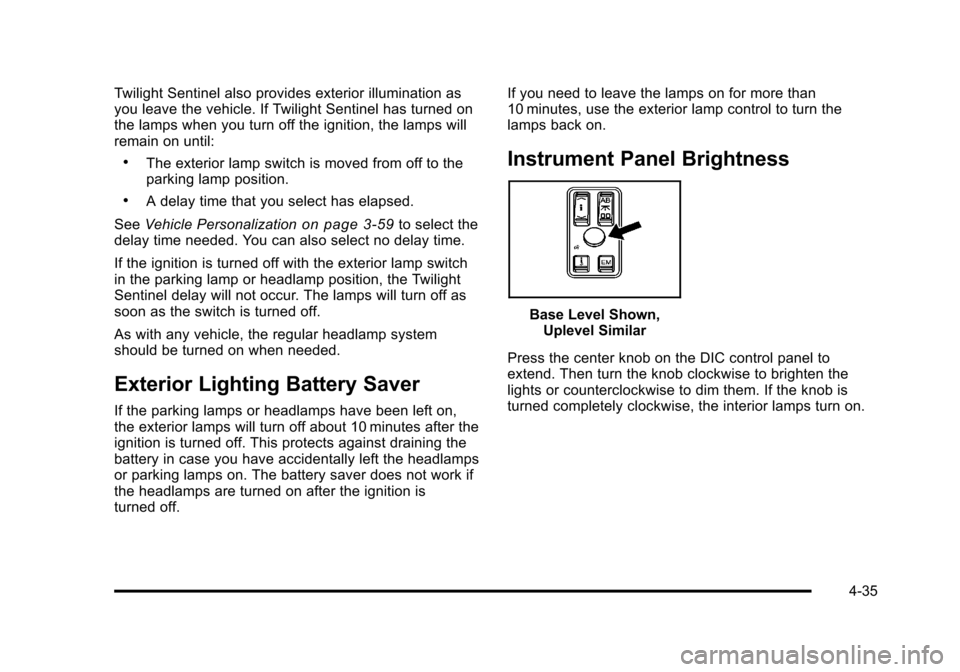
Instrument Panel Brightness
Base Level Shown,
Uplevel Similar
Press the center knob on the DIC control panel to
extend. Then turn the knob clockwise to brighten the
lights or counterclockwise to dim them. If the knob is
turned completely clockwise, the interior lamps turn on.
4-35
Page 224 of 528
Black plate (38,1)Cadillac STS Owner Manual - 2011
Head-Up Display (HUD)
{WARNING:
If the HUD image is too bright, or too high in your
field of view, it may take you more time to see
things you need to see when it is dark outside. Be
sure to keep the HUD image dim and placed low
in your field of view.
For vehicles with the Head-Up Display (HUD), some of
the driver information that appears on the instrument
panel cluster is projected onto an image on the
windshield.
The information can be displayed in English or metric
units. To change from English to metric units, see DIC
Operation and Displays on page 4‑70.
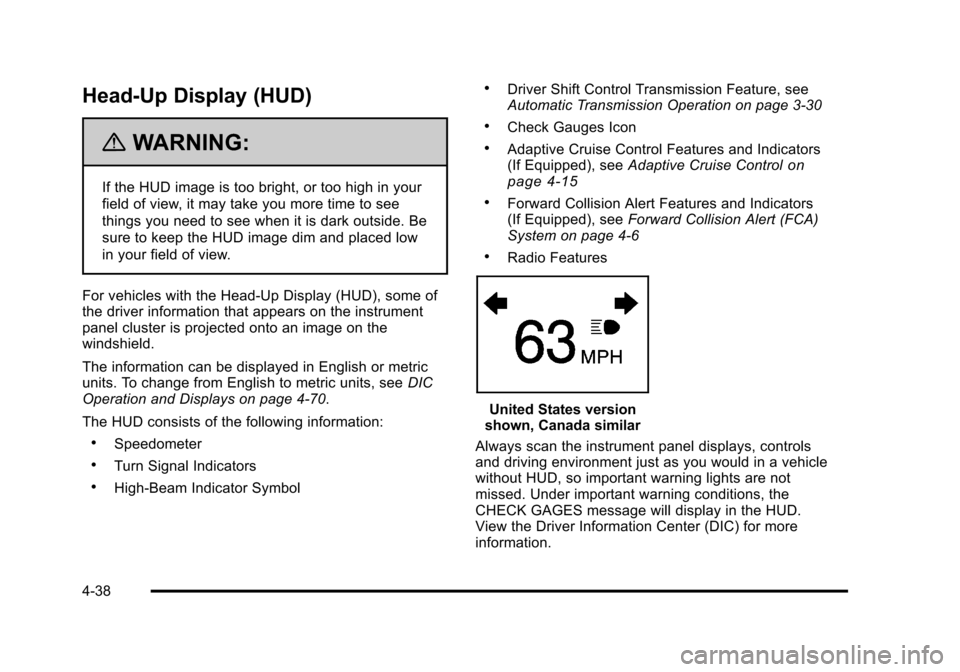
The HUD consists of the following information:
.Speedometer
.Turn Signal Indicators
.High-Beam Indicator Symbol
.Driver Shift Control Transmission Feature, see
Automatic Transmission Operation on page 3‑30
.Check Gauges Icon
.Adaptive Cruise Control Features and Indicators
(If Equipped), see Adaptive Cruise Controlon
page 4‑15
.Forward Collision Alert Features and Indicators
(If Equipped), see Forward Collision Alert (FCA)
System on page 4‑6
.Radio Features
United States version
shown, Canada similar
Always scan the instrument panel displays, controls
and driving environment just as you would in a vehicle
without HUD, so important warning lights are not
missed. Under important warning conditions, the
CHECK GAGES message will display in the HUD.
View the Driver Information Center (DIC) for more
information.
4-38
Page 235 of 528
Black plate (49,1)Cadillac STS Owner Manual - 2011
Rear Climate Control System
The vehicle has a rear climate control system. The
base model includes air outlets in the rear of the center
console for cooling and under-seat air outlets for
heating. The temperature, amount of airflow, and the
air delivery mode is controlled automatically by the front
climate control system.
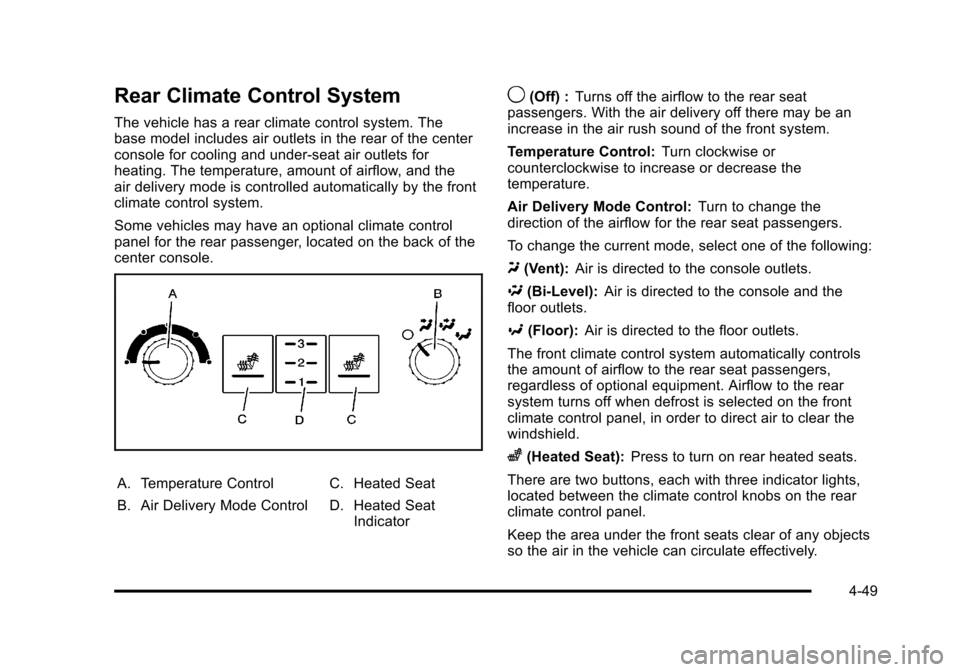
Some vehicles may have an optional climate control
panel for the rear passenger, located on the back of the
center console.
A. Temperature Control
B. Air Delivery Mode ControlC. Heated Seat
D. Heated Seat
Indicator
9(Off) : Turns off the airflow to the rear seat
passengers. With the air delivery off there may be an
increase in the air rush sound of the front system.
Temperature Control: Turn clockwise or
counterclockwise to increase or decrease the
temperature.
Air Delivery Mode Control: Turn to change the
direction of the airflow for the rear seat passengers.
To change the current mode, select one of the following:
Y (Vent): Air is directed to the console outlets.
\ (Bi-Level): Air is directed to the console and the
floor outlets.
[ (Floor): Air is directed to the floor outlets.
The front climate control system automatically controls
the amount of airflow to the rear seat passengers,
regardless of optional equipment. Airflow to the rear
system turns off when defrost is selected on the front
climate control panel, in order to direct air to clear the
windshield.
z(Heated Seat): Press to turn on rear heated seats.
There are two buttons, each with three indicator lights,
located between the climate control knobs on the rear
climate control panel.
Keep the area under the front seats clear of any objects
so the air in the vehicle can circulate effectively.
4-49
Page 237 of 528
Black plate (51,1)Cadillac STS Owner Manual - 2011
4. Lift the inboard edge of the deflector to release theretention tab.
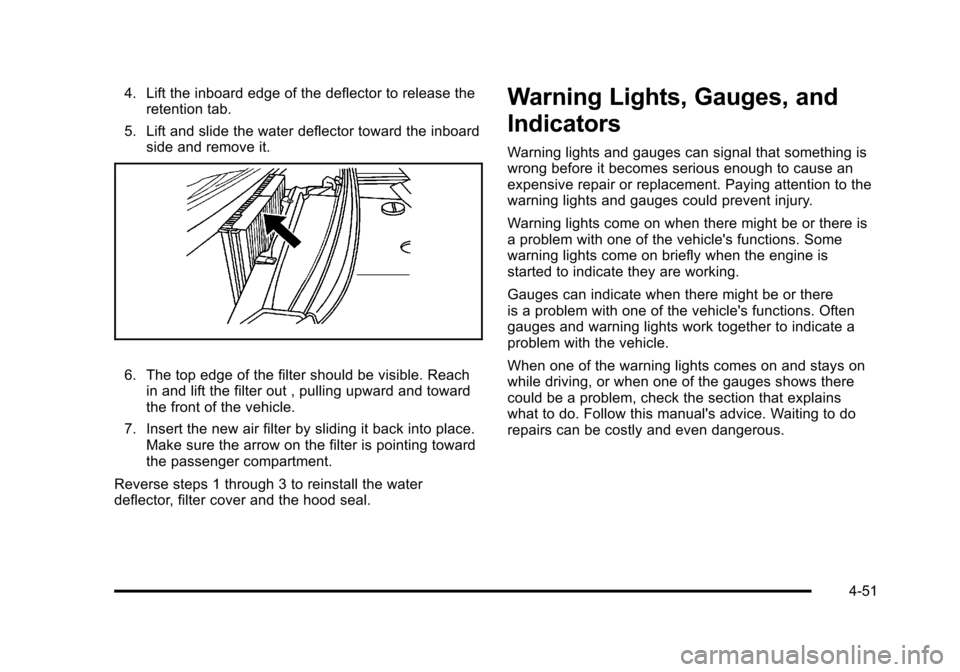
5. Lift and slide the water deflector toward the inboard side and remove it.
6. The top edge of the filter should be visible. Reachin and lift the filter out , pulling upward and toward
the front of the vehicle.
7. Insert the new air filter by sliding it back into place. Make sure the arrow on the filter is pointing toward
the passenger compartment.
Reverse steps 1 through 3 to reinstall the water
deflector, filter cover and the hood seal.
Warning Lights, Gauges, and
Indicators
Warning lights and gauges can signal that something is
wrong before it becomes serious enough to cause an
expensive repair or replacement. Paying attention to the
warning lights and gauges could prevent injury.
Warning lights come on when there might be or there is
a problem with one of the vehicle's functions. Some
warning lights come on briefly when the engine is
started to indicate they are working.
Gauges can indicate when there might be or there
is a problem with one of the vehicle's functions. Often
gauges and warning lights work together to indicate a
problem with the vehicle.
When one of the warning lights comes on and stays on
while driving, or when one of the gauges shows there
could be a problem, check the section that explains
what to do. Follow this manual's advice. Waiting to do
repairs can be costly and even dangerous.
4-51
Page 243 of 528
Black plate (57,1)Cadillac STS Owner Manual - 2011
If, after several seconds, both status indicator lights
remain on, or if there are no lights at all, there may
be a problem with the lights or the passenger sensing
system. See your dealer for service.
{WARNING:
If the airbag readiness light in the instrument
panel cluster ever comes on and stays on, it
means that something may be wrong with the
airbag system. If this ever happens, have the
vehicle serviced promptly, because an adult-size
person sitting in the right front passenger's seat
may not have the protection of the airbag(s). See
Airbag Readiness Light
on page 4‑54for more
on this, including important safety information.
Charging System Light
This light comes on briefly
when the ignition key is
turned to START, but the
engine is not running, as
a check to show it is
working.
If it does not, have the vehicle serviced by your dealer.
The light should go out once the engine starts. If it stays
on, or comes on while driving, there could be a problem
with the charging system. A charging system message
in the Driver Information Center (DIC) can also appear.
See DIC Warnings and Messages
on page 4‑76for
more information. This light could indicate that there are
problems with a generator drive belt, or that there is an
electrical problem. Have it checked right away. If the
vehicle must be driven a short distance with the light
on, turn off accessories, such as the radio and air
conditioner.
4-57
Page 253 of 528
Black plate (67,1)Cadillac STS Owner Manual - 2011
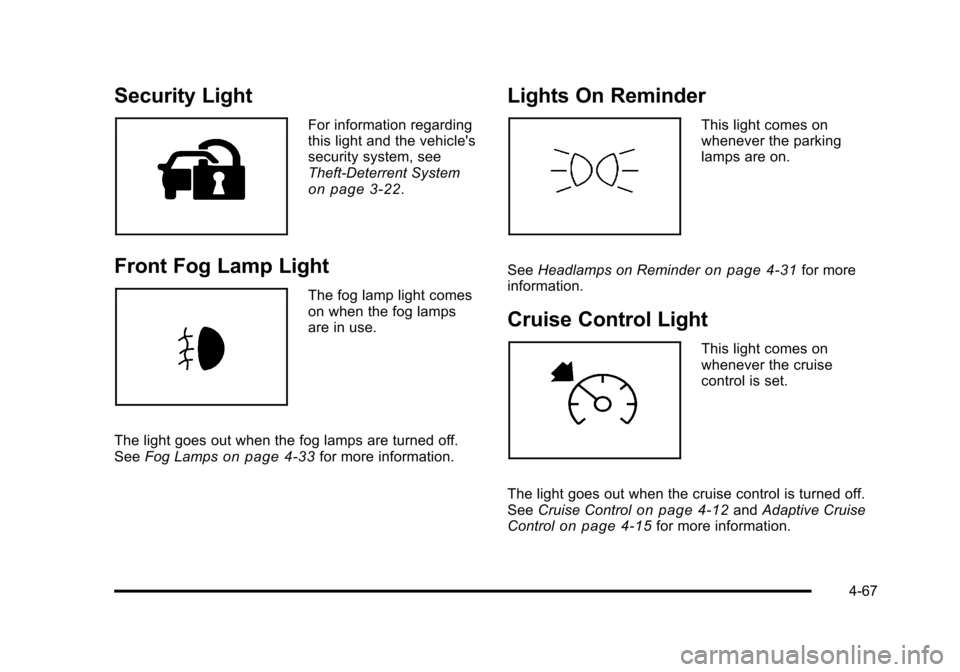
Security Light
For information regarding
this light and the vehicle's
security system, see
Theft-Deterrent System
on page 3‑22.
Front Fog Lamp Light
The fog lamp light comes
on when the fog lamps
are in use.
The light goes out when the fog lamps are turned off.
See Fog Lamps
on page 4‑33for more information.
Lights On Reminder
This light comes on
whenever the parking
lamps are on.
See Headlamps on Reminder
on page 4‑31for more
information.
Cruise Control Light
This light comes on
whenever the cruise
control is set.
The light goes out when the cruise control is turned off.
See Cruise Control
on page 4‑12andAdaptive Cruise
Controlon page 4‑15for more information.
4-67
Page 262 of 528
Black plate (76,1)Cadillac STS Owner Manual - 2011
DIC Warnings and Messages
Messages are displayed on the DIC to notify the driver
that the status of the vehicle has changed and that
some action may be needed by the driver to correct the
condition. Multiple messages may appear one after
another.
The text messages are the same for both the base
audio and Navigation systems unless otherwise
indicated.
Some messages may not require immediate action, but
you can press the reset button to acknowledge that you
received the messages and to clear them from the
display.
Some messages cannot be cleared from the DIC
display because they are more urgent. These
messages require action before they can be cleared.
Take any messages that appear on the display
seriously and remember that clearing the messages
will only make the messages disappear, not correct the
problem.The following are the possible messages that can be
displayed and some information about them.ADVISORY: XXX MPH (KM/H)
This message displays when the Speed Alert has been
turned on through the DIC Information Menu and the
vehicle is at or above the advised speed. See
DIC
Operation and Displays
on page 4‑70for more
information.
AUTOMATIC LIGHTS OFF
This message displays when the automatic headlamps
are turned off. See Headlampson page 4‑27for more
information.
AUTOMATIC LIGHTS ON
This message displays when the automatic headlamps
are turned on. See Headlampson page 4‑27for more
information.
4-76