remote start CADILLAC STS 2011 1.G Owner's Manual
[x] Cancel search | Manufacturer: CADILLAC, Model Year: 2011, Model line: STS, Model: CADILLAC STS 2011 1.GPages: 528, PDF Size: 4.96 MB
Page 170 of 528
Black plate (64,1)Cadillac STS Owner Manual - 2011
START BUTTON RECALL
If your vehicle has the optional memory package, you
will have this feature. When this feature is turned on,
you can recall any previously programmed seat, mirror,
and steering column position when the start button on
the ignition is pressed.
Programmable Modes
Mode 1:ON
Mode 2: OFF (default)
To program the vehicle to a different mode: 1. Enter the PERSONAL SETTINGS MENU by following the instructions listed previously under
“Entering the Personal Settings Menu.”
2. Turn the tune/select knob until START BUTTON RECALL is highlighted.
3. Press the tune/select knob to switch back and forth between on and off.
When the mode is turned on, a check mark will
appear next to the feature name.
If this feature is selected, REMOTE RECALL MEMORY
cannot be selected.
The mode you selected is now set. You can either exit
the programming mode by following the instructions
later in this section or program the next feature
available on your vehicle.
AUTO EXIT SEAT
If your vehicle has the optional memory package, you
will have this feature. When this feature is turned on,
you can recall any previously programmed exit position
for the driver's seat when the vehicle is off, the shift
lever is in P (Park), and the driver's door is opened.
Programmable Modes
Mode 1: ON
Mode 2: OFF (default)
To program the vehicle to a different mode: 1. Enter the PERSONAL SETTINGS MENU by following the instructions listed previously under
“Entering the Personal Settings Menu.”
2. Turn the tune/select knob until AUTO EXIT SEAT is highlighted.
3. Press the tune/select knob to switch back and forth between on and off.
When the mode is turned on, a check mark will
appear in the box next to the feature name.
The mode you selected is now set. You can either exit
the programming mode by following the instructions
later in this section or program the next feature
available on your vehicle.
3-64
Page 181 of 528
Black plate (75,1)Cadillac STS Owner Manual - 2011
The mode you selected is now set. You can either exit
the programming mode by following the instructions
later in this section or program the next feature
available on your vehicle by pressing the F6 (BACK)
button, located on the radio, to return to the
PERSONAL SETTINGS MENU.
Exiting the Personal Settings Menu
Once you have finished making your selections on the
base audio system, you will automatically return to the
main audio screen after 15 seconds. You can also press
the F6 (BACK) button, located on the radio, to return to
the main audio screen.
Memory Seat, Mirrors and Steering
Wheel
If the vehicle has the memory feature, you can program
and recall memory settings for the following features for
up to two drivers:
.The driver seat position
.The outside rearview mirrors position
.The power tilt wheel and telescopic steering
column position
The following settings and presets are set automatically:
.The language, radio and XM™ presets, tone,
volume, playback mode (AM/FM or CD), last
displayed stations, and compact disc position
.The last climate control setting
.The Head-Up Display (HUD) position, if your
vehicle has this feature
.Other personalization settings, for example, remote
start settings
See Vehicle Personalization on page 3‑59.
3-75
Page 183 of 528
Black plate (77,1)Cadillac STS Owner Manual - 2011
Driver Selection Submenu Items
DRIVER 1/DRIVER 2
The numbers on the back of each keyless access
transmitter correspond to DRIVER 1 and DRIVER 2.
If you would like to recall or store driver settings for the
driver that does not correspond to the number on the
back of the keyless access transmitter that you are
using:1. Enter the memory programming mode for your driver settings by following the instructions listed
previously under “Entering the Driver Selection
Submenu.”
2. From the DRIVER SELECTION submenu, turn the tune/select knob to highlight the driver number that
you want, either DRIVER 1 or DRIVER 2.
3. Set your choice by pressing in the tune/ select knob.
If you would like to recall or store driver settings for the
selected driver, see “RECALL DRIVER SETTINGS” or
“STORE DRIVER SETTINGS” later in this section.
If you would like to recall or store exit settings for the
selected driver, see “RECALL EXIT SETTINGS” or
“STORE EXIT SETTINGS” later in this section.
RECALL DRIVER SETTINGS
To recall driver settings:
1. Enter the memory programming mode for your driver settings by following the instructions listed
previously under “Entering the Driver Selection
Submenu.”
2. From the DRIVER SELECTION submenu, turn the tune/select knob to scroll to RECALL DRIVER
SETTINGS and press in the knob.
If the vehicle is in P (Park), one beep will sound
and your previously saved driving position will then
be recalled.
If the vehicle is not in P (Park), three beeps will
sound and your previously saved driving position
will not be recalled.
A memory recall can be stopped by pressing any
memory seat or mirror position button.
If you would like the stored driving positions to be
recalled when unlocking your vehicle with the keyless
access transmitter or when starting your vehicle, see
“REMOTE RECALL MEMORY” or“START BUTTON
RECALL” underVehicle Personalization on page 3‑59.
3-77
Page 232 of 528
Black plate (46,1)Cadillac STS Owner Manual - 2011
Rear Window Defogger
The rear window defogger uses a warming grid to
remove fog or frost from the rear window.
The defogger only works when the ignition is on or
during remote start, if programmed. See“Personal
Settings Menu” underVehicle Personalization
on
page 3‑59for additional information.
= (Rear Window Defogger): Press to turn the rear
window defogger on or off. The rear window defogger
stays on for 10 minutes, before turning off.
If the vehicle's speed is above 48 km/h (30 mph), the
rear defogger stays on continuously. If turned on again,
the defogger only runs for about five minutes before
turning off. The defogger can also be turned off by
turning off the engine. The heated outside rearview mirrors also heat to help
clear fog or frost from the surface of the mirror when
the rear window defogger is on. See
Outside Heated
Mirrors on page 3‑40.
Notice: Do not use a razor blade or sharp object
to clear the inside rear window. Do not adhere
anything to the defogger grid lines in the rear glass.
These actions may damage the rear defogger.
Repairs would not be covered by your warranty.
{ (Ventilated Seat): If the vehicle has this feature,
press to turn the driver or passenger side ventilated
seat on. See Heated and Ventilated Seats
on
page 2‑5.
J (Heated Seat): If the vehicle has this feature, press
to turn the driver or passenger side heated seat and
seatback on. See Heated and Ventilated Seats
on
page 2‑5.
4-46
Page 241 of 528
Black plate (55,1)Cadillac STS Owner Manual - 2011
{WARNING:
If the airbag readiness light stays on after the
vehicle is started or comes on while driving, it
means the airbag system might not be working
properly. The airbags in the vehicle might not
inflate in a crash, or they could even inflate
without a crash. To help avoid injury, have the
vehicle serviced right away.
If there is a problem with the airbag system, an airbag
Driver Information Center (DIC) message can also
come on. See DIC Warnings and Messages
on
page 4‑76for more information.
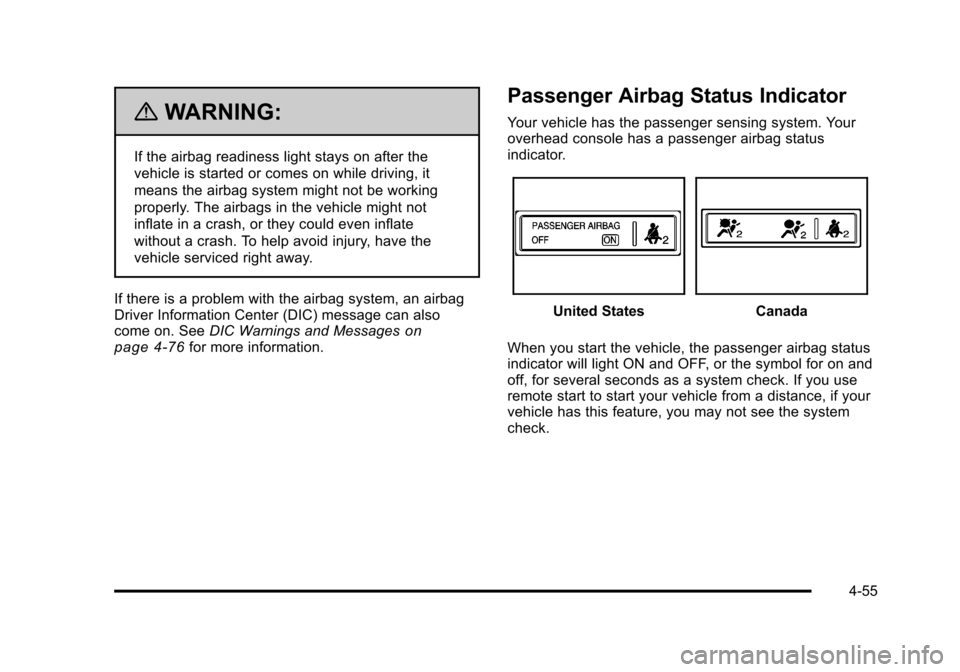
Passenger Airbag Status Indicator
Your vehicle has the passenger sensing system. Your
overhead console has a passenger airbag status
indicator.
United StatesCanada
When you start the vehicle, the passenger airbag status
indicator will light ON and OFF, or the symbol for on and
off, for several seconds as a system check. If you use
remote start to start your vehicle from a distance, if your
vehicle has this feature, you may not see the system
check.
4-55
Page 269 of 528
Black plate (83,1)Cadillac STS Owner Manual - 2011
NO FOBS DETECTED
This message displays if the vehicle does not detect the
presence of a keyless access transmitter when you
have attempted to start the vehicle or a vehicle door
has just closed. The following conditions may cause this
message to appear:
.Driver-added equipment plugged into the
accessory power outlet on the center console
is causing interference. Examples of these
devices are cell phones and cell phone chargers,
two-way radios, power inverters, or similar items.
Try moving the keyless access transmitter away
from these devices when starting the vehicle. In
addition, PDA devices and remote garage and
gate openers may also generate Electromagnetic
Interference (EMI) that may interfere with the
keyless access transmitter. Do not carry the
keyless access transmitter in the same pocket
or bag as these devices.
.The vehicle is experiencing Electromagnetic
Interference (EMI). Some locations, such as
airports, automatic toll booths, and some gas
stations, have EMI fields which may interfere
with the keyless access transmitter.
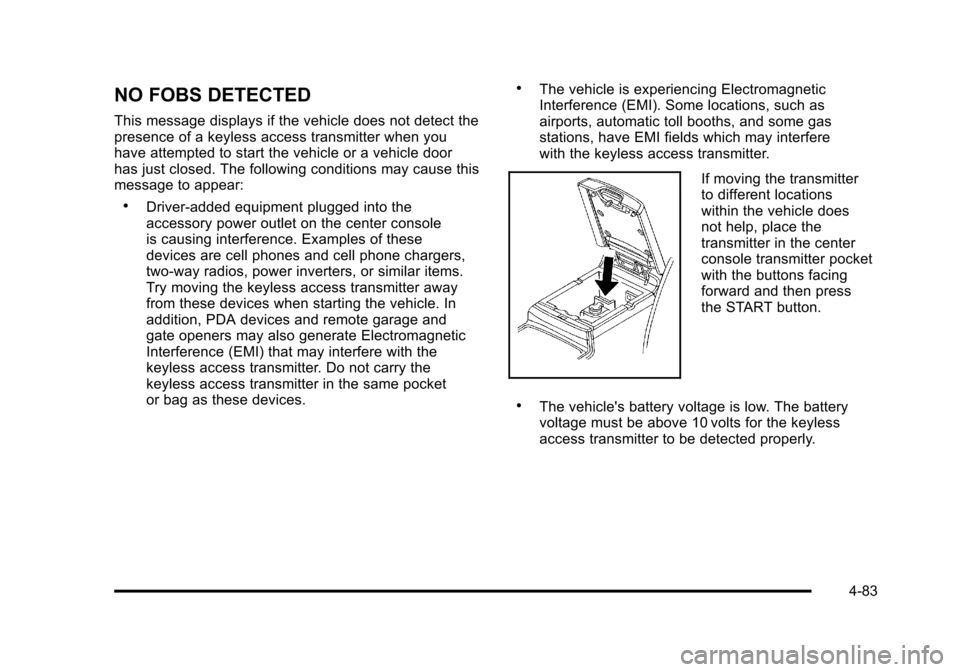
If moving the transmitter
to different locations
within the vehicle does
not help, place the
transmitter in the center
console transmitter pocket
with the buttons facing
forward and then press
the START button.
.The vehicle's battery voltage is low. The battery
voltage must be above 10 volts for the keyless
access transmitter to be detected properly.
4-83
Page 274 of 528
Black plate (88,1)Cadillac STS Owner Manual - 2011
SERVICE SUSPENSION SYS (System)
This message displays when the suspension system is
not operating properly. Have your vehicle serviced by
your dealer.
If your All-Wheel Drive (AWD) vehicle has the Active
Steering with Enhanced StabiliTrak option and the
suspension system needs service, the Enhanced
StabiliTrak system may be operating in the Stability
Secure Mode and the STABILITY SECURE MODE
message will display. SeeEnhanced StabiliTrak
®on
page 5‑7.
SERVICE TIRE MONITOR
This message displays if a part on the Tire Pressure
Monitor System (TPMS) is not working properly. The tire
pressure light also flashes and then remains on during
the same ignition cycle. See Tire Pressure Light
on
page 4‑62. Several conditions may cause this message
to appear. See Tire Pressure Monitor Operationon
page 6‑62for more information. If the warning comes
on and stays on, there may be a problem with the
TPMS. See your dealer.
SERVICE THEFT SYSTEM
This message displays when there is a problem with the
hood open and closed switches. The switches may
need to be replaced. When this message is displayed,
the theft-deterrent system will still be protecting the
interior of the vehicle, however, the hood area will not
be protected at this time. Also, the remote start function
will not work when this message appears. See your
dealer for service.
SERVICE TRANSMISSION
This message displays when there is a problem with
the transmission. Have your vehicle serviced by your
dealer.
SERVICE VEHICLE SOON
This message displays when a non-emissions related
malfunction occurs. Have your vehicle serviced by your
dealer as soon as possible.
4-88
Page 365 of 528
Black plate (15,1)Cadillac STS Owner Manual - 2011
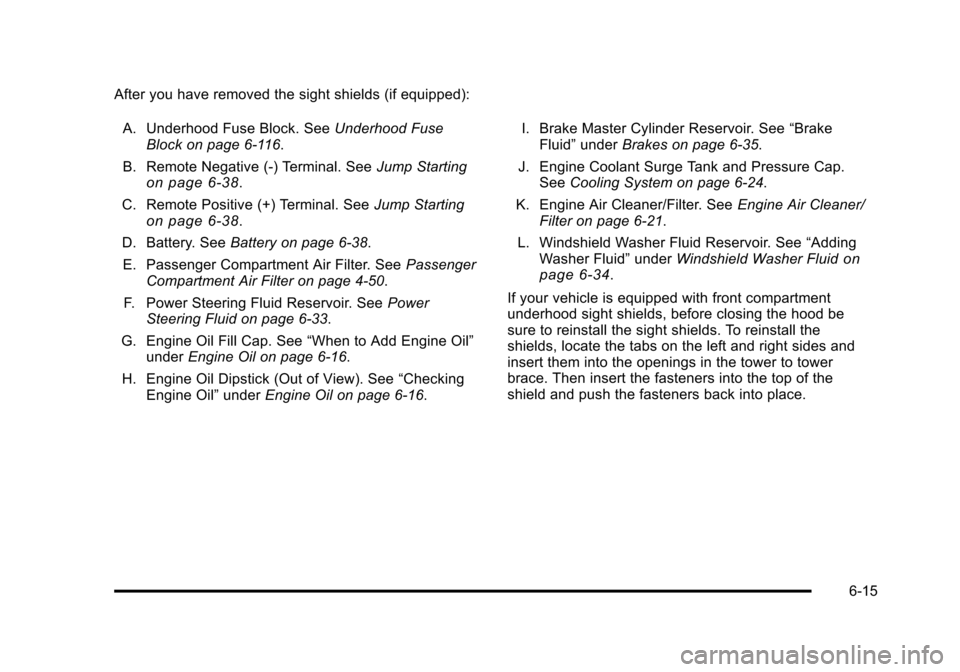
After you have removed the sight shields (if equipped):A. Underhood Fuse Block. See Underhood Fuse
Block on page 6‑116.
B. Remote Negative (-) Terminal. See Jump Starting
on page 6‑38.
C. Remote Positive (+) Terminal. See Jump Starting
on page 6‑38.
D. Battery. See Battery on page 6‑38.
E. Passenger Compartment Air Filter. See Passenger
Compartment Air Filter on page 4‑50.
F. Power Steering Fluid Reservoir. See Power
Steering Fluid on page 6‑33.
G. Engine Oil Fill Cap. See “When to Add Engine Oil”
under Engine Oil on page 6‑16.
H. Engine Oil Dipstick (Out of View). See “Checking
Engine Oil” underEngine Oil on page 6‑16. I. Brake Master Cylinder Reservoir. See
“Brake
Fluid” under Brakes on page 6‑35.
J. Engine Coolant Surge Tank and Pressure Cap. See Cooling System on page 6‑24.
K. Engine Air Cleaner/Filter. See Engine Air Cleaner/
Filter on page 6‑21.
L. Windshield Washer Fluid Reservoir. See “Adding
Washer Fluid” underWindshield Washer Fluid
on
page 6‑34.
If your vehicle is equipped with front compartment
underhood sight shields, before closing the hood be
sure to reinstall the sight shields. To reinstall the
shields, locate the tabs on the left and right sides and
insert them into the openings in the tower to tower
brace. Then insert the fasteners into the top of the
shield and push the fasteners back into place.
6-15
Page 389 of 528
Black plate (39,1)Cadillac STS Owner Manual - 2011
Notice:Ignoring these steps could result in costly
damage to the vehicle that would not be covered by
the warranty.
Trying to start the vehicle by pushing or pulling it
will not work, and it could damage the vehicle.
1. Check the other vehicle. It must have a 12-volt battery with a negative ground system.
Notice: If the other vehicle's system is not a 12-volt
system with a negative ground, both vehicles can
be damaged. Only use vehicles with 12-volt systems
with negative grounds to jump start your vehicle.
2. Get the vehicles close enough so the jumper cables can reach, but be sure the vehicles are not
touching each other. If they are, it could cause a
ground connection you do not want. You would not
be able to start your vehicle and the bad grounding
could damage the electrical systems.
To avoid the possibility of the vehicles rolling, set
the parking brake firmly on both vehicles involved
in the jump start procedure. Put an automatic
transmission in P (Park) or a manual transmission
in NEUTRAL before setting the parking brake. Notice:
If you leave the radio or other accessories
on during the jump starting procedure, they could
be damaged. The repairs would not be covered by
the warranty. Always turn off the radio and other
accessories when jump starting the vehicle.
3. Turn off the ignition on both vehicles. Unplug unnecessary accessories plugged into the
cigarette lighter or the accessory power outlets.
Turn off the radio and all lamps that are not
needed. This will avoid sparks and help save both
batteries. And it could save the radio!
4. Open the hoods and locate the positive (+) and negative (−) terminal locations or the remote
positive (+) and remote negative (−) terminals of
the other vehicle. Then locate the remote
positive (+) location on your vehicle. See Engine
Compartment Overview
on page 6‑13for more
information on locations the terminals.
6-39
Page 390 of 528
Black plate (40,1)Cadillac STS Owner Manual - 2011
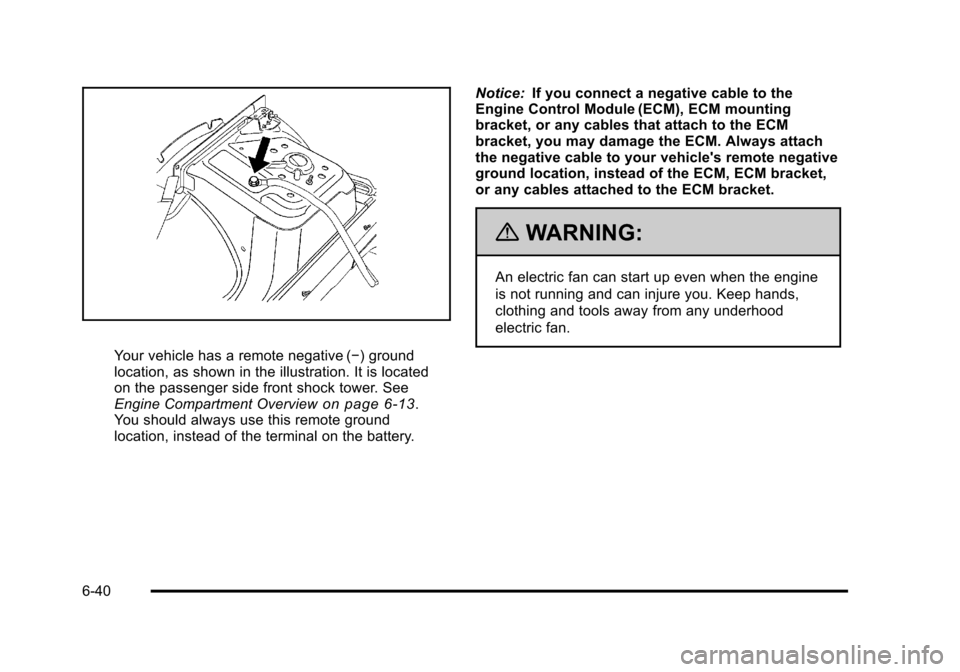
Your vehicle has a remote negative (−) ground
location, as shown in the illustration. It is located
on the passenger side front shock tower. See
Engine Compartment Overview
on page 6‑13.
You should always use this remote ground
location, instead of the terminal on the battery. Notice:
If you connect a negative cable to the
Engine Control Module (ECM), ECM mounting
bracket, or any cables that attach to the ECM
bracket, you may damage the ECM. Always attach
the negative cable to your vehicle's remote negative
ground location, instead of the ECM, ECM bracket,
or any cables attached to the ECM bracket.
{WARNING:
An electric fan can start up even when the engine
is not running and can injure you. Keep hands,
clothing and tools away from any underhood
electric fan.
6-40