remote start CADILLAC STS 2011 1.G User Guide
[x] Cancel search | Manufacturer: CADILLAC, Model Year: 2011, Model line: STS, Model: CADILLAC STS 2011 1.GPages: 528, PDF Size: 4.96 MB
Page 107 of 528
Black plate (1,1)Cadillac STS Owner Manual - 2011
Section 3 Features and Controls
Keys. . . . . . . . . . . . . . . . . . . . . . . . . . . . . . . . . . . . . . . . . . . . . . . . 3-3
Keyless Access System . . . . . . . . . . . . . . . . . . . . . . . . . 3-4
Keyless Access System Operation . . . . . . . . . . . . . . 3-5
Remote Vehicle Start . . . . . . . . . . . . . . . . . . . . . . . . . . 3-10
Doors and Locks . . . . . . . . . . . . . . . . . . . . . . . . . . . . . . . . . 3-12
Door Locks . . . . . . . . . . . . . . . . . . . . . . . . . . . . . . . . . . . . 3-12
Power Door Locks . . . . . . . . . . . . . . . . . . . . . . . . . . . . . 3-13
Programmable Automatic Door Locks . . . . . . . . . . 3-14
Rear Door Security Locks . . . . . . . . . . . . . . . . . . . . . 3-14
Lockout Protection . . . . . . . . . . . . . . . . . . . . . . . . . . . . . 3-15
Trunk . . . . . . . . . . . . . . . . . . . . . . . . . . . . . . . . . . . . . . . . . . 3-15
Windows . . . . . . . . . . . . . . . . . . . . . . . . . . . . . . . . . . . . . . . . . . 3-18
Power Windows . . . . . . . . . . . . . . . . . . . . . . . . . . . . . . . 3-19
Sun Visors . . . . . . . . . . . . . . . . . . . . . . . . . . . . . . . . . . . . . 3-21
Theft-Deterrent Systems . . . . . . . . . . . . . . . . . . . . . . . . .3-22
Theft-Deterrent System . . . . . . . . . . . . . . . . . . . . . . . . 3-22
Valet Lockout Switch . . . . . . . . . . . . . . . . . . . . . . . . . . . 3-24
Immobilizer . . . . . . . . . . . . . . . . . . . . . . . . . . . . . . . . . . . . 3-24
Immobilizer Operation . . . . . . . . . . . . . . . . . . . . . . . . . 3-24 Starting and Operating Your Vehicle
. . . . . . . . . . . .3-25
New Vehicle Break-In . . . . . . . . . . . . . . . . . . . . . . . . . . 3-25
Ignition Positions . . . . . . . . . . . . . . . . . . . . . . . . . . . . . . 3-26
Retained Accessory Power (RAP) . . . . . . . . . . . . . 3-27
Starting the Engine . . . . . . . . . . . . . . . . . . . . . . . . . . . . 3-27
Engine Coolant Heater . . . . . . . . . . . . . . . . . . . . . . . . . 3-29
Automatic Transmission Operation . . . . . . . . . . . . . 3-30
Parking Brake . . . . . . . . . . . . . . . . . . . . . . . . . . . . . . . . . 3-33
Shifting Into Park . . . . . . . . . . . . . . . . . . . . . . . . . . . . . . 3-34
Shifting Out of Park . . . . . . . . . . . . . . . . . . . . . . . . . . . . 3-35
Parking Over Things That Burn . . . . . . . . . . . . . . . . 3-35
Engine Exhaust . . . . . . . . . . . . . . . . . . . . . . . . . . . . . . . . 3-36
Running the Vehicle While Parked . . . . . . . . . . . . . 3-36
Mirrors . . . . . . . . . . . . . . . . . . . . . . . . . . . . . . . . . . . . . . . . . . . . 3-37
Automatic Dimming Rearview Mirror . . . . . . . . . . . 3-37
Compass . . . . . . . . . . . . . . . . . . . . . . . . . . . . . . . . . . . . . . 3-38
Outside Power Mirrors . . . . . . . . . . . . . . . . . . . . . . . . . 3-39
Outside Automatic Dimming Mirror . . . . . . . . . . . . . 3-39
Park Tilt Mirrors . . . . . . . . . . . . . . . . . . . . . . . . . . . . . . . . 3-40
Outside Convex Mirror . . . . . . . . . . . . . . . . . . . . . . . . . 3-40
Outside Heated Mirrors . . . . . . . . . . . . . . . . . . . . . . . . 3-40
3-1
Page 112 of 528
Black plate (6,1)Cadillac STS Owner Manual - 2011
Other conditions can affect the performance
of the transmitter. SeeKeyless Access Systemon
page 3‑4.
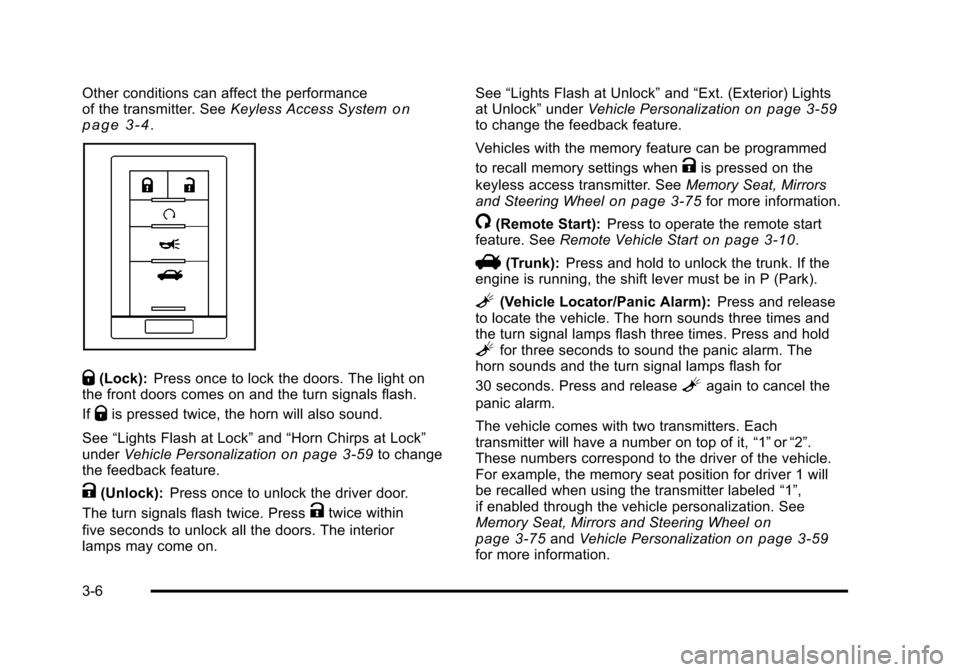
Q(Lock): Press once to lock the doors. The light on
the front doors comes on and the turn signals flash.
If
Qis pressed twice, the horn will also sound.
See “Lights Flash at Lock” and“Horn Chirps at Lock”
under Vehicle Personalization
on page 3‑59to change
the feedback feature.
K(Unlock): Press once to unlock the driver door.
The turn signals flash twice. Press
Ktwice within
five seconds to unlock all the doors. The interior
lamps may come on. See
“Lights Flash at Unlock” and“Ext. (Exterior) Lights
at Unlock” underVehicle Personalization
on page 3‑59to change the feedback feature.
Vehicles with the memory feature can be programmed
to recall memory settings when
Kis pressed on the
keyless access transmitter. See Memory Seat, Mirrors
and Steering Wheel
on page 3‑75for more information.
/(Remote Start): Press to operate the remote start
feature. See Remote Vehicle Starton page 3‑10.
V(Trunk):Press and hold to unlock the trunk. If the
engine is running, the shift lever must be in P (Park).
L(Vehicle Locator/Panic Alarm): Press and release
to locate the vehicle. The horn sounds three times and
the turn signal lamps flash three times. Press and hold
Lfor three seconds to sound the panic alarm. The
horn sounds and the turn signal lamps flash for
30 seconds. Press and release
Lagain to cancel the
panic alarm.
The vehicle comes with two transmitters. Each
transmitter will have a number on top of it, “1”or“2”.
These numbers correspond to the driver of the vehicle.
For example, the memory seat position for driver 1 will
be recalled when using the transmitter labeled “1”,
if enabled through the vehicle personalization. See
Memory Seat, Mirrors and Steering Wheel
on
page 3‑75and Vehicle Personalizationon page 3‑59for more information.
3-6
Page 116 of 528
Black plate (10,1)Cadillac STS Owner Manual - 2011
Battery Replacement
Notice:When replacing the battery, do not touch
any of the circuitry on the transmitter. Static from
your body could damage the transmitter.
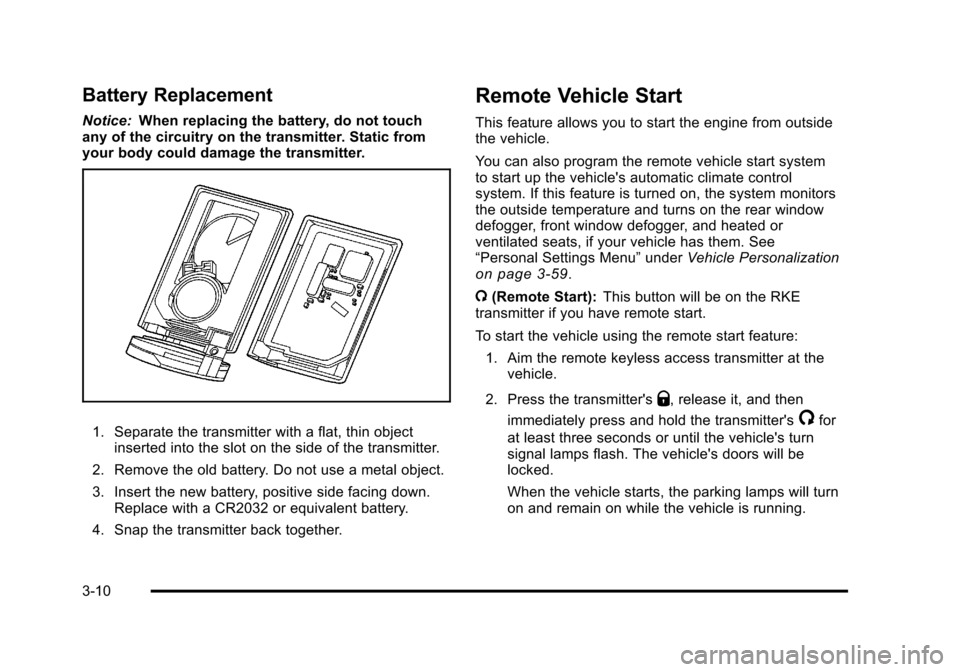
1. Separate the transmitter with a flat, thin object inserted into the slot on the side of the transmitter.
2. Remove the old battery. Do not use a metal object.
3. Insert the new battery, positive side facing down. Replace with a CR2032 or equivalent battery.
4. Snap the transmitter back together.
Remote Vehicle Start
This feature allows you to start the engine from outside
the vehicle.
You can also program the remote vehicle start system
to start up the vehicle's automatic climate control
system. If this feature is turned on, the system monitors
the outside temperature and turns on the rear window
defogger, front window defogger, and heated or
ventilated seats, if your vehicle has them. See
“Personal Settings Menu” underVehicle Personalization
on page 3‑59.
/ (Remote Start): This button will be on the RKE
transmitter if you have remote start.
To start the vehicle using the remote start feature:
1. Aim the remote keyless access transmitter at the vehicle.
2. Press the transmitter's
Q, release it, and then
immediately press and hold the transmitter's
/for
at least three seconds or until the vehicle's turn
signal lamps flash. The vehicle's doors will be
locked.
When the vehicle starts, the parking lamps will turn
on and remain on while the vehicle is running.
3-10
Page 117 of 528
Black plate (11,1)Cadillac STS Owner Manual - 2011
3. If it is the first remote start since the vehicle hasbeen driven, repeat these steps, while the engine
is still running, to extend the engine running time
by 10 minutes. Remote start can be extended
one time.
If the vehicle is left running it will automatically shut off
after 10 minutes unless a time extension has been
done. To manually shut off a remote start, do one of the
following:
.Aim the keyless access transmitter at the vehicle
and press the remote start button until the parking
lamps turn off.
.Turn on the hazard warning flashers.
.Press the Acc. button (ignition switch). See Ignition
Positions on page 3‑26.
.Turn on the valet lockout switch. See Valet Lockout
Switch on page 3‑24.
When you enter the vehicle during a remote start, press
the brake pedal and press the start button on the
keyless ignition switch to transition from remote start
operation to normal vehicle operation. Laws in some local communities may restrict the use
of remote starters. For example, laws may require a
person using remote start to have the vehicle in view
when doing so. Check local regulations for any
requirements on remote starting of vehicles.
Do not use the remote start feature if your vehicle is low
on fuel. Your vehicle may run out of fuel.
The remote start feature provides two separate starts,
each with 10 minutes of engine running. If you press
the lock button and then hold the remote start button
on the keyless access transmitter again for at least
three seconds before the first 10 minutes of engine
running time has expired, 10 minutes is added to the
remaining minutes. For example, if the remote start is
initiated again after five minutes of the engine run time,
10 minutes is added and you now have 15 minutes
with the engine running. Once two remote starts or
20 minutes of the engine running have been provided,
the vehicle must be started using the keyless access
with pushbutton start feature, if the engine needs to be
restarted. See
Starting the Engine
on page 3‑27for
more information regarding the keyless ignition.
3-11
Page 118 of 528
Black plate (12,1)Cadillac STS Owner Manual - 2011
The remote start feature will not operate if any of the
following occur:
.The check engine light is displayed. See“Check
Engine Light” underMalfunction Indicator Lampon
page 4‑62.
.The valet lockout switch is on.
.The keyless access transmitter is in the vehicle.
.The vehicle's hood is open.
.An unauthorized vehicle entry or a vehicle theft
was attempted.
If your vehicle has the remote start feature, the keyless
access transmitter functions will have an increased
range of operation. However, the range may be less
while the vehicle is running.
There are other conditions which can affect the
performance of the transmitter, see Keyless Access
System on page 3‑4.
Doors and Locks
Door Locks
{WARNING:
Unlocked doors can be dangerous.
.Passengers, especially children, can easily
open the doors and fall out of a moving
vehicle. When a door is locked, the handle will
not open it. The chance of being thrown out of
the vehicle in a crash is increased if the doors
are not locked. So, all passengers should
wear safety belts properly and the doors
should be locked whenever the vehicle is
driven.
.Young children who get into unlocked vehicles
may be unable to get out. A child can be
overcome by extreme heat and can suffer
permanent injuries or even death from heat
stroke. Always lock the vehicle whenever
leaving it.
(Continued)
3-12
Page 130 of 528
Black plate (24,1)Cadillac STS Owner Manual - 2011
Valet Lockout Switch
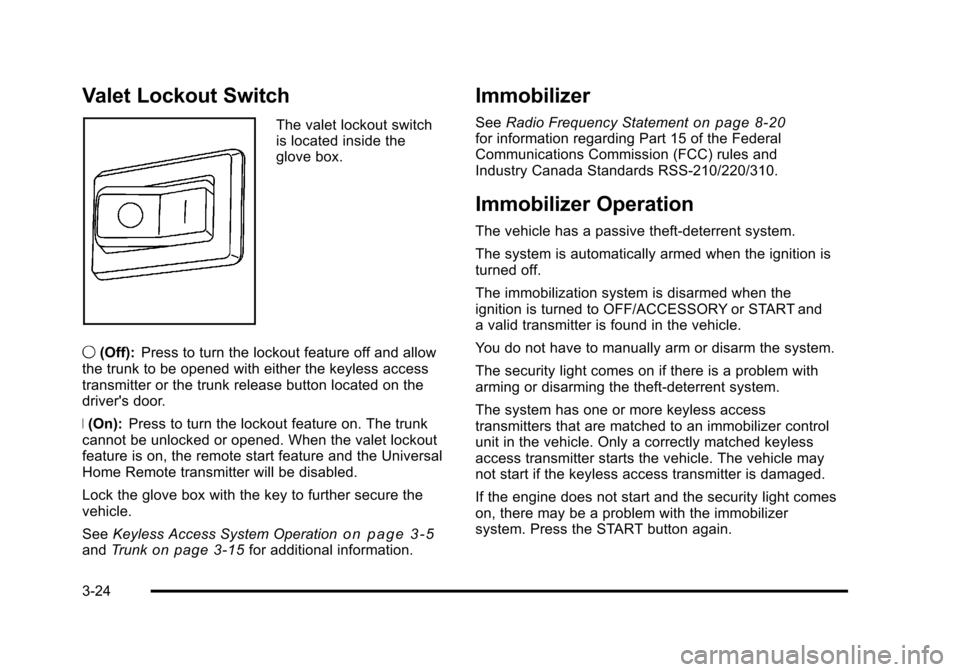
The valet lockout switch
is located inside the
glove box.
9 (Off): Press to turn the lockout feature off and allow
the trunk to be opened with either the keyless access
transmitter or the trunk release button located on the
driver's door.
R (On): Press to turn the lockout feature on. The trunk
cannot be unlocked or opened. When the valet lockout
feature is on, the remote start feature and the Universal
Home Remote transmitter will be disabled.
Lock the glove box with the key to further secure the
vehicle.
See Keyless Access System Operation
on page 3‑5andTrunkon page 3‑15for additional information.
Immobilizer
See Radio Frequency Statementon page 8‑20for information regarding Part 15 of the Federal
Communications Commission (FCC) rules and
Industry Canada Standards RSS-210/220/310.
Immobilizer Operation
The vehicle has a passive theft-deterrent system.
The system is automatically armed when the ignition is
turned off.
The immobilization system is disarmed when the
ignition is turned to OFF/ACCESSORY or START and
a valid transmitter is found in the vehicle.
You do not have to manually arm or disarm the system.
The security light comes on if there is a problem with
arming or disarming the theft-deterrent system.
The system has one or more keyless access
transmitters that are matched to an immobilizer control
unit in the vehicle. Only a correctly matched keyless
access transmitter starts the vehicle. The vehicle may
not start if the keyless access transmitter is damaged.
If the engine does not start and the security light comes
on, there may be a problem with the immobilizer
system. Press the START button again.
3-24
Page 156 of 528
Black plate (50,1)Cadillac STS Owner Manual - 2011
Read the instructions completely before attempting to
program the transmitter. Because of the steps involved,
it may be helpful to have another person available to
assist you in programming the transmitter.
Be sure to keep the original remote control transmitter
for use in other vehicles, as well as, for future
programming. Only the original remote control
transmitter is needed for Fixed Code programming.
The programmed buttons should be erased when the
vehicle is sold or the lease ends. See“Erasing
Universal Home Remote Buttons” later in this section.
Park the vehicle outside of the garage when
programming a garage door. Be sure that people and
objects are clear of the garage door or gate that is
being programmed.Programming Universal Home
Remote —Rolling Code
For questions or help programming the Universal Home
Remote System, call 1-866-572-2728 or go to
learcar2u.com.
Most garage door openers sold after 1996 are Rolling
Code units.
Programming a garage door opener involves
time-sensitive actions, so read the entire procedure
before starting. Otherwise, the device will time out and
the procedure will have to be repeated.
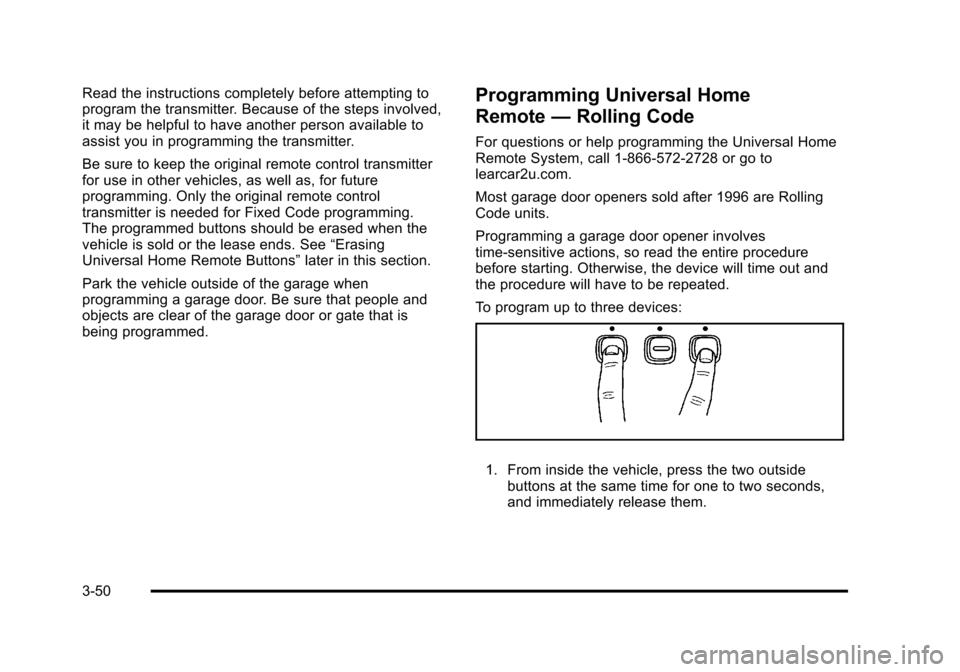
To program up to three devices:
1. From inside the vehicle, press the two outside
buttons at the same time for one to two seconds,
and immediately release them.
3-50
Page 158 of 528
Black plate (52,1)Cadillac STS Owner Manual - 2011
Programming Universal Home
Remote—Fixed Code
For questions or help programming the Universal Home
Remote System, call 1-866-572-2728 or go to
learcar2u.com.
Most garage door openers sold before 1996 are Fixed
Code units.
Programming a garage door opener involves
time-sensitive actions, so read the entire procedure
before starting. Otherwise, the device will time out and
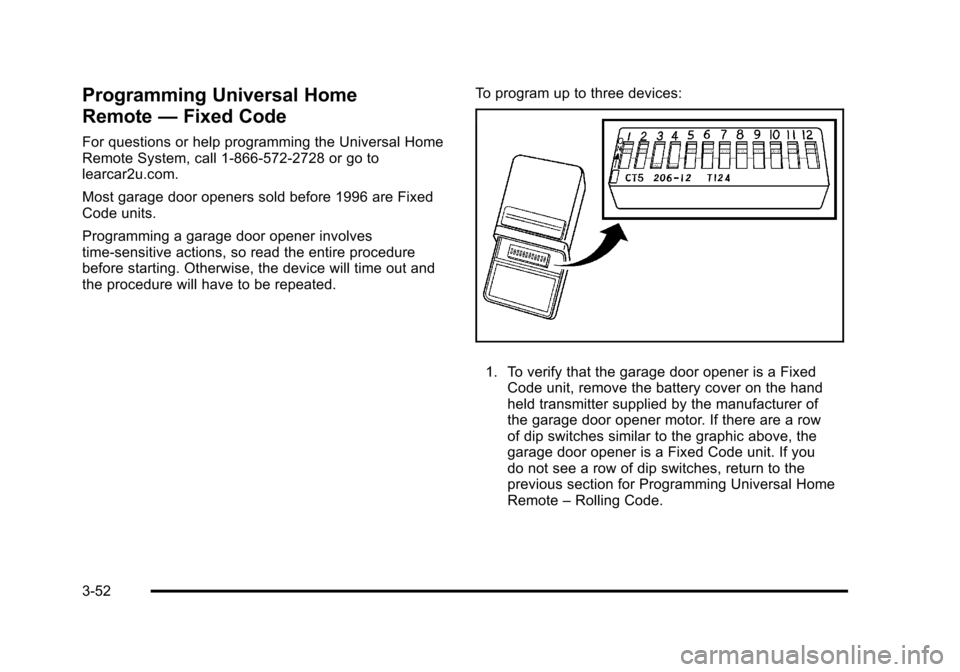
the procedure will have to be repeated. To program up to three devices:
1. To verify that the garage door opener is a Fixed
Code unit, remove the battery cover on the hand
held transmitter supplied by the manufacturer of
the garage door opener motor. If there are a row
of dip switches similar to the graphic above, the
garage door opener is a Fixed Code unit. If you
do not see a row of dip switches, return to the
previous section for Programming Universal Home
Remote –Rolling Code.
3-52
Page 168 of 528
Black plate (62,1)Cadillac STS Owner Manual - 2011
KEY FOB REMINDER
This feature sounds the horn three times when the
driver's door is closed and there is a keyless access
transmitter left inside of the vehicle. This will only occur
when the vehicle is off.
Programmable Modes
Mode 1:ON (default)
Mode 2: OFF
To program the vehicle to a different mode: 1. Enter the PERSONAL SETTINGS MENU by following the instructions listed previously under
“Entering the Personal Settings Menu.”
2. Turn the tune/select knob until KEY FOB REMINDER is highlighted.
3. Press the tune/select knob to switch back and forth between on and off.
When the mode is turned on, a check mark will
appear next to the feature name.
The mode you selected is now set. You can either exit
the programming mode by following the instructions
later in this section or program the next feature
available on your vehicle.
REMOTE START
With remote start you can choose which features are
activated when the vehicle is started remotely. These
features include the climate control system, the rear
defogger, and the seat temperature, if your vehicle has
this feature. See Remote Vehicle Start
on page 3‑10for more information.
Mode 1:ON (default)
Mode 2: OFF
To program the vehicle to a different mode: 1. Enter the PERSONAL SETTINGS MENU by following the instructions listed previously under
“Entering the Personal Settings Menu.”
2. Turn the tune/select knob until REMOTE START is highlighted.
3. Press the tune/select knob to switch back and forth between on and off.
When REMOTE START is on, a check mark will appear
next to the feature name. You can then choose to
activate any or all of the following features by turning
the tune/select knob to highlight the feature, then
pressing the knob to turn it on.
3-62
Page 169 of 528

Black plate (63,1)Cadillac STS Owner Manual - 2011
CLIMATE CONTROL:The climate control system will
engage when the vehicle is started using the remote
start feature. It will be at the same climate control
setting that was last used by the driver using that
keyless entry transmitter.
REAR WINDOW DEFOG: If this feature is active, the
rear defogger will engage when the vehicle is started
using the remote start feature.
SEAT TEMP (Temperature) CONTROL: If your vehicle
has this feature and this feature is active, the seats will
be heated or cooled when the vehicle is started using
the remote start feature.
The mode you selected is now set. You can either exit
the programming mode by following the instructions
later in this section or program the next feature
available on your vehicle by pressing the F6 (BACK)
button, located on the radio, to return to the
PERSONAL SETTINGS MENU.
REMOTE RECALL MEMORY
If your vehicle has the optional memory package, you
will have this feature. When this feature is turned on,
you can recall any previously programmed seat position
and mirror position when the unlock button on the
keyless access transmitter is pressed. Programmable Modes
Mode 1:
ON
Mode 2: OFF (default)
The exception to the default is the recall seat to driver
position which is on.
To program the vehicle to a different mode: 1. Enter the PERSONAL SETTINGS MENU by following the instructions listed previously under
“Entering the Personal Settings Menu.”
2. Turn the tune/select knob until REMOTE RECALL MEMORY is highlighted.
3. Press the tune/select knob to switch back and forth between on and off.
When the mode is turned on, a check mark will
appear next to the feature name.
If this feature is selected, START BUTTON RECALL
cannot be selected.
The mode you selected is now set. You can either exit
the programming mode by following the instructions
later in this section or program the next feature
available on your vehicle.
3-63