seats CADILLAC STS 2011 1.G Owner's Manual
[x] Cancel search | Manufacturer: CADILLAC, Model Year: 2011, Model line: STS, Model: CADILLAC STS 2011 1.GPages: 528, PDF Size: 4.96 MB
Page 103 of 528
Black plate (71,1)Cadillac STS Owner Manual - 2011
Adding Equipment to Your
Airbag-Equipped Vehicle
Q: Is there anything I might add to or change aboutthe vehicle that could keep the airbags from
working properly?
A: Yes. If you add things that change your vehicle's
frame, bumper system, height, front end or side
sheet metal, they may keep the airbag system from
working properly. Changing or moving any parts of
the front seats, safety belts, the airbag sensing and
diagnostic module, steering wheel, instrument panel,
roof-rail airbag modules, ceiling headliner or pillar
garnish trim, overhead console, front sensors, side
impact sensors, or airbag wiring can affect the
operation of the airbag system.
In addition, your vehicle has a passenger sensing
system for the right front passenger's position, which
includes sensors that are part of the passenger's
seat. The passenger sensing system may not
operate properly if the original seat trim is replaced
with non-GM covers, upholstery or trim, or with GM
covers, upholstery or trim designed for a different
vehicle. Any object, such as an aftermarket seat
heater or a comfort enhancing pad or device, installed under or on top of the seat fabric, could
also interfere with the operation of the passenger
sensing system. This could either prevent proper
deployment of the passenger airbag(s) or prevent
the passenger sensing system from properly turning
off the passenger airbag(s). See
Passenger Sensing
System on page 2‑66.
If you have any questions about this, you should
contact Customer Assistance before you modify
your vehicle. The phone numbers and addresses
for Customer Assistance are in Step Two of the
Customer Satisfaction Procedure in this manual.
See Customer Satisfaction Procedure on page 8‑2.
Q: Because I have a disability, I have to get my vehicle modified. How can I find out whether this
will affect my airbag system?
A: If you have questions, call Customer Assistance.
The phone numbers and addresses for Customer
Assistance are in Step Two of the Customer
Satisfaction Procedure in this manual. See
Customer Satisfaction Procedure on page 8‑2.
In addition, your dealer and the service manual have
information about the location of the airbag sensors,
sensing and diagnostic module and airbag wiring.
2-71
Page 113 of 528
Black plate (7,1)Cadillac STS Owner Manual - 2011
Programming Transmitters to the
Vehicle
Only keyless access transmitters programmed to this
vehicle will work. If a transmitter is lost or stolen, a
replacement can be purchased and programmed
through your dealer. The vehicle can be reprogrammed
so that lost or stolen transmitters no longer work. Each
vehicle can have up to four transmitters programmed
to it.
Programming with a Recognized
Transmitter
A new transmitter can be programmed to the vehicle
when there is one recognized transmitter. For vehicles
sold in Canada, two recognized transmitters are
required to program a new transmitter.1. The vehicle must be off.
2. Both the recognized and new transmitters must be with you.
3. Insert the vehicle key into the key cylinder located on the outside of the driver door. 4. Turn the key to the unlock position five times within
five seconds.
5. The Driver Information Center (DIC) displays READY FOR FOB 2, 3 or 4.
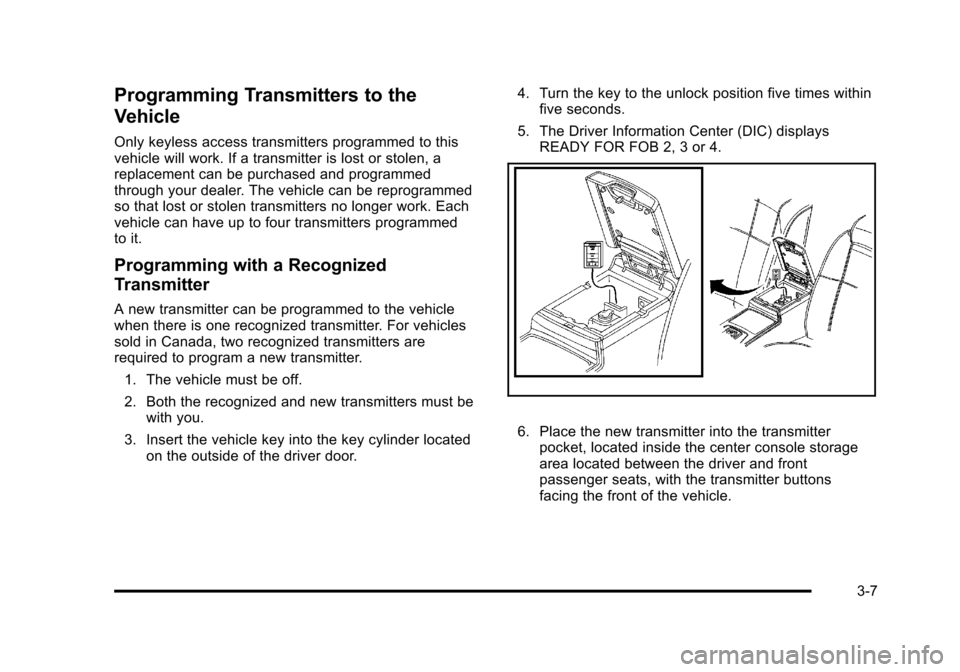
6. Place the new transmitter into the transmitterpocket, located inside the center console storage
area located between the driver and front
passenger seats, with the transmitter buttons
facing the front of the vehicle.
3-7
Page 114 of 528
Black plate (8,1)Cadillac STS Owner Manual - 2011
7. A beep sounds once programming in complete.The DIC displays READY FOR 3 or 4, or MAX #
FOBS LEARNED.
8. Remove the transmitter from the transmitter pocket and press
Ktwice on each newly programmed
transmitter to complete the process.
9. To program additional transmitters, repeat Step 6. Press Acc. on the ignition switch if programming is
complete.
Programming without a Recognized
Transmitter
This procedure requires three ten minutes cycles to
complete the programming process. United States
owners are permitted to program a new transmitter to
their vehicle when a recognized transmitter is not
available. The Canadian immobilizer standard requires
that Canadian owners see their dealer for programming
new transmitters when two recognized transmitters are
not available.
1. The vehicle must be off.
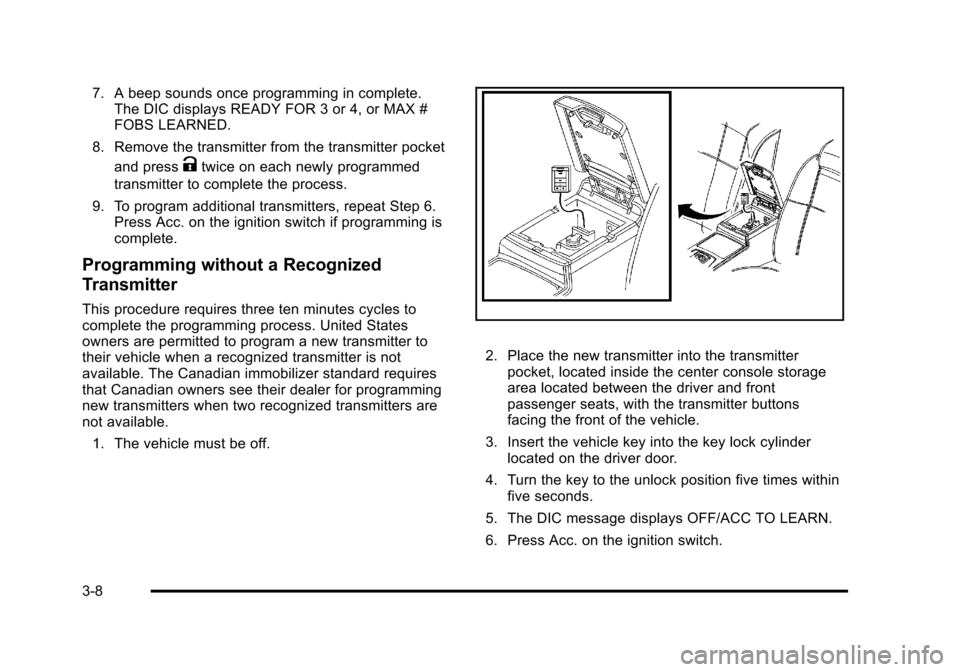
2. Place the new transmitter into the transmitter pocket, located inside the center console storage
area located between the driver and front
passenger seats, with the transmitter buttons
facing the front of the vehicle.
3. Insert the vehicle key into the key lock cylinder located on the driver door.
4. Turn the key to the unlock position five times within five seconds.
5. The DIC message displays OFF/ACC TO LEARN.
6. Press Acc. on the ignition switch.
3-8
Page 116 of 528
Black plate (10,1)Cadillac STS Owner Manual - 2011
Battery Replacement
Notice:When replacing the battery, do not touch
any of the circuitry on the transmitter. Static from
your body could damage the transmitter.
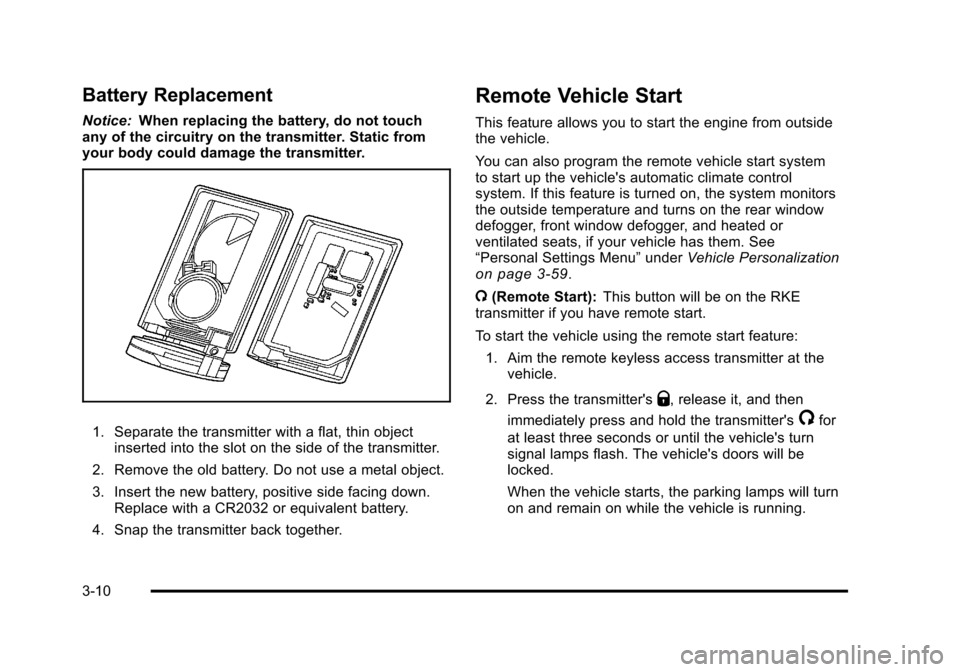
1. Separate the transmitter with a flat, thin object inserted into the slot on the side of the transmitter.
2. Remove the old battery. Do not use a metal object.
3. Insert the new battery, positive side facing down. Replace with a CR2032 or equivalent battery.
4. Snap the transmitter back together.
Remote Vehicle Start
This feature allows you to start the engine from outside
the vehicle.
You can also program the remote vehicle start system
to start up the vehicle's automatic climate control
system. If this feature is turned on, the system monitors
the outside temperature and turns on the rear window
defogger, front window defogger, and heated or
ventilated seats, if your vehicle has them. See
“Personal Settings Menu” underVehicle Personalization
on page 3‑59.
/ (Remote Start): This button will be on the RKE
transmitter if you have remote start.
To start the vehicle using the remote start feature:
1. Aim the remote keyless access transmitter at the vehicle.
2. Press the transmitter's
Q, release it, and then
immediately press and hold the transmitter's
/for
at least three seconds or until the vehicle's turn
signal lamps flash. The vehicle's doors will be
locked.
When the vehicle starts, the parking lamps will turn
on and remain on while the vehicle is running.
3-10
Page 123 of 528
Black plate (17,1)Cadillac STS Owner Manual - 2011
Rear Seat Pass-Through Door
To open the door:1. Pull the rear seat armrest down.
2. If the door is locked, insert the key into the lock and turn it counterclockwise.
3. Press the button above the lock and lower the door.
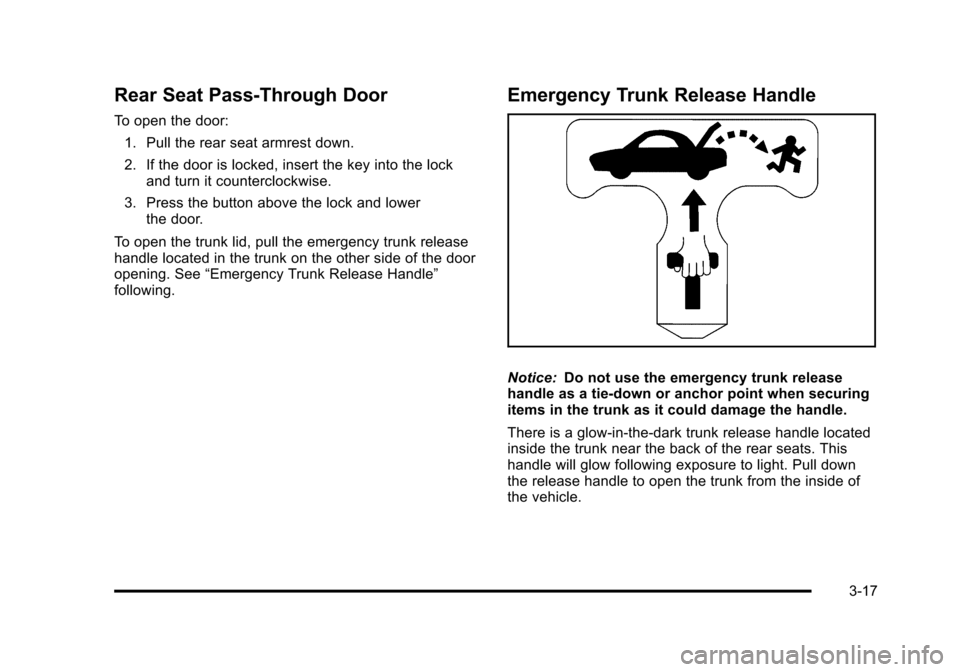
To open the trunk lid, pull the emergency trunk release
handle located in the trunk on the other side of the door
opening. See “Emergency Trunk Release Handle”
following.
Emergency Trunk Release Handle
Notice: Do not use the emergency trunk release
handle as a tie-down or anchor point when securing
items in the trunk as it could damage the handle.
There is a glow-in-the-dark trunk release handle located
inside the trunk near the back of the rear seats. This
handle will glow following exposure to light. Pull down
the release handle to open the trunk from the inside of
the vehicle.
3-17
Page 162 of 528
Black plate (56,1)Cadillac STS Owner Manual - 2011
Using Universal Home Remote
Press and hold the appropriate button for at least half of
a second. The indicator light will come on while the
signal is being transmitted.
Reprogramming Universal Home
Remote Buttons
Any of the three buttons can be reprogrammed by
repeating the instructions.
Erasing Universal Home Remote
Buttons
The programmed buttons should be erased when the
vehicle is sold or the lease ends.
To erase either Rolling Code or Fixed Code on the
Universal Home Remote device:1. Press and hold the two outside buttons at the same time for approximately 20 seconds, until the
indicator lights, located directly above the buttons,
begin to blink rapidly.
2. Once the indicator lights begin to blink, release both buttons. The codes from all buttons will be
erased.
For help or information on the Universal Home Remote
System, call the customer assistance phone number
under Customer Assistance Offices on page 8‑6.
Storage Areas
Glove Box
Lift up on the glove box lever to open it.
Cupholders
The vehicle has two cupholders in the center
console area.
Center Console Storage
The vehicle has a center console storage area located
between the front seats. It includes storage areas, and
accessory power outlet(s) on the rear of the console.
Floor Mats
{WARNING:
If a floor mat is the wrong size or is not properly
installed, it can interfere with the accelerator pedal
and/or brake pedal. Interference with the pedals
can cause unintended acceleration and/or
(Continued)
3-56
Page 169 of 528

Black plate (63,1)Cadillac STS Owner Manual - 2011
CLIMATE CONTROL:The climate control system will
engage when the vehicle is started using the remote
start feature. It will be at the same climate control
setting that was last used by the driver using that
keyless entry transmitter.
REAR WINDOW DEFOG: If this feature is active, the
rear defogger will engage when the vehicle is started
using the remote start feature.
SEAT TEMP (Temperature) CONTROL: If your vehicle
has this feature and this feature is active, the seats will
be heated or cooled when the vehicle is started using
the remote start feature.
The mode you selected is now set. You can either exit
the programming mode by following the instructions
later in this section or program the next feature
available on your vehicle by pressing the F6 (BACK)
button, located on the radio, to return to the
PERSONAL SETTINGS MENU.
REMOTE RECALL MEMORY
If your vehicle has the optional memory package, you
will have this feature. When this feature is turned on,
you can recall any previously programmed seat position
and mirror position when the unlock button on the
keyless access transmitter is pressed. Programmable Modes
Mode 1:
ON
Mode 2: OFF (default)
The exception to the default is the recall seat to driver
position which is on.
To program the vehicle to a different mode: 1. Enter the PERSONAL SETTINGS MENU by following the instructions listed previously under
“Entering the Personal Settings Menu.”
2. Turn the tune/select knob until REMOTE RECALL MEMORY is highlighted.
3. Press the tune/select knob to switch back and forth between on and off.
When the mode is turned on, a check mark will
appear next to the feature name.
If this feature is selected, START BUTTON RECALL
cannot be selected.
The mode you selected is now set. You can either exit
the programming mode by following the instructions
later in this section or program the next feature
available on your vehicle.
3-63
Page 222 of 528
Black plate (36,1)Cadillac STS Owner Manual - 2011
Entry Lighting
The entry lighting system turns on the reading and
dome lamps and the backlighting to the exterior lamp
control when a door is opened or if you press the
remote keyless entry transmitter unlock button.
If activated by the transmitter, the lighting will remain
active for about 25 seconds. The entry lighting system
uses the light sensor; it must be dark outside in order
for the lamps to turn on. The lamps turn off about
25 seconds after the last door is closed. They will dim
to off if the ignition is on, or immediately deactivate if
the power locks are activated.
Parade Dimming
This feature prohibits dimming of the instrument panel
displays and backlighting during daylight hours when
the key is in the ignition and the headlamps are on.
This feature operates with the light sensor and is fully
automatic. When the light sensor reads darkness
outside and the parking lamps are active, the
instrument panel displays can be adjusted by turning
the instrument panel brightness knob. SeeInstrument
Panel Brightness
on page 4‑35for additional
information.
Reading Lamps
The reading lamps are located on the overhead
console. These lamps come on automatically when any
door is opened.
For manual operation, press the button next to each
lamp to turn it on or off.
If the reading lamps are left on, they automatically shut
off 10 minutes after the ignition has been turned off.
Battery Load Management
The battery load management feature is designed to
monitor the vehicle's electrical load and determine when
the battery is in a heavy discharge condition. During
times of high electrical loading, the engine may idle at a
higher revolutions per minute (rpm) setting than normal
to make sure the battery charges. High electrical loads
may occur when several of the following are on:
headlamps, high beams, fog lamps, rear window
defogger, the climate control fan at high speeds, heated
seats and engine cooling fans.
If the battery continues to discharge, even with the
engine idling at a higher rpm setting, some electrical
loads will automatically be reduced. When this occurs,
the rear window defogger may take slightly longer to
clear the glass and the fan may cut back to a lower
4-36
Page 223 of 528
Black plate (37,1)Cadillac STS Owner Manual - 2011
speed. For more battery saving information, see
“Battery Saver Active Message”underDIC Warnings
and Messages on page 4‑76.
Electric Power Management
The vehicle has Electric Power Management (EPM) that
estimates the battery's temperature and state of charge.
It then adjusts the voltage for best performance and
extended life of the battery.
When the battery's state of charge is low, the voltage is
raised slightly to quickly bring the charge back up.
When the state of charge is high, the voltage is lowered
slightly to prevent overcharging. If the vehicle has a
voltmeter gauge or a voltage display on the Driver
Information Center (DIC), you may see the voltage
move up or down. This is normal. If there is a problem,
an alert will be displayed.
The battery can be discharged at idle if the electrical
loads are very high. This is true for all vehicles. This is
because the generator (alternator) may not be spinning
fast enough at idle to produce all the power that is
needed for very high electrical loads.
A high electrical load occurs when several of the
following are on, such as: headlamps, high beams, fog
lamps, rear window defogger, climate control fan at high
speed, heated seats, engine cooling fans, trailer loads,
and loads plugged into accessory power outlets. EPM works to prevent excessive discharge of the
battery. It does this by balancing the generator's output
and the vehicle's electrical needs. It can increase
engine idle speed to generate more power, whenever
needed. It can temporarily reduce the power demands
of some accessories.
Normally, these actions occur in steps or levels, without
being noticeable. In rare cases at the highest levels of
corrective action, this action may be noticeable to the
driver. If so, a Driver Information Center (DIC) message
might be displayed, such as BATTERY SAVER ACTIVE
or BATTERY VOLTAGE LOW. If this message is
displayed, it is recommended that the driver reduce the
electrical loads as much as possible. See
DIC Warnings
and Messages on page 4‑76.
Inadvertent Power Battery Saver
This feature is designed to protect the vehicle's battery
against drainage from the interior lamps, trunk lamp,
glove box lamp, or the garage door opener. When the
ignition is turned off, the power to these features will
automatically turn off after 10 minutes (three minutes if a
new car has 24 km (15 miles) or less). Power will be
restored for an additional 10 minutes if any door is
opened, the trunk is opened or the courtesy lamp switch
is turned on.
4-37
Page 229 of 528
Black plate (43,1)Cadillac STS Owner Manual - 2011
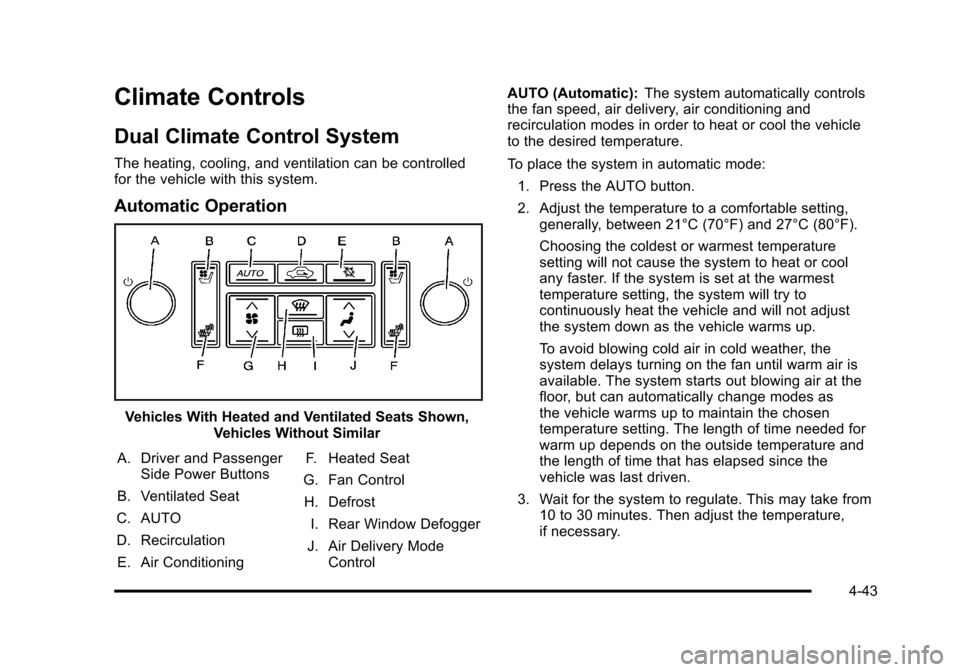
Climate Controls
Dual Climate Control System
The heating, cooling, and ventilation can be controlled
for the vehicle with this system.
Automatic Operation
Vehicles With Heated and Ventilated Seats Shown,Vehicles Without Similar
A. Driver and Passenger Side Power Buttons
B. Ventilated Seat
C. AUTO
D. Recirculation E. Air Conditioning F. Heated Seat
G. Fan Control H. Defrost I. Rear Window Defogger
J. Air Delivery Mode Control AUTO (Automatic):
The system automatically controls
the fan speed, air delivery, air conditioning and
recirculation modes in order to heat or cool the vehicle
to the desired temperature.
To place the system in automatic mode:
1. Press the AUTO button.
2. Adjust the temperature to a comfortable setting, generally, between 21°C (70°F) and 27°C (80°F).
Choosing the coldest or warmest temperature
setting will not cause the system to heat or cool
any faster. If the system is set at the warmest
temperature setting, the system will try to
continuously heat the vehicle and will not adjust
the system down as the vehicle warms up.
To avoid blowing cold air in cold weather, the
system delays turning on the fan until warm air is
available. The system starts out blowing air at the
floor, but can automatically change modes as
the vehicle warms up to maintain the chosen
temperature setting. The length of time needed for
warm up depends on the outside temperature and
the length of time that has elapsed since the
vehicle was last driven.
3. Wait for the system to regulate. This may take from 10 to 30 minutes. Then adjust the temperature,
if necessary.
4-43