cruise control CADILLAC STS 2011 1.G Owner's Guide
[x] Cancel search | Manufacturer: CADILLAC, Model Year: 2011, Model line: STS, Model: CADILLAC STS 2011 1.GPages: 528, PDF Size: 4.96 MB
Page 253 of 528
Black plate (67,1)Cadillac STS Owner Manual - 2011
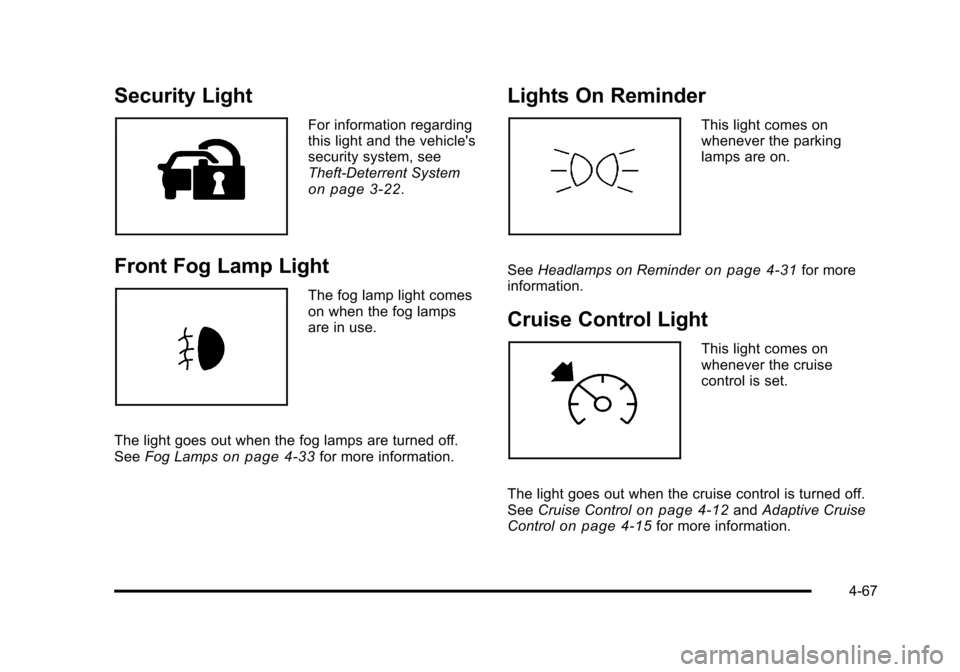
Security Light
For information regarding
this light and the vehicle's
security system, see
Theft-Deterrent System
on page 3‑22.
Front Fog Lamp Light
The fog lamp light comes
on when the fog lamps
are in use.
The light goes out when the fog lamps are turned off.
See Fog Lamps
on page 4‑33for more information.
Lights On Reminder
This light comes on
whenever the parking
lamps are on.
See Headlamps on Reminder
on page 4‑31for more
information.
Cruise Control Light
This light comes on
whenever the cruise
control is set.
The light goes out when the cruise control is turned off.
See Cruise Control
on page 4‑12andAdaptive Cruise
Controlon page 4‑15for more information.
4-67
Page 265 of 528
Black plate (79,1)Cadillac STS Owner Manual - 2011
CHECK TIRE PRESSURE or TIRE LOW
ADD AIR TO TIRE
This message displays when the pressure in one or
more of the vehicle's tires Is low. It also gives the
location of the tire. The low tire pressure warning light
will also comes on. SeeTire Pressure Light
on
page 4‑62. If a tire pressure message appears on the
DIC, stop as soon as you can. Have the tire pressures
checked and set to those shown on the Tire Loading
Information label. See Tires
on page 6‑50,Loading the
Vehicleon page 5‑23, and Inflation - Tire Pressureon
page 6‑58. The DIC also shows the tire pressure
values. See DIC Operation and Displayson page 4‑70.
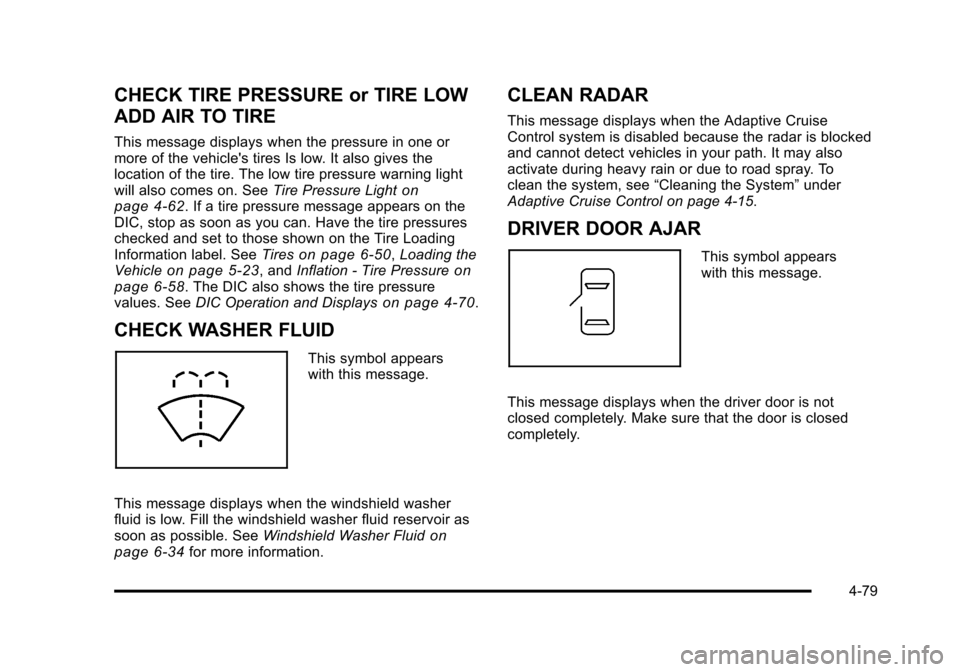
CHECK WASHER FLUID
This symbol appears
with this message.
This message displays when the windshield washer
fluid is low. Fill the windshield washer fluid reservoir as
soon as possible. See Windshield Washer Fluid
on
page 6‑34for more information.
CLEAN RADAR
This message displays when the Adaptive Cruise
Control system is disabled because the radar is blocked
and cannot detect vehicles in your path. It may also
activate during heavy rain or due to road spray. To
clean the system, see “Cleaning the System” under
Adaptive Cruise Control on page 4‑15.
DRIVER DOOR AJAR
This symbol appears
with this message.
This message displays when the driver door is not
closed completely. Make sure that the door is closed
completely.
4-79
Page 271 of 528
Black plate (85,1)Cadillac STS Owner Manual - 2011
PRESS START AND BRAKE TO START
ENGINE
This message displays when you need to press down
on the brake pedal while pressing the start button on
the electronic keyless ignition when trying to start your
vehicle. SeeStarting the Engine
on page 3‑27for more
information.
RADAR CRUISE NOT READY
This message displays when the Adaptive Cruise
Control system is not activating due to a temporary
condition. Your vehicle does not require service. This
message also displays when either of the following
conditions occur:
.The driver turns off the head-up display (HUD)
while the Adaptive Cruise Control is engaged.
.The driver attempts to engage the Adaptive Cruise
Control while the HUD is off.
If this message appears when attempting to activate the
system, continue driving for several minutes and then
try activating the system again.
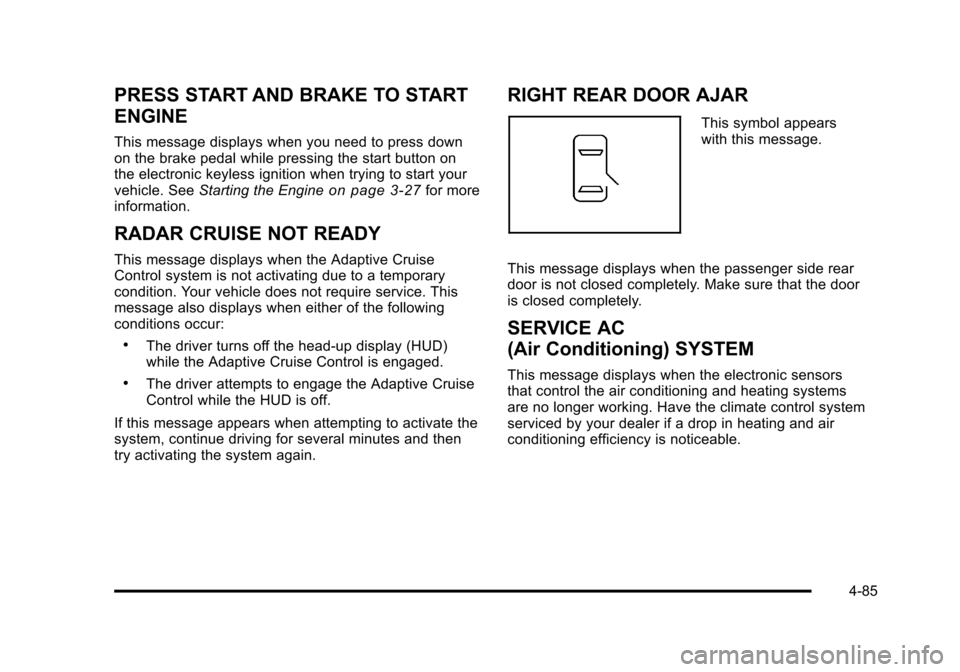
RIGHT REAR DOOR AJAR
This symbol appears
with this message.
This message displays when the passenger side rear
door is not closed completely. Make sure that the door
is closed completely.
SERVICE AC
(Air Conditioning) SYSTEM
This message displays when the electronic sensors
that control the air conditioning and heating systems
are no longer working. Have the climate control system
serviced by your dealer if a drop in heating and air
conditioning efficiency is noticeable.
4-85
Page 272 of 528
Black plate (86,1)Cadillac STS Owner Manual - 2011
SERVICE AIR BAG
This message displays if there is a problem with the
airbag system. Have your vehicle serviced by your
dealer immediately. SeeAirbag Readiness Light
on
page 4‑54for more information.
SERVICE BRAKE ASSIST
This message displays when a problem with the panic
brake assist system has been detected. Have your
vehicle serviced by your dealer.
SERVICE LANE DEPARTURE SYSTEM
If your vehicle has the Lane Departure Warning (LDW)
system, this message may display to indicate that the
LDW system is not working properly. If this message
remains on after continued driving, the system needs
service. See your dealer. See the Index in the
Navigation manual for more information.
SERVICE RADAR CRUISE
This message displays when the Adaptive Cruise
Control system is disabled and needs service. See
your dealer.
SERVICE SIDE BLIND ZONE ALERT
SYSTEM
If your vehicle has the Side Blind Zone Alert (SBZA)
system and this message displays, both SBZA
displays will remain on indicating there is a problem
with the SBZA system. If these displays remain on after
continued driving, the system needs service. See your
dealer. See the Index in the Navigation manual for more
information.
SERVICE STABILITY SYS (System)
Your vehicle has a vehicle stability enhancement
system called StabiliTrak®. All-Wheel Drive (AWD)
vehicle with the Active Steering with Enhanced
StabiliTrak option have a stability enhancement
system called Enhanced StabiliTrak.
This message displays if there has been a problem
detected with the stability system.
If this message comes on while driving, pull off the road
as soon as possible and stop carefully. Try resetting the
system by turning the ignition off then back on. If this
message still stays on or comes back on again while
driving, your vehicle needs service. Have the stability
system inspected by your dealer as soon as possible.
See StabiliTrak
®Systemon page 5‑6orEnhanced
StabiliTrak®on page 5‑7for more information.
4-86
Page 319 of 528
Black plate (7,1)Cadillac STS Owner Manual - 2011
StabiliTrak comes on automatically whenever the
vehicle is started. To help assist with directional control
of the vehicle, always leave the system on. StabiliTrak
can be turned off, however, by using the Traction
Control System (TCS)/StabiliTrak button. SeeTraction
Control System (TCS) on page 5‑9.
If cruise control is being used when StabiliTrak
activates, it will automatically disengage. Cruise control
may be reengaged when road conditions allow. See
Cruise Control
on page 4‑12or Adaptive Cruise
Controlon page 4‑15for more information.
Enhanced StabiliTrak®
All‐wheel‐drive (AWD) vehicles with the Active Steering
with Enhanced StabiliTrak option have an enhanced
computer controlled vehicle stability system that assists
with directional control of the vehicle in difficult driving
conditions. This system coordinates automatic control of
the Active Steering System, the Magnetic Ride Control
Suspension System, and the Brake Control System for
better vehicle performance.
During extreme cold temperature conditions, the active
steering function may be temporarily disabled which
may cause the steering wheel to be offset from the
center position while driving straight. This is normal
operation and the vehicle is safe to drive in these
cases. Stability control activates when the computer senses a
difference between the intended path and the direction
the vehicle is actually traveling. Stability control
automatically adjusts the front road wheel steering
angle, modifies the suspension stiffness, and selectively
applies braking pressure at any one of the vehicle’s
brakes to help maintain directional control of the
vehicle.
When the system activates, a STABILITY SYS ACTIVE
message displays on the Driver Information Center
(DIC). See
DIC Warnings and Messages
on page 4‑76.
It is normal to hear a noise or feel vibration in the brake
pedal when the system is working. Continue to steer the
vehicle in the intended direction.
If cruise control is engaged when Enhanced
StabiliTrak activates, the cruise control will
automatically disengage. Re-engage cruise control
when road conditions allow. See Cruise Control
on
page 4‑12, or Adaptive Cruise Controlon page 4‑15for more information.
Enhanced StabiliTrak comes on automatically in the
Stability Touring Mode, when the vehicle is started.
The Stability Touring Mode is recommended for normal
driving.
5-7
Page 329 of 528
Black plate (17,1)Cadillac STS Owner Manual - 2011
{WARNING:
Wet brakes can cause crashes. They might not
work as well in a quick stop and could cause
pulling to one side. You could lose control of the
vehicle.
After driving through a large puddle of water or a
car/vehicle wash, lightly apply the brake pedal
until the brakes work normally.
Flowing or rushing water creates strong forces.
Driving through flowing water could cause your
vehicle to be carried away. If this happens, you
and other vehicle occupants could drown. Do not
ignore police warnings and be very cautious about
trying to drive through flowing water.
Hydroplaning
Hydroplaning is dangerous. Water can build up under
your vehicle's tires so they actually ride on the water.
This can happen if the road is wet enough and you are
going fast enough. When your vehicle is hydroplaning,
it has little or no contact with the road.
There is no hard and fast rule about hydroplaning. The
best advice is to slow down when the road is wet.
Other Rainy Weather Tips
Besides slowing down, other wet weather driving tips
include:
.Allow extra following distance.
.Pass with caution.
.Keep windshield wiping equipment in good shape.
.Keep the windshield washer fluid reservoir filled.
.Have good tires with proper tread depth. SeeTireson page 6‑50.
.Turn off cruise control.
5-17
Page 332 of 528

Black plate (20,1)Cadillac STS Owner Manual - 2011
Winter Driving
Driving on Snow or Ice
Drive carefully when there is snow or ice between the
tires and the road, creating less traction or grip. Wet ice
can occur at about 0°C (32°F) when freezing rain
begins to fall, resulting in even less traction. Avoid
driving on wet ice or in freezing rain until roads can be
treated with salt or sand.
Drive with caution, whatever the condition. Accelerate
gently so traction is not lost. Accelerating too quickly
causes the wheels to spin and makes the surface under
the tires slick, so there is even less traction.
Try not to break the fragile traction. If you accelerate too
fast, the drive wheels will spin and polish the surface
under the tires even more.The
Traction Control System (TCS)
on page 5‑9improves the ability to accelerate on slippery roads,
but slow down and adjust your driving to the road
conditions. When driving through deep snow, turn off
the traction control system to help maintain vehicle
motion at lower speeds.
TheAntilock Brake System (ABS)
on page 5‑5improves vehicle stability during hard stops on a
slippery roads, but apply the brakes sooner than
when on dry pavement.
Allow greater following distance on any slippery road
and watch for slippery spots. Icy patches can occur on
otherwise clear roads in shaded areas. The surface
of a curve or an overpass can remain icy when the
surrounding roads are clear. Avoid sudden steering
maneuvers and braking while on ice.
Turn off cruise control, if equipped, on slippery surfaces.
5-20
Page 467 of 528

Black plate (117,1)Cadillac STS Owner Manual - 2011
The underhood fuse block is located in the front of the
engine compartment on the passenger side of the
vehicle. SeeEngine Compartment Overview
on
page 6‑13for more information on location and
removal procedure for the front compartment underhood
sights shields.
To access the fuses, push in the tabs located on each
side of the fuse block cover, then lift the cover off.
Notice: Spilling liquid on any electrical component
on the vehicle may damage it. Always keep the
covers on any electrical component.
Fuses JCase Usage
ABS MTR ABS Module- ABS Module-Stabilitrak AFS Active Front Steering
BLWR Blower Motor
FAN 1 Cooling Fan-Low Speed
FAN 2 Cooling Fan-High Speed
LPDB 1 Driver Side Rear Fuse Block
LPDB 2 Driver Side Rear Fuse Block
RPDB 1 Passenger Side Rear Fuse Block
RPDB 2 Passenger Side Rear Fuse Block
Fuses JCase Usage
SPARE Spare
SPARE Spare
STRTR Starter
Fuses MiniUsage
A/C CLTCH Air Conditioning Compressor Clutch
ABS ABS Module-Stabilitrak
ABS IGN Antilock Brake Controller
AUX OUTLET Rear Accessory Power Outlet BRK
VAC PUMP Brake Vacuum Pump
CCP Climate Control Panel
CCP/RLY COILS Climate Control Panel, Headlamp
Level Control, Active Cruise Control,
Relay Coils, Starter, Front Blower
ECM 1 Engine Control Module (ECM)
ECM/TCM BATT ECM, Transmission Control
Module (TCM)
ECM/TCM IGN ECM, TCM, Instrument Panel Cluster
6-117
Page 515 of 528

Black plate (1,1)Cadillac STS Owner Manual - 2011
A
Accessories and Modifications . . . . . . . . . . . . . . . . . . . . . . .6-4
Accessory Power . . . . . . . . . . . . . . . . . . . . . . . . . . . . . . . . . . 3-27
Accessory Power Outlets . . . . . . . . . . . . . . . . . . . . . . . . . . 4-42
Adaptive Cruise Control . . . . . . . . . . . . . . . . . . . . . . . . . . . 4-15
Add-On Electrical Equipment . . . . . . . . . . . . . . . . . . . . . 6-114
Additives, Fuel . . . . . . . . . . . . . . . . . . . . . . . . . . . . . . . . . . . . . . .6-7
AdjustmentsHeadlamp Range . . . . . . . . . . . . . . . . . . . . . . . . . . . . . . . . . 2-12
Air Cleaner/Filter, Engine . . . . . . . . . . . . . . . . . . . . . . . . . . 6-21
Air Filter, Passenger Compartment . . . . . . . . . . . . . . . . 4-50
Airbag Adding Equipment to Your Airbag-EquippedVehicle . . . . . . . . . . . . . . . . . . . . . . . . . . . . . . . . . . . . . . . . . . 2-71
Airbag System How Does an Airbag Restrain? . . . . . . . . . . . . . . . . . . . 2-63
Passenger Sensing System . . . . . . . . . . . . . . . . . . . . . . 2-66
Servicing Your Airbag-Equipped Vehicle . . . . . . . . . . 2-70
What Makes an Airbag Inflate? . . . . . . . . . . . . . . . . . . . 2-63
What Will You See After an Airbag Inflates? . . . . . . 2-64
When Should an Airbag Inflate? . . . . . . . . . . . . . . . . . . 2-62
Where Are the Airbags? . . . . . . . . . . . . . . . . . . . . . . . . . . 2-59
Airbags Passenger Status Indicator . . . . . . . . . . . . . . . . . . . . . . . 4-55
Readiness Light . . . . . . . . . . . . . . . . . . . . . . . . . . . . . . . . . . 4-54
System Check . . . . . . . . . . . . . . . . . . . . . . . . . . . . . . . . . . . . 2-57
All-Wheel Drive . . . . . . . . . . . . . . . . . . . . . . . . . . . . . . . . . . . . 6-43 All-Wheel-Drive (AWD) System . . . . . . . . . . . . . . . . . . . . 5-11
Antenna
Backglass . . . . . . . . . . . . . . . . . . . . . . . . . . . . . . . . . . . . . . .4-126
Antenna, XM™ Satellite Radio Antenna
System . . . . . . . . . . . . . . . . . . . . . . . . . . . . . . . . . . . . . . . . . . 4-126
Antilock Brake System (ABS) . . . . . . . . . . . . . . . . . . . . . . . .5-5 Warning Light . . . . . . . . . . . . . . . . . . . . . . . . . . . . . . . . . . . . . 4-59
Appearance Care Aluminum or Chrome-Plated Wheels . . . . . . . . . . . . 6-112
Care of Safety Belts . . . . . . . . . . . . . . . . . . . . . . . . . . . . .6-109
Chemical Paint Spotting . . . . . . . . . . . . . . . . . . . . . . . . . 6-113
Cleaning Exterior Lamps/Lenses . . . . . . . . . . . . . . . . 6-110
Fabric/Carpet . . . . . . . . . . . . . . . . . . . . . . . . . . . . . . . . . . . .6-107
Finish Care . . . . . . . . . . . . . . . . . . . . . . . . . . . . . . . . . . . . . . 6-110
Finish Damage . . . . . . . . . . . . . . . . . . . . . . . . . . . . . . . . . . 6-113
Instrument Panel, Vinyl, and Other PlasticSurfaces . . . . . . . . . . . . . . . . . . . . . . . . . . . . . . . . . . . . . . .6-108
Interior Cleaning . . . . . . . . . . . . . . . . . . . . . . . . . . . . . . . . .6-106
Leather . . . . . . . . . . . . . . . . . . . . . . . . . . . . . . . . . . . . . . . . . .6-108
Sheet Metal Damage . . . . . . . . . . . . . . . . . . . . . . . . . . . . 6-113
Speaker Covers . . . . . . . . . . . . . . . . . . . . . . . . . . . . . . . . .6-109
Tires . . . . . . . . . . . . . . . . . . . . . . . . . . . . . . . . . . . . . . . . . . . . . 6-113
Underbody Maintenance . . . . . . . . . . . . . . . . . . . . . . . . . 6-113
Washing Your Vehicle . . . . . . . . . . . . . . . . . . . . . . . . . . .6-109
Weatherstrips . . . . . . . . . . . . . . . . . . . . . . . . . . . . . . . . . . . .6-109
Windshield and Wiper Blades . . . . . . . . . . . . . . . . . . . . 6-111
Wood Panels . . . . . . . . . . . . . . . . . . . . . . . . . . . . . . . . . . . .6-109
i - 1
Page 518 of 528

Black plate (4,1)Cadillac STS Owner Manual - 2011
Convenience Net . . . . . . . . . . . . . . . . . . . . . . . . . . . . . . . . . . 3-57
CoolantEngine . . . . . . . . . . . . . . . . . . . . . . . . . . . . . . . . . . . . . . . . . . . . 6-25
Engine Temperature Gauge . . . . . . . . . . . . . . . . . . . . . . 4-61
Engine Temperature Warning Light . . . . . . . . . . . . . . . 4-61
Cooling System . . . . . . . . . . . . . . . . . . . . . . . . . . . . . . . . . . . . 6-24
Courtesy Transportation Program . . . . . . . . . . . . . . . . . . 8-12
Cruise Control . . . . . . . . . . . . . . . . . . . . . . . . . . . . . . . . . . . . . 4-12 Light . . . . . . . . . . . . . . . . . . . . . . . . . . . . . . . . . . . . . . . . . . . . . . 4-67
Cruise Control, Active . . . . . . . . . . . . . . . . . . . . . . . . . . . . . 4-15
Cruise Control, Forward Collision Alert (FCA) System . . . . . . . . . . . . . . . . . . . . . . . . . . . . . . . . . . . . . . . . . . . . .4-6
Cupholders . . . . . . . . . . . . . . . . . . . . . . . . . . . . . . . . . . . . . . . . 3-56
Customer Assistance . . . . . . . . . . . . . . . . . . . . . . . . . . . . . . . .8-6 Text Telephone (TTY) Users . . . . . . . . . . . . . . . . . . . . . . . 8-6
Customer Assistance Offices . . . . . . . . . . . . . . . . . . . . . . . .8-6
Customer Information
Service Publications Ordering Information . . . . . . . . 8-17
Customer Satisfaction Procedure . . . . . . . . . . . . . . . . . . . .8-2
D
Damage Repair, Collision . . . . . . . . . . . . . . . . . . . . . . . . . . 8-13
Data Recorders, Event . . . . . . . . . . . . . . . . . . . . . . . . . . . . 8-19
Daytime Running Lamps (DRL) . . . . . . . . . . . . . . . . . . . . 4-32
Defensive Driving . . . . . . . . . . . . . . . . . . . . . . . . . . . . . . . . . . . .5-2
Disc, MP3 . . . . . . . . . . . . . . . . . . . . . . . . . . . . . . . . . . . . . . . . 4-108 Displays
Head-Up . . . . . . . . . . . . . . . . . . . . . . . . . . . . . . . . . . . . . . . . . . 4-38
Doing Your Own Service Work . . . . . . . . . . . . . . . . . . . . . . .6-5
Door Locks . . . . . . . . . . . . . . . . . . . . . . . . . . . . . . . . . . . . . . . . . . . . . 3-12
Power Locks . . . . . . . . . . . . . . . . . . . . . . . . . . . . . . . . . . . . . . 3-13
Programmable Automatic Door Locks . . . . . . . . . . . . 3-14
Rear Door Security Locks . . . . . . . . . . . . . . . . . . . . . . . . 3-14
Drive Systems All-Wheel Drive . . . . . . . . . . . . . . . . . . . . . . . . . . . . . . . . . . . 6-43
Driver Information Center (DIC) . . . . . . . . . . . . . . . . . . . . 4-69
DIC Operation and Displays . . . . . . . . . . . . . . . . . . . . . . 4-70
DIC Warnings and Messages . . . . . . . . . . . . . . . . . . . . . 4-76
Other Messages . . . . . . . . . . . . . . . . . . . . . . . . . . . . . . . . . . 4-93
Driving At Night . . . . . . . . . . . . . . . . . . . . . . . . . . . . . . . . . . . . . . . . . . . 5-16
Before a Long Trip . . . . . . . . . . . . . . . . . . . . . . . . . . . . . . . . 5-18
Defensive . . . . . . . . . . . . . . . . . . . . . . . . . . . . . . . . . . . . . . . . . . 5-2
Drunk . . . . . . . . . . . . . . . . . . . . . . . . . . . . . . . . . . . . . . . . . . . . . . 5-2
Highway Hypnosis . . . . . . . . . . . . . . . . . . . . . . . . . . . . . . . . 5-18
Hill and Mountain Roads . . . . . . . . . . . . . . . . . . . . . . . . . . 5-19
In Rain and on Wet Roads . . . . . . . . . . . . . . . . . . . . . . . . 5-16
Loss of Control . . . . . . . . . . . . . . . . . . . . . . . . . . . . . . . . . . . 5-14
Off-Road Recovery . . . . . . . . . . . . . . . . . . . . . . . . . . . . . . . 5-14
Rocking Your Vehicle to Get it Out . . . . . . . . . . . . . . . . 5-23
Winter . . . . . . . . . . . . . . . . . . . . . . . . . . . . . . . . . . . . . . . . . . . . 5-20
Driving for Better Fuel Economy . . . . . . . . . . . . . . . . . . . 1-23
Dual Climate Control System . . . . . . . . . . . . . . . . . . . . . . 4-43
i - 4