radio CADILLAC STS 2011 1.G Owner's Guide
[x] Cancel search | Manufacturer: CADILLAC, Model Year: 2011, Model line: STS, Model: CADILLAC STS 2011 1.GPages: 528, PDF Size: 4.96 MB
Page 263 of 528
Black plate (77,1)Cadillac STS Owner Manual - 2011
BATTERY NOT CHARGING SERVICE
CHARGING SYS (System)
This symbol appears
with this message.
This message displays when a problem with the
charging system has been detected. Have your vehicle
serviced by your dealer.
BATTERY SAVER ACTIVE
This message displays when the system detects that
the battery voltage is dropping beyond a reasonable
level. The battery saver system starts reducing certain
features of the vehicle that may be noticeable. At the
point that the features are disabled, this message is
displayed. It means that the vehicle is trying to save the
charge in the battery.
Turn off all unnecessary accessories to allow the
battery to recharge.
The normal battery voltage range is 11.5 to 15.5 volts.
To monitor battery voltage on the DIC, press the
information button until BATTERY VOLTS displays.
BATTERY VOLTAGE HIGH
This symbol appears
with this message.
This message displays when the electrical charging
system is overcharging the battery. When the system
detects that the battery voltage is above an estimated
16 volts, this message displays.
To reduce the charging overload, use the vehicle's
accessories:
.Turn on the exterior lamps and radio.
.Set the climate control on AUTO and the fan speed
on the highest setting.
.Turn the rear window defogger on.
The normal battery voltage range is 11.5 to 15.5 volts
when the engine is running. To monitor battery voltage
on the DIC, press the information button until BATTERY
VOLTS displays.
4-77
Page 269 of 528
Black plate (83,1)Cadillac STS Owner Manual - 2011
NO FOBS DETECTED
This message displays if the vehicle does not detect the
presence of a keyless access transmitter when you
have attempted to start the vehicle or a vehicle door
has just closed. The following conditions may cause this
message to appear:
.Driver-added equipment plugged into the
accessory power outlet on the center console
is causing interference. Examples of these
devices are cell phones and cell phone chargers,
two-way radios, power inverters, or similar items.
Try moving the keyless access transmitter away
from these devices when starting the vehicle. In
addition, PDA devices and remote garage and
gate openers may also generate Electromagnetic
Interference (EMI) that may interfere with the
keyless access transmitter. Do not carry the
keyless access transmitter in the same pocket
or bag as these devices.
.The vehicle is experiencing Electromagnetic
Interference (EMI). Some locations, such as
airports, automatic toll booths, and some gas
stations, have EMI fields which may interfere
with the keyless access transmitter.
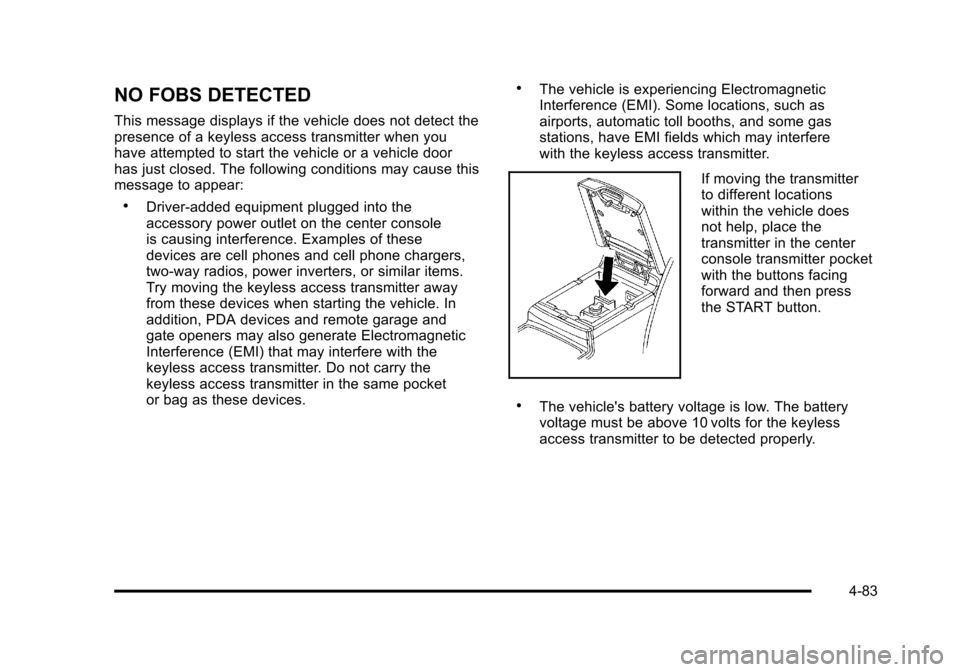
If moving the transmitter
to different locations
within the vehicle does
not help, place the
transmitter in the center
console transmitter pocket
with the buttons facing
forward and then press
the START button.
.The vehicle's battery voltage is low. The battery
voltage must be above 10 volts for the keyless
access transmitter to be detected properly.
4-83
Page 270 of 528
Black plate (84,1)Cadillac STS Owner Manual - 2011
NO FOB OFF OR RUN?
This message displays when the keyless access
transmitter is not detected inside the vehicle while you
are trying to turn the ignition off. Your vehicle may be
near a strong radio antenna signal causing the keyless
access system to be jammed. The vehicle remains in
ACCESSORY until OFF or START has been pressed or
10 minutes has expired. If you turn the ignition off and
you cannot find the keyless access transmitter, you will
not be able to restart the vehicle. The keyless access
transmitter needs to be inside of the vehicle in order for
the vehicle to start. SeeStarting the Engine
on
page 3‑27for more information.
OIL PRESSURE LOW STOP ENGINE
Notice: If you drive your vehicle while the engine
oil pressure is low, severe engine damage may
occur. If a low oil pressure warning appears on
the instrument panel cluster and/or DIC, stop the
vehicle as soon as possible. Do not drive the
vehicle until the cause of the low oil pressure is
corrected. See Engine Oil
on page 6‑16for more
information.
This message displays when the vehicle's engine oil
pressure is low. A multiple chime sounds when this message is
displayed. See
Engine Oil
on page 6‑16for more
information.
Stop the vehicle immediately, as engine damage can
result from driving a vehicle with low oil pressure. Have
the vehicle serviced by your dealer as soon as possible
when this message is displayed.
PASSENGER DOOR AJAR
This symbol appears
with this message.
This message displays when the passenger side front
door is not closed completely. Make sure that the door
is closed completely.
4-84
Page 280 of 528
Black plate (94,1)Cadillac STS Owner Manual - 2011
Audio System(s)
Determine which radio the vehicle has and read the
following pages to become familiar with its features.
{WARNING:
Taking your eyes off the road for extended periods
could cause a crash resulting in injury or death to
you or others. Do not give extended attention to
entertainment tasks while driving.
This system provides access to many audio and non
audio listings. To minimize taking your eyes off the road while driving,
do the following while the vehicle is parked:
.Become familiar with the operation and controls of
the audio system.
.Set up the tone, speaker adjustments, and preset
radio stations.
For more information, see Defensive Driving
on
page 5‑2.
Notice: Contact your dealer before adding any
equipment.
Adding audio or communication equipment could
interfere with the operation of the vehicle's engine,
radio, or other systems, and could damage them.
Follow federal rules covering mobile radio and
telephone equipment.
The vehicle has Retained Accessory Power (RAP). With
RAP, the audio system can be played even after the
ignition is turned off. See Retained Accessory Power
(RAP)
on page 3‑27for more information.
4-94
Page 281 of 528
Black plate (95,1)Cadillac STS Owner Manual - 2011
Setting the Clock
To adjust the time:1. Press
w,located on the radio, to enter the
main menu.
2. Turn
wuntil SET CLOCK displays.
3. Press
wto select SET CLOCK.
4. Turn
wto adjust the time.
5. Press
wto update the time and VEHICLE TIME
UPDATED displays.
To adjust the date:
1. Press
wto enter the main menu.
2. Turn
wuntil SET DATE displays.
3. Press
wto select SET DATE.
4. Turn
wto adjust the date.
5. Press
wto update the date and VEHICLE DATE
UPDATED displays.
Radio(s)
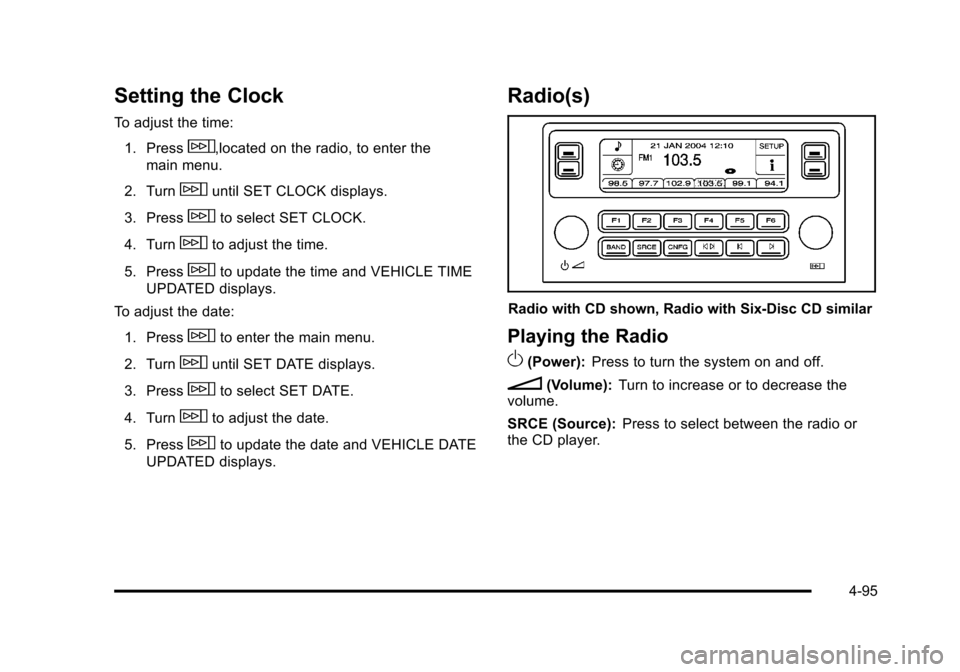
Radio with CD shown, Radio with Six-Disc CD similar
Playing the Radio
O
(Power): Press to turn the system on and off.
n(Volume): Turn to increase or to decrease the
volume.
SRCE (Source): Press to select between the radio or
the CD player.
4-95
Page 282 of 528
Black plate (96,1)Cadillac STS Owner Manual - 2011
Radio Data System (RDS)
The audio system has RDS features that are available
for use only on FM stations that broadcast RDS
information.
With RDS:
.Stations can be selected based on programming
.Stations with traffic announcements can be
selected
.Announcements concerning local and national
emergencies can be received.
.Messages display from radio stations.
RDS relies on receiving specific information from
radio stations and only works when the information is
available. In rare cases, a radio station could broadcast
incorrect information that causes the radio features to
work improperly. Contact the radio station if this
happens.
When the radio is tuned to an RDS station, the station
name or call letters display instead of the frequency.
RDS stations can also provide the time of day, a
program type (PTY) for current programming, and the
name of the program being broadcast.
Finding a Station
BAND: Press to select FM1, FM2, AM, or XM1 or XM2.
w(Tune): Turn to select radio stations.
© ¨(Seek): Press to go to the previous or next station
and stay there. The radio only seeks stations with a
strong signal in the selected band, and the sound mutes
while seeking.
© ¨(Scan): Press to scan stations or preset stations.
The radio only scans stations with a strong signal in the
selected band.
To scan stations:
1. Press and release
©or¨, SCAN displays. The
radio goes to a station, plays for five seconds, then
goes to the next station.
2. Press and release
©or¨again to stop scanning.
4-96
Page 283 of 528
Black plate (97,1)Cadillac STS Owner Manual - 2011
To scan preset stations:1. Press and hold
©or¨for more than two seconds
until a beep sounds and PSCAN displays. The
radio goes to the first preset station, plays for
five seconds, then goes to the next preset station.
2. Press and release
©or¨to stop scanning.
ALOCAL/DISTANT Selection: The radio can be set
to search for local stations or stations that are further
away for a larger selection.
To select between LOCAL or DISTANT:
1. Press
wto enter the main menu.
2. Turn
wuntil SEEK LOCAL or SEEK DISTANT
displays.
3. Press
wto select either LOCAL or DISTANT.
4. Press F6 to exit the display. To return to the original display, repeatedly press F6 or wait for the
display to time out. To search for stations, press
©or¨. If the system is set
to LOCAL, SEEK displays and seeks to stations only
with strong signals. If the system is set to DISTANT,
D-SEEK displays and seeks to stations with weak and
strong signals.
This feature does not function with the XM™ radio
stations.
4(Information): Press while in XM mode to retrieve
three different categories of information related to the
current song or channel: Artist, Song Title, Category or
PTY. To view this information:
1. Press
wto enter the main menu.
2. Turn
wuntil INFO displays.
3. Press
wto select INFO. The display changes to
show the additional XM information.
4. Press F6 to exit the display. To return to the original display, repeatedly press F6 or wait for the
display to time out.
4-97
Page 284 of 528
Black plate (98,1)Cadillac STS Owner Manual - 2011
Setting Preset Stations
Up to 30 stations (six FM1, six FM2, six AM, six XM1 and
six XM2), can be programmed on the six numbered
pushbuttons.
To program preset stations:1. Tune to a station and select the equalization, DSP, or PTY (program type) setting if desired.
2. Press and hold one of the six numbered pushbuttons for two seconds until a beep sounds.
The set preset station number displays above the
set pushbutton. If the numbered pushbutton is
pressed for less then two seconds, the radio tunes
to the station set to that pushbutton.
3. Repeat the steps for each pushbutton.
AUTOSTORE PRESETS: When Autostore is used, the
radio automatically searches the selected band and
stores the six radio stations with the strongest signal.
The stations are stored by signal strength, not
sequential order. This feature does not function with
XM radio stations.
To program autostore presets:
1. Press
wto enter the main menu.
2. Turn
wuntil AUTOSTORE PRESETS displays. 3. Press
wto select AUTOSTORE PRESETS. The
radio begins searching and AUTOSTORE displays.
4. Press F6 to exit the display. To return to the original display, repeatedly press F6 or wait for the
display to time out.
The radio presets do not have to be reset when the
vehicle is started, or when the battery power is
removed.
PRESETS HOME/AWAY: This feature stores two
different kinds of station presets. HOME can be used for
local stations and AWAY for stations outside of the local
broadcasting area. This feature does not function with
the XM radio stations.
To set preset stations for home and away:
1. Press
wto enter the main menu.
2. Turn
wuntil PRESETS HOME/AWAY displays.
3. Press
wto select HOME or AWAY.
4. Press F6 to exit the display. To return to the original display, repeatedly press F6 or wait for the
display to time out.
5. Follow the steps for programming presets or autostore presets.
4-98
Page 286 of 528
Black plate (100,1)Cadillac STS Owner Manual - 2011
Adjusting the Speakers (Balance/Fade)
To adjust the balance or fade:1. Press
wto enter the main menu.
2. Turn
wuntil BALANCE‐FADER displays.
3. Press
wto enter the settings.
4. Press
wto scroll to BALANCE or FADER.
5. Turn
wto adjust the BALANCE to the right or
the left speakers and the FADER to the front or the
rear speakers.
6. Press
wto set the adjustment.
7. Press F6 to exit the display. To return to the original display, repeatedly press F6 or wait for the
display to time out.
EQ0 does not display while in this mode.
RDS Messages
ALERT: Displays when local or national emergency
announcements are received. If the radio tunes to a
related network station for the announcement, it returns
to the original station when the announcement ends.
The announcement should be heard even if the volume
is low or a CD is playing. If a CD is playing, it will stop
playing during the announcement.
.The RDS alert feature is not supported by all RDS
radio stations.
.The RDS alert feature cannot be turned off.
.Alert is not affected by tests of the emergency
broadcast system.
Displays if the current RDS station has a message.
The message displays the artist, song title, call in phone
numbers, etc. If the entire message does not display,
parts of the message appear every three seconds until
the message is completed. MSG disappears from the
display once the completed message has displayed.
4-100
Page 287 of 528
Black plate (101,1)Cadillac STS Owner Manual - 2011
MSG (Message):Displays if the current RDS station
has a message. The message can display the artist,
song title, call in phone numbers, etc. If the entire
message does not display, parts of the message appear
every three seconds until the message is completed.
MSG disappears from the display once the completed
message has displayed.
To display the last message:
1. Press
wto enter the main menu.
2. Turn
wuntil RECALL RDS MESSAGE displays.
3. Press
wand the message displays.
Once the message displays, MSG disappears from the
display until another new message is received.
TP (Traffic Program): Displays when the radio
detects a signal from an RDS station that has traffic
announcement broadcast capability. TA (Traffic Announcement):
Displays when
the feature is turned on and allows the radio to
automatically seek radio stations that broadcast
traffic announcements.
.If the current radio station broadcasts traffic
announcements the station will not change.
.If the current radio station does not broadcast
traffic announcements, the radio seeks to the first
station that does. If the radio cannot find a station
that broadcasts traffic announcements, No Traffic
displays.
.If a CD is playing and the previous radio station
broadcasts traffic announcements, the radio
interrupts the CD for the traffic announcement.
To turn TA on or off:
1. Press
wto enter the main menu.
2. Turn
wuntil TRAFFIC ANNOUNCE displays.
3. Press
wto select ON or OFF. An X appears in
the box when ON is selected.
4. Press F6 to exit the display. To return to the original display, repeatedly press F6 or wait for
the display to time out.
4-101