warning CADILLAC STS 2011 1.G Repair Manual
[x] Cancel search | Manufacturer: CADILLAC, Model Year: 2011, Model line: STS, Model: CADILLAC STS 2011 1.GPages: 528, PDF Size: 4.96 MB
Page 139 of 528
Black plate (33,1)Cadillac STS Owner Manual - 2011
If shifting is prevented for any reason, the selected gear
will flash multiple times, indicating that the transmission
has not shifted gears.
The transmission will allow you to shift to the gear
selected and will automatically downshift when the
vehicle comes to a stop. This will allow for more power
during take-off and passing.
Parking Brake
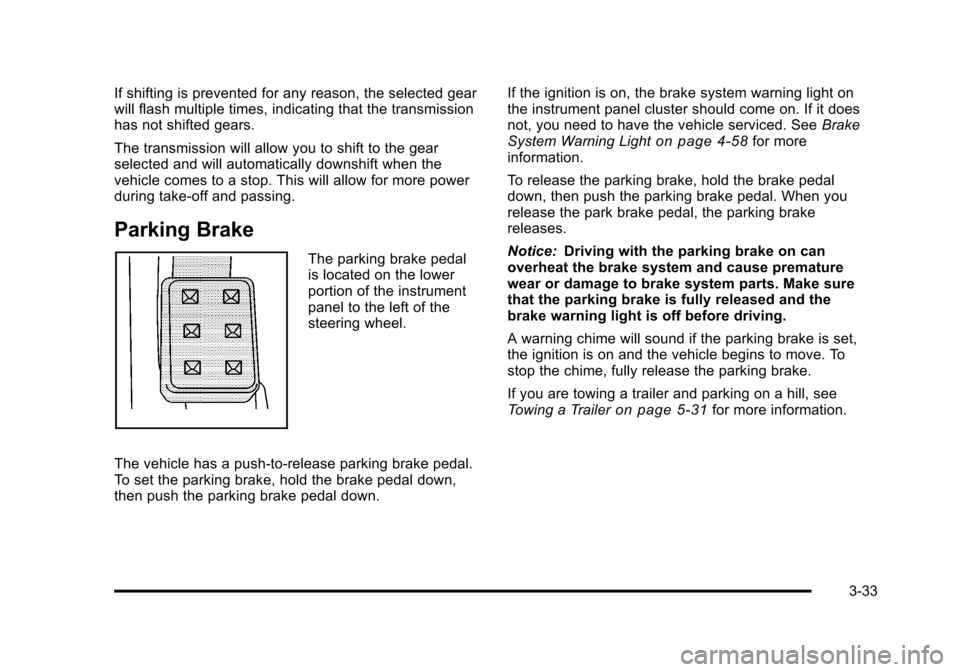
The parking brake pedal
is located on the lower
portion of the instrument
panel to the left of the
steering wheel.
The vehicle has a push-to-release parking brake pedal.
To set the parking brake, hold the brake pedal down,
then push the parking brake pedal down. If the ignition is on, the brake system warning light on
the instrument panel cluster should come on. If it does
not, you need to have the vehicle serviced. See
Brake
System Warning Light
on page 4‑58for more
information.
To release the parking brake, hold the brake pedal
down, then push the parking brake pedal. When you
release the park brake pedal, the parking brake
releases.
Notice: Driving with the parking brake on can
overheat the brake system and cause premature
wear or damage to brake system parts. Make sure
that the parking brake is fully released and the
brake warning light is off before driving.
A warning chime will sound if the parking brake is set,
the ignition is on and the vehicle begins to move. To
stop the chime, fully release the parking brake.
If you are towing a trailer and parking on a hill, see
Towing a Trailer
on page 5‑31for more information.
3-33
Page 140 of 528
Black plate (34,1)Cadillac STS Owner Manual - 2011
Shifting Into Park
{WARNING:
It can be dangerous to get out of the vehicle if the
shift lever is not fully in P (Park) with the parking
brake firmly set. The vehicle can roll. If you have
left the engine running, the vehicle can move
suddenly. You or others could be injured. To be
sure the vehicle will not move, even when you are
on fairly level ground, use the steps that follow.
If you are pulling a trailer, seeTowing a Trailer
on
page 5‑31
.
To shift into P (Park), use the following steps: 1. Hold the brake pedal down.
2. Move the shift lever into P (Park) by pressing the button on the front of the shift lever while pushing
the lever all the way toward the front of the vehicle.
Release the button.
3. With your foot still holding the brake pedal down, set the parking brake. See Parking Brake
on
page 3‑33for more information.
4. Turn the ignition off.
Leaving the Vehicle With the Engine
Running
{WARNING:
It can be dangerous to leave the vehicle with the
engine running. The vehicle could move suddenly
if the shift lever is not fully in P (Park) with the
parking brake firmly set. And, if you leave the
vehicle with the engine running, it could overheat
and even catch fire. You or others could be
injured. Do not leave the vehicle with the engine
running.
If you leave the vehicle with the engine running, the
vehicle must be in P (Park) and the parking brake set.
After shifting into P (Park), try to move the shift lever out
without first pushing the button on the shift lever. If you
can, the shift lever was not fully locked into P (Park).
3-34
Page 141 of 528
Black plate (35,1)Cadillac STS Owner Manual - 2011
Torque Lock
Torque lock is when the weight of the vehicle puts too
much force on the parking pawl in the transmission.
This happens when parking on a hill and shifting the
transmission into P (Park) is not done properly and then
it is difficult to shift out of P (Park). To prevent torque
lock, set the parking brake and then shift into P (Park).
To find out how, see“Shifting Into P (Park)” listed
previously.
If torque lock does occur, your vehicle may need to be
pushed uphill by another vehicle to relieve the parking
pawl pressure, so you can shift out of P (Park).
Shifting Out of Park
Shift lock release prevents shifting out of P (Park)
unless the vehicle is running or in Accessory mode and
the brake pedal is applied.
The shift lock release is always functional except in the
case of an uncharged or low voltage (less than 9‐volt)
battery. See Jump Starting
on page 6‑38for more
information. To shift out of P (Park) use the following:
1. Apply the brake pedal.
2. Press the shift lever button.
3. Move the shift lever to the desired position.
If you still are unable to shift out of P (Park): 1. Fully release the shift lever button.
2. While holding down the brake pedal, press the shift lever button again.
3. Move the shift lever to the desired position.
If you still cannot move the shift lever from P (Park),
consult your dealer or a professional towing service.
Parking Over Things That Burn
{WARNING:
Things that can burn could touch hot exhaust
parts under the vehicle and ignite. Do not park
over papers, leaves, dry grass, or other things that
can burn.
3-35
Page 142 of 528
Black plate (36,1)Cadillac STS Owner Manual - 2011
Engine Exhaust
{WARNING:
Engine exhaust contains Carbon Monoxide (CO)
which cannot be seen or smelled. Exposure to CO
can cause unconsciousness and even death.
Exhaust may enter the vehicle if:
.The vehicle idles in areas with poor ventilation
(parking garages, tunnels, deep snow that
may block underbody airflow or tail pipes).
.The exhaust smells or sounds strange or
different.
.The exhaust system leaks due to corrosion or
damage.
.The vehicle’s exhaust system has been
modified, damaged or improperly repaired.
.There are holes or openings in the vehicle
body from damage or after-market
modifications that are not completely sealed.(Continued)
WARNING: (Continued)
If unusual fumes are detected or if it is suspected
that exhaust is coming into the vehicle:
.Drive it only with the windows
completely down.
.Have the vehicle repaired immediately.
Never park the vehicle with the engine running in
an enclosed area such as a garage or a building
that has no fresh air ventilation.
Running the Vehicle While Parked
It is better not to park with the engine running. But if you
ever have to, here are some things to know.
{WARNING:
Idling a vehicle in an enclosed area with poor
ventilation is dangerous. Engine exhaust may
enter the vehicle. Engine exhaust contains
Carbon Monoxide (CO) which cannot be seen or
smelled. It can cause unconsciousness and even (Continued)
3-36
Page 143 of 528
Black plate (37,1)Cadillac STS Owner Manual - 2011
WARNING: (Continued)
death. Never run the engine in an enclosed area
that has no fresh air ventilation. For more
information, seeEngine Exhaust on page 3‑36.
{WARNING:
It can be dangerous to get out of the vehicle if the
automatic transmission shift lever is not fully in
P (Park) with the parking brake firmly set. The
vehicle can roll. Do not leave the vehicle when the
engine is running unless you have to. If you have
left the engine running, the vehicle can move
suddenly. You or others could be injured. To be
sure the vehicle will not move, even when you are
on fairly level ground, always set the parking
brake after you move the shift lever to P (Park).
Follow the proper steps to be sure the vehicle will not
move. See Shifting Into Park on page 3‑34.
If parking on a hill and pulling a trailer, see Towing a
Trailer on page 5‑31.
Mirrors
Automatic Dimming Rearview Mirror
The vehicle may have an inside rearview mirror with
automatic dimming and OnStar®controls; or it may
have OnStar®and a compass display. See the OnStar®
owner guide and/or Compasson page 3‑38for more
information.
O(On/Off): Press to turn the dimming feature on or off.
Automatic Dimming Mirror Operation
Automatic dimming reduces the glare of lights from
behind the vehicle. The dimming feature comes on and
the indicator light illuminates each time the vehicle is
started.
Cleaning the Mirror
Do not spray glass cleaner directly on the mirror. Use a
soft towel dampened with water.
3-37
Page 146 of 528
Black plate (40,1)Cadillac STS Owner Manual - 2011
Park Tilt Mirrors
This feature assists the driver by improving rear
obstacle detection and is useful in viewing the curb
when parallel parking.
The passenger and/or driver mirror tilts to a preselected
position when the vehicle is in R (Reverse). This feature
lets the driver view the curb when parallel parking.
If further adjustment is needed after the mirror is tilted,
the mirror switch may be used. The mirror then returns
to this new position when the vehicle is shifted into
R (Reverse).
When the vehicle is shifted out of R (Reverse), and a
five-second delay has occurred, the mirror will return to
its original position. The delay prevents movement of
the mirror if multiple gear transitions R (Reverse) to
D (Drive) to R (Reverse) occur during a parallel parking
maneuver.
If the outside mirror selector switch is in the middle
position, neither outside mirror will move.
Side Blind Zone Alert (SBZA)
If the vehicle has the Side Blind Zone Alert (SBZA)
system, seeSide Blind Zone Alert (SBZA)on
page 3‑44for more information.
Outside Convex Mirror
{WARNING:
A convex mirror can make things, like other
vehicles, look farther away than they really are.
If you cut too sharply into the right lane, you could
hit a vehicle on the right. Check the inside mirror
or glance over your shoulder before changing
lanes.
The passenger side mirror is convex shaped. A convex
mirror's surface is curved so more can be seen from the
driver seat.
Outside Heated Mirrors
For vehicles with this feature:
<(Rear Window Defogger): Press to heat the
mirrors. See “Rear Window Defogger” underDual
Climate Control System
on page 4‑43for more
information.
3-40
Page 147 of 528
Black plate (41,1)Cadillac STS Owner Manual - 2011
Object Detection Systems
Ultrasonic Rear Parking
Assist (URPA)
For vehicles with the URPA system, it operates at
speeds less than 3 mph (5 km/h), and assists the driver
with parking and avoiding objects while in R (Reverse).
The sensors on the rear bumper are used to detect the
distance to an object up to 5 feet (1.5 m) behind the
vehicle and at least 10 inches (25.4 cm) off the ground.
{WARNING:
The Ultrasonic Rear Parking Assist (URPA)
system does not replace driver vision. It cannot
detect:
.Objects that are below the bumper,
underneath the vehicle, or too close or far
from the vehicle
.Children, pedestrians, bicyclists, or pets.(Continued)
WARNING: (Continued)
If you do not use proper care before and while
backing, vehicle damage, injury, or death could
occur. Even with URPA, always check behind the
vehicle before backing up. While backing, be sure
to look for objects and check the vehicle's mirrors.
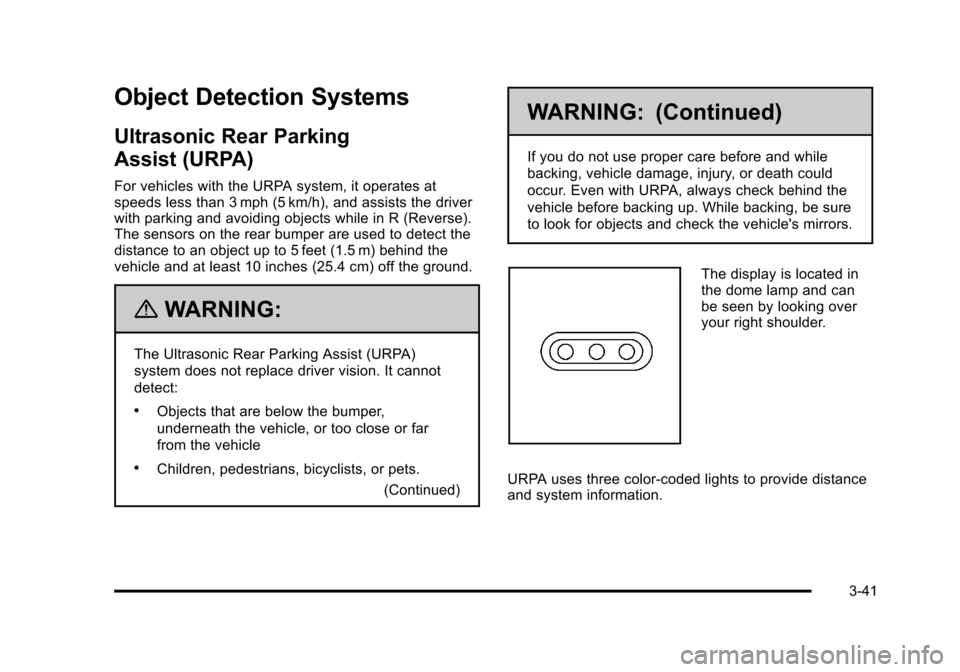
The display is located in
the dome lamp and can
be seen by looking over
your right shoulder.
URPA uses three color-coded lights to provide distance
and system information.
3-41
Page 150 of 528
Black plate (44,1)Cadillac STS Owner Manual - 2011
Side Blind Zone Alert (SBZA)
The vehicle may have a Side Blind Zone Alert (SBZA)
system. Read this entire section before using the
system.
{WARNING:
SBZA is only a lane changing aid and does not
replace driver vision. SBZA does not detect:
.Vehicles outside the side blind zones which
may be rapidly approaching.
.Pedestrians, bicyclists, or animals.
Failure to use proper care when changing lanes
may result in damage to the vehicle, injury,
or death. Always check the outside and rearview
mirrors, glance over your shoulder, and use the
turn signal before changing lanes.
The SBZA system is an aid that may help you avoid
lane change crashes with vehicles in the side blind
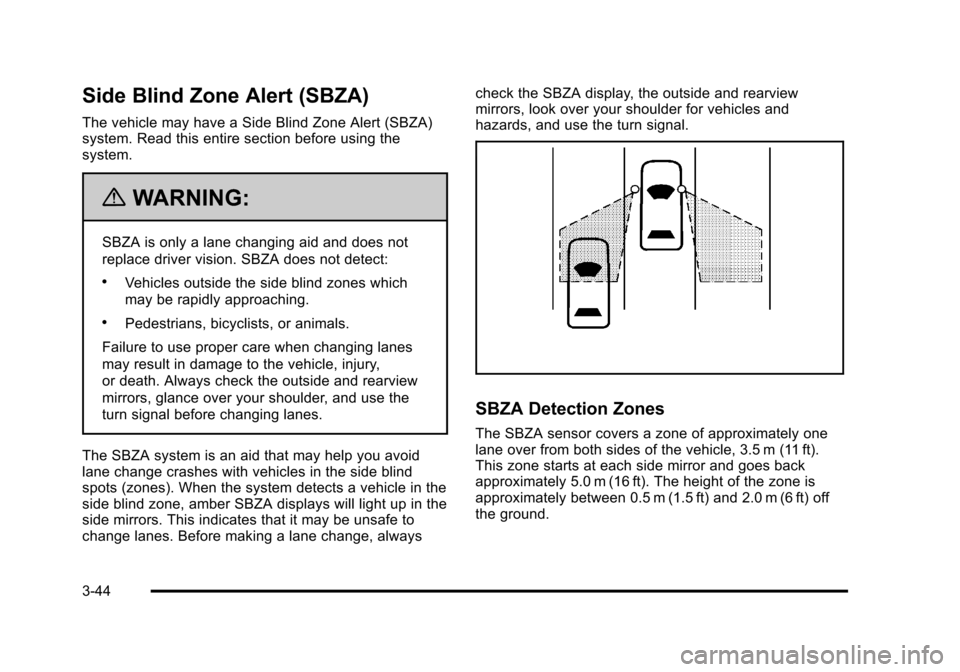
spots (zones). When the system detects a vehicle in the
side blind zone, amber SBZA displays will light up in the
side mirrors. This indicates that it may be unsafe to
change lanes. Before making a lane change, always check the SBZA display, the outside and rearview
mirrors, look over your shoulder for vehicles and
hazards, and use the turn signal.
SBZA Detection Zones
The SBZA sensor covers a zone of approximately one
lane over from both sides of the vehicle, 3.5 m (11 ft).
This zone starts at each side mirror and goes back
approximately 5.0 m (16 ft). The height of the zone is
approximately between 0.5 m (1.5 ft) and 2.0 m (6 ft) off
the ground.
3-44
Page 151 of 528
Black plate (45,1)Cadillac STS Owner Manual - 2011
The SBZA detection zones do not change if the vehicle
is towing a trailer. So be extra careful when changing
lanes while towing a trailer.
How the System Works
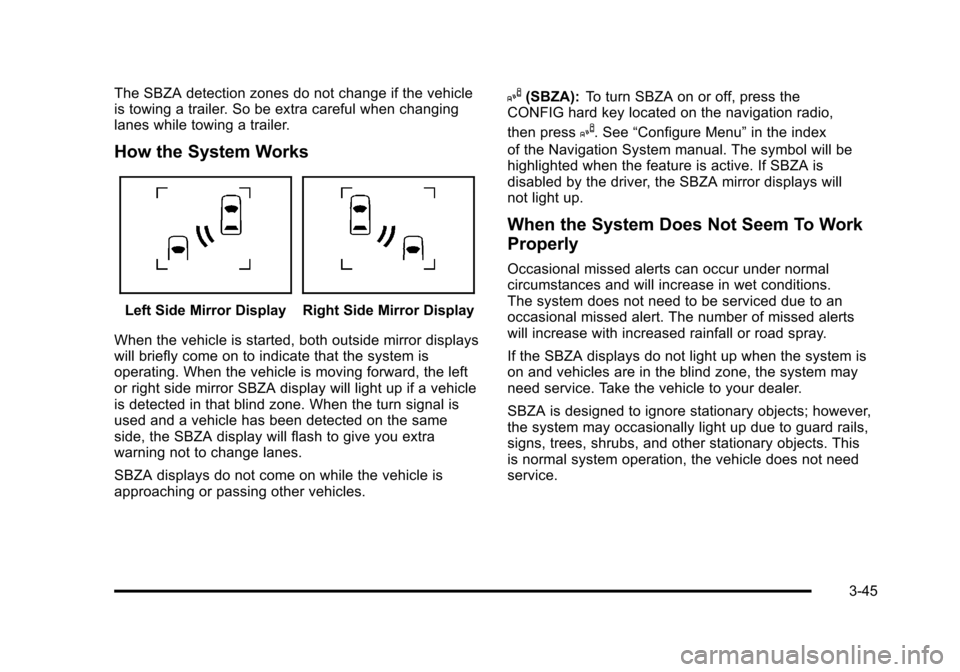
Left Side Mirror DisplayRight Side Mirror Display
When the vehicle is started, both outside mirror displays
will briefly come on to indicate that the system is
operating. When the vehicle is moving forward, the left
or right side mirror SBZA display will light up if a vehicle
is detected in that blind zone. When the turn signal is
used and a vehicle has been detected on the same
side, the SBZA display will flash to give you extra
warning not to change lanes.
SBZA displays do not come on while the vehicle is
approaching or passing other vehicles.
I(SBZA): To turn SBZA on or off, press the
CONFIG hard key located on the navigation radio,
then press
I. See “Configure Menu” in the index
of the Navigation System manual. The symbol will be
highlighted when the feature is active. If SBZA is
disabled by the driver, the SBZA mirror displays will
not light up.
When the System Does Not Seem To Work
Properly
Occasional missed alerts can occur under normal
circumstances and will increase in wet conditions.
The system does not need to be serviced due to an
occasional missed alert. The number of missed alerts
will increase with increased rainfall or road spray.
If the SBZA displays do not light up when the system is
on and vehicles are in the blind zone, the system may
need service. Take the vehicle to your dealer.
SBZA is designed to ignore stationary objects; however,
the system may occasionally light up due to guard rails,
signs, trees, shrubs, and other stationary objects. This
is normal system operation, the vehicle does not need
service.
3-45
Page 153 of 528
Black plate (47,1)Cadillac STS Owner Manual - 2011
Lane Departure Warning (LDW)
If the vehicle has the LDW system. Read this entire
section before using the system.
{WARNING:
The Lane Departure Warning (LDW) system does
not steer the vehicle and is only an aid to help you
stay in your driving lane. The LDW system
may not:
.Provide you with enough time to avoid a lane
change collision.
.Be loud enough for you to hear the warning
beeps.
.Work properly under bad weather conditions
or if the windshield is not kept clean.
.Detect lane markings and will not detect road
edges.
.Warn you that your vehicle is crossing a lane
marking if the system does not detect the lane
marking.(Continued)
WARNING: (Continued)
LDW will indicate the system is working whenever
it detects either the left or right lane marking. So if
you depart on the side of the lane that LDW is not
detecting, LDW will not warn you.
If you do not carefully maintain your vehicle
position within the lane, vehicle damage, injury,
or death could occur. Even with LDW, always
keep your attention on the road and maintain
proper vehicle position within the lane. Always
keep the windshield clean and do not use LDW in
bad weather conditions.
When the vehicle crosses a detected lane marking, the
LDW symbol will flash and you will hear three beeps.
LDW will not warn you if the turn signal is on or if the
vehicle makes a sharp maneuver. Before making a lane
change, check the vehicle's mirrors, glance over your
shoulder for vehicles and hazards, and turn on the turn
signal before changing lanes.
3-47