warning CADILLAC STS 2011 1.G Owners Manual
[x] Cancel search | Manufacturer: CADILLAC, Model Year: 2011, Model line: STS, Model: CADILLAC STS 2011 1.GPages: 528, PDF Size: 4.96 MB
Page 209 of 528
Black plate (23,1)Cadillac STS Owner Manual - 2011
Stationary or Very Slow-Moving Objects
{WARNING:
Adaptive Cruise Control may not detect and
react to stationary or slow‐moving vehicles or
other objects ahead of you. You could crash into
an object ahead of you. Do not use Adaptive
Cruise Control when approaching stationary or
slow‐moving vehicles or other objects.
{WARNING:
Adaptive Cruise Control may not detect and react
to stationary or slow-moving vehicles or other
objects ahead of you. Your vehicle may accelerate
toward objects, such as a stopped vehicle that
suddenly appears after the lead vehicle changes
lanes. Your complete attention is always required
while driving and you should be ready to take
action and apply the brakes.
Low-Speed Deactivation
If your speed falls below 40 km/h (25 mph) while
following a vehicle ahead, Adaptive Cruise Control will
begin to disengage. The driver alert symbol on the HUD
will flash and the warning beep will sound. The driver
must take action since Adaptive Cruise Control will not
slow the vehicle to a stop.
Deactivation When Head-Up Display is
Turned Off
If the HUD is turned off when Adaptive Cruise Control is
engaged, it will begin to disengage. A warning beep
sounds and the message RADAR CRUISE NOT
READY appears on the Driver Information Center (DIC).
SeeDIC Warnings and Messages
on page 4‑76for
additional information. If Adaptive Cruise Control was
braking when the HUD is turned off, the braking will
continue briefly.
4-23
Page 210 of 528
Black plate (24,1)Cadillac STS Owner Manual - 2011
Passing a Vehicle/Adaptive Cruise Control
Override
To increase speed to pass a vehicle, use the
accelerator pedal. While you are doing this, the system
will not automatically apply the brakes. A PEDAL
APPLIED ACC OVERRIDE message will appear on the
HUD. SeeHead-Up Display (HUD)
on page 4‑38for
additional information. Once you pass the vehicle and
remove your foot from the accelerator pedal, Adaptive
Cruise Control returns to normal operation and the
brakes can be applied, if needed.
{WARNING:
If you rest your foot on the accelerator pedal, the
system will not automatically apply the brakes.
You could crash into a vehicle ahead of you. Do
not rest your foot on the accelerator pedal when
using Adaptive Cruise Control.
Curves in the Road
{WARNING:
Due to Adaptive Cruise Control limitations in
curves, it may respond to a vehicle in another
lane, or may not have time to react to a vehicle in
your lane. You could crash into a vehicle ahead of
you, or lose control of your vehicle. Give extra
attention in curves and be ready to use the brakes
if necessary. Select an appropriate speed while
driving in curves.
Adaptive Cruise Control might operate differently in a
sharp curve. It might reduce your speed if the curve is
too sharp.
4-24
Page 212 of 528
Black plate (26,1)Cadillac STS Owner Manual - 2011
Highway Exit Ramps
{WARNING:
Adaptive Cruise Control may lose track of the
vehicle ahead and accelerate up to your set
speed while entering or on highway exit ramps.
You could be startled by this acceleration and
even lose control of the vehicle. Disengage
Adaptive Cruise Control before entering a
highway exit ramp. Do not use Adaptive Cruise
Control while entering or on exit ramps.
Other Vehicle Lane Changes
If another vehicle enters the same lane as you,
Adaptive Cruise Control will not detect the vehicle until
it is completely in the lane. Be ready to take action and
apply the brakes yourself.
Using Adaptive Cruise Controls on Hills
and When Towing a Trailer
How well Adaptive Cruise Control works on hills
and while a trailer is being towed depends on your
vehicle speed, vehicle load, traffic conditions, and the
steepness of the hills. It might not detect a vehicle in
your lane while driving on hills. While going up steep
hills, you might want to use the accelerator pedal to
maintain your vehicle speed. While going downhill and
towing a trailer, you might might have to brake to keep
the vehicle speed down. When the brakes are applied
the cruise control is disengaged. You may choose not to
use Adaptive Cruise Control on steep hills when towing
a trailer.
Disengaging Adaptive Cruise Control
Apply the brake pedal or move the Adaptive Cruise
Control switch to off, to disengage the system. Adaptive
Cruise Control information does not appear on the HUD
while the system is not engaged.
4-26
Page 213 of 528
Black plate (27,1)Cadillac STS Owner Manual - 2011
Erasing Set Speed Memory
The set speed memory is erased from memory by
moving the Adaptive Cruise Control switch to
9or if
the ignition is turned off.
Other Messages
There are three messages that may appear on the DIC.
They are SERVICE RADAR CRUISE, RADAR CRUISE
NOT READY and CLEAN RADAR. These messages
will appear to indicate a problem with the Adaptive
Cruise Control. See DIC Warnings and Messages
on
page 4‑76for more information.
Cleaning the System
The radar can become blocked by snow, ice, or dirt.
If this happens, turn off the engine and clean the
emblem/lens, located in the center of the front outside
grille. Do not use Adaptive Cruise Control in icy
conditions, or when visibility is low, such as in fog,
rain or snow.
To clean the emblem/lens, wipe the surface with a
soft cloth. After cleaning the emblem/lens, engage the
Adaptive Cruise Control. If there are problems, see your
dealer.
Headlamps
The exterior lamp control is located in the middle of the
turn signal/multifunction lever.
O (Exterior Lamp Control): Turn the control with this
symbol on it to operate the exterior lamps.
The exterior lamp control has four positions:
O(Off): Turns off all lamps and automatic lighting
features, including Daytime Running Lamps (DRL)
and IntelliBeam
®.
This is a momentary switch that springs back to the
AUTO position when released. An AUTOMATIC
LIGHTS ON message appears on the DIC when
automatic lights are enabled or an AUTOMATIC
LIGHTS OFF message appears on the DIC when
the automatic lights are disabled.
4-27
Page 217 of 528
Black plate (31,1)Cadillac STS Owner Manual - 2011
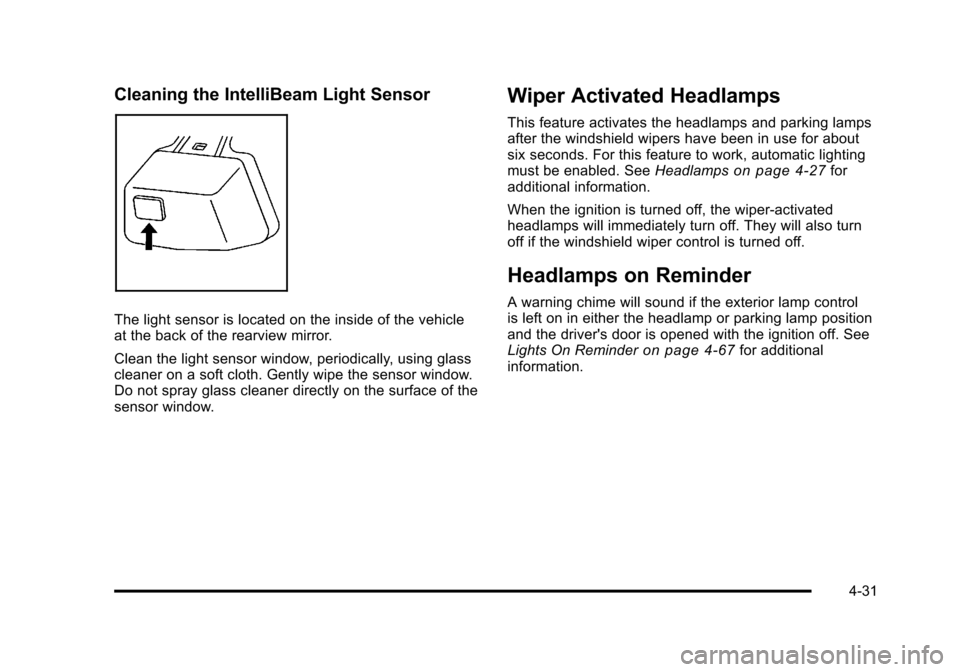
Cleaning the IntelliBeam Light Sensor
The light sensor is located on the inside of the vehicle
at the back of the rearview mirror.
Clean the light sensor window, periodically, using glass
cleaner on a soft cloth. Gently wipe the sensor window.
Do not spray glass cleaner directly on the surface of the
sensor window.
Wiper Activated Headlamps
This feature activates the headlamps and parking lamps
after the windshield wipers have been in use for about
six seconds. For this feature to work, automatic lighting
must be enabled. SeeHeadlamps
on page 4‑27for
additional information.
When the ignition is turned off, the wiper-activated
headlamps will immediately turn off. They will also turn
off if the windshield wiper control is turned off.
Headlamps on Reminder
A warning chime will sound if the exterior lamp control
is left on in either the headlamp or parking lamp position
and the driver's door is opened with the ignition off. See
Lights On Reminder
on page 4‑67for additional
information.
4-31
Page 218 of 528
Black plate (32,1)Cadillac STS Owner Manual - 2011
Daytime Running Lamps (DRL)
Daytime Running Lamps (DRL) can make it easier for
others to see the front of your vehicle during the day.
Fully functional daytime running lamps are required on
all vehicles first sold in Canada.
The DRL system comes on when the following
conditions are met:
.It is still daylight and the ignition is on.
.The automatic lights are enabled.
.The transmission is not in P (Park).
When DRL are on, only the front turn signal lamps will
be on. No other exterior lamps will be on when the DRL
are being used. The instrument panel will not be lit.
When the automatic lights are enabled and it is dark
enough outside, the DRL will turn off and the low-beam
headlamps will turn on. When it is bright enough
outside, the low-beam headlamps will go off, and the
DRL will turn back on. If the vehicle is started in a dark
garage, the automatic headlamp system comes on
immediately. Once the vehicle leaves the garage,
it will take about one minute for the automatic
headlamp system to change to DRL if it is light outside. During that delay, the instrument panel cluster may not
be as bright as usual. Make sure the instrument panel
brightness lever is in the full bright position. See
Instrument Panel Brightness on page 4‑35.
To operate the vehicle with the DRL off, turn the exterior
lamp control off and then do one of the following:
.Turn the exterior lamp control to the parking lamp
position.
.Turn the exterior lamp control to the headlamp
position.
.Turn the exterior lamp control from AUTO to off
and back to AUTO.
An AUTOMATIC LIGHTS OFF message will appear on
the DIC, showing that automatic lighting has been
disabled. See DIC Warnings and Messages
on
page 4‑76.
The regular headlamp system should be turned on
when needed.
4-32
Page 223 of 528
Black plate (37,1)Cadillac STS Owner Manual - 2011
speed. For more battery saving information, see
“Battery Saver Active Message”underDIC Warnings
and Messages on page 4‑76.
Electric Power Management
The vehicle has Electric Power Management (EPM) that
estimates the battery's temperature and state of charge.
It then adjusts the voltage for best performance and
extended life of the battery.
When the battery's state of charge is low, the voltage is
raised slightly to quickly bring the charge back up.
When the state of charge is high, the voltage is lowered
slightly to prevent overcharging. If the vehicle has a
voltmeter gauge or a voltage display on the Driver
Information Center (DIC), you may see the voltage
move up or down. This is normal. If there is a problem,
an alert will be displayed.
The battery can be discharged at idle if the electrical
loads are very high. This is true for all vehicles. This is
because the generator (alternator) may not be spinning
fast enough at idle to produce all the power that is
needed for very high electrical loads.
A high electrical load occurs when several of the
following are on, such as: headlamps, high beams, fog
lamps, rear window defogger, climate control fan at high
speed, heated seats, engine cooling fans, trailer loads,
and loads plugged into accessory power outlets. EPM works to prevent excessive discharge of the
battery. It does this by balancing the generator's output
and the vehicle's electrical needs. It can increase
engine idle speed to generate more power, whenever
needed. It can temporarily reduce the power demands
of some accessories.
Normally, these actions occur in steps or levels, without
being noticeable. In rare cases at the highest levels of
corrective action, this action may be noticeable to the
driver. If so, a Driver Information Center (DIC) message
might be displayed, such as BATTERY SAVER ACTIVE
or BATTERY VOLTAGE LOW. If this message is
displayed, it is recommended that the driver reduce the
electrical loads as much as possible. See
DIC Warnings
and Messages on page 4‑76.
Inadvertent Power Battery Saver
This feature is designed to protect the vehicle's battery
against drainage from the interior lamps, trunk lamp,
glove box lamp, or the garage door opener. When the
ignition is turned off, the power to these features will
automatically turn off after 10 minutes (three minutes if a
new car has 24 km (15 miles) or less). Power will be
restored for an additional 10 minutes if any door is
opened, the trunk is opened or the courtesy lamp switch
is turned on.
4-37
Page 224 of 528
Black plate (38,1)Cadillac STS Owner Manual - 2011
Head-Up Display (HUD)
{WARNING:
If the HUD image is too bright, or too high in your
field of view, it may take you more time to see
things you need to see when it is dark outside. Be
sure to keep the HUD image dim and placed low
in your field of view.
For vehicles with the Head-Up Display (HUD), some of
the driver information that appears on the instrument
panel cluster is projected onto an image on the
windshield.
The information can be displayed in English or metric
units. To change from English to metric units, see DIC
Operation and Displays on page 4‑70.
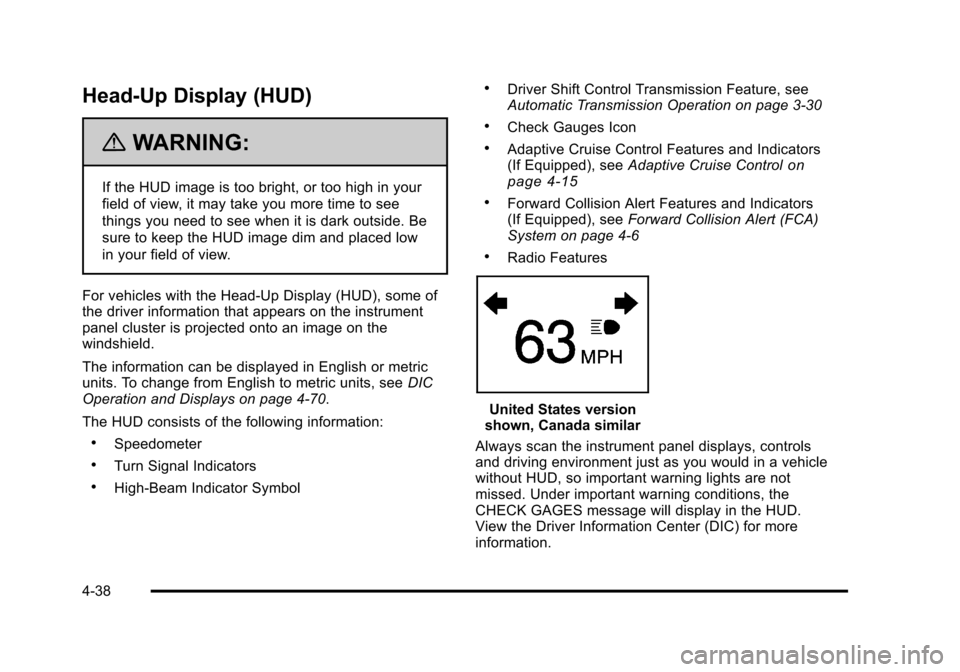
The HUD consists of the following information:
.Speedometer
.Turn Signal Indicators
.High-Beam Indicator Symbol
.Driver Shift Control Transmission Feature, see
Automatic Transmission Operation on page 3‑30
.Check Gauges Icon
.Adaptive Cruise Control Features and Indicators
(If Equipped), see Adaptive Cruise Controlon
page 4‑15
.Forward Collision Alert Features and Indicators
(If Equipped), see Forward Collision Alert (FCA)
System on page 4‑6
.Radio Features
United States version
shown, Canada similar
Always scan the instrument panel displays, controls
and driving environment just as you would in a vehicle
without HUD, so important warning lights are not
missed. Under important warning conditions, the
CHECK GAGES message will display in the HUD.
View the Driver Information Center (DIC) for more
information.
4-38
Page 228 of 528
Black plate (42,1)Cadillac STS Owner Manual - 2011
Accessory Power Outlet(s)
Accessory power outlets can be used to plug in
electrical equipment, such as a cell phone or MP3
player.
The vehicle has one outlet in front of the center
console, one in the center console lid and there may be
an additional outlet in the rear of the center console.
The vehicle may have a small cap that must be
removed to access the accessory power outlet.
Replace the cap when not in use. use.
{WARNING:
Power is always supplied to the outlets. Do not
leave electrical equipment plugged in when the
vehicle is not in use because the vehicle could
catch fire and cause injury or death.Notice:
Leaving electrical equipment plugged in for
an extended period of time while the vehicle is off
will drain the battery. Always unplug electrical
equipment when not in use and do not plug in
equipment that exceeds the maximum 20 ampere
rating.
Certain accessory power plugs may not be compatible
to the accessory power outlet and could overload
vehicle and adapter fuses. If a problem is experienced,
see your dealer.
When adding electrical equipment, be sure to follow
the proper installation instructions included with the
equipment. See Add-On Electrical Equipment
on
page 6‑114.
Notice: Hanging heavy equipment from the power
outlet can cause damage not covered by the vehicle
warranty. The power outlets are designed for
accessory power plugs only, such as cell phone
charge cords.
4-42
Page 237 of 528
Black plate (51,1)Cadillac STS Owner Manual - 2011
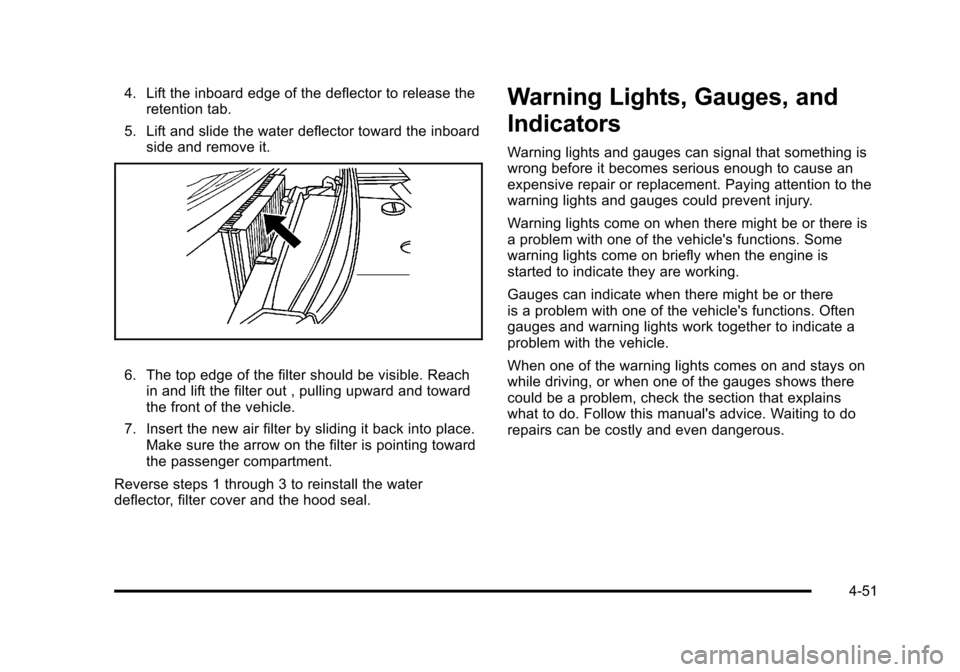
4. Lift the inboard edge of the deflector to release theretention tab.
5. Lift and slide the water deflector toward the inboard side and remove it.
6. The top edge of the filter should be visible. Reachin and lift the filter out , pulling upward and toward
the front of the vehicle.
7. Insert the new air filter by sliding it back into place. Make sure the arrow on the filter is pointing toward
the passenger compartment.
Reverse steps 1 through 3 to reinstall the water
deflector, filter cover and the hood seal.
Warning Lights, Gauges, and
Indicators
Warning lights and gauges can signal that something is
wrong before it becomes serious enough to cause an
expensive repair or replacement. Paying attention to the
warning lights and gauges could prevent injury.
Warning lights come on when there might be or there is
a problem with one of the vehicle's functions. Some
warning lights come on briefly when the engine is
started to indicate they are working.
Gauges can indicate when there might be or there
is a problem with one of the vehicle's functions. Often
gauges and warning lights work together to indicate a
problem with the vehicle.
When one of the warning lights comes on and stays on
while driving, or when one of the gauges shows there
could be a problem, check the section that explains
what to do. Follow this manual's advice. Waiting to do
repairs can be costly and even dangerous.
4-51