warning light CADILLAC STS 2011 1.G Repair Manual
[x] Cancel search | Manufacturer: CADILLAC, Model Year: 2011, Model line: STS, Model: CADILLAC STS 2011 1.GPages: 528, PDF Size: 4.96 MB
Page 387 of 528
Black plate (37,1)Cadillac STS Owner Manual - 2011
{WARNING:
The brake wear warning sound means that soon
the brakes will not work well. That could lead to a
crash. When the brake wear warning sound is
heard, have the vehicle serviced.
Notice: Continuing to drive with worn-out brake
pads could result in costly brake repair.
Some driving conditions or climates can cause a brake
squeal when the brakes are first applied or lightly
applied. This does not mean something is wrong with
the brakes.
Properly torqued wheel nuts are necessary to help
prevent brake pulsation. When tires are rotated, inspect
brake pads for wear and evenly tighten wheel nuts in
the proper sequence to torque specifications in
Capacities and Specifications on page 6‑128.
Brake linings should always be replaced as complete
axle sets.
Brake Pedal Travel
See your dealer if the brake pedal does not return to
normal height, or if there is a rapid increase in pedal
travel. This could be a sign that brake service might be
required.
Brake Adjustment
Every time the brakes are applied, with or without the
vehicle moving, the brakes adjust for wear.
Replacing Brake System Parts
The braking system on a vehicle is complex. Its many
parts have to be of top quality and work well together if
the vehicle is to have really good braking. The vehicle
was designed and tested with top-quality brake parts.
When parts of the braking system are replaced —for
example, when the brake linings wear down and new
ones are installed —be sure to get new approved
replacement parts. If this is not done, the brakes might
not work properly. For example, if someone puts in
brake linings that are wrong for the vehicle, the balance
between the front and rear brakes can change —for the
worse. The braking performance expected can change
in many other ways if the wrong replacement brake
parts are installed.
6-37
Page 391 of 528
Black plate (41,1)Cadillac STS Owner Manual - 2011
{WARNING:
Using an open flame near a battery can cause
battery gas to explode. People have been hurt
doing this, and some have been blinded. Use a
flashlight if you need more light.
Be sure the battery has enough water. You do not
need to add water to the battery installed in your
new vehicle. But if a battery has filler caps, be
sure the right amount of fluid is there. If it is low,
add water to take care of that first. If you do not,
explosive gas could be present.
Battery fluid contains acid that can burn you. Do
not get it on you. If you accidentally get it in your
eyes or on your skin, flush the place with water
and get medical help immediately.
{WARNING:
Fans or other moving engine parts can injure you
badly. Keep your hands away from moving parts
once the engine is running.
5. Check that the jumper cables do not have loose or missing insulation. If they do, you could get a
shock. The vehicles could be damaged too.
Before you connect the cables, here are some
basic things you should know. Positive (+) will go to
positive (+) or to a remote positive (+) terminal if
the vehicle has one. Negative (−) will go to a
heavy, unpainted metal engine part or to a remote
negative (−) terminal if the vehicle has one.
Do not connect positive (+) to negative (−) or you
will get a short that would damage the battery and
maybe other parts too. And do not connect the
negative (−) cable to the negative (−) terminal on
the dead battery because this can cause sparks.
6-41
Page 397 of 528
Black plate (47,1)Cadillac STS Owner Manual - 2011
Bulb Replacement
For the proper type of replacement bulbs, see
Replacement Bulbs on page 6‑48.
For any bulb changing procedure not listed in this
section, contact your dealer.
High Intensity Discharge (HID)
Lighting
{WARNING:
The low beam high intensity discharge lighting
system operates at a very high voltage. If you try
to service any of the system components, you
could be seriously injured. Have your dealer or a
qualified technician service them.The vehicle may have HID headlamps. After an HID
headlamp bulb has been replaced, you may notice that
the beam is a slightly different shade than it was
originally. This is normal.
Halogen Bulbs
{WARNING:
Halogen bulbs have pressurized gas inside and
can burst if you drop or scratch the bulb. You or
others could be injured. Be sure to read and
follow the instructions on the bulb package.
6-47
Page 412 of 528
Black plate (62,1)Cadillac STS Owner Manual - 2011
Tire Pressure Monitor Operation
This vehicle may have a Tire Pressure Monitor System
(TPMS). The TPMS is designed to warn the driver when
a low tire pressure condition exists. TPMS sensors are
mounted onto each tire and wheel assembly, excluding
the spare tire and wheel assembly, if the vehicle has
one. The TPMS sensors monitor the air pressure in the
vehicle's tires and transmits the tire pressure readings
to a receiver located in the vehicle.
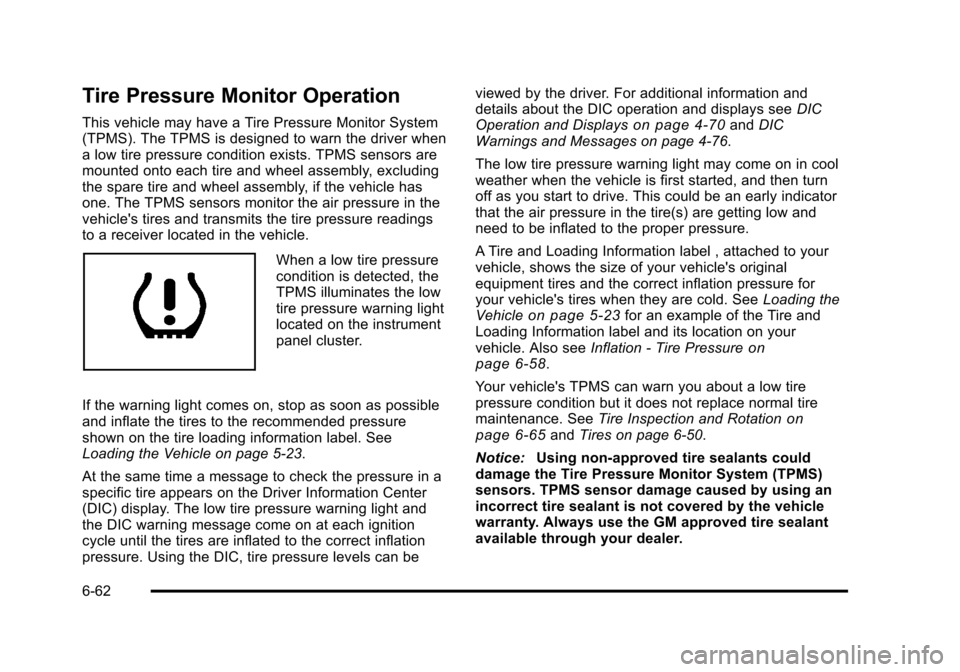
When a low tire pressure
condition is detected, the
TPMS illuminates the low
tire pressure warning light
located on the instrument
panel cluster.
If the warning light comes on, stop as soon as possible
and inflate the tires to the recommended pressure
shown on the tire loading information label. See
Loading the Vehicle on page 5‑23.
At the same time a message to check the pressure in a
specific tire appears on the Driver Information Center
(DIC) display. The low tire pressure warning light and
the DIC warning message come on at each ignition
cycle until the tires are inflated to the correct inflation
pressure. Using the DIC, tire pressure levels can be viewed by the driver. For additional information and
details about the DIC operation and displays see
DIC
Operation and Displays
on page 4‑70and DIC
Warnings and Messages on page 4‑76.
The low tire pressure warning light may come on in cool
weather when the vehicle is first started, and then turn
off as you start to drive. This could be an early indicator
that the air pressure in the tire(s) are getting low and
need to be inflated to the proper pressure.
A Tire and Loading Information label , attached to your
vehicle, shows the size of your vehicle's original
equipment tires and the correct inflation pressure for
your vehicle's tires when they are cold. See Loading the
Vehicle
on page 5‑23for an example of the Tire and
Loading Information label and its location on your
vehicle. Also see Inflation - Tire Pressure
on
page 6‑58.
Your vehicle's TPMS can warn you about a low tire
pressure condition but it does not replace normal tire
maintenance. See Tire Inspection and Rotation
on
page 6‑65and Tires on page 6‑50.
Notice: Using non‐approved tire sealants could
damage the Tire Pressure Monitor System (TPMS)
sensors. TPMS sensor damage caused by using an
incorrect tire sealant is not covered by the vehicle
warranty. Always use the GM approved tire sealant
available through your dealer.
6-62
Page 413 of 528
Black plate (63,1)Cadillac STS Owner Manual - 2011
Factory-installed Tire Inflator Kits use a GM approved
liquid tire sealant. Using non-approved tire sealants
could damage the TPMS sensors. SeeTire Sealant and
Compressor Kit (Without Selector Switch)
on
page 6‑76or Tire Sealant and Compressor Kit (With
Selector Switch)on page 6‑85for information
regarding the inflator kit materials and instructions.
TPMS Malfunction Light and Message
The TPMS will not function properly if one or more of
the TPMS sensors are missing or inoperable. When the
system detects a malfunction, the low tire warning light
flashes for about one minute and then stays on for the
remainder of the ignition cycle. A DIC warning message
is also displayed. The low tire warning light and DIC
warning message come on at each ignition cycle until
the problem is corrected. Some of the conditions that
can cause the malfunction light and DIC message to
come on are:
.One of the road tires has been replaced with the
spare tire, if the vehicle has one. The spare tire
does not have a TPMS sensor. The DIC message
should go off once you re‐install the road tire
containing the TPMS sensor.
.The TPMS sensor matching process was started
but not completed or not completed successfully
after rotating the vehicle's tires. The DIC message
and TPMS malfunction light should go off once the
TPMS sensor matching process is performed
successfully. See “TPMS Sensor Matching
Process” later in this section.
.One or more TPMS sensors are missing or
damaged. The DIC message and the TPMS
malfunction light should go off when the TPMS
sensors are installed and the sensor matching
process is performed successfully. See your dealer
for service.
.Replacement tires or wheels do not match your
vehicle's original equipment tires or wheels. Tires
and wheels other than those recommended for
your vehicle could prevent the TPMS from
functioning properly. See Buying New Tires
on
page 6‑67.
.Operating electronic devices or being near facilities
using radio wave frequencies similar to the TPMS
could cause the TPMS sensors to malfunction.
If the TPMS is not functioning it cannot detect or signal
a low tire condition. See your dealer for service if the
TPMS malfunction light and DIC message comes on
and stays on.
6-63
Page 416 of 528
Black plate (66,1)Cadillac STS Owner Manual - 2011
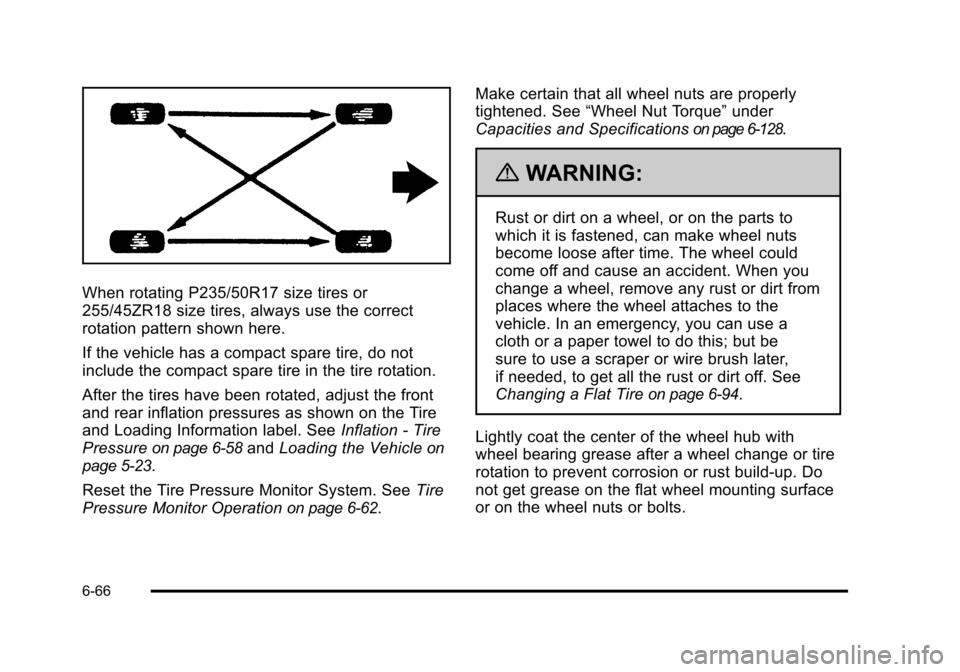
When rotating P235/50R17 size tires or
255/45ZR18 size tires, always use the correct
rotation pattern shown here.
If the vehicle has a compact spare tire, do not
include the compact spare tire in the tire rotation.
After the tires have been rotated, adjust the front
and rear inflation pressures as shown on the Tire
and Loading Information label. SeeInflation - Tire
Pressure
on page 6‑58and Loading the Vehicleon
page 5‑23
.
Reset the Tire Pressure Monitor System. See Tire
Pressure Monitor Operation
on page 6‑62. Make certain that all wheel nuts are properly
tightened. See
“Wheel Nut Torque” under
Capacities and Specifications
on page 6‑128.
{WARNING:
Rust or dirt on a wheel, or on the parts to
which it is fastened, can make wheel nuts
become loose after time. The wheel could
come off and cause an accident. When you
change a wheel, remove any rust or dirt from
places where the wheel attaches to the
vehicle. In an emergency, you can use a
cloth or a paper towel to do this; but be
sure to use a scraper or wire brush later,
if needed, to get all the rust or dirt off. See
Changing a Flat Tire
on page 6‑94.
Lightly coat the center of the wheel hub with
wheel bearing grease after a wheel change or tire
rotation to prevent corrosion or rust build-up. Do
not get grease on the flat wheel mounting surface
or on the wheel nuts or bolts.
6-66
Page 439 of 528
Black plate (89,1)Cadillac STS Owner Manual - 2011
If a tire goes flat, avoid further tire and wheel damage
by driving slowly to a level place. Turn on the hazard
warning flashers. SeeHazard Warning Flashers
on
page 4‑3.
See If a Tire Goes Flat
on page 6‑74for other
important safety warnings.
Do not remove any objects that have penetrated
the tire.
1. Remove the tire sealant and compressor kit from its storage location. See Tire Sealant and
Compressor Kit Storage on page 6‑94.
2. Unwrap the sealant/air hose (F) and the power plug (H).
3. Place the kit on the ground.
4. Remove the valve stem cap from the flat tire by turning it counterclockwise.
5. Attach the sealant/air hose (F) onto the tire valve stem. Turn it clockwise until it is tight. 6. Plug the power plug (H) into the accessory power
outlet in the vehicle. Unplug all items from other
accessory power outlets. See Accessory Power
Outlet(s) on page 4‑42.
If the vehicle has an accessory power outlet, do
not use the cigarette lighter.
If the vehicle only has a cigarette lighter, use the
cigarette lighter.
Do not pinch the power plug cord in the door or
window.
7. Start the vehicle. The vehicle must be running while using the air compressor.
8. Turn the selector switch (A) counterclockwise to the Sealant + Air position.
9. Press the on/off (B) button to turn the tire sealant and compressor kit on.
The compressor will inject sealant and air into
the tire.
The pressure gauge (C) will initially show a high
pressure while the compressor pushes the sealant
into the tire. Once the sealant is completely
dispersed into the tire, the pressure will quickly
drop and start to rise again as the tire inflates with
air only.
6-89
Page 442 of 528

Black plate (92,1)Cadillac STS Owner Manual - 2011
SeeIf a Tire Goes Flaton page 6‑74for other
important safety warnings.
1. Remove the tire sealant and compressor kit from its storage location. See Tire Sealant and
Compressor Kit Storage on page 6‑94.
2. Unwrap the air only hose (G) and the power plug (H).
3. Place the kit on the ground.
4. Remove the tire valve stem cap from the flat tire by turning it counterclockwise.
5. Attach the air only hose (G) onto the tire valve stem by turning it clockwise until it is tight.
6. Plug the power plug (H) into the accessory power outlet in the vehicle. Unplug all items from other
accessory power outlets. See Accessory Power
Outlet(s) on page 4‑42.
If the vehicle has an accessory power outlet, do
not use the cigarette lighter.
If the vehicle only has a cigarette lighter, use the
cigarette lighter.
Do not pinch the power plug cord in the door or
window.
7. Start the vehicle. The vehicle must be running while using the air compressor.
8. Turn the selector switch (A) clockwise to the Air Only position. 9. Press the on/off (B) button to turn the
compressor on.
The compressor will inflate the tire with air only.
10. Inflate the tire to the recommended inflation pressure using the pressure gauge (C). The
recommended inflation pressure can be found on
the Tire and Loading Information label. See
Inflation - Tire Pressure on page 6‑58.
The pressure gauge (C) may read higher than the
actual tire pressure while the compressor is on.
Turn the compressor off to get an accurate
reading. The compressor may be turned on/off until
the correct pressure is reached.
If you inflate the tire higher than the recommended
pressure you can adjust the excess pressure by
pressing the pressure deflation button (D) until the
proper pressure reading is reached. This option is
only functional when using the air only hose (G).
11. Press the on/off button (B) to turn the tire sealant and compressor kit off.
Be careful while handling the tire sealant and
compressor kit as it could be warm after usage.
12. Unplug the power plug (H) from the accessory power outlet in the vehicle.
13. Disconnect the air only hose (G) from the tire valve stem, by turning it counterclockwise, and replace
the tire valve stem cap.
6-92
Page 459 of 528
Black plate (109,1)Cadillac STS Owner Manual - 2011
Wood Panels
Use a clean cloth moistened in warm, soapy water (use
mild dish washing soap). Dry the wood immediately with
a clean cloth.
Speaker Covers
Vacuum around a speaker cover gently, so that the
speaker will not be damaged. Clean spots with just
water and mild soap.
Care of Safety Belts
Keep belts clean and dry.
{WARNING:
Do not bleach or dye safety belts. It may severely
weaken them. In a crash, they might not be able
to provide adequate protection. Clean safety belts
only with mild soap and lukewarm water.
Weatherstrips
Silicone grease on weatherstrips will make them last
longer, seal better, and not stick or squeak. Apply
silicone grease with a clean cloth. During very cold,
damp weather frequent application may be required.
SeeRecommended Fluids and Lubricants
on
page 7‑9.
Washing Your Vehicle
The best way to preserve the vehicle's finish is to keep
it clean by washing it often.
Notice: Certain cleaners contain chemicals that can
damage the emblems or nameplates on the vehicle.
Check the cleaning product label. If it states that it
should not be used on plastic parts, do not use it on
the vehicle or damage may occur and it would not
be covered by the warranty.
Do not wash the vehicle in direct sunlight. Use a car
washing soap. Do not use cleaning agents that are
petroleum based or that contain acid or abrasives, as
they can damage the paint, metal or plastic on the
vehicle. Approved cleaning products can be obtained
from your dealer. Follow all manufacturers' directions
regarding correct product usage, necessary safety
precautions and appropriate disposal of any vehicle
care product.
6-109
Page 515 of 528

Black plate (1,1)Cadillac STS Owner Manual - 2011
A
Accessories and Modifications . . . . . . . . . . . . . . . . . . . . . . .6-4
Accessory Power . . . . . . . . . . . . . . . . . . . . . . . . . . . . . . . . . . 3-27
Accessory Power Outlets . . . . . . . . . . . . . . . . . . . . . . . . . . 4-42
Adaptive Cruise Control . . . . . . . . . . . . . . . . . . . . . . . . . . . 4-15
Add-On Electrical Equipment . . . . . . . . . . . . . . . . . . . . . 6-114
Additives, Fuel . . . . . . . . . . . . . . . . . . . . . . . . . . . . . . . . . . . . . . .6-7
AdjustmentsHeadlamp Range . . . . . . . . . . . . . . . . . . . . . . . . . . . . . . . . . 2-12
Air Cleaner/Filter, Engine . . . . . . . . . . . . . . . . . . . . . . . . . . 6-21
Air Filter, Passenger Compartment . . . . . . . . . . . . . . . . 4-50
Airbag Adding Equipment to Your Airbag-EquippedVehicle . . . . . . . . . . . . . . . . . . . . . . . . . . . . . . . . . . . . . . . . . . 2-71
Airbag System How Does an Airbag Restrain? . . . . . . . . . . . . . . . . . . . 2-63
Passenger Sensing System . . . . . . . . . . . . . . . . . . . . . . 2-66
Servicing Your Airbag-Equipped Vehicle . . . . . . . . . . 2-70
What Makes an Airbag Inflate? . . . . . . . . . . . . . . . . . . . 2-63
What Will You See After an Airbag Inflates? . . . . . . 2-64
When Should an Airbag Inflate? . . . . . . . . . . . . . . . . . . 2-62
Where Are the Airbags? . . . . . . . . . . . . . . . . . . . . . . . . . . 2-59
Airbags Passenger Status Indicator . . . . . . . . . . . . . . . . . . . . . . . 4-55
Readiness Light . . . . . . . . . . . . . . . . . . . . . . . . . . . . . . . . . . 4-54
System Check . . . . . . . . . . . . . . . . . . . . . . . . . . . . . . . . . . . . 2-57
All-Wheel Drive . . . . . . . . . . . . . . . . . . . . . . . . . . . . . . . . . . . . 6-43 All-Wheel-Drive (AWD) System . . . . . . . . . . . . . . . . . . . . 5-11
Antenna
Backglass . . . . . . . . . . . . . . . . . . . . . . . . . . . . . . . . . . . . . . .4-126
Antenna, XM™ Satellite Radio Antenna
System . . . . . . . . . . . . . . . . . . . . . . . . . . . . . . . . . . . . . . . . . . 4-126
Antilock Brake System (ABS) . . . . . . . . . . . . . . . . . . . . . . . .5-5 Warning Light . . . . . . . . . . . . . . . . . . . . . . . . . . . . . . . . . . . . . 4-59
Appearance Care Aluminum or Chrome-Plated Wheels . . . . . . . . . . . . 6-112
Care of Safety Belts . . . . . . . . . . . . . . . . . . . . . . . . . . . . .6-109
Chemical Paint Spotting . . . . . . . . . . . . . . . . . . . . . . . . . 6-113
Cleaning Exterior Lamps/Lenses . . . . . . . . . . . . . . . . 6-110
Fabric/Carpet . . . . . . . . . . . . . . . . . . . . . . . . . . . . . . . . . . . .6-107
Finish Care . . . . . . . . . . . . . . . . . . . . . . . . . . . . . . . . . . . . . . 6-110
Finish Damage . . . . . . . . . . . . . . . . . . . . . . . . . . . . . . . . . . 6-113
Instrument Panel, Vinyl, and Other PlasticSurfaces . . . . . . . . . . . . . . . . . . . . . . . . . . . . . . . . . . . . . . .6-108
Interior Cleaning . . . . . . . . . . . . . . . . . . . . . . . . . . . . . . . . .6-106
Leather . . . . . . . . . . . . . . . . . . . . . . . . . . . . . . . . . . . . . . . . . .6-108
Sheet Metal Damage . . . . . . . . . . . . . . . . . . . . . . . . . . . . 6-113
Speaker Covers . . . . . . . . . . . . . . . . . . . . . . . . . . . . . . . . .6-109
Tires . . . . . . . . . . . . . . . . . . . . . . . . . . . . . . . . . . . . . . . . . . . . . 6-113
Underbody Maintenance . . . . . . . . . . . . . . . . . . . . . . . . . 6-113
Washing Your Vehicle . . . . . . . . . . . . . . . . . . . . . . . . . . .6-109
Weatherstrips . . . . . . . . . . . . . . . . . . . . . . . . . . . . . . . . . . . .6-109
Windshield and Wiper Blades . . . . . . . . . . . . . . . . . . . . 6-111
Wood Panels . . . . . . . . . . . . . . . . . . . . . . . . . . . . . . . . . . . .6-109
i - 1