center console CADILLAC STS 2011 1.G Owners Manual
[x] Cancel search | Manufacturer: CADILLAC, Model Year: 2011, Model line: STS, Model: CADILLAC STS 2011 1.GPages: 528, PDF Size: 4.96 MB
Page 15 of 528
Black plate (9,1)Cadillac STS Owner Manual - 2011
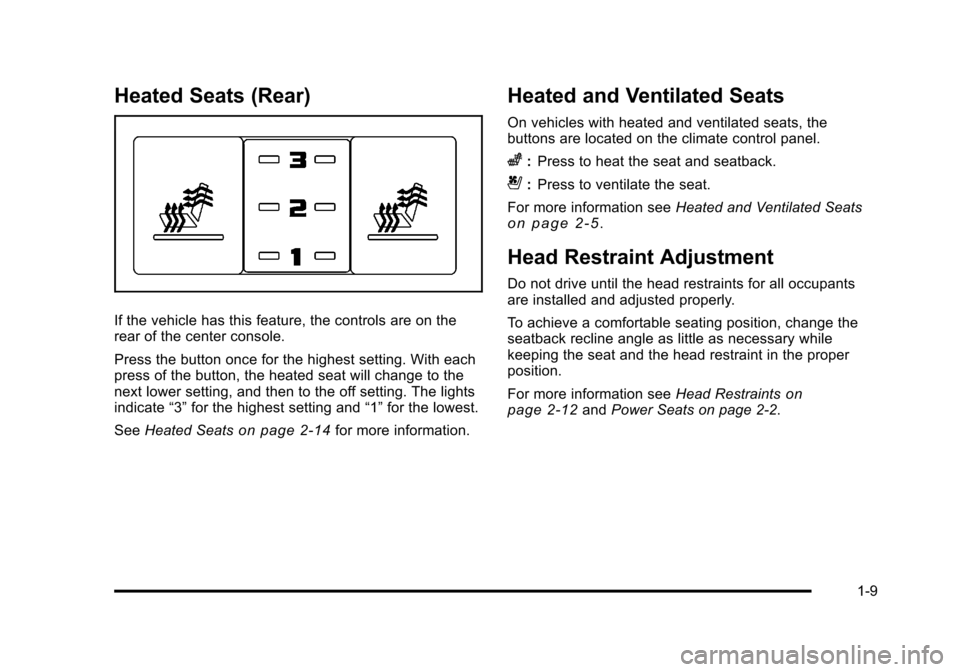
Heated Seats (Rear)
If the vehicle has this feature, the controls are on the
rear of the center console.
Press the button once for the highest setting. With each
press of the button, the heated seat will change to the
next lower setting, and then to the off setting. The lights
indicate“3”for the highest setting and “1”for the lowest.
See Heated Seats
on page 2‑14for more information.
Heated and Ventilated Seats
On vehicles with heated and ventilated seats, the
buttons are located on the climate control panel.
z:Press to heat the seat and seatback.
{:Press to ventilate the seat.
For more information see Heated and Ventilated Seats
on page 2‑5.
Head Restraint Adjustment
Do not drive until the head restraints for all occupants
are installed and adjusted properly.
To achieve a comfortable seating position, change the
seatback recline angle as little as necessary while
keeping the seat and the head restraint in the proper
position.
For more information seeHead Restraints
on
page 2‑12and Power Seats on page 2‑2.
1-9
Page 27 of 528
Black plate (21,1)Cadillac STS Owner Manual - 2011
Power Outlets
Accessory power outlets can be used to plug in
electrical equipment, such as a cellphone or MP3
player.
The vehicle has one outlet in front of the center
console, one in the center console lid and there may be
an additional outlet in the rear of the center console.
SeeAccessory Power Outlet(s) on page 4‑42.
Performance and Maintenance
Traction Control System (TCS)
The traction control system limits wheel spin. The
system turns on automatically every time the vehicle is
started.
.To turn off traction control, press and release thetbutton located on the console.iilluminates
when the system is turned off.
For more information, see Traction Control System
(TCS) on page 5‑9.
StabiliTrak®System
The StabiliTrak system assists with directional control of
the vehicle in difficult driving conditions. The system
turns on automatically every time the vehicle is started.
.To turn off both Traction Control and StabiliTrak,
press and hold
t, located on the console,
until
iilluminates and the appropriate DIC
message displays. See DIC Warnings and
Messages on page 4‑76.
.Press and release the button again to turn on both
systems.
For more information, see StabiliTrak
®Systemon
page 5‑6.
1-21
Page 46 of 528
Black plate (14,1)Cadillac STS Owner Manual - 2011
Rear Seats
Heated Seats
{WARNING:
If you cannot feel temperature change or pain to
the skin, the seat heater may cause burns even at
low temperatures. See the Warning underHeated
Seats on page 2‑4.
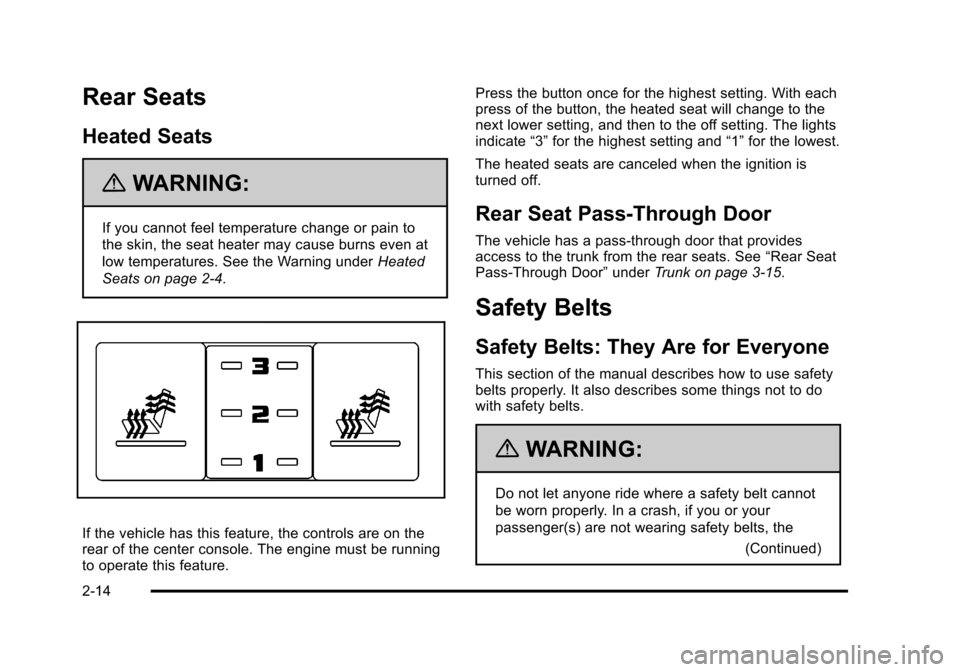
If the vehicle has this feature, the controls are on the
rear of the center console. The engine must be running
to operate this feature. Press the button once for the highest setting. With each
press of the button, the heated seat will change to the
next lower setting, and then to the off setting. The lights
indicate
“3”for the highest setting and “1”for the lowest.
The heated seats are canceled when the ignition is
turned off.
Rear Seat Pass-Through Door
The vehicle has a pass‐through door that provides
access to the trunk from the rear seats. See “Rear Seat
Pass‐Through Door” underTrunk on page 3‑15.
Safety Belts
Safety Belts: They Are for Everyone
This section of the manual describes how to use safety
belts properly. It also describes some things not to do
with safety belts.
{WARNING:
Do not let anyone ride where a safety belt cannot
be worn properly. In a crash, if you or your
passenger(s) are not wearing safety belts, the
(Continued)
2-14
Page 108 of 528
Black plate (2,1)Cadillac STS Owner Manual - 2011
Section 3 Features and Controls
Object Detection Systems. . . . . . . . . . . . . . . . . . . . . . .3-41
Ultrasonic Rear Parking Assist (URPA) . . . . . . . . 3-41
Side Blind Zone Alert (SBZA) . . . . . . . . . . . . . . . . . . 3-44
Lane Departure Warning (LDW) . . . . . . . . . . . . . . . 3-47
Universal Home Remote System . . . . . . . . . . . . . . . .3-49
Universal Home Remote System Operation (With Three Round LED) . . . . . . . . . . . . . . . . . . . . 3-49 Storage Areas
. . . . . . . . . . . . . . . . . . . . . . . . . . . . . . . . . . . . 3-56
Glove Box . . . . . . . . . . . . . . . . . . . . . . . . . . . . . . . . . . . . . 3-56
Cupholders . . . . . . . . . . . . . . . . . . . . . . . . . . . . . . . . . . . . 3-56
Center Console Storage . . . . . . . . . . . . . . . . . . . . . . 3-56
Floor Mats . . . . . . . . . . . . . . . . . . . . . . . . . . . . . . . . . . . . . 3-56
Convenience Net . . . . . . . . . . . . . . . . . . . . . . . . . . . . . . 3-57
Sunroof . . . . . . . . . . . . . . . . . . . . . . . . . . . . . . . . . . . . . . . . . . . 3-57
Vehicle Personalization . . . . . . . . . . . . . . . . . . . . . . . . . . 3-59
Memory Seat, Mirrors and Steering Wheel . . . . . 3-75
3-2
Page 113 of 528
Black plate (7,1)Cadillac STS Owner Manual - 2011
Programming Transmitters to the
Vehicle
Only keyless access transmitters programmed to this
vehicle will work. If a transmitter is lost or stolen, a
replacement can be purchased and programmed
through your dealer. The vehicle can be reprogrammed
so that lost or stolen transmitters no longer work. Each
vehicle can have up to four transmitters programmed
to it.
Programming with a Recognized
Transmitter
A new transmitter can be programmed to the vehicle
when there is one recognized transmitter. For vehicles
sold in Canada, two recognized transmitters are
required to program a new transmitter.1. The vehicle must be off.
2. Both the recognized and new transmitters must be with you.
3. Insert the vehicle key into the key cylinder located on the outside of the driver door. 4. Turn the key to the unlock position five times within
five seconds.
5. The Driver Information Center (DIC) displays READY FOR FOB 2, 3 or 4.
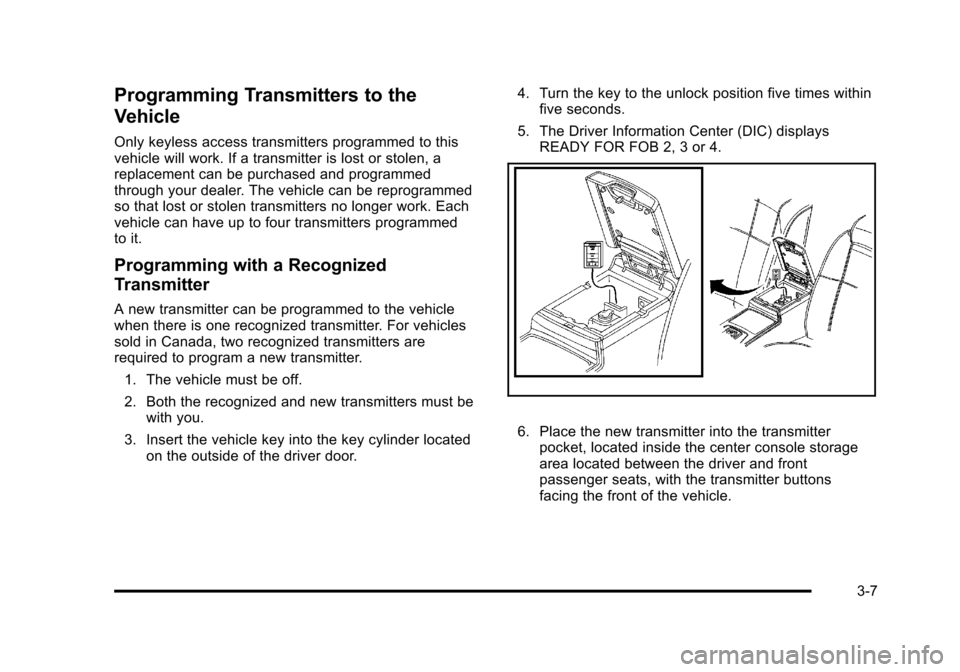
6. Place the new transmitter into the transmitterpocket, located inside the center console storage
area located between the driver and front
passenger seats, with the transmitter buttons
facing the front of the vehicle.
3-7
Page 114 of 528
Black plate (8,1)Cadillac STS Owner Manual - 2011
7. A beep sounds once programming in complete.The DIC displays READY FOR 3 or 4, or MAX #
FOBS LEARNED.
8. Remove the transmitter from the transmitter pocket and press
Ktwice on each newly programmed
transmitter to complete the process.
9. To program additional transmitters, repeat Step 6. Press Acc. on the ignition switch if programming is
complete.
Programming without a Recognized
Transmitter
This procedure requires three ten minutes cycles to
complete the programming process. United States
owners are permitted to program a new transmitter to
their vehicle when a recognized transmitter is not
available. The Canadian immobilizer standard requires
that Canadian owners see their dealer for programming
new transmitters when two recognized transmitters are
not available.
1. The vehicle must be off.
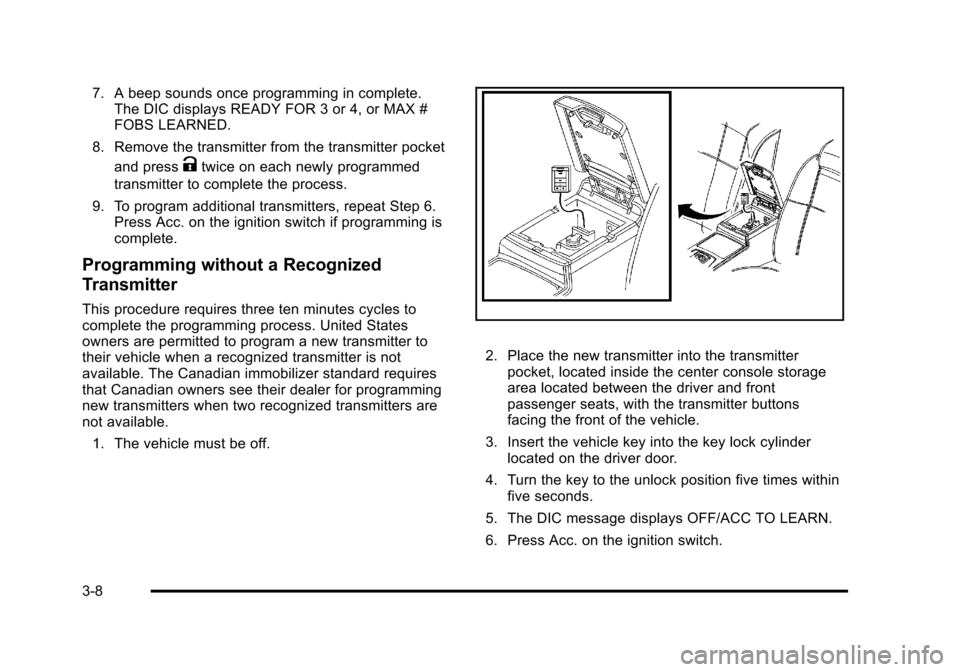
2. Place the new transmitter into the transmitter pocket, located inside the center console storage
area located between the driver and front
passenger seats, with the transmitter buttons
facing the front of the vehicle.
3. Insert the vehicle key into the key lock cylinder located on the driver door.
4. Turn the key to the unlock position five times within five seconds.
5. The DIC message displays OFF/ACC TO LEARN.
6. Press Acc. on the ignition switch.
3-8
Page 115 of 528
Black plate (9,1)Cadillac STS Owner Manual - 2011
7. The DIC reads WAIT 10 MINUTES and countsdown to zero.
8. The DIC displays OFF/ACC TO LEARN again.
9. Press Acc. on the ignition switch.
10. Steps 7, 8 and 9 will be repeated two more times. 11. A beep sounds and the DIC reads READY FOR FOB 1. All previously known transmitter
programming has been erased.
12. A beep sounds once programming in complete. The DIC displays READY FOR FOB #2.
13. To program additional transmitters, take transmitter 1 out of the transmitter pocket and place
transmitter 2 in the pocket. Up to four transmitters
can be programmed. The DIC will then display
MAX # FOBS LEARNED and will exit the
programming mode.
14. Remove the transmitter from the transmitter pocket and press
Ktwice on each newly programmed
transmitter to complete the process.
Starting the Vehicle with a Low
Transmitter Battery
If the transmitter battery is weak, the DIC may display
NO FOBS DETECTED when trying to start the vehicle.
To start the vehicle, place the transmitter in the center
console storage area transmitter pocket with the
buttons facing to the front of the vehicle. Then, with
the vehicle in P (Park) OR N (Neutral), press the brake
pedal and
/. Replace the transmitter battery as soon
as possible. Change the transmitter battery if the DIC
displays KEY FOB BATTERY LOW.
3-9
Page 162 of 528
Black plate (56,1)Cadillac STS Owner Manual - 2011
Using Universal Home Remote
Press and hold the appropriate button for at least half of
a second. The indicator light will come on while the
signal is being transmitted.
Reprogramming Universal Home
Remote Buttons
Any of the three buttons can be reprogrammed by
repeating the instructions.
Erasing Universal Home Remote
Buttons
The programmed buttons should be erased when the
vehicle is sold or the lease ends.
To erase either Rolling Code or Fixed Code on the
Universal Home Remote device:1. Press and hold the two outside buttons at the same time for approximately 20 seconds, until the
indicator lights, located directly above the buttons,
begin to blink rapidly.
2. Once the indicator lights begin to blink, release both buttons. The codes from all buttons will be
erased.
For help or information on the Universal Home Remote
System, call the customer assistance phone number
under Customer Assistance Offices on page 8‑6.
Storage Areas
Glove Box
Lift up on the glove box lever to open it.
Cupholders
The vehicle has two cupholders in the center
console area.
Center Console Storage
The vehicle has a center console storage area located
between the front seats. It includes storage areas, and
accessory power outlet(s) on the rear of the console.
Floor Mats
{WARNING:
If a floor mat is the wrong size or is not properly
installed, it can interfere with the accelerator pedal
and/or brake pedal. Interference with the pedals
can cause unintended acceleration and/or
(Continued)
3-56
Page 228 of 528
Black plate (42,1)Cadillac STS Owner Manual - 2011
Accessory Power Outlet(s)
Accessory power outlets can be used to plug in
electrical equipment, such as a cell phone or MP3
player.
The vehicle has one outlet in front of the center
console, one in the center console lid and there may be
an additional outlet in the rear of the center console.
The vehicle may have a small cap that must be
removed to access the accessory power outlet.
Replace the cap when not in use. use.
{WARNING:
Power is always supplied to the outlets. Do not
leave electrical equipment plugged in when the
vehicle is not in use because the vehicle could
catch fire and cause injury or death.Notice:
Leaving electrical equipment plugged in for
an extended period of time while the vehicle is off
will drain the battery. Always unplug electrical
equipment when not in use and do not plug in
equipment that exceeds the maximum 20 ampere
rating.
Certain accessory power plugs may not be compatible
to the accessory power outlet and could overload
vehicle and adapter fuses. If a problem is experienced,
see your dealer.
When adding electrical equipment, be sure to follow
the proper installation instructions included with the
equipment. See Add-On Electrical Equipment
on
page 6‑114.
Notice: Hanging heavy equipment from the power
outlet can cause damage not covered by the vehicle
warranty. The power outlets are designed for
accessory power plugs only, such as cell phone
charge cords.
4-42
Page 234 of 528
Black plate (48,1)Cadillac STS Owner Manual - 2011
Outlet Adjustment
Use the lever located in the center of each outlet to
change the direction of the airflow, either side-to-side or
up and down. Use the thumbwheels to open or close
the outlets to adjust the airflow.
Turn the thumbwheel towards the vehicle door to open
the outlets and allow the maximum amount of air to
enter your vehicle. Turn the thumbwheel towards the
center console to close the outlets and minimize the
amount of air entering the vehicle.
Operation Tips
.Clear away any ice, snow or leaves from the air
inlets at the base of the windshield that may block
the flow of air into your vehicle.
.Use of non-GM approved hood deflectors may
adversely affect the performance of the system.
.Keep the path under the front seats clear of
objects to help circulate the air inside of your
vehicle more effectively.
.If the airflow seems low when the fan speed is at
the highest setting, the passenger compartment
air filter may need to be replaced. For more
information, seePassenger Compartment Air
Filter on page 4‑50.
4-48