fog light CADILLAC STS 2011 1.G Owners Manual
[x] Cancel search | Manufacturer: CADILLAC, Model Year: 2011, Model line: STS, Model: CADILLAC STS 2011 1.GPages: 528, PDF Size: 4.96 MB
Page 5 of 528
Black plate (5,1)Cadillac STS Owner Manual - 2011
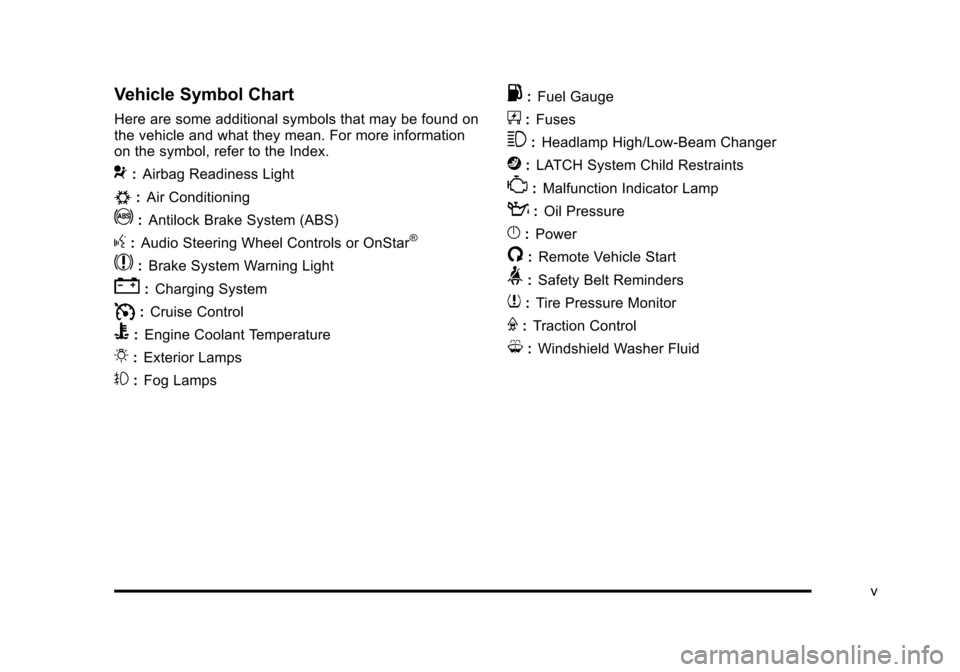
Vehicle Symbol Chart
Here are some additional symbols that may be found on
the vehicle and what they mean. For more information
on the symbol, refer to the Index.
9:Airbag Readiness Light
#:Air Conditioning
!:Antilock Brake System (ABS)
g:Audio Steering Wheel Controls or OnStar®
$: Brake System Warning Light
":Charging System
I:Cruise Control
B: Engine Coolant Temperature
O:Exterior Lamps
#:Fog Lamps
.: Fuel Gauge
+:Fuses
3: Headlamp High/Low-Beam Changer
j:LATCH System Child Restraints
*: Malfunction Indicator Lamp
::Oil Pressure
}:Power
/:Remote Vehicle Start
>:Safety Belt Reminders
7:Tire Pressure Monitor
F:Traction Control
M:Windshield Washer Fluid
v
Page 19 of 528
Black plate (13,1)Cadillac STS Owner Manual - 2011
Exterior Lighting
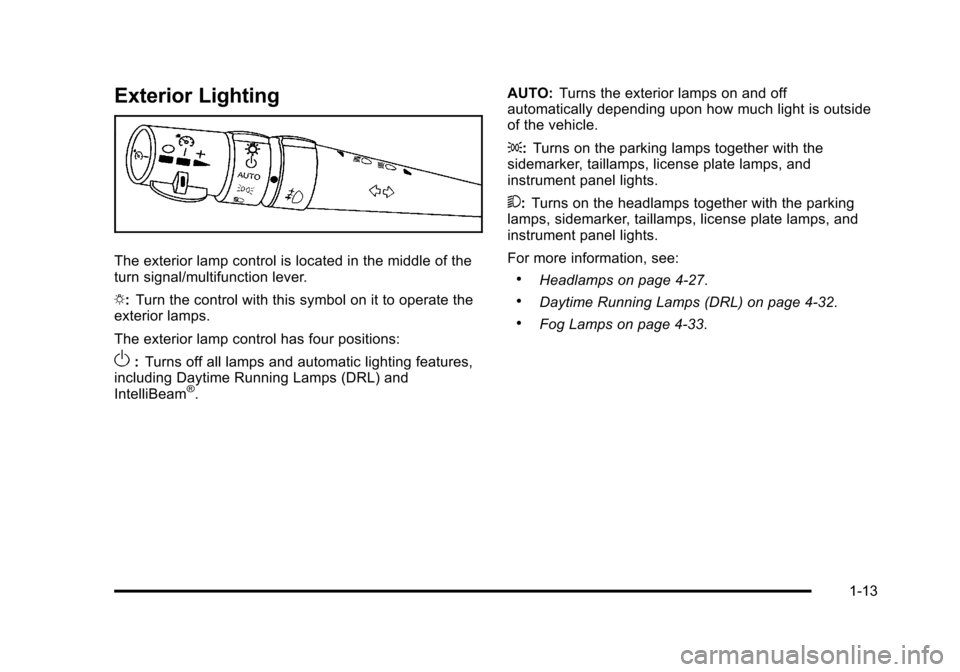
The exterior lamp control is located in the middle of the
turn signal/multifunction lever.
O:Turn the control with this symbol on it to operate the
exterior lamps.
The exterior lamp control has four positions:
O: Turns off all lamps and automatic lighting features,
including Daytime Running Lamps (DRL) and
IntelliBeam
®. AUTO:
Turns the exterior lamps on and off
automatically depending upon how much light is outside
of the vehicle.
;: Turns on the parking lamps together with the
sidemarker, taillamps, license plate lamps, and
instrument panel lights.
5: Turns on the headlamps together with the parking
lamps, sidemarker, taillamps, license plate lamps, and
instrument panel lights.
For more information, see:
.Headlamps on page 4‑27.
.Daytime Running Lamps (DRL) on page 4‑32.
.Fog Lamps on page 4‑33.
1-13
Page 154 of 528
Black plate (48,1)Cadillac STS Owner Manual - 2011
How the System Works
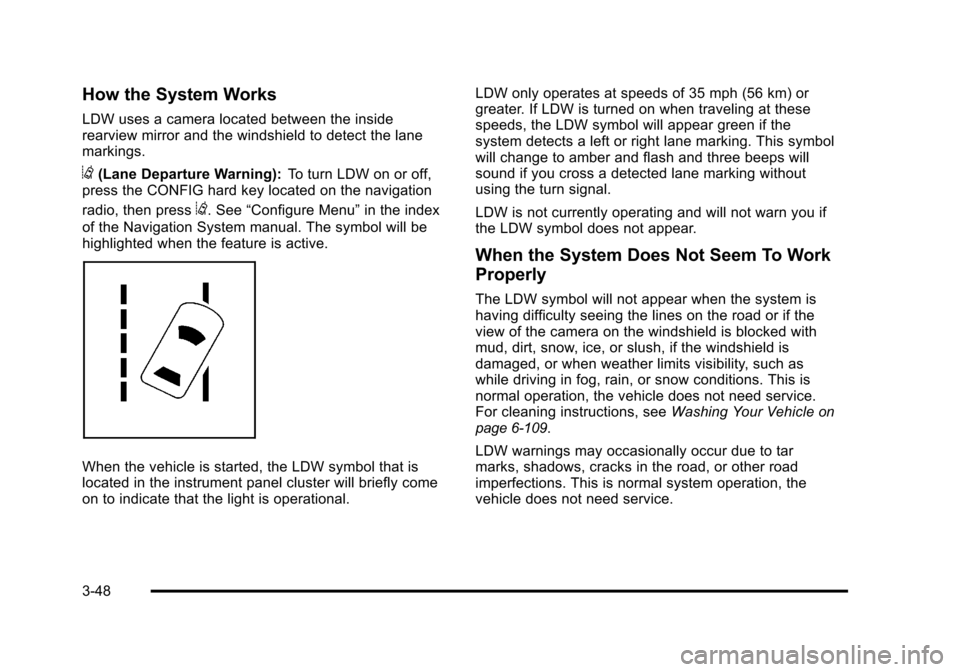
LDW uses a camera located between the inside
rearview mirror and the windshield to detect the lane
markings.
@(Lane Departure Warning):To turn LDW on or off,
press the CONFIG hard key located on the navigation
radio, then press
@. See “Configure Menu” in the index
of the Navigation System manual. The symbol will be
highlighted when the feature is active.
When the vehicle is started, the LDW symbol that is
located in the instrument panel cluster will briefly come
on to indicate that the light is operational. LDW only operates at speeds of 35 mph (56 km) or
greater. If LDW is turned on when traveling at these
speeds, the LDW symbol will appear green if the
system detects a left or right lane marking. This symbol
will change to amber and flash and three beeps will
sound if you cross a detected lane marking without
using the turn signal.
LDW is not currently operating and will not warn you if
the LDW symbol does not appear.
When the System Does Not Seem To Work
Properly
The LDW symbol will not appear when the system is
having difficulty seeing the lines on the road or if the
view of the camera on the windshield is blocked with
mud, dirt, snow, ice, or slush, if the windshield is
damaged, or when weather limits visibility, such as
while driving in fog, rain, or snow conditions. This is
normal operation, the vehicle does not need service.
For cleaning instructions, see
Washing Your Vehicle
on
page 6‑109.
LDW warnings may occasionally occur due to tar
marks, shadows, cracks in the road, or other road
imperfections. This is normal system operation, the
vehicle does not need service.
3-48
Page 168 of 528
Black plate (62,1)Cadillac STS Owner Manual - 2011
KEY FOB REMINDER
This feature sounds the horn three times when the
driver's door is closed and there is a keyless access
transmitter left inside of the vehicle. This will only occur
when the vehicle is off.
Programmable Modes
Mode 1:ON (default)
Mode 2: OFF
To program the vehicle to a different mode: 1. Enter the PERSONAL SETTINGS MENU by following the instructions listed previously under
“Entering the Personal Settings Menu.”
2. Turn the tune/select knob until KEY FOB REMINDER is highlighted.
3. Press the tune/select knob to switch back and forth between on and off.
When the mode is turned on, a check mark will
appear next to the feature name.
The mode you selected is now set. You can either exit
the programming mode by following the instructions
later in this section or program the next feature
available on your vehicle.
REMOTE START
With remote start you can choose which features are
activated when the vehicle is started remotely. These
features include the climate control system, the rear
defogger, and the seat temperature, if your vehicle has
this feature. See Remote Vehicle Start
on page 3‑10for more information.
Mode 1:ON (default)
Mode 2: OFF
To program the vehicle to a different mode: 1. Enter the PERSONAL SETTINGS MENU by following the instructions listed previously under
“Entering the Personal Settings Menu.”
2. Turn the tune/select knob until REMOTE START is highlighted.
3. Press the tune/select knob to switch back and forth between on and off.
When REMOTE START is on, a check mark will appear
next to the feature name. You can then choose to
activate any or all of the following features by turning
the tune/select knob to highlight the feature, then
pressing the knob to turn it on.
3-62
Page 169 of 528

Black plate (63,1)Cadillac STS Owner Manual - 2011
CLIMATE CONTROL:The climate control system will
engage when the vehicle is started using the remote
start feature. It will be at the same climate control
setting that was last used by the driver using that
keyless entry transmitter.
REAR WINDOW DEFOG: If this feature is active, the
rear defogger will engage when the vehicle is started
using the remote start feature.
SEAT TEMP (Temperature) CONTROL: If your vehicle
has this feature and this feature is active, the seats will
be heated or cooled when the vehicle is started using
the remote start feature.
The mode you selected is now set. You can either exit
the programming mode by following the instructions
later in this section or program the next feature
available on your vehicle by pressing the F6 (BACK)
button, located on the radio, to return to the
PERSONAL SETTINGS MENU.
REMOTE RECALL MEMORY
If your vehicle has the optional memory package, you
will have this feature. When this feature is turned on,
you can recall any previously programmed seat position
and mirror position when the unlock button on the
keyless access transmitter is pressed. Programmable Modes
Mode 1:
ON
Mode 2: OFF (default)
The exception to the default is the recall seat to driver
position which is on.
To program the vehicle to a different mode: 1. Enter the PERSONAL SETTINGS MENU by following the instructions listed previously under
“Entering the Personal Settings Menu.”
2. Turn the tune/select knob until REMOTE RECALL MEMORY is highlighted.
3. Press the tune/select knob to switch back and forth between on and off.
When the mode is turned on, a check mark will
appear next to the feature name.
If this feature is selected, START BUTTON RECALL
cannot be selected.
The mode you selected is now set. You can either exit
the programming mode by following the instructions
later in this section or program the next feature
available on your vehicle.
3-63
Page 187 of 528
Black plate (1,1)Cadillac STS Owner Manual - 2011
Section 4 Instrument Panel
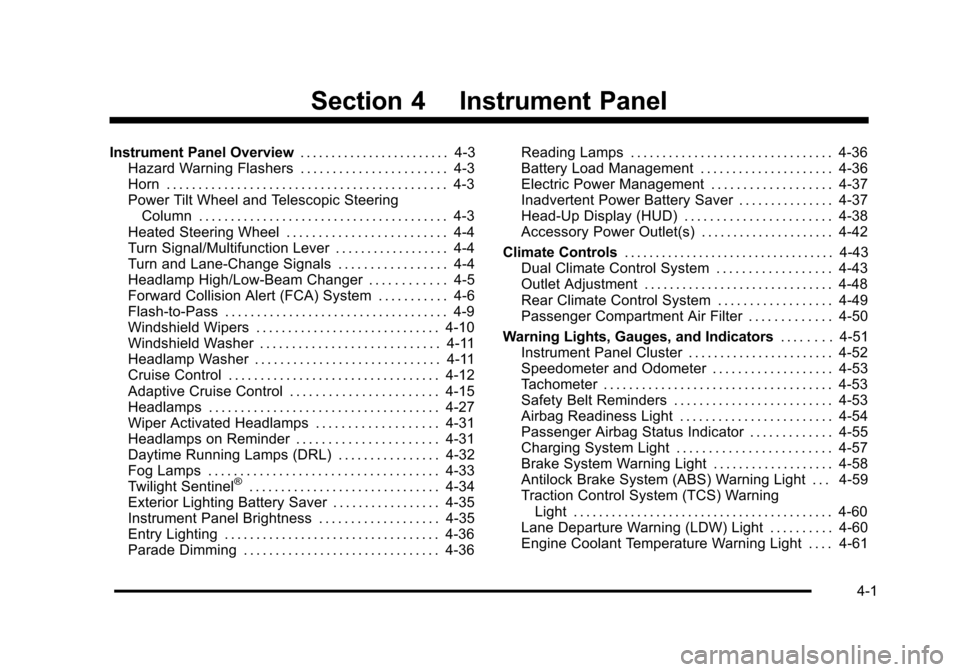
Instrument Panel Overview. . . . . . . . . . . . . . . . . . . . . . . .4-3
Hazard Warning Flashers . . . . . . . . . . . . . . . . . . . . . . . 4-3
Horn . . . . . . . . . . . . . . . . . . . . . . . . . . . . . . . . . . . . . . . . . . . . 4-3
Power Tilt Wheel and Telescopic Steering Column . . . . . . . . . . . . . . . . . . . . . . . . . . . . . . . . . . . . . . . 4-3
Heated Steering Wheel . . . . . . . . . . . . . . . . . . . . . . . . . 4-4
Turn Signal/Multifunction Lever . . . . . . . . . . . . . . . . . . 4-4
Turn and Lane-Change Signals . . . . . . . . . . . . . . . . . 4-4
Headlamp High/Low-Beam Changer . . . . . . . . . . . . 4-5
Forward Collision Alert (FCA) System . . . . . . . . . . . 4-6
Flash-to-Pass . . . . . . . . . . . . . . . . . . . . . . . . . . . . . . . . . . . 4-9
Windshield Wipers . . . . . . . . . . . . . . . . . . . . . . . . . . . . . 4-10
Windshield Washer . . . . . . . . . . . . . . . . . . . . . . . . . . . . 4-11
Headlamp Washer . . . . . . . . . . . . . . . . . . . . . . . . . . . . . 4-11
Cruise Control . . . . . . . . . . . . . . . . . . . . . . . . . . . . . . . . . 4-12
Adaptive Cruise Control . . . . . . . . . . . . . . . . . . . . . . . 4-15
Headlamps . . . . . . . . . . . . . . . . . . . . . . . . . . . . . . . . . . . . 4-27
Wiper Activated Headlamps . . . . . . . . . . . . . . . . . . . 4-31
Headlamps on Reminder . . . . . . . . . . . . . . . . . . . . . . 4-31
Daytime Running Lamps (DRL) . . . . . . . . . . . . . . . . 4-32
Fog Lamps . . . . . . . . . . . . . . . . . . . . . . . . . . . . . . . . . . . . 4-33
Twilight Sentinel
®. . . . . . . . . . . . . . . . . . . . . . . . . . . . . . 4-34
Exterior Lighting Battery Saver . . . . . . . . . . . . . . . . . 4-35
Instrument Panel Brightness . . . . . . . . . . . . . . . . . . . 4-35
Entry Lighting . . . . . . . . . . . . . . . . . . . . . . . . . . . . . . . . . . 4-36
Parade Dimming . . . . . . . . . . . . . . . . . . . . . . . . . . . . . . . 4-36 Reading Lamps . . . . . . . . . . . . . . . . . . . . . . . . . . . . . . . . 4-36
Battery Load Management . . . . . . . . . . . . . . . . . . . . . 4-36
Electric Power Management . . . . . . . . . . . . . . . . . . . 4-37
Inadvertent Power Battery Saver . . . . . . . . . . . . . . . 4-37
Head-Up Display (HUD) . . . . . . . . . . . . . . . . . . . . . . . 4-38
Accessory Power Outlet(s) . . . . . . . . . . . . . . . . . . . . . 4-42
Climate Controls . . . . . . . . . . . . . . . . . . . . . . . . . . . . . . . . . . 4-43
Dual Climate Control System . . . . . . . . . . . . . . . . . . 4-43
Outlet Adjustment . . . . . . . . . . . . . . . . . . . . . . . . . . . . . . 4-48
Rear Climate Control System . . . . . . . . . . . . . . . . . . 4-49
Passenger Compartment Air Filter . . . . . . . . . . . . . 4-50
Warning Lights, Gauges, and Indicators . . . . . . . .4-51
Instrument Panel Cluster . . . . . . . . . . . . . . . . . . . . . . . 4-52
Speedometer and Odometer . . . . . . . . . . . . . . . . . . . 4-53
Tachometer . . . . . . . . . . . . . . . . . . . . . . . . . . . . . . . . . . . . 4-53
Safety Belt Reminders . . . . . . . . . . . . . . . . . . . . . . . . . 4-53
Airbag Readiness Light . . . . . . . . . . . . . . . . . . . . . . . . 4-54
Passenger Airbag Status Indicator . . . . . . . . . . . . . 4-55
Charging System Light . . . . . . . . . . . . . . . . . . . . . . . . 4-57
Brake System Warning Light . . . . . . . . . . . . . . . . . . . 4-58
Antilock Brake System (ABS) Warning Light . . . 4-59
Traction Control System (TCS) Warning Light . . . . . . . . . . . . . . . . . . . . . . . . . . . . . . . . . . . . . . . . . 4-60
Lane Departure Warning (LDW) Light . . . . . . . . . . 4-60
Engine Coolant Temperature Warning Light . . . . 4-61
4-1
Page 188 of 528
Black plate (2,1)Cadillac STS Owner Manual - 2011
Section 4 Instrument Panel
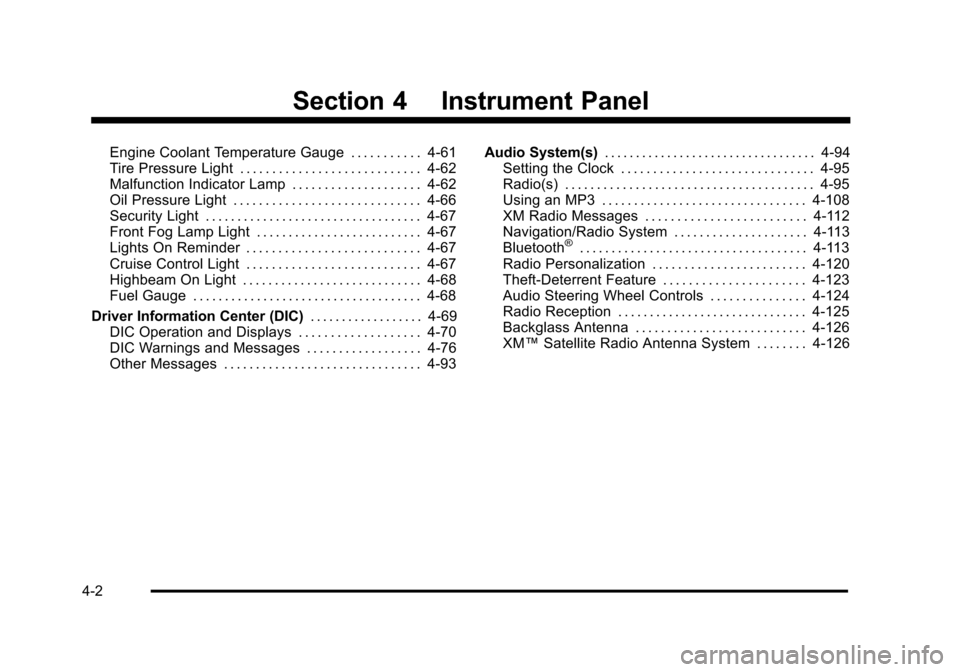
Engine Coolant Temperature Gauge . . . . . . . . . . . 4-61
Tire Pressure Light . . . . . . . . . . . . . . . . . . . . . . . . . . . . 4-62
Malfunction Indicator Lamp . . . . . . . . . . . . . . . . . . . . 4-62
Oil Pressure Light . . . . . . . . . . . . . . . . . . . . . . . . . . . . . 4-66
Security Light . . . . . . . . . . . . . . . . . . . . . . . . . . . . . . . . . . 4-67
Front Fog Lamp Light . . . . . . . . . . . . . . . . . . . . . . . . . . 4-67
Lights On Reminder . . . . . . . . . . . . . . . . . . . . . . . . . . . 4-67
Cruise Control Light . . . . . . . . . . . . . . . . . . . . . . . . . . . 4-67
Highbeam On Light . . . . . . . . . . . . . . . . . . . . . . . . . . . . 4-68
Fuel Gauge . . . . . . . . . . . . . . . . . . . . . . . . . . . . . . . . . . . . 4-68
Driver Information Center (DIC) . . . . . . . . . . . . . . . . . .4-69
DIC Operation and Displays . . . . . . . . . . . . . . . . . . . 4-70
DIC Warnings and Messages . . . . . . . . . . . . . . . . . . 4-76
Other Messages . . . . . . . . . . . . . . . . . . . . . . . . . . . . . . . 4-93 Audio System(s)
. . . . . . . . . . . . . . . . . . . . . . . . . . . . . . . . . . 4-94
Setting the Clock . . . . . . . . . . . . . . . . . . . . . . . . . . . . . . 4-95
Radio(s) . . . . . . . . . . . . . . . . . . . . . . . . . . . . . . . . . . . . . . . 4-95
Using an MP3 . . . . . . . . . . . . . . . . . . . . . . . . . . . . . . . . 4-108
XM Radio Messages . . . . . . . . . . . . . . . . . . . . . . . . . 4-112
Navigation/Radio System . . . . . . . . . . . . . . . . . . . . . 4-113
Bluetooth
®. . . . . . . . . . . . . . . . . . . . . . . . . . . . . . . . . . . . 4-113
Radio Personalization . . . . . . . . . . . . . . . . . . . . . . . . 4-120
Theft-Deterrent Feature . . . . . . . . . . . . . . . . . . . . . . 4-123
Audio Steering Wheel Controls . . . . . . . . . . . . . . . 4-124
Radio Reception . . . . . . . . . . . . . . . . . . . . . . . . . . . . . . 4-125
Backglass Antenna . . . . . . . . . . . . . . . . . . . . . . . . . . . 4-126
XM™ Satellite Radio Antenna System . . . . . . . . 4-126
4-2
Page 190 of 528
Black plate (4,1)Cadillac STS Owner Manual - 2011
Heated Steering Wheel
For vehicles with a heated steering wheel, the button for
this feature is located on the steering wheel.
(:Press to turn the heated steering wheel on or off.
A light on the button displays when the feature is
turned on.
The steering wheel takes about three minutes to start
heating.
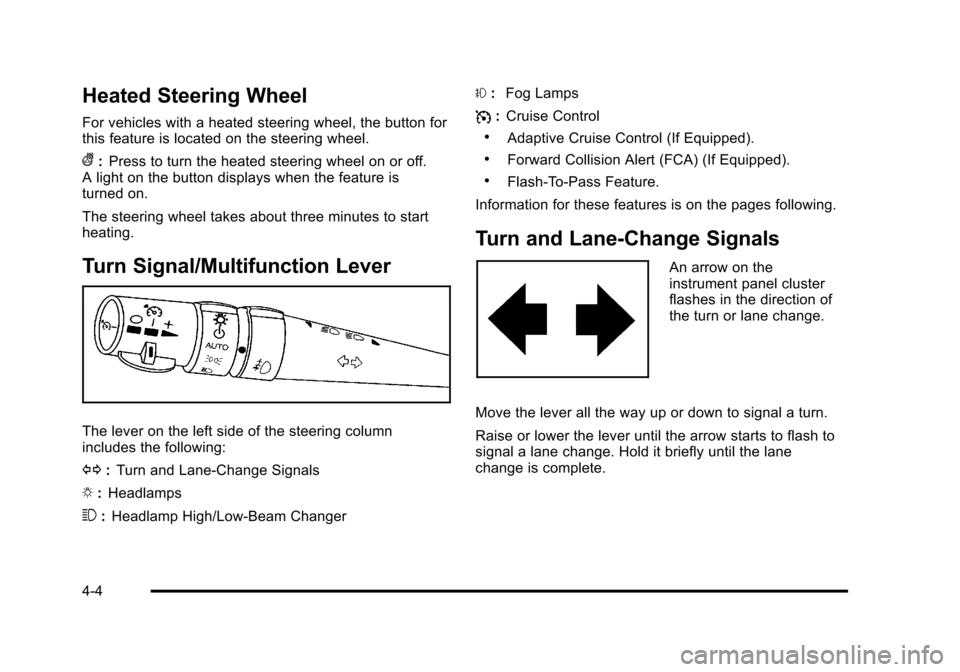
Turn Signal/Multifunction Lever
The lever on the left side of the steering column
includes the following:
G :Turn and Lane-Change Signals
O :Headlamps
3 :Headlamp High/Low-Beam Changer #
:Fog Lamps
I :Cruise Control
.Adaptive Cruise Control (If Equipped).
.Forward Collision Alert (FCA) (If Equipped).
.Flash-To-Pass Feature.
Information for these features is on the pages following.
Turn and Lane-Change Signals
An arrow on the
instrument panel cluster
flashes in the direction of
the turn or lane change.
Move the lever all the way up or down to signal a turn.
Raise or lower the lever until the arrow starts to flash to
signal a lane change. Hold it briefly until the lane
change is complete.
4-4
Page 213 of 528
Black plate (27,1)Cadillac STS Owner Manual - 2011
Erasing Set Speed Memory
The set speed memory is erased from memory by
moving the Adaptive Cruise Control switch to
9or if
the ignition is turned off.
Other Messages
There are three messages that may appear on the DIC.
They are SERVICE RADAR CRUISE, RADAR CRUISE
NOT READY and CLEAN RADAR. These messages
will appear to indicate a problem with the Adaptive
Cruise Control. See DIC Warnings and Messages
on
page 4‑76for more information.
Cleaning the System
The radar can become blocked by snow, ice, or dirt.
If this happens, turn off the engine and clean the
emblem/lens, located in the center of the front outside
grille. Do not use Adaptive Cruise Control in icy
conditions, or when visibility is low, such as in fog,
rain or snow.
To clean the emblem/lens, wipe the surface with a
soft cloth. After cleaning the emblem/lens, engage the
Adaptive Cruise Control. If there are problems, see your
dealer.
Headlamps
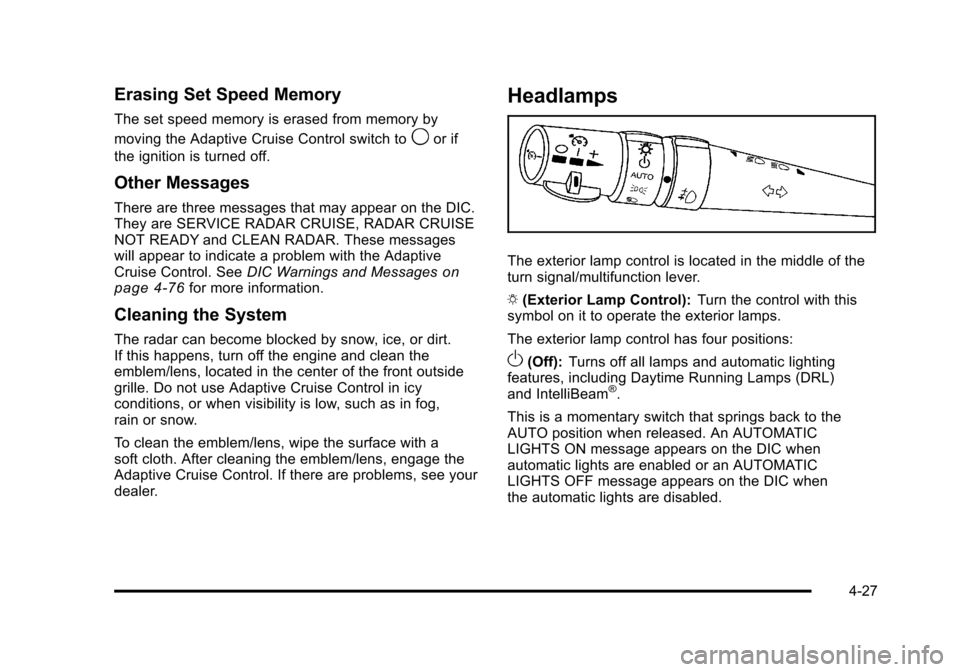
The exterior lamp control is located in the middle of the
turn signal/multifunction lever.
O (Exterior Lamp Control): Turn the control with this
symbol on it to operate the exterior lamps.
The exterior lamp control has four positions:
O(Off): Turns off all lamps and automatic lighting
features, including Daytime Running Lamps (DRL)
and IntelliBeam
®.
This is a momentary switch that springs back to the
AUTO position when released. An AUTOMATIC
LIGHTS ON message appears on the DIC when
automatic lights are enabled or an AUTOMATIC
LIGHTS OFF message appears on the DIC when
the automatic lights are disabled.
4-27
Page 216 of 528
Black plate (30,1)Cadillac STS Owner Manual - 2011
IntelliBeam may not turn off the high-beams if the
system cannot detect other vehicle's lamps because of
any of the following:
.The others vehicle's lamp(s) are missing,
damaged, obstructed from view, or otherwise
undetected.
.The other vehicle's lamp(s) are covered with dirt,
snow and/or road spray.
.The other vehicle's lamp(s) cannot be detected
due to dense exhaust, smoke, fog, snow, road
spray, mist, or other airborne obstructions.
.Your vehicle's windshield is dirty, cracked,
or obstructed by something that blocks the
view of the IntelliBeam light sensor.
.Your vehicle's windshield is covered with ice, dirt,
haze, or other obstructions.
.Your vehicle is loaded such that the front end of
the vehicle points upward, causing the IntelliBeam
sensor to aim high and not detect headlamps and
taillamps.
.You are driving on winding or hilly roads.
You might need to manually disable or cancel the
high-beam headlamps by turning the low-beam
headlamps on, if any of the above conditions exist.
Disabling and Resetting IntelliBeam at the
Rearview Mirror
IntelliBeam can be disabled and reset to the original
factory setting by using the controls on the inside
rearview mirror.
AUTO
3(IntelliBeam On/Off): To disable the system,
press this button on the inside rearview mirror. The
IntelliBeam indicator turns off and does not come back
on until the IntelliBeam button is pressed again.
When IntelliBeam has turned on the high-beams, pull or
push the high-beam stalk. This disables IntelliBeam and
the IntelliBeam indicator on the rearview mirror turns off.
To re-enable IntelliBeam, press the IntelliBeam button
on the mirror.
A different sensitivity setting is available for dealer
diagnostics. This is done by pushing and holding this
button for 20 seconds until the light flashes three times.
If you accidentally activate this, the vehicle's setting
automatically resets each time the ignition is turned off
and then on again; otherwise, refer to the text above for
resetting the system.
4-30