oil temperature CADILLAC STS 2011 1.G Owners Manual
[x] Cancel search | Manufacturer: CADILLAC, Model Year: 2011, Model line: STS, Model: CADILLAC STS 2011 1.GPages: 528, PDF Size: 4.96 MB
Page 5 of 528
Black plate (5,1)Cadillac STS Owner Manual - 2011
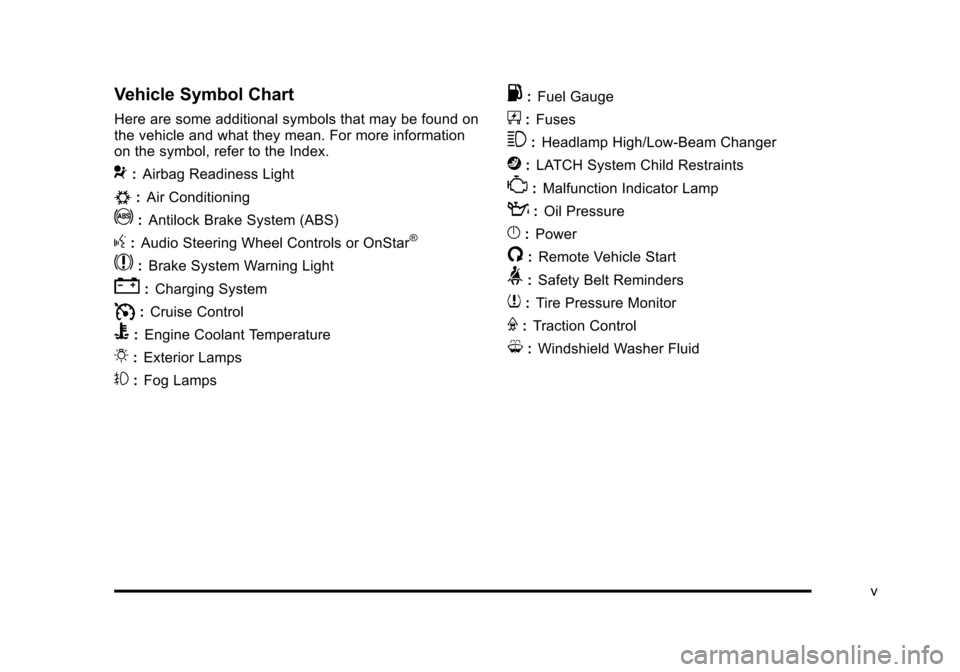
Vehicle Symbol Chart
Here are some additional symbols that may be found on
the vehicle and what they mean. For more information
on the symbol, refer to the Index.
9:Airbag Readiness Light
#:Air Conditioning
!:Antilock Brake System (ABS)
g:Audio Steering Wheel Controls or OnStar®
$: Brake System Warning Light
":Charging System
I:Cruise Control
B: Engine Coolant Temperature
O:Exterior Lamps
#:Fog Lamps
.: Fuel Gauge
+:Fuses
3: Headlamp High/Low-Beam Changer
j:LATCH System Child Restraints
*: Malfunction Indicator Lamp
::Oil Pressure
}:Power
/:Remote Vehicle Start
>:Safety Belt Reminders
7:Tire Pressure Monitor
F:Traction Control
M:Windshield Washer Fluid
v
Page 25 of 528
Black plate (19,1)Cadillac STS Owner Manual - 2011
Driver Information Center (DIC)
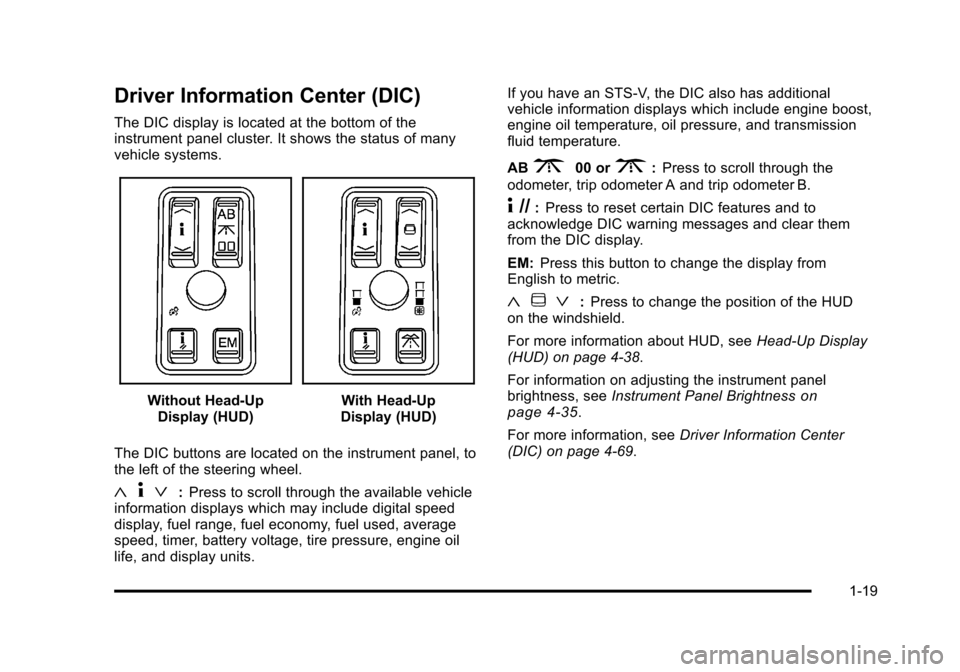
The DIC display is located at the bottom of the
instrument panel cluster. It shows the status of many
vehicle systems.
Without Head-UpDisplay (HUD)With Head-Up
Display (HUD)
The DIC buttons are located on the instrument panel, to
the left of the steering wheel.
« 4ª:Press to scroll through the available vehicle
information displays which may include digital speed
display, fuel range, fuel economy, fuel used, average
speed, timer, battery voltage, tire pressure, engine oil
life, and display units. If you have an STS-V, the DIC also has additional
vehicle information displays which include engine boost,
engine oil temperature, oil pressure, and transmission
fluid temperature.
AB
300 or3:
Press to scroll through the
odometer, trip odometer A and trip odometer B.
4 //: Press to reset certain DIC features and to
acknowledge DIC warning messages and clear them
from the DIC display.
EM: Press this button to change the display from
English to metric.
« ~ ª:Press to change the position of the HUD
on the windshield.
For more information about HUD, see Head-Up Display
(HUD) on page 4‑38.
For information on adjusting the instrument panel
brightness, see Instrument Panel Brightness
on
page 4‑35.
For more information, see Driver Information Center
(DIC) on page 4‑69.
1-19
Page 188 of 528
Black plate (2,1)Cadillac STS Owner Manual - 2011
Section 4 Instrument Panel
Engine Coolant Temperature Gauge . . . . . . . . . . . 4-61
Tire Pressure Light . . . . . . . . . . . . . . . . . . . . . . . . . . . . 4-62
Malfunction Indicator Lamp . . . . . . . . . . . . . . . . . . . . 4-62
Oil Pressure Light . . . . . . . . . . . . . . . . . . . . . . . . . . . . . 4-66
Security Light . . . . . . . . . . . . . . . . . . . . . . . . . . . . . . . . . . 4-67
Front Fog Lamp Light . . . . . . . . . . . . . . . . . . . . . . . . . . 4-67
Lights On Reminder . . . . . . . . . . . . . . . . . . . . . . . . . . . 4-67
Cruise Control Light . . . . . . . . . . . . . . . . . . . . . . . . . . . 4-67
Highbeam On Light . . . . . . . . . . . . . . . . . . . . . . . . . . . . 4-68
Fuel Gauge . . . . . . . . . . . . . . . . . . . . . . . . . . . . . . . . . . . . 4-68
Driver Information Center (DIC) . . . . . . . . . . . . . . . . . .4-69
DIC Operation and Displays . . . . . . . . . . . . . . . . . . . 4-70
DIC Warnings and Messages . . . . . . . . . . . . . . . . . . 4-76
Other Messages . . . . . . . . . . . . . . . . . . . . . . . . . . . . . . . 4-93 Audio System(s)
. . . . . . . . . . . . . . . . . . . . . . . . . . . . . . . . . . 4-94
Setting the Clock . . . . . . . . . . . . . . . . . . . . . . . . . . . . . . 4-95
Radio(s) . . . . . . . . . . . . . . . . . . . . . . . . . . . . . . . . . . . . . . . 4-95
Using an MP3 . . . . . . . . . . . . . . . . . . . . . . . . . . . . . . . . 4-108
XM Radio Messages . . . . . . . . . . . . . . . . . . . . . . . . . 4-112
Navigation/Radio System . . . . . . . . . . . . . . . . . . . . . 4-113
Bluetooth
®. . . . . . . . . . . . . . . . . . . . . . . . . . . . . . . . . . . . 4-113
Radio Personalization . . . . . . . . . . . . . . . . . . . . . . . . 4-120
Theft-Deterrent Feature . . . . . . . . . . . . . . . . . . . . . . 4-123
Audio Steering Wheel Controls . . . . . . . . . . . . . . . 4-124
Radio Reception . . . . . . . . . . . . . . . . . . . . . . . . . . . . . . 4-125
Backglass Antenna . . . . . . . . . . . . . . . . . . . . . . . . . . . 4-126
XM™ Satellite Radio Antenna System . . . . . . . . 4-126
4-2
Page 256 of 528
Black plate (70,1)Cadillac STS Owner Manual - 2011
DIC Operation and Displays
The Driver Information Center (DIC) has different
modes which can be accessed by pressing the four
DIC buttons located on the instrument panel, to the
left of the steering wheel.
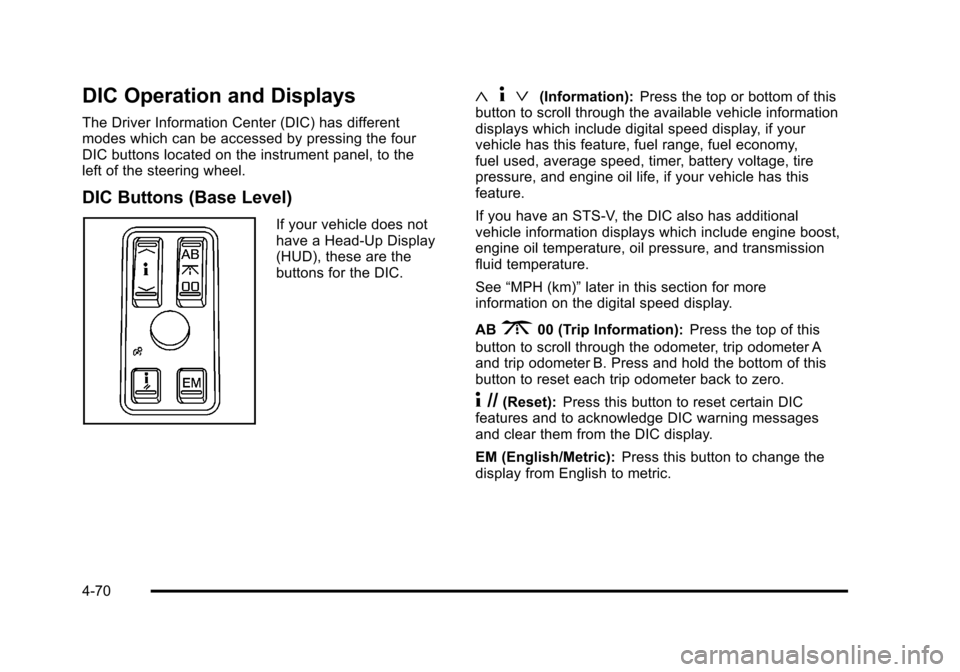
DIC Buttons (Base Level)
If your vehicle does not
have a Head-Up Display
(HUD), these are the
buttons for the DIC.
«4ª(Information): Press the top or bottom of this
button to scroll through the available vehicle information
displays which include digital speed display, if your
vehicle has this feature, fuel range, fuel economy,
fuel used, average speed, timer, battery voltage, tire
pressure, and engine oil life, if your vehicle has this
feature.
If you have an STS-V, the DIC also has additional
vehicle information displays which include engine boost,
engine oil temperature, oil pressure, and transmission
fluid temperature.
See “MPH (km)” later in this section for more
information on the digital speed display.
AB
300 (Trip Information): Press the top of this
button to scroll through the odometer, trip odometer A
and trip odometer B. Press and hold the bottom of this
button to reset each trip odometer back to zero.
4 //(Reset): Press this button to reset certain DIC
features and to acknowledge DIC warning messages
and clear them from the DIC display.
EM (English/Metric): Press this button to change the
display from English to metric.
4-70
Page 261 of 528
Black plate (75,1)Cadillac STS Owner Manual - 2011
ENGLISH DISPLAY UNITS
(METRIC DISPLAY UNITS)
This display allows you to select between English and
metric units of measurement if your vehicle has the
uplevel DIC. Press the reset button to switch between
English and metric units.
Blank Line
This display shows no information.
ENGINE BOOST (STS-V Only)
This display shows a graphic that indicates the amount
of boost the engine is receiving in either pounds per
square inch (psi) or kilopascals (kPa).
ENGINE OIL TEMPERATURE (STS-V Only)
This display shows the engine oil temperature in either
degrees Fahrenheit (°F) or degrees Celsius (°C).
OIL PRESSURE (STS-V Only)
This display shows the oil pressure in either pounds per
square inch (psi) or kilopascals (kPa).
TRANS (Transmission) FLUID TEMP
(Temperature) (STS-V Only)
This display shows the transmission fluid temperature in
either degrees Fahrenheit (°F) or degrees Celsius (°C).
Trip Information Display Menu Items
The following display menu items can be displayed by
pressing the trip Information button.
Odometer
Press the trip information button until the odometer
appears on the DIC display. The odometer shows the
total distance the vehicle has been driven in either
miles (mi) or kilometers (km).
Trip Odometer
Press the trip information button until trip
odometer A or B appears on the DIC display. The trip
odometer shows the current distance traveled since the
last reset for each trip odometer in either miles (mi) or
kilometers (km). Both odometers can be used at the
same time.
For base level vehicles, each trip odometer can be
reset to zero separately by pressing and holding the
bottom of the trip information button while the desired
trip odometer is displayed. For uplevel vehicles, reset
each trip odometer by pressing the reset button or by
pressing and holding the trip information button while
the desired trip odometer is displayed.
4-75
Page 267 of 528
Black plate (81,1)Cadillac STS Owner Manual - 2011
ENGINE PROTECTION REDUCED
RPM'S (Revolutions Per Minute)
This message displays when your vehicle is in an
overheated engine operating mode. If this message
appears, the vehicle has determined that continued
operation at the existing engine speed may lead to
engine overheating. The vehicle automatically limits
engine RPMs to prevent engine overheating. You may
notice the vehicle upshifting early or reduced speeds
while this message is displayed. When the engine oil
returns to a safe operating temperature, this message
clears from the DIC and the vehicle returns to normal
operation. Your vehicle does not require service when
this message is displayed.
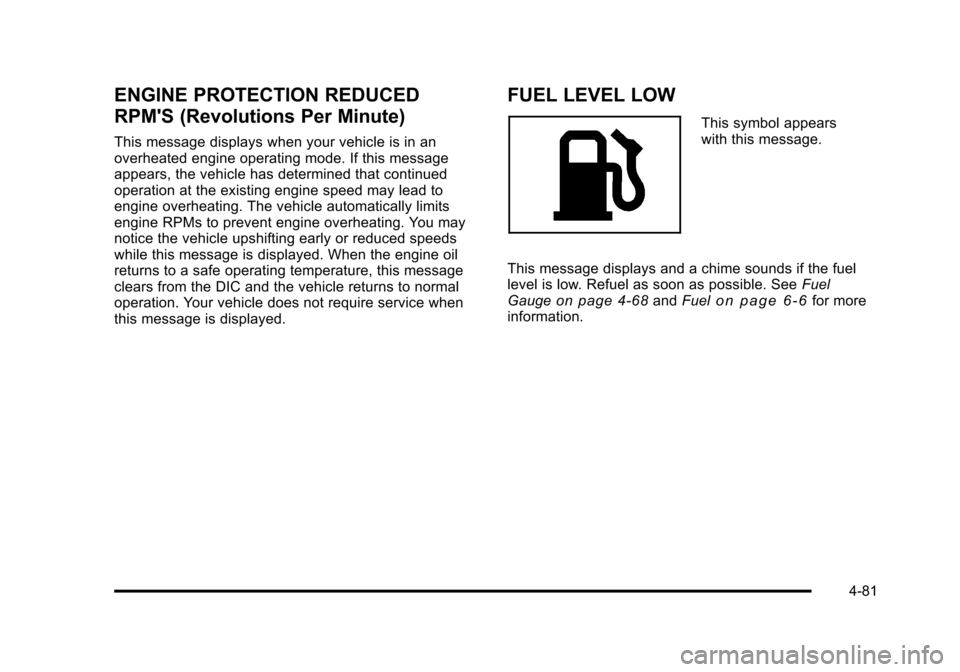
FUEL LEVEL LOW
This symbol appears
with this message.
This message displays and a chime sounds if the fuel
level is low. Refuel as soon as possible. See Fuel
Gauge
on page 4‑68and Fuelon page 6‑6for more
information.
4-81
Page 330 of 528
Black plate (18,1)Cadillac STS Owner Manual - 2011
Before Leaving on a Long Trip
To prepare your vehicle for a long trip, consider having
it serviced by your dealer before departing.
Things to check on your own include:
.Windshield Washer Fluid:Reservoir full? Windows
clean —inside and outside?
.Wiper Blades: In good shape?
.Fuel, Engine Oil, Other Fluids: All levels checked?
.Lamps:Do they all work and are lenses clean?
.Tires:Are treads good? Are tires inflated to
recommended pressure?
.Weather and Maps: Safe to travel? Have
up-to-date maps?
Highway Hypnosis
Always be alert and pay attention to your surroundings
while driving. If you become tired or sleepy, find a safe
place to park your vehicle and rest.
Other driving tips include:
.Keep the vehicle well ventilated.
.Keep interior temperature cool.
.Keep your eyes moving —scan the road ahead
and to the sides.
.Check the rearview mirror and vehicle instruments
often.
5-18
Page 349 of 528
Black plate (37,1)Cadillac STS Owner Manual - 2011
Driving On Grades
Reduce speed and shift to a lower gearbeforestarting
down a long or steep downgrade. If the transmission is
not shifted down, the brakes might have to be used so
much that they would get hot and no longer work well.
On a long uphill grade, shift down and reduce the
vehicle's speed to around 45 mph (70 km/h) to reduce
the possibility of the engine and the transmission
overheating.
Vehicles can tow in D (Drive). Shift the transmission to
a lower gear if the transmission shifts too often under
heavy loads and/or hilly conditions.
When towing at high altitude on steep uphill grades,
consider the following: Engine coolant will boil at a
lower temperature than at normal altitudes. If the engine
is turned off immediately after towing at high altitude on
steep uphill grades, the vehicle may show signs similar
to engine overheating. To avoid this, let the engine run
while parked, preferably on level ground, with the
automatic transmission in P (Park) for a few minutes
before turning the engine off. If the overheat warning
comes on, see Engine Overheating on page 6‑30.
Parking on Hills
{WARNING:
Parking the vehicle on a hill with the trailer
attached can be dangerous. If something goes
wrong, the rig could start to move. People can be
injured, and both the vehicle and the trailer can be
damaged. When possible, always park the rig on
a flat surface.
If parking the rig on a hill: 1. Press the brake pedal, but do not shift into P (Park) yet. Turn the wheels into the curb if facing downhill
or into traffic if facing uphill.
2. Have someone place chocks under the trailer wheels.
3. When the wheel chocks are in place, release the regular brakes until the chocks absorb the load.
4. Reapply the brake pedal. Then apply the parking brake and shift into P (Park).
5. Release the brake pedal.
5-37
Page 369 of 528
Black plate (19,1)Cadillac STS Owner Manual - 2011
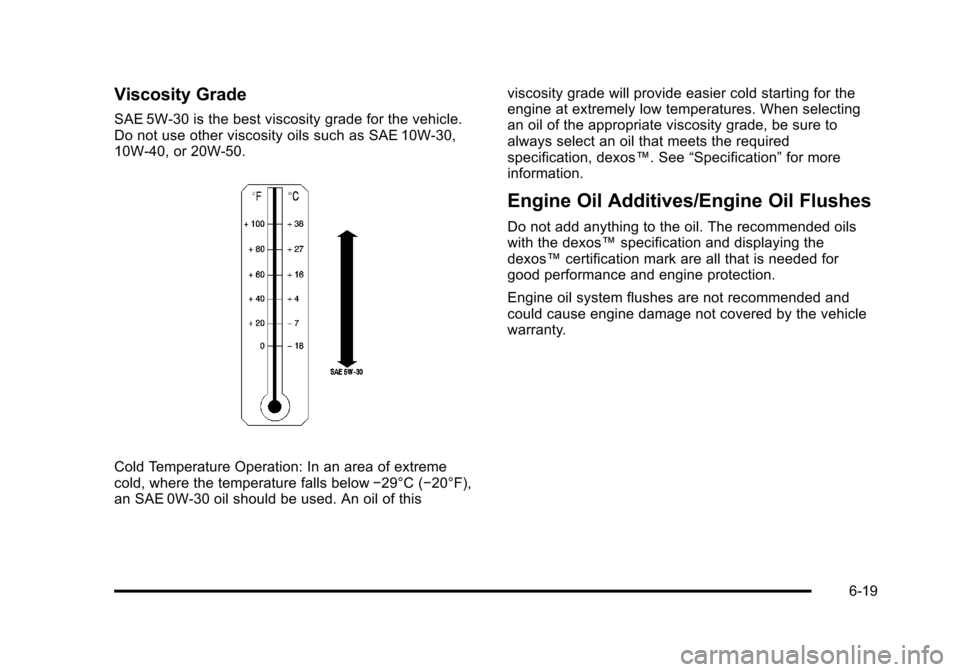
Viscosity Grade
SAE 5W-30 is the best viscosity grade for the vehicle.
Do not use other viscosity oils such as SAE 10W‐30,
10W‐40, or 20W-50.
Cold Temperature Operation: In an area of extreme
cold, where the temperature falls below−29°C (−20°F),
an SAE 0W-30 oil should be used. An oil of this viscosity grade will provide easier cold starting for the
engine at extremely low temperatures. When selecting
an oil of the appropriate viscosity grade, be sure to
always select an oil that meets the required
specification, dexos™. See
“Specification”for more
information.
Engine Oil Additives/Engine Oil Flushes
Do not add anything to the oil. The recommended oils
with the dexos™ specification and displaying the
dexos™ certification mark are all that is needed for
good performance and engine protection.
Engine oil system flushes are not recommended and
could cause engine damage not covered by the vehicle
warranty.
6-19
Page 370 of 528
Black plate (20,1)Cadillac STS Owner Manual - 2011
What to Do with Used Oil
Used engine oil contains certain elements that can be
unhealthy for your skin and could even cause cancer.
Do not let used oil stay on your skin for very long. Clean
your skin and nails with soap and water, or a good hand
cleaner. Wash or properly dispose of clothing or rags
containing used engine oil. See the manufacturer's
warnings about the use and disposal of oil products.
Used oil can be a threat to the environment. If you
change your own oil, be sure to drain all the oil from
the filter before disposal. Never dispose of oil by putting
it in the trash or pouring it on the ground, into sewers,
or into streams or bodies of water. Recycle it by taking it
to a place that collects used oil.
Engine Oil Life System
When to Change Engine Oil
This vehicle has a computer system that indicates when
to change the engine oil and filter. This is based on
engine revolutions and engine temperature, and not on
mileage. Based on driving conditions, the mileage at
which an oil change is indicated can vary considerably.
For the oil life system to work properly, the system must
be reset every time the oil is changed.When the system has calculated that oil life has been
diminished, it indicates that an oil change is necessary.
A CHANGE ENGINE OIL SOON message in the DIC
comes on. See
DIC Warnings and Messages
on
page 4‑76. Change the oil as soon as possible within
the next 600 miles (1 000 km). It is possible that,
if driving under the best conditions, the oil life system
might indicate that an oil change is not necessary for up
to a year. The engine oil and filter must be changed at
least once a year and, at this time, the system must be
reset. Your dealer has trained service people who will
perform this work and reset the system. It is also
important to check the oil regularly over the course of
an oil drain interval and keep it at the proper level.
If the system is ever reset accidentally, the oil must be
changed at 3,000 miles (5 000 km) since the last oil
change. Remember to reset the oil life system
whenever the oil is changed.
6-20