turn signal CADILLAC XLR 2004 1.G User Guide
[x] Cancel search | Manufacturer: CADILLAC, Model Year: 2004, Model line: XLR, Model: CADILLAC XLR 2004 1.GPages: 356, PDF Size: 2.36 MB
Page 134 of 356

Fog Lamps
If your vehicle has fog lamps, use them for better vision
in foggy or misty conditions.
The fog lamps control is located on the multifunction
lever next to the exterior lamp control.
-(Fog Lamps):Turning the band to this position will
turn on the fog lamps.
When you turn on the fog lamps, the fog lamp light on
the instrument panel cluster will come on to indicate that
the fog lamps and the parking lamps are on.
If you turn on the high-beam headlamps, the fog lamps
will turn off. They will turn back on again when you
switch to low-beam headlamps.
The ignition must be on for the fog lamps to operate.
Twilight Sentinelž
Twilight Sentinelžcan turn your lamps on and off for
you. A light sensor on top of the instrument panel makes
the Twilight Sentinel
žwork, so be sure it is not
covered.With Twilight Sentinel
žyou will see the following
happen:
·When it is dark enough outside, the front turn signal
lamps (DRL) will go off, and the headlamps and
parking lamps will come on. The other lamps
that come on with headlamps will also come on.
·When it is bright enough outside, the headlamps
will go off, and the front turn signal lamps (DRL)
will come on, as long as the exterior lamp switch is
in the OFF position.
If you start your vehicle in a dark garage, the automatic
headlamp system will come on immediately. Once
you leave the garage, it will take approximately
one minute for the automatic headlamp system to
change to DRL if it is light outside. During that delay,
your instrument panel cluster may not be as bright
as usual. Make sure your instrument panel brightness
control is in full bright position. See ªInstrument
Panel Brightness Controlº under
Interior Lamps on
page 3-25.
You can idle the vehicle with the lamps off, even when
it is dark outside. First set the parking brake while
the ignition is in OFF. Then start the vehicle. The lamps
will stay off until you release the parking brake.
3-24
Page 137 of 356
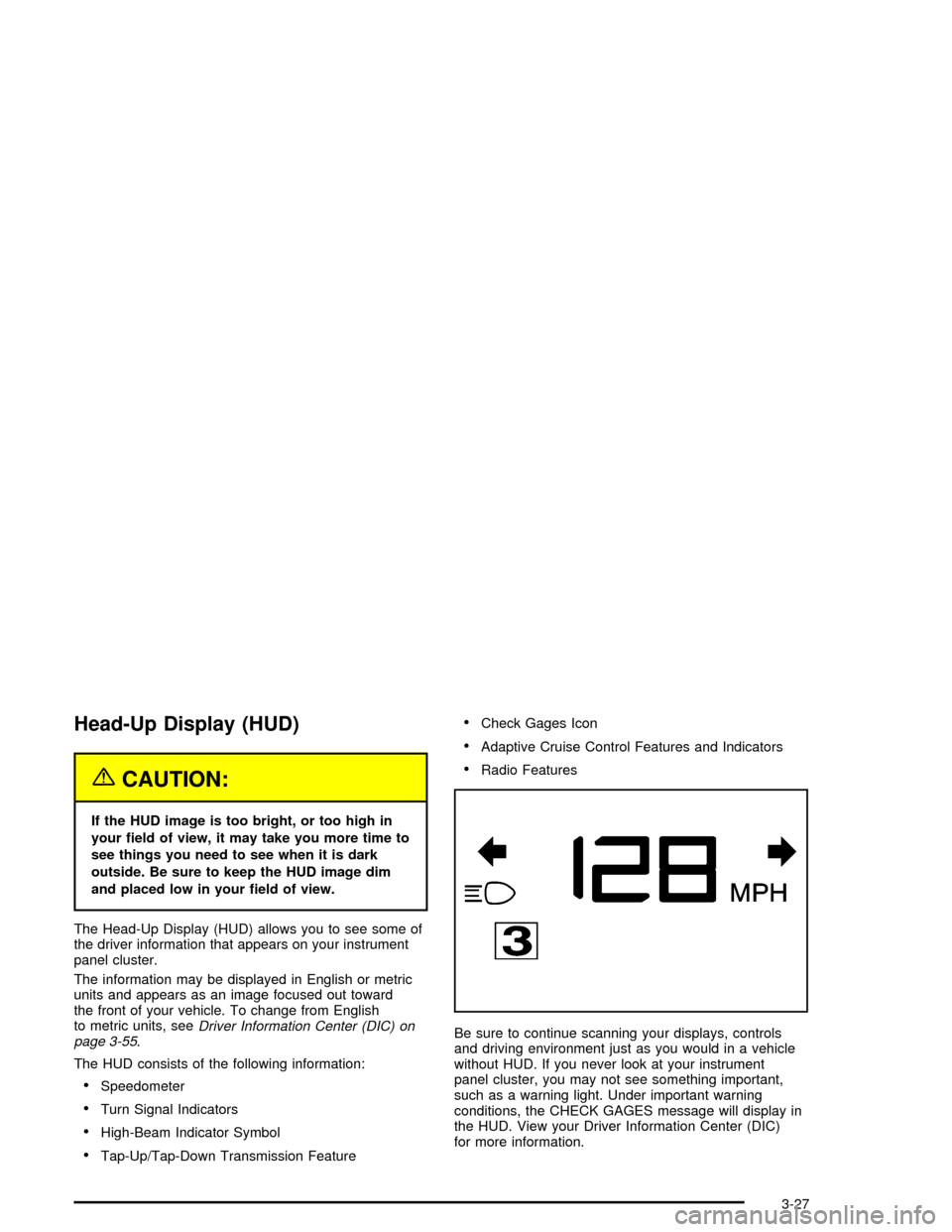
Head-Up Display (HUD)
{CAUTION:
If the HUD image is too bright, or too high in
your ®eld of view, it may take you more time to
see things you need to see when it is dark
outside. Be sure to keep the HUD image dim
and placed low in your ®eld of view.
The Head-Up Display (HUD) allows you to see some of
the driver information that appears on your instrument
panel cluster.
The information may be displayed in English or metric
units and appears as an image focused out toward
the front of your vehicle. To change from English
to metric units, see
Driver Information Center (DIC) on
page 3-55.
The HUD consists of the following information:
·Speedometer
·Turn Signal Indicators
·High-Beam Indicator Symbol
·Tap-Up/Tap-Down Transmission Feature
·Check Gages Icon
·Adaptive Cruise Control Features and Indicators
·Radio Features
Be sure to continue scanning your displays, controls
and driving environment just as you would in a vehicle
without HUD. If you never look at your instrument
panel cluster, you may not see something important,
such as a warning light. Under important warning
conditions, the CHECK GAGES message will display in
the HUD. View your Driver Information Center (DIC)
for more information.
3-27
Page 139 of 356

Clean the inside of the windshield as needed to remove
any dirt or ®lm that reduces the sharpness or clarity
of the HUD image.
To clean the HUD, spray household glass cleaner on a
soft, clean cloth. Wipe the HUD lens gently, then dry
it. Do not spray cleaner directly on the lens because the
cleaner could leak into the unit.
If the ignition is on and you cannot see the HUD image,
check to see if:
·Something is covering the HUD unit.
·The brightness is adjusted properly.
·The HUD image is adjusted to the proper height.
·Ambient light in the direction your vehicle is facing
is low.
·A fuse is blown. SeeFuses and Circuit Breakers on
page 5-85
.
Keep in mind that your windshield is part of the HUD
system. If you ever have to have your windshield
replaced, be sure to get one that is designed for HUD
or your HUD image may look blurred and out of focus.The following Adaptive Cruise Control (ACC) messages
may appear in the HUD:
CRUISE SPEED LIMITED:This message indicates that
your vehicle speed has been reduced below your set
speed due to ACC limitations. Your set speed is too high
and ACC cannot detect other vehicles at far enough
distances for the system to operate properly.
TIGHT CURVE:This message indicates that ACC has
reduced your vehicle speed due to a tight curve in
the road. Once the road straightens, ACC will return to
your selected set speed or follow distance setting.
See ªAdaptive Cruise Control (ACC)º under
Turn
Signal/Multifunction Lever on page 3-5for more
information.
You may also see an ACC active symbol, alert symbol
or vehicle ahead symbol. See ªAdaptive Cruise
Control (ACC)º under
Turn Signal/Multifunction Lever on
page 3-5for more information.
3-29
Page 168 of 356

CHANGE OIL NOW:This means that the life of the
engine oil has expired. SeeScheduled Maintenance on
page 6-4. After an oil change, the Oil Life Indicator
must be reset. SeeOil Life Indicator on page 3-70. SeeEngine Oil on page 5-13.
CHARGE SYSTEM FAULT:This message will display
when a problem with the charging system has been
detected. Have your vehicle serviced at your dealership.
CHECK GAS CAP:This message will appear if the
gas cap has not been fully tightened. You should
recheck your gas cap to ensure that it is on properly.
CLEAN RADAR CRUISE:This message indicates the
ACC system is disabled because the radar is blocked
and cannot detect vehicles in your path. It may
also activate during heavy rain or due to road spray. To
clean the system, see ªAdaptive Cruise Control
(ACC)º under
Turn Signal/Multifunction Lever on
page 3-5.
CLOSE CARGO COVER:This message indicates that
the cargo cover is not in place. Open the trunk and
make sure the cargo cover is secure and no objects are
on the cover. See
Rear Storage Area on page 2-43for more information.COOLANT OVER TEMP:This message will appear
when the engine coolant temperature is too hot.
Stop and allow your vehicle to idle in PARK (P) until it
cools down and the message is removed. Do not
increase engine speed above a normal idle. If it does
not cool down, turn off the engine and have it serviced
before driving it again. Severe engine damage can
result from an overheated engine. See
Engine
Overheating on page 5-23.
CRUISE NOT READY:This message indicates that
ACC will not activate due to a temporary condition. Your
vehicle does not require service. If this message
appears when you attempt to activate the system,
continue driving for several minutes then try again to
activate the system.
DRIVER NO. X (1 OR 2):This message will be
displayed when the vehicle is started or when there is a
change of driver. The message will show which driver
is activating the personalization feature. It will only
stay on for ®ve seconds.
ENGINE HOT, STOP ENGINE:This message will
appear when the engine has overheated. Stop and turn
the engine off immediately to avoid severe engine
damage. See
Engine Overheating on page 5-23.A
multiple chime will also sound when this message
is displayed.
3-58
Page 178 of 356

Flash at Unlock
This feature activates the front and rear turn signals for
two short ¯ashes when the unlock or trunk button on
the keyless access transmitter is pressed or when
OnStar
žunlocks the doors. This will only occur when
the vehicle is off.
The DIC will display NO FLASH AT UNLOCK or FLASH
AT UNLOCK. Press the OPTIONS button to change
the setting.
Flash at Lock
This feature activates the front and rear turn signals for
one long ¯ash when the lock button on the keyless
access transmitter is pressed or when OnStar
žlocks the
doors. This will only occur when the vehicle is off. If
the lock button is pressed again within ®ve seconds, the
horn will sound regardless of which setting you have
selected.
The DIC will display NO FLASH AT LOCK or FLASH
AT LOCK. Press the OPTIONS button to change
the setting.
FOB Reminder
This feature sounds the horn three times when the
driver door is closed and there is a keyless access
transmitter inside the interior of the vehicle. This will only
occur when the vehicle is off.
The DIC will display FOB REMINDER OFF or FOB
REMINDER HORN. Press the OPTIONS button
to change the setting.
Passive Locking
This feature automatically locks the doors when:
·no keyless access transmitter is in the vehicle while
closing either door, resulting in both doors being
closed,
·the vehicle is off, and
·both doors have been closed for ®ve seconds.
This feature may be temporarily disabled by pressing
the unlock button on the door while the door is
open. Passive locking will then remain disabled until the
lock button on the door is pressed or the vehicle is
no longer off.
You can also select to have the horn sound once when
the passive lock occurs.
The DIC will display PASSIVE LOCKING OFF, SILENT
PASSIVE LOCK or HORN AT PASSIVE LOCK.
Press the OPTIONS button to change the setting.
3-68
Page 182 of 356

Radio Reception
AM
The range for most AM stations is greater than for FM,
especially at night. The longer range can cause
station frequencies to interfere with each other. Static
can occur on AM stations caused by things like
storms and power lines. Try reducing the treble to
reduce this noise.
FM Stereo
FM stereo will give the best sound, but FM signals will
reach only about 10 to 40 miles (16 to 65 km). Tall
buildings or hills can interfere with FM signals, causing
the sound to fade in and out.
XMŸ Satellite Radio Service
XMŸ Satellite Radio Service gives digital radio
reception from coast to coast. Just as with FM, tall
buildings or hills can interfere with satellite radio signals,
causing the sound to fade in and out. The radio may
display NO XM SIGNAL to indicate interference.
Cellular Phone Usage
Cellular phone usage may cause interference with your
vehicle's radio. This interference may occur when
making or receiving phone calls, charging the phone's
battery, or simply having the phone on. This interference
is an increased level of static while listening to the
radio. If static is received while listening to the radio,
unplug the cellular phone and turn it off.
Care of Your CDs
Handle CDs carefully. Store them in their original cases
or other protective cases and away from direct
sunlight and dust. If the surface of a CD is soiled,
dampen a clean, soft cloth in a mild, neutral detergent
solution and clean it, wiping from the center to the edge.
Be sure never to touch the side without writing when
handling CDs. Pick up CDs by grasping the outer edges
or the edge of the hole and the outer edge.
Care of Your CD Player
The use of CD lens cleaners for CD players is not
advised, due to the risk of contaminating the lens of the
CD optics with lubricants internal to the CD mechanism.
3-72
Page 193 of 356

Traction Control System (TCS)
Your vehicle has a traction control system that limits
wheel spin. This is especially useful in slippery
road conditions. The system operates only if it senses
that one or both of the rear wheels are spinning or
beginning to lose traction. When this happens,
the system works the rear brakes and reduces engine
power to limit wheel spin.
The TRAC SYSTEM ACTIVE message will display on
the Driver Information Center (DIC) when the traction
control system is limiting wheel spin. See
DIC Warnings
and Messages on page 3-57. You may feel or hear
the system working, but this is normal.
If your vehicle is in cruise control when the traction
control system begins to limit wheel spin, the cruise
control will automatically disengage. When road
conditions allow you to safely use it again, you may
reengage the cruise control. See ªCruise Controlº under
Turn Signal/Multifunction Lever on page 3-5.This warning light will
come on to let you know if
there is a problem with
your traction control
system.
See
Traction Control System (TCS) Warning Light on
page 3-46. When this warning light is on, the system will
not limit wheel spin. Adjust your driving accordingly.
The traction control system automatically comes
on whenever you start your vehicle. To limit wheel spin,
especially in slippery road conditions, you should
always leave the system on. But you can turn the
traction control system off if you ever need to. You
should turn the system off if your vehicle ever gets stuck
in sand, mud or snow and rocking the vehicle is
required. See ªRocking Your Vehicle To Get It Outº
under
If You Are Stuck: In Sand, Mud, Ice or Snow on
page 4-31.
4-9
Page 200 of 356

·Do not get too close to the vehicle you want to
pass while you are awaiting an opportunity. For one
thing, following too closely reduces your area of
vision, especially if you are following a larger
vehicle. Also, you will not have adequate space if
the vehicle ahead suddenly slows or stops.
Keep back a reasonable distance.
·When it looks like a chance to pass is coming up,
start to accelerate but stay in the right lane and
do not get too close. Time your move so you will be
increasing speed as the time comes to move into
the other lane. If the way is clear to pass, you
will have a ªrunning startº that more than makes up
for the distance you would lose by dropping
back. And if something happens to cause you to
cancel your pass, you need only slow down
and drop back again and wait for another
opportunity.
·If other vehicles are lined up to pass a slow vehicle,
wait your turn. But take care that someone is not
trying to pass you as you pull out to pass the slow
vehicle. Remember to glance over your shoulder
and check the blind spot.
·Check your mirrors, glance over your shoulder, and
start your left lane change signal before moving out
of the right lane to pass. When you are farenough ahead of the passed vehicle to see its front
in your inside mirror, activate your right lane
change signal and move back into the right lane.
(Remember that your right outside mirror is convex.
The vehicle you just passed may seem to be
farther away from you than it really is.)
·Try not to pass more than one vehicle at a time on
two-lane roads. Reconsider before passing the
next vehicle.
·Do not overtake a slowly moving vehicle too rapidly.
Even though the brake lamps are not ¯ashing, it
may be slowing down or starting to turn.
·If you are being passed, make it easy for the
following driver to get ahead of you. Perhaps
you can ease a little to the right.
Loss of Control
Let us review what driving experts say about what
happens when the three control systems (brakes,
steering and acceleration) do not have enough friction
where the tires meet the road to do what the driver
has asked.
In any emergency, do not give up. Keep trying to steer
and constantly seek an escape route or area of less
danger.
4-16
Page 204 of 356

Driving in Rain and on Wet Roads
Rain and wet roads can mean driving trouble. On a wet
road, you can not stop, accelerate or turn as well
because your tire-to-road traction is not as good as on
dry roads. And, if your tires do not have much tread
left, you will get even less traction. It is always wise to
go slower and be cautious if rain starts to fall while
you are driving. The surface may get wet suddenly when
your re¯exes are tuned for driving on dry pavement.The heavier the rain, the harder it is to see. Even if your
windshield wiper blades are in good shape, a heavy
rain can make it harder to see road signs and
traffic signals, pavement markings, the edge of the road
and even people walking.
It is wise to keep your windshield wiping equipment in
good shape and keep your windshield washer tank ®lled
with washer ¯uid. Replace your windshield wiper
inserts when they show signs of streaking or missing
areas on the windshield, or when strips of rubber start to
separate from the inserts.
4-20
Page 207 of 356

City DrivingOne of the biggest problems with city streets is the
amount of traffic on them. You will want to watch out for
what the other drivers are doing and pay attention to
traffic signals.
Here are ways to increase your safety in city driving:
·Know the best way to get to where you are
going. Get a city map and plan your trip into
an unknown part of the city just as you would for a
cross-country trip.
·Try to use the freeways that rim and crisscross
most large cities. You will save time and energy.
See
Freeway Driving on page 4-24.
·Treat a green light as a warning signal. A traffic
light is there because the corner is busy enough
to need it. When a light turns green, and just before
you start to move, check both ways for vehicles
that have not cleared the intersection or may
be running the red light.
4-23