ignition CADILLAC XLR 2004 1.G Owner's Manual
[x] Cancel search | Manufacturer: CADILLAC, Model Year: 2004, Model line: XLR, Model: CADILLAC XLR 2004 1.GPages: 356, PDF Size: 2.36 MB
Page 146 of 356

?(Recirculation):Press this button to turn the
recirculation mode on or off. The air-conditioning
compressor also comes on. This mode keeps outside
air from coming in the vehicle. It can be used to prevent
outside air and odors from entering your vehicle or to
help cool the air inside your vehicle more quickly.
Recirculation is not available in defrost or
¯oor/defog mode.
Using recirculation for long periods of time may cause
the air inside your vehicle to become too dry. To prevent
this from happening, after the air in your vehicle has
cooled, turn the recirculation mode off.
Sensors
There are sensors to measure the temperature and
sun's effect on passenger comfort.
The solar sensor on your vehicle monitors the solar
radiation then uses the information to maintain the
selected temperature when operating in AUTO mode by
initiating needed adjustments to the temperature, the
fan speed and the air delivery system. The system may
also supply cooler air to the side of the vehicle facing
the sun. The recirculation mode will also be activated, as
necessary. Do not cover the solar sensor located on
the top right side of the instrument panel near the
windshield or system will not work properly.There is also a sensor located behind the front bumper.
This sensor reads the outside air temperature and
helps maintain the temperature inside the vehicle. The
outside temperature will be displayed in the navigation
system only when the engine is running. Any cover
on the front of the vehicle could give a false reading of
the temperature.
If the outside temperature goes up, the display
temperature will not change until:
·The vehicle's speed is above 10 mph (16 km/h) for
®ve minutes.
·The vehicle's speed is above 32 mph (51 km/h) for
two and one-half minutes.
These delays prevent false readings. If the temperature
goes down, the outside temperature will be shown
when you start the vehicle. If it has been turned off for
less than three hours, the temperature will be recalled
from the previous vehicle operation.
There is also an inside temperature sensor located to
the left of the ignition button. The automatic climate
control system uses this sensor to receive information,
so if you block or cover it, the system will not function
properly.
3-36
Page 156 of 356

Anti-Lock Brake System
Warning Light
With the anti-lock brake
system, the light will come
on when your engine is
started and may stay on for
several seconds. That is
normal.
If the light stays on, turn the ignition off. Or, if the light
comes on when you are driving, stop as soon as
possible and turn the ignition off. Then start the engine
again to reset the system. If the light still stays on,
or comes on again while you are driving, your vehicle
needs service. If the regular brake system warning light
is not on, you still have brakes, but you do not have
anti-lock brakes. If the regular brake system warning
light is also on, you do not have anti-lock brakes
and there is a problem with your regular brakes. See
ªService ABSº under
DIC Warnings and Messages
on page 3-57.
The anti-lock brake system warning light will come on
brie¯y when you turn the ignition on. This is normal.
If the light does not come on then, have it ®xed so it will
be ready to warn you if there is a problem.
Traction Control System (TCS)
Warning Light
This light should come on
brie¯y as you start the
engine. If the light does not
come on then, have it
®xed so it will be ready to
warn you if there is a
problem.
The light will also come on while the Stabilitrak
žsystem
warms up and the STABILITRAK WARMING message
will be displayed in the Driver Information Center (DIC).
If it stays on, or comes on and the DIC shows a
SERVICE TRACTION SYS message when you are
driving, there is a problem with your TCS and your
vehicle needs service. When this light is on, the system
will not limit wheel spin. Adjust your driving accordingly.
If the driver turns off TCS by pressing the button on
the console, the TCS system light will come on and the
TRACTION SYSTEM-OFF message will show on
the DIC.
3-46
Page 158 of 356

Tire Pressure Light
This light should come on
brie¯y as you start the
engine. It will then come on
only when a low tire
pressure condition exists.
See
Tire Pressure Monitor System on page 5-58for
more information.
Malfunction Indicator Lamp
Check Engine Light
Your vehicle is equipped
with a computer which
monitors operation of the
fuel, ignition and emission
control systems.
This system is called OBD II (On-Board
Diagnostics-Second Generation) and is intended to
assure that emissions are at acceptable levels for the
life of the vehicle, helping to produce a cleaner
environment. The CHECK ENGINE light comes on to
indicate that there is a problem and service is required.
Malfunctions often will be indicated by the system
before any problem is apparent. This may prevent more
serious damage to your vehicle. This system is also
designed to assist your service technician in correctly
diagnosing any malfunction.
3-48
Page 164 of 356

Fuel Gage
Your fuel gage tells you
about how much fuel you
have left when the
ignition is on.
When the needle approaches the low fuel symbol, LOW
FUEL will appear on the Driver Information Center (DIC)
display. At this time, you still have a little fuel left, but
you should get more soon.
Press RESET to acknowledge a DIC message(s).
Pressing RESET will also turn off a DIC message but
the LOW FUEL message will come on again in
10 minutes if you have not added fuel to the vehicle.Here are ®ve things that some owners ask about. All
these things are normal and do not indicate that
anything is wrong with the fuel gage.·At the gas station, the gas pump shuts off before
the gage reads the full symbol.
·It takes more (or less) fuel to ®ll up than the gage
reads. For example, the gage reads half full, but it
took more (or less) than half of the tank's
capacity to ®t it.
·The gage pointer may move while cornering,
braking or speeding up.
·The gage may not indicate the tank is empty when
the ignition is turned off.
·The gage reading may change slightly within the
®rst several minutes after starting the vehicle.
3-54
Page 172 of 356

SERVICE A/C:This message appears when the
electronic sensors that control the air conditioning and
heating systems are no longer working. Have the climate
control system serviced if you notice a drop in heating
and air conditioning efficiency.
SERVICE ABS:If the SERVICE ABS message is
displayed when you are driving, stop as soon as
possible and turn the ignition off. Then start the engine
again to reset the system. If the message stays on,
or comes back on again while you are driving,
your vehicle is in need of service.
If the SERVICE ABS message is being displayed, your
Traction Control System and Stabilitrak
žSystem will
also be disabled. The Driver Information Center
will scroll three messages: SERVICE ABS, SERVICE
TRACTION SYS and SERVICE STABILITRAK, and the
traction control warning light on the instrument panel
cluster will be illuminated. The driver can acknowledge
these messages by pressing the RESET button
three times. When the service message is displayed the
computer controlled systems will not assist the driver
and you should have the system repaired as soon
as possible. Adjust your driving accordingly.
SERVICE ELECT SYSTEM:This message will display
if an electrical problem has occurred within the
Powertrain Control Module (PCM) or the ignition switch.
Have your vehicle serviced by your dealership.SERVICE FUEL SYSTEM:The Powertrain Control
Module (PCM) has detected a problem within the fuel
system when this message appears. Have your
vehicle serviced by your dealership. This message will
also be displayed when the cluster is not getting
fuel information from the PCM.
SERVICE RADAR CRUISE:This message indicates
that the Adaptive Cruise Control (ACC) system is
disabled and needs service.
SERVICE RIDE CONTROL:This message indicates
there is a problem with the Magnetic Ride Control
System. Have your vehicle serviced by your dealership.
SERVICE TRACTION SYS:This message indicates
there is a problem with the Traction Control System
(TCS). Have your vehicle serviced by your dealership.
SERVICE STABILITRAK:If this message appears
it means there may be a problem with your stability
enhancement system. If you see this message, try to
reset the system (stop, turn off the engine, then start the
engine again). If the SERVICE STABILITRAK message
still comes on, it means there is a problem. You
should see your dealer for service. Reduce your speed
and drive accordingly. A single chime will also sound
when this message is displayed.
3-62
Page 180 of 356

Trip Computer
Oil Life Indicator
This feature lets you know when to change the engine
oil. It is based on the engine oil temperatures and
your driving patterns.
To see the display, press the information button several
times until OIL LIFE appears. If you see 99% OIL
LIFE, 99 percent of your current oil life remains.
The DIC may display a CHANGE OIL NOW message.
For more information, see
Scheduled Maintenance
on page 6-4. If you see CHANGE OIL NOW, it means
the oil life is gone and you should change the oil
right away. The system does not check how much oil
you have, so you will still have to check for that. To see
how, see
Engine Oil on page 5-13.
When the oil is changed, you will need to reset the
system. See
Engine Oil on page 5-13. Always keep a
written record of the mileage and date when you
changed your oil.
Audio System(s)
Notice:Before adding any sound equipment to
your vehicle, like a tape player, CB radio, mobile
telephone, or two-way radio, make sure that it can
be added by checking with your dealer. Also,
check federal rules covering mobile radio and
telephone units. If sound equipment can be added,
it is very important to do it properly. Added
sound equipment may interfere with the operation
of your vehicle's engine, radio, or other systems,
and even damage them. Your vehicle's systems may
interfere with the operation of sound equipment
that has been added improperly.
Figure out which audio system is in your vehicle, ®nd
out what your audio system can do, and how to operate
all of its controls.
Your vehicle has a feature called Retained Accessory
Power (RAP). With RAP, the audio system can be
played even after the ignition is turned off. See
ªRetained Accessory Power (RAP)º under
Ignition
Positions on page 2-19.
3-70
Page 211 of 356

·Know how to go down hills. The most important
thing to know is this: let your engine do some of
the slowing down. Shift to a lower gear when you go
down a steep or long hill.
{CAUTION:
If you do not shift down, your brakes could get
so hot that they would not work well. You
would then have poor braking or even none
going down a hill. You could crash. Shift down
to let your engine assist your brakes on a
steep downhill slope.
{CAUTION:
Coasting downhill in NEUTRAL (N) or with the
ignition off is dangerous. Your brakes will have
to do all the work of slowing down. They could
get so hot that they would not work well.
CAUTION: (Continued)
CAUTION: (Continued)
You would then have poor braking or even
none going down a hill. You could crash.
Always have your engine running and your
vehicle in gear when you go downhill.
·Know how to go uphill. You may want to shift down
to a lower gear. The lower gears help cool your
engine and transmission, and you can climb the
hill better.
·Stay in your own lane when driving on two-lane
roads in hills or mountains. Do not swing wide
or cut across the center of the road. Drive at speeds
that let you stay in your own lane.
·As you go over the top of a hill, be alert. There
could be something in your lane, like a stalled car or
an accident.
·You may see highway signs on mountains that
warn of special problems. Examples are long
grades, passing or no-passing zones, a falling rocks
area or winding roads. Be alert to these and take
appropriate action.
4-27
Page 262 of 356

Notice:If you leave your radio or other accessories
on during the jump starting procedure, they could
be damaged. The repairs would not be covered
by your warranty. Always turn off your radio and
other accessories when jump starting your vehicle.
3. Turn off the ignition on both vehicles. Unplug
unnecessary accessories plugged into the cigarette
lighter or in the accessory power outlet. Turn off
the radio and all lamps that are not needed. This will
avoid sparks and help save both batteries. And it
could save your radio!
4. Open the hoods and locate the batteries. Find the
positive (+) and negative (-) terminal locations on
each vehicle. See
Engine Compartment Overview
on page 5-12for more information on location.
{CAUTION:
An electric fan can start up even when the
engine is not running and can injure you. Keep
hands, clothing and tools away from any
underhood electric fan.
{CAUTION:
Using a match near a battery can cause battery
gas to explode. People have been hurt doing
this, and some have been blinded. Use a
¯ashlight if you need more light.
Be sure the battery has enough water. You do
not need to add water to the ACDelco
žbattery
installed in your new vehicle. But if a battery
has ®ller caps, be sure the right amount of
¯uid is there. If it is low, add water to take care
of that ®rst. If you do not, explosive gas could
be present.
Battery ¯uid contains acid that can burn you.
Do not get it on you. If you accidentally get it
in your eyes or on your skin, ¯ush the place
with water and get medical help immediately.
5-40
Page 308 of 356
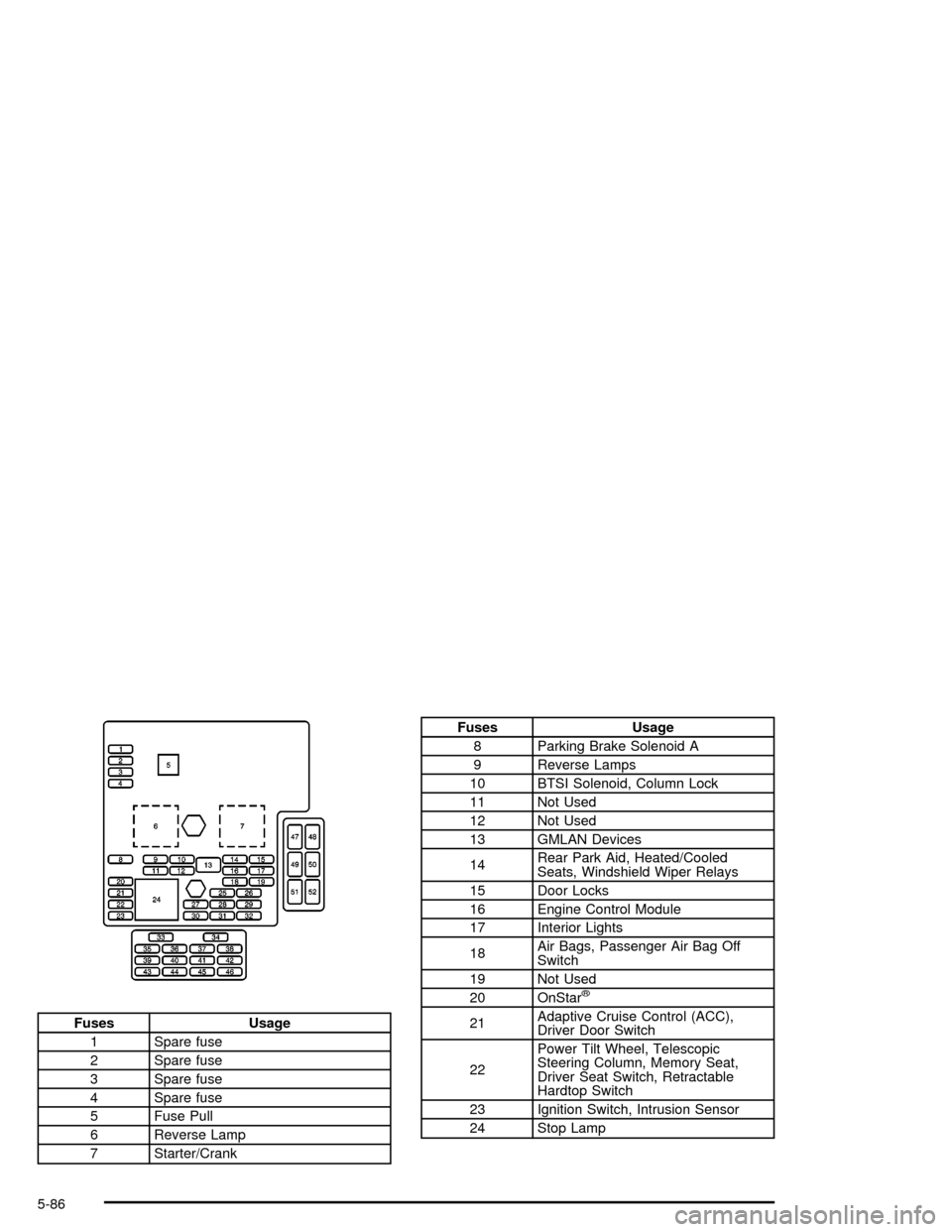
Fuses Usage
1 Spare fuse
2 Spare fuse
3 Spare fuse
4 Spare fuse
5 Fuse Pull
6 Reverse Lamp
7 Starter/Crank
Fuses Usage
8 Parking Brake Solenoid A
9 Reverse Lamps
10 BTSI Solenoid, Column Lock
11 Not Used
12 Not Used
13 GMLAN Devices
14Rear Park Aid, Heated/Cooled
Seats, Windshield Wiper Relays
15 Door Locks
16 Engine Control Module
17 Interior Lights
18Air Bags, Passenger Air Bag Off
Switch
19 Not Used
20 OnStar
ž
21Adaptive Cruise Control (ACC),
Driver Door Switch
22Power Tilt Wheel, Telescopic
Steering Column, Memory Seat,
Driver Seat Switch, Retractable
Hardtop Switch
23 Ignition Switch, Intrusion Sensor
24 Stop Lamp
5-86
Page 312 of 356
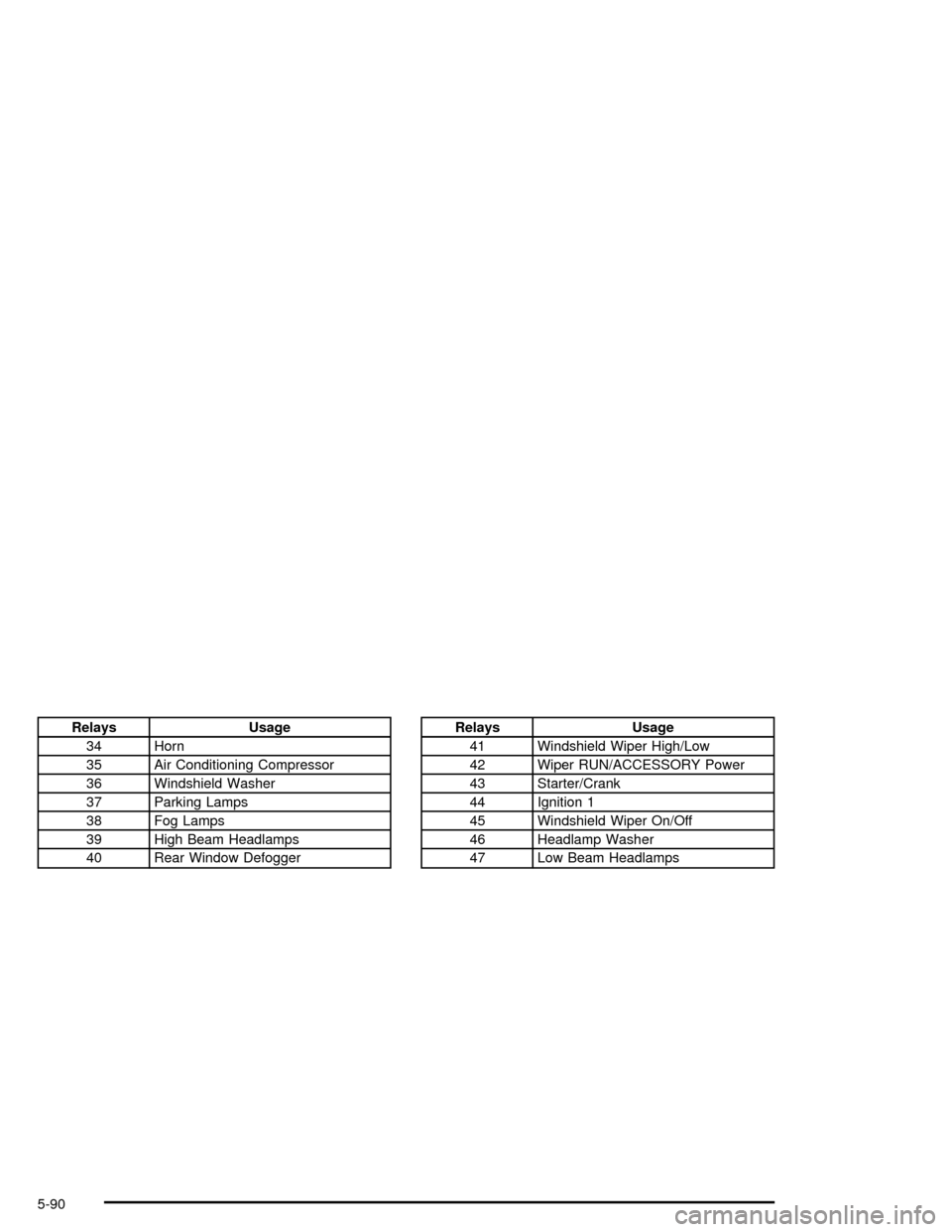
Relays Usage
34 Horn
35 Air Conditioning Compressor
36 Windshield Washer
37 Parking Lamps
38 Fog Lamps
39 High Beam Headlamps
40 Rear Window DefoggerRelays Usage
41 Windshield Wiper High/Low
42 Wiper RUN/ACCESSORY Power
43 Starter/Crank
44 Ignition 1
45 Windshield Wiper On/Off
46 Headlamp Washer
47 Low Beam Headlamps
5-90