instrument panel CADILLAC XLR 2004 1.G Owner's Manual
[x] Cancel search | Manufacturer: CADILLAC, Model Year: 2004, Model line: XLR, Model: CADILLAC XLR 2004 1.GPages: 356, PDF Size: 2.36 MB
Page 134 of 356

Fog Lamps
If your vehicle has fog lamps, use them for better vision
in foggy or misty conditions.
The fog lamps control is located on the multifunction
lever next to the exterior lamp control.
-(Fog Lamps):Turning the band to this position will
turn on the fog lamps.
When you turn on the fog lamps, the fog lamp light on
the instrument panel cluster will come on to indicate that
the fog lamps and the parking lamps are on.
If you turn on the high-beam headlamps, the fog lamps
will turn off. They will turn back on again when you
switch to low-beam headlamps.
The ignition must be on for the fog lamps to operate.
Twilight Sentinelž
Twilight Sentinelžcan turn your lamps on and off for
you. A light sensor on top of the instrument panel makes
the Twilight Sentinel
žwork, so be sure it is not
covered.With Twilight Sentinel
žyou will see the following
happen:
·When it is dark enough outside, the front turn signal
lamps (DRL) will go off, and the headlamps and
parking lamps will come on. The other lamps
that come on with headlamps will also come on.
·When it is bright enough outside, the headlamps
will go off, and the front turn signal lamps (DRL)
will come on, as long as the exterior lamp switch is
in the OFF position.
If you start your vehicle in a dark garage, the automatic
headlamp system will come on immediately. Once
you leave the garage, it will take approximately
one minute for the automatic headlamp system to
change to DRL if it is light outside. During that delay,
your instrument panel cluster may not be as bright
as usual. Make sure your instrument panel brightness
control is in full bright position. See ªInstrument
Panel Brightness Controlº under
Interior Lamps on
page 3-25.
You can idle the vehicle with the lamps off, even when
it is dark outside. First set the parking brake while
the ignition is in OFF. Then start the vehicle. The lamps
will stay off until you release the parking brake.
3-24
Page 135 of 356

Twilight Sentinelžalso provides exterior illumination as
you leave the vehicle. If Twilight Sentinelžhas turned
on the lamps when you turn off the ignition, your lamps
will remain on until:
·The exterior lamp switch is moved from OFF to the
parking lamp position, or
·a delay time that you select has elapsed.
See
Driver Information Center (DIC) on page 3-55to
select the delay time that you want. You can also select
no delay time.
If you turn off the ignition with the exterior lamp switch
in the parking lamp or headlamp position, the Twilight
Sentinel
ždelay will not occur. The lamps will turn off as
soon as the switch is turned off.
As with any vehicle, you should turn on the regular
headlamp system when you need it.
Exterior Lighting Battery Saver
If the manual parking lamps or headlamps have been
left on, the exterior lamps will turn off as soon as
the ignition is turned off or RAP is active. This protects
against draining the battery in case you have
accidentally left the headlamps or parking lamps on.
The battery saver does not work if the headlamps are
turned on after the ignition switch is turned to OFF.
If you need to leave the lamps on, use the exterior lamp
control to turn the lamps back on.
Interior Lamps
Instrument Panel Brightness
The button for this feature is located on the instrument
panel to the left of the steering column.
+
!- (Brightness):Press this button to change the
brightness of the instrument panel lights.
Press the DIMMER button until PANEL DIMMING
appears on the Driver Information Center (DIC). Then
use the brightness button to adjust the instrument panel
brightness. Press the top of the button to brighten the
lights or the bottom of the button to dim the lights.
See
Head-Up Display (HUD) on page 3-27for more
information.
Be sure not to have the brightness turned all the way
down with the lamps on during the day. Your DIC
may not be visible.
3-25
Page 136 of 356

Courtesy Lamps
When any door or the trunk lid is opened, the interior
lamps will go on unless it is bright outside.
You can also turn on the courtesy lamps by pressing
the interior lamp button on the right side of the
instrument panel cluster.
Exit/Entry Lighting
With entry lighting, the interior lamps will come on when
entering the vehicle. The interior lamps will come on
for about 20 seconds when the engine is turned off or a
door is ajar.
You can turn exit and entry lighting off by quickly turning
the headlamps on and off or by quickly turning the
courtesy lamps on and off.
Reading Lamps
Your inside rearview mirror includes two reading lamps.
The lamps will go on when a door is opened. When
the doors are closed, each lamp can be turned on
individually by pressing the button for that lamp.
Battery Run-Down Protection
Your vehicle has a feature to help prevent you from
draining the battery in case the underhood lamp, vanity
mirror lamps, cargo lamps, reading lamps, console
or glove box lamps are accidentally left on or in case
something is plugged into the accessory power outlet or
cigarette lighter. If you leave any of these lamps on,
they will automatically time-out after about 20 minutes.
To reset it, all of the above lamps must be turned
off or the ignition key must be in ON.
3-26
Page 137 of 356
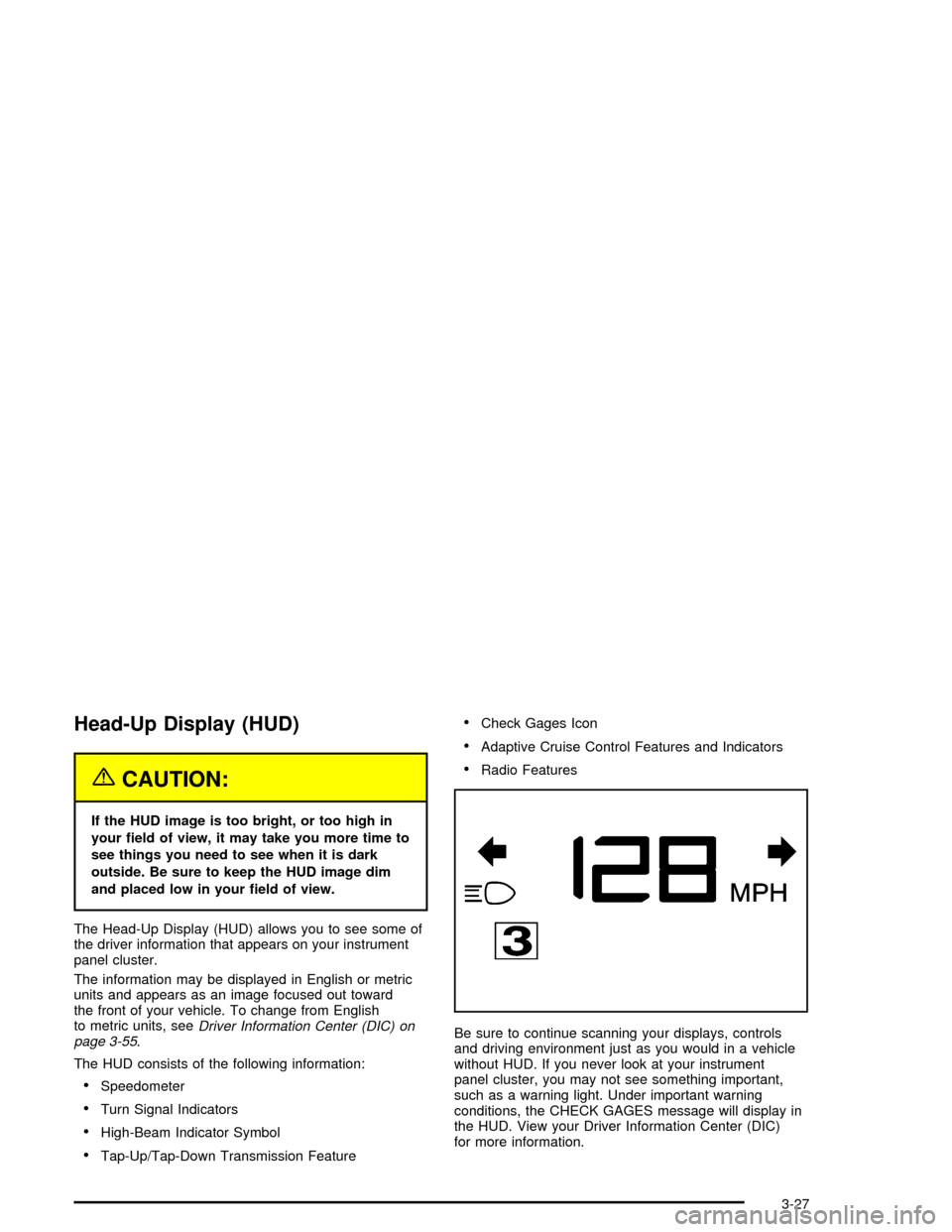
Head-Up Display (HUD)
{CAUTION:
If the HUD image is too bright, or too high in
your ®eld of view, it may take you more time to
see things you need to see when it is dark
outside. Be sure to keep the HUD image dim
and placed low in your ®eld of view.
The Head-Up Display (HUD) allows you to see some of
the driver information that appears on your instrument
panel cluster.
The information may be displayed in English or metric
units and appears as an image focused out toward
the front of your vehicle. To change from English
to metric units, see
Driver Information Center (DIC) on
page 3-55.
The HUD consists of the following information:
·Speedometer
·Turn Signal Indicators
·High-Beam Indicator Symbol
·Tap-Up/Tap-Down Transmission Feature
·Check Gages Icon
·Adaptive Cruise Control Features and Indicators
·Radio Features
Be sure to continue scanning your displays, controls
and driving environment just as you would in a vehicle
without HUD. If you never look at your instrument
panel cluster, you may not see something important,
such as a warning light. Under important warning
conditions, the CHECK GAGES message will display in
the HUD. View your Driver Information Center (DIC)
for more information.
3-27
Page 138 of 356

The HUD controls are
located to the left of the
steering wheel.
+
!- (Brightness):This button is used to adjust the
brightness of the HUD and the instrument panel cluster.
DIMMER:This button is used to select the HUD or
the instrument panel cluster to adjust the brightness.
HUD:This button is used to adjust the vertical position
of the HUD display.
To adjust the HUD so you can see it properly, do the
following:
1. Adjust the seat to a comfortable driving position. If
you change your seat position later, you may have
to re-adjust your HUD.2. Start your engine and press the top or bottom
of the HUD button to center the HUD image in
your view.
The HUD image can only be adjusted up and down,
not side-to-side.
3. Press the DIMMER button until the DIC reads HUD
DIMMING. Then use the brightness button to adjust
the desired intensity.
The brightness of the HUD image is determined by the
light conditions in the direction your vehicle is facing
and where you have the HUD set. If you are facing a
dark object or a heavily shaded area, your HUD
may anticipate that you are entering a dark area and
may begin to dim.
To turn off the HUD, press the brightness button down
until the image disappears.
Polarized sunglasses could make the HUD image
harder to see.
As light shines out from the HUD, it is possible for light
to shine back in. In rare occurrences, when the sun
is at a speci®c angle and position, the sun's rays can
shine back into the HUD. When this occurs, the display
device within the HUD will be temporarily illuminated.
The event will end when the vehicle's angle to the
sun changes.
3-28
Page 144 of 356

Automatic Operation
AUTO (Automatic):When this button is pressed and
the temperature is set, the system will automatically
control the inside temperature, the air delivery mode, the
air-conditioning compressor and the fan speed. AUTO
will appear on the display.
1. Press the AUTO button.
2. Adjust the temperature to a comfortable setting
between 70ÉF (21ÉC) and 80ÉF (27ÉC).
Choosing the warmest or coldest temperature
setting will not cause the system to heat or cool any
faster. If you set the system at the warmest or
coldest temperature setting, the system will remain
in manual mode at that temperature and it will
not go into automatic mode.
In cold weather, the system will start at reduced fan
speeds to avoid blowing cold air into your vehicle
until warmer air is available. The system will
start out blowing air at the ¯oor but may change
modes automatically as the vehicle warms up
to maintain the chosen temperature setting. The
length of time needed for warm up will depend on
the outside temperature and the length of time
that has elapsed since your vehicle was last driven.
3. Wait for the system to regulate. This may take from
10 to 30 minutes. Then adjust the temperature, if
necessary.You can switch from English to metric units through the
Driver Information Center (DIC). SeeDIC Controls
and Displays on page 3-55for more information.
The air-conditioning system removes moisture from the
air, so you may sometimes notice a small amount of
water dripping underneath your vehicle while idling
or after turning off the engine. This is normal.
Do not cover the solar sensor located in the center of
the instrument panel, near the windshield. For more
information on the solar sensor, see ªSensorsº later in
this section.
Manual Operation
wPWRx(Power/Temperature):Press the PWR
button on the left side of the climate control panel to turn
the entire climate control system on or off. Press the
up or down arrow on the switch to manually increase or
decrease the temperature inside the vehicle.
Press the PWR button on the right side of the climate
control panel to turn the passenger's climate control
system on or off. Press the up or down arrow on
the switch to manually increase or decrease the
temperature for the passenger.
If the passenger's PWR button is off, the driver's
temperature switch controls the temperature for the
entire vehicle.
3-34
Page 145 of 356

«9ª(Fan):Press this switch to increase or
decrease the fan speed. Pressing this switch cancels
automatic operation and places the system in manual
mode. Press AUTO to return to automatic operation.
If the air¯ow seems low when the fan speed is at
the highest setting, the passenger compartment air ®lter
may need to be replaced. For more information, see
Passenger Compartment Air Filter on page 3-38andScheduled Maintenance on page 6-4.
ªN«(Mode):Pressing the switch and changing the
mode cancels automatic operation and places the
system in manual mode. Press the AUTO button to
return to automatic operation.
To change the current mode, select one of the following:
H(Vent):This mode directs air to the instrument
panel outlets.
%(Bi-Level):This mode directs approximately half of
the air to the instrument panel outlets, and then
directs most of the remaining air to the ¯oor outlets. In
automatic operation, cooler air is directed to the
upper outlets and warmer air to the ¯oor outlets.
6(Floor):This mode directs most of the air to the
¯oor outlets with some air directed to the side window
outlets, and a little air directed to the windshield.
The mode switch can also be used to select the defog
mode. Information on defogging and defrosting can
be found later in this section.
A/C OFF (Air Conditioning):Press this button to turn
off the air conditioning compressor. Press AUTO to
return to automatic operation. The compressor cannot
be turned off in either the defrost or ¯oor/defog mode.
((Heated/Cooled Seat):Press this button to turn the
feature on. The button on the left controls the driver's
seat and the button on the right controls the passenger's
seat. Each press of the button will take you to a
different setting. The settings available in order are HI
HEAT, LO HEAT, OFF, HI COOL, LO COOL and
OFF. You will be able to feel the temperature change in
a few minutes.
The feature will automatically shut off when the vehicle
is turned off.
3-35
Page 146 of 356

?(Recirculation):Press this button to turn the
recirculation mode on or off. The air-conditioning
compressor also comes on. This mode keeps outside
air from coming in the vehicle. It can be used to prevent
outside air and odors from entering your vehicle or to
help cool the air inside your vehicle more quickly.
Recirculation is not available in defrost or
¯oor/defog mode.
Using recirculation for long periods of time may cause
the air inside your vehicle to become too dry. To prevent
this from happening, after the air in your vehicle has
cooled, turn the recirculation mode off.
Sensors
There are sensors to measure the temperature and
sun's effect on passenger comfort.
The solar sensor on your vehicle monitors the solar
radiation then uses the information to maintain the
selected temperature when operating in AUTO mode by
initiating needed adjustments to the temperature, the
fan speed and the air delivery system. The system may
also supply cooler air to the side of the vehicle facing
the sun. The recirculation mode will also be activated, as
necessary. Do not cover the solar sensor located on
the top right side of the instrument panel near the
windshield or system will not work properly.There is also a sensor located behind the front bumper.
This sensor reads the outside air temperature and
helps maintain the temperature inside the vehicle. The
outside temperature will be displayed in the navigation
system only when the engine is running. Any cover
on the front of the vehicle could give a false reading of
the temperature.
If the outside temperature goes up, the display
temperature will not change until:
·The vehicle's speed is above 10 mph (16 km/h) for
®ve minutes.
·The vehicle's speed is above 32 mph (51 km/h) for
two and one-half minutes.
These delays prevent false readings. If the temperature
goes down, the outside temperature will be shown
when you start the vehicle. If it has been turned off for
less than three hours, the temperature will be recalled
from the previous vehicle operation.
There is also an inside temperature sensor located to
the left of the ignition button. The automatic climate
control system uses this sensor to receive information,
so if you block or cover it, the system will not function
properly.
3-36
Page 148 of 356

Outlet Adjustment
Use the thumbwheel to open or close the outlets.
Operation Tips
·
Clear away any ice, snow or leaves from the air
inlets at the base of the windshield that may
block the ¯ow of air into your vehicle.
·Use of non-GM approved hood de¯ectors may
adversely affect the performance of the system.
·Keep the area around the base of the instrument
panel console and air path under the seats clear
of objects to help circulate the air inside of
your vehicle more effectively.
Passenger Compartment Air Filter
The passenger compartment air ®lter removes certain
odor and particles from the air including pollen and dust
particles. Reductions in air¯ow, which may occur
more often in dusty areas, indicate that the ®lter may
need to be replaced early.
The ®lter should be replaced as part of the routine
scheduled maintenance. See
Scheduled Maintenance
on page 6-4for more information.
The passenger compartment air ®lter is located on the
passenger's side of the engine compartment near
the battery. See
Engine Compartment Overview on
page 5-12for more information on location.
To check or replace the air ®lter, do the following:
1. With the hood open, unlatch and remove the access
panel.
2. Pull the old ®lter out of the housing.
3. Insert the new ®lter into the housing. The ®lter
should be fully inserted with the arrows pointing up.
4. Reinstall the air ®lter access panel.
3-38
Page 150 of 356

Instrument Panel Cluster
Your instrument panel cluster and Driver Information Center (DIC) are designed to let you know at a glance how the
vehicle is running. You will know how fast you are going, about how much fuel you have left and many other things
you will need to know to drive safely and economically. The instrument panel cluster indicator warning lights, gages
and DIC messages are explained on the following pages.
United States shown, Canada similar
3-40