change time CADILLAC XLR 2004 1.G Owners Manual
[x] Cancel search | Manufacturer: CADILLAC, Model Year: 2004, Model line: XLR, Model: CADILLAC XLR 2004 1.GPages: 356, PDF Size: 2.36 MB
Page 2 of 356
GENERAL MOTORS, GM, the GM Emblem, CADILLAC,
the CADILLAC Crest & Wreath are registered
trademarks and the name XLR is a trademark of
General Motors Corporation.
This manual includes the latest information at the time it
was printed. We reserve the right to make changes
after that time without further notice. For vehicles ®rst
sold in Canada, substitute the name ªGeneral Motors of
Canada Limitedº for Cadillac Motor Car Division
whenever it appears in this manual.
Please keep this manual in your vehicle, so it will be
there if you ever need it when you're on the road. If you
sell the vehicle, please leave this manual in it so the
new owner can use it.
Litho in U.S.A.
Part No. 10327354 B First Edition
Copyright General Motors Corporation 11/04/03
All Rights Reserved
Canadian Owners
A French language copy of this manual can be obtained
from your dealer or from:
Helm, Incorporated
P.O. Box 07130
Detroit, MI 48207
How to Use This Manual
Many people read the owner manual from beginning to
end when they ®rst receive their new vehicle. If you
do this, it can help you learn about the features
and controls for the vehicle. Pictures and words work
together in the owner manual to explain things.
Index
A good place to look for what you need is the Index in
back of the manual. It is an alphabetical list of what
is in the manual, and the page number where you will
®nd it.
ii
Page 26 of 356
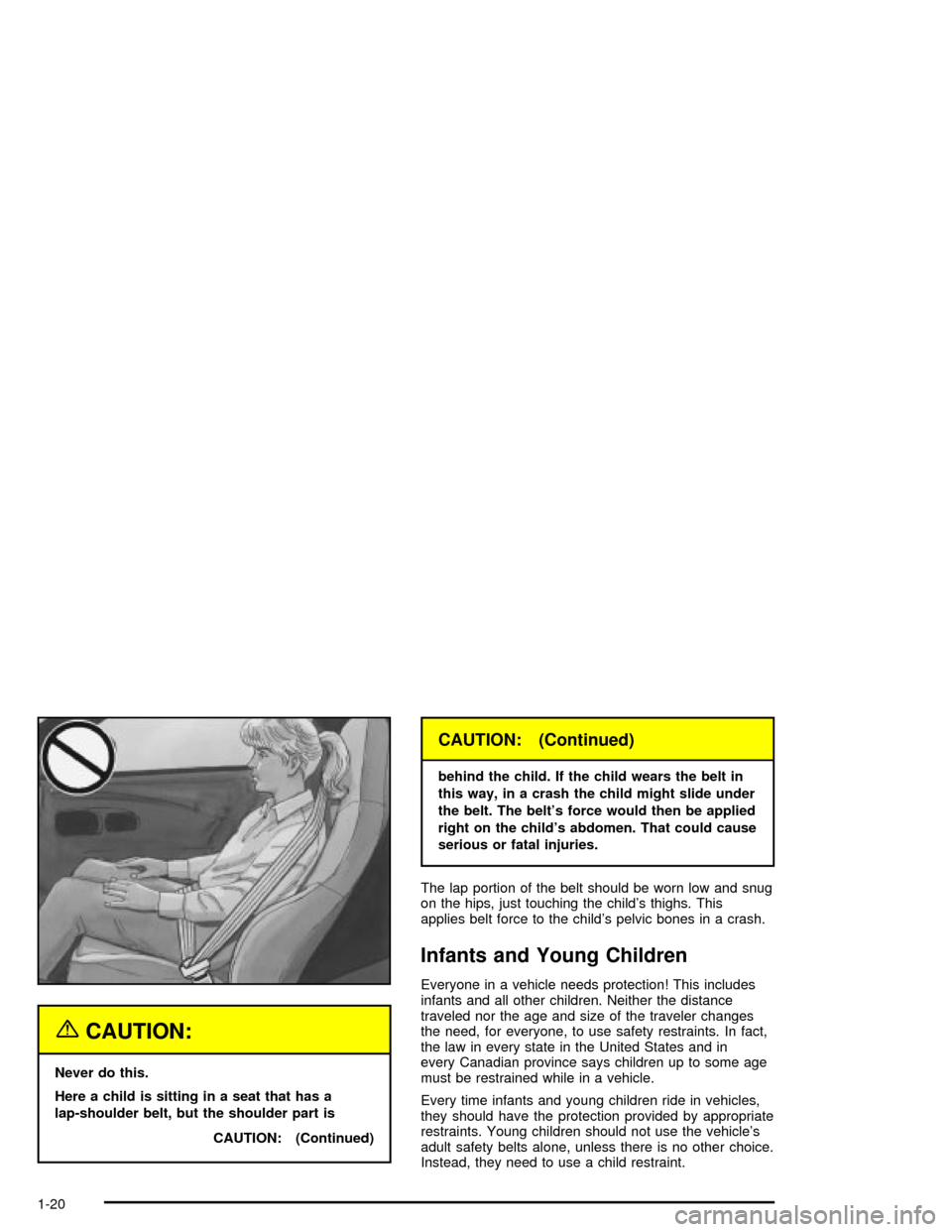
{CAUTION:
Never do this.
Here a child is sitting in a seat that has a
lap-shoulder belt, but the shoulder part is
CAUTION: (Continued)
CAUTION: (Continued)
behind the child. If the child wears the belt in
this way, in a crash the child might slide under
the belt. The belt's force would then be applied
right on the child's abdomen. That could cause
serious or fatal injuries.
The lap portion of the belt should be worn low and snug
on the hips, just touching the child's thighs. This
applies belt force to the child's pelvic bones in a crash.
Infants and Young Children
Everyone in a vehicle needs protection! This includes
infants and all other children. Neither the distance
traveled nor the age and size of the traveler changes
the need, for everyone, to use safety restraints. In fact,
the law in every state in the United States and in
every Canadian province says children up to some age
must be restrained while in a vehicle.
Every time infants and young children ride in vehicles,
they should have the protection provided by appropriate
restraints. Young children should not use the vehicle's
adult safety belts alone, unless there is no other choice.
Instead, they need to use a child restraint.
1-20
Page 63 of 356
Battery Replacement
Under normal use, the battery in your keyless access
transmitter should last about three years.
You can tell the battery is weak if the transmitter will not
work at the normal range in any location. If you have
to get close to your vehicle before the transmitter works,
it is probably time to change the battery.
A weak battery may also cause the DIC to display NO
FOBS DETECTED when you try to start the vehicle. If
this happens, place the transmitter in the glove box
transmitter pocket with the buttons facing to the right.
Then, with the vehicle in PARK (P) or NEUTRAL (N),
press the brake pedal and the START button. Although
this will start the vehicle, it is recommended that you
replace the transmitter battery as soon as possible. The
DIC may display FOB BATTERY LOW.
Notice:When replacing the battery, use care not to
touch any of the circuitry. Static from your body
transferred to these surfaces may damage the
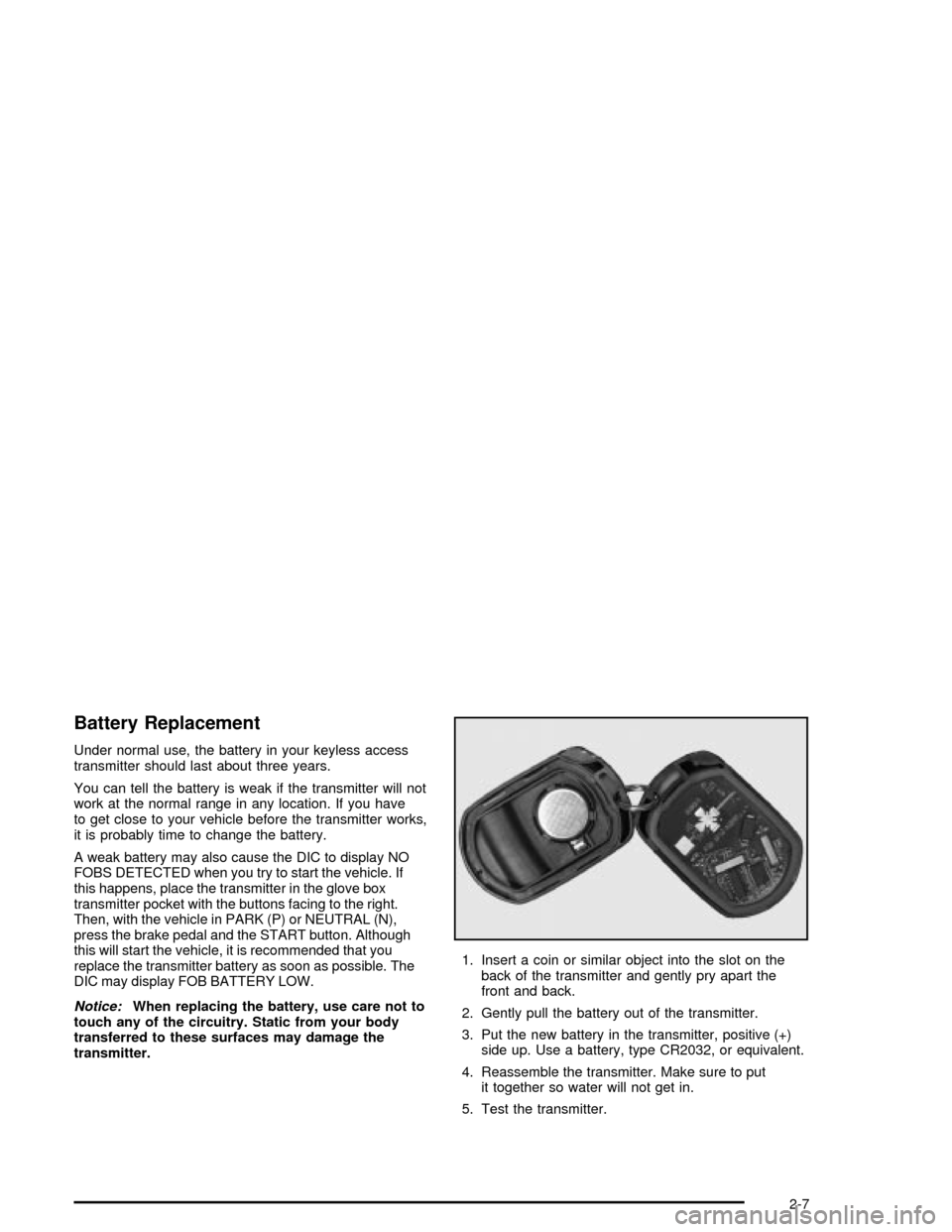
transmitter.1. Insert a coin or similar object into the slot on the
back of the transmitter and gently pry apart the
front and back.
2. Gently pull the battery out of the transmitter.
3. Put the new battery in the transmitter, positive (+)
side up. Use a battery, type CR2032, or equivalent.
4. Reassemble the transmitter. Make sure to put
it together so water will not get in.
5. Test the transmitter.
2-7
Page 77 of 356

Notice:Holding the button in for longer than
15 seconds at a time will cause the battery to be
drained much sooner. This can also cause damage
to the starter motor. Wait 15 seconds between
each try to avoid draining your vehicle's battery or
damaging the starter.
2. If the engine does not start and no DIC message is
displayed, wait 15 seconds before trying again.
Notice:Your engine is designed to work with the
electronics in your vehicle. If you add electrical
parts or accessories, you could change the way the
engine operates. Before adding electrical equipment,
check with your dealer. If you do not, your engine
might not perform properly.
Stopping Your Engine
Move the shift lever to PARK (P) and press the
OFF/ACCESSORY button. If the shifter is not in PARK
(P), the vehicle will go into ACCESSORY mode and
the DIC will display SHIFT TO PARK. Once the shifter
is moved to PARK (P), the vehicle will turn off.If the keyless access transmitter is not detected
while going to off, the DIC will display NO FOB, OFF
OR RUN.
See
DIC Warnings and Messages on page 3-57for
more information.
Engine Coolant Heater
Your vehicle may be equipped with an engine coolant
heater.
In very cold weather, 0ÉF (-18ÉC) or colder, the engine
coolant heater can help. You will get easier starting
and better fuel economy during engine warm-up.
Usually, the coolant heater should be plugged in a
minimum of four hours prior to starting your vehicle. At
temperatures above 32ÉF (0ÉC), use of the coolant
heater is not required.
2-21
Page 81 of 356

Driver Shift Control
The driver shift control feature gives you more manual
control over the operation of the transmission.
To use this feature, move
the shift lever from the
AUTOMATIC OVERDRIVE
(D) position to the left
and into the driver
shift control gate.
A plus symbol will also appear on the shift console
above the AUTOMATIC OVERDRIVE (D) indicator and
minus symbol will appear below the indicator.
To request an upshift, brie¯y move the shift lever up
toward the plus symbol. To request a downshift, brie¯y
move the shift lever down toward the minus symbol.
The Head-Up Display (HUD) will display the change in
gear range, though the actual upshift or downshift
may be delayed until the engine speed is correct for the
requested gear range.The currently selected gear will be remembered as the
selected gear range and will be displayed in the
HUD. SeeHead-Up Display (HUD) on page 3-27.
The gear range indicated in the HUD is only a requested
range of available gears. It does not indicate that the
vehicle will operate only in that speci®c gear. The actual
gear the vehicle will choose depends on a combination
of the driver-requested gear range, vehicle speed
and throttle position.
If you do not upshift as the engine approaches the
redline engine rpm for the selected gear range,
an engine speed limiter will prevent over-revving by
limiting the engine rpm available. No automatic upshift
will occur until you request it. Operating the engine
for extended periods of time against the speed limiter is
not recommended.
Not all manual downshift requests will be accepted by
the transmission. To prevent over-revving the engine,
each gear range has a maximum vehicle speed
associated with it. Any downshift request above this
speed will be ignored by the transmission.
2-25
Page 120 of 356

This device complies with RSS-210 of Industry Canada.
Operation is subject to the following two conditions:
1. This device may not cause interference, and
2. This device must accept any interference received,
including interference that may cause undesired
operation of the device.
Changes or modi®cations to this system by other than
an authorized service facility could void authorization to
use this equipment.
Adaptive Cruise Control (ACC) is an enhancement to
traditional cruise control and is not a safety system. ACC
allows you to keep cruise control engaged in moderate
traffic conditions without having to constantly reset
your cruise control. ACC uses radar to detect a vehicle
directly ahead in your path, within a distance of
328 ft (100 m), and operates at speeds above
25 mph (40 km/h). When it is engaged by the driver,
ACC can apply limited braking or acceleration of
the vehicle automatically to maintain a selected follow
distance to the vehicle ahead. ACC braking is limited to
0.3 g's (2.95 m/sec2) of deceleration, which is
comparable to moderate application of the vehicle's
brakes. To disengage ACC, apply the brake. If there is
no vehicle in your path, your vehicle will react like
traditional cruise control.
{CAUTION:
ACC will not apply hard braking or bring the
vehicle to a complete stop. ACC will not
respond to stopped vehicles, pedestrians or
animals. When you are approaching a vehicle
or object, ACC may not have time to slow your
vehicle enough to avoid a collision. Your
complete attention is always required while
driving and you should be ready to take action
and apply the brakes. For more information,
see
Defensive Driving on page 4-2.
3-10
Page 121 of 356
{CAUTION:
·On winding roads, ACC may not detect a
vehicle ahead. You could crash into a
vehicle ahead of you. Do not use ACC on
winding roads.
·In heavy stop-and-go traffic, ACC may not
have time to slow your vehicle enough to
avoid a collision because of the rapidly
changing traffic conditions. Do not use
ACC in heavy stop-and-go traffic.
·On slippery roads, fast changes in tire
traction can cause needless wheel
spinning, and you could lose control. Do
not use cruise control on slippery roads.
·When visibility is low, such as in fog, rain
or snow, you can not tell how far away
things are and ACC performance is limited.
There may not be enough distance to
adapt to the changing traffic conditions.
Do not use cruise control when visibility
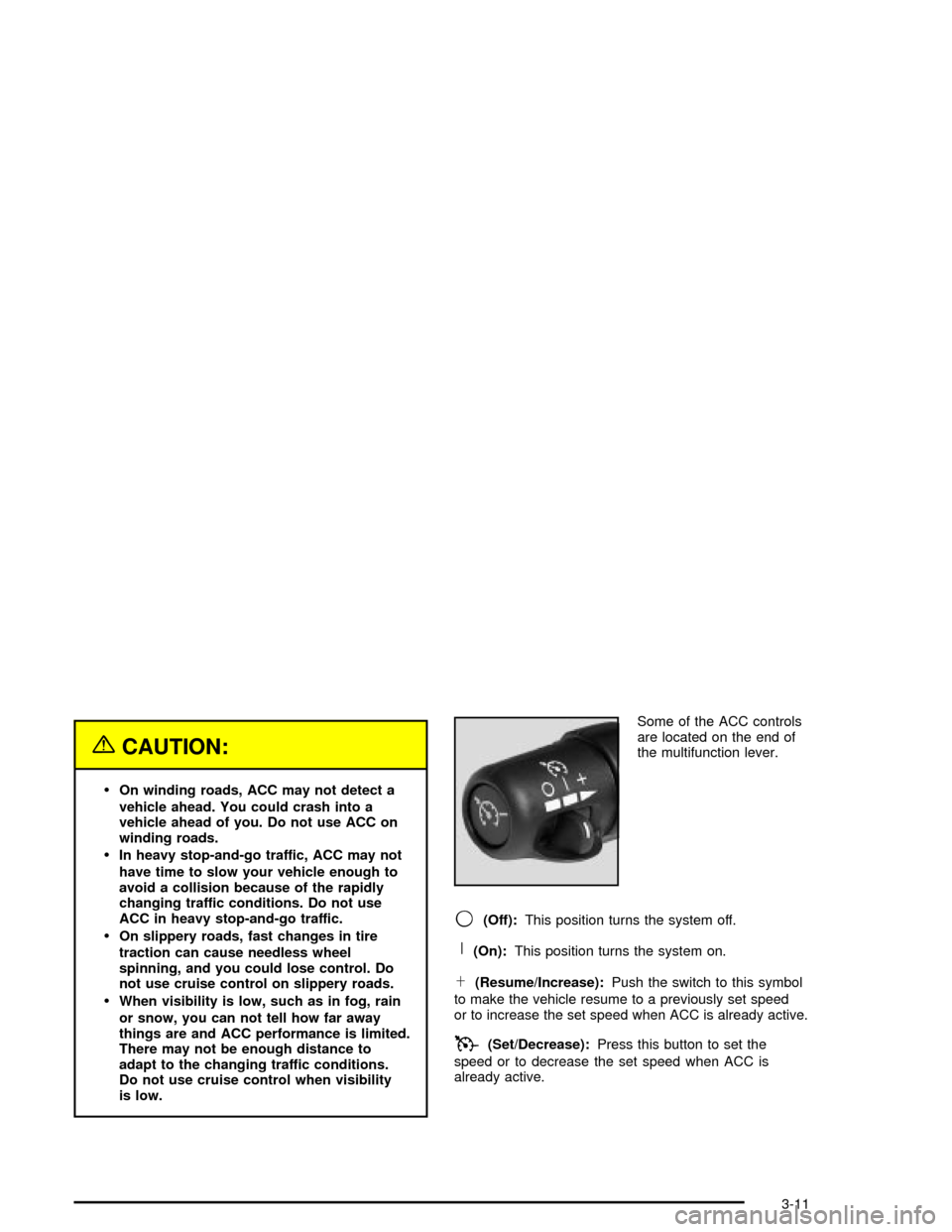
is low.Some of the ACC controls
are located on the end of
the multifunction lever.
9(Off):This position turns the system off.
R(On):This position turns the system on.
S(Resume/Increase):Push the switch to this symbol
to make the vehicle resume to a previously set speed
or to increase the set speed when ACC is already active.
T(Set/Decrease):Press this button to set the
speed or to decrease the set speed when ACC is
already active.
3-11
Page 124 of 356
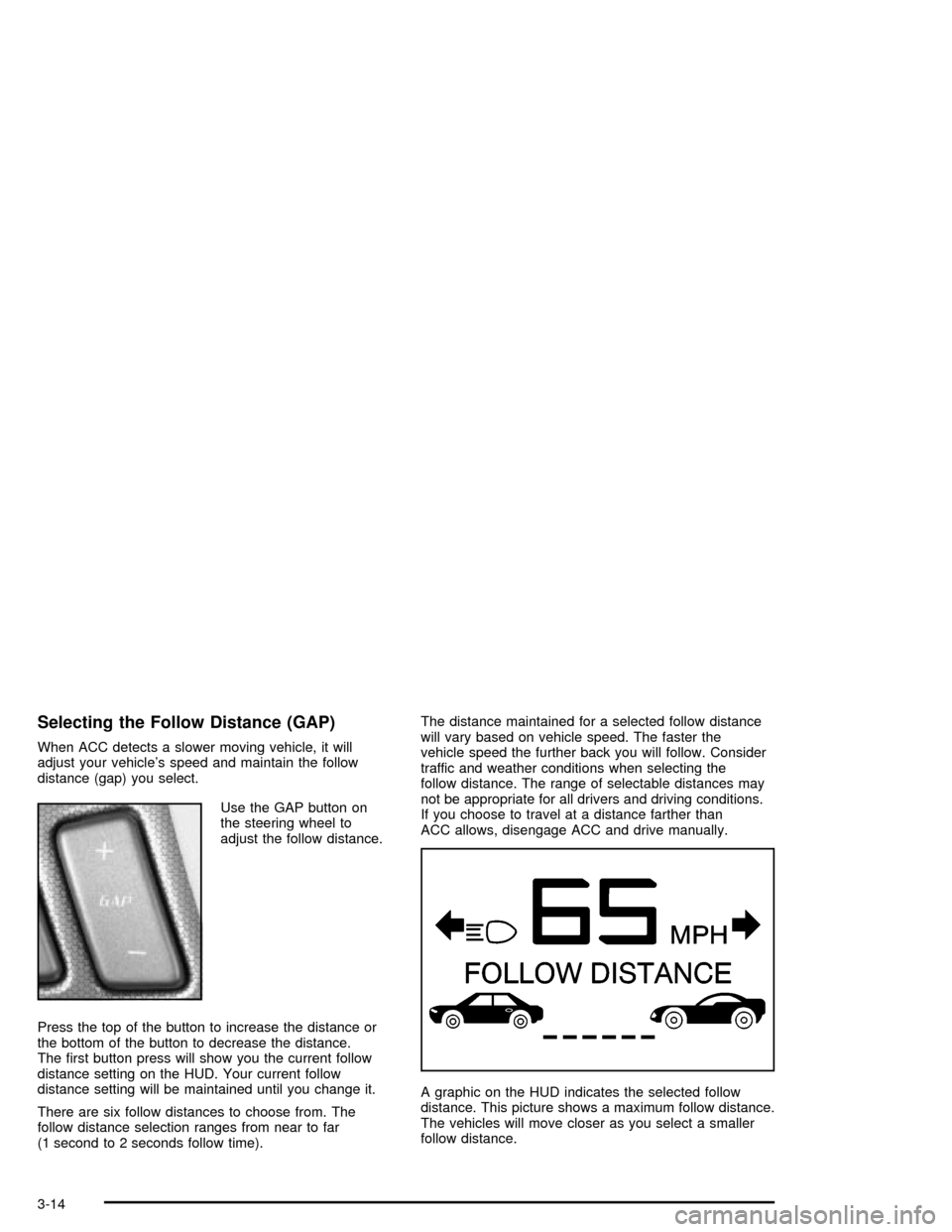
Selecting the Follow Distance (GAP)
When ACC detects a slower moving vehicle, it will
adjust your vehicle's speed and maintain the follow
distance (gap) you select.
Use the GAP button on
the steering wheel to
adjust the follow distance.
Press the top of the button to increase the distance or
the bottom of the button to decrease the distance.
The ®rst button press will show you the current follow
distance setting on the HUD. Your current follow
distance setting will be maintained until you change it.
There are six follow distances to choose from. The
follow distance selection ranges from near to far
(1 second to 2 seconds follow time).The distance maintained for a selected follow distance
will vary based on vehicle speed. The faster the
vehicle speed the further back you will follow. Consider
traffic and weather conditions when selecting the
follow distance. The range of selectable distances may
not be appropriate for all drivers and driving conditions.
If you choose to travel at a distance farther than
ACC allows, disengage ACC and drive manually.
A graphic on the HUD indicates the selected follow
distance. This picture shows a maximum follow distance.
The vehicles will move closer as you select a smaller
follow distance.
3-14
Page 133 of 356

Lamps on Reminder
A warning chime will sound if the exterior lamp control
is left on in either the headlamp or parking lamp position
and the driver's door is opened with the ignition off.
Daytime Running Lamps
Daytime Running Lamps (DRL) can make it easier for
others to see the front of your vehicle during the
day. DRL can be helpful in many different driving
conditions, but they can be especially helpful in the short
periods after dawn and before sunset. Fully functional
daytime running lamps are required on all vehicles
®rst sold in Canada.
The DRL system will make the front turn signal lamps
come on when the following conditions are met:
·It is still daylight and the ignition is on,
·the exterior lamp control is in the off position and
·the transmission is not in PARK (P).
When DRL are on, only the front turn signal lamps will
be on. No other exterior lamps such as the parking
lamps, taillamps, etc. will be on when the DRL are being
used. Your instrument panel will not be lit up either.
When it is dark enough outside, the front turn signal
lamps will turn off and normal low-beam headlamps will
turn on.When it is bright enough outside, the regular lamps will
go off, and the front turn signal lamps will take over.
If you start your vehicle in a dark garage, the automatic
headlamp system will come on immediately. Once
you leave the garage, it will take approximately
one minute for the automatic headlamp system to
change to DRL if it is light outside. During that delay,
your instrument panel cluster may not be as bright
as usual. Make sure your instrument panel brightness
knob is in the full bright position. See ªInstrument Panel
Brightnessº under
Interior Lamps on page 3-25.
If it is dark enough outside and the exterior lamp control
is off, a HEADLAMPS SUGGESTED message will
display on the Driver's Information Center (DIC). This
message informs the driver that turning on the exterior
lamps is recommended.
Turning the exterior lamp control to off a second time,
or turning on the headlamps will remove the
HEADLAMPS SUGGESTED message. If the parking
lamps or the fog lamps were turned on instead,
the HEADLAMPS SUGGESTED message will continue
to be displayed.
As with any vehicle, you should turn on the regular
headlamp system when you need it.
3-23
Page 135 of 356

Twilight Sentinelžalso provides exterior illumination as
you leave the vehicle. If Twilight Sentinelžhas turned
on the lamps when you turn off the ignition, your lamps
will remain on until:
·The exterior lamp switch is moved from OFF to the
parking lamp position, or
·a delay time that you select has elapsed.
See
Driver Information Center (DIC) on page 3-55to
select the delay time that you want. You can also select
no delay time.
If you turn off the ignition with the exterior lamp switch
in the parking lamp or headlamp position, the Twilight
Sentinel
ždelay will not occur. The lamps will turn off as
soon as the switch is turned off.
As with any vehicle, you should turn on the regular
headlamp system when you need it.
Exterior Lighting Battery Saver
If the manual parking lamps or headlamps have been
left on, the exterior lamps will turn off as soon as
the ignition is turned off or RAP is active. This protects
against draining the battery in case you have
accidentally left the headlamps or parking lamps on.
The battery saver does not work if the headlamps are
turned on after the ignition switch is turned to OFF.
If you need to leave the lamps on, use the exterior lamp
control to turn the lamps back on.
Interior Lamps
Instrument Panel Brightness
The button for this feature is located on the instrument
panel to the left of the steering column.
+
!- (Brightness):Press this button to change the
brightness of the instrument panel lights.
Press the DIMMER button until PANEL DIMMING
appears on the Driver Information Center (DIC). Then
use the brightness button to adjust the instrument panel
brightness. Press the top of the button to brighten the
lights or the bottom of the button to dim the lights.
See
Head-Up Display (HUD) on page 3-27for more
information.
Be sure not to have the brightness turned all the way
down with the lamps on during the day. Your DIC
may not be visible.
3-25