climate control CADILLAC XLR 2004 1.G Owners Manual
[x] Cancel search | Manufacturer: CADILLAC, Model Year: 2004, Model line: XLR, Model: CADILLAC XLR 2004 1.GPages: 356, PDF Size: 2.36 MB
Page 1 of 356

Seats and Restraint Systems........................... 1-1
Front Seats
............................................... 1-2
Safety Belts
.............................................. 1-4
Child Restraints
.......................................1-18
Air Bag Systems
......................................1-36
Restraint System Check
............................1-48
Features and Controls..................................... 2-1
Keys
........................................................ 2-2
Doors and Locks
....................................... 2-8
Windows
.................................................2-14
Theft-Deterrent Systems
............................2-17
Starting and Operating Your Vehicle
...........2-19
Mirrors
....................................................2-33
OnStar
žSystem
......................................2-35
HomeLinkžTransmitter
.............................2-37
Storage Areas
.........................................2-41
Retractable Hardtop
..................................2-44
Vehicle Personalization
.............................2-53
Instrument Panel............................................. 3-1
Instrument Panel Overview
.......................... 3-2
Climate Controls
......................................3-33
Warning Lights, Gages, and Indicators
........3-39
Driver Information Center (DIC)
..................3-55Trip Computer
.........................................3-70
Audio System(s)
.......................................3-70
Driving Your Vehicle....................................... 4-1
Your Driving, the Road, and Your Vehicle
..... 4-2
Towing
...................................................4-32
Service and Appearance Care.......................... 5-1
Service
..................................................... 5-3
Fuel
......................................................... 5-5
Checking Things Under the Hood
...............5-10
Rear Axle
...............................................5-45
Headlamp Aiming
.....................................5-46
Bulb Replacement
....................................5-49
Windshield Wiper Blade Replacement
.........5-49
Tires
......................................................5-50
Appearance Care
.....................................5-75
Vehicle Identi®cation
.................................5-83
Electrical System
......................................5-84
Capacities and Speci®cations
.....................5-91
Maintenance Schedule..................................... 6-1
Maintenance Schedule
................................ 6-2
Customer Assistance and Information.............. 7-1
Customer Assistance and Information
........... 7-2
Reporting Safety Defects
...........................7-10
Index................................................................ 1
2004 Cadillac XLR Owner ManualM
Page 4 of 356

Vehicle Damage Warnings
Also, in this manual you will ®nd these notices:
Notice:These mean there is something that could
damage your vehicle.
A notice tells about something that can damage your
vehicle. Many times, this damage would not be covered
by your vehicle's warranty, and it could be costly. But
the notice will tell you what to do to help avoid the
damage.
When you read other manuals, you might see
CAUTION and NOTICE warnings in different
colors or in different words.
There are also warning labels on your vehicle. They use
the same words, CAUTION or NOTICE.
Vehicle Symbols
The vehicle has components and labels that use
symbols instead of text. Symbols are shown along with
the text describing the operation or information
relating to a speci®c component, control, message,
gage, or indicator.
If you need help ®guring out a speci®c name of a
component, gage, or indicator, reference the
following topics:
·Seats and Restraint Systems in Section 1
·Features and Controls in Section 2
·Instrument Panel Overview in Section 3
·Climate Controls in Section 3
·Warning Lights, Gages, and Indicators in Section 3
·Audio System(s) in Section 3
·Engine Compartment Overview in Section 5
iv
Page 9 of 356

Power Lumbar
The driver's and
passenger's seatback
lumbar support switches
are located on the
outboard sides of
the seats.
Use the power seat controls ®rst to get the proper
position, then continue with the lumbar adjustment.
Use the top lumbar switch to adjust support to the
middle seatback and the bottom lumbar switch to adjust
support to the lower seatback. Press the front of the
switch to increase support and the rear of the switch to
decrease support.
Keep in mind that as your seating position changes, as
it may during long trips, so should the position of
your lumbar support. Adjust the seat as needed.
Heated and Cooled Seats
The buttons for the heated and cooled seats are located
on the climate controls.
((Heated/Cooled Seat):Press this button to turn the
feature on. The button on the left controls the driver's
seat and the button on the right controls the passenger's
seat. Each press of the button will take you to a
different setting. The settings available in order are HI
HEAT, LO HEAT, OFF, HI COOL, LO COOL and
OFF. You will be able to feel the temperature change in
a few minutes.
The feature will automatically shut off when the vehicle
is turned off.
1-3
Page 67 of 356

Lockout Protection
Your vehicle can be programmed to sound the horn
three times and unlock the driver's door when both
doors are closed and there is a keyless access
transmitter inside the interior of the vehicle. When the
driver's door is reopened, the key in reminder chime will
sound continuously. The vehicle will remain locked
only when at least one transmitter has been removed
from the vehicle and both doors are closed. See
DIC Vehicle Personalization on page 3-66.
Leaving Your Vehicle
If you are leaving the vehicle, take your keyless access
transmitter with you, open your door and set the
locks from inside or with the keyless access transmitter.
Then get out and close the door.
The vehicle can also be programmed to have the doors
lock automatically when you exit the vehicle. See
DIC Vehicle Personalization on page 3-66.
Trunk
{CAUTION:
It can be dangerous to drive with the trunk lid
open because carbon monoxide (CO) gas can
come into your vehicle. You can not see or
smell CO. It can cause unconsciousness and
even death. If you must drive with the trunk lid
open or if electrical wiring or other cable
connections must pass through the seal
between the body and the trunk lid:
·Make sure all other windows are shut.
·Turn the fan on your heating or cooling
system to its highest speed and select the
control setting that will force outside air
into your vehicle. See Climate Control
System in the Index.
·If you have air outlets on or under the
instrument panel, open them all the way.
See
Engine Exhaust on page 2-31.
2-11
Page 88 of 356

Running Your Engine While You
Are Parked
It is better not to park with the engine running. But if
you ever have to, here are some things to know.
{CAUTION:
Idling the engine with the climate control
system off could allow dangerous exhaust into
your vehicle. See the earlier Caution under
Engine Exhaust on page 2-31.
Also, idling in a closed-in place can let deadly
carbon monoxide (CO) into your vehicle even if
the climate control fan is at the highest setting.
One place this can happen is a garage.
Exhaust Ð with CO Ð can come in easily.
NEVER park in a garage with the engine
running.
Another closed-in place can be a blizzard. See
Winter Driving on page 4-28.
{CAUTION:
It can be dangerous to get out of your vehicle
if the shift lever is not fully in PARK (P) with
the parking brake ®rmly set. Your vehicle can
roll. Do not leave your vehicle when the engine
is running unless you have to. If you have left
the engine running, the vehicle can move
suddenly. You or others could be injured. To
be sure your vehicle will not move, even when
you are on fairly level ground, always set your
parking brake and move the shift lever to
PARK (P).
Follow the proper steps to be sure your vehicle will not
move. See
Shifting Into Park (P) on page 2-28.
2-32
Page 89 of 356
Mirrors
Automatic Dimming Rearview Mirror
with OnStar
ž
Your vehicle has an automatic dimming inside rearview
mirror. The mirror also contains OnStaržcontrols.
For more information about OnStarž, seeOnStarž
System on page 2-35.
O(On/Off):This button, located on the lower left side
of the mirror, is for the automatic dimming functions.
Mirror Operation
The automatic dimming feature is active each time the
vehicle is started.
To turn the automatic dimming feature on or off, press
and release the on/off button. The indicator light will
illuminate when this feature is active.
Cleaning the Mirror
When cleaning the mirror, use a paper towel or similar
material dampened with glass cleaner. Do not spray
glass cleaner directly on the mirror as that may cause
the liquid cleaner to enter the mirror housing.
Outside Power Heated Mirrors
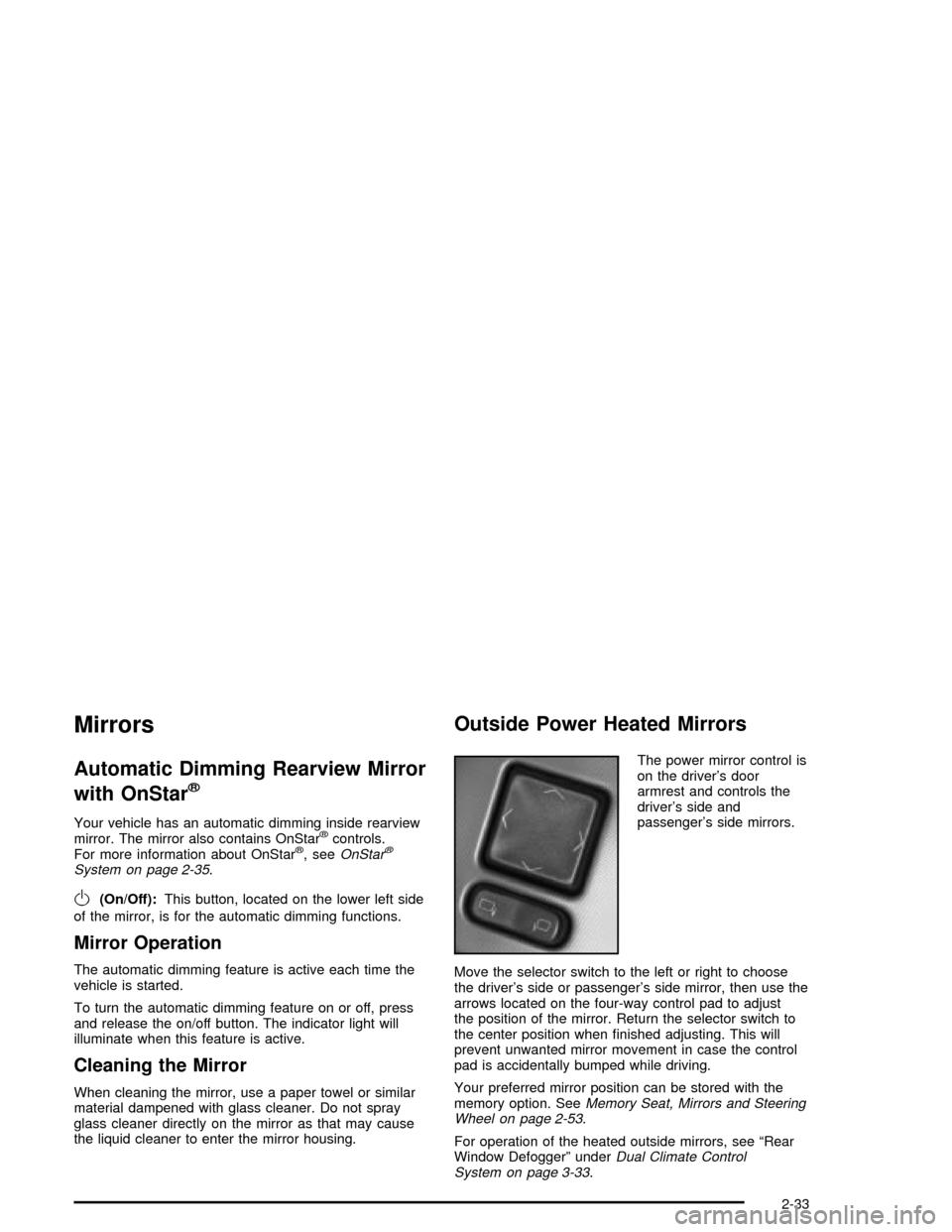
The power mirror control is
on the driver's door
armrest and controls the
driver's side and
passenger's side mirrors.
Move the selector switch to the left or right to choose
the driver's side or passenger's side mirror, then use the
arrows located on the four-way control pad to adjust
the position of the mirror. Return the selector switch to
the center position when ®nished adjusting. This will
prevent unwanted mirror movement in case the control
pad is accidentally bumped while driving.
Your preferred mirror position can be stored with the
memory option. See
Memory Seat, Mirrors and Steering
Wheel on page 2-53.
For operation of the heated outside mirrors, see ªRear
Window Defoggerº under
Dual Climate Control
System on page 3-33.
2-33
Page 111 of 356

Instrument Panel Overview...............................3-2
Hazard Warning Flashers................................3-4
Other Warning Devices...................................3-4
Horn.............................................................3-5
Power Tilt Wheel and Telescopic Steering
Column......................................................3-5
Turn Signal/Multifunction Lever.........................3-5
Exterior Lamps.............................................3-22
Interior Lamps..............................................3-25
Head-Up Display (HUD).................................3-27
Ultrasonic Rear Parking Assist (URPA)............3-30
Accessory Power Outlets...............................3-32
Ashtrays and Cigarette Lighter........................3-33
Climate Controls............................................3-33
Dual Climate Control System..........................3-33
Outlet Adjustment.........................................3-38
Passenger Compartment Air Filter...................3-38
Warning Lights, Gages, and Indicators............3-39
Instrument Panel Cluster................................3-40
Speedometer and Odometer...........................3-41
Trip Odometer..............................................3-41
Tachometer.................................................3-41
Safety Belt Reminder Light.............................3-41
Air Bag Readiness Light................................3-42
Air Bag Off Light..........................................3-43
Voltmeter Gage............................................3-44
Brake System Warning Light..........................3-45
Anti-Lock Brake System Warning Light.............3-46Traction Control System (TCS) Warning Light . . .3-46
Engine Coolant Temperature Gage..................3-47
Tire Pressure Light.......................................3-48
Malfunction Indicator Lamp.............................3-48
Engine Oil Pressure Gage.............................3-52
Security Light...............................................3-52
Fog Lamp Light............................................3-53
Lights On Reminder......................................3-53
Fuel Gage...................................................3-54
Driver Information Center (DIC).......................3-55
DIC Controls and Displays.............................3-55
DIC Warnings and Messages.........................3-57
Other Messages...........................................3-65
DIC Vehicle Personalization............................3-66
Trip Computer................................................3-70
Oil Life Indicator...........................................3-70
Audio System(s).............................................3-70
Navigation/Radio System...............................3-71
Theft-Deterrent Feature..................................3-71
Audio Steering Wheel Controls.......................3-71
Radio Reception...........................................3-72
Care of Your CDs.........................................3-72
Care of Your CD Player................................3-72
Diversity Antenna System..............................3-73
XMŸ Satellite Radio Antenna System.............3-73
Section 3 Instrument Panel
3-1
Page 113 of 356

The main components of the instrument panel are the following:
A. Head-Up Display (HUD) Controls/Instrument Panel
Brightness Controls. See
Head-Up Display (HUD) on
page 3-27or ªInstrument Panel Brightnessº underInterior Lamps on page 3-25.
B. Turn Signal/Multifunction Lever. See
Turn
Signal/Multifunction Lever on page 3-5.
C. Instrument Panel Cluster. See
Instrument Panel
Cluster on page 3-40.
D. Windshield Wiper/Washer Lever. See ªWindshield
Wipersº under
Turn Signal/Multifunction Lever
on page 3-5.
E. Driver Information Center (DIC) Controls/Interior
Lamps. See
DIC Controls and Displays on
page 3-55.
F. Air Outlets. See
Outlet Adjustment on page 3-38.
G. Hazard Warning Flasher Button. See
Hazard
Warning Flashers on page 3-4.
H. Voice Commands/Audio Controls. See
OnStarž
System on page 2-35orAudio Steering Wheel
Controls on page 3-71.
I. Adaptive Cruise Controls. See ªAdaptive Cruise
Control (ACC)º under
Turn Signal/Multifunction Lever
on page 3-5.J. Horn. See
Horn on page 3-5.
K. Audio Steering Wheel Controls. See
Audio Steering
Wheel Controls on page 3-71.
L. Ignition Switch. See
Ignition Positions on page 2-19.
M. Shift Lever. See
Automatic Transmission Operation
on page 2-23.
N. Traction Control Button. See
Traction Control
System (TCS) on page 4-9.
O. Passenger Air Bag Off Indicator. See
Air Bag Off
Light on page 3-43.
P. Retractable Hardtop Button. See
Retractable
Hardtop on page 2-44.
Q. Cupholders. See
Cupholder(s) on page 2-41.
R. Cigarette Lighter. See
Ashtrays and Cigarette Lighter
on page 3-33.
S. Climate Controls. See
Dual Climate Control System
on page 3-33.
T. Audio/Navigation System. See
Navigation/Radio
System on page 3-71.
U. Glove Box. See
Glove Box on page 2-41.
3-3
Page 143 of 356
Ashtrays and Cigarette Lighter
The ashtray and cigarette lighter are located under a lid
in the front console to the right of the shift lever.
Press the left side of the lid and it will open
automatically.
Notice:If you put papers or other ¯ammable items
in the ashtray, hot cigarettes or other smoking
materials could ignite them and possibly damage
your vehicle. Never put ¯ammable items in the
ashtray.
Loose objects, such as paper clips, can lodge behind
and beneath the ashtray lid and prevent movement
of the lid. You should avoid putting small, loose objects
near the ashtray.
To use the cigarette lighter, push it in all the way and let
go. When it is ready, it will pop back out by itself.
Notice:Holding a cigarette lighter in while it is
heating will not allow the lighter to back away from
the heating element when it is hot. Damage from
overheating may occur to the lighter or heating
element, or a fuse could be blown. Do not hold a
cigarette lighter in while it is heating.
Climate Controls
Dual Climate Control System
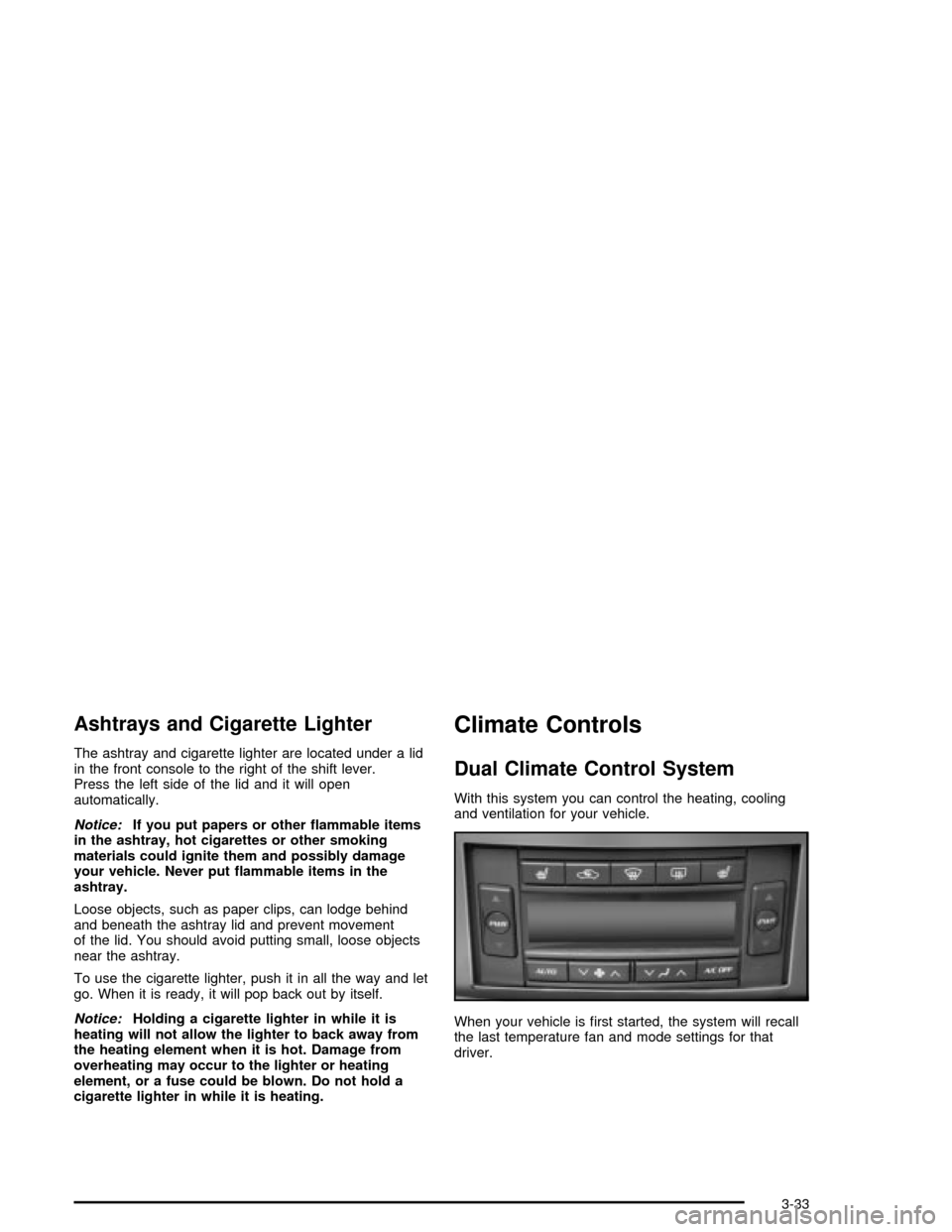
With this system you can control the heating, cooling
and ventilation for your vehicle.
When your vehicle is ®rst started, the system will recall
the last temperature fan and mode settings for that
driver.
3-33
Page 144 of 356

Automatic Operation
AUTO (Automatic):When this button is pressed and
the temperature is set, the system will automatically
control the inside temperature, the air delivery mode, the
air-conditioning compressor and the fan speed. AUTO
will appear on the display.
1. Press the AUTO button.
2. Adjust the temperature to a comfortable setting
between 70ÉF (21ÉC) and 80ÉF (27ÉC).
Choosing the warmest or coldest temperature
setting will not cause the system to heat or cool any
faster. If you set the system at the warmest or
coldest temperature setting, the system will remain
in manual mode at that temperature and it will
not go into automatic mode.
In cold weather, the system will start at reduced fan
speeds to avoid blowing cold air into your vehicle
until warmer air is available. The system will
start out blowing air at the ¯oor but may change
modes automatically as the vehicle warms up
to maintain the chosen temperature setting. The
length of time needed for warm up will depend on
the outside temperature and the length of time
that has elapsed since your vehicle was last driven.
3. Wait for the system to regulate. This may take from
10 to 30 minutes. Then adjust the temperature, if
necessary.You can switch from English to metric units through the
Driver Information Center (DIC). SeeDIC Controls
and Displays on page 3-55for more information.
The air-conditioning system removes moisture from the
air, so you may sometimes notice a small amount of
water dripping underneath your vehicle while idling
or after turning off the engine. This is normal.
Do not cover the solar sensor located in the center of
the instrument panel, near the windshield. For more
information on the solar sensor, see ªSensorsº later in
this section.
Manual Operation
wPWRx(Power/Temperature):Press the PWR
button on the left side of the climate control panel to turn
the entire climate control system on or off. Press the
up or down arrow on the switch to manually increase or
decrease the temperature inside the vehicle.
Press the PWR button on the right side of the climate
control panel to turn the passenger's climate control
system on or off. Press the up or down arrow on
the switch to manually increase or decrease the
temperature for the passenger.
If the passenger's PWR button is off, the driver's
temperature switch controls the temperature for the
entire vehicle.
3-34