battery CADILLAC XLR 2005 1.G Owner's Manual
[x] Cancel search | Manufacturer: CADILLAC, Model Year: 2005, Model line: XLR, Model: CADILLAC XLR 2005 1.GPages: 438, PDF Size: 3.69 MB
Page 179 of 438

LOW OIL PRESSURE:If this message appears while
the engine is running, stop the engine and do not
operate it until the cause of low oil pressure is corrected.
Severe damage to the engine can result. A multiple
chime will sound when this message is displayed.
LOW VOLTAGE:This message will appear when the
electrical system is charging less than 10 volts or if
the battery has been drained. If this message appears
immediately after starting, it is possible that the
generator can still recharge the battery. The battery
should recharge while driving but may take a few hours
to do so. Consider using an auxiliary charger (be
sure to follow the manufacturer’s instructions) to boost
the battery after returning home or to a nal destination.
If this message appears while driving or after starting
your vehicle and stays on, have it checked immediately
by your GM dealer to determine the cause of this
problem. To help the generator recharge the battery
quickly, you can reduce the load on the electrical system
by turning off the accessories. You can monitor battery
voltage on the DIC by pressing the INFO button.
The normal range is 11.5 to 15.5 volts.
LOW WASHER FLUID:This message means that your
vehicle is low on windshield washer uid. See
Windshield Washer Fluid on page 6-32.MAX SPEED XX MPH (XX KM/H):A failure in the
magnetic ride control system has occurred when this
message appears. The Powertrain Control Module
(PCM) determines the speed to which your vehicle is
limited. Have your vehicle serviced by your GM dealer if
this message appears.
NO FOB DETECTED:This message is displayed if the
vehicle does not detect the presence of a keyless
access transmitter when you have attempted to start the
vehicle or a vehicle door has just closed. The following
conditions may cause this message to appear:
Driver-added equipment, such as two-way radios or
power inverters, is causing interference. Try moving
the keyless access transmitter away from these
devices when starting the vehicle.
The vehicle is experiencing Electro-Magnetic
Interference (EMI). Some locations, such as airports
or some gas stations, have EMI elds which may
interfere with your keyless access transmitter. If
moving the transmitter to different locations within the
vehicle does not help, place the transmitter in the
glove box transmitter pocket with the buttons facing
to the right and then press the START button.
3-67
Page 184 of 438
Other Messages
Here are more messages that you can receive on your
Driver Information Center (DIC). To acknowledge a
message and read another message that may have
come on at the same time, press the RESET button.
ACCESSORY MODE ON
CHANGE OIL SOON
(SeeEngine Oil on page 6-13andEngine Oil Life
System on page 6-16.)
FOB BATTERY LOW
HIGH TIRE PRESS LF
HIGH TIRE PRESS RF
HIGH TIRE PRESS LR
HIGH TIRE PRESS RR
INTRUSION SENSOR OFF
INTRUSION SENSOR ON
KNOWN FOB
LEFT FRONT TIRE FLAT MAX SPD 55, REDUCED
HNDLG
LEFT REAR TIRE FLAT MAX SPD 55, REDUCED
HNDLG
LOW TIRE PRESS LF
LOW TIRE PRESS RF
LOW TIRE PRESS LR
LOW TIRE PRESS RR
MAX # FOBS LEARNED
OFF-ACC TO LEARN
READY FOR FOB #X
RIGHT FRT TIRE FLAT MAX SPD 55, REDUCED
HNDLG
RIGHT REAR TIRE FLAT MAX SPD 55, REDUCED
HNDLG
WAIT XX MINUTES
3-72
Page 192 of 438
Radio Reception
AM
The range for most AM stations is greater than for FM,
especially at night. The longer range can cause
station frequencies to interfere with each other. Static
can occur on AM stations caused by things like
storms and power lines. Try reducing the treble to
reduce this noise.
FM Stereo
FM stereo will give the best sound, but FM signals will
reach only about 10 to 40 miles (16 to 65 km). Tall
buildings or hills can interfere with FM signals, causing
the sound to fade in and out.
XM™ Satellite Radio Service
XM™ Satellite Radio Service gives digital radio
reception from coast to coast. Just as with FM, tall
buildings or hills can interfere with satellite radio signals,
causing the sound to fade in and out. The radio may
display NO XM SIGNAL to indicate interference.
Cellular Phone Usage
Cellular phone usage may cause interference with your
vehicle’s radio. This interference may occur when
making or receiving phone calls, charging the phone’s
battery, or simply having the phone on. This interference
is an increased level of static while listening to the
radio. If static is received while listening to the radio,
unplug the cellular phone and turn it off.
Care of Your CDs
Handle CDs carefully. Store them in their original cases
or other protective cases and away from direct
sunlight and dust. If the surface of a CD is soiled,
dampen a clean, soft cloth in a mild, neutral detergent
solution and clean it, wiping from the center to the edge.
Be sure never to touch the side without writing when
handling CDs. Pick up CDs by grasping the outer edges
or the edge of the hole and the outer edge.
Care of Your CD Player
The use of CD lens cleaners for CD players is not
advised, due to the risk of contaminating the lens of the
CD optics with lubricants internal to the CD mechanism.
3-80
Page 238 of 438
The vehicle is repeating a change of direction by
going forward and backward, or turning on a turn
table in a parking lot.
The vehicle is entering and/or exiting a parking lot or
garage with a roof.
The vehicle has a roof carrier, ski, or bike rack
installed on it.
The vehicle has tire chains on it.
The tires have been replaced.
The tire pressure is incorrect.
The tires are worn.
The battery is disconnected.
The vehicle is driven in heavy traffic where driving is
at low speeds and the vehicle is stopped and started
repeatedly.
Problems with Route Guidance
Inappropriate route guidance may occur under any of
the following conditions:
You have not turned onto the road indicated by
the system.
Route guidance is not available for the next turn.
The route is not changed during automatic rerouting.
Plural names of places are displayed.
You are driving at high speeds, which may cause
the automatic rerouting to operate more slowly.
The route prohibits the entry of a vehicle due to a
regulation by time or season or any other regulation
which may be given.
A route cannot be found.
A road is new, was recently changed or is not listed
on the DVD. The route to the destination may not
be shown. SeeOrdering Map DVDs on page 4-45.
4-44
Page 263 of 438
Radio Personalization with Home
and Away Feature
With this feature, you can recall the latest audio system
settings as adjusted the last time your vehicle was
operated. This feature allows two different drivers to store
and recall their own audio system settings. The settings
recalled by the audio system are determined by which
RKE transmitter (1 or 2) was used to enter the vehicle.
The number on the back of the RKE transmitter
corresponds to driver 1 or to driver 2. The audio system
settings will automatically adjust to where they were last
set by the identied driver. The settings can also be
recalled by briey pressing the MEMORY seat switches 1
or 2 located on the driver’s door.
Your audio system can store HOME and AWAY preset
stations. HOME and AWAY preset stations allow
you to use one set of preset radio settings in the area
where you live, and another set when you go out of
town. That way, you will not need to reprogram
your preset stations every time you travel.To select HOME and AWAY preset stations, do the
following:
1. With the audio system on, touch the Audio hard key
and turn the audio system off.
2. Touch the HOME or AWAY button from the main
audio screen.
The next time the audio system is turned on, the
system will recall the last active preset selection.
When battery power is removed and later applied, you
will not have to reset your home audio system preset
stations because the audio system remembers
them. However, you will have to reset your away radio
preset stations.
Voice Recognition
The navigation system’s voice recognition allows for
hands-free operation of navigation and audio system
features. Voice recognition can be used when the ignition
is in on or when Retained Accessory Power (RAP)
is active.
This feature only works if the map DVD is inserted and
I AGREE has been selected. If you try to use voice
recognition without the map DVD inserted, the system
will display “Please insert the navigation map DVD
to use the voice recognition feature.”
4-69
Page 300 of 438
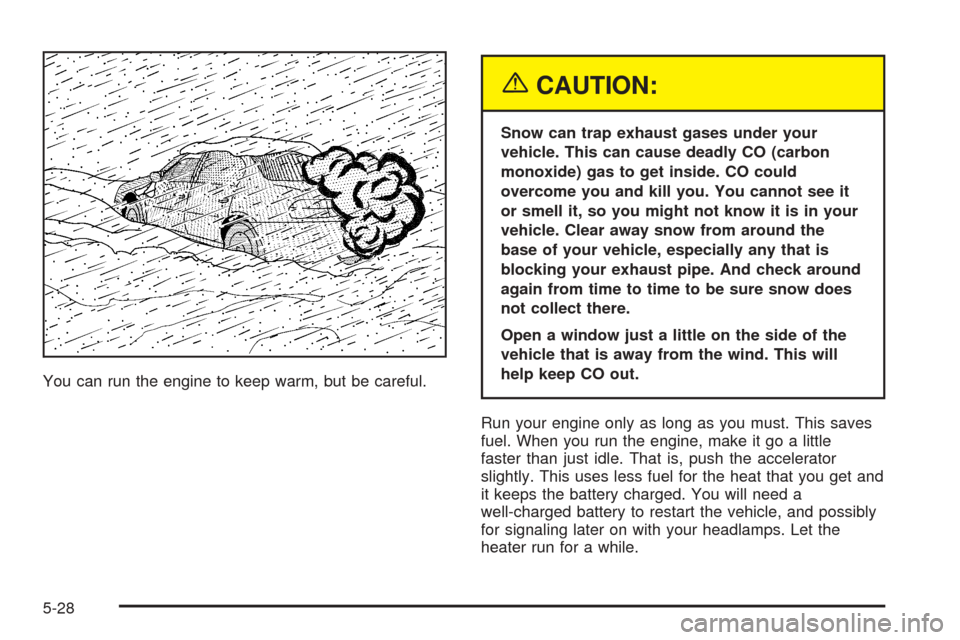
You can run the engine to keep warm, but be careful.
{CAUTION:
Snow can trap exhaust gases under your
vehicle. This can cause deadly CO (carbon
monoxide) gas to get inside. CO could
overcome you and kill you. You cannot see it
or smell it, so you might not know it is in your
vehicle. Clear away snow from around the
base of your vehicle, especially any that is
blocking your exhaust pipe. And check around
again from time to time to be sure snow does
not collect there.
Open a window just a little on the side of the
vehicle that is away from the wind. This will
help keep CO out.
Run your engine only as long as you must. This saves
fuel. When you run the engine, make it go a little
faster than just idle. That is, push the accelerator
slightly. This uses less fuel for the heat that you get and
it keeps the battery charged. You will need a
well-charged battery to restart the vehicle, and possibly
for signaling later on with your headlamps. Let the
heater run for a while.
5-28
Page 309 of 438
Service............................................................6-3
Doing Your Own Service Work.........................6-4
Adding Equipment to the Outside of Your
Vehicle......................................................6-5
Fuel................................................................6-5
Gasoline Octane............................................6-5
Gasoline Specications....................................6-5
California Fuel...............................................6-5
Additives.......................................................6-6
Fuels in Foreign Countries...............................6-6
Filling Your Tank............................................6-7
Filling a Portable Fuel Container.....................6-10
Checking Things Under the Hood....................6-10
Hood Release..............................................6-11
Engine Compartment Overview.......................6-12
Engine Oil...................................................6-13
Engine Oil Life System..................................6-16
Engine Air Cleaner/Filter................................6-18
Automatic Transmission Fluid.........................6-20
Engine Coolant.............................................6-20
Coolant Surge Tank Pressure Cap..................6-23
Engine Overheating.......................................6-23
Overheated Engine Protection
Operating Mode........................................6-25
Cooling System............................................6-26
Power Steering Fluid.....................................6-31Windshield Washer Fluid................................6-32
Brakes........................................................6-33
Battery........................................................6-36
Jump Starting...............................................6-37
Rear Axle.......................................................6-41
Headlamp Aiming...........................................6-42
Headlamp Vertical Aiming..............................6-43
Bulb Replacement..........................................6-44
Windshield Wiper Blade Replacement..............6-45
Tires..............................................................6-46
Tire Sidewall Labelling...................................6-47
Tire Terminology and Denitions.....................6-49
Run-Flat Tires..............................................6-52
Ination - Tire Pressure.................................6-53
Tire Pressure Monitor System.........................6-55
Tire Inspection and Rotation...........................6-57
When It Is Time for New Tires.......................6-58
Buying New Tires.........................................6-58
Uniform Tire Quality Grading..........................6-59
Wheel Alignment and Tire Balance..................6-61
Wheel Replacement......................................6-61
Tire Chains..................................................6-63
Lifting Your Vehicle.......................................6-64
If a Tire Goes Flat........................................6-68
Section 6 Service and Appearance Care
6-1
Page 321 of 438
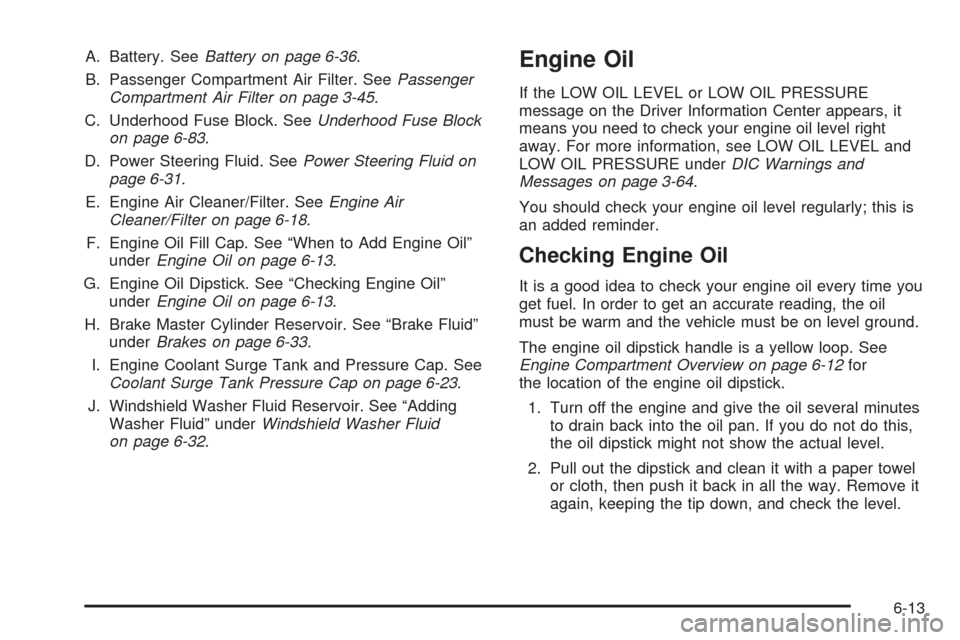
A. Battery. SeeBattery on page 6-36.
B. Passenger Compartment Air Filter. SeePassenger
Compartment Air Filter on page 3-45.
C. Underhood Fuse Block. SeeUnderhood Fuse Block
on page 6-83.
D. Power Steering Fluid. SeePower Steering Fluid on
page 6-31.
E. Engine Air Cleaner/Filter. SeeEngine Air
Cleaner/Filter on page 6-18.
F. Engine Oil Fill Cap. See “When to Add Engine Oil”
underEngine Oil on page 6-13.
G. Engine Oil Dipstick. See “Checking Engine Oil”
underEngine Oil on page 6-13.
H. Brake Master Cylinder Reservoir. See “Brake Fluid”
underBrakes on page 6-33.
I. Engine Coolant Surge Tank and Pressure Cap. See
Coolant Surge Tank Pressure Cap on page 6-23.
J. Windshield Washer Fluid Reservoir. See “Adding
Washer Fluid” underWindshield Washer Fluid
on page 6-32.Engine Oil
If the LOW OIL LEVEL or LOW OIL PRESSURE
message on the Driver Information Center appears, it
means you need to check your engine oil level right
away. For more information, see LOW OIL LEVEL and
LOW OIL PRESSURE underDIC Warnings and
Messages on page 3-64.
You should check your engine oil level regularly; this is
an added reminder.
Checking Engine Oil
It is a good idea to check your engine oil every time you
get fuel. In order to get an accurate reading, the oil
must be warm and the vehicle must be on level ground.
The engine oil dipstick handle is a yellow loop. See
Engine Compartment Overview on page 6-12for
the location of the engine oil dipstick.
1. Turn off the engine and give the oil several minutes
to drain back into the oil pan. If you do not do this,
the oil dipstick might not show the actual level.
2. Pull out the dipstick and clean it with a paper towel
or cloth, then push it back in all the way. Remove it
again, keeping the tip down, and check the level.
6-13
Page 344 of 438
Battery
Your vehicle has a maintenance free battery. When it is
time for a new battery, get one that has the replacement
number shown on the original battery’s label. We
recommend an ACDelco
®replacement battery.
For battery replacement, see your dealer or the service
manual. To purchase a service manual, seeService
and Owner PublicationsinService Publications Ordering
Information on page 8-12.
Warning:Battery posts, terminals and related
accessories contain lead and lead compounds,
chemicals known to the State of California to cause
cancer and reproductive harm. Wash hands
after handling.
Vehicle Storage
If you are not going to drive your vehicle for 25 days or
more, remove the black, negative (−) cable from the
battery. This will help keep your battery from
running down.
{CAUTION:
Batteries have acid that can burn you and gas
that can explode. You can be badly hurt if you
are not careful. SeeJump Starting on
page 6-37for tips on working around a battery
without getting hurt.
You must close all doors and the trunk before
reconnecting the battery. After reconnecting the battery,
you must press the unlock button on the keyless
access transmitter. Failure to follow this procedure may
result in the alarm sounding. Pressing unlock on the
keyless access transmitter would stop the alarm.
Also, for your audio system, seeTheft-Deterrent Feature
on page 3-78.
6-36
Page 345 of 438
Jump Starting
If your battery has run down, you may want to use
another vehicle and some jumper cables to start your
vehicle. Be sure to use the following steps to do it safely.
{CAUTION:
Batteries can hurt you. They can be dangerous
because:
They contain acid that can burn you.
They contain gas that can explode or ignite.
They contain enough electricity to
burn you.
If you do not follow these steps exactly, some or
all of these things can hurt you.
Notice:If you try to start your vehicle by pushing
or pulling it, you could damage your vehicle. Do not
push or pull your vehicle to start it; instead, use
the jump starting procedure in this manual to start
your vehicle when the battery has run down.
1. Check the other vehicle. It must have a 12-volt
battery with a negative ground system.Notice:If the other vehicle’s system is not a 12-volt
system with a negative ground, both vehicles can
be damaged. Only use vehicles with 12-volt systems
with negative grounds to jump start your vehicle.
2. Get the vehicles close enough so the jumper cables
can reach, but be sure the vehicles are not touching
each other. If they are, it could cause a ground
connection you do not want. You would not be able
to start your vehicle, and the bad grounding
could damage the electrical systems.
To avoid the possibility of the vehicles rolling, set
the parking brake rmly on both vehicles involved
in the jump start procedure. Put an automatic
transmission in PARK (P) or a manual transmission
in NEUTRAL before setting the parking brake.
Notice:If you leave your radio or other accessories
on during the jump starting procedure, they could
be damaged. The repairs would not be covered
by your warranty. Always turn off your radio and
other accessories when jump starting your vehicle.
3. Turn off the ignition on both vehicles. Unplug
unnecessary accessories plugged into the cigarette
lighter or the accessory power outlet. Turn off
the radio and all lamps that are not needed. This
will avoid sparks and help save both batteries. And
it could save the radio!
6-37