steering CADILLAC XLR 2006 1.G Owner's Manual
[x] Cancel search | Manufacturer: CADILLAC, Model Year: 2006, Model line: XLR, Model: CADILLAC XLR 2006 1.GPages: 456, PDF Size: 3.74 MB
Page 130 of 456
Selecting the Follow Distance (GAP)
When the system detects a slower moving vehicle,
it will adjust your vehicle’s speed and maintain the
follow distance (gap) you select.
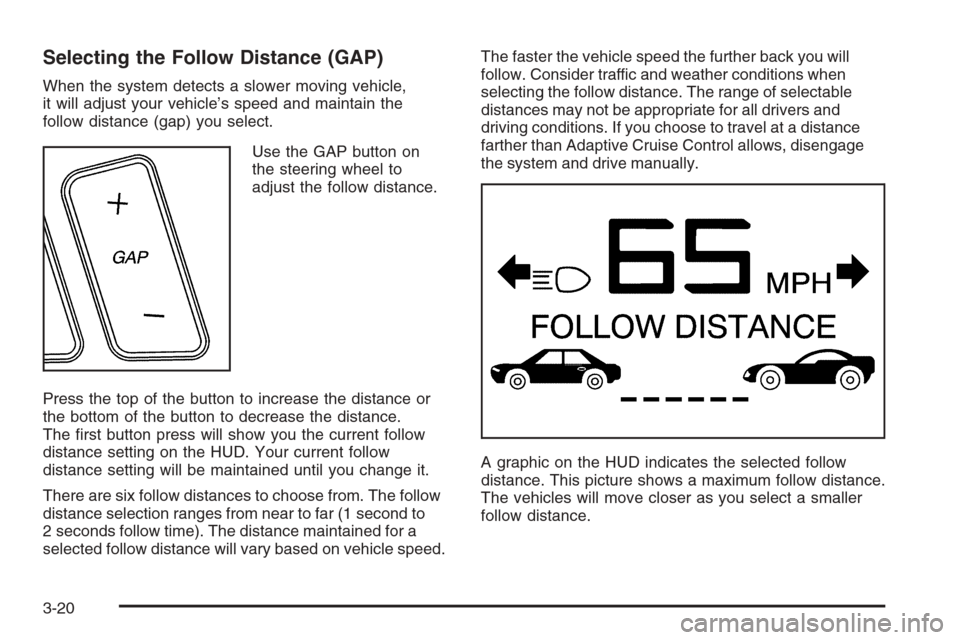
Use the GAP button on
the steering wheel to
adjust the follow distance.
Press the top of the button to increase the distance or
the bottom of the button to decrease the distance.
The rst button press will show you the current follow
distance setting on the HUD. Your current follow
distance setting will be maintained until you change it.
There are six follow distances to choose from. The follow
distance selection ranges from near to far (1 second to
2 seconds follow time). The distance maintained for a
selected follow distance will vary based on vehicle speed.The faster the vehicle speed the further back you will
follow. Consider traffic and weather conditions when
selecting the follow distance. The range of selectable
distances may not be appropriate for all drivers and
driving conditions. If you choose to travel at a distance
farther than Adaptive Cruise Control allows, disengage
the system and drive manually.
A graphic on the HUD indicates the selected follow
distance. This picture shows a maximum follow distance.
The vehicles will move closer as you select a smaller
follow distance.
3-20
Page 138 of 456
Exterior Lamps
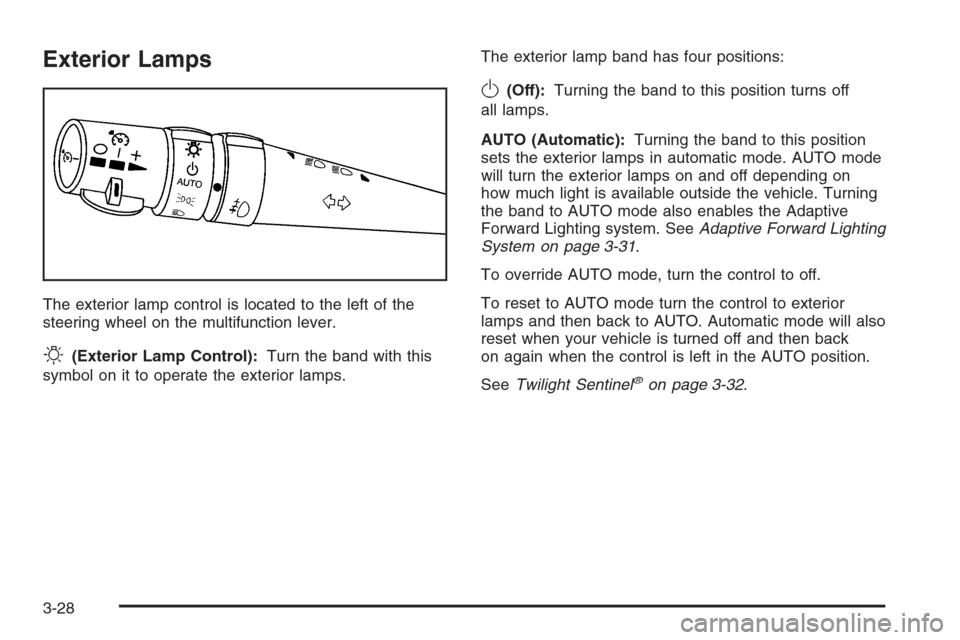
The exterior lamp control is located to the left of the
steering wheel on the multifunction lever.
O(Exterior Lamp Control):Turn the band with this
symbol on it to operate the exterior lamps.The exterior lamp band has four positions:
O(Off):Turning the band to this position turns off
all lamps.
AUTO (Automatic):Turning the band to this position
sets the exterior lamps in automatic mode. AUTO mode
will turn the exterior lamps on and off depending on
how much light is available outside the vehicle. Turning
the band to AUTO mode also enables the Adaptive
Forward Lighting system. SeeAdaptive Forward Lighting
System on page 3-31.
To override AUTO mode, turn the control to off.
To reset to AUTO mode turn the control to exterior
lamps and then back to AUTO. Automatic mode will also
reset when your vehicle is turned off and then back
on again when the control is left in the AUTO position.
SeeTwilight Sentinel
®on page 3-32.
3-28
Page 143 of 456

Exterior Lighting Battery Saver
If the manual parking lamps or headlamps have been
left on, the exterior lamps will turn off as soon as
the ignition is turned off or RAP is active. This protects
against draining the battery in case you have
accidentally left the headlamps or parking lamps on.
The battery saver does not work if the headlamps are
turned on after the ignition switch is turned to off.
If you need to leave the lamps on, use the exterior lamp
control to turn the lamps back on.
Instrument Panel Brightness
The button for this feature is located on the instrument
panel to the left of the steering column.
+
!- (Brightness):Press this button to change the
brightness of the instrument panel lights.
Press the DIMMER button until PANEL DIMMING
appears on the Driver Information Center (DIC). Then
use the brightness button to adjust the instrument panel
brightness. Press the top of the button to brighten the
lights or the bottom of the button to dim the lights.
SeeHead-Up Display (HUD) on page 3-34for more
information.
Be sure not to have the brightness turned all the
way down with the lamps on during the day.
Your DIC may not be visible.
Courtesy Lamps
When any door or the trunk lid is opened, the interior
lamps will go on unless it is bright outside.
You can also turn the courtesy lamps on by pressing
the interior lamp button on the right side of the
instrument panel cluster.
Press this button if the courtesy lamps will not go off.
Entry/Exit Lighting
With entry lighting, the interior lamps will come on when
entering the vehicle. The interior lamps will come on
for about 20 seconds when the engine is turned off.
You can turn exit and entry lighting off by quickly turning
the courtesy lamps on and off.
Reading Lamps
Your inside rearview mirror includes two reading lamps.
The lamps will go on when a door is opened.
When the doors are closed, each lamp can be turned
on individually by pressing the button for that lamp.
3-33
Page 145 of 456

Be sure to continue scanning your displays, controls
and driving environment just as you would in a vehicle
without HUD. If you never look at your instrument
panel cluster, you may not see something important,
such as a warning light. Under important warning
conditions, the CHECK GAGES message will display in
the HUD. View your Driver Information Center (DIC)
for more information.The HUD controls are
located to the left of the
steering wheel.
+!- (Brightness):This button is used to adjust the
brightness of the HUD and the instrument panel cluster.
DIMMER:This button is used to select the HUD or
the instrument panel cluster to adjust the brightness.
HUD:This button is used to adjust the vertical position
of the HUD display.
3-35
Page 174 of 456
You can use the Driver Information Center (DIC) to
display more detailed fuel information. While scrolling
through the DIC, you will also nd:
AVERAGE XX.X MPG (Average Miles Per Gallon):
The fuel economy calculated for the last 20 gallons
(76 L) of fuel used, or since you last reset the display.
INST XX.X MPG (Instantaneous Miles Per Gallon):
The fuel economy calculated for your current driving
conditions.
RANGE XXX MI:The approximate distance you can
drive before refueling.
SeeDIC Controls and Displays on page 3-64for more
information.
You should reset the fuel information display every time
you refuel. To reset AVERAGE, use the information up or
down button to scroll to AVE FUEL ECON and hold the
reset button. RANGE will automatically reset.
Driver Information Center (DIC)
This display gives you the status of many of your
vehicle’s systems. The DIC is also used to display driver
personalization features and warning/status messages.
All messages will appear in the DIC display, located
at the bottom of the instrument panel cluster.
DIC Controls and Displays
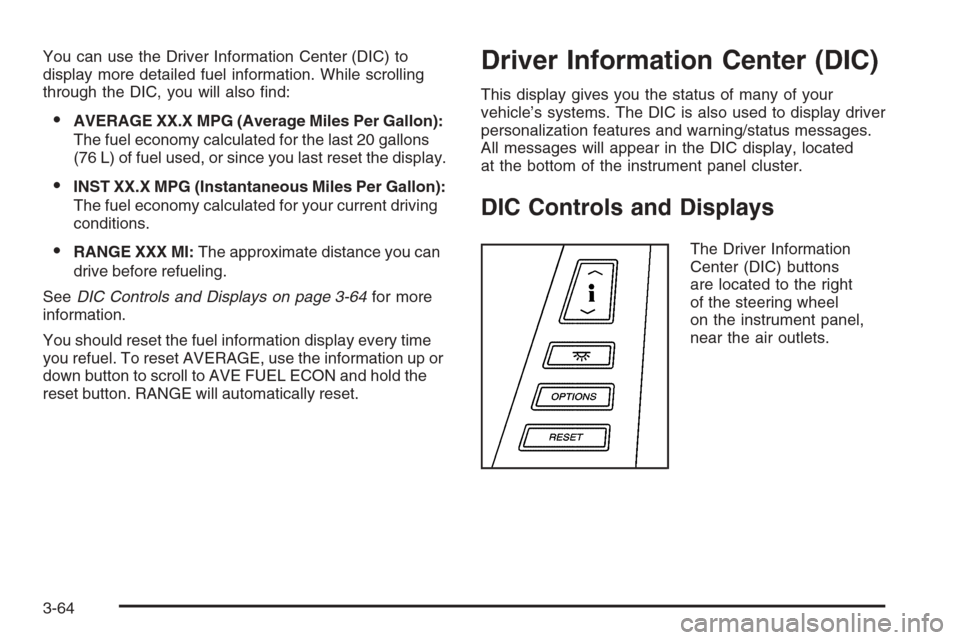
The Driver Information
Center (DIC) buttons
are located to the right
of the steering wheel
on the instrument panel,
near the air outlets.
3-64
Page 185 of 456

SHIFT TO PARK:This message indicates that the
vehicle is not in PARK (P) when the engine is being
turned off. The vehicle will be in accessory mode. Once
the shifter is moved to PARK (P), the vehicle will turn off.
STABILITRAK ACTIVE:You may see the
STABILITRAK ACTIVE message on the DIC. It means
that an advanced, computer-controlled system has
come on to help your vehicle continue to go in
the direction in which you are steering. This stability
enhancement system activates when the computer
senses that your vehicle is just starting to spin, as it
might if you hit a patch of ice or other slippery spot
on the road. When the system is on, you may hear
a noise or feel a vibration in the brake pedal.
This is normal.
When the STABILITRAK ACTIVE message is on, you
should continue to steer in the direction you want to go.
The system is designed to help you in bad weather
or other difficult driving situations by making the
most of whatever road conditions will permit. If the
STABILITRAK ACTIVE message comes on, you will
know that something has caused your vehicle to start to
spin, so you should consider slowing down. A single
chime will also sound when this message is displayed.
STABILITRAK READY:If this message appears
and a chime sounds, the system has completed the
functional check of the StabiliTrak
®System.STABILITRAK WARMING:When you rst start your
vehicle and drive away, especially during cold winter
weather, the STABILITRAK WARMING message may
be displayed in the DIC along with a chime and the
traction control warning light. This is normal. You can
acknowledge this message by pressing the RESET
button. The StabiliTrak
®performance is affected until the
STABILITRAK READY message is displayed in the
DIC, which can take up to 15 minutes.
SVC (Service) TIRE MONITOR:If this message comes
on, a part on the Tire Pressure Monitor (TPM) is not
working properly. If you drive your vehicle while any of the
four sensors are missing or inoperable, the warning will
come on in approximately 10 minutes. If all four sensors
are missing, the warning will come on in approximately
15 to 20 minutes. All the sensors would be missing, for
example, if you put different wheels on your vehicle
without transferring the sensors. If the warning comes on
and stays on, there may be a problem with the TPM.
See your GM dealer.
TOOCOLDTOMOVETOP:This message will display
when the retractable hardtop button is pressed and the
hardtop pump motor temperature is below−4°F (−20°C).
Wait for the hardtop pump motor to warm up before using
the retractable hardtop.
3-75
Page 186 of 456

TOP INOP (Inoperative) – VALET ON:This message
will display when the retractable hardtop button is
pressed and the valet switch is on. Turn off the valet
switch before using the retractable hardtop.
TOP INOP (Inoperative) OUT OF PARK:This
message will display if the retractable hardtop button is
pressed while the vehicle is not in PARK (P).
TOP MOTOR OVER TEMP (Temperature):This
message will display when the retractable hardtop button
is pressed and the hardtop pump motor temperature
is over 221°F (105°C). Wait for the hardtop pump motor
to cool down before using the retractable hardtop.
TOP NOT SECURE:This message will display when
the retractable hardtop button is released before the top
open or close operation is complete. Press and hold the
retractable hardtop button to fully open or close the top.
TRAC (Traction) SYSTEM ACTIVE:When your
traction control system is limiting wheel spin, the
TRACTION SYSTEM ACTIVE message will be
displayed. Slippery road conditions may exist if this
message is displayed, so adjust your driving accordingly.
This message will stay on for a few seconds after the
traction control system stops limited wheel spin.TRAC (Traction)/STABILITRAK OFF:This message
indicates that both the Traction Control System
(TCS) and StabiliTrak
®are off. The message will remain
until the systems are turned on again.
TRAC (Traction)/STABILITRAK ON:This message
indicates that both the Traction Control System
(TCS) and the StabiliTrak
®are on.
TRACTION SYSTEM OFF:This message indicates
that the Traction Control System (TCS) is off but
StabiliTrak
®remains on.
TRACTION SYSTEM ON:This message indicates that
the Traction Control System (TCS) is on.
TRUNK AJAR:This message indicates that the trunk is
open while the vehicle is running and not in PARK (P).
WAIT FOR STABILITRAK:This message will be
displayed after driving 19 mph (30 km/h) for 10 seconds
if the steering is not centered. StabiliTrak
®is not
available until the steering centers itself and the
STABILITRAK READY message is displayed in the DIC.
3-76
Page 188 of 456

DIC Vehicle Personalization
Your vehicle is equipped with personalization capabilities
that allows you to program certain features to a
preferred setting for up to two drivers. The back of the
keyless access transmitters are labelled 1 or 2.
The current driver’s preferences are recalled when one
of the following occurs:
The lock or unlock button on the keyless access
transmitter, programmed as 1 or 2, is pressed.
The appropriate memory button, 1 or 2, located on
the driver’s seat is pressed. SeeMemory Seat,
Mirrors and Steering Wheel on page 2-56for more
information.
A valid keyless access transmitter is detected upon
opening the driver’s door.
If more than one valid keyless access transmitter is
detected upon opening the driver’s door, the driver
preferences for the lowest driver number will be recalled.
If a keyless access transmitter is programmed
as #3 or #4, the personalization system will not
recognize the transmitter. The Driver Information
Center (DIC) will not display a current driver number
and the features that are normally programmed
through the DIC will be set to the default states.Also, if the OPTIONS button is pressed, the DIC does
not display the menus used to set personalizations,
but instead displays OPTIONS UNAVAILABLE for a
few seconds.
Feature Programming
To change feature preferences, make sure the vehicle
is running and in PARK (P). Press the OPTIONS
button and the Driver Information Center (DIC) will
display the current driver for a few seconds, then display
the rst personalization menu item. You can now use
the OPTIONS button to change the setting of the
displayed feature. Press the top or bottom of the
information button to scroll up or down the list of
features. When you get to a feature you want to change,
press the OPTIONS button again. When you are
nished, press the RESET button to exit the
personalization menu. If no button is pressed within
45 seconds, the DIC will exit the personalization menu.
The following are DIC options that will be available
in the personalization menu.
Auto Recall
This feature allows the steering column, outside mirrors
and the driver’s seat to automatically move to the current
driver’s set position when the engine starts. The DIC will
display AUTO RECALL OFF or AUTO RECALL ON.
Press the OPTIONS button to change the setting.
3-78
Page 189 of 456

Auto Exit Recall
This feature allows the steering column and driver’s
seat to automatically move to the current driver’s
exit position when one of the following occurs:
The vehicle is turned off or in RAP or accessory
mode and the driver’s door is opened.
The vehicle is turned off or in RAP and the unlock
button on the keyless access transmitter is
pressed.
The DIC will display AUTO EXIT RECALL OFF or
AUTO EXIT RECALL ON. Press the OPTIONS button
to change the setting.
Approach Lights
This feature activates the parking lamps, front fog lamps
and back-up lamps during low light periods when the
unlock button on the keyless access transmitter is
pressed, both doors are closed and the vehicle is off or
in RAP. The lamps remain on for 20 seconds or until
a door is opened, the lock button on the keyless access
transmitter is pressed or the vehicle is no longer off
or in RAP.
The DIC will display APPROACH LIGHTS OFF or
APPROACH LIGHTS ON. Press the OPTIONS button
to change the setting.
Exit Lights
This feature activates the parking lamps and front fog
lamps for 15, 30 or 90 seconds. This will occur when the
vehicle is off or in RAP and the headlamps are on
due to the automatic headlamp system. The parking
lamps and front fog lamps will remain on until the driver
selected time period expires, the exterior lamp control
is activated or the vehicle is no longer off or in RAP.
The DIC will display EXIT LIGHTS OFF, EXIT
LIGHTS - 15 SEC, EXIT LIGHTS - 30 SEC or
EXIT LIGHTS - 90 SEC. Press the OPTIONS button
to change the setting.
Flash at Unlock
This feature activates the front and rear turn signals for
two short ashes when the unlock or trunk button on
the keyless access transmitter is pressed. This will only
occur when the vehicle is off.
The DIC will display NO FLASH AT UNLOCK or FLASH
AT UNLOCK. Press the OPTIONS button to change
the setting.
3-79
Page 192 of 456
Trip Computer
Oil Life Indicator
This feature lets you know when to change the engine
oil. It is based on the engine oil temperatures and
your driving patterns.
To see the display, press the information button
several times until OIL LIFE appears. If you see 99%
OIL LIFE, 99 percent of your current oil life remains.
The DIC may display a CHANGE OIL NOW message.
If you see CHANGE OIL NOW, it means the oil life
is gone. For more information, seeScheduled
Maintenance on page 7-4andEngine Oil on page 6-15.
When the oil is changed, you will need to reset the
system. SeeEngine Oil Life System on page 6-18.
Always keep a written record of the mileage and date
when you changed your oil.
Audio System(s)
Determine which radio your vehicle has and then read the
pages following to familiarize yourself with its features.
Driving without distraction is a necessity for a safer
driving experience. SeeDefensive Driving on page 5-2.
By taking a few moments to read this manual and get
familiar with your vehicle’s audio system, you can use it
with less effort, as well as take advantage of its features.
While your vehicle is parked, set up your audio system by
presetting your favorite radio stations, setting the tone
and adjusting the speakers. Then, when driving
conditions permit, you can tune to your favorite stations
using the presets and steering wheel controls if the
vehicle has them.
{CAUTION:
This system provides you with a far greater
access to audio stations and song listings.
Giving extended attention to entertainment
tasks while driving can cause a crash and you
or others can be injured or killed. Always keep
your eyes on the road and your mind on the
drive — avoid engaging in extended searching
while driving.
3-82