radio CADILLAC XLR 2006 1.G Service Manual
[x] Cancel search | Manufacturer: CADILLAC, Model Year: 2006, Model line: XLR, Model: CADILLAC XLR 2006 1.GPages: 456, PDF Size: 3.74 MB
Page 271 of 456

Voice Recognition
The navigation system’s voice recognition allows for
hands-free operation of navigation and audio system
features. Voice recognition can be used when the
ignition is on or when Retained Accessory Power (RAP)
is active.
This feature only works if the map DVD is inserted and
I AGREE has been selected. If you try to use voice
recognition without the map DVD inserted, the system
will display “Please insert the navigation map DVD
to use the voice recognition feature.”
To use navigation voice recognition, do the following:
1. Press the talk symbol
steering wheel control
and release it, when
you hear a beep.
The audio system,
if on, will mute.2. Clearly state one of the commands listed on the
following pages. For example, say “FM1”.
3. The system will tell you the command being
implemented. For example, the system will
say “FM1 Radio” and change the audio system to
the FM1 source.
You can end voice recognition by not speaking any
commands. After about ve seconds of silence,
the system will automatically cancel voice recognition.
At times, the system may not understand a spoken
command. If this happens, try saying the command
again. If a spoken command is not available, the system
will provide feedback based on availability.
While using voice recognition, make sure to keep
interior noise levels to a minimum. Otherwise, the
system might not recognize voice commands.
The system will only recognize commands spoken
in English.
4-75
Page 272 of 456

Voice Recognition Commands
The following list shows all of the voice commands
available for the navigation system with a brief
description of each. To use the voice commands, refer
to the instructions listed previously.
Help Commands
These commands are universal and will enable you to
use the help prompts available from the system.
Map Help:This command will enable the system to
provide the available commands for the map screen.
Destination Help:This command will enable the
system to provide the available commands for entering
a destination.
Guidance Help:This command will enable the system
to provide the available commands for the guidance
method.
Radio Help:This command will enable the system to
provide the available commands for the radio.
Disc Help:This command will enable the system to
provide the available commands for the CD changer.
Radio Commands
Radio:This command will change the audio system to
the next radio audio source.
AM:This command will change the audio system to the
AM audio source.
FM1:This command will change the audio system to
the FM1 audio source.
FM2:This command will change the audio system to
the FM2 audio source.
XM1:This command will change the audio system to
the XM1 audio source.
XM2:This command will change the audio system to
the XM2 audio source.
CD Changer:This command will change the audio
system to the CD changer audio source.
WX, Weather Band:These commands will change the
audio system to the weather band audio source.
Power On, Audio On:These commands will turn the
system’s power on.
Power Off, Audio Off:These commands will turn the
system’s power off.
4-76
Page 356 of 456

Notice:If you try to start your vehicle by pushing
or pulling it, you could damage your vehicle. Do not
push or pull your vehicle to start it; instead, use
the jump starting procedure in this manual to start
your vehicle when the battery has run down.
1. Check the other vehicle. It must have a 12-volt
battery with a negative ground system.
Notice:If the other vehicle’s system is not a 12-volt
system with a negative ground, both vehicles can
be damaged. Only use vehicles with 12-volt systems
with negative grounds to jump start your vehicle.
2. Get the vehicles close enough so the jumper cables
can reach, but be sure the vehicles are not touching
each other. If they are, it could cause a ground
connection you do not want. You would not be able
to start your vehicle, and the bad grounding
could damage the electrical systems.
To avoid the possibility of the vehicles rolling, set
the parking brake rmly on both vehicles involved
in the jump start procedure. Put an automatic
transmission in PARK (P) or a manual transmission
in NEUTRAL before setting the parking brake.Notice:If you leave your radio or other accessories
on during the jump starting procedure, they could
be damaged. The repairs would not be covered
by your warranty. Always turn off your radio and
other accessories when jump starting your vehicle.
3. Turn off the ignition on both vehicles. Unplug
unnecessary accessories plugged into the cigarette
lighter or the accessory power outlet. Turn off
the radio and all lamps that are not needed.
This will avoid sparks and help save both batteries.
And it could save the radio!
4. Open the hoods and locate the batteries. Find the
positive (+) and negative (−) terminal locations on
each vehicle. SeeEngine Compartment Overview
on page 6-12for more information on location.
{CAUTION:
An electric fan can start up even when the
engine is not running and can injure you.
Keep hands, clothing and tools away from
any underhood electric fan.
6-40
Page 375 of 456
Remove the valve cap from the tire valve stem. Press
the tire gage rmly onto the valve to get a pressure
measurement. If the cold tire ination pressure matches
the recommended pressure on the Tire and Loading
Information label, no further adjustment is necessary.
If the ination pressure is low, add air until you reach the
recommended amount.
If you overll the tire, release air by pushing on the
metal stem in the center of the tire valve. Recheck the
tire pressure with the tire gage.
Be sure to put the valve caps back on the valve stems.
They help prevent leaks by keeping out dirt and
moisture.
Tire Pressure Monitor (TPM)
Your vehicle has a Tire Pressure Monitor (TPM) that
sends tire pressure information to the Driver Information
Center (DIC). Using the DIC control buttons, the
driver is able to check tire pressure levels in all four
road tires. SeeTire Pressure Monitor System on
page 6-59andDIC Controls and Displays on page 3-64
for additional information.
Tire Pressure Monitor System
The Tire Pressure Monitor System (TPMS) on your
vehicle, uses radio and sensor technology to check tire
pressure levels. Sensors, mounted on each tire and
wheel assembly transmit tire pressure readings to
a receiver located in the vehicle. The TPMS sensors
transmit tire pressure readings once every 60 seconds
while the vehicle is being driven and once every
60 minutes when the vehicle is stationary for more than
15 minutes. Using the Driver Information Center
(DIC), tire pressure levels can be viewed by the driver.
The TPMS also uses the DIC to warn the driver
when air pressure, in one or more tires, falls below
25 psi (172 kPa) or is above 42 psi (290 kPa).
For additional information and details about the
DIC operation and displays seeDIC Controls and
Displays on page 3-64andDIC Warnings and
Messages on page 3-67.
A low tire pressure warning light also appears on the
instrument panel cluster when a low tire condition exists.
The DIC message, CHECK TIRE PRESSURE and
the low tire pressure warning light will be shown each
time the engine is started and stays on until the low tire
condition is corrected.
6-59
Page 377 of 456
Your vehicle’s TPMS can alert you about a low or high
tire pressure condition but it does not replace normal
tire maintenance. SeeTire Inspection and Rotation
on page 6-62
The SVC (Service) TIRE MONITOR message is
displayed when the TPM system is malfunctioning.
For example, one or more TPM sensors may be
inoperable or missing. See your dealer for service.
TPMS Sensor Identication Codes
Each TPMS sensor has a unique identication code.
Any time you replace one or more of the TPMS sensors
or rotate the vehicle’s tires, the identication codes
will need to be matched to the new tire/wheel position.
The sensors are matched, to the tire/wheel positions,
in the following order: driver’s side front tire, passenger’s
side front tire, passenger’s side rear tire, and
driver’s side rear tire using a TPMS diagnostic tool.
See your GM dealer for service.
Federal Communications
Commission (FCC) and Industry
and Science Canada
The Tire Pressure Monitor System (TPMS) operates
on a radio frequency and complies with Part 15 of
the FCC Rules. Operation is subject to the following
two conditions:
1. This device may not cause harmful interference.
2. This device must accept any interference received,
including interference that may cause undesired
operation.
The Tire Pressure Monitor System (TPMS) operates
on a radio frequency and complies with RSS-210
of Industry and Science Canada. Operation is subject
to the following two conditions:
1. This device may not cause interference.
2. This device must accept any interference received,
including interference that may cause undesired
operation of the device.
Changes or modications to this system by other than
an authorized service facility could void authorization to
use this equipment.
6-61
Page 393 of 456
Notice:If you use abrasive cleaners when cleaning
glass surfaces on your vehicle, you could scratch
the glass and/or cause damage to the integrated
radio antenna and the rear window defogger.
When cleaning the glass on your vehicle, use only
a soft cloth and glass cleaner.
Many cleaners contain solvents that may become
concentrated in your vehicle’s breathing space.
Before using cleaners, read and adhere to all safety
instructions on the label. While cleaning your vehicle’s
interior, maintain adequate ventilation by opening
your vehicle’s doors and windows.
Dust may be removed from small buttons and knobs
using a small brush with soft bristles.
Your GM dealer has a product for cleaning your
vehicle’s glass. Should it become necessary, you can
also obtain a product from your GM dealer to remove
odors from your vehicle’s upholstery.Do not clean your vehicle using the following cleaners
or techniques:
Never use a knife or any other sharp object to
remove a soil from any interior surface.
Never use a stiff brush. It can cause damage to
your vehicle’s interior surfaces.
Never apply heavy pressure or rub aggressively
with a cleaning cloth. Use of heavy pressure
can damage your interior and does not improve
the effectiveness of soil removal.
Use only mild, neutral-pH soaps. Avoid laundry
detergents or dishwashing soaps with degreasers.
Using too much soap will leave a residue that
leaves streaks and attracts dirt. For liquid cleaners,
about 20 drops per gallon (3.78 L) of water is a
good guide.
Do not heavily saturate your upholstery while
cleaning.
Damage to your vehicle’s interior may result from
the use of many organic solvents such as naptha,
alcohol, etc.
6-77
Page 402 of 456
Electrical System
Add-On Electrical Equipment
Notice:Don’t add anything electrical to your vehicle
unless you check with your dealer rst. Some
electrical equipment can damage your vehicle and
the damage wouldn’t be covered by your warranty.
Some add-on electrical equipment can keep other
components from working as they should.
Your vehicle has an airbag system. Before attempting to
add anything electrical to your vehicle, seeServicing
Your Airbag-Equipped Vehicle on page 1-44.
Windshield Wiper Fuses
The windshield wiper motor is protected by an internal
circuit breaker. If the wiper motor overheats due to
heavy snow, the wipers will stop until the motor cools
and will then restart.
A fuse powers the wiper motor. If the fuse blows, there
is an electrical problem. Be sure to have it xed.
Power Windows and Other
Power Options
Circuit breakers protect the power windows and power
seats. When the current load is too heavy, the circuit
breaker opens and closes, protecting the circuit until the
problem is xed or goes away.
Fuses and Circuit Breakers
The wiring circuits in your vehicle are protected from
short circuits by a combination of fuses and circuit
breakers. This greatly reduces the chance of res
caused by electrical problems.
Look at the silver-colored band inside the fuse. If the
band is broken or melted, replace the fuse. Be sure you
replace a bad fuse with a new one of the identical
size and rating. If a fuse should blow, see your dealer
for service immediately.
If you ever have a problem on the road and do not have
a spare fuse, you can “borrow” one that has the same
amperage. Pick some feature of your vehicle that
you can get along without — like the radio or cigarette
lighter — and use its fuse, if it is the correct amperage.
Replace it as soon as you can.
6-86
Page 404 of 456
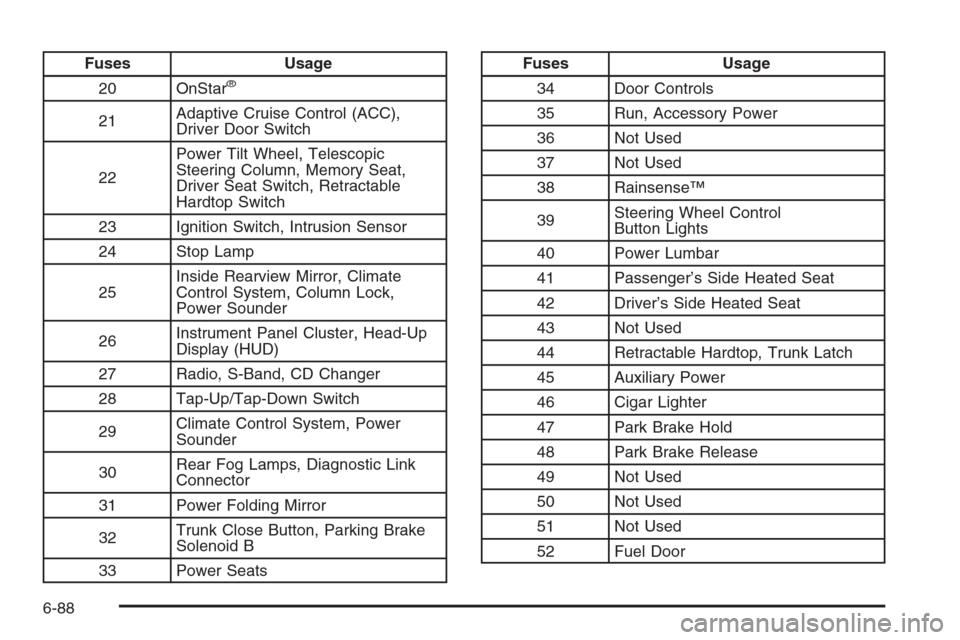
Fuses Usage
20 OnStar
®
21Adaptive Cruise Control (ACC),
Driver Door Switch
22Power Tilt Wheel, Telescopic
Steering Column, Memory Seat,
Driver Seat Switch, Retractable
Hardtop Switch
23 Ignition Switch, Intrusion Sensor
24 Stop Lamp
25Inside Rearview Mirror, Climate
Control System, Column Lock,
Power Sounder
26Instrument Panel Cluster, Head-Up
Display (HUD)
27 Radio, S-Band, CD Changer
28 Tap-Up/Tap-Down Switch
29Climate Control System, Power
Sounder
30Rear Fog Lamps, Diagnostic Link
Connector
31 Power Folding Mirror
32Trunk Close Button, Parking Brake
Solenoid B
33 Power Seats
Fuses Usage
34 Door Controls
35 Run, Accessory Power
36 Not Used
37 Not Used
38 Rainsense™
39Steering Wheel Control
Button Lights
40 Power Lumbar
41 Passenger’s Side Heated Seat
42 Driver’s Side Heated Seat
43 Not Used
44 Retractable Hardtop, Trunk Latch
45 Auxiliary Power
46 Cigar Lighter
47 Park Brake Hold
48 Park Brake Release
49 Not Used
50 Not Used
51 Not Used
52 Fuel Door
6-88
Page 443 of 456
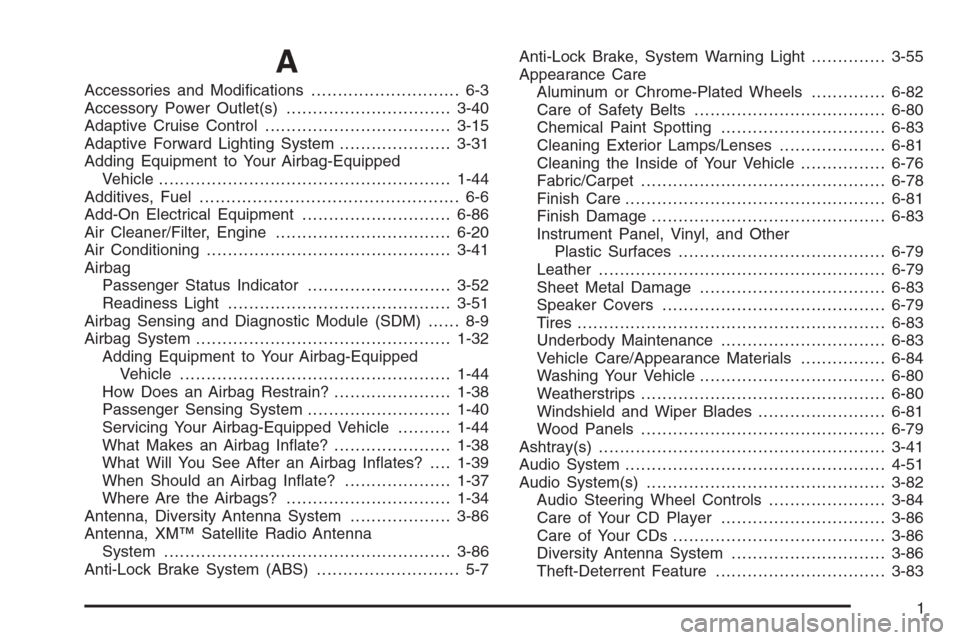
A
Accessories and Modications............................ 6-3
Accessory Power Outlet(s)...............................3-40
Adaptive Cruise Control...................................3-15
Adaptive Forward Lighting System.....................3-31
Adding Equipment to Your Airbag-Equipped
Vehicle.......................................................1-44
Additives, Fuel................................................. 6-6
Add-On Electrical Equipment............................6-86
Air Cleaner/Filter, Engine.................................6-20
Air Conditioning..............................................3-41
Airbag
Passenger Status Indicator...........................3-52
Readiness Light..........................................3-51
Airbag Sensing and Diagnostic Module (SDM)...... 8-9
Airbag System................................................1-32
Adding Equipment to Your Airbag-Equipped
Vehicle...................................................1-44
How Does an Airbag Restrain?......................1-38
Passenger Sensing System...........................1-40
Servicing Your Airbag-Equipped Vehicle..........1-44
What Makes an Airbag Inate?......................1-38
What Will You See After an Airbag Inates?....1-39
When Should an Airbag Inate?....................1-37
Where Are the Airbags?...............................1-34
Antenna, Diversity Antenna System...................3-86
Antenna, XM™ Satellite Radio Antenna
System......................................................3-86
Anti-Lock Brake System (ABS)........................... 5-7Anti-Lock Brake, System Warning Light..............3-55
Appearance Care
Aluminum or Chrome-Plated Wheels..............6-82
Care of Safety Belts....................................6-80
Chemical Paint Spotting...............................6-83
Cleaning Exterior Lamps/Lenses....................6-81
Cleaning the Inside of Your Vehicle................6-76
Fabric/Carpet..............................................6-78
Finish Care.................................................6-81
Finish Damage............................................6-83
Instrument Panel, Vinyl, and Other
Plastic Surfaces.......................................6-79
Leather......................................................6-79
Sheet Metal Damage...................................6-83
Speaker Covers..........................................6-79
Tires..........................................................6-83
Underbody Maintenance...............................6-83
Vehicle Care/Appearance Materials................6-84
Washing Your Vehicle...................................6-80
Weatherstrips..............................................6-80
Windshield and Wiper Blades........................6-81
Wood Panels..............................................6-79
Ashtray(s)......................................................3-41
Audio System.................................................4-51
Audio System(s).............................................3-82
Audio Steering Wheel Controls......................3-84
Care of Your CD Player...............................3-86
Care of Your CDs ........................................3-86
Diversity Antenna System.............................3-86
Theft-Deterrent Feature................................3-83
1
Page 444 of 456
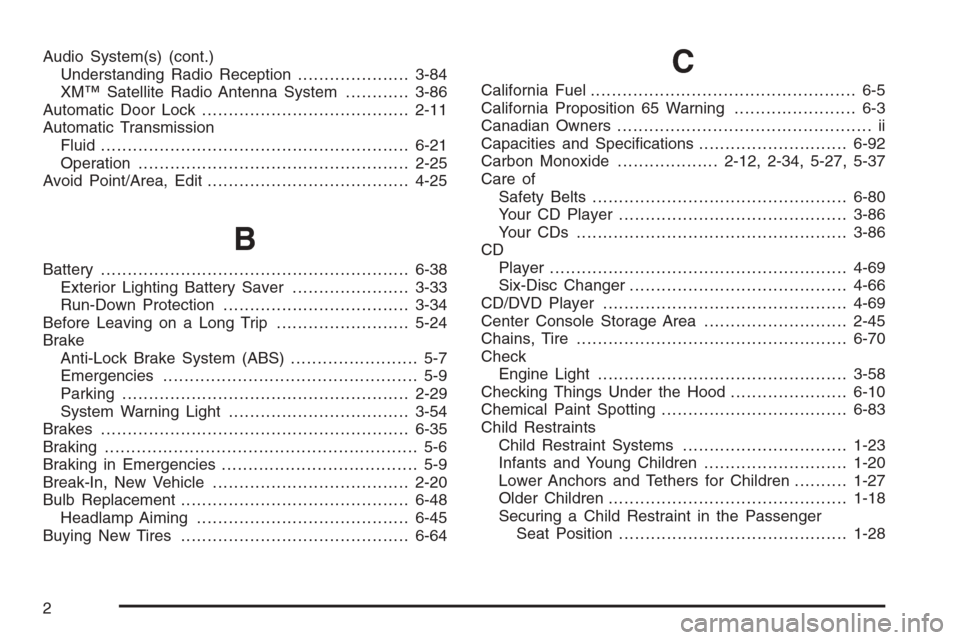
Audio System(s) (cont.)
Understanding Radio Reception.....................3-84
XM™ Satellite Radio Antenna System............3-86
Automatic Door Lock.......................................2-11
Automatic Transmission
Fluid..........................................................6-21
Operation...................................................2-25
Avoid Point/Area, Edit......................................4-25
B
Battery..........................................................6-38
Exterior Lighting Battery Saver......................3-33
Run-Down Protection...................................3-34
Before Leaving on a Long Trip.........................5-24
Brake
Anti-Lock Brake System (ABS)........................ 5-7
Emergencies................................................ 5-9
Parking......................................................2-29
System Warning Light..................................3-54
Brakes..........................................................6-35
Braking........................................................... 5-6
Braking in Emergencies..................................... 5-9
Break-In, New Vehicle.....................................2-20
Bulb Replacement...........................................6-48
Headlamp Aiming........................................6-45
Buying New Tires...........................................6-64
C
California Fuel.................................................. 6-5
California Proposition 65 Warning....................... 6-3
Canadian Owners................................................ ii
Capacities and Specications............................6-92
Carbon Monoxide...................2-12, 2-34, 5-27, 5-37
Care of
Safety Belts................................................6-80
Your CD Player...........................................3-86
Your CDs ...................................................3-86
CD
Player........................................................4-69
Six-Disc Changer.........................................4-66
CD/DVD Player..............................................4-69
Center Console Storage Area...........................2-45
Chains, Tire...................................................6-70
Check
Engine Light...............................................3-58
Checking Things Under the Hood......................6-10
Chemical Paint Spotting...................................6-83
Child Restraints
Child Restraint Systems...............................1-23
Infants and Young Children...........................1-20
Lower Anchors and Tethers for Children..........1-27
Older Children.............................................1-18
Securing a Child Restraint in the Passenger
Seat Position...........................................1-28
2