ESP CADILLAC XLR 2008 1.G User Guide
[x] Cancel search | Manufacturer: CADILLAC, Model Year: 2008, Model line: XLR, Model: CADILLAC XLR 2008 1.GPages: 470, PDF Size: 8.39 MB
Page 146 of 470

Curves in the Road
{CAUTION:
Due to Adaptive Cruise Control limitations in
curves, it may respond to a vehicle in another
lane, or may not have time to react to a vehicle
in your lane. You could crash into a vehicle
ahead of you, or lose control of your vehicle.
Give extra attention in curves and be ready to
use the brakes if necessary. Select an
appropriate speed while driving in curves.
Adaptive Cruise Control might operate differently in a
sharp curve. It might reduce your speed if the curve is
too sharp. The TIGHT CURVE message will also display
on the HUD. SeeHead-Up Display (HUD) on page 3-33
for more information.When following a vehicle and entering a curve, Adaptive
Cruise Control could lose track of the vehicle in your
lane and accelerate your vehicle. When this happens,
the vehicle ahead symbol will not appear on the HUD.
3-24
Page 147 of 470
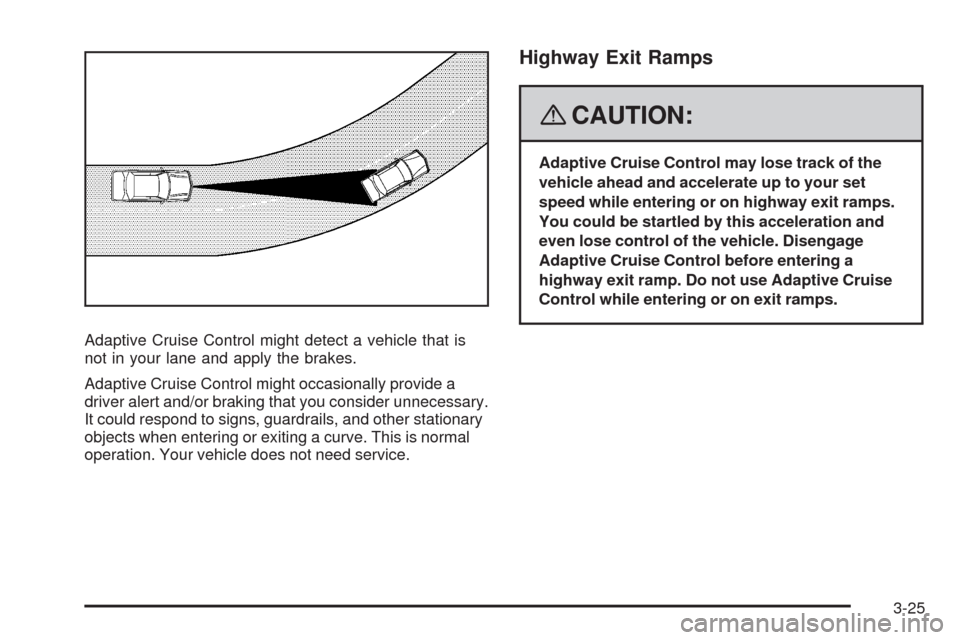
Adaptive Cruise Control might detect a vehicle that is
not in your lane and apply the brakes.
Adaptive Cruise Control might occasionally provide a
driver alert and/or braking that you consider unnecessary.
It could respond to signs, guardrails, and other stationary
objects when entering or exiting a curve. This is normal
operation. Your vehicle does not need service.
Highway Exit Ramps
{CAUTION:
Adaptive Cruise Control may lose track of the
vehicle ahead and accelerate up to your set
speed while entering or on highway exit ramps.
You could be startled by this acceleration and
even lose control of the vehicle. Disengage
Adaptive Cruise Control before entering a
highway exit ramp. Do not use Adaptive Cruise
Control while entering or on exit ramps.
3-25
Page 151 of 470

Wiper Activated Headlamps
This feature activates the headlamps and parking
lamps after the windshield wipers have been in use for
approximately six seconds and the multifunction lever is
in the AUTO position. SeeExterior Lamps on page 3-28.
When the exterior lamp control has been turned off or is
in the parking lamp position and the wiper control is
on delay, low speed or high speed, the HEADLAMPS
SUGGESTED message will appear on the Driver
Information Center (DIC).
When the ignition is turned off, the wiper-activated
headlamps will immediately turn off.
Headlamps on Reminder
A warning chime will sound if the exterior lamp control
is left on in either the headlamp or parking lamp position
and the driver’s door is opened with the ignition off.
Daytime Running Lamps (DRL)
Daytime Running Lamps (DRL) can make it easier for
others to see the front of your vehicle during the
day. DRL can be helpful in many different driving
conditions, but they can be especially helpful in the short
periods after dawn and before sunset. Fully functional
DRL are required on all vehicles rst sold in Canada.The DRL system makes the front turn signal lamps
come on when the following conditions are met:
It is still daylight and the ignition is on.
The exterior lamp control is in the off position.
The transmission is not in PARK (P).
When DRL are on, only the front turn signal lamps are
on. No other exterior lamps such as the parking lamps,
taillamps, etc. are on when the DRL are used. Your
instrument panel is not be lit up either.
When it is dark enough outside, the front turn signal
lamps turn off and normal low-beam headlamps turn on.
When it is bright enough outside, the regular lamps go off,
and the front turn signal lamps take over. If you start your
vehicle in a dark garage, the automatic headlamp system
comes on immediately. Once you leave the garage, it
takes about one minute for the automatic headlamp
system to change to DRL if it is light outside. During that
delay, the instrument panel cluster might not be as bright
as usual. Make sure the instrument panel brightness
knob is in the full bright position. SeeInstrument Panel
Brightness on page 3-32for more information.
If it is dark enough outside and the exterior lamp control
is off, a HEADLAMPS SUGGESTED message displays
on the Driver’s Information Center (DIC). This message
informs the driver that turning on the exterior lamps is
recommended. SeeDIC Warnings and Messages on
page 3-63.
3-29
Page 194 of 470

SERVICE VEHICLE SOON
This message displays when a non-emissions related
powertrain malfunction occurs. Have your vehicle
serviced by your dealer/retailer as soon as possible.
SHIFT TO PARK
This message displays if the vehicle is not in PARK (P)
when the engine is being turned off. The vehicle will
be in accessory mode. Once the shift lever is moved
to PARK (P), the vehicle will turn off.
STABILITRAK ACTIVE
You may see this message on the DIC. It means that
an advanced, computer-controlled system has come on
to help your vehicle continue to go in the direction in
which you are steering. This stability enhancement
system activates when the computer senses that your
vehicle is just starting to spin, as it might if you hit
a patch of ice or other slippery spot on the road.
When the system is on, you may hear a noise or
feel a vibration in the brake pedal. This is normal.When this message is on, continue to steer in the
direction you want to go. The system is designed to
help you in bad weather or other difficult driving situations
by making the most of whatever road conditions will
permit. If this message comes on, you will know that
something has caused your vehicle to start to spin,
so consider slowing down. A single chime also sounds
when this message is displayed.
STABILITRAK READY
If this message displays and a chime sounds, the
system has completed the functional check of the
StabiliTrak
®System.
STABILITRAK WARMING
When you rst start your vehicle and drive away,
especially during cold winter weather, this message
may display along with a chime and the traction control
warning light. This is normal. You can acknowledge
this message by pressing the RESET button. The
StabiliTrak
®System performance is affected until the
STABILITRAK READY message is displayed in the DIC,
which can take up to 15 minutes.
3-72
Page 202 of 470

Language
This feature allows you to select the language the
DIC and Head-Up Display (HUD), uses to display
messages.
The DIC will display ENGLISH, FRENCH, GERMAN,
ITALIAN, JAPANESE, or SPANISH. Press the
OPTIONS button to change the setting.
If you become stuck in a language that you do not
understand, hold the OPTIONS and RESET buttons
for ve seconds. The DIC will scroll through all
available languages for as long as the buttons are held.
Each language option will display in its own language.
For example, English will be displayed as ENGLISH,
Spanish as ESPANOL, etc. When the desired language
is available, release the buttons and the DIC will
set to this language.
Trip Computer
Oil Life Indicator
This feature lets you know when to change the engine
oil. It is based on the engine oil temperatures and
your driving patterns.
To see the display, press the information button several
times until OIL LIFE appears. If you see 99% OIL
LIFE, 99 percent of your current oil life remains.
The DIC may display a CHANGE OIL NOW message.
If you see CHANGE OIL NOW, it means the oil life
is gone. For more information, seeScheduled
Maintenance on page 7-4andEngine Oil on page 6-16.
When the oil is changed, you will need to reset the
system. SeeEngine Oil Life System on page 6-20.
Always keep a written record of the mileage and date
when you changed your oil.
3-80
Page 206 of 470

Radio Reception
Frequency interference and static can occur during
normal radio reception if items such as cell phone
chargers, vehicle convenience accessories, and external
electronic devices are plugged into the accessory
power outlet. If there is interference or static, unplug
the item from the accessory power outlet.
AM
The range for most AM stations is greater than for
FM, especially at night. The longer range can cause
station frequencies to interfere with each other.
For better radio reception, most AM radio stations
boost the power levels during the day, and then reduce
these levels during the night. Static can also occur
when things like storms and power lines interfere with
radio reception. When this happens, try reducing
the treble on your radio.
FM Stereo
FM stereo gives the best sound, but FM signals only
reach about 10 to 40 miles (16 to 65 km). Tall buildings
or hills can interfere with FM signals, causing the
sound to fade in and out.
XM™ Satellite Radio Service
XM™ Satellite Radio Service gives digital radio
reception from coast-to-coast in the 48 contiguous
United States, and in Canada. Just as with FM,
tall buildings or hills can interfere with satellite radio
signals, causing the sound to fade in and out.
In addition, traveling or standing under heavy foliage,
bridges, garages, or through tunnels could cause loss
of the XM™ signal for a period of time. The radio
may display NO XM SIGNAL to indicate interference.
3-84
Page 258 of 470

Keyless Access System
When the engine is started, Driver 1 or Driver 2 will
display on the screen. A message will not appear on the
screen if the driver is unknown. The number on the
back of the transmitter corresponds to driver 1 or
driver 2. The navigation system can store memory points
for drivers 1 and 2 individually. SeeKeyless Access
System on page 2-5for more information.
OnStar®System
When using the OnStar®system, the audio system will
be muted and the navigation voice prompts will be
disabled during the call. The volume of the OnStar
®call
can be adjusted by using the steering wheel volume
controls. SeeOnStar
®System on page 2-41for
more information.
Global Positioning System (GPS)
The navigation system determines the position of your
vehicle by using satellite signals, various vehicle signals,
and map data.
At times, other interferences such as the satellite
condition, road conguration, the condition of the vehicle
and/or other circumstances can interfere with the
navigation system’s ability to determine the accurate
position of the vehicle.The GPS shows the current position of your vehicle using
signals sent by the GPS Satellites of the United States
Department of Defense. When your vehicle is not
receiving signals from the satellites, a symbol will appear
on the map screen. Refer toSymbols on page 4-44.
This system may not be available or interferences may
occur if any of the following are true:
Signals are obstructed by tall buildings, trees, large
trucks, or a tunnel.
Objects are located on the rear shelf.
Satellites are being repaired or improved.
After-market glass tinting has been applied to the
vehicle’s rear windshield.
Notice:Do not apply after-market glass tinting to
the vehicle’s windows. Glass tinting will interfere
with the system’s ability to receive GPS signals and
cause the system to malfunction. You might have
to replace the window to correct the problem.
This would not be covered by your warranty.
For more information if you are experiencing a problem,
seeIf the System Needs Service on page 4-52and
Problems with Route Guidance on page 4-52.
4-50
Page 261 of 470
Ordering Map DVDs
The map DVD in your vehicle is the most up-to-date
information available when your vehicle was produced.
The map DVD is updated periodically, provided that
the map information has changed.
If you have any questions about the operation of the
navigation system or the update process, contact
the GM Nav Disc Center toll-free phone number,
1-877-NAV-DISC (1-877-628-3472) or go to the
center’s website, www.gmnavdisc.com. If you need any
updates or a replacement disc, because the current
disc is lost, damaged, or needs to be updated, call the
GM Nav Disc Center or order a new disc online.
To order a disc, have your Vehicle Identication
Number (VIN) available. This helps the center make
sure you receive the correct and most up-to-date DVD
map disc for your vehicle. SeeVehicle Identification
Number (VIN) on page 6-89for more information.After receiving the updated disc, replace the old disc in
the navigation system. See “Installing the DVD Map
Disc” and “Ejecting the DVD Map Disc” underMaps on
page 4-39. Dispose of the old disc to avoid confusion
about which disc is the most current.
Database Coverage Explanations
Coverage areas vary with respect to the level of map
detail available for any given area. Some areas will
feature greater levels of detail than others. If this
happens, it does not mean there is a problem with the
system. As the map DVD is updated, more detail
may become available for areas which previously had
limited detail. SeeOrdering Map DVDs on page 4-53.
4-53
Page 283 of 470
c(Stop):Touch this button to stop the DVD.
j(Pause):Touch this button to pause the DVD.
[(Forward):Touch this button to advance rapidly
during playback.
L(Frame Advance):Touch this button to advance by
chapter during playback.
Radio Personalization with Home
and Away Feature
With this feature, you can recall the latest audio system
settings as adjusted the last time your vehicle was
operated. This feature allows two different drivers to
store and recall their own audio system settings.
The settings recalled by the audio system are
determined by which transmitter (1 or 2) was used to
enter the vehicle. The number on the back of the
transmitter corresponds to driver 1 or to driver 2.
The audio system settings will automatically adjust
to where they were last set by the identied driver.
The settings can also be recalled by briey pressing
the MEMORY seat switches 1 or 2 located on the
driver’s door.Your audio system can store HOME and AWAY preset
stations. HOME and AWAY preset stations allow
you to use one set of preset radio settings in the area
where you live, and another set when you go out of
town. That way, you will not need to reprogram
your preset stations every time you travel.
To select HOME and AWAY preset stations, do the
following:
1. With the audio system on, touch the Audio hard key
and turn the audio system off.
2. Touch the HOME or AWAY button from the main
audio screen.
The next time the audio system is turned on, the
system will recall the last active preset selection.
When battery power is removed and later applied, you
will not have to reset your home audio system preset
stations because the audio system remembers them.
However, you will have to reset your away radio preset
stations.
4-75
Page 295 of 470

Police records show that almost 40 percent of all motor
vehicle-related deaths involve alcohol. In most cases,
these deaths are the result of someone who was
drinking and driving. In recent years, more than
17,000 annual motor vehicle-related deaths have been
associated with the use of alcohol, with about
250,000 people injured.
For persons under 21, it is against the law in every
U.S. state to drink alcohol. There are good medical,
psychological, and developmental reasons for
these laws.
The obvious way to eliminate the leading highway
safety problem is for people never to drink alcohol
and then drive.
Medical research shows that alcohol in a person’s
system can make crash injuries worse, especially
injuries to the brain, spinal cord, or heart. This means
that when anyone who has been drinking — driver
or passenger — is in a crash, that person’s chance of
being killed or permanently disabled is higher than if the
person had not been drinking.Control of a Vehicle
The following three systems help to control your
vehicle while driving — brakes, steering, and
accelerator. At times, as when driving on snow or ice,
it is easy to ask more of those control systems than the
tires and road can provide. Meaning, you can lose
control of your vehicle. SeeTraction Control System
(TCS) on page 5-6andStabiliTrak
®System on
page 5-8.
Adding non-dealer/non-retailer accessories can affect
your vehicle’s performance. SeeAccessories and
Modifications on page 6-3.
5-3