instrument panel CADILLAC XLR 2008 1.G User Guide
[x] Cancel search | Manufacturer: CADILLAC, Model Year: 2008, Model line: XLR, Model: CADILLAC XLR 2008 1.GPages: 470, PDF Size: 8.39 MB
Page 85 of 470

Cell phone chargers can interfere with the operation of
the Keyless Access System. Battery chargers should
not be plugged in when starting or turning off the engine.
To start you vehicle, do the following:
Starting Procedure
1. With your foot on the brake pedal, press the
START button located on the instrument panel.
If there is not a keyless access transmitter in
the vehicle or if there is something causing
interference with it, the DIC will display NO FOBS
DETECTED. SeeDIC Warnings and Messages
on page 3-63for more information.
2. When the engine begins cranking, let go of the
button and the engine cranks automatically until
it starts. If the battery in the keyless access
transmitter is weak, the DIC displays KEY FOB
BATTERY LOW. You can still drive the vehicle.
See “Battery Replacement” underKeyless Access
System Operation on page 2-6for more information.
If the fob battery is dead, you need to insert the
fob into the fob slot to enable engine starting.
See “No Fobs Detected” underDIC Warnings and
Messages on page 3-63.3. Do not race the engine immediately after starting it.
Operate the engine and transmission gently until
the oil warms up and lubricates all moving parts.
4. If the engine does not start and no DIC message is
displayed, wait 15 seconds before trying again to let
the cranking motor cool down.
If the engine does not start after 5-10 seconds,
especially in very cold weather (below 0°F or−18°C),
it could be ooded with too much gasoline. Try
pushing the accelerator pedal all the way to the oor
while cranking for up to 15 seconds maximum. Wait
at least 15 seconds between each try, to allow the
cranking motor to cool down. When the engine starts,
let go of the accelerator. If the vehicle starts briey
but then stops again, do the same thing. This clears
the extra gasoline from the engine.
Notice:Cranking the engine for long periods of
time, by pressing the START button immediately
after cranking has ended, can overheat and damage
the cranking motor, and drain the battery. Wait at
least 15 seconds between each try, to allow the
cranking motor to cool down.
2-25
Page 86 of 470

Your vehicle has a Computer-Controlled Cranking
System. This feature assists in starting the engine and
protects components. Once cranking has been initiated,
the engine continues cranking for a few seconds or until
the vehicle starts. If the engine does not start, cranking
automatically stops after 15 seconds to prevent cranking
motor damage. To prevent gear damage, this system
also prevents cranking if the engine is already running.
Notice:The engine is designed to work with the
electronics in your vehicle. If you add electrical parts
or accessories, you could change the way the engine
operates. Before adding electrical equipment, check
with your dealer/retailer. If you do not, your engine
might not perform properly. Any resulting damage
would not be covered by your vehicle’s warranty.
Stopping Your Engine
Move the shift lever to PARK (P) and press the Acc.
button located on the instrument panel. If the shifter is
not in PARK (P), the engine shuts off and the vehicle
goes into the Accessory Mode. The DIC displays SHIFT
TO PARK. Once the shifter is moved to PARK (P),
the vehicle turns off.
The DIC displays NO FOB, OFF OR RUN?, if the
keyless access transmitter is not detected inside the
vehicle when it is turned off.
SeeDIC Warnings and Messages on page 3-63for
more information.
Automatic Transmission Operation
There are several different positions for the shift lever.
PARK (P):This position locks the rear wheels. It is
the best position to use when you starting the engine
because your vehicle cannot move easily.
2-26
Page 90 of 470

Some automatic downshifts can occur to maintain
minimum engine speed. This only happens if the vehicle
is left in too high of a gear for the vehicle’s speed.
For example, if you have been driving in sixth gear
range and come to a stop without manually
downshifting, the transmission automatically downshifts
to rst gear and displays rst gear on the HUD. As
you begin to drive and accelerate, the transmission
remains in rst gear until the driver selects an upshift.
DSC can be used while using cruise control, but
transmission shifting is different while the cruise control
is on. This is not a malfunction and is necessary to
let proper operation of the cruise control.
To return to fully automatic operation, move the shift
lever to the right and back into DRIVE (D).
When accelerating your vehicle from a stop in snowy
and icy conditions, you may want to shift into second
gear. A higher gear lets you gain more traction on
slippery surfaces.
In higher gears, on the XLR only, an automatic downshift
occurs if you press the accelerator pedal to the oor.
This feature provides adequate acceleration capabilities
if you forget to downshift manually. Tap the shifter
forward and the vehicle upshifts.Parking Brake
The parking brake pedal is
located to the left of the
regular brake pedal,
near the driver’s door.
To set the parking brake, hold the regular brake pedal
down with your right foot and push the parking brake
pedal down with your left foot.
If the ignition is on, the parking brake indicator light
on the instrument panel cluster should come on.
If it does not, you need to have your vehicle serviced.
2-30
Page 91 of 470
When you move out of PARK (P) or NEUTRAL (N)
and the engine is running, the parking brake should
release. If the parking brake has not been fully released
and you try to drive off with the parking brake on, the
parking brake indicator light will come on and stay on.
If the parking brake does not fully release, you can
manually release the pedal.
{CAUTION:
Always shift to PARK (P) before pulling the
manual release lever. If your hand or arm is in
the way of the pedal you could be hurt. The
pedal springs back quickly. Keep your hand
and arm away when you use the manual
release lever.
Before releasing the manual parking brake, be sure to
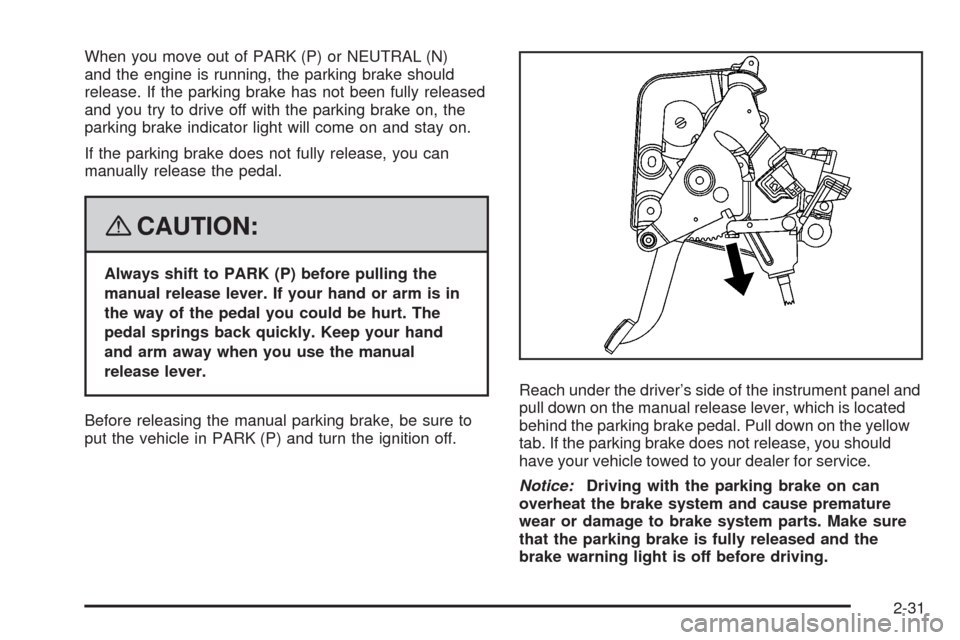
put the vehicle in PARK (P) and turn the ignition off.Reach under the driver’s side of the instrument panel and
pull down on the manual release lever, which is located
behind the parking brake pedal. Pull down on the yellow
tab. If the parking brake does not release, you should
have your vehicle towed to your dealer for service.
Notice:Driving with the parking brake on can
overheat the brake system and cause premature
wear or damage to brake system parts. Make sure
that the parking brake is fully released and the
brake warning light is off before driving.
2-31
Page 123 of 470
Instrument Panel Overview...............................3-4
Hazard Warning Flashers................................3-6
Other Warning Devices...................................3-6
Horn.............................................................3-6
Power Tilt Wheel and Telescopic
Steering Column.........................................3-7
Heated Steering Wheel...................................3-7
Turn Signal/Multifunction Lever.........................3-8
Turn and Lane-Change Signals........................3-8
Headlamp High/Low-Beam Changer..................3-9
Flash-to-Pass.................................................3-9
Windshield Wipers........................................3-10
Rainsense™ Wipers......................................3-11
Windshield Washer.......................................3-12
Headlamp Washer........................................3-12
Cruise Control..............................................3-12
Adaptive Cruise Control.................................3-15
Exterior Lamps.............................................3-28
Wiper Activated Headlamps............................3-29
Headlamps on Reminder................................3-29
Daytime Running Lamps (DRL).......................3-29
Adaptive Forward Lighting System...................3-30
Fog Lamps..................................................3-30Twilight Sentinel®..........................................3-31
Exterior Lighting Battery Saver........................3-32
Instrument Panel Brightness...........................3-32
Courtesy Lamps...........................................3-32
Entry/Exit Lighting.........................................3-32
Reading Lamps............................................3-32
Battery Run-Down Protection..........................3-33
Head-Up Display (HUD).................................3-33
Accessory Power Outlet(s).............................3-36
Ashtray(s) and Cigarette Lighter......................3-37
Climate Controls............................................3-38
Dual Climate Control System..........................3-38
Outlet Adjustment.........................................3-42
Passenger Compartment Air Filter...................3-42
Warning Lights, Gages, and Indicators............3-43
Instrument Panel Cluster................................3-44
Speedometer and Odometer...........................3-45
Trip Odometer..............................................3-45
Tachometer.................................................3-45
Safety Belt Reminders...................................3-46
Airbag Readiness Light..................................3-46
Passenger Airbag Status Indicator...................3-47
Charging System Light..................................3-49
Section 3 Instrument Panel
3-1
Page 124 of 470
Voltmeter Gage............................................3-50
Brake System Warning Light..........................3-50
Antilock Brake System
Warning Light...........................................3-51
Traction Control System (TCS)
Warning Light...........................................3-52
Engine Coolant Temperature Gage..................3-53
Tire Pressure Light.......................................3-53
Malfunction Indicator Lamp.............................3-54
Engine Oil Pressure Gage.............................3-57
Security Light...............................................3-58
Fog Lamp Light............................................3-58
Lights On Reminder......................................3-58
Highbeam On Light.......................................3-58
Fuel Gage...................................................3-59Driver Information Center (DIC).......................3-60
DIC Operation and Displays...........................3-60
DIC Warnings and Messages.........................3-63
Other Messages...........................................3-74
DIC Vehicle Personalization............................3-76
Trip Computer................................................3-80
Oil Life Indicator...........................................3-80
Audio System(s).............................................3-81
Theft-Deterrent Feature..................................3-82
Audio Steering Wheel Controls.......................3-82
Radio Reception...........................................3-84
Care of Your CDs.........................................3-85
Care of the CD Player...................................3-85
Diversity Antenna System..............................3-85
XM™ Satellite Radio Antenna System.............3-85
Section 3 Instrument Panel
3-2
Page 126 of 470
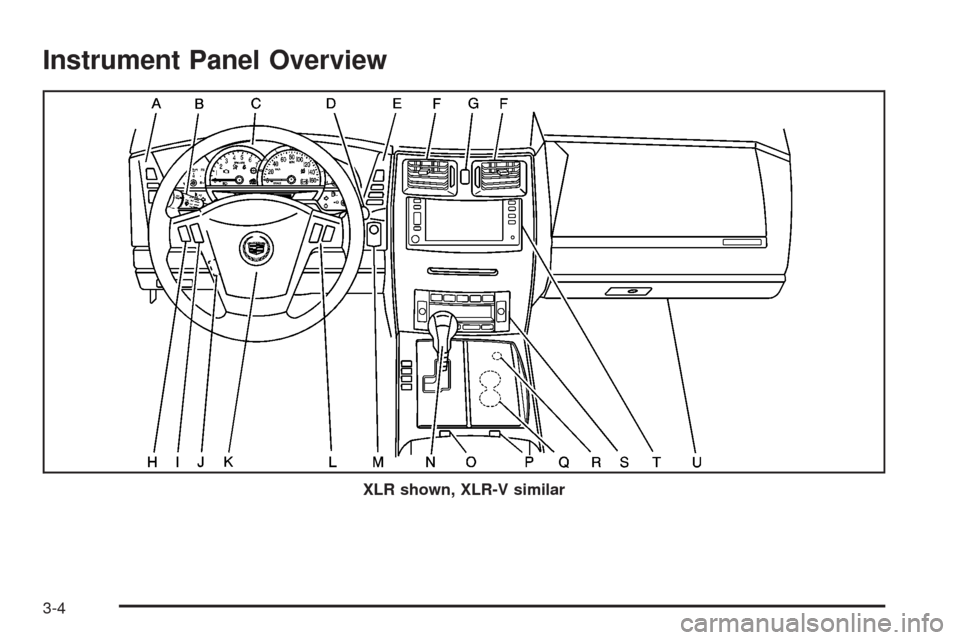
Instrument Panel Overview
XLR shown, XLR-V similar
3-4
Page 127 of 470
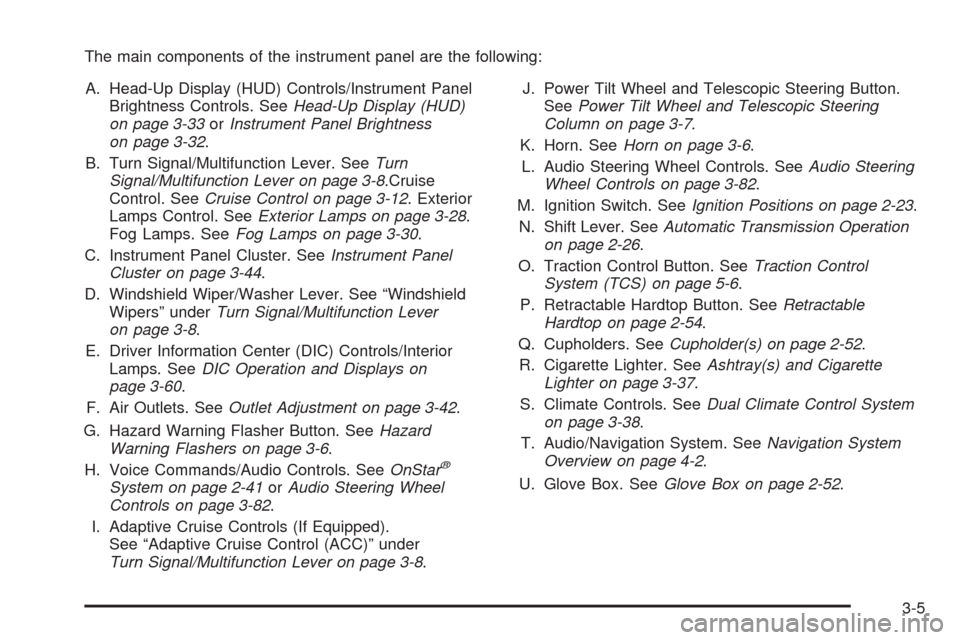
The main components of the instrument panel are the following:
A. Head-Up Display (HUD) Controls/Instrument Panel
Brightness Controls. SeeHead-Up Display (HUD)
on page 3-33orInstrument Panel Brightness
on page 3-32.
B. Turn Signal/Multifunction Lever. SeeTurn
Signal/Multifunction Lever on page 3-8.Cruise
Control. SeeCruise Control on page 3-12. Exterior
Lamps Control. SeeExterior Lamps on page 3-28.
Fog Lamps. SeeFog Lamps on page 3-30.
C. Instrument Panel Cluster. SeeInstrument Panel
Cluster on page 3-44.
D. Windshield Wiper/Washer Lever. See “Windshield
Wipers” underTurn Signal/Multifunction Lever
on page 3-8.
E. Driver Information Center (DIC) Controls/Interior
Lamps. SeeDIC Operation and Displays on
page 3-60.
F. Air Outlets. SeeOutlet Adjustment on page 3-42.
G. Hazard Warning Flasher Button. SeeHazard
Warning Flashers on page 3-6.
H. Voice Commands/Audio Controls. SeeOnStar
®
System on page 2-41orAudio Steering Wheel
Controls on page 3-82.
I. Adaptive Cruise Controls (If Equipped).
See “Adaptive Cruise Control (ACC)” under
Turn Signal/Multifunction Lever on page 3-8.J. Power Tilt Wheel and Telescopic Steering Button.
SeePower Tilt Wheel and Telescopic Steering
Column on page 3-7.
K. Horn. SeeHorn on page 3-6.
L. Audio Steering Wheel Controls. SeeAudio Steering
Wheel Controls on page 3-82.
M. Ignition Switch. SeeIgnition Positions on page 2-23.
N. Shift Lever. SeeAutomatic Transmission Operation
on page 2-26.
O. Traction Control Button. SeeTraction Control
System (TCS) on page 5-6.
P. Retractable Hardtop Button. SeeRetractable
Hardtop on page 2-54.
Q. Cupholders. SeeCupholder(s) on page 2-52.
R. Cigarette Lighter. SeeAshtray(s) and Cigarette
Lighter on page 3-37.
S. Climate Controls. SeeDual Climate Control System
on page 3-38.
T. Audio/Navigation System. SeeNavigation System
Overview on page 4-2.
U. Glove Box. SeeGlove Box on page 2-52.
3-5
Page 128 of 470
Hazard Warning Flashers
Your hazard warning ashers let you warn others. They
also let police know you have a problem. Your front
and rear turn signal lamps will ash on and off.
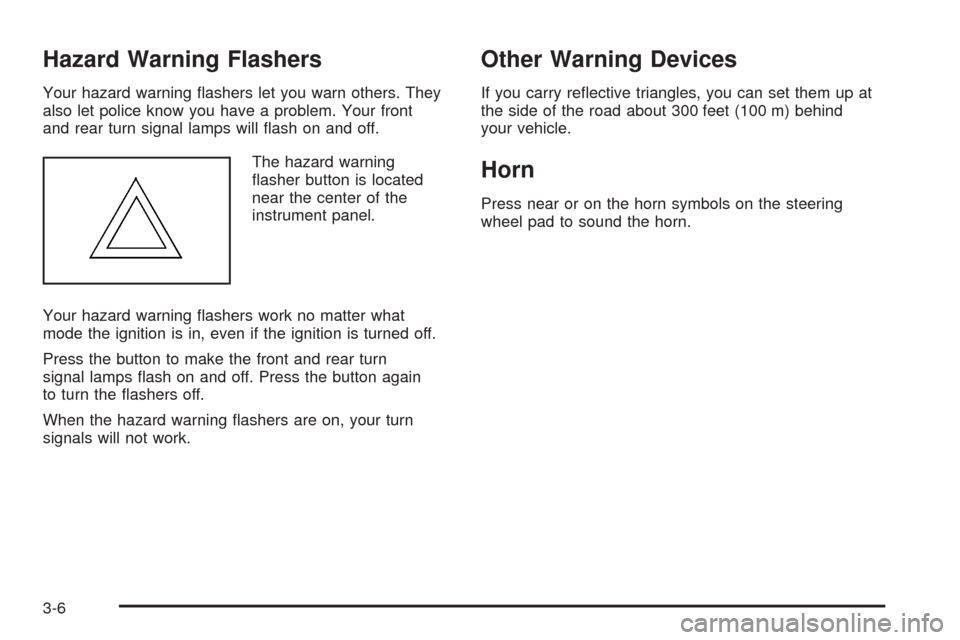
The hazard warning
asher button is located
near the center of the
instrument panel.
Your hazard warning ashers work no matter what
mode the ignition is in, even if the ignition is turned off.
Press the button to make the front and rear turn
signal lamps ash on and off. Press the button again
to turn the ashers off.
When the hazard warning ashers are on, your turn
signals will not work.
Other Warning Devices
If you carry reective triangles, you can set them up at
the side of the road about 300 feet (100 m) behind
your vehicle.
Horn
Press near or on the horn symbols on the steering
wheel pad to sound the horn.
3-6
Page 130 of 470

Turn Signal/Multifunction Lever
The lever on the left side of the steering column
includes the following:
GTurn and Lane-Change Signals. SeeTurn
and Lane-Change Signals on page 3-8.
3Headlamp High/Low-Beam Changer. See
Headlamp High/Low-Beam Changer on page 3-9.
-Fog Lamps. SeeFog Lamps on page 3-30.
Flash-to-Pass Feature. SeeFlash-to-Pass on
page 3-9.
ICruise Control. SeeCruise Control on
page 3-12.
PExterior Lamps Control. SeeExterior Lamps
on page 3-28.
Turn and Lane-Change Signals
The turn signal has two upward (for right) and two
downward (for left) positions. These positions allow you
to signal a turn or a lane change.
To signal a turn, move the multifunction lever all the
way up or down. When the turn is nished, the lever will
return automatically.
An arrow on the instrument
panel cluster will ash in
the direction of the
turn or lane change.
To signal a lane change, just raise or lower the lever
until the arrow starts to ash. Hold it there until you
complete your lane change. The lever will return by itself
when you release it.
If you signal a turn or a lane change and the arrows
ash faster than normal, a signal bulb may be burned
out. Other drivers will not see the turn signal.
Replace burned-out bulbs to help avoid possible
accidents. If the arrows do not go on at all when you
signal a turn, check the fuses and check for burned-out
bulbs. SeeFuses and Circuit Breakers on page 6-90.
3-8