reset CADILLAC XLR 2008 1.G User Guide
[x] Cancel search | Manufacturer: CADILLAC, Model Year: 2008, Model line: XLR, Model: CADILLAC XLR 2008 1.GPages: 470, PDF Size: 8.39 MB
Page 182 of 470
You can use the Driver Information Center (DIC) to
display more detailed fuel information. While scrolling
through the DIC, you will also nd:
AVERAGE XX.X MPG (Average Miles Per Gallon):
The fuel economy calculated for the last 20 gallons
(76 L) of fuel used, or since you last reset the display.
INST XX.X MPG (Instantaneous Miles Per Gallon):
The fuel economy calculated for your current driving
conditions.
RANGE XXX MI:The approximate distance you can
drive before refueling.
SeeDIC Operation and Displays on page 3-60for
more information.
You should reset the fuel information display every
time you refuel. To reset AVERAGE, use the information
up or down button to scroll to AVE FUEL ECON and
hold the reset button. RANGE will automatically reset.
Driver Information Center (DIC)
This display gives you the status of many of your
vehicle’s systems. The DIC is also used to display driver
personalization features and warning/status messages.
All messages will appear in the DIC display, located
at the bottom of the instrument panel cluster.
DIC Operation and Displays
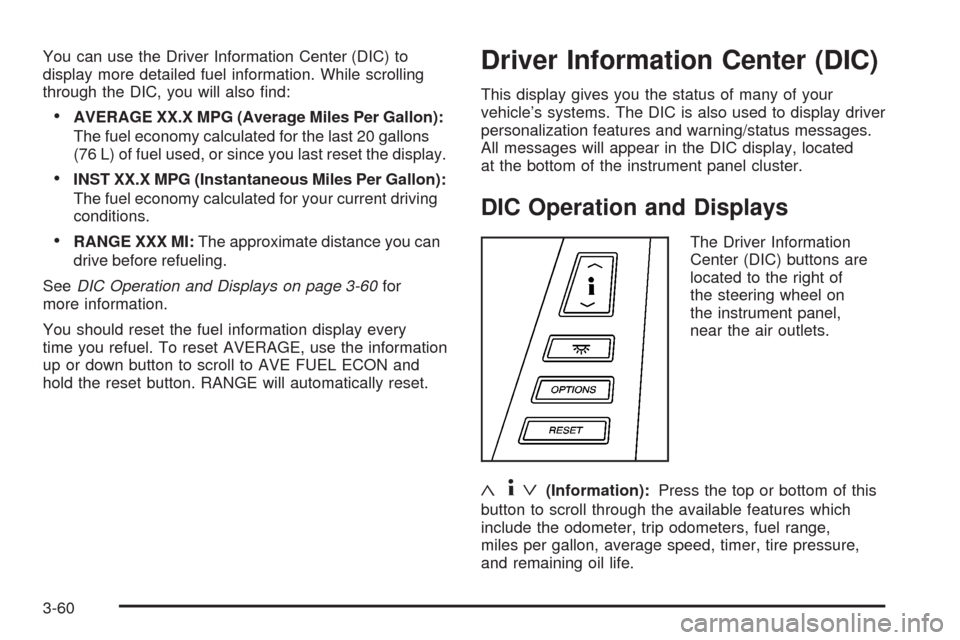
The Driver Information
Center (DIC) buttons are
located to the right of
the steering wheel on
the instrument panel,
near the air outlets.
«4ª(Information):Press the top or bottom of this
button to scroll through the available features which
include the odometer, trip odometers, fuel range,
miles per gallon, average speed, timer, tire pressure,
and remaining oil life.
3-60
Page 183 of 470

+(Interior Lamps):Press this button to turn the
interior lamps on and off.
OPTIONS:Press this button to choose personal
options that are available on your vehicle.
RESET:Press this button to reset a feature. It is also
used to switch between English and Metric options.
Use the information button to scroll through the
following options:
ODOMETER:This feature shows how far the vehicle
has been driven in either miles (mi) or kilometers (km).
Use the ENG/METRIC feature to switch between
English and Metric units.
TRIP A:This feature will record the distance traveled
since the last time it was reset. Press and hold the
RESET button to return to zero. If your vehicle is rst
sold in the United States, the trip odometer will return
to zero after 999.9 miles (1 609 km). If your vehicle
is rst sold in Canada, the trip odometer will return to
zero after 1,242 miles (1 999 km).
TRIP B:This feature allows you to record the distance
traveled during a second trip and functions the same
as TRIP A.RANGE xxx MI:This feature shows about how many
miles (mi) or kilometers (km) you can drive without
relling your fuel tank. Once the range drops below
40 miles (64 km) remaining, the display will show LOW.
If the vehicle has been idling for a long time, the
range displayed on the DIC could be abnormally low.
The vehicle must be driven 5-10 miles (8-16 km) to
get an accurate reading.
AVERAGE xx.x MPG (Average Miles Per Gallon):
This feature shows the approximate fuel economy the
vehicle has averaged since the last time the value
was reset. To reset the average miles per gallon, press
the information button to display AVERAGE xx.x MPG,
then press and hold the RESET button until AVERAGE
00.0 MPG is displayed.
INST xx.x MPG (Instantaneous Miles Per Gallon):
This feature shows the instantaneous fuel economy
which varies with your driving conditions, such as
acceleration, braking, and the grade of the road being
traveled. The RESET button does not function in
this mode.
3-61
Page 184 of 470
AVERAGE SPEED:This feature shows the average
speed the vehicle has traveled since the last time
the value was reset. To reset the value, press the
information button to display AVERAGE SPEED, then
press and hold the RESET button until AVERAGE
SPEED 00.0 is displayed.
ELAPSED TIME:This feature is like a stopwatch, in
that you can clock the time it takes to get from one point
to another.
To operate, press the information button to display
ELAPSED TIME. Each of the elds for the hours,
minutes, and seconds are two numeric digits.
Once ELAPSED TIME 00:00:00 is displayed, press the
RESET button to start the timing feature. Press the
RESET button again to stop it. If you will be starting and
stopping your vehicle, during a trip for instance, the
ELAPSED TIME feature will automatically start timing
where it left off when you last stopped. To reset it,
press and hold the RESET button until the display
reads ELAPSED TIME 00:00:00. Press the information
button to exit from the ELAPSED TIME display.FRONT Lxx Rxx PSI:This feature shows the tire
pressure for the front left and right tires.
REAR Lxx Rxx PSI:This feature shows the tire
pressure for the rear left and right tires.
OIL LIFE:This feature shows the estimated oil life
remaining. SeeOil Life Indicator on page 3-80for more
information. To reset the engine oil life system, see
Engine Oil Life System on page 6-20. This only needs
to be reset after you have had the oil changed.
In addition to the engine oil life system monitoring oil
life, additional maintenance is recommended in the
Maintenance Schedule in this manual. SeeScheduled
Maintenance on page 7-4andEngine Oil on page 6-16
for more information.
ENG/METRIC (English/Metric):This feature allows
you to switch the DIC displays between English
and Metric. Press the RESET button to switch the
display between English and Metric. There will be
an arrow next to the option that is selected.
3-62
Page 185 of 470
DIC Warnings and Messages
These messages appear if there is a problem detected
in one of your vehicle’s systems. You must then
press RESET to clear the display screen for further use.
However, be sure to take any message that appears
on the display screen seriously and remember that
pressing the RESET button will only make the message
disappear, not the problem.
DIC messages can also be displayed in English,
French, German, Italian, Japanese, and Spanish.
ABS (Antilock Brake System) ACTIVE
This message displays when the Antilock Brake
System (ABS) is adjusting brake pressure to help
avoid a braking skid.
Slippery road conditions may exist if this message
displays, so adjust your driving accordingly.
The message may stay on for a few seconds after
the system stops adjusting brake pressure.
BUCKLE PASSENGER
This message reminds you to buckle the passenger’s
safety belt.
This message displays and a chime sounds when the
ignition is on, the driver’s safety belt is buckled, the
passenger’s safety belt is unbuckled with the passenger
airbag enabled, and the vehicle is in motion. You
should have the passenger buckle their safety belt.
The reminder will be repeated if the ignition is on, the
vehicle is in motion, the driver is buckled and the
passenger is still unbuckled, and the passenger airbag
is enabled. If the passenger’s safety belt is already
buckled, this message and chime will not come on.
BUCKLE SEAT BELT
This message reminds you to buckle the driver’s
safety belt.
This message displays and a chime sounds when the
ignition is on, the driver’s safety belt is unbuckled,
and the vehicle is in motion. You should buckle your
safety belt.
3-63
Page 186 of 470

If the driver remains unbuckled when the ignition is
on and the vehicle is in motion, the reminder will
be repeated. If the driver’s safety belt is already buckled,
this message and chime will not come on.
This message is an additional reminder to the Safety
Belt Reminder Light in the instrument panel cluster.
SeeSafety Belt Reminders on page 3-46for more
information.
CHANGE OIL NOW
This message displays when the life of the engine oil
has expired. SeeScheduled Maintenance on page 7-4.
After an oil change, the Oil Life Indicator must be
reset. SeeOil Life Indicator on page 3-80andEngine
Oil Life System on page 6-20.
CHARGE SYSTEM FAULT
This message displays when a problem with the
charging system has been detected. Have your vehicle
serviced by your dealer/retailer.
CHECK GAS CAP
This message displays if the fuel cap has not been
fully tightened. Check the fuel cap to make sure that
it is on properly.
CLEAN RADAR CRUISE
If your vehicle has this feature, this message displays
when the Adaptive Cruise Control (ACC) system is
disabled because the radar is blocked and cannot
detect vehicles in your path. It may also activate during
heavy rain or due to road spray. To clean the system,
seeAdaptive Cruise Control on page 3-15.
CLOSE CARGO DIVIDER
This message displays if the cargo divider is not in
place. Open the trunk and make sure the cargo divider
is secure and no objects are on the divider. See
Rear Storage Area on page 2-53for more information.
COOLANT OVER TEMP (Temperature)
This message displays when the engine coolant
temperature is too hot. Stop and allow your vehicle to
idle in PARK (P) until it cools down and the message
is removed. Do not increase engine speed above
a normal idle. If it does not cool down, turn off the
engine and have your vehicle serviced by your
dealer/retailer before driving it again. Severe engine
damage can result from an overheated engine.
SeeEngine Overheating on page 6-27.
3-64
Page 192 of 470
REDUCED ENGINE POWER
This message displays when the vehicle is reducing
engine power because the transmission is being placed
in gear under conditions that may cause damage to
the vehicle’s engine, transmission, or ability to
accelerate. Reduced engine power can affect the
vehicle’s ability to accelerate. If this message is on,
but there is no reduction in performance, proceed
to your destination. The performance may be reduced
the next time the vehicle is driven. The vehicle may
be driven at a reduced speed while this message is on,
but acceleration and speed may be reduced. Anytime
this message stays on, the vehicle should be taken
to your dealer/retailer for service as soon as possible.
RIGHT DOOR AJAR
This message displays anytime the engine is running,
the transmission is not in PARK (P), and the passenger
door is open or ajar. A chime sounds if the vehicle’s
speed is greater than 3 mph (5 km/h).
SERVICE A/C
This message displays when the electronic sensors that
control the air conditioning and heating systems are
no longer working. Have the climate control system
serviced by your dealer/retailer if you notice a drop in
heating and air conditioning efficiency.
SERVICE ABS (Antilock Brake System)
If this message displays when you are driving, stop
as soon as possible and turn the ignition off. Then start
the engine again to reset the system. If the message
stays on, or comes back on again while you are driving,
your vehicle is in need of service. See your
dealer/retailer.
If the SERVICE ABS message is being displayed, the
Traction Control System (TCS) and StabiliTrak
®System
will also be disabled. The Driver Information Center
will scroll three messages: SERVICE ABS, SERVICE
TRACTION SYS, and SERVICE STABILITRAK, and the
antilock brake system and traction control warning
lights on the instrument panel cluster will be illuminated.
SeeAntilock Brake System Warning Light on page 3-51
andTraction Control System (TCS) Warning Light on
page 3-52. The driver can acknowledge these messages
by pressing the RESET button three times. When the
service message is displayed, the computer controlled
systems will not assist the driver and you should
have the system repaired by your dealer/retailer as
soon as possible. Adjust your driving accordingly.
3-70
Page 193 of 470

SERVICE AFS (Adaptive Forward
Lighting System) LAMPS
This message displays when the Adaptive Forward
Lighting System (AFS) is disabled and needs service.
See your dealer/retailer. SeeAdaptive Forward Lighting
System on page 3-30for more information.
SERVICE ELECT (Electrical) SYSTEM
This message displays if an electrical problem has
occurred within the Powertrain Control Module (PCM).
Have your vehicle serviced by your dealer/retailer.
SERVICE FUEL SYSTEM
This message displays when the Powertrain Control
Module (PCM) has detected a problem within the
fuel system. Have your vehicle serviced by your
dealer/retailer. This message will also be displayed
when the cluster is not getting fuel information from
the PCM.
SERVICE RADAR CRUISE
If your vehicle has this feature, this message displays
when the Adaptive Cruise Control (ACC) system is
disabled and needs service. See your dealer/retailer.
SERVICE RIDE CONTROL
This message displays when there is a problem with
the Magnetic Ride Control System. Have your vehicle
serviced by your dealer/retailer.
SERVICE TRACTION SYS (System)
This message displays when there is a problem with
the Traction Control System (TCS). Have your vehicle
serviced by your dealer/retailer.
SERVICE STABILITRAK
If this message displays, it means there may be a
problem with the stability enhancement system.
If you see this message, try to reset the system.
Stop, turn off the engine, then start the engine again.
If this message still comes on, it means there is a
problem. You should see your dealer/retailer for service.
Reduce your speed and drive accordingly. A single
chime also sounds when this message is displayed.
SERVICE TRANSMISSION
This message displays when there is a problem with
the transmission. Have your vehicle serviced by
your dealer/retailer.
3-71
Page 194 of 470

SERVICE VEHICLE SOON
This message displays when a non-emissions related
powertrain malfunction occurs. Have your vehicle
serviced by your dealer/retailer as soon as possible.
SHIFT TO PARK
This message displays if the vehicle is not in PARK (P)
when the engine is being turned off. The vehicle will
be in accessory mode. Once the shift lever is moved
to PARK (P), the vehicle will turn off.
STABILITRAK ACTIVE
You may see this message on the DIC. It means that
an advanced, computer-controlled system has come on
to help your vehicle continue to go in the direction in
which you are steering. This stability enhancement
system activates when the computer senses that your
vehicle is just starting to spin, as it might if you hit
a patch of ice or other slippery spot on the road.
When the system is on, you may hear a noise or
feel a vibration in the brake pedal. This is normal.When this message is on, continue to steer in the
direction you want to go. The system is designed to
help you in bad weather or other difficult driving situations
by making the most of whatever road conditions will
permit. If this message comes on, you will know that
something has caused your vehicle to start to spin,
so consider slowing down. A single chime also sounds
when this message is displayed.
STABILITRAK READY
If this message displays and a chime sounds, the
system has completed the functional check of the
StabiliTrak
®System.
STABILITRAK WARMING
When you rst start your vehicle and drive away,
especially during cold winter weather, this message
may display along with a chime and the traction control
warning light. This is normal. You can acknowledge
this message by pressing the RESET button. The
StabiliTrak
®System performance is affected until the
STABILITRAK READY message is displayed in the DIC,
which can take up to 15 minutes.
3-72
Page 196 of 470
TRAC (Traction)/STABILITRAK ON
This message displays when both the Traction Control
System (TCS) and the StabiliTrak®System are on.
TRACTION SYSTEM OFF
This message displays when the Traction Control
System (TCS) is off, but the StabiliTrak®System
remains on.
TRACTION SYSTEM ON
This message displays when the Traction Control
System (TCS) is on.
TRUNK AJAR
This message displays when the trunk is open while
the vehicle is running and is not in PARK (P).
WAIT FOR STABILITRAK
This message displays after driving 19 mph (30 km/h)
for 10 seconds if the steering is not centered.
The StabiliTrak
®System is not available until the
steering centers itself and the STABILITRAK READY
message is displayed in the DIC.
Other Messages
Here are more messages that you can receive on the
Driver Information Center (DIC). To acknowledge a
message and read another message that may have
come on at the same time, press the RESET button.
ACCESSORY MODE ON
SeeIgnition Positions on page 2-23.
CHANGE OIL SOON
SeeEngine Oil on page 6-16andEngine Oil
Life System on page 6-20.
FOB BATTERY LOW
See “Battery Replacement” underKeyless
Access System Operation on page 2-6.
HIGH TIRE PRESS LF
SeeInflation - Tire Pressure on page 6-60.
HIGH TIRE PRESS RF
SeeInflation - Tire Pressure on page 6-60.
HIGH TIRE PRESS LR
SeeInflation - Tire Pressure on page 6-60.
HIGH TIRE PRESS RR
SeeInflation - Tire Pressure on page 6-60.
3-74
Page 198 of 470

DIC Vehicle Personalization
Your vehicle has personalization capabilities that allow
you to program certain features to a preferred setting
for up to two drivers. The back of the keyless access
transmitters are labelled 1 or 2.
The current driver’s preferences are recalled when one
of the following occurs:
The lock or unlock button on the keyless access
transmitter, programmed as 1 or 2, is pressed.
The appropriate memory button, 1 or 2, located on
the driver’s seat is pressed. SeeMemory Seat,
Mirrors and Steering Wheel on page 1-3for more
information.
A valid keyless access transmitter is detected upon
opening the driver’s door.
If more than one valid keyless access transmitter is
detected upon opening the driver’s door, the driver
preferences for the lowest driver number will be recalled.
If a keyless access transmitter is programmed
as #3 or #4, the personalization system will not
recognize the transmitter. The Driver Information
Center (DIC) will not display a current driver number
and the features that are normally programmed
through the DIC will be set to the default states.Also, if the OPTIONS button is pressed, the DIC does
not display the menus used to set personalizations,
but instead displays OPTIONS UNAVAILABLE for
a few seconds.
Feature Programming
To change feature preferences, make sure the vehicle
is running and in PARK (P). To avoid excessive drain
on the battery, it is recommended that the headlamps
are turned off. Press the OPTIONS button and the
Driver Information Center (DIC) will display the
current driver for a few seconds, then display the
rst personalization menu item. You can now use the
OPTIONS button to change the setting of the displayed
feature. Press the top or bottom of the information
button to scroll up or down the list of features. When
you get to a feature you want to change, press the
OPTIONS button again. When you are nished, press
the RESET button to exit the personalization menu.
If no button is pressed within 45 seconds, the DIC will
exit the personalization menu.
The following are DIC options that will be available in
the personalization menu.
3-76