mirror CADILLAC XLR 2008 1.G Owner's Manual
[x] Cancel search | Manufacturer: CADILLAC, Model Year: 2008, Model line: XLR, Model: CADILLAC XLR 2008 1.GPages: 470, PDF Size: 8.39 MB
Page 198 of 470

DIC Vehicle Personalization
Your vehicle has personalization capabilities that allow
you to program certain features to a preferred setting
for up to two drivers. The back of the keyless access
transmitters are labelled 1 or 2.
The current driver’s preferences are recalled when one
of the following occurs:
The lock or unlock button on the keyless access
transmitter, programmed as 1 or 2, is pressed.
The appropriate memory button, 1 or 2, located on
the driver’s seat is pressed. SeeMemory Seat,
Mirrors and Steering Wheel on page 1-3for more
information.
A valid keyless access transmitter is detected upon
opening the driver’s door.
If more than one valid keyless access transmitter is
detected upon opening the driver’s door, the driver
preferences for the lowest driver number will be recalled.
If a keyless access transmitter is programmed
as #3 or #4, the personalization system will not
recognize the transmitter. The Driver Information
Center (DIC) will not display a current driver number
and the features that are normally programmed
through the DIC will be set to the default states.Also, if the OPTIONS button is pressed, the DIC does
not display the menus used to set personalizations,
but instead displays OPTIONS UNAVAILABLE for
a few seconds.
Feature Programming
To change feature preferences, make sure the vehicle
is running and in PARK (P). To avoid excessive drain
on the battery, it is recommended that the headlamps
are turned off. Press the OPTIONS button and the
Driver Information Center (DIC) will display the
current driver for a few seconds, then display the
rst personalization menu item. You can now use the
OPTIONS button to change the setting of the displayed
feature. Press the top or bottom of the information
button to scroll up or down the list of features. When
you get to a feature you want to change, press the
OPTIONS button again. When you are nished, press
the RESET button to exit the personalization menu.
If no button is pressed within 45 seconds, the DIC will
exit the personalization menu.
The following are DIC options that will be available in
the personalization menu.
3-76
Page 199 of 470
Auto Recall
This feature allows the steering column, outside mirrors
and the driver’s seat to automatically move to the current
driver’s set position when the engine starts. The DIC will
display AUTO RECALL OFF or AUTO RECALL ON.
Press the OPTIONS button to change the setting.
Auto Exit Recall
This feature allows the steering column and driver’s
seat to automatically move to the current driver’s
exit position when one of the following occurs:
The vehicle is turned off or in RAP or accessory
mode and the driver’s door is opened.
The vehicle is turned off or in RAP and the
unlock button on the keyless access transmitter
is pressed.
The DIC will display AUTO EXIT RECALL OFF or
AUTO EXIT RECALL ON. Press the OPTIONS
button to change the setting.
Approach Lights
This feature activates the parking lamps, front fog lamps
and back-up lamps during low light periods when the
unlock button on the keyless access transmitter is
pressed, both doors are closed and the vehicle is off or
in RAP. The lamps remain on for 20 seconds or until
a door is opened, the lock button on the keyless access
transmitter is pressed or the vehicle is no longer off
or in RAP.
The DIC will display APPROACH LIGHTS OFF or
APPROACH LIGHTS ON. Press the OPTIONS button
to change the setting.
Exit Lights
This feature activates the parking lamps and front fog
lamps for 15, 30 or 90 seconds. This will occur when
the vehicle is off or in RAP and the headlamps are on
due to the automatic headlamp system. The parking
lamps and front fog lamps will remain on until the driver
selected time period expires, the exterior lamp control
is activated or the vehicle is no longer off or in RAP.
The DIC will display EXIT LIGHTS OFF, EXIT
LIGHTS - 15 SEC, EXIT LIGHTS - 30 SEC, or
EXIT LIGHTS - 90 SEC. Press the OPTIONS button
to change the setting.
3-77
Page 201 of 470
You may temporarily disable the passive door locking
feature by pressing the door unlock switch for
three seconds on an open door. Passive door locking
will then remain disabled until a door lock switch is
pressed or until the power mode transitions from
the off power mode.
You can select to not have the horn sound when the
passive lock occurs. If you choose this setting, the doors
will automatically lock eight seconds after you turn the
ignition off, remove a keyless access transmitter
from the interior of the vehicle, and close both doors.
You can also select to have the horn sound once when
the passive lock occurs. If you choose this setting,
the doors will automatically lock and the horn will chirp
eight seconds after you turn the ignition off, remove
a keyless access transmitter from the interior of
the vehicle, and close both doors.
If you are parking in a quiet area and do not want the
horn to sound when the doors lock, press the lock button
on the keyless access transmitter immediately after
removing it from the interior and closing the doors.
This will lock the doors and cancel the passive locking
for this ignition cycle.
The DIC will display PASSIVE LOCKING OFF, SILENT
PASSIVE LOCK, or HORN AT PASSIVE LOCK.
Press the OPTIONS button to change the setting.Passive Unlocking
This feature allows you to select which doors will
automatically unlock when you approach and open the
driver’s door with your keyless access transmitter.
You can choose to have the driver’s door unlock or
both doors unlock. SeeDoor Locks on page 2-10
for more information.
The DIC will display PASSIVE UNLK DRIVER or
PASSIVE UNLK BOTH. Press the OPTIONS button
to change this setting.
Auto Unlock
This feature automatically unlocks either the driver’s
door or both doors, depending on the setting, when
the shift lever is moved to PARK (P).
The DIC will display AUTO UNLOCK OFF,
AUTO UNLOCK DRIVER, or AUTO UNLOCK BOTH.
Press the OPTIONS button to change the setting.
Park Assist
This feature tilts the passenger’s side mirror downward
when the shifter is moved to REVERSE (R). This can
help you to see the curb while backing up. If you adjust
the mirror while in REVERSE (R), the new position
will be saved as the park assist position.
The DIC will display PARK ASSIST OFF or
PARK ASSIST ON.
3-79
Page 207 of 470

Care of Your CDs
Handle CDs carefully. Store them in their original
cases or other protective cases and away from direct
sunlight and dust. The CD player scans the bottom
surface of the disc. If the surface of a CD is damaged,
such as cracked, broken, or scratched, the CD does
not play properly or not at all. If the surface of a CD is
soiled, take a soft, lint free cloth or dampen a clean,
soft cloth in a mild, neutral detergent solution mixed
with water, and clean it. Make sure the wiping process
starts from the center to the edge.
Do not touch the bottom side of a CD while handling
it; this could damage the surface. Pick up CDs by
grasping the outer edges or the edge of the hole and
the outer edge.
Care of the CD Player
Do not use CD lens cleaners for CD players because
the lens of the CD optics can become contaminated
by lubricants.
Diversity Antenna System
The AM-FM antennas are located under the decklid
surface in the trunk compartment. The antennas
are hidden from view and are not accessible.
If adding an aftermarket cellular telephone to your
vehicle, do not attach the antenna to the rear glass.
This would interfere with the convertible top retraction
operation and could cause damage to the
nished/painted surfaces.
XM™ Satellite Radio Antenna
System
Your vehicle may have the XM™ Satellite Radio
antennas that are located in the outside rear view
mirrors. These antennas are hidden from view and
are not accessible.
3-85
Page 305 of 470
Of course, traction is reduced when water, snow, ice,
gravel, or other material is on the road. For safety,
you will want to slow down and adjust your driving to
these conditions. It is important to slow down on slippery
surfaces because stopping distance will be longer and
vehicle control more limited.
While driving on a surface with reduced traction,
try your best to avoid sudden steering, acceleration, or
braking, including reducing vehicle speed by shifting
to a lower gear. Any sudden changes could cause the
tires to slide. You may not realize the surface is
slippery until your vehicle is skidding. Learn to
recognize warning clues — such as enough water, ice,
or packed snow on the road to make a mirrored
surface — and slow down when you have any doubt.
Remember: Any Antilock Brake System (ABS) helps
avoid only the braking skid.Racing or Other Competitive
Driving (XLR-V)
See your warranty book before using your vehicle for
racing or other competitive driving.
Notice:If you use your vehicle for racing or other
competitive driving, the engine may use more
oil than it would with normal use. Low oil levels can
damage the engine. Be sure to check the oil level
often during racing or other competitive driving and
keep the level at or near 2 quarts (2 L) above the
upper mark that shows the proper operating range
on the engine oil dipstick. For information on
how to add oil, seeEngine Oil on page 6-16.
After the competitive driving, remove excess oil
so that the level on the dipstick is not above
the upper mark that shows the proper operating
range.
5-13
Page 306 of 470
Driving at Night
Night driving is more dangerous than day driving because
some drivers are likely to be impaired — by alcohol or
drugs, with night vision problems, or by fatigue.
Night driving tips include:
Drive defensively.
Do not drink and drive.
Reduce headlamp glare by adjusting the inside
rearview mirror.
Slow down and keep more space between you and
other vehicles because your headlamps can only
light up so much road ahead.
Watch for animals.
When tired, pull off the road.
Do not wear sunglasses.
Avoid staring directly into approaching headlamps.
Keep the windshield and all glass on your vehicle
clean — inside and out.
Keep your eyes moving, especially during turns
or curves.
No one can see as well at night as in the daytime.
But, as we get older, these differences increase.
A 50-year-old driver might need at least twice as much
light to see the same thing at night as a 20-year-old.
Driving in Rain and on Wet Roads
Rain and wet roads can reduce vehicle traction
and affect your ability to stop and accelerate. Always
drive slower in these types of driving conditions
and avoid driving through large puddles and
deep-standing or owing water.
{CAUTION:
Wet brakes can cause accidents. They might
not work as well in a quick stop and could
cause pulling to one side. You could lose
control of the vehicle.
After driving through a large puddle of water
or a car/vehicle wash, lightly apply the brake
pedal until the brakes work normally.
Flowing or rushing water creates strong
forces. Driving through owing water could
cause your vehicle to be carried away. If this
happens, you and other vehicle occupants
could drown. Do not ignore police warnings
and be very cautious about trying to drive
through owing water.
5-14
Page 308 of 470

Highway Hypnosis
Always be alert and pay attention to your surroundings
while driving. If you become tired or sleepy, nd a
safe place to park your vehicle and rest.
Other driving tips include:
Keep the vehicle well ventilated.
Keep interior temperature cool.
Keep your eyes moving — scan the road ahead
and to the sides.
Check the rearview mirror and vehicle
instruments often.
Hill and Mountain Roads
Driving on steep hills or through mountains is different
than driving on at or rolling terrain. Tips for driving
in these conditions include:
Keep your vehicle serviced and in good shape.
Check all uid levels and brakes, tires, cooling
system, and transmission.
Going down steep or long hills, shift to a
lower gear.
{CAUTION:
If you do not shift down, the brakes could
get so hot that they would not work well.
You would then have poor braking or even
none going down a hill. You could crash.
Shift down to let the engine assist the brakes
on a steep downhill slope.
5-16
Page 412 of 470

Fuses Usage
FUSE PULLER Fuse Puller
REVERSE
LAMPReverse Lamp
RUN/CRANK Starter/Crank
PRK/BRK
SOL AParking Brake Solenoid A
REVERSE
LAMPSReverse Lamps
BTSI SOL/
COL LOCKBTSI Solenoid, Column Lock
EMPTY Not Used
EMPTY Not Used
GMLAN
DEVICESGMLAN Devices
RPA/H/C
SEAT/WPR
RELAYSRear Park Aid, Heated/Cooled
Seats, Windshield Wiper Relays
DR LOCKS Door Locks
ECM Engine Control Module
INTERIOR
LIGHTSInterior LightsFuses Usage
SDM/PSIR SW Airbags
EMPTY Not Used
ONSTAR OnStar
®
ACCA/DRIV
DR SWAdaptive Cruise Control (ACC),
Driver Door Switch
TILT/TELE
SW/MEM SEAT
MOD/TOP SWPower Tilt Wheel, Telescopic
Steering Column, Memory Seat,
Driver Seat Switch, Retractable
Hardtop Switch
IGN SW/INTR
SNSRIgnition Switch, Intrusion Sensor
STOP LAMP Stop Lamp
ISRVM/HVACInside Rearview Mirror, Climate
Control System, Column Lock,
Power Sounder
CLSTR/HUDInstrument Panel Cluster, Head-Up
Display (HUD)
RADIO/
S-BAND/VICSRadio, S-Band, CD Changer
TUTD SW/
STRG COL SWTap-Up/Tap-Down Switch
HVAC/PWR
SNDClimate Control System, Power
Sounder
6-92
Page 413 of 470
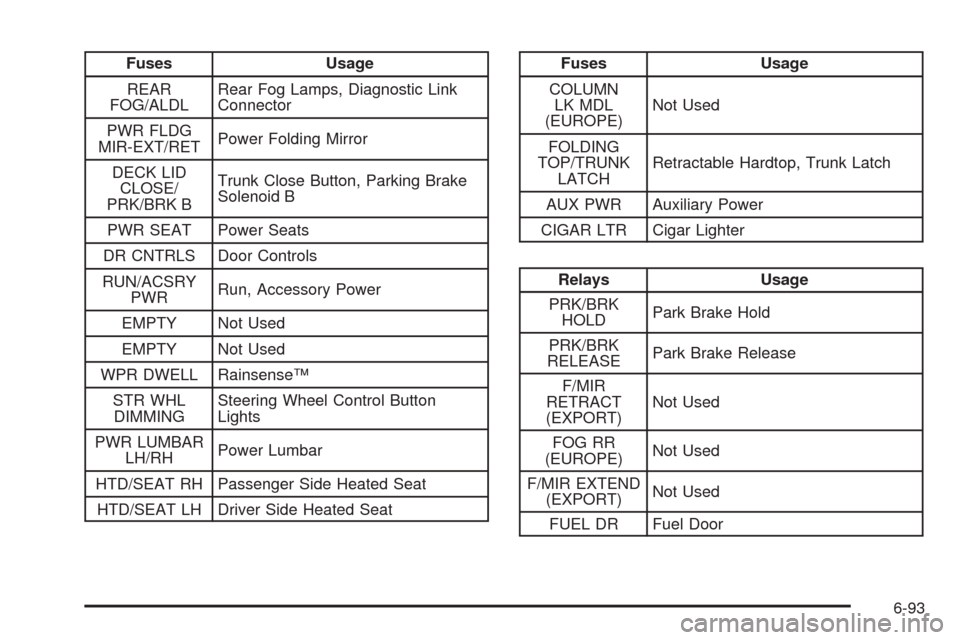
Fuses Usage
REAR
FOG/ALDLRear Fog Lamps, Diagnostic Link
Connector
PWR FLDG
MIR-EXT/RETPower Folding Mirror
DECK LID
CLOSE/
PRK/BRK BTrunk Close Button, Parking Brake
Solenoid B
PWR SEAT Power Seats
DR CNTRLS Door Controls
RUN/ACSRY
PWRRun, Accessory Power
EMPTY Not Used
EMPTY Not Used
WPR DWELL Rainsense™
STR WHL
DIMMINGSteering Wheel Control Button
Lights
PWR LUMBAR
LH/RHPower Lumbar
HTD/SEAT RH Passenger Side Heated Seat
HTD/SEAT LH Driver Side Heated SeatFuses Usage
COLUMN
LK MDL
(EUROPE)Not Used
FOLDING
TOP/TRUNK
LATCHRetractable Hardtop, Trunk Latch
AUX PWR Auxiliary Power
CIGAR LTR Cigar Lighter
Relays Usage
PRK/BRK
HOLDPark Brake Hold
PRK/BRK
RELEASEPark Brake Release
F/MIR
RETRACT
(EXPORT)Not Used
FOG RR
(EUROPE)Not Used
F/MIR EXTEND
(EXPORT)Not Used
FUEL DR Fuel Door
6-93
Page 464 of 470

Lighting
Entry/Exit...................................................3-32
Lights
Exterior Lamps............................................3-28
Flash-to-Pass............................................... 3-9
High/Low Beam Changer................................ 3-9
On Reminder..............................................3-29
Limited-Slip Rear Axle....................................... 5-7
Loading Your Vehicle.......................................5-22
Lockout Protection..........................................2-12
Locks
Automatic Door Lock....................................2-12
Door..........................................................2-10
Lockout Protection.......................................2-12
Power Door................................................2-12
Programmable Automatic Door Unlock............2-12
Loss of Control...............................................5-12
Lowering the Retractable Hardtop......................2-54
Lumbar
Power Controls............................................. 1-2M
Magnetic Ride Control....................................... 5-7
Maintenance Schedule
Additional Required Services........................... 7-5
At Each Fuel Fill........................................... 7-8
At Least Once a Month.................................. 7-8
At Least Once a Year.................................... 7-9
Introduction.................................................. 7-2
Maintenance Footnotes.................................. 7-6
Maintenance Record....................................7-15
Maintenance Requirements............................. 7-2
Normal Maintenance Replacement Parts.........7-13
Owner Checks and Services........................... 7-8
Recommended Fluids and Lubricants.............7-11
Scheduled Maintenance................................. 7-4
Using.......................................................... 7-2
Your Vehicle and the Environment................... 7-2
Malfunction Indicator Light................................3-54
Manual, Using.................................................... iv
Maps............................................................4-39
Memory Point, Edit.........................................4-20
Memory Seat, Mirrors, Steering Wheel Controls.... 1-3
Menu
Setup........................................................4-13
8