steering wheel CADILLAC XLR 2008 1.G Owner's Manual
[x] Cancel search | Manufacturer: CADILLAC, Model Year: 2008, Model line: XLR, Model: CADILLAC XLR 2008 1.GPages: 470, PDF Size: 8.39 MB
Page 150 of 470

Exterior Lamps
The exterior lamp control is located to the left of the
steering wheel on the multifunction lever.
O(Exterior Lamp Control):Turn the band with this
symbol on it to operate the exterior lamps.
The exterior lamp band has four positions:
O(Off):Turning the band to this position turns off
all lamps.
AUTO (Automatic):Turning the band to this position
sets the exterior lamps in automatic mode. AUTO mode
will turn the exterior lamps on and off depending on how
much light is available outside the vehicle.Turning the band to AUTO mode also enables the
Adaptive Forward Lighting system. SeeAdaptive Forward
Lighting System on page 3-30.
To override AUTO mode, turn the control to off.
To reset to AUTO mode turn the control to exterior lamps
and then back to AUTO. Automatic mode will also reset
when your vehicle is turned off and then back on again
when the control is left in the AUTO position.
SeeTwilight Sentinel
®on page 3-31.
;(Parking Lamp):Turning the band to this position
turns on the parking lamps together with the following:
Sidemarker Lamps
Taillamps
License Plate Lamps
Instrument Panel Lights
The parking brake indicator light will come on and stay
on when the parking lamps are on with the engine
off and the ignition to Acc.
5(Headlamps):Turning the control to this position
turns on the headlamps, together with the previously
listed lamps and lights.
3-28
Page 156 of 470

Be sure to continue scanning your displays, controls
and driving environment just as you would in a vehicle
without HUD. If you never look at your instrument
panel cluster, you may not see something important,
such as a warning light. Under important warning
conditions, the CHECK GAGES message will display in
the HUD. View your Driver Information Center (DIC)
for more information.The HUD controls are
located to the left of the
steering wheel.
+
!- (Brightness):This button is used to adjust the
brightness of the HUD and the instrument panel cluster.
DIMMER:This button is used to select the HUD or
the instrument panel cluster to adjust the brightness.
HUD:This button is used to adjust the vertical position
of the HUD display.
3-34
Page 182 of 470
You can use the Driver Information Center (DIC) to
display more detailed fuel information. While scrolling
through the DIC, you will also nd:
AVERAGE XX.X MPG (Average Miles Per Gallon):
The fuel economy calculated for the last 20 gallons
(76 L) of fuel used, or since you last reset the display.
INST XX.X MPG (Instantaneous Miles Per Gallon):
The fuel economy calculated for your current driving
conditions.
RANGE XXX MI:The approximate distance you can
drive before refueling.
SeeDIC Operation and Displays on page 3-60for
more information.
You should reset the fuel information display every
time you refuel. To reset AVERAGE, use the information
up or down button to scroll to AVE FUEL ECON and
hold the reset button. RANGE will automatically reset.
Driver Information Center (DIC)
This display gives you the status of many of your
vehicle’s systems. The DIC is also used to display driver
personalization features and warning/status messages.
All messages will appear in the DIC display, located
at the bottom of the instrument panel cluster.
DIC Operation and Displays
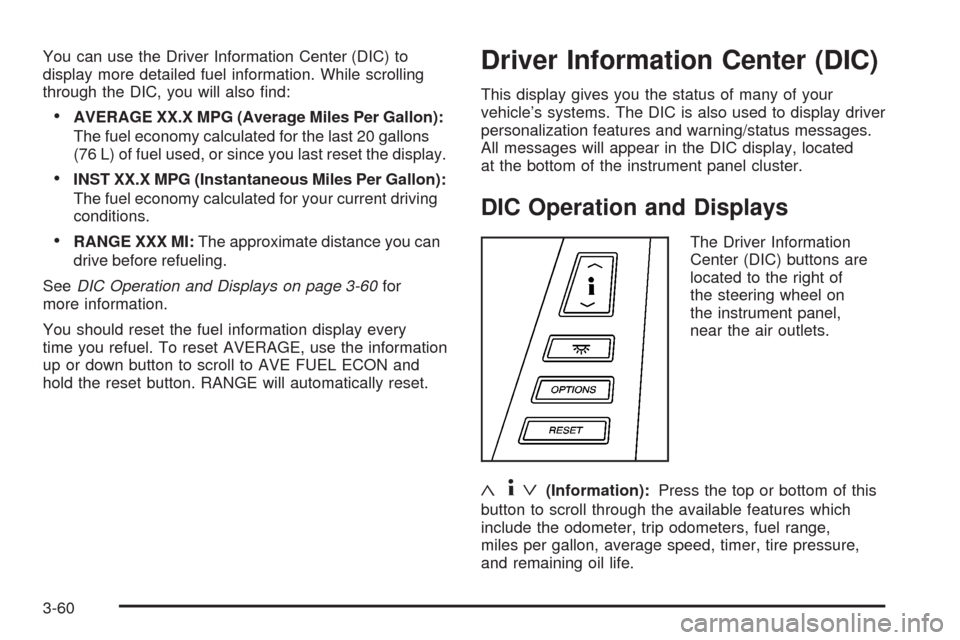
The Driver Information
Center (DIC) buttons are
located to the right of
the steering wheel on
the instrument panel,
near the air outlets.
«4ª(Information):Press the top or bottom of this
button to scroll through the available features which
include the odometer, trip odometers, fuel range,
miles per gallon, average speed, timer, tire pressure,
and remaining oil life.
3-60
Page 198 of 470

DIC Vehicle Personalization
Your vehicle has personalization capabilities that allow
you to program certain features to a preferred setting
for up to two drivers. The back of the keyless access
transmitters are labelled 1 or 2.
The current driver’s preferences are recalled when one
of the following occurs:
The lock or unlock button on the keyless access
transmitter, programmed as 1 or 2, is pressed.
The appropriate memory button, 1 or 2, located on
the driver’s seat is pressed. SeeMemory Seat,
Mirrors and Steering Wheel on page 1-3for more
information.
A valid keyless access transmitter is detected upon
opening the driver’s door.
If more than one valid keyless access transmitter is
detected upon opening the driver’s door, the driver
preferences for the lowest driver number will be recalled.
If a keyless access transmitter is programmed
as #3 or #4, the personalization system will not
recognize the transmitter. The Driver Information
Center (DIC) will not display a current driver number
and the features that are normally programmed
through the DIC will be set to the default states.Also, if the OPTIONS button is pressed, the DIC does
not display the menus used to set personalizations,
but instead displays OPTIONS UNAVAILABLE for
a few seconds.
Feature Programming
To change feature preferences, make sure the vehicle
is running and in PARK (P). To avoid excessive drain
on the battery, it is recommended that the headlamps
are turned off. Press the OPTIONS button and the
Driver Information Center (DIC) will display the
current driver for a few seconds, then display the
rst personalization menu item. You can now use the
OPTIONS button to change the setting of the displayed
feature. Press the top or bottom of the information
button to scroll up or down the list of features. When
you get to a feature you want to change, press the
OPTIONS button again. When you are nished, press
the RESET button to exit the personalization menu.
If no button is pressed within 45 seconds, the DIC will
exit the personalization menu.
The following are DIC options that will be available in
the personalization menu.
3-76
Page 203 of 470
Audio System(s)
Your vehicle has the Navigation Audio System. Read the
following pages to familiarize yourself with its features.
{CAUTION:
This system provides you with far greater
access to audio stations and song listings.
Giving extended attention to entertainment
tasks while driving can cause a crash and you
or others can be injured or killed. Always keep
your eyes on the road and your mind on the
drive — avoid engaging in extended searching
while driving.
Keeping your mind on the drive is important for safe
driving. SeeDefensive Driving on page 5-2. Here
are some ways in which you can help avoid distraction
while driving.While your vehicle is parked:
Familiarize yourself with all of its controls.
Familiarize yourself with its operation.
Set up your audio system by presetting your
favorite radio stations, setting the tone, and
adjusting the speakers. Then, when driving
conditions permit, you can tune to your favorite
radio stations using the presets and steering
wheel controls if the vehicle has them.
Notice:Before adding any sound equipment to
your vehicle, such as an audio system, CD player,
CB radio, mobile telephone, or two-way radio,
make sure that it can be added by checking with
your dealer/retailer. Also, check federal rules
covering mobile radio and telephone units. If sound
equipment can be added, it is very important to
do it properly. Added sound equipment may
interfere with the operation of your vehicle’s engine,
radio, or other systems, and even damage them.
Your vehicle’s systems may interfere with the
operation of sound equipment that has been added.
Your vehicle has a feature called Retained Accessory
Power (RAP). With RAP, the audio system can
be played even after the ignition is turned off.
SeeRetained Accessory Power (RAP) on page 2-24
for more information.
3-81
Page 204 of 470

Theft-Deterrent Feature
THEFTLOCK®is designed to discourage theft of your
vehicle’s radio. The feature works automatically by
learning a portion of the Vehicle Identication Number
(VIN). If the radio is moved to a different vehicle, it does
not operate. If the radio is removed from your vehicle,
the original VIN in the radio can be used to trace
the radio back to your vehicle.
With THEFTLOCK
®activated, the radio does not
operate if stolen.
Audio Steering Wheel Controls
Your vehicle has audio steering wheel controls,
they could differ depending on your vehicle’s options.
There are two versions.On the outboard side, you may have:
1. SEEK, SRCE, Heated Steering Wheel and
Cruise Control Cancel.
2. SRCE, Heated Steering Wheel, Adaptive
Cruise Control Gap, and Cruise Control Cancel.
The right side controls are the same for all versions.
Audio Controls
With Heated Steering
Wheel and Cruise
Control Cancel
Audio Controls
With Heated Steering
Wheel and Adaptive
Cruise and GAP
3-82
Page 205 of 470

Some audio controls can
be adjusted at the steering
wheel. See the following
descriptions of the controls
that can adjusted.
©SEEK¨:Press the SEEK arrows to go to the
previous or the next radio station while in AM, FM, or
XM™ (if equipped).
The radio seeks stations only with a strong signal that
are in the selected band.
Press either SEEK arrow to go to the previous or the
next track while sourced to a CD.
SRCE (Source):Press this button to switch between
the radio (AM, FM), XM™ (if equipped) and CD.
SCAN:To scan stations, press and hold this button for
a few seconds, the radio goes to a station, plays for
a few seconds, then goes to the next station. Press this
button again to stop scanning.The radio scans stations only with a strong signal that
are in the selected band.
yz(Previous/Next):Press the arrows to go to the
previous or the next radio station stored as a favorite.
When a CD is playing, press either arrow to go to
the previous or to the next track.
+
e−e(Volume):Press the plus or minus volume
button to increase or to decrease the radio volume.
g(Mute/Voice Recognition):Press and release this
button to silence the vehicle speakers only. The audio of
the wireless and wired headphones, if your vehicle has
these features, does not mute. Press and release this
button again, to turn the sound on.
If your vehicle has the navigation system, press and hold
this button for longer than one second to initiate voice
recognition. See “Voice Recognition” in the Navigation
System manual for more information.
If your vehicle has OnStar
®, press and hold this button
for longer than one second to interact with the OnStar®
system. If your vehicle also has the navigation system,
press and hold this button for longer than one second to
initiate voice recognition and say “OnStar” to enter
OnStar
®mode. See theOnStar®System on page 2-41
OnStar®System Right-Side Audio
Controls
3-83
Page 212 of 470
Getting Started
Before you begin to operate the navigation system, read
this manual thoroughly to become familiar with it and
to understand how the system works.
Any route suggestions made by this navigation system
may never override local traffic regulations, your
own judgement, and/or knowledge of safe driving
practices.
Disregard route suggestions made by the navigation
system if such suggestions would; cause you to perform
a hazardous or illegal maneuver, place you in a
hazardous situation, or route you into an area you
consider unsafe.Keeping your mind on the drive is important for safe
driving. SeeDefensive Driving on page 5-2for
more information. Get familiar with your vehicle’s
navigation system so you can use it with less effort
and take full advantage of its features. Your navigation
system includes not only navigation, but also audio
functions. While your vehicle is parked:
Familiarize yourself with all of its controls: hard
keys on the faceplate and touch-sensitive screen
buttons.
Familiarize yourself with its operation.
Set up your audio by presetting your favorite stations,
setting the tone, and adjusting the speakers. Then,
when driving conditions permit, you can tune to your
favorite stations using the presets and steering wheel
controls (if equipped).
Set up the navigation features that can only be done
before you begin driving, such as entering an
address or a preset destination.
4-4
Page 258 of 470

Keyless Access System
When the engine is started, Driver 1 or Driver 2 will
display on the screen. A message will not appear on the
screen if the driver is unknown. The number on the
back of the transmitter corresponds to driver 1 or
driver 2. The navigation system can store memory points
for drivers 1 and 2 individually. SeeKeyless Access
System on page 2-5for more information.
OnStar®System
When using the OnStar®system, the audio system will
be muted and the navigation voice prompts will be
disabled during the call. The volume of the OnStar
®call
can be adjusted by using the steering wheel volume
controls. SeeOnStar
®System on page 2-41for
more information.
Global Positioning System (GPS)
The navigation system determines the position of your
vehicle by using satellite signals, various vehicle signals,
and map data.
At times, other interferences such as the satellite
condition, road conguration, the condition of the vehicle
and/or other circumstances can interfere with the
navigation system’s ability to determine the accurate
position of the vehicle.The GPS shows the current position of your vehicle using
signals sent by the GPS Satellites of the United States
Department of Defense. When your vehicle is not
receiving signals from the satellites, a symbol will appear
on the map screen. Refer toSymbols on page 4-44.
This system may not be available or interferences may
occur if any of the following are true:
Signals are obstructed by tall buildings, trees, large
trucks, or a tunnel.
Objects are located on the rear shelf.
Satellites are being repaired or improved.
After-market glass tinting has been applied to the
vehicle’s rear windshield.
Notice:Do not apply after-market glass tinting to
the vehicle’s windows. Glass tinting will interfere
with the system’s ability to receive GPS signals and
cause the system to malfunction. You might have
to replace the window to correct the problem.
This would not be covered by your warranty.
For more information if you are experiencing a problem,
seeIf the System Needs Service on page 4-52and
Problems with Route Guidance on page 4-52.
4-50
Page 271 of 470
the current station. If the current station does not
broadcast traffic announcements, the audio system will
seek to a station which will. When the audio system nds
a station which broadcasts traffic announcements, it will
stop. If no station is found, TA will turn off.
While a traffic announcement plays, the audio system
uses TA volume. To increase TA volume, touch the VOL
button on your steering wheel or use the VOL up or down
buttons during the announcement. See “Voice Guidance
Volume Settings” underSetup Menu on page 4-13for
more information.
When a traffic announcement comes on the current radio
station or a related network station, you will hear it even if
the volume is muted or a CD is playing. If the audio
system tunes to a related network station for a traffic
announcement, it will return to the original station when
the announcement is nished. If the CD player was being
used, the CD will stay in the player and resume play at
the point where it stopped.
Touch RDS followed by TA again to turn TA off.
MSG (Message):When RDS is on, if the current station
has a message, MSG will appear on the display. Touch
MSG from the preset menu to view the message. If the
whole message does not appear on the display, parts of
the message will appear every three seconds until the
message is completed. Once the complete message hasbeen displayed, MSG will disappear from the display until
another new message is received. MSG will remain
available to allow you to display the entire message
again.
PTY:PTY allows you to seek only stations with types
of programs you want to listen to. This button is used to
turn on and off Program Type (PTY) features.
With RDS on, touch RDS, followed by PTY. The PTY
display will turn on. Touch RDS followed by this button
again to turn the PTY display off.
Select PTY (Select Program Type):With RDS and
PTY on, touch RDS, then SEL PTY. The PTY menu will
appear. Use the up and down arrows to select a PTY.
Touch your PTY selection and the system will return
you to the screen with the preset stations shown.
See Steps 1 through 7 under “Preset Station Menu” to
store the selected PTYs. The selected PTY is then
stored on the preset. You can now touch the PTY preset
to recall your settings.
When the PTY display is on, press TUNE/SEEK and
SCAN to nd radio stations of the PTY selected. The last
PTY selected will be used for seek and scan modes.
If a station with the selected PTY is not found, NONE
FOUND will appear on the display. If both PTY and TA
are on, the audio system will search for stations with
traffic announcements and the selected PTY.
4-63