instrument panel CADILLAC XLR 2009 1.G Owner's Manual
[x] Cancel search | Manufacturer: CADILLAC, Model Year: 2009, Model line: XLR, Model: CADILLAC XLR 2009 1.GPages: 462, PDF Size: 3.72 MB
Page 134 of 462
Setting Cruise Control
{CAUTION:
If you leave your cruise control on when you are
not using cruise, you might hit a button and go
into cruise when you do not want to. You could be
startled and even lose control. Keep the cruise
control switch off until you want to use cruise
control.
1. Move the cruise control switch to on.
2. Get up to the speed desired.
3. Press the set button at the end of the lever and
release it.
4. Take your foot off the accelerator pedal.
This light
Jappears on the instrument panel cluster
when the cruise control is engaged.
Resuming a Set Speed
If the cruise control is set at a desired speed and
the brake is applied, the cruise control will turn off.
It does not need to be reset
Once the vehicle is going about 25 mph (40 km/h) or
more, move the cruise control switch briey from
RtoS.
The vehicle will go back up to the chosen speed and
stay there.
If the switch is held at resume/accelerate the vehicle
will keep going faster until the switch is released or
the brake is applied. Do not hold the switch at
resume/accelerate, unless you want the vehicle to
go faster.
3-12
Page 148 of 462
Exterior Lamps
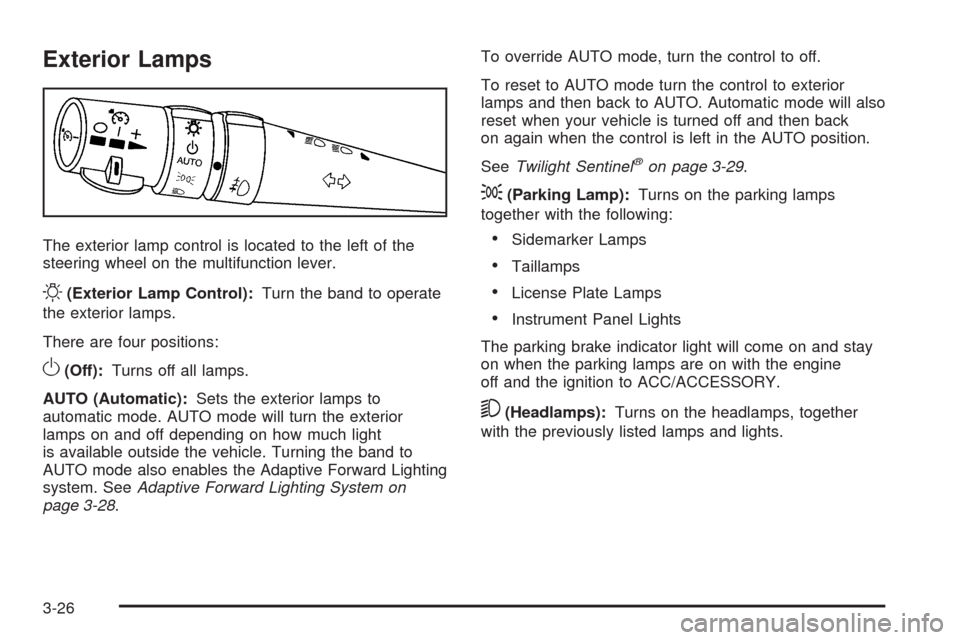
The exterior lamp control is located to the left of the
steering wheel on the multifunction lever.
O(Exterior Lamp Control):Turn the band to operate
the exterior lamps.
There are four positions:
O(Off):Turns off all lamps.
AUTO (Automatic):Sets the exterior lamps to
automatic mode. AUTO mode will turn the exterior
lamps on and off depending on how much light
is available outside the vehicle. Turning the band to
AUTO mode also enables the Adaptive Forward Lighting
system. SeeAdaptive Forward Lighting System on
page 3-28.To override AUTO mode, turn the control to off.
To reset to AUTO mode turn the control to exterior
lamps and then back to AUTO. Automatic mode will also
reset when your vehicle is turned off and then back
on again when the control is left in the AUTO position.
SeeTwilight Sentinel
®on page 3-29.
;(Parking Lamp):Turns on the parking lamps
together with the following:
Sidemarker Lamps
Taillamps
License Plate Lamps
Instrument Panel Lights
The parking brake indicator light will come on and stay
on when the parking lamps are on with the engine
off and the ignition to ACC/ACCESSORY.
5(Headlamps):Turns on the headlamps, together
with the previously listed lamps and lights.
3-26
Page 149 of 462
Wiper Activated Headlamps
This feature activates the headlamps and parking lamps
after the windshield wipers have been in use for
approximately six seconds and the multifunction lever is
in the AUTO position. SeeExterior Lamps on page 3-26.
When the exterior lamp control has been turned off or is
in the parking lamp position and the wiper control is
on delay, low speed or high speed, the HEADLAMPS
SUGGESTED message will appear on the Driver
Information Center (DIC).
When the ignition is turned off, the wiper-activated
headlamps will immediately turn off.
Headlamps on Reminder
A warning chime will sound if the exterior lamp control
is left on in either the headlamp or parking lamp position
and the driver’s door is opened with the ignition off.
Daytime Running Lamps (DRL)
Daytime Running Lamps (DRL) can make it easier for
others to see the front of your vehicle during the
day. Fully functional DRL are required on all vehicles
rst sold in Canada.The DRL system comes on when the following
conditions are met:
It is still daylight and the ignition is on.
The exterior lamp control is in the off position.
The transmission is not in P (Park).
When DRL are on, only the front turn signal lamps are
on. No other exterior lamps such as the parking
lamps, taillamps, etc. are on when the DRL are used.
The instrument panel is not be lit up either.
When it is dark enough outside, the front turn signal
lamps turn off and normal low-beam headlamps turn on.
When it is bright enough outside, the regular lamps
go off, and the front turn signal lamps take over. If the
vehicle is started in a dark garage, the automatic
headlamp system comes on immediately. Once the
vehicle leaves the garage, it takes about one minute for
the automatic headlamp system to change to DRL if
it is light outside. During that delay, the instrument panel
cluster might not be as bright as usual. Make sure the
instrument panel brightness knob is in the full bright
position. SeeInstrument Panel Brightness on page 3-30
for more information.
3-27
Page 150 of 462
If it is dark enough outside and the exterior lamp control
is off, a HEADLAMPS SUGGESTED message displays
on the Driver’s Information Center (DIC). This message
informs the driver that turning on the exterior lamps is
recommended. SeeDIC Warnings and Messages on
page 3-60.
Turn the exterior lamp control off a second time,
or turn on the headlamps to turn off the HEADLAMPS
SUGGESTED message in the DIC. If the parking
lamps or the fog lamps were turned on instead, the
HEADLAMPS SUGGESTED message continues to
display.
The regular headlamp system should be turned on
when needed.
Adaptive Forward Lighting System
The Adaptive Forward Lighting System (AFS) swivels
the headlamps horizontally to provide greater road
illumination while turning. AFS will operate when the
vehicle speed is greater than 2 mph (3 km/h). AFS will
not operate when the transmission is in R (Reverse).
AFS is not immediately operable after starting the
vehicle; driving a short distance is required to calibratethe AFS. To enable AFS, set the exterior lamp switch
on the multifunction lever to the AUTO position.
Moving the switch out of the AUTO position will
deactivate the system. SeeExterior Lamps on
page 3-26.
Fog Lamps
Use fog lamps for better vision in foggy or misty
conditions.
The fog lamps control is located on the multifunction
lever next to the exterior lamp control.
#(Fog Lamps):Turn the band to turn the fog lamps on.
The fog lamp light appears on the instrument panel
cluster to indicate that the fog lamps and the parking
lamps are on.
If you turn the high-beam headlamps on, the fog lamps
will turn off. They will turn on again when you switch
to low-beam headlamps.
The ignition must be on for the fog lamps to operate.
The fog lamps will turn off when the ignition is turned off.
Some localities have laws that require the headlamps
to be on along with the fog lamps.
3-28
Page 151 of 462

Twilight Sentinel®
This feature can turn the lamps on and off for you.
A light sensor on top of the instrument panel makes the
Twilight Sentinel
®work, so be sure it is not covered.
With Twilight Sentinel
®you will see the following happen:
When it is dark enough outside, the front turn signal
lamps (DRL) will go off, and the headlamps and
parking lamps will come on. The other lamps that
come on with headlamps will also come on.
When it is bright enough outside, the headlamps will
go off, and the front turn signal lamps (DRL) will
come on, as long as the exterior lamp switch is in the
AUTO position.
If the vehicle is started in a dark garage, the automatic
headlamp system will come on immediately. Once the
vehicle leaves the garage, it takes about one minute for
the automatic headlamp system to change to DRL if
it is light outside. During that delay, the instrument panel
cluster may not be as bright as usual. Make sure the
instrument panel brightness control is in full bright
position. SeeInstrument Panel Brightness on page 3-30
for more information.You can idle the vehicle with the lamps off, even when
it is dark outside. After starting the vehicle, turn the
exterior lamp control band to off, then release it.
The lamps will remain off until you turn the control
band to off again.
Twilight Sentinel
®also provides exterior illumination as
you leave the vehicle. If Twilight Sentinel®has turned
on the lamps when you turn off the ignition, the
lamps will remain on until:
The exterior lamp switch is moved from OFF to the
parking lamp position, or
the delay time selected has elapsed.
SeeDriver Information Center (DIC) on page 3-57to
select the delay time. You can also select no delay time.
If the ignition is turned off with the exterior lamp switch
in the parking lamp or headlamp position, the Twilight
Sentinel
®delay will not occur. The lamps will turn off as
soon as the switch is turned off.
The regular headlamp system should be turned on
when needed.
3-29
Page 152 of 462

Exterior Lighting Battery Saver
If the manual parking lamps or headlamps have been
left on, the exterior lamps will turn off as soon as
the ignition is turned off or Retained Accessory Power
(RAP) is active. This protects against draining the
battery in case you have accidentally left the headlamps
or parking lamps on. The battery saver does not work
if the headlamps are turned on after the ignition switch is
turned to off.
If you need to leave the lamps on, use the exterior lamp
control to turn the lamps back on.
Instrument Panel Brightness
The button for this feature is located on the instrument
panel to the left of the steering column.
+
!- (Brightness):Press to change the brightness of
the instrument panel lights.
Press the DIMMER button until PANEL DIMMING
appears on the Driver Information Center (DIC). Then
use the brightness button to adjust the instrument panel
brightness. Press the top or bottom of the button to
brighten or dim the lights. SeeHead-Up Display (HUD)
on page 3-31for more information.Be sure not to have the brightness turned all the way
down with the lamps on during the day. The DIC
may not be visible.
Courtesy Lamps
When any door or the trunk lid is opened, the interior
lamps will go on unless it is bright outside.
Press the interior lamp button on the right side of the
instrument panel, to turn the courtesy lamps on or off.
Entry/Exit Lighting
With entry lighting, the interior lamps will come on when
entering the vehicle. The interior lamps will come on
for about 20 seconds when the engine is turned off.
You can turn exit and entry lighting off by quickly turning
the courtesy lamps on and off.
Reading Lamps
The inside rearview mirror includes two reading lamps.
The lamps will go on when a door is opened. When
the doors are closed, each lamp can be turned on
individually by pressing the button for that lamp.
3-30
Page 153 of 462
Battery Run-Down Protection
The vehicle has a feature to help prevent the battery
from being drained, in case the underhood lamp, vanity
mirror lamps, cargo lamps, reading lamps, console,
or glove box lamps are accidentally left on, or something
is left plugged into the accessory power outlet or
cigarette lighter. If any of the accessory lamps are
left on, they will automatically time-out after about
10 minutes. To reset the battery protection, all of the
above lamps must be turned off or the ignition must be
in the ACC/ACCESSORY position.
Head-Up Display (HUD)
{CAUTION:
If the HUD image is too bright, or too high in your
eld of view, it may take you more time to see
things you need to see when it is dark outside.
Be sure to keep the HUD image dim and placed
low in your eld of view.The Head-Up Display (HUD) allows you to see some of
the driver information that appears on the instrument
panel cluster.
The information may be displayed in English or metric
units and appears as an image focused out toward
the front of the vehicle. To change from English to metric
units, seeDriver Information Center (DIC) on page 3-57.
The HUD consists of the following information:
Speedometer
Turn Signal Indicators
High-Beam Indicator Symbol
Tap-Up/Tap-Down Transmission Feature
Check Gages Message
Adaptive Cruise Control Features and Indicators
Radio Features
3-31
Page 154 of 462

Continue to scan the displays, controls and driving
environment just as you would in a vehicle without HUD.
Check the instrument panel cluster, to be sure you do
not miss something important, such as a warning
light. Under important warning conditions, the CHECK
GAGES message will display in the HUD. View the
Driver Information Center (DIC) for more information.The HUD controls are
located to the left of the
steering wheel.
+
!- (Brightness):Use to adjust the brightness of the
HUD and the instrument panel cluster.
DIMMER:Use to select the HUD or the instrument
panel cluster to adjust the brightness.
HUD:Use to adjust the vertical position of the HUD
display.
3-32
Page 159 of 462
You can switch from English to metric units through the
Driver Information Center (DIC). SeeDIC Operation
and Displays on page 3-57for more information.
The air conditioning system removes moisture from the
air, so a small amount of water might drip under the
vehicle while idling or after turning off the engine.
This is normal.
Do not cover the solar sensor located in the center of
the instrument panel, near the windshield. For more
information on the solar sensor, see “Sensors” later in
this section.
Manual Operation
wPWRx(Power/Temperature):Press the PWR
button on the left side of the climate control panel to turn
the entire climate control system on or off. Press
worx
to increase or decrease the temperature inside the
vehicle.
Press the PWR button on the right side of the climate
control panel to turn the passenger climate control
system on or off. Press
worxto increase or decrease
the temperature for the passenger.If the passenger PWR button is off, the driver temperature
switch controls the temperature for the entire vehicle.
«9 ª(Fan Control):Press to increase or decrease
the fan speed. Pressing this switch cancels automatic
operation and places the system in manual mode.
Press AUTO to return to automatic operation.
If the airow seems low when the fan speed is at the
highest setting, the passenger compartment air lter
may need to be replaced. For more information,
seePassenger Compartment Air Filter on page 3-41
andScheduled Maintenance on page 7-4.
ªN«(Air Delivery Mode Control ):Press to
change the direction of the airow inside of the vehicle.
Changing the mode cancels automatic operation and
places the system in manual mode. Press the
AUTO button to return to automatic operation.
3-37
Page 160 of 462
To change the current mode, select one of the following:
H(Vent):Air is directed to the instrument panel
outlets.
%(Bi-Level):Air is divided between the instrument
panel and oor outlets. In automatic operation, cooler air
is directed to the upper outlets and warmer air to the
oor outlets.
6(Floor):Air is directed to the oor outlets, with
some air directed to the windshield and side window
outlets.
-(Floor/Defog):This mode clears windows of fog or
moisture. Air is directed to the windshield, oor
outlets and side windows. In this mode, the system
turns off recirculation and runs the air conditioning
compressor unless the outside temperature is near or
below freezing.
1(Defrost):This mode removes fog or frost from the
windshield more quickly. Press to direct air to the
windshield, with some air directed to the side windows.In this mode, the system automatically turns off the
recirculation and runs the air conditioning compressor,
unless the outside temperature is near or below freezing.
Do not drive the vehicle until all the windows are clear.
A/C OFF (Air Conditioning):Press to turn off the air
conditioning compressor. Press AUTO to return to
automatic operation. The compressor cannot be turned
off in either the defrost or oor/defog mode.
?(Recirculation):Press to turn the recirculation
mode on or off. The air conditioning compressor
also comes on.
This mode recirculates and helps to quickly cool the
air inside the vehicle. It can be used to help prevent
outside air and odors from entering the vehicle.
Recirculation is not available in defrost or oor/defog
modes.
Using recirculation for long periods of time may cause
the air inside the vehicle to become too dry. To prevent
this from happening, after the air in the vehicle has
cooled, turn the recirculation mode off.
3-38