reset CADILLAC XLR 2009 1.G Owner's Manual
[x] Cancel search | Manufacturer: CADILLAC, Model Year: 2009, Model line: XLR, Model: CADILLAC XLR 2009 1.GPages: 462, PDF Size: 3.72 MB
Page 218 of 462
Getting Started
Read this manual thoroughly to become familiar with
how the navigation system operates.
The navigation system includes navigation and audio
functions.
Keeping your eyes on the road and your mind on the
drive is important for safe driving. The navigation
system has built-in features intended to help you do this.
Some features may be disabled while driving. Note, these
functions are grayed-out. A grayed-out function indicates
it is not available when the vehicle is moving.
All functions are available when the vehicle is parked.
Do the following before driving:
Become familiar with the navigation system
operation, hard keys on the faceplate, and
touch-sensitive screen buttons of the navigation
system.
Set up the audio by presetting favorite stations,
setting the tone, and adjusting the speakers.
Set up the navigation features before beginning
driving, such as entering an address or a preset
destination.
Set up the phone numbers in advance so they can be
called easily with the press of a single button or a
single voice command (for navigation systems
equipped with phone capability).
{CAUTION:
Taking your eyes off the road too long or too often
while using the navigation system could cause a
crash resulting in injury or death to you or others.
Focus your attention on driving.
{CAUTION:
Avoid looking too long or too often at the moving
map on the navigation screen. This could cause a
crash and you or others can be injured or killed.
Use the turn-by-turn voice guidance directions
whenever possible.
4-4
Page 219 of 462
Use the navigation system to:
Plan a route.
Select a destination using various methods and
choices.
Follow turn-by-turn route and map guidance with
voice prompts, only if permitted by traffic laws,
controls, and conditions.
Always be alert, obey traffic and roadway laws, and
instructions, regardless of the guidance from the
navigation system. Because the navigation system uses
street map information that does not include all traffic
restrictions or the latest road changes, it may suggest
using a road that is now closed for construction or a turn
that is prohibited by signs at the intersection. Because
the system uses limited information, you must always
evaluate whether following the system’s directions
is safe and legal for the current conditions.
When the navigation system is turned on, a screen may
appear with the information below, and you must
read and acknowledge the information it contains.
After you acknowledge the start up information you will
be able to access the NAV (navigation) and DEST
(destination) functions. Once accessed, you can enter
or delete information in the navigation system or access
other functions. See instructions later in this section.
Deleting Personal Information
This navigation system can record and store
destinations. At times, such as when you are disposing
of the vehicle, you may want to delete these
destinations. Refer to the following sections to delete
the destination information that has been stored.
See “Deleting Single Memory Points”, “Deleting All
Memory Points”, “Preset Dests.” (Destinations), “Home”
and “Previous Dest.” (Destination) underEdit Memory
Point on page 4-19for deleting stored destinations.
Storing Radio Station Presets
To set preset radio stations:
1. Press the PWR/VOL knob to turn the system on.
2. Press the audio source screen button (AM, FM1,
FM2, etc.) and select the desired band (AM, FM1,
FM2, XM1, or XM2 (if equipped), or WX (weather)
(if equipped)).
3. Use the TUNE/SEEK arrows to tune to the desired
station.
4. Press and hold one of the six preset screen buttons,
at the bottom of the screen, until a beep is heard
or see the station displayed on the selected preset
button.
5. Repeat the steps for each preset.
See “Preset Station Menu” underNavigation Audio
System on page 4-52for more information.
4-5
Page 220 of 462
Setting the Clock
To set the time:
1. Press the PWR/VOL knob to turn the system on.
2. Press the
e/z(Audio/Adjust) hard key.
3. Press the
8clock symbol screen button.
4. Select the 12H or 24H screen button to display the
time in standard or military time.
5. Press and hold the HOUR and MIN. (minute) arrow
buttons to increase or to decrease the time.
6. Select the appropriate time zone screen button.
7. Select the Daylight Saving Time screen button,
if necessary.
The radio uses the GPS satellite to set the time.
The vehicle needs to be in an open area to receive the
signal. See “Clock Adjust Menu” underNavigation
Audio System on page 4-52for more information.
Setting the Search Area, Entering an
Address and Point of Interest, Storing a
Home Destination, and Using The
Home or Previous Destinations
Before entering an Address, Point of Interest, Home, or
Preset Destination, select the appropriate region that
contains the nal destination. The vehicle must be
stopped to perform this operation.
Setting the Search Area
To set the search area:
1. If the radio is already on with a map disc inserted,
skip to Step 5.
2. Press the PWR/VOL knob to turn the system on.
3. Insert the DVD map disc. See “Regional Maps”
underMaps on page 4-38for more information.
4. A notice may appear. Touch the I AGREE screen
button to proceed.
5. Press the ROUTE hard key.
6. Press the Enter Destination screen button.
7. Press the Change screen button.
8. Select the appropriate region numbered screen
button that contains your nal destination.
The system returns to the Destination menu. SeeEnter
Destination on page 4-27for more information.
4-6
Page 225 of 462
The following hard keys are located to the right of the
navigation screen:
RPT:Press to repeat the current voice guidance
navigation prompt.
MAP:Press to view the map screen showing current
vehicle position.
The map screen can also display the following
information:
North or Heading Up symbol. SeeSymbols on
page 4-43.
Map scale. SeeMaps on page 4-38.
Distance to destination.
GPS symbol if GPS signal is not being received.
SeeGlobal Positioning System (GPS) on
page 4-49.
Selected options for reaching your current
destination.
Driver Information.
Radio band and presets.ROUTE:Press to display the PLAN ROUTE menu.
SeePlan Route on page 4-18.
MENU:Press to display the SETUP MENU. SeeSetup
Menu on page 4-12.
TILT
X:Press to open the navigation system faceplate
for loading or removing the map DVD, a video DVD, or an
audio CD. This key can only be used while the vehicle is
in P (Park).
Alpha-Numeric Keypad
Letters of the alphabet, symbols, punctuation, and
numbers, when available, display on the navigation
screen as an alpha or numeric keypad. The alpha
keypad displays when the system needs a city or street
name, entered. A Char at the bottom of the alpha
keypad to access the numeric keypad can be touched
when entering a house address, punctuation mark,
or other character. Touch A - Z to return to the
alpha keypad.
All characters are touch-sensitive screen buttons.
Touch a character to select it.
4-11
Page 227 of 462
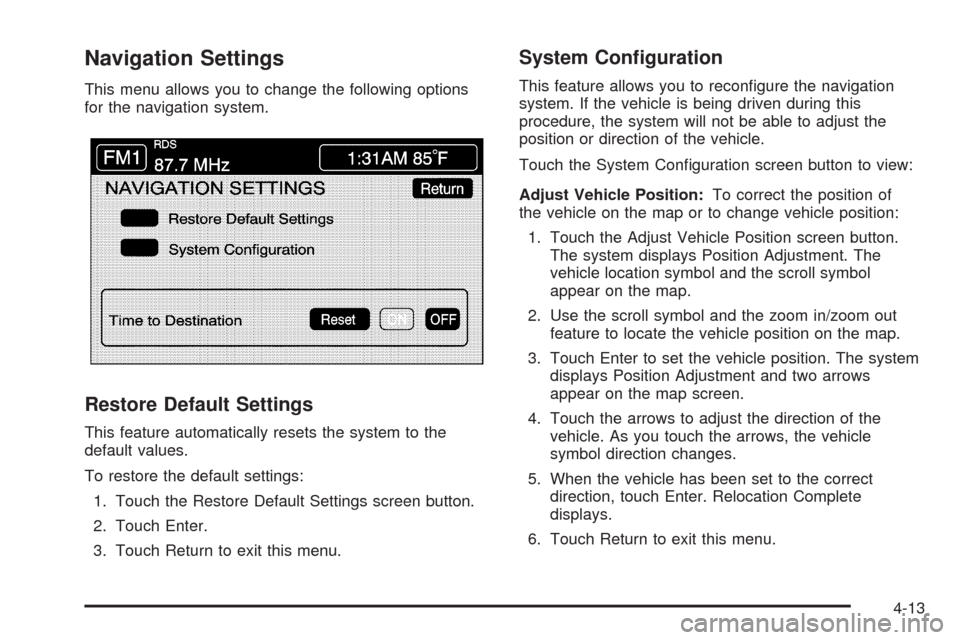
Navigation Settings
This menu allows you to change the following options
for the navigation system.
Restore Default Settings
This feature automatically resets the system to the
default values.
To restore the default settings:
1. Touch the Restore Default Settings screen button.
2. Touch Enter.
3. Touch Return to exit this menu.
System Conguration
This feature allows you to recongure the navigation
system. If the vehicle is being driven during this
procedure, the system will not be able to adjust the
position or direction of the vehicle.
Touch the System Conguration screen button to view:
Adjust Vehicle Position:To correct the position of
the vehicle on the map or to change vehicle position:
1. Touch the Adjust Vehicle Position screen button.
The system displays Position Adjustment. The
vehicle location symbol and the scroll symbol
appear on the map.
2. Use the scroll symbol and the zoom in/zoom out
feature to locate the vehicle position on the map.
3. Touch Enter to set the vehicle position. The system
displays Position Adjustment and two arrows
appear on the map screen.
4. Touch the arrows to adjust the direction of the
vehicle. As you touch the arrows, the vehicle
symbol direction changes.
5. When the vehicle has been set to the correct
direction, touch Enter. Relocation Complete
displays.
6. Touch Return to exit this menu.
4-13
Page 228 of 462
Calibrate Vehicle Speed Signal:If there are tire
pressure differences or if a spare tire is installed, the
navigation system automatically recalibrates the system.
To manually calibrate the system:
1. Touch Start to begin calibration.
2. Touch Return to exit this menu.
Time to Destination
This feature allows you to view the estimated time to
travel from your current position to the destination, and
to reset the average speed to factory default settings.
Estimated travel time is based on calculated route
information and the vehicle’s average speed. Touch ON
to turn this feature on, OFF to turn this feature off, or
Reset to restore vehicle speed default settings. With this
feature on, the estimated travel time to destination
displays along with the distance to destination.
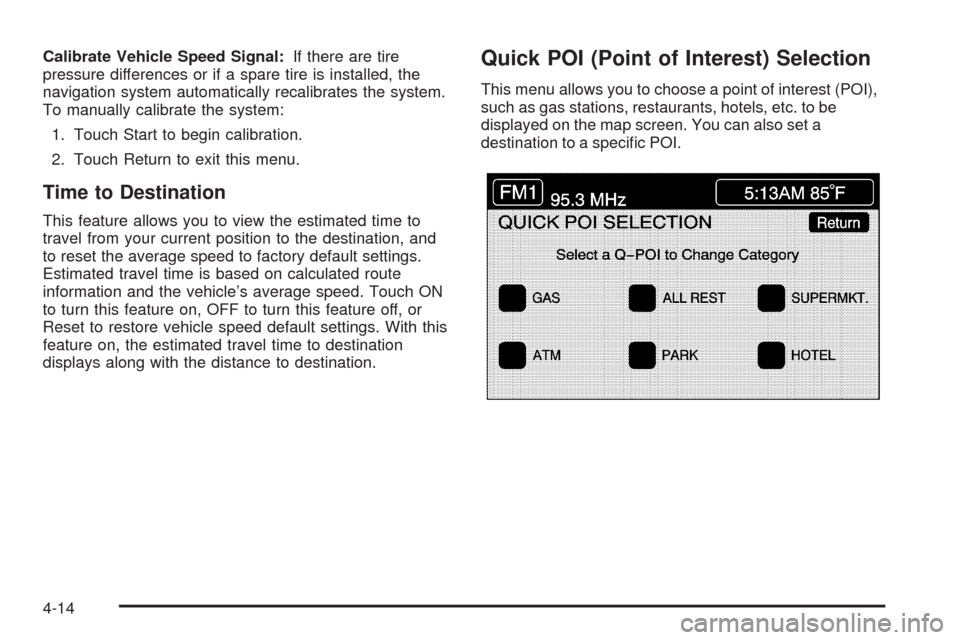
Quick POI (Point of Interest) Selection
This menu allows you to choose a point of interest (POI),
such as gas stations, restaurants, hotels, etc. to be
displayed on the map screen. You can also set a
destination to a specic POI.
4-14
Page 231 of 462
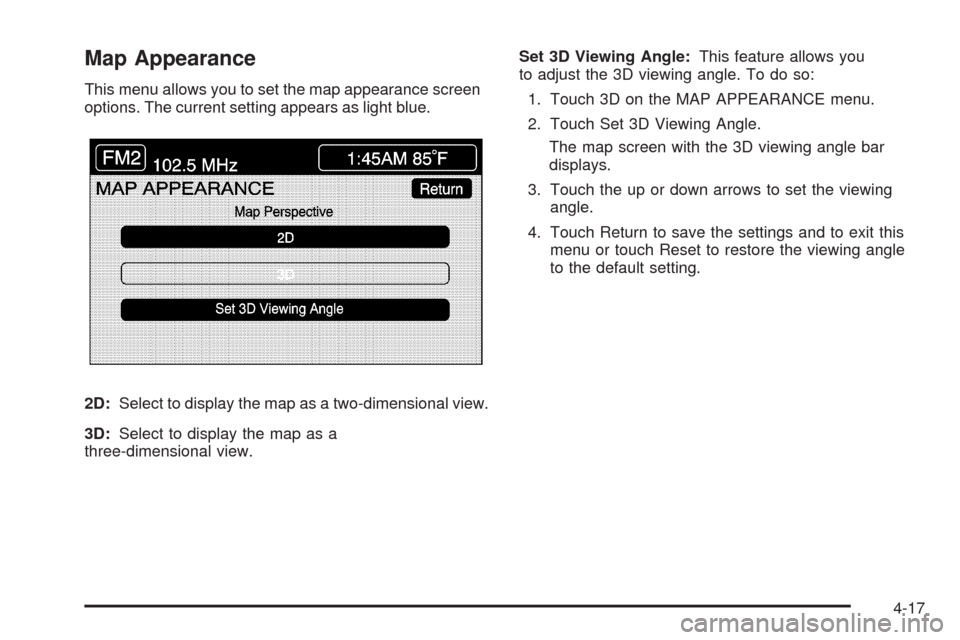
Map Appearance
This menu allows you to set the map appearance screen
options. The current setting appears as light blue.
2D:Select to display the map as a two-dimensional view.
3D:Select to display the map as a
three-dimensional view.Set 3D Viewing Angle:This feature allows you
to adjust the 3D viewing angle. To do so:
1. Touch 3D on the MAP APPEARANCE menu.
2. Touch Set 3D Viewing Angle.
The map screen with the 3D viewing angle bar
displays.
3. Touch the up or down arrows to set the viewing
angle.
4. Touch Return to save the settings and to exit this
menu or touch Reset to restore the viewing angle
to the default setting.
4-17
Page 267 of 462
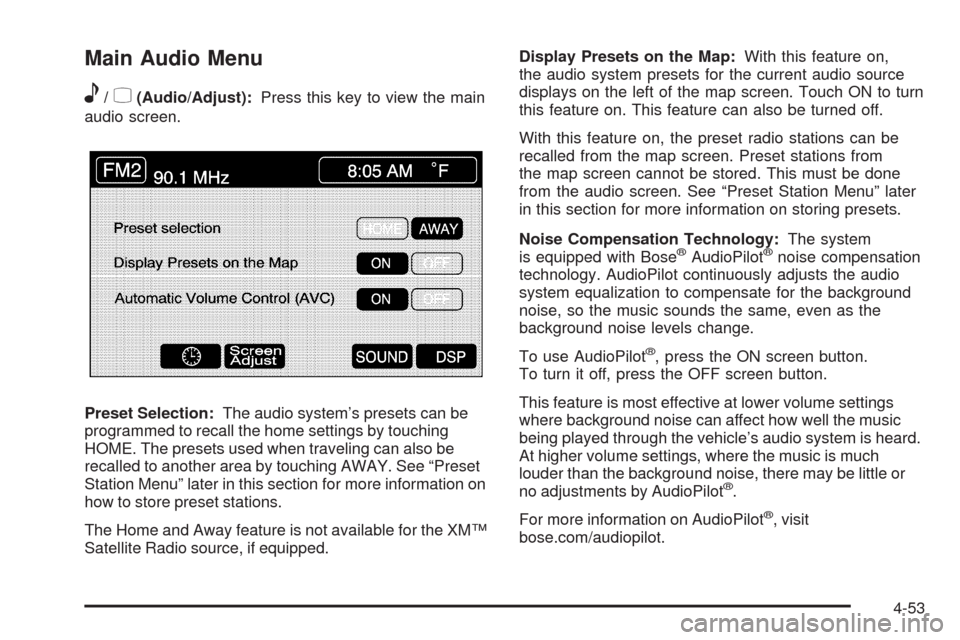
Main Audio Menu
e
/z(Audio/Adjust):Press this key to view the main
audio screen.
Preset Selection:The audio system’s presets can be
programmed to recall the home settings by touching
HOME. The presets used when traveling can also be
recalled to another area by touching AWAY. See “Preset
Station Menu” later in this section for more information on
how to store preset stations.
The Home and Away feature is not available for the XM™
Satellite Radio source, if equipped.Display Presets on the Map:With this feature on,
the audio system presets for the current audio source
displays on the left of the map screen. Touch ON to turn
this feature on. This feature can also be turned off.
With this feature on, the preset radio stations can be
recalled from the map screen. Preset stations from
the map screen cannot be stored. This must be done
from the audio screen. See “Preset Station Menu” later
in this section for more information on storing presets.
Noise Compensation Technology:The system
is equipped with Bose
®AudioPilot®noise compensation
technology. AudioPilot continuously adjusts the audio
system equalization to compensate for the background
noise, so the music sounds the same, even as the
background noise levels change.
To use AudioPilot
®, press the ON screen button.
To turn it off, press the OFF screen button.
This feature is most effective at lower volume settings
where background noise can affect how well the music
being played through the vehicle’s audio system is heard.
At higher volume settings, where the music is much
louder than the background noise, there may be little or
no adjustments by AudioPilot
®.
For more information on AudioPilot
®, visit
bose.com/audiopilot.
4-53
Page 271 of 462
Preset Station Menu
Up to 36 stations, 6 AM, 6 FM 1, 6 FM 2, 6 XM 1,
6 XM 2, and 6 WX, if equipped, can be programmed for
home and for away. To store presets:
1. Turn the audio system on.
2. Touch AM, FM, XM, or WX, if equipped, to display
the desired source. The preset station menu
appears.
3. Tune to the desired station by using the
TUNE/SEEK arrows.
4. Touch SOUND to set the bass, mid-range, treble,
and DSP for your preset, if desired. See “Sound
Menu” later in this section for more information.
5. Touch and hold one of the six numbered preset
buttons for more than two seconds until a beep
is heard.
6. Repeat the steps for each preset and source.SCAN:To scan stations, touch SCAN. The radio goes
to a station, plays for a few seconds, then goes to
the next station. Touch SCAN again to stop scanning.
To scan preset stations, touch and hold SCAN for
two seconds. It only scans the audio source it is in, with
the exception of FM 1 and FM 2, which will both be
scanned if in that source. Touch SCAN again to stop
scanning.
RDS (Radio Data System):See “Radio Data System
(RDS)” later in this section for more information.
MSG (Message):See “Radio Data System (RDS)” later
in this section for more information.
AutoSet:Touch AutoSet to replace currently stored
preset stations with the strongest stations available in
the immediate area. Touch AutoSet again to return
to the original preset stations.
SOUND:See “Sound Menu” following for more
information.
DSP:See “Adjusting the Speakers” later in this section
for more information.
4-57
Page 272 of 462
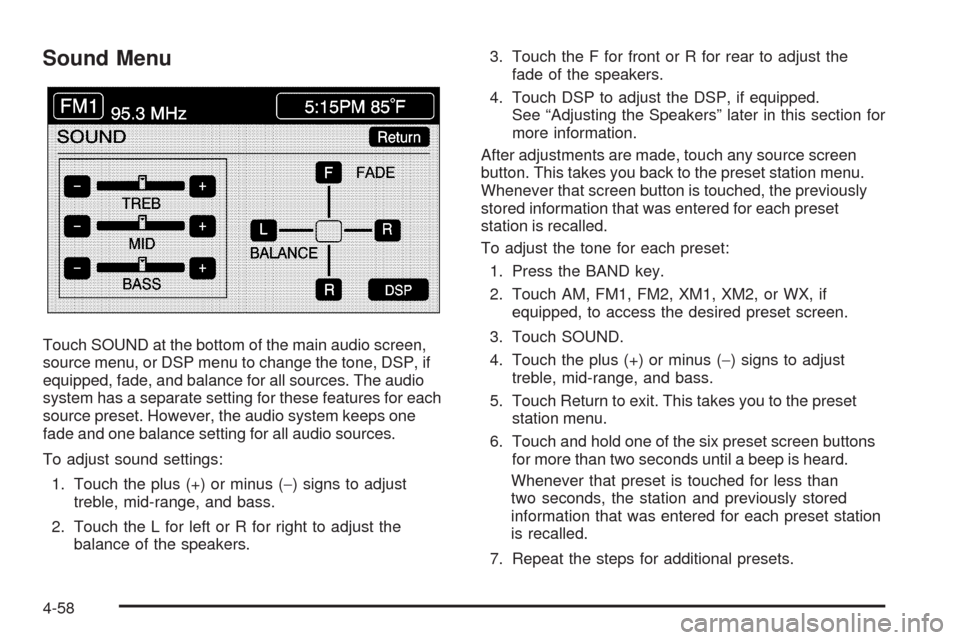
Sound Menu
Touch SOUND at the bottom of the main audio screen,
source menu, or DSP menu to change the tone, DSP, if
equipped, fade, and balance for all sources. The audio
system has a separate setting for these features for each
source preset. However, the audio system keeps one
fade and one balance setting for all audio sources.
To adjust sound settings:
1. Touch the plus (+) or minus (−) signs to adjust
treble, mid-range, and bass.
2. Touch the L for left or R for right to adjust the
balance of the speakers.3. Touch the F for front or R for rear to adjust the
fade of the speakers.
4. Touch DSP to adjust the DSP, if equipped.
See “Adjusting the Speakers” later in this section for
more information.
After adjustments are made, touch any source screen
button. This takes you back to the preset station menu.
Whenever that screen button is touched, the previously
stored information that was entered for each preset
station is recalled.
To adjust the tone for each preset:
1. Press the BAND key.
2. Touch AM, FM1, FM2, XM1, XM2, or WX, if
equipped, to access the desired preset screen.
3. Touch SOUND.
4. Touch the plus (+) or minus (−) signs to adjust
treble, mid-range, and bass.
5. Touch Return to exit. This takes you to the preset
station menu.
6. Touch and hold one of the six preset screen buttons
for more than two seconds until a beep is heard.
Whenever that preset is touched for less than
two seconds, the station and previously stored
information that was entered for each preset station
is recalled.
7. Repeat the steps for additional presets.
4-58