cruise control CADILLAC XLR V 2006 1.G Owner's Manual
[x] Cancel search | Manufacturer: CADILLAC, Model Year: 2006, Model line: XLR V, Model: CADILLAC XLR V 2006 1.GPages: 456, PDF Size: 3.74 MB
Page 144 of 456
Battery Run-Down Protection
Your vehicle has a feature to help prevent you from
draining the battery in case the underhood lamp, vanity
mirror lamps, cargo lamps, reading lamps, console
or glove box lamps are accidentally left on or in case
something is plugged into the accessory power outlet or
cigarette lighter. If you leave any of these lamps on,
they will automatically time-out after about 20 minutes.
To reset it, all of the above lamps must be turned
off or the ignition key must be in ON.
Head-Up Display (HUD)
{CAUTION:
If the HUD image is too bright, or too high in
your eld of view, it may take you more time to
see things you need to see when it is dark
outside. Be sure to keep the HUD image dim
and placed low in your eld of view.The Head-Up Display (HUD) allows you to see some of
the driver information that appears on your instrument
panel cluster.
The information may be displayed in English or metric
units and appears as an image focused out toward
the front of your vehicle. To change from English
to metric units, seeDriver Information Center (DIC)
on page 3-64.
The HUD consists of the following information:
Speedometer
Turn Signal Indicators
High-Beam Indicator Symbol
Tap-Up/Tap-Down Transmission Feature
Check Gages Icon
Adaptive Cruise Control Features and Indicators
Radio Features
3-34
Page 147 of 456
If the ignition is on and you cannot see the HUD image,
check to see if:
Something is covering the HUD unit.
The brightness is adjusted properly.
The HUD image is adjusted to the proper height.
Ambient light in the direction your vehicle is facing
is low.
A fuse is blown. SeeFuses and Circuit Breakers
on page 6-86.
Keep in mind that your windshield is part of the HUD
system. SeeWindshield Replacement on page 6-49.The following Adaptive Cruise Control (ACC) messages
may appear in the HUD:
CRUISE SPEED LIMITED:This message indicates that
your vehicle speed has been reduced below your set
speed due to ACC limitations. Your set speed is too high
and ACC cannot detect other vehicles at far enough
distances for the system to operate properly.
TIGHT CURVE:This message indicates that ACC has
reduced your vehicle speed due to a tight curve in
the road. Once the road straightens, ACC will return to
your selected set speed or follow distance setting.
See “Adaptive Cruise Control (ACC)” underTurn
Signal/Multifunction Lever on page 3-7for more
information.
You may also see an ACC active symbol, alert symbol
or vehicle ahead symbol. See “Adaptive Cruise
Control (ACC)” underTurn Signal/Multifunction Lever
on page 3-7for more information.
3-37
Page 178 of 456
BUCKLE SEAT BELT:This message reminds you to
buckle the driver’s seat belt.
This message will display and a chime will sound when
the ignition is on, the driver’s seat belt is unbuckled,
and the vehicle is in motion. You should buckle
your seat belt.
If the driver remains unbuckled when the ignition is on
and the vehicle is in motion, the reminder will be
repeated. If the driver’s seat belt is already buckled,
this message and chime will not come on.
This message is an additional reminder to the Safety
Belt Reminder Light in the instrument panel cluster.
SeeSafety Belt Reminder Light on page 3-50for more
information.
CHANGE OIL NOW:This means that the life of the
engine oil has expired. SeeScheduled Maintenance on
page 7-4. After an oil change, the Oil Life Indicator
must be reset. SeeOil Life Indicator on page 3-82and
Engine Oil Life System on page 6-18.
CHARGE SYSTEM FAULT:This message will display
when a problem with the charging system has been
detected. Have your vehicle serviced by your GM dealer.CHECK GAS CAP:This message will appear if the gas
cap has not been fully tightened. You should recheck
your gas cap to ensure that it is on properly.
CLEAN RADAR CRUISE:If your vehicle has this
feature, this message indicates the Adaptive Cruise
Control (ACC) system is disabled because the radar is
blocked and cannot detect vehicles in your path.
It may also activate during heavy rain or due to road
spray. To clean the system, seeAdaptive Cruise Control
on page 3-15.
CLOSE CARGO DIVIDER:This message indicates that
the cargo divider is not in place. Open the trunk and
make sure the cargo divider is secure and no objects are
on the divider. SeeRear Storage Area on page 2-46
for more information.
COOLANT OVER TEMP (Temperature):This message
will appear when the engine coolant temperature is
too hot. Stop and allow your vehicle to idle in PARK (P)
until it cools down and the message is removed. Do
not increase engine speed above a normal idle. If it does
not cool down, turn off the engine and have it serviced
by your GM dealer before driving it again. Severe
engine damage can result from an overheated engine.
SeeEngine Overheating on page 6-25.
3-68
Page 179 of 456
CRUISE NOT READY:This message indicates that
ACC will not activate due to a temporary condition.
Your vehicle does not require service. If this message
appears when you attempt to activate the system,
continue driving for several minutes then try again to
activate the system.
DRIVER NO. X (1 OR 2):This message will be
displayed when the vehicle is started or when there
is a change of driver. The message will show which
driver is activating the personalization feature. It will
only stay on for ve seconds.
ENGINE HOT, STOP ENGINE:This message will
appear when the engine has overheated. Stop and
turn the engine off immediately to avoid severe engine
damage. SeeEngine Overheating on page 6-25.
A multiple chime will also sound when this message
is displayed.
ENGINE PROTECTION REDUCE ENGINE RPM:
If this message appears, the control system has
determined that continued operation at the existing
engine speed may lead to engine overheating.
Therefore, you should lower the engine speed by
upshifting the transmission or drive at a lower speed.HEADLAMPS SUGGESTED:If it is dark enough
outside and the headlamps and Twilight Sentinel®
controls are off, this message will display on the DIC.
This message informs the driver that turning on the
exterior lamps is recommended. It has become
dark enough outside to require the headlamps and/or
other exterior lamps. This message will also appear
if the optional Rainsense™ wiping feature is on and
the Twilight Sentinel
®is off.
HIGH TRANS (Transmission) TEMP (Temperature):
This message indicates that the transmission uid in
your vehicle is too hot. Stop and allow your vehicle to idle
until it cools down or until this message is removed.
HIGH VOLTAGE:This message shows that the
electrical charging system is overcharging. To avoid
being stranded, have the electrical system checked
by your GM dealer. You can reduce the charging
overload by using the accessories. Turn on the lamps
and radio, set the climate control on AUTO and the
fan speed on HI, and turn the rear window defogger
on. You can monitor battery voltage on the DIC
by pressing the information button. The normal range
is 11.5 to 15.5 volts when the engine is running.
3-69
Page 184 of 456
The Driver Information Center will scroll three messages:
SERVICE ABS, SERVICE TRACTION SYS and
SERVICE STABILITRAK, and the anti-lock brake system
and traction control warning lights on the instrument
panel cluster will be illuminated. SeeAnti-Lock Brake
System Warning Light on page 3-55andTraction
Control System (TCS) Warning Light on page 3-56. The
driver can acknowledge these messages by pressing
the RESET button three times. When the service
message is displayed, the computer controlled systems
will not assist the driver and you should have the
system repaired by your GM dealer as soon as possible.
Adjust your driving accordingly.
SERVICE AFS LAMPS:This message indicates that
the Adaptive Forward Lighting System (AFS) is disabled
and needs service. See your GM dealer. SeeAdaptive
Forward Lighting System on page 3-31for more
information.
SERVICE ELECT (Electrical) SYSTEM:This message
will display if an electrical problem has occurred within
the Powertrain Control Module (PCM). Have your vehicle
serviced by your GM dealer.
SERVICE FUEL SYSTEM:The Powertrain Control
Module (PCM) has detected a problem within the
fuel system when this message appears. Have your
vehicle serviced by your GM dealer. This message will
also be displayed when the cluster is not getting
fuel information from the PCM.SERVICE RADAR CRUISE:If your vehicle has this
feature, this message indicates that the Adaptive Cruise
Control (ACC) system is disabled and needs service.
See your GM dealer.
SERVICE RIDE CONTROL:This message indicates
there is a problem with the Magnetic Ride Control
System. Have your vehicle serviced by your GM dealer.
SERVICE TRACTION SYS (System):This message
indicates there is a problem with the Traction Control
System (TCS). Have your vehicle serviced by your
GM dealer.
SERVICE STABILITRAK:If this message appears,
it means there may be a problem with your stability
enhancement system. If you see this message, try to
reset the system. Stop, turn off the engine, then start the
engine again. If the SERVICE STABILITRAK message
still comes on, it means there is a problem. You should
see your GM dealer for service. Reduce your speed and
drive accordingly. A single chime will also sound when
this message is displayed.
SERVICE TRANSMISSION:This message indicates
that there is a problem with the transmission. Have your
vehicle serviced by your GM dealer.
SERVICE VEHICLE SOON:This message is displayed
when a non-emissions related powertrain malfunction
occurs. Have your vehicle serviced by your GM dealer
as soon as possible.
3-74
Page 287 of 456
Remember: ABS does not change the time you need to
get your foot up to the brake pedal or always decrease
stopping distance. If you get too close to the vehicle
in front of you, you will not have time to apply your
brakes if that vehicle suddenly slows or stops. Always
leave enough room up ahead to stop, even though
you have ABS.
Using ABS
Do not pump the brakes. Just hold the brake pedal
down rmly and let anti-lock work for you. You may
hear a motor or clicking noise and feel the brake pedal
move a little during a stop, but this is normal.
Braking in Emergencies
With ABS, you can steer and brake at the same time.
In many emergencies, steering can help you more
than even the very best braking.
Traction Control System (TCS)
Your vehicle has a traction control system that limits
wheel spin. This is especially useful in slippery
road conditions. The system operates only if it senses
that one or both of the rear wheels are spinning or
beginning to lose traction. When this happens,
the system works the rear brakes and reduces engine
power to limit wheel spin.
The TRAC SYSTEM ACTIVE message will display on
the Driver Information Center (DIC) when the traction
control system is limiting wheel spin. SeeDIC Warnings
and Messages on page 3-67. You may feel or hear
the system working, but this is normal.
If your vehicle is in cruise control when the traction
control system begins to limit wheel spin, the cruise
control will automatically disengage. When road
conditions allow you to safely use it again, you may
reengage the cruise control. SeeAdaptive Cruise
Control on page 3-15orCruise Control on page 3-12
for more information.
5-9
Page 404 of 456
Fuses Usage
20 OnStar
®
21Adaptive Cruise Control (ACC),
Driver Door Switch
22Power Tilt Wheel, Telescopic
Steering Column, Memory Seat,
Driver Seat Switch, Retractable
Hardtop Switch
23 Ignition Switch, Intrusion Sensor
24 Stop Lamp
25Inside Rearview Mirror, Climate
Control System, Column Lock,
Power Sounder
26Instrument Panel Cluster, Head-Up
Display (HUD)
27 Radio, S-Band, CD Changer
28 Tap-Up/Tap-Down Switch
29Climate Control System, Power
Sounder
30Rear Fog Lamps, Diagnostic Link
Connector
31 Power Folding Mirror
32Trunk Close Button, Parking Brake
Solenoid B
33 Power Seats
Fuses Usage
34 Door Controls
35 Run, Accessory Power
36 Not Used
37 Not Used
38 Rainsense™
39Steering Wheel Control
Button Lights
40 Power Lumbar
41 Passenger’s Side Heated Seat
42 Driver’s Side Heated Seat
43 Not Used
44 Retractable Hardtop, Trunk Latch
45 Auxiliary Power
46 Cigar Lighter
47 Park Brake Hold
48 Park Brake Release
49 Not Used
50 Not Used
51 Not Used
52 Fuel Door
6-88
Page 405 of 456
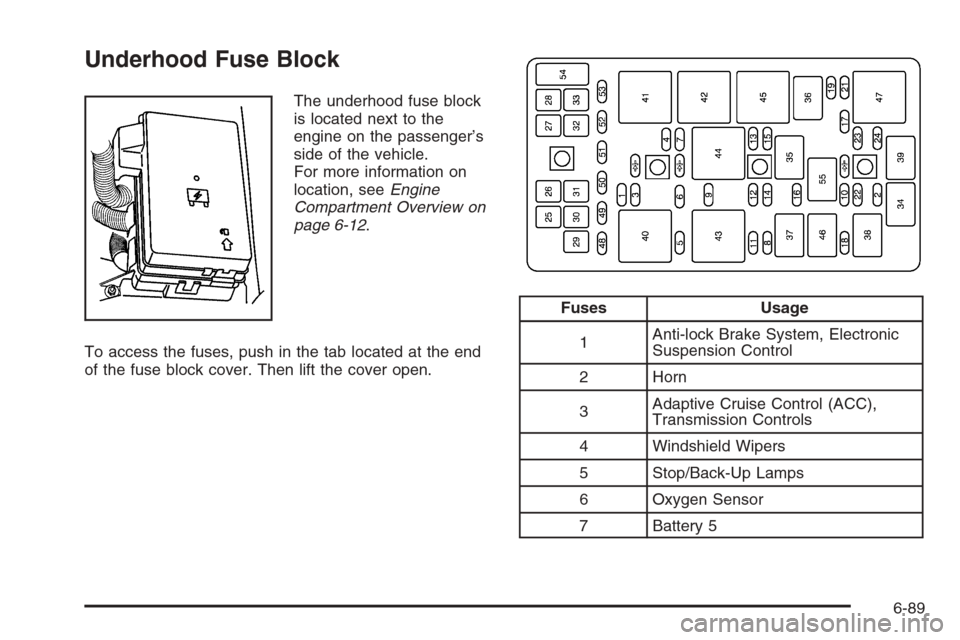
Underhood Fuse Block
The underhood fuse block
is located next to the
engine on the passenger’s
side of the vehicle.
For more information on
location, seeEngine
Compartment Overview on
page 6-12.
To access the fuses, push in the tab located at the end
of the fuse block cover. Then lift the cover open.
Fuses Usage
1Anti-lock Brake System, Electronic
Suspension Control
2 Horn
3Adaptive Cruise Control (ACC),
Transmission Controls
4 Windshield Wipers
5 Stop/Back-Up Lamps
6 Oxygen Sensor
7 Battery 5
6-89
Page 443 of 456
A
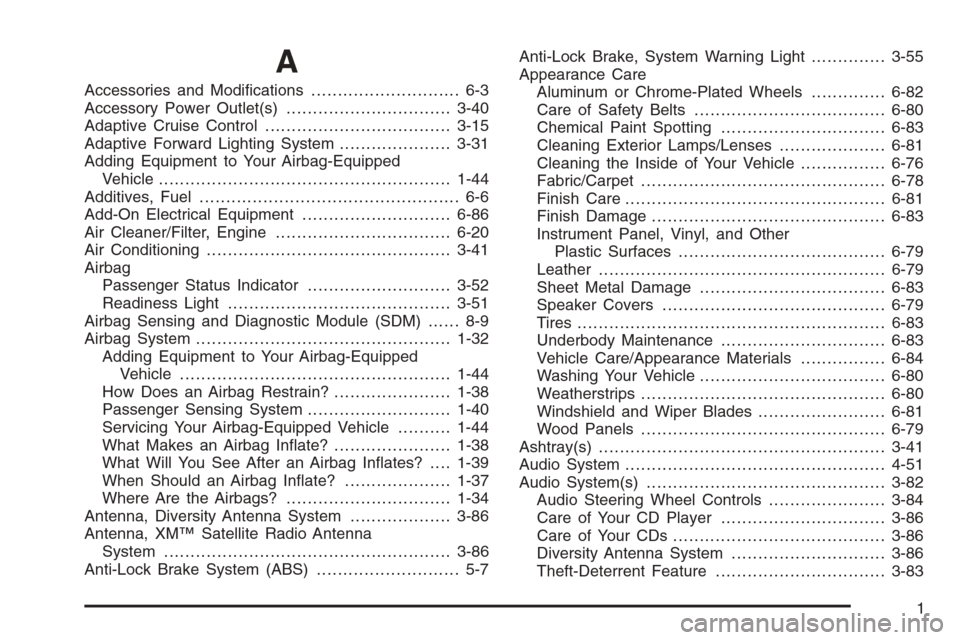
Accessories and Modications............................ 6-3
Accessory Power Outlet(s)...............................3-40
Adaptive Cruise Control...................................3-15
Adaptive Forward Lighting System.....................3-31
Adding Equipment to Your Airbag-Equipped
Vehicle.......................................................1-44
Additives, Fuel................................................. 6-6
Add-On Electrical Equipment............................6-86
Air Cleaner/Filter, Engine.................................6-20
Air Conditioning..............................................3-41
Airbag
Passenger Status Indicator...........................3-52
Readiness Light..........................................3-51
Airbag Sensing and Diagnostic Module (SDM)...... 8-9
Airbag System................................................1-32
Adding Equipment to Your Airbag-Equipped
Vehicle...................................................1-44
How Does an Airbag Restrain?......................1-38
Passenger Sensing System...........................1-40
Servicing Your Airbag-Equipped Vehicle..........1-44
What Makes an Airbag Inate?......................1-38
What Will You See After an Airbag Inates?....1-39
When Should an Airbag Inate?....................1-37
Where Are the Airbags?...............................1-34
Antenna, Diversity Antenna System...................3-86
Antenna, XM™ Satellite Radio Antenna
System......................................................3-86
Anti-Lock Brake System (ABS)........................... 5-7Anti-Lock Brake, System Warning Light..............3-55
Appearance Care
Aluminum or Chrome-Plated Wheels..............6-82
Care of Safety Belts....................................6-80
Chemical Paint Spotting...............................6-83
Cleaning Exterior Lamps/Lenses....................6-81
Cleaning the Inside of Your Vehicle................6-76
Fabric/Carpet..............................................6-78
Finish Care.................................................6-81
Finish Damage............................................6-83
Instrument Panel, Vinyl, and Other
Plastic Surfaces.......................................6-79
Leather......................................................6-79
Sheet Metal Damage...................................6-83
Speaker Covers..........................................6-79
Tires..........................................................6-83
Underbody Maintenance...............................6-83
Vehicle Care/Appearance Materials................6-84
Washing Your Vehicle...................................6-80
Weatherstrips..............................................6-80
Windshield and Wiper Blades........................6-81
Wood Panels..............................................6-79
Ashtray(s)......................................................3-41
Audio System.................................................4-51
Audio System(s).............................................3-82
Audio Steering Wheel Controls......................3-84
Care of Your CD Player...............................3-86
Care of Your CDs ........................................3-86
Diversity Antenna System.............................3-86
Theft-Deterrent Feature................................3-83
1
Page 445 of 456
Cigarette Lighter.............................................3-41
Cleaning
Aluminum or Chrome-Plated Wheels..............6-82
Exterior Lamps/Lenses.................................6-81
Fabric/Carpet..............................................6-78
Finish Care.................................................6-81
Inside of Your Vehicle..................................6-76
Instrument Panel, Vinyl, and Other
Plastic Surfaces.......................................6-79
Leather......................................................6-79
Speaker Covers..........................................6-79
Tires..........................................................6-83
Underbody Maintenance...............................6-83
Washing Your Vehicle...................................6-80
Weatherstrips..............................................6-80
Windshield and Wiper Blades........................6-81
Wood Panels..............................................6-79
Climate Control System
Air Filter, Passenger Compartment.................3-47
Dual ..........................................................3-41
Outlet Adjustment........................................3-47
Collision Damage Repair..................................8-10
Competitive Driving, Racing or Other.................5-18
Control of a Vehicle.......................................... 5-6
Convenience Net............................................2-46Coolant
Engine Temperature Gage............................3-57
Heater, Engine............................................2-24
Surge Tank Pressure Cap.............................6-25
Cooled Seats................................................... 1-3
Cooling System..............................................6-28
Courtesy Lamps.............................................3-33
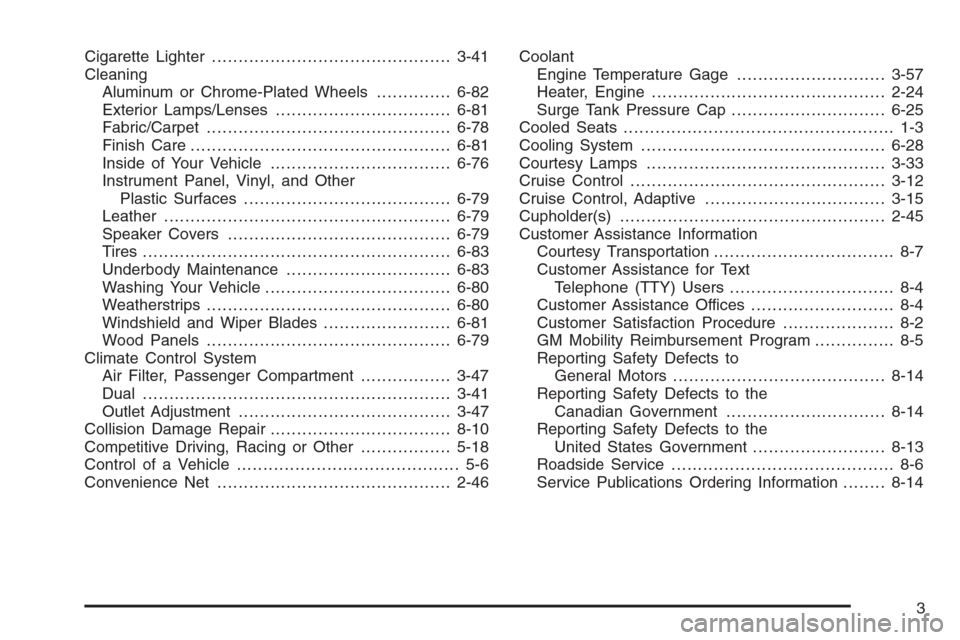
Cruise Control................................................3-12
Cruise Control, Adaptive..................................3-15
Cupholder(s)..................................................2-45
Customer Assistance Information
Courtesy Transportation.................................. 8-7
Customer Assistance for Text
Telephone (TTY) Users............................... 8-4
Customer Assistance Offices........................... 8-4
Customer Satisfaction Procedure..................... 8-2
GM Mobility Reimbursement Program............... 8-5
Reporting Safety Defects to
General Motors........................................8-14
Reporting Safety Defects to the
Canadian Government..............................8-14
Reporting Safety Defects to the
United States Government.........................8-13
Roadside Service.......................................... 8-6
Service Publications Ordering Information........8-14
3