keyless entry CADILLAC XT4 2019 User Guide
[x] Cancel search | Manufacturer: CADILLAC, Model Year: 2019, Model line: XT4, Model: CADILLAC XT4 2019Pages: 381, PDF Size: 6.4 MB
Page 56 of 381

Cadillac XT4 Owner Manual (GMNA-Localizing-U.S./Canada/Mexico-
12017481) - 2019 - CRC - 11/5/18
52 KEYS, DOORS, AND WINDOWS
If the ignition mode will not change
with the other transmitter or in the
front cupholder, your vehicle needs
service. If the ignition does change
modes, the first transmitter may be
faulty. See your dealer who can service
the theft-deterrent system and have a
new RKE transmitter programmed to
the vehicle.
It is possible for the immobilizer
system to learn new or replacement
RKE transmitters. Up to eight
transmitters can be programmed for
the vehicle. To program additional
transmitters, see“Programming
Transmitters to the Vehicle ”under
Remote Keyless Entry (RKE) System
Operation 029.
Do not leave the key or device that
disarms or deactivates the
theft-deterrent system in the vehicle.Exterior Mirrors
Convex Mirrors
{Warning
A convex mirror can make things,
like other vehicles, look farther
away than they really are. If you cut
too sharply into the right lane, you
could hit a vehicle on the right.
Check the inside mirror or glance
over your shoulder before changing
lanes.
The passenger side mirror is convex
shaped. A convex mirror's surface is
curved so more can be seen from the
driver seat.
Power Mirrors
To adjust a mirror: 1. Press
}or|to choose the
driver or passenger mirror.
2. Press the arrows on the control pad to move each mirror in the
desired direction.
Memory Mirrors
The vehicle may have memory
mirrors. See Memory Seats 066.
Lane Change Alert (LCA)
The vehicle may have LCA. See Lane
Change Alert (LCA) 0232.
Page 57 of 381

Cadillac XT4 Owner Manual (GMNA-Localizing-U.S./Canada/Mexico-
12017481) - 2019 - CRC - 11/5/18
KEYS, DOORS, AND WINDOWS 53
Side Blind Zone Alert (SBZA)
The vehicle may have Side Blind Zone
Alert. SeeSide Blind Zone Alert (SBZA)
0 232.
Turn Signal Indicator
The vehicle may have a turn signal
indicator on the mirror housings. The
indicator will flash when turn signal
or hazard warning flashers are used.
Folding Mirrors
Manual Folding Mirrors
If equipped, manually fold the mirrors
inward toward the vehicle to prevent
damage when going through an
automatic car wash. Push the mirror
outward to return it to the original
position.
Power Folding Mirrors
If equipped, press to power fold the
mirrors. Press again to unfold.
Resetting the Power Folding
Mirrors
Reset the power folding mirrors if:
. The mirrors are accidentally
obstructed while folding.
. They are accidentally manually
folded/unfolded.
. The mirrors do not stay in the
unfolded position. .
The mirrors vibrate at normal
driving speeds.
Fold and unfold the mirrors one time
using the mirror controls to reset
them to their normal position. A noise
may be heard during the resetting of
the power folding mirrors. This sound
is normal after a manual folding
operation.
Remote Folding Mirrors
If equipped, press and holdQon the
RKE transmitter for approximately
one second to automatically fold the
exterior mirrors. Press and hold
Kon
the RKE transmitter for approximately
one second to unfold. See Remote
Keyless Entry (RKE) System Operation
0 29.
This feature is turned on or off
through vehicle personalization. See
Vehicle Personalization 0149.
Page 61 of 381
Cadillac XT4 Owner Manual (GMNA-Localizing-U.S./Canada/Mexico-
12017481) - 2019 - CRC - 11/5/18
KEYS, DOORS, AND WINDOWS 57
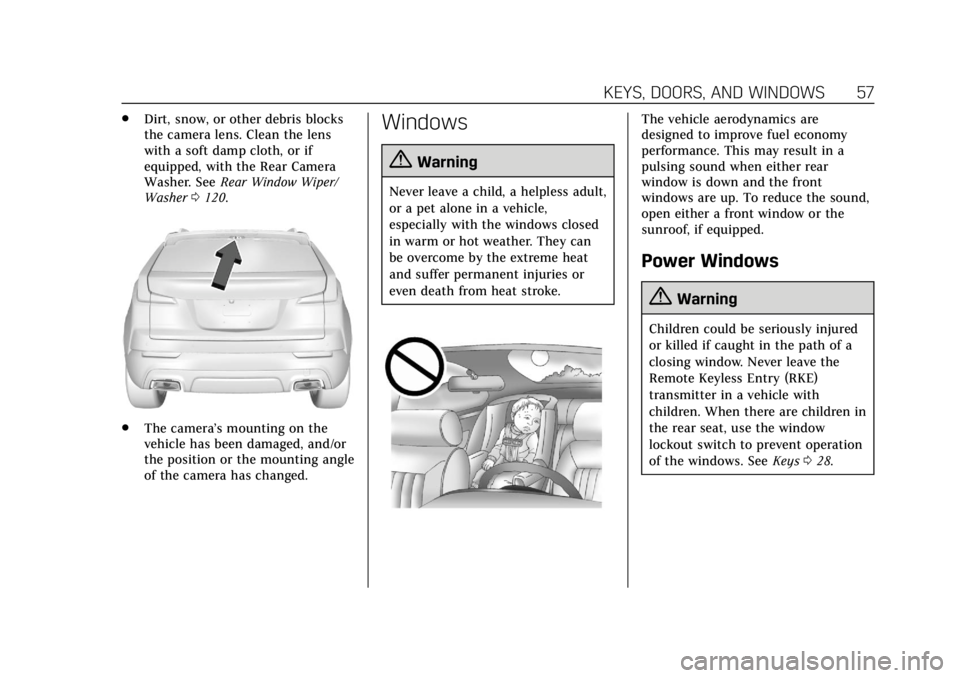
.Dirt, snow, or other debris blocks
the camera lens. Clean the lens
with a soft damp cloth, or if
equipped, with the Rear Camera
Washer. See Rear Window Wiper/
Washer 0120.
.
The camera’s mounting on the
vehicle has been damaged, and/or
the position or the mounting angle
of the camera has changed.
Windows
{Warning
Never leave a child, a helpless adult,
or a pet alone in a vehicle,
especially with the windows closed
in warm or hot weather. They can
be overcome by the extreme heat
and suffer permanent injuries or
even death from heat stroke.
The vehicle aerodynamics are
designed to improve fuel economy
performance. This may result in a
pulsing sound when either rear
window is down and the front
windows are up. To reduce the sound,
open either a front window or the
sunroof, if equipped.
Power Windows
{Warning
Children could be seriously injured
or killed if caught in the path of a
closing window. Never leave the
Remote Keyless Entry (RKE)
transmitter in a vehicle with
children. When there are children in
the rear seat, use the window
lockout switch to prevent operation
of the windows. See Keys028.
Page 70 of 381
Cadillac XT4 Owner Manual (GMNA-Localizing-U.S./Canada/Mexico-
12017481) - 2019 - CRC - 11/5/18
66 SEATS AND RESTRAINTS
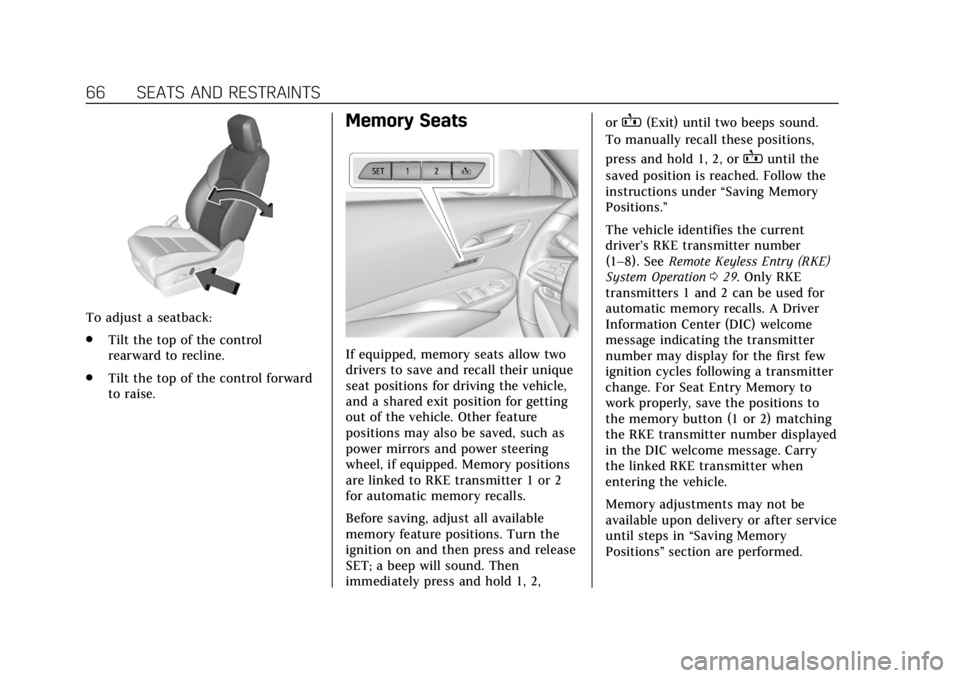
To adjust a seatback:
.Tilt the top of the control
rearward to recline.
. Tilt the top of the control forward
to raise.
Memory Seats
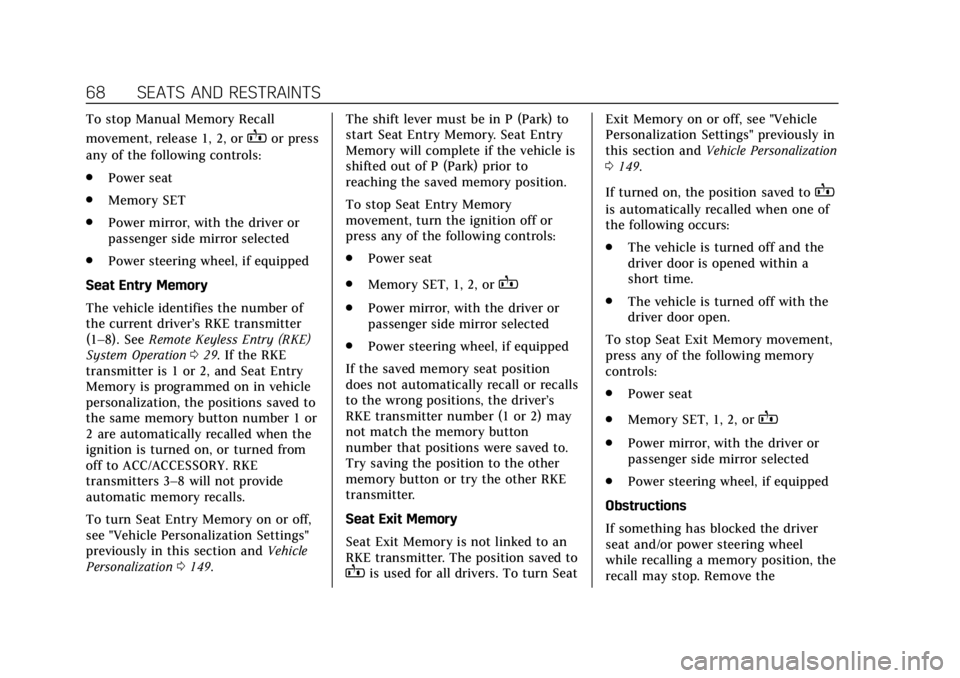
If equipped, memory seats allow two
drivers to save and recall their unique
seat positions for driving the vehicle,
and a shared exit position for getting
out of the vehicle. Other feature
positions may also be saved, such as
power mirrors and power steering
wheel, if equipped. Memory positions
are linked to RKE transmitter 1 or 2
for automatic memory recalls.
Before saving, adjust all available
memory feature positions. Turn the
ignition on and then press and release
SET; a beep will sound. Then
immediately press and hold 1, 2, or
B(Exit) until two beeps sound.
To manually recall these positions,
press and hold 1, 2, or
Buntil the
saved position is reached. Follow the
instructions under “Saving Memory
Positions.”
The vehicle identifies the current
driver’s RKE transmitter number
(1–8). See Remote Keyless Entry (RKE)
System Operation 029. Only RKE
transmitters 1 and 2 can be used for
automatic memory recalls. A Driver
Information Center (DIC) welcome
message indicating the transmitter
number may display for the first few
ignition cycles following a transmitter
change. For Seat Entry Memory to
work properly, save the positions to
the memory button (1 or 2) matching
the RKE transmitter number displayed
in the DIC welcome message. Carry
the linked RKE transmitter when
entering the vehicle.
Memory adjustments may not be
available upon delivery or after service
until steps in “Saving Memory
Positions” section are performed.
Page 72 of 381
Cadillac XT4 Owner Manual (GMNA-Localizing-U.S./Canada/Mexico-
12017481) - 2019 - CRC - 11/5/18
68 SEATS AND RESTRAINTS
To stop Manual Memory Recall
movement, release 1, 2, or
Bor press
any of the following controls:
. Power seat
. Memory SET
. Power mirror, with the driver or
passenger side mirror selected
. Power steering wheel, if equipped
Seat Entry Memory
The vehicle identifies the number of
the current driver’s RKE transmitter
(1–8). See Remote Keyless Entry (RKE)
System Operation 029. If the RKE
transmitter is 1 or 2, and Seat Entry
Memory is programmed on in vehicle
personalization, the positions saved to
the same memory button number 1 or
2 are automatically recalled when the
ignition is turned on, or turned from
off to ACC/ACCESSORY. RKE
transmitters 3–8 will not provide
automatic memory recalls.
To turn Seat Entry Memory on or off,
see "Vehicle Personalization Settings"
previously in this section and Vehicle
Personalization 0149. The shift lever must be in P (Park) to
start Seat Entry Memory. Seat Entry
Memory will complete if the vehicle is
shifted out of P (Park) prior to
reaching the saved memory position.
To stop Seat Entry Memory
movement, turn the ignition off or
press any of the following controls:
.
Power seat
. Memory SET, 1, 2, or
B
.Power mirror, with the driver or
passenger side mirror selected
. Power steering wheel, if equipped
If the saved memory seat position
does not automatically recall or recalls
to the wrong positions, the driver’s
RKE transmitter number (1 or 2) may
not match the memory button
number that positions were saved to.
Try saving the position to the other
memory button or try the other RKE
transmitter.
Seat Exit Memory
Seat Exit Memory is not linked to an
RKE transmitter. The position saved to
Bis used for all drivers. To turn Seat Exit Memory on or off, see "Vehicle
Personalization Settings" previously in
this section and
Vehicle Personalization
0 149.
If turned on, the position saved to
B
is automatically recalled when one of
the following occurs:
. The vehicle is turned off and the
driver door is opened within a
short time.
. The vehicle is turned off with the
driver door open.
To stop Seat Exit Memory movement,
press any of the following memory
controls:
. Power seat
. Memory SET, 1, 2, or
B
.Power mirror, with the driver or
passenger side mirror selected
. Power steering wheel, if equipped
Obstructions
If something has blocked the driver
seat and/or power steering wheel
while recalling a memory position, the
recall may stop. Remove the
Page 155 of 381
Cadillac XT4 Owner Manual (GMNA-Localizing-U.S./Canada/Mexico-
12017481) - 2019 - CRC - 11/5/18
INSTRUMENTS AND CONTROLS 151
Lane Change Alert
This setting specifies if an alert will
display on the outside mirror to help
you avoid crashing into a vehicle in
your blind spot, or rapidly
approaching your blind spot, during a
lane change maneuver. SeeLane
Change Alert (LCA) 0232.
When Lane Change Alert is disabled,
Side Blind Zone Alert is also disabled.
Touch Off or On.
Rear Camera Park Assist Symbols
This setting enables the Rear Camera
Park Assist Symbols. See Assistance
Systems for Parking or Backing 0219.
Touch Off or On.
Rear Cross Traffic Alert
This setting specifies if an alert will
display when the vehicle detects
approaching rear cross traffic when in
R (Reverse). See Assistance Systems for
Parking or Backing 0219.
Touch Off or On.Comfort and Convenience
Touch and the following may display:
. Chime Volume
. Reverse Tilt Mirror
. Remote Mirror Folding
. Rain Sense Wipers
. Auto Wipe in Reverse Gear
. Hands Free Liftgate Control
Chime Volume
This setting determines the chime
volume level.
Touch the controls on the
infotainment display to adjust the
volume.
Reverse Tilt Mirror
When on, both the driver and
passenger, driver, or passenger outside
mirrors will tilt downward when the
vehicle is shifted to R (Reverse) to
improve visibility of the ground near
the rear wheels. They will return to
their previous driving position when the vehicle is shifted out of
R (Reverse) or the engine is turned off.
See
Reverse Tilt Mirrors 054.
Touch Off, On - Driver and Passenger,
On - Driver, or On - Passenger.
Remote Mirror Folding
When on, the outside mirrors will
automatically fold or unfold when the
Remote Keyless Entry (RKE)
transmitter
QorKbutton is pressed
and held. See Folding Mirrors 053.
Touch Off or On.
Rain Sense Wipers
This setting automatically turns on
the wipers when moisture is detected
and the wiper switch is in
intermittent mode.
Touch Disabled or Enabled.
Auto Wipe in Reverse Gear
When on and the front wiper is on,
the rear wiper will automatically
activate when the vehicle is shifted to
R (Reverse).
Select Off or On.
Page 156 of 381

Cadillac XT4 Owner Manual (GMNA-Localizing-U.S./Canada/Mexico-
12017481) - 2019 - CRC - 11/5/18
152 INSTRUMENTS AND CONTROLS
Hands Free Liftgate Control
The liftgate may be operated with a
kicking motion under the left corner
of the rear bumper. SeeLiftgate042.
Select Off, On-Open and Close,
or On-Open Only.
Lighting
Touch and the following may display:
. Vehicle Locator Lights
. Exit Lighting
Vehicle Locator Lights
This setting flashes the headlamps of
your vehicle when you press
Kon the
Remote Keyless Entry (RKE)
transmitter.
Touch Off or On.
Exit Lighting
This setting specifies how long the
headlamps stay on after the vehicle is
turned off and exited.
Touch Off, 30 Seconds, 60 Seconds,
or 120 Seconds.
Power Door Locks
Touch and the following may display:
. Open Door Anti Lock Out
. Auto Door Unlock
. Delayed Door Lock
Open Door Anti Lock Out
This setting prevents the driver door
from locking when the door is open.
If this setting is on, the Delayed Door
Lock menu will not be available.
Touch Off or On.
Auto Door Unlock
This setting allows selection of which
doors will automatically unlock when
the vehicle is shifted into P (Park).
Touch Off, All Doors, or Driver Door.
Delayed Door Lock
This setting delays the locking of the
vehicle’s doors.
Touch Off or On.
Remote Lock, Unlock, Start
Touch and the following may display:
. Remote Unlock Light Feedback
. Remote Lock Feedback
. Remote Door Unlock
. Remote Start Auto Cool Seats
. Remote Start Auto Heat Seats
. Remote Window Operation
. Passive Door Unlock
. Passive Door Lock
. Remote Left in Vehicle Alert
Remote Unlock Light Feedback
This setting flashes the exterior lamps
when the vehicle is unlocked with the
RKE transmitter.
Touch Off or Flash Lights.
Remote Lock Feedback
This setting specifies how the vehicle
responds when the vehicle is locked
with the RKE transmitter.
Touch Off, Lights and Horn, Lights
Only, or Horn Only.
Page 157 of 381
Cadillac XT4 Owner Manual (GMNA-Localizing-U.S./Canada/Mexico-
12017481) - 2019 - CRC - 11/5/18
INSTRUMENTS AND CONTROLS 153
Remote Door Unlock
This setting specifies whether all
doors, or just the driver door, unlock
when pressing
Kon the RKE
transmitter.
Touch All Doors or Driver Door.
Remote Start Auto Cool Seats
This setting automatically turns on
the ventilated seats when using the
remote start function on warm days.
See Heated and Ventilated Front Seats
0 69 and Remote Vehicle Start 036.
Touch Off or On.
Remote Start Auto Heat Seats
This setting automatically turns on
the heated seats when using the
remote start function on cold days.
See Heated and Ventilated Front Seats
0 69 and Remote Vehicle Start 036.
Touch Off or On. Remote Window Operation
If equipped, this feature enables
remote operation of the windows with
the RKE transmitter. See
Remote
Keyless Entry (RKE) System Operation
0 29.
Touch Off or On.
Passive Door Unlock
This setting specifies which doors
unlock when using the button on the
driver door handle to unlock the
vehicle.
Touch All Doors or Driver Door Only.
Passive Door Lock
This setting specifies if the vehicle will
automatically lock, or lock and
provide an alert after all the doors are
closed, and you walk away from the
vehicle with the RKE transmitter. See
Remote Keyless Entry (RKE) System
Operation 029.
Touch Off, On with Horn Chirp, or On. Remote Left in Vehicle Alert
This feature sounds an alert when the
RKE transmitter is left in the vehicle.
This menu also enables Remote No
Longer in Vehicle Alert.
Touch Off or On.
Seating Position
Touch and the following may display:
.
Seat Entry Memory
. Seat Exit Memory
Seat Entry Memory
This feature automatically recalls the
current driver’s previously stored 1 or
2 button positions when the ignition
is changed from off to on or ACC/
ACCESSORY. See Memory Seats066.
Touch Off or On.
Seat Exit Memory
This feature automatically recalls the
previously stored exit button position
when exiting the vehicle. See Memory
Seats 066.
Touch Off or On.
Page 167 of 381
Cadillac XT4 Owner Manual (GMNA-Localizing-U.S./Canada/Mexico-
12017481) - 2019 - CRC - 11/5/18
LIGHTING 163
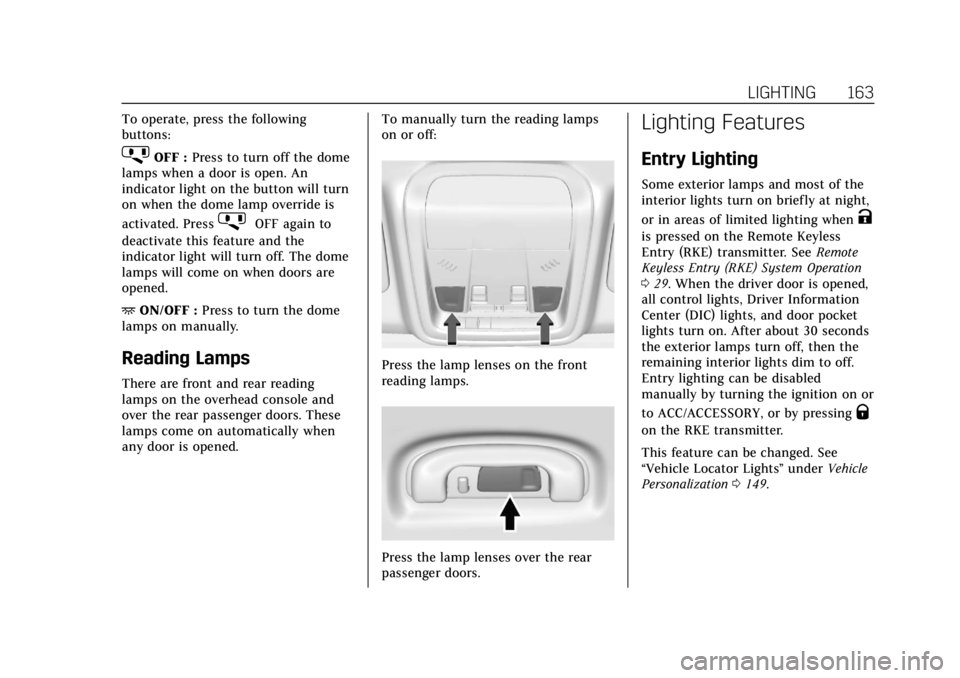
To operate, press the following
buttons:
jOFF :Press to turn off the dome
lamps when a door is open. An
indicator light on the button will turn
on when the dome lamp override is
activated. Press
jOFF again to
deactivate this feature and the
indicator light will turn off. The dome
lamps will come on when doors are
opened.
+ ON/OFF : Press to turn the dome
lamps on manually.
Reading Lamps
There are front and rear reading
lamps on the overhead console and
over the rear passenger doors. These
lamps come on automatically when
any door is opened. To manually turn the reading lamps
on or off:
Press the lamp lenses on the front
reading lamps.
Press the lamp lenses over the rear
passenger doors.
Lighting Features
Entry Lighting
Some exterior lamps and most of the
interior lights turn on briefly at night,
or in areas of limited lighting when
K
is pressed on the Remote Keyless
Entry (RKE) transmitter. See
Remote
Keyless Entry (RKE) System Operation
0 29. When the driver door is opened,
all control lights, Driver Information
Center (DIC) lights, and door pocket
lights turn on. After about 30 seconds
the exterior lamps turn off, then the
remaining interior lights dim to off.
Entry lighting can be disabled
manually by turning the ignition on or
to ACC/ACCESSORY, or by pressing
Q
on the RKE transmitter.
This feature can be changed. See
“Vehicle Locator Lights” underVehicle
Personalization 0149.
Page 189 of 381
Cadillac XT4 Owner Manual (GMNA-Localizing-U.S./Canada/Mexico-
12017481) - 2019 - CRC - 11/5/18
DRIVING AND OPERATING 185
If the pushbutton start is not working,
the vehicle may be near a strong radio
antenna signal causing interference to
the Remote Keyless Entry (RKE)
system. SeeRemote Keyless Entry
(RKE) System Operation 029.
To shift out of P (Park), the vehicle
must be turned on and the brake
pedal must be applied.
Stopping the Engine/OFF (No
Indicator Light) : When the vehicle is
stopped, press ENGINE START/STOP
once to turn the engine off.
If the vehicle is in P (Park), the
ignition will turn off, and Retained
Accessory Power (RAP) will remain
active. See Retained Accessory Power
(RAP) 0189.
If the vehicle is in R (Reverse), D
(Drive) or M (Manual Mode), the
vehicle will shift to P (Park), the
ignition will turn off, and RAP will
remain active.
If the vehicle is in N (Neutral), the
ignition will return to ACC/
ACCESSORY and display the message
SHIFT TO PARK in the Driver
Information Center (DIC). When the vehicle is shifted into
P (Park), the ignition will turn off.
{Warning
Turning off the vehicle while
moving may cause loss of power
assist in the brake and steering
systems and disable the airbags.
While driving, only shut the vehicle
off in an emergency.
If the vehicle must be shut off in an
emergency: 1. Brake using a firm and steady pressure. Do not pump the
brakes repeatedly. This may
deplete power assist, requiring
increased brake pedal force.
2. Shift the vehicle to N (Neutral). This can be done while the
vehicle is moving. After shifting
to N (Neutral), firmly apply the
brakes and steer the vehicle to a
safe location.
3. Come to a complete stop and shift to P (Park). 4. Set the parking brake. See
Electric Parking Brake 0201.
Press ENGINE START/STOP to
turn the vehicle off.
If the vehicle cannot be pulled over
and must be shut off while driving,
press and hold ENGINE START/STOP
for longer than two seconds, or press
twice in five seconds.
ACC/ACCESSORY (Amber Indicator
Light) : This mode allows you to use
some electrical accessories when the
engine is off.
With the ignition off, pressing
ENGINE START/STOP once without
the brake pedal applied will place the
ignition system in ACC/ACCESSORY.
The ignition will switch from ACC/
ACCESSORY to OFF after 10 minutes
to prevent battery rundown.
ON/RUN/START (Green Indicator
Light) : This mode is for driving and
starting. With the ignition off and the
brake pedal applied, pressing ENGINE
START/STOP once will place the
ignition system in ON/RUN/START.
Once engine cranking begins, release
the button. Engine cranking will