towing CADILLAC XT4 2019 User Guide
[x] Cancel search | Manufacturer: CADILLAC, Model Year: 2019, Model line: XT4, Model: CADILLAC XT4 2019Pages: 381, PDF Size: 6.4 MB
Page 195 of 381
Cadillac XT4 Owner Manual (GMNA-Localizing-U.S./Canada/Mexico-
12017481) - 2019 - CRC - 11/5/18
DRIVING AND OPERATING 191
5. The P indicator will turn whiteand the gear indicator on the
shift lever will turn red when the
vehicle is no longer in P (Park).
6. After releasing the shift lever, it will return to the center position.
If the vehicle cannot shift from
P (Park), a Driver Information
Center (DIC) message will be
displayed. See your dealer for service.
Manual Park Release
{Warning
The transmission will be placed in
N (Neutral) when the manual park
release is pulled. The vehicle can
roll and you or others could be
injured. Ensure the vehicle is on
level ground.
Caution
The manual park release is not
intended to be used for towing.
Damage may result from using the
manual park release in this way.
The repairs would not be covered
by the vehicle warranty.
The manual park release can be used
to shift the vehicle into N (Neutral)
when the engine is not running.
Pulling the manual park release while
the vehicle is on or turning the
ignition on while the manual park
release is pulled, will cause a DIC
message to display.
To place the vehicle in N (Neutral)
using the manual park release: 1. Ensure the vehicle is on level ground and set the parking
brake.
2. Turn the vehicle off.
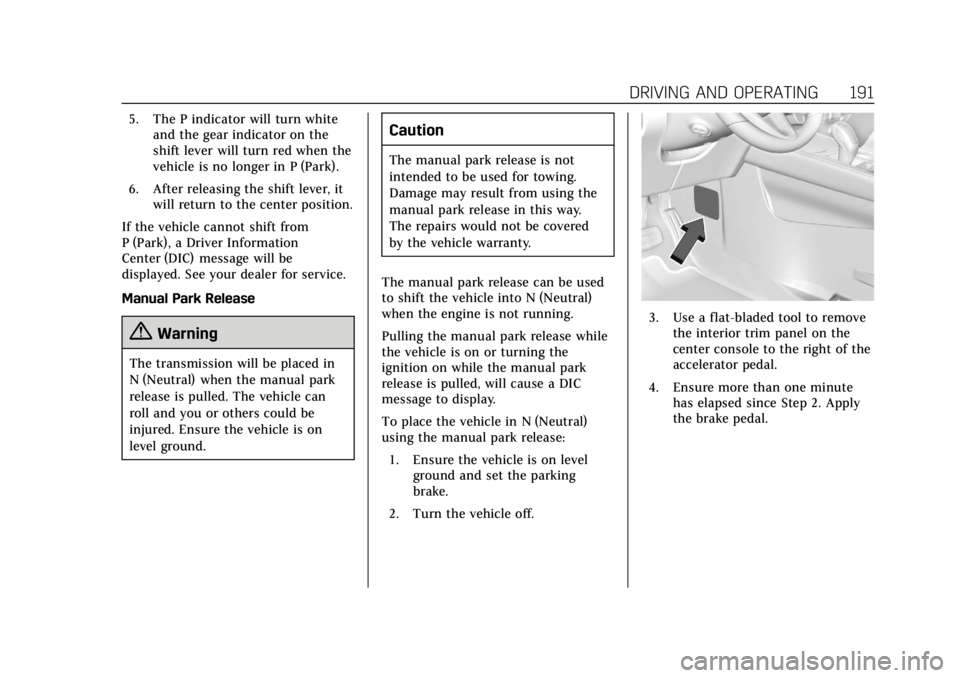
3. Use a flat-bladed tool to remove the interior trim panel on the
center console to the right of the
accelerator pedal.
4. Ensure more than one minute has elapsed since Step 2. Apply
the brake pedal.
Page 198 of 381
Cadillac XT4 Owner Manual (GMNA-Localizing-U.S./Canada/Mexico-
12017481) - 2019 - CRC - 11/5/18
194 DRIVING AND OPERATING
Running the Vehicle While
Parked
It is better not to park with the engine
running.
If the vehicle is left with the engine
running, follow the proper steps to be
sure the vehicle will not move.
SeeShifting Into Park 0190 and Engine
Exhaust 0193.
If parking on a hill and pulling a
trailer, see Driving Characteristics and
Towing Tips 0240.
Automatic Transmission
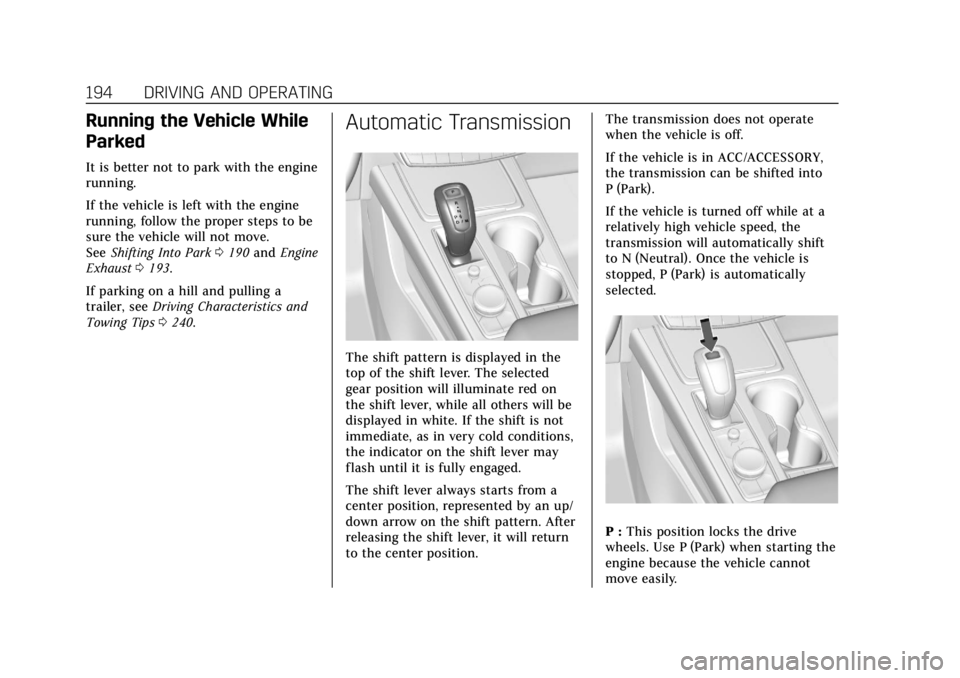
The shift pattern is displayed in the
top of the shift lever. The selected
gear position will illuminate red on
the shift lever, while all others will be
displayed in white. If the shift is not
immediate, as in very cold conditions,
the indicator on the shift lever may
flash until it is fully engaged.
The shift lever always starts from a
center position, represented by an up/
down arrow on the shift pattern. After
releasing the shift lever, it will return
to the center position. The transmission does not operate
when the vehicle is off.
If the vehicle is in ACC/ACCESSORY,
the transmission can be shifted into
P (Park).
If the vehicle is turned off while at a
relatively high vehicle speed, the
transmission will automatically shift
to N (Neutral). Once the vehicle is
stopped, P (Park) is automatically
selected.
P :
This position locks the drive
wheels. Use P (Park) when starting the
engine because the vehicle cannot
move easily.
Page 199 of 381

Cadillac XT4 Owner Manual (GMNA-Localizing-U.S./Canada/Mexico-
12017481) - 2019 - CRC - 11/5/18
DRIVING AND OPERATING 195
{Warning
It is dangerous to get out of the
vehicle if the transmission is not in
P (Park) with the parking brake set.
The vehicle can roll.
Do not leave the vehicle when the
engine is running. If the engine has
been left running, the vehicle can
move suddenly. You or others could
be injured. To be sure the vehicle
will not move, even when on fairly
level ground, always set the parking
brake and place the transmission
into P (Park). SeeShifting Into Park
0 190, Driving Characteristics and
Towing Tips 0240 and Electric
Parking Brake 0201.
This vehicle is equipped with an
electronically controlled transmission.
The shift lock release button is
designed to prevent inadvertent
shifting out of P (Park) unless the
ignition is on, the brake pedal is
applied, and the shift lock release
button is pressed.
When the vehicle is stopped, press
ENGINE START/STOP to turn off the
vehicle. The transmission will shift to
P (Park) automatically unless the
vehicle is in N (Neutral), See “Car
Wash Mode ”following. The vehicle will not shift into P (Park)
if it is moving too fast. Stop the
vehicle and shift into P (Park).
To shift in and out of P (Park), see
Shifting Into Park
0190 and Shifting
out of Park 0190.
Service Shift Lever Message
If the message SERVICE SHIFTER SEE
OWNER’S MANUAL appears in the
Driver Information Center (DIC), the
shift lever needs service. Have the
vehicle serviced as soon as possible.
If the vehicle is automatically shifting
into P (Park), check to see if the
P (Park) button on top of the shift
lever is stuck. To operate the vehicle,
hold the shift lever in the desired gear,
R (Reverse) or D (Drive), until vehicle
speed exceeds 15 km/h (10 mph), then
release the shift lever.
R : Use this gear to back up.
If the vehicle is shifted from either
R (Reverse) to D (Drive) or M (Manual
Mode), or M (Manual Mode) or
D (Drive) to R (Reverse) while the
speed is too high, the vehicle will shift
to N (Neutral). Reduce the vehicle
speed and try the shift again.
Page 200 of 381

Cadillac XT4 Owner Manual (GMNA-Localizing-U.S./Canada/Mexico-
12017481) - 2019 - CRC - 11/5/18
196 DRIVING AND OPERATING
To shift into R (Reverse):1. Bring the vehicle to a complete stop.
2. Press and hold shift lock release button on the side of the shift
lever.
3. From the center position, move the shift lever forward through
the first detent to the end of
travel. R is illuminated in red.
4. After releasing the shift lever, it will return to the center position.
To shift out of R (Reverse):
1. Bring the vehicle to a complete stop.
2. Shift to the desired gear.
3. After releasing the shift lever, it will return to the center position.
At low vehicle speeds, R (Reverse) can
be used to rock the vehicle back and
forth to get out of snow, ice, or sand
without damaging the transmission.
See If the Vehicle Is Stuck 0179. N :
In this position, the engine does
not connect with the wheels. To
restart the engine when the vehicle is
already moving, use N (Neutral) only.
{Warning
Shifting into a drive gear while the
engine is running at high speed is
dangerous. Unless your foot is
firmly on the brake pedal, the
vehicle could move very rapidly.
You could lose control and hit
people or objects. Do not shift into
a drive gear while the engine is
running at high speed.
Caution
Shifting out of P (Park) or
N (Neutral) with the engine running
at high speed may damage the
transmission. The repairs would not
be covered by the vehicle warranty.
Be sure the engine is not running at
high speed when shifting the
vehicle. The vehicle is not designed to stay in
N (Neutral) for more than
five minutes. It may automatically
shift into P (Park). N (Neutral) is not
intended for towing. If the vehicle
needs to be towed, see
Towing the
Vehicle 0312.
To shift into N (Neutral): 1. Move the shift lever forward to the first detent from the center
position.
.If the vehicle is in P (Park),
apply the brake pedal and
press the shift lock release
button while moving the shift
lever forward.
. N will illuminate in red.
2. After releasing the shift lever, it will return to the center position.
To shift out of N (Neutral):
1. Bring the vehicle to a complete stop.
2. Shift to the desired gear. If shifting from N (Neutral) to
R (Reverse), press the shift lock
release button.
Page 206 of 381
Cadillac XT4 Owner Manual (GMNA-Localizing-U.S./Canada/Mexico-
12017481) - 2019 - CRC - 11/5/18
202 DRIVING AND OPERATING
to apply it again. If the light does not
come on, or keeps flashing, have the
vehicle serviced. Do not drive the
vehicle if the
Yor PARK light is
flashing. See your dealer. See Electric
Parking Brake Light 0136.
If the
8light is on, press the EPB
switch and hold it. Continue to hold
the switch until the
Yor PARK light
remains on. If the
8light remains on,
see your dealer.
If the EPB is applied while the vehicle
is moving, the vehicle will decelerate
as long as the switch is pressed. If the
switch is pressed until the vehicle
comes to a stop, the EPB will remain
applied.
The vehicle may automatically apply
the EPB in some situations when the
vehicle is not moving. This is normal,
and is done to periodically check the
correct operation of the EPB system.
If the EPB fails to apply, block the rear
wheels to prevent vehicle movement.
EPB Release
To release the EPB:
1. Turn the ignition on or to ACC/ ACCESSORY.
2. Apply and hold the brake pedal.
3. Press the EPB switch momentarily.
The EPB is released when the
Yor
PARK light is off.
If the
8light is on, release the EPB by
pressing and holding the EPB switch.
Continue to hold the switch until
the
Yor PARK light is off. If either
light stays on after release is
attempted, see your dealer.
Caution
Driving with the parking brake on
can overheat the brake system and
cause premature wear or damage to
brake system parts. Make sure that
the parking brake is fully released
and the brake warning light is off
before driving.
Automatic EPB Release
The EPB will automatically release if
the vehicle is running, placed into
gear, and an attempt is made to drive
away. Avoid rapid acceleration when
the EPB is applied, to preserve parking
brake lining life.
If parking on a hill, or if the vehicle is
pulling a trailer, see Driving
Characteristics and Towing Tips 0240.
Brake Assist
The Brake Assist feature is designed to
assist the driver in stopping or
decreasing vehicle speed in emergency
driving conditions. This feature uses
the Electronic Brake Control Module
(EBCM), which controls the hydraulic
brake circuits to detect when the
driver has quickly and forcefully
applied the brake pedal in an attempt
to quickly stop or slow down the
vehicle and to provide additional
braking beyond a normal brake pedal
apply. The EBCM increases brake
pressure at each corner of the vehicle
until the ABS activates. Minor ABS
noise during this time is normal and
Page 220 of 381
Cadillac XT4 Owner Manual (GMNA-Localizing-U.S./Canada/Mexico-
12017481) - 2019 - CRC - 11/5/18
216 DRIVING AND OPERATING
{Warning
On curves, ACC may respond to a
vehicle in another lane, or may not
have time to react to a vehicle in
your lane. You could crash into a
vehicle ahead of you, or lose control
of your vehicle. Give extra attention
in curves and be ready to use the
brakes if necessary. Select an
appropriate speed while driving in
curves.
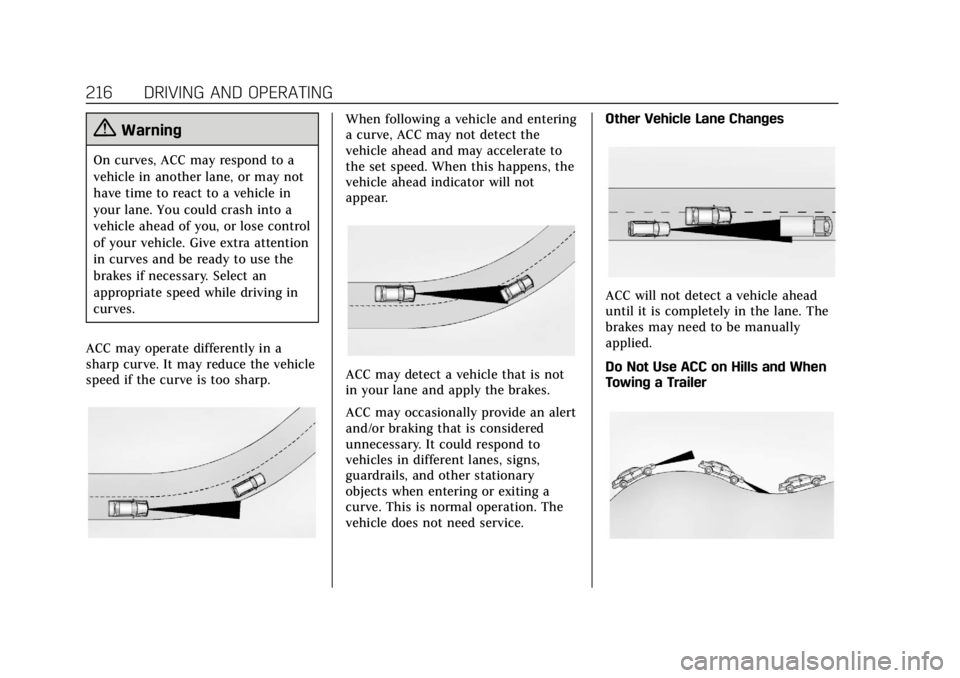
ACC may operate differently in a
sharp curve. It may reduce the vehicle
speed if the curve is too sharp.
When following a vehicle and entering
a curve, ACC may not detect the
vehicle ahead and may accelerate to
the set speed. When this happens, the
vehicle ahead indicator will not
appear.
ACC may detect a vehicle that is not
in your lane and apply the brakes.
ACC may occasionally provide an alert
and/or braking that is considered
unnecessary. It could respond to
vehicles in different lanes, signs,
guardrails, and other stationary
objects when entering or exiting a
curve. This is normal operation. The
vehicle does not need service. Other Vehicle Lane Changes
ACC will not detect a vehicle ahead
until it is completely in the lane. The
brakes may need to be manually
applied.
Do Not Use ACC on Hills and When
Towing a Trailer
Page 221 of 381

Cadillac XT4 Owner Manual (GMNA-Localizing-U.S./Canada/Mexico-
12017481) - 2019 - CRC - 11/5/18
DRIVING AND OPERATING 217
Do not use ACC when driving on steep
hills or when towing a trailer. ACC will
not detect a vehicle in the lane while
driving on steep hills. The driver will
often need to take over acceleration
and braking on steep hills, especially
when towing a trailer. If the brakes are
applied, the ACC disengages.
Disengaging ACC
There are three ways to
disengage ACC:
.Step lightly on the brake pedal.
. Press
*.
. Press
J. Erasing Speed Memory
The cruise control set speed is erased
from memory if
Jis pressed or if
the ignition is turned off.
Cleaning the Sensing System
The camera sensor on the windshield
behind the rearview mirror and the
radar sensors on the front of the
vehicle can become blocked by snow,
ice, dirt, or mud. These areas need to
be cleaned for ACC to operate
properly.
For cleaning instructions, see
“Washing the Vehicle ”under Exterior
Care 0315.
System operation may also be limited
under snow, heavy rain, or road spray
conditions.
Driver Assistance
Systems
This vehicle may have features that
work together to help avoid crashes or
reduce crash damage while driving,
backing, and parking. Read this entire
section before using these systems.
{Warning
Do not rely on the Driver
Assistance Systems. These systems
do not replace the need for paying
attention and driving safely. You
may not hear or feel alerts or
warnings provided by these
systems. Failure to use proper care
when driving may result in injury,
death, or vehicle damage. See
Defensive Driving 0174.
Under many conditions, these
systems will not: . Detect children, pedestrians,
bicyclists, or animals.
(Continued)
Page 228 of 381
Cadillac XT4 Owner Manual (GMNA-Localizing-U.S./Canada/Mexico-
12017481) - 2019 - CRC - 11/5/18
224 DRIVING AND OPERATING
pulses occur on the left or right side,
depending on the direction of the
detected vehicle.
Use caution while backing up when
towing a trailer, as the RCTA
detection zones that extend out from
the back of the vehicle do not move
further back when a trailer is towed.
SeeRadio Frequency Statement 0350.
Turning the Features On or Off
PressXon the center stack to turn
on or off the Front and Rear Park
Assist, Reverse Automatic Braking
(RAB), and the Backing Warning
System at the same time. The
indicator light next to the button
comes on when the features are on
and turns off when the features have
been disabled.
Turn off Park Assist, RCTA, and RAB
when towing a trailer.
RCTA can be turned on or off through
vehicle personalization. See “Collision/
Detection Systems” underVehicle
Personalization 0149.
Automatic Parking Assist (APA)
with Braking
If equipped, APA searches for and
steers the vehicle into parallel and
perpendicular parking spots. When
using APA, you must still shift gears,
while the system applies the brakes
and accelerator. A display and audible
beeps help to guide parking
maneuvers.
Do not use APA when towing a trailer.
{Warning
APA may not detect objects in the
parking space, objects that are soft
or narrow, objects high off the
ground such as flatbed trucks,
objects below ground level such as
large potholes, or moving objects
(e.g. pedestrians). Always verify that
the parking space is appropriate for
parking a vehicle. APA does not
respond to changes in the parking
space, such as movement of an
adjacent vehicle, or a person or
object entering the parking space.
(Continued)
Warning (Continued)
APA does not detect or avoid traffic
that is behind or alongside of the
vehicle. Always be prepared to stop
the vehicle during the parking
maneuver.
Press
Oon the center stack to
enable the system to search for a
parking space that is large enough and
within 1.5 m (5 ft) of the vehicle. The
vehicle speed must be below
30 km/h (18 mph). The system cannot:
. Detect whether it is a legal parking
space.
. Park exactly lined up with the
vehicle next to it if the spot is
approached at an angle or if the
parking space is angled.
. Park exactly centered in a spot
that is marked too large.
. Always detect short curbs.
When enabled, APA searches for
parallel parking spaces to the right of
the vehicle. To search for a parking
Page 234 of 381

Cadillac XT4 Owner Manual (GMNA-Localizing-U.S./Canada/Mexico-
12017481) - 2019 - CRC - 11/5/18
230 DRIVING AND OPERATING
Minor brake pedal pulsations or pedal
movement during this time is normal
and the brake pedal should continue
to be applied as needed. IBA will
automatically disengage only when
the brake pedal is released.
{Warning
IBA may increase vehicle braking in
situations when it may not be
necessary. You could block the flow
of traffic. If this occurs, take your
foot off the brake pedal and then
apply the brakes as needed.
FAB and IBA can be disabled through
vehicle personalization. See “Collision/
Detection Systems” underVehicle
Personalization 0149.
{Warning
Using FAB or IBA while towing a
trailer could cause you to lose
control of the vehicle and crash.
(Continued)
Warning (Continued)
Turn the system to Alert, or if the
vehicle has ACC to Off, when
towing a trailer.
A system unavailable message may
display if:
. The front of the vehicle or
windshield is not clean.
. Heavy rain or snow is interfering
with object detection.
. There is a problem with the
StabiliTrak/Electronic Stability
Control (ESC) system.
The FAB system does not need
service.
Front Pedestrian Braking
(FPB) System
If equipped, the FPB system may help
avoid or reduce the harm caused by
front-end crashes with nearby
pedestrians when driving in a
forward gear. FPB displays an amber indicator,
~, when a nearby
pedestrian is detected directly ahead.
When approaching a detected
pedestrian too quickly, FPB provides a
red flashing alert on the windshield
and rapidly beeps or pulses the driver
seat. FPB can provide a boost to
braking or automatically brake the
vehicle. This system includes
Intelligent Brake Assist (IBA), and the
Forward Automatic Braking (FAB)
system may also respond to
pedestrians. See Forward Automatic
Braking (FAB) 0228.
The FPB system can detect and alert
to pedestrians in a forward gear at
speeds between 8 km/h (5 mph) and
80 km/h (50 mph). During daytime
driving, the system detects
pedestrians up to a distance of
approximately 40 m (131 ft). During
nighttime driving, system performance
is very limited.
Page 236 of 381

Cadillac XT4 Owner Manual (GMNA-Localizing-U.S./Canada/Mexico-
12017481) - 2019 - CRC - 11/5/18
232 DRIVING AND OPERATING
some very low speed pedestrian
crashes or reduce pedestrian injury.
FPB can automatically brake to
detected pedestrians between 8 km/h
(5 mph) and 80 km/h (50 mph).
Automatic braking levels may be
reduced under certain conditions,
such as higher speeds.
If this happens, Automatic Braking
may engage the Electric Parking Brake
(EPB) to hold the vehicle at a stop.
Release the EPB. A firm press of the
accelerator pedal will also release
Automatic Braking and the EPB.
{Warning
FPB may alert or automatically
brake the vehicle suddenly in
situations where it is unexpected
and undesired. It could falsely alert
or brake for objects similar in shape
or size to pedestrians, including
shadows. This is normal operation
and the vehicle does not need
service. To override Automatic
Braking, firmly press the accelerator
pedal, if it is safe to do so.Automatic Braking can be disabled
through vehicle personalization. See
“Front Pedestrian Detection
”in
“Collision/Detection Systems” under
Vehicle Personalization 0149.
{Warning
Using the Front Pedestrian Braking
system while towing a trailer could
cause you to lose control of the
vehicle and crash. Turn the system
to Alert or Off when towing a
trailer.
Cleaning the System
If FPB does not seem to operate
properly, cleaning the outside of the
windshield in front of the rearview
mirror may correct the issue.
Side Blind Zone
Alert (SBZA)
If equipped, the SBZA system is a
lane-changing aid that assists drivers
with avoiding crashes that occur with
moving vehicles in the side blind zone
(or spot) areas. When the vehicle is in a forward gear, the left or right side
mirror display will light up if a moving
vehicle is detected in that blind zone.
If the turn signal is activated and a
vehicle is also detected on the same
side, the display will flash as an extra
warning not to change lanes. Since
this system is part of the Lane Change
Alert (LCA) system, read the entire
LCA section before using this feature.
Lane Change Alert (LCA)
If equipped, the LCA system is a
lane-changing aid that assists drivers
with avoiding lane change crashes
that occur with moving vehicles in the
side blind zone (or spot) areas or with
vehicles rapidly approaching these
areas from behind. The LCA warning
display will light up in the
corresponding outside side mirror and
will flash if the turn signal is on.