instrument panel CADILLAC XT4 2019 Owner's Guide
[x] Cancel search | Manufacturer: CADILLAC, Model Year: 2019, Model line: XT4, Model: CADILLAC XT4 2019Pages: 381, PDF Size: 6.4 MB
Page 183 of 381

Cadillac XT4 Owner Manual (GMNA-Localizing-U.S./Canada/Mexico-
12017481) - 2019 - CRC - 11/5/18
DRIVING AND OPERATING 179
clear roads in shaded areas. The
surface of a curve or an overpass
can remain icy when the
surrounding roads are clear. Avoid
sudden steering maneuvers and
braking while on ice.
. Turn off cruise control.
. Select All-Wheel Drive (AWD)
mode. See Driver Mode Control
0 205.
Blizzard Conditions
Stop the vehicle in a safe place and
signal for help. Stay with the vehicle
unless there is help nearby. If possible,
use Roadside Assistance. See Roadside
Service 0344. To get help and keep
everyone in the vehicle safe:
. Turn on the hazard warning
flashers.
. Tie a red cloth to an outside
mirror.
{Warning
Snow can trap engine exhaust
under the vehicle. This may cause
exhaust gases to get inside. Engine
exhaust contains carbon monoxide
(CO), which cannot be seen or
smelled. It can cause
unconsciousness and even death.
If the vehicle is stuck in snow:
. Clear snow from the base of
the vehicle, especially any
blocking the exhaust pipe.
. Open a window about 5 cm
(2 in) on the vehicle side that
is away from the wind, to
bring in fresh air.
. Fully open the air outlets on
or under the instrument
panel.
. Adjust the climate control
system to circulate the air
inside the vehicle and set the
(Continued)
Warning (Continued)
fan speed to the highest
setting. See“Climate Control
Systems.”
For more information about CO, see
Engine Exhaust 0193.
To save fuel, run the engine for short
periods to warm the vehicle and then
shut the engine off and partially close
the window. Moving about to keep
warm also helps.
If it takes time for help to arrive,
when running the engine, push the
accelerator pedal slightly so the
engine runs faster than the idle speed.
This keeps the battery charged to
restart the vehicle and to signal for
help with the headlamps. Do this as
little as possible, to save fuel.
If the Vehicle Is Stuck
Slowly and cautiously spin the wheels
to free the vehicle when stuck in sand,
mud, ice, or snow.
Page 216 of 381
Cadillac XT4 Owner Manual (GMNA-Localizing-U.S./Canada/Mexico-
12017481) - 2019 - CRC - 11/5/18
212 DRIVING AND OPERATING
Once ACC has resumed, if there is no
vehicle ahead, if the vehicle ahead is
beyond the selected following gap,
or if the vehicle has exited a sharp
curve, then the vehicle speed will
increase to the set speed.
Increasing Speed While ACC is at a
Set Speed
If ACC is already activated, do one of
the following:
.Use the accelerator to get to the
higher speed. Move the
thumbwheel down toward SET– .
Release the control and the
accelerator pedal. The vehicle will
now cruise at the higher speed.
When the accelerator pedal is
pressed, ACC will not brake
because it is overridden. The ACC
indicator will turn blue on the
instrument panel and HUD,
if equipped. See Vehicle Messages
0 148.
. Move the thumbwheel up toward
RES+ until the desired set speed
appears on the display, then
release it. .
To increase vehicle speed in small
increments, move the thumbwheel
up toward RES+ to the first detent.
For each press, the vehicle goes
1 km/h (1 mph) faster.
. To increase vehicle speed in larger
increments, move the thumbwheel
up toward RES+ to the second
detent. For each press, the vehicle
speed increases to the next 5 km/h
(5 mph) mark on the speedometer.
The set speed can also be increased
while the vehicle is stopped.
. If stopped with the brake applied,
move the thumbwheel up toward
RES+ until the desired set speed is
displayed.
. If ACC is holding the vehicle at a
stop and there is another vehicle
directly ahead, moving the
thumbwheel up toward RES+ will
increase the set speed. Moving the
thumbwheel up toward RES+ when
there is no longer a vehicle ahead
will cause the ACC to resume. When it is determined that there is no
vehicle ahead or the vehicle ahead is
beyond the selected following gap,
then the vehicle speed will increase to
the set speed.
The speedometer reading can be
displayed in either English or metric
units. See
Instrument Cluster 0126.
The increment value used depends on
the units displayed.
Reducing Speed While ACC is at a
Set Speed
If ACC is already activated, do one of
the following:
. Use the brake to get to the desired
lower speed. Release the brake and
move the thumbwheel down
toward SET– . The vehicle will
now cruise at the lower speed.
. Hold the thumbwheel down
toward SET– until the desired
lower speed is reached, then
release it.
. To decrease the vehicle speed in
smaller increments, move the
thumbwheel down toward SET− to
Page 246 of 381

Cadillac XT4 Owner Manual (GMNA-Localizing-U.S./Canada/Mexico-
12017481) - 2019 - CRC - 11/5/18
242 DRIVING AND OPERATING
{Warning
To prevent serious injury or death
from carbon monoxide (CO), when
towing a trailer:. Do not drive with the liftgate,
trunk/hatch, or rear-most
window open.
. Fully open the air outlets on
or under the instrument
panel.
. Adjust the climate control
system to a setting that
brings in only outside air. See
“Climate Control Systems” in
the Index.
For more information about carbon
monoxide, see Engine Exhaust
0 193.
Towing a trailer requires experience.
The combination of the vehicle and
trailer is longer and not as responsive
as the vehicle itself. Get used to the
handling and braking of the
combination by driving on a level road
surface before driving on public roads. The trailer structure, the tires, and the
brakes must be all be rated to carry
the intended cargo. Inadequate trailer
equipment can cause the combination
to operate in an unexpected or unsafe
manner. Before driving, inspect all
trailer hitch parts and attachments,
safety chains, electrical connectors,
lamps, tires, and mirrors. See
Towing
Equipment 0247. If the trailer has
electric brakes, start the combination
moving and then manually apply the
trailer brake controller to check that
the trailer brakes work. During the
trip, occasionally check that the cargo
and trailer are secure and that the
lamps and any trailer brakes are
working.
Towing with a Stability Control
System
When towing, the stability control
system might be heard. The system
reacts to vehicle movement caused by
the trailer, which mainly occurs
during cornering. This is normal when
towing heavier trailers.
Following Distance
Stay at least twice as far behind the
vehicle ahead as you would when
driving without a trailer. This can help
to avoid heavy braking and sudden
turns.
Passing
More passing distance is needed when
towing a trailer. The combination of
the vehicle and trailer will not
accelerate as quickly and is much
longer than the vehicle alone. It is
necessary to go much farther beyond
the passed vehicle before returning to
the lane. Pass on level roadways.
Avoid passing on hills if possible.
Backing Up
Hold the bottom of the steering wheel
with one hand. To move the trailer to
the left, move that hand to the left. To
move the trailer to the right, move
that hand to the right. Always back up
slowly and, if possible, have someone
guide you.
Page 256 of 381
Cadillac XT4 Owner Manual (GMNA-Localizing-U.S./Canada/Mexico-
12017481) - 2019 - CRC - 11/5/18
252 VEHICLE CARE
Vehicle Care
General Information
General Information . . . . . . . . . . . . . 253
California Proposition65 Warning . . . . . . . . . . . . . . . . . . . . . 253
California Perchlorate Materials Requirements . . . . . . . . . . . . . . . . . . . 254
Accessories and Modifications . . . . . . . . . . . . . . . . . . . 254
Vehicle Checks
Doing Your OwnService Work . . . . . . . . . . . . . . . . . . . . 254
Hood . . . . . . . . . . . . . . . . . . . . . . . . . . . . . . 255
Engine Compartment Overview . . . . . . . . . . . . . . . . . . . . . . . . . 256
Engine Oil . . . . . . . . . . . . . . . . . . . . . . . . . 257
Engine Oil Life System . . . . . . . . . . . 259
Automatic Transmission Fluid . . . . . . . . . . . . . . . . . . . . . . . . . . . . . 260
Engine Air Filter Life System . . . . 260
Engine Air Cleaner/Filter . . . . . . . . . 261
Cooling System . . . . . . . . . . . . . . . . . . . 262
Engine Overheating . . . . . . . . . . . . . . 265
Washer Fluid . . . . . . . . . . . . . . . . . . . . . 266
Brakes . . . . . . . . . . . . . . . . . . . . . . . . . . . . . 267
Brake Fluid . . . . . . . . . . . . . . . . . . . . . . . 268
Battery - North America . . . . . . . . . 269 All-Wheel Drive . . . . . . . . . . . . . . . . . . 270
Starter Switch Check . . . . . . . . . . . . . 270
Park Brake and P (Park)
Mechanism Check . . . . . . . . . . . . . . 270
Wiper Blade Replacement . . . . . . . 271
Windshield Replacement . . . . . . . . 272
Gas Strut(s) . . . . . . . . . . . . . . . . . . . . . . . 272
Headlamp Aiming
Headlamp Aiming . . . . . . . . . . . . . . . . 273
Bulb Replacement
Bulb Replacement . . . . . . . . . . . . . . . . 273
LED Lighting . . . . . . . . . . . . . . . . . . . . . 273
Front Turn Signal Lamps . . . . . . . . 273
Back-Up Lamps . . . . . . . . . . . . . . . . . . . 274
Electrical System
Electrical System Overload . . . . . . 275
Fuses and Circuit Breakers . . . . . . 275
Engine Compartment Fuse
Block . . . . . . . . . . . . . . . . . . . . . . . . . . . . 276
Instrument Panel Fuse Block . . . . 279
Wheels and Tires
Tires . . . . . . . . . . . . . . . . . . . . . . . . . . . . . . . 281
All-Season Tires . . . . . . . . . . . . . . . . . . 282
Winter Tires . . . . . . . . . . . . . . . . . . . . . . 282
Summer Tires . . . . . . . . . . . . . . . . . . . . 283
Tire Sidewall Labeling . . . . . . . . . . . 283
Tire Designations . . . . . . . . . . . . . . . . . 285 Tire Terminology and
Definitions . . . . . . . . . . . . . . . . . . . . . . 286
Tire Pressure . . . . . . . . . . . . . . . . . . . . . . 288
Tire Pressure for High-Speed Operation . . . . . . . . . . . . . . . . . . . . . . . . 290
Tire Pressure Monitor System . . . 290
Tire Pressure Monitor Operation . . . . . . . . . . . . . . . . . . . . . . . . 291
Tire Inspection . . . . . . . . . . . . . . . . . . . 295
Tire Rotation . . . . . . . . . . . . . . . . . . . . . 295
When It Is Time for New Tires . . . . . . . . . . . . . . . . . . . . . . . . . . . . . 296
Buying New Tires . . . . . . . . . . . . . . . . 297
Different Size Tires and Wheels . . . . . . . . . . . . . . . . . . . . . . . . . . 298
Uniform Tire Quality Grading . . . 299
Wheel Alignment and Tire Balance . . . . . . . . . . . . . . . . . . . . . . . . . . 300
Wheel Replacement . . . . . . . . . . . . . . 300
Tire Chains . . . . . . . . . . . . . . . . . . . . . . . 301
If a Tire Goes Flat . . . . . . . . . . . . . . . . 302
Tire Changing . . . . . . . . . . . . . . . . . . . . . 303
Compact Spare Tire . . . . . . . . . . . . . . 308Jump Starting
Jump Starting - North America . . . . . . . . . . . . . . . . . . . . . . . . . 309
Page 259 of 381
Cadillac XT4 Owner Manual (GMNA-Localizing-U.S./Canada/Mexico-
12017481) - 2019 - CRC - 11/5/18
VEHICLE CARE 255
If equipped with remote vehicle start,
open the hood before performing any
service work to prevent remote
starting the vehicle accidentally. See
Remote Vehicle Start036.
Keep a record with all parts receipts
and list the mileage and the date of
any service work performed. See
Maintenance Records 0336.
Caution
Even small amounts of
contamination can cause damage to
vehicle systems. Do not allow
contaminants to contact the fluids,
reservoir caps, or dipsticks.
Hood
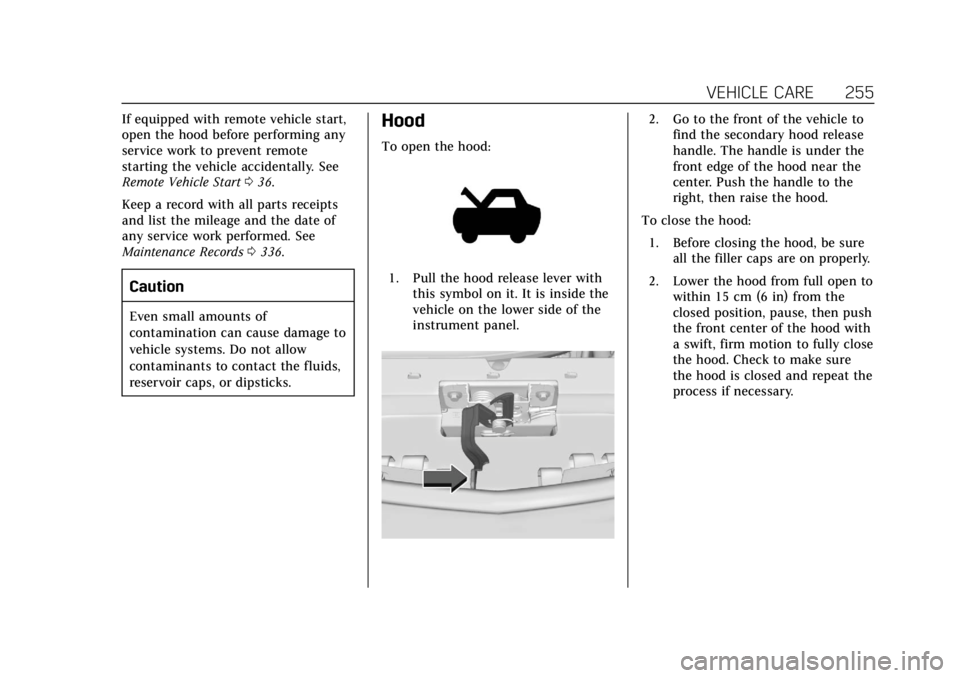
To open the hood:
1. Pull the hood release lever with
this symbol on it. It is inside the
vehicle on the lower side of the
instrument panel.
2. Go to the front of the vehicle tofind the secondary hood release
handle. The handle is under the
front edge of the hood near the
center. Push the handle to the
right, then raise the hood.
To close the hood: 1. Before closing the hood, be sure all the filler caps are on properly.
2. Lower the hood from full open to within 15 cm (6 in) from the
closed position, pause, then push
the front center of the hood with
a swift, firm motion to fully close
the hood. Check to make sure
the hood is closed and repeat the
process if necessary.
Page 282 of 381

Cadillac XT4 Owner Manual (GMNA-Localizing-U.S./Canada/Mexico-
12017481) - 2019 - CRC - 11/5/18
278 VEHICLE CARE
FusesUsage
26 Transmission control module/Ignition
27 Instrument panel body/ Ignition
28 Rear wiper
29 Seat ventilation
30 Malfunction indicator lamp
32 Rear drive control module 1
33 Front heated seat
34 Handsfree/Window switch
35 –
36 Fuel module
39 Massage
40 Steering column lock
41 –
43 Heated steering wheel
44 –
46 Engine control module/ Ignition Fuses
Usage
48 Rear drive control module 2
49 Heating ventilation/Air conditioning blower
motor
50 –
51 –
54 –
55 –
56 Starter motor
57 –
58 –
59 High-beam headlamps
60 –
61 –
62 –
63 –
65 Air conditioning control
67 –
68 –
69 – Fuses
Usage
70 Trailer park lamp
72 Starter pinion
75 Engine control module
76 Powertrain off engine
78 Horn
79 Washer pump
81 Transmission control module/Engine control
module
83 Ignition coil
84 Powertrain on engine
85 Shunt
86 Shunt
87 –
88 Aeroshutter
89 –
92 Trailer stop/Turn right
93 –
95 –
96 –
Page 283 of 381

Cadillac XT4 Owner Manual (GMNA-Localizing-U.S./Canada/Mexico-
12017481) - 2019 - CRC - 11/5/18
VEHICLE CARE 279
FusesUsage
99 –
Relays Usage
4 –
20 Rear defogger
25 Front wiper control
31 Run/Crank
37 Front wiper speed
42 –
64 Starter motor
66 Powertrain
71 Trailer park lamp
73 Air conditioning control
80 Starter pinion
90 –
94 –
98 –Instrument Panel Fuse
Block
The instrument panel fuse block is on
the driver side of the instrument
panel, between the steering wheel and
the door. To access the fuses, remove
the panel, starting at the top. Once
clips are disengaged, the tabs along
the bottom of the door can be
disengaged from the instrument panel
to remove the door.
To reinstall the door, place the bottom
tabs into the slots, and rotate the door
into position, engaging the clips. The vehicle may not be equipped with
all of the fuses, relays, and features
shown.
Page 325 of 381

Cadillac XT4 Owner Manual (GMNA-Localizing-U.S./Canada/Mexico-
12017481) - 2019 - CRC - 11/5/18
VEHICLE CARE 321
colorfastness before using a
commercial upholstery cleaner or spot
lifter. If ring formation occurs, clean
the entire fabric or carpet.
After cleaning, use a paper towel to
blot excess moisture.
Cleaning High Gloss Surfaces
and Vehicle Information and
Radio Displays
Use a microfiber cloth on high gloss
surfaces or vehicle displays. First, use
a soft bristle brush to remove dirt that
can scratch the surface. Then gently
clean by rubbing with a microfiber
cloth. Never use window cleaners or
solvents. Periodically hand wash the
microfiber cloth separately, using mild
soap. Do not use bleach or fabric
softener. Rinse thoroughly and air dry
before next use.
Caution
Do not attach a device with a
suction cup to the display. This may
cause damage and would not be
covered by the vehicle warranty.
Instrument Panel, Leather, Vinyl,
Other Plastic Surfaces, Low
Gloss Paint Surfaces, and
Natural Open Pore Wood
Surfaces
Use a soft microfiber cloth dampened
with water to remove dust and loose
dirt. For a more thorough cleaning,
use a soft microfiber cloth dampened
with a mild soap solution.
Caution
Soaking or saturating leather,
especially perforated leather, as well
as other interior surfaces, may
cause permanent damage. Wipe
excess moisture from these surfaces
after cleaning and allow them to
dry naturally. Never use heat,
steam, or spot removers. Do not use
cleaners that contain silicone or
wax-based products. Cleaners
containing these solvents can
permanently change the appearance
and feel of leather or soft trim, and
are not recommended.Do not use cleaners that increase
gloss, especially on the instrument
panel. Reflected glare can decrease
visibility through the windshield
under certain conditions.
Caution
Use of air fresheners may cause
permanent damage to plastics and
painted surfaces. If an air freshener
comes in contact with any plastic
or painted surface in the vehicle,
blot immediately and clean with a
soft cloth dampened with a mild
soap solution. Damage caused by
air fresheners would not be covered
by the vehicle warranty.
Cargo Cover and
Convenience Net
If equipped, wash with warm water
and mild detergent. Do not use
chlorine bleach. Rinse with cold water,
and then dry completely.
Page 341 of 381

Cadillac XT4 Owner Manual (GMNA-Localizing-U.S./Canada/Mexico-
12017481) - 2019 - CRC - 11/5/18
TECHNICAL DATA 337
Technical Data
Vehicle Identification
Vehicle IdentificationNumber (VIN) . . . . . . . . . . . . . . . . . . . 337
Service Parts Identification Label . . . . . . . . . . . . . . . . . . . . . . . . . . . . . 337
Vehicle Data
Capacities and Specifications . . . . 338
Engine Drive Belt Routing . . . . . . . 339
Vehicle Identification
Vehicle Identification
Number (VIN)
This legal identifier is in the front
corner of the instrument panel, on the
driver side of the vehicle. It can be
seen through the windshield from
outside. The Vehicle Identification
Number (VIN) also appears on the
Vehicle Certification and Service Parts
labels and certificates of title and
registration.
Engine Identification
The eighth character in the VIN is the
engine code. This code identifies the
vehicle's engine, specifications, and
replacement parts. See “EngineSpecifications”
underCapacities and
Specifications 0338 for the vehicle's
engine code.
Service Parts Identification
Label
There may be a label on the inside of
the spare tire compartment that
contains the following information:
. Vehicle Identification
Number (VIN)
. Model designation
. Paint information
. Production options and special
equipment
If there is no label, there is a barcode
on the certification label on the
center (B) pillar to scan for this same
information.
Page 345 of 381
Cadillac XT4 Owner Manual (GMNA-Localizing-U.S./Canada/Mexico-
12017481) - 2019 - CRC - 11/5/18
CUSTOMER INFORMATION 341
STEP TWO :If after contacting a
member of dealership management, it
appears your concern cannot be
resolved by your dealership without
further help, in the U.S., call the
Cadillac Customer Assistance Center
at 1-800–458–8006. In Canada, call
the Canadian Cadillac Customer Care
Centre at 1-888-446-2000.
We encourage you to call the toll-free
number in order to give your inquiry
prompt attention. Have the following
information available to give the
Customer Assistance representative:
. Vehicle Identification
Number (VIN). This is available
from the vehicle registration or
title, or the plate at the top left of
the instrument panel and visible
through the windshield.
. Dealership name and location.
. Vehicle delivery date and present
mileage.
When contacting Cadillac, remember
that your concern will likely be
resolved at a dealer's facility. That is
why we suggest following Step One
first. STEP THREE
—U.S. Owners : Both
General Motors and your dealer are
committed to making sure you are
completely satisfied with the new
vehicle. However, if you continue to
remain unsatisfied after following the
procedure outlined in Steps One and
Two, you can file with the Better
Business Bureau (BBB) Auto Line
Program to enforce your rights.
The BBB Auto Line Program is an
out-of-court program administered by
the Council of Better Business Bureaus
to settle automotive disputes
regarding vehicle repairs or the
interpretation of the New Vehicle
Limited Warranty. Although you may
be required to resort to this informal
dispute resolution program prior to
filing a court action, use of the
program is free of charge and your
case will generally be heard within
40 days. If you do not agree with the
decision given in your case, you may
reject it and proceed with any other
venue for relief available to you. You may contact the BBB Auto Line
Program using the toll-free telephone
number or write them at the following
address:
BBB Auto Line Program
Council of Better Business Bureaus,
Inc.
3033 Wilson Boulevard
Suite 600
Arlington, VA 22201
Telephone: 1-800-955-5100
http://www.bbb.org/council/
programs-services/
dispute-handling-and-resolution/
bbb-auto-line
This program is available in all
50 states and the District of Columbia.
Eligibility is limited by vehicle age,
mileage, and other factors. General
Motors reserves the right to change
eligibility limitations and/or
discontinue its participation in this
program.