brake service CADILLAC XT4 2019 Owner's Manual
[x] Cancel search | Manufacturer: CADILLAC, Model Year: 2019, Model line: XT4, Model: CADILLAC XT4 2019Pages: 381, PDF Size: 6.4 MB
Page 90 of 381
Cadillac XT4 Owner Manual (GMNA-Localizing-U.S./Canada/Mexico-
12017481) - 2019 - CRC - 11/5/18
86 SEATS AND RESTRAINTS
{Warning
When an airbag inflates, there may
be dust in the air. This dust could
cause breathing problems for
people with a history of asthma or
other breathing trouble. To avoid
this, everyone in the vehicle should
get out as soon as it is safe to do
so. If you have breathing problems
but cannot get out of the vehicle
after an airbag inflates, then get
fresh air by opening a window or a
door. If you experience breathing
problems following an airbag
deployment, you should seek
medical attention.
The vehicle has a feature that may
automatically unlock the doors, turn
on the interior lamps and hazard
warning flashers, and shut off the fuel
system after the airbags inflate. The
feature may also activate, without
airbag inflation, after an event that
exceeds a predetermined threshold.
After turning the ignition off and then
on again, the fuel system will return to normal operation; the doors can be
locked, the interior lamps can be
turned off, and the hazard warning
flashers can be turned off using the
controls for those features. If any of
these systems are damaged in the
crash they may not operate as normal.
{Warning
A crash severe enough to inflate the
airbags may have also damaged
important functions in the vehicle,
such as the fuel system, brake and
steering systems, etc. Even if the
vehicle appears to be drivable after
a moderate crash, there may be
concealed damage that could make
it difficult to safely operate the
vehicle.
Use caution if you should attempt
to restart the engine after a crash
has occurred.
In many crashes severe enough to
inflate the airbag, windshields are
broken by vehicle deformation. Additional windshield breakage may
also occur from the front outboard
passenger airbag.
.
Airbags are designed to inflate
only once. After an airbag inflates,
you will need some new parts for
the airbag system. If you do not
get them, the airbag system will
not be there to help protect you in
another crash. A new system will
include airbag modules and
possibly other parts. The service
manual for the vehicle covers the
need to replace other parts.
. The vehicle has a crash sensing
and diagnostic module which
records information after a crash.
See Vehicle Data Recording and
Privacy 0352 and Event Data
Recorders 0352.
. Let only qualified technicians
work on the airbag systems.
Improper service can mean that
an airbag system will not work
properly. See your dealer for
service.
Page 120 of 381
Cadillac XT4 Owner Manual (GMNA-Localizing-U.S./Canada/Mexico-
12017481) - 2019 - CRC - 11/5/18
116 INSTRUMENTS AND CONTROLS
Instruments and
Controls
Controls
Steering Wheel Adjustment . . . . . 117
Steering Wheel Controls . . . . . . . . . 117
Heated Steering Wheel . . . . . . . . . . 117
Horn . . . . . . . . . . . . . . . . . . . . . . . . . . . . . . . 118
Windshield Wiper/Washer . . . . . . . 118
Rear Window Wiper/Washer . . . . 120
Compass . . . . . . . . . . . . . . . . . . . . . . . . . . 121
Clock . . . . . . . . . . . . . . . . . . . . . . . . . . . . . . 121
Power Outlets . . . . . . . . . . . . . . . . . . . . . 121
Wireless Charging . . . . . . . . . . . . . . . . 122
Cigarette Lighter . . . . . . . . . . . . . . . . . . 124
Ashtrays . . . . . . . . . . . . . . . . . . . . . . . . . . 125
Warning Lights, Gauges, and
Indicators
Warning Lights, Gauges, andIndicators . . . . . . . . . . . . . . . . . . . . . . . 125
Instrument Cluster . . . . . . . . . . . . . . . 126
Speedometer . . . . . . . . . . . . . . . . . . . . . . 129
Odometer . . . . . . . . . . . . . . . . . . . . . . . . . 129
Trip Odometer . . . . . . . . . . . . . . . . . . . . 129
Tachometer . . . . . . . . . . . . . . . . . . . . . . . 129
Fuel Gauge . . . . . . . . . . . . . . . . . . . . . . . . 129 Engine Coolant Temperature
Gauge . . . . . . . . . . . . . . . . . . . . . . . . . . . . 130
Seat Belt Reminders . . . . . . . . . . . . . . 131
Airbag Readiness Light . . . . . . . . . . 131
Passenger Airbag Status Indicator . . . . . . . . . . . . . . . . . . . . . . . . . 132
Charging System Light . . . . . . . . . . . 133
Malfunction Indicator Lamp (Check Engine Light) . . . . . . . . . . . 133
Brake System Warning Light . . . . 135
Electric Parking Brake Light . . . . . 136
Service Electric Parking Brake Light . . . . . . . . . . . . . . . . . . . . . . . . . . . . . 136
Antilock Brake System (ABS) Warning Light . . . . . . . . . . . . . . . . . . 136
All-Wheel-Drive Light . . . . . . . . . . . . 137
Lane Keep Assist (LKA) Light . . . 137
Vehicle Ahead Indicator . . . . . . . . . 137
Pedestrian Ahead Indicator . . . . . . 137
Traction Off Light . . . . . . . . . . . . . . . . 138
StabiliTrak OFF Light . . . . . . . . . . . . 138
Traction Control System (TCS)/ StabiliTrak Light . . . . . . . . . . . . . . . . 138
Engine Coolant Temperature Warning Light . . . . . . . . . . . . . . . . . . 139
Driver Mode Control Light . . . . . . . 139
Tire Pressure Light . . . . . . . . . . . . . . . 139
Engine Oil Pressure Light . . . . . . . . 140
Low Fuel Warning Light . . . . . . . . . 140
Security Light . . . . . . . . . . . . . . . . . . . . . 140 High-Beam On Light . . . . . . . . . . . . . 141
Lamps On Reminder . . . . . . . . . . . . . 141
Cruise Control Light . . . . . . . . . . . . . . 141
Door Ajar Light . . . . . . . . . . . . . . . . . . . 142
Information Displays
Driver Information
Center (DIC) . . . . . . . . . . . . . . . . . . . . . 142
Head-Up Display (HUD) . . . . . . . . . 145
Vehicle Messages
Vehicle Messages . . . . . . . . . . . . . . . . . 148
Engine Power Messages . . . . . . . . . . 148
Vehicle Speed Messages . . . . . . . . . 149
Vehicle Personalization
Vehicle Personalization . . . . . . . . . . 149
Universal Remote System
Universal Remote System . . . . . . . . 154
Universal Remote System Programming . . . . . . . . . . . . . . . . . . . 154
Universal Remote System Operation . . . . . . . . . . . . . . . . . . . . . . . . 156
Page 139 of 381
Cadillac XT4 Owner Manual (GMNA-Localizing-U.S./Canada/Mexico-
12017481) - 2019 - CRC - 11/5/18
INSTRUMENTS AND CONTROLS 135
12-volt battery has recently been
replaced or run down, or if the
vehicle has been recently serviced.
See your dealer if the vehicle will not
pass or cannot be made ready for
the test.
Brake System Warning
Light
The vehicle brake system consists of
electronically controlled hydraulic
brake circuits. If a fault is detected,
valves are adjusted to allow the brake
pedal to push brake fluid directly into
the hydraulic brake circuits. When a
fault occurs, the brake system warning
light comes on, and Driver
Information Center (DIC) messages
may display. Vehicle speed may also
be limited and the amount of brake
pedal force applied may need to
increase. Have the vehicle brake
system serviced as soon as possible.
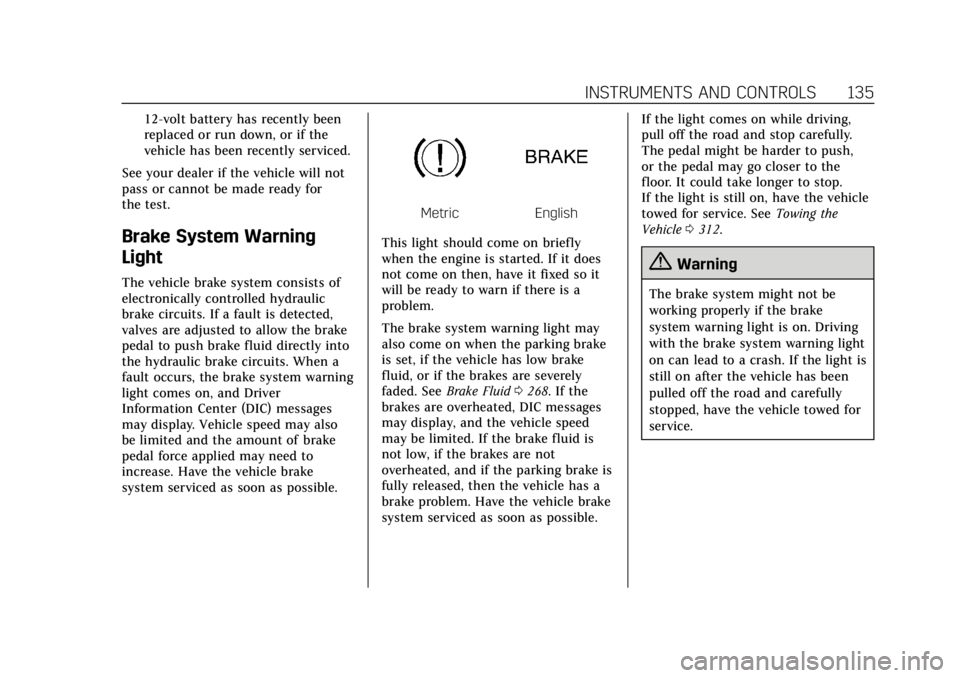
MetricEnglish
This light should come on briefly
when the engine is started. If it does
not come on then, have it fixed so it
will be ready to warn if there is a
problem.
The brake system warning light may
also come on when the parking brake
is set, if the vehicle has low brake
fluid, or if the brakes are severely
faded. See Brake Fluid 0268. If the
brakes are overheated, DIC messages
may display, and the vehicle speed
may be limited. If the brake fluid is
not low, if the brakes are not
overheated, and if the parking brake is
fully released, then the vehicle has a
brake problem. Have the vehicle brake
system serviced as soon as possible. If the light comes on while driving,
pull off the road and stop carefully.
The pedal might be harder to push,
or the pedal may go closer to the
floor. It could take longer to stop.
If the light is still on, have the vehicle
towed for service. See
Towing the
Vehicle 0312.
{Warning
The brake system might not be
working properly if the brake
system warning light is on. Driving
with the brake system warning light
on can lead to a crash. If the light is
still on after the vehicle has been
pulled off the road and carefully
stopped, have the vehicle towed for
service.
Page 140 of 381
Cadillac XT4 Owner Manual (GMNA-Localizing-U.S./Canada/Mexico-
12017481) - 2019 - CRC - 11/5/18
136 INSTRUMENTS AND CONTROLS
Electric Parking Brake
Light
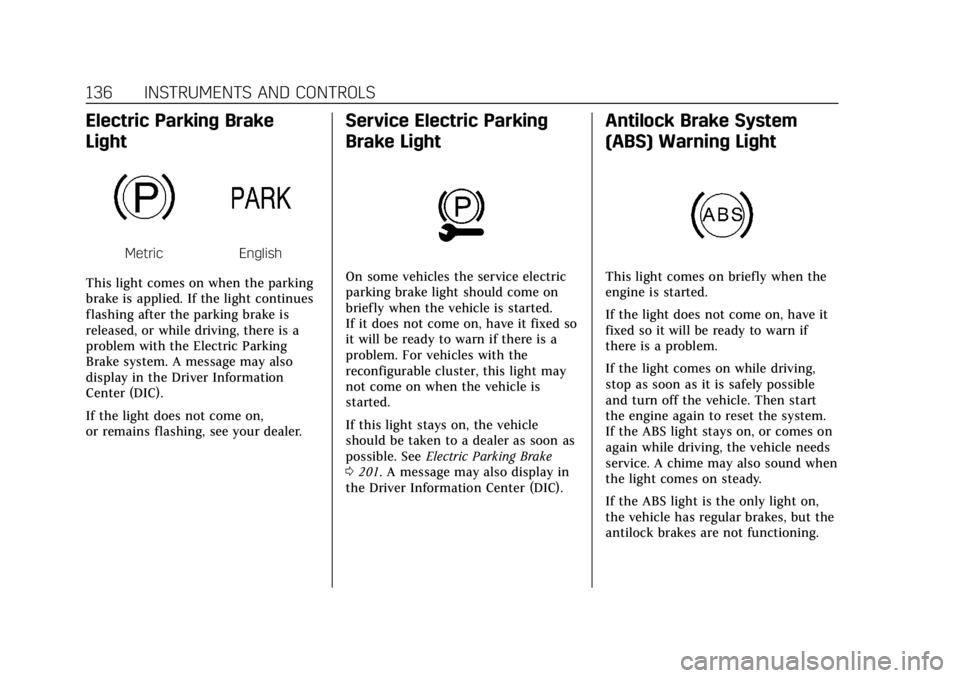
MetricEnglish
This light comes on when the parking
brake is applied. If the light continues
flashing after the parking brake is
released, or while driving, there is a
problem with the Electric Parking
Brake system. A message may also
display in the Driver Information
Center (DIC).
If the light does not come on,
or remains flashing, see your dealer.
Service Electric Parking
Brake Light
On some vehicles the service electric
parking brake light should come on
briefly when the vehicle is started.
If it does not come on, have it fixed so
it will be ready to warn if there is a
problem. For vehicles with the
reconfigurable cluster, this light may
not come on when the vehicle is
started.
If this light stays on, the vehicle
should be taken to a dealer as soon as
possible. See Electric Parking Brake
0 201. A message may also display in
the Driver Information Center (DIC).
Antilock Brake System
(ABS) Warning Light
This light comes on briefly when the
engine is started.
If the light does not come on, have it
fixed so it will be ready to warn if
there is a problem.
If the light comes on while driving,
stop as soon as it is safely possible
and turn off the vehicle. Then start
the engine again to reset the system.
If the ABS light stays on, or comes on
again while driving, the vehicle needs
service. A chime may also sound when
the light comes on steady.
If the ABS light is the only light on,
the vehicle has regular brakes, but the
antilock brakes are not functioning.
Page 141 of 381
Cadillac XT4 Owner Manual (GMNA-Localizing-U.S./Canada/Mexico-
12017481) - 2019 - CRC - 11/5/18
INSTRUMENTS AND CONTROLS 137
If both the ABS and the brake system
warning light are on, the vehicle's
antilock brakes are not functioning
and there is a problem with the
regular brakes. See your dealer for
service.
SeeBrake System Warning Light 0135.
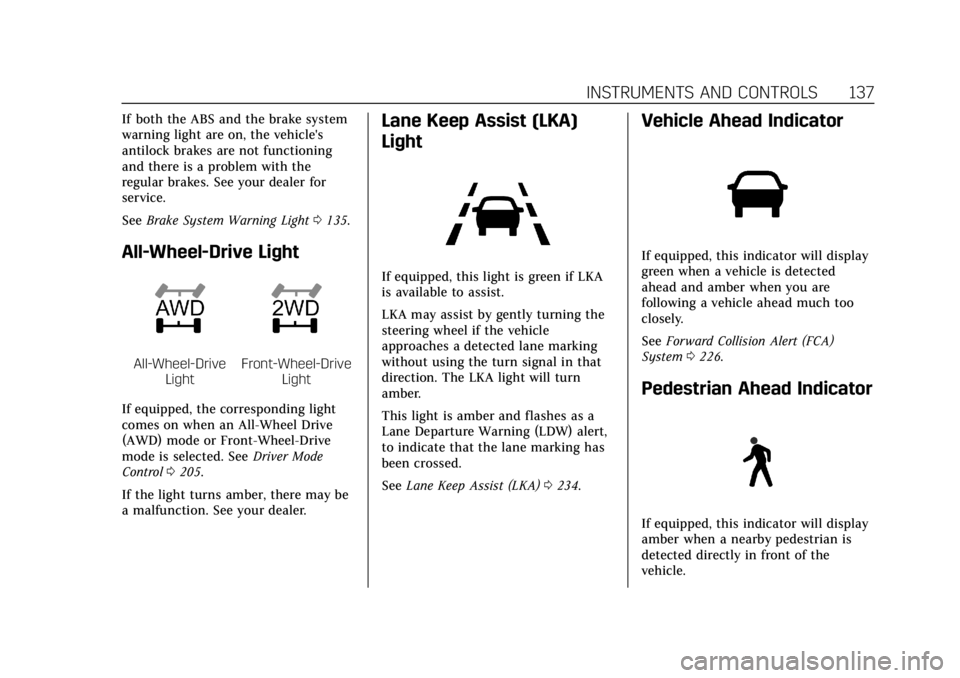
All-Wheel-Drive Light
All-Wheel-Drive
LightFront-Wheel-Drive Light
If equipped, the corresponding light
comes on when an All-Wheel Drive
(AWD) mode or Front-Wheel-Drive
mode is selected. See Driver Mode
Control 0205.
If the light turns amber, there may be
a malfunction. See your dealer.
Lane Keep Assist (LKA)
Light
If equipped, this light is green if LKA
is available to assist.
LKA may assist by gently turning the
steering wheel if the vehicle
approaches a detected lane marking
without using the turn signal in that
direction. The LKA light will turn
amber.
This light is amber and flashes as a
Lane Departure Warning (LDW) alert,
to indicate that the lane marking has
been crossed.
See Lane Keep Assist (LKA) 0234.
Vehicle Ahead Indicator
If equipped, this indicator will display
green when a vehicle is detected
ahead and amber when you are
following a vehicle ahead much too
closely.
See Forward Collision Alert (FCA)
System 0226.
Pedestrian Ahead Indicator
If equipped, this indicator will display
amber when a nearby pedestrian is
detected directly in front of the
vehicle.
Page 152 of 381
Cadillac XT4 Owner Manual (GMNA-Localizing-U.S./Canada/Mexico-
12017481) - 2019 - CRC - 11/5/18
148 INSTRUMENTS AND CONTROLS
HUD Troubleshooting
If you cannot see the HUD image
when the ignition is on, check that:
.Nothing is covering the HUD lens.
. The HUD brightness setting is not
too dim or too bright.
. The HUD is adjusted to the proper
height.
. Polarized sunglasses are not worn.
. The windshield and HUD lens are
clean.
If the HUD image is not correct,
contact your dealer.
The windshield is part of the HUD
system. See Windshield Replacement
0 272.
Vehicle Messages
Messages displayed on the Driver
Information Center (DIC) indicate the
status of the vehicle or some action
that may be needed to correct a
condition. Multiple messages may
appear one after another.
The messages that do not require
immediate action can be
acknowledged and cleared by pressing
the thumbwheel. The messages that
require immediate action cannot be
cleared until that action is performed.
All messages should be taken
seriously; clearing the message does
not correct the problem.
If a SERVICE message appears, see
your dealer.
Follow the instructions given in the
messages. The system displays
messages regarding the following
topics:
.
Service Messages
. Fluid Levels
. Vehicle Security
. Brakes .
Steering
. Ride Control Systems
. Driver Assistance Systems
. Cruise Control
. Lighting and Bulb Replacement
. Wiper/Washer Systems
. Doors and Windows
. Seat Belts
. Airbag Systems
. Engine and Transmission
. Tire Pressure
. Battery
Engine Power Messages
ENGINE POWER IS REDUCED
This message displays when the
vehicle's propulsion power is reduced.
A reduction in propulsion power can
affect the vehicle's ability to
accelerate. If this message is on, but
there is no observed reduction in
performance, proceed to your
destination. The performance may be
reduced the next time the vehicle is
Page 182 of 381
Cadillac XT4 Owner Manual (GMNA-Localizing-U.S./Canada/Mexico-
12017481) - 2019 - CRC - 11/5/18
178 DRIVING AND OPERATING
Hill and Mountain Roads
Driving on steep hills or through
mountains is different than driving on
flat or rolling terrain. Tips include:
.Keep the vehicle serviced and in
good shape.
. Check all fluid levels and brakes,
tires, cooling system, and
transmission.
. Shift to a lower gear when going
down steep or long hills.
{Warning
Using the brakes to slow the vehicle
on a long downhill slope can cause
brake overheating, can reduce brake
performance, and could result in a
loss of braking. Shift the
transmission to a lower gear to let
the engine assist the brakes on a
steep downhill slope.
{Warning
Coasting downhill in N (Neutral) or
with the ignition off is dangerous.
This can cause overheating of the
brakes and loss of steering assist.
Always have the engine running
and the vehicle in gear.
. Drive at speeds that keep the
vehicle in its own lane. Do not
swing wide or cross the
center line.
. Be alert on top of hills; something
could be in your lane (e.g., stalled
car, crash).
. Pay attention to special road signs
(e.g., falling rocks area, winding
roads, long grades, passing or
no-passing zones) and take
appropriate action.
. Select All-Wheel Drive (AWD)
Mode. See Driver Mode Control
0 205 and All-Wheel Drive 0200.
Winter Driving
Driving on Snow or Ice
Snow or ice between the tires and the
road creates less traction or grip, so
drive carefully. Wet ice can occur at
about 0 °C (32 °F) when freezing rain
begins to fall. Avoid driving on wet ice
or in freezing rain until roads can be
treated.
For Slippery Road Driving:
.
Accelerate gently. Accelerating too
quickly causes the wheels to spin
and makes the surface under the
tires slick.
. Verify Traction Control is on. See
Traction Control/Electronic Stability
Control 0203.
. Antilock Brake System (ABS)
improves vehicle stability during
hard stops, but the brakes should
be applied sooner than when on
dry pavement. See Antilock Brake
System (ABS) 0200.
. Allow greater following distance
and watch for slippery spots. Icy
patches can occur on otherwise
Page 190 of 381
Cadillac XT4 Owner Manual (GMNA-Localizing-U.S./Canada/Mexico-
12017481) - 2019 - CRC - 11/5/18
186 DRIVING AND OPERATING
continue until the engine starts. The
ignition will then remain on. See
Starting the Engine0186.
Service Mode
This mode is available to verify the
proper operation of the malfunction
indicator lamp as may be required for
emissions inspection purposes and for
service and diagnostics. See Automatic
Transmission 0194.
With the vehicle off, and the brake
pedal not applied, pressing and
holding ENGINE START/STOP for
more than five seconds will place the
vehicle in Service Mode. The
instruments and audio systems will
operate as they do in ON/RUN, but
the vehicle will not be able to be
driven. The engine will not start in
Service Mode. Press ENGINE START/
STOP again to turn the vehicle off.
Starting the Engine
Place the transmission in the proper
gear, P (Park) or N (Neutral). To restart
the engine when the vehicle is already
moving, use N (Neutral).
Caution
Do not try to shift to P (Park) if the
vehicle is moving. If you do, you
could damage the transmission.
Shift to P (Park) only when the
vehicle is stopped.
Caution
If you add electrical parts or
accessories, you could change the
way the engine operates. Any
resulting damage would not be
covered by the vehicle warranty. See
Add-On Electrical Equipment 0250.
To start the vehicle: 1. With the Keyless Access system, the RKE transmitter must be in
the vehicle. Press ENGINE
START/STOP with the brake
pedal applied. When the engine
begins cranking, let go of the
button. The idle speed will go down as the engine warms up.
Do not race the engine
immediately after starting it.
If the RKE transmitter is not in
the vehicle, if there is
interference, or if the RKE
battery is low, a Driver
Information Center (DIC)
message will display. See
Remote
Keyless Entry (RKE) System
Operation 029.Caution
Cranking the engine for long
periods of time, by pressing
ENGINE START/STOP immediately
after cranking has ended, can
overheat and damage the cranking
motor, and drain the battery. Wait
at least 15 seconds between each
try, to let the cranking motor
cool down.
2. If the engine does not start after five to 10 seconds, especially in
very cold weather (below −18 °C
or 0 °F), it could be flooded with
too much gasoline. Try pushing
Page 195 of 381
Cadillac XT4 Owner Manual (GMNA-Localizing-U.S./Canada/Mexico-
12017481) - 2019 - CRC - 11/5/18
DRIVING AND OPERATING 191
5. The P indicator will turn whiteand the gear indicator on the
shift lever will turn red when the
vehicle is no longer in P (Park).
6. After releasing the shift lever, it will return to the center position.
If the vehicle cannot shift from
P (Park), a Driver Information
Center (DIC) message will be
displayed. See your dealer for service.
Manual Park Release
{Warning
The transmission will be placed in
N (Neutral) when the manual park
release is pulled. The vehicle can
roll and you or others could be
injured. Ensure the vehicle is on
level ground.
Caution
The manual park release is not
intended to be used for towing.
Damage may result from using the
manual park release in this way.
The repairs would not be covered
by the vehicle warranty.
The manual park release can be used
to shift the vehicle into N (Neutral)
when the engine is not running.
Pulling the manual park release while
the vehicle is on or turning the
ignition on while the manual park
release is pulled, will cause a DIC
message to display.
To place the vehicle in N (Neutral)
using the manual park release: 1. Ensure the vehicle is on level ground and set the parking
brake.
2. Turn the vehicle off.
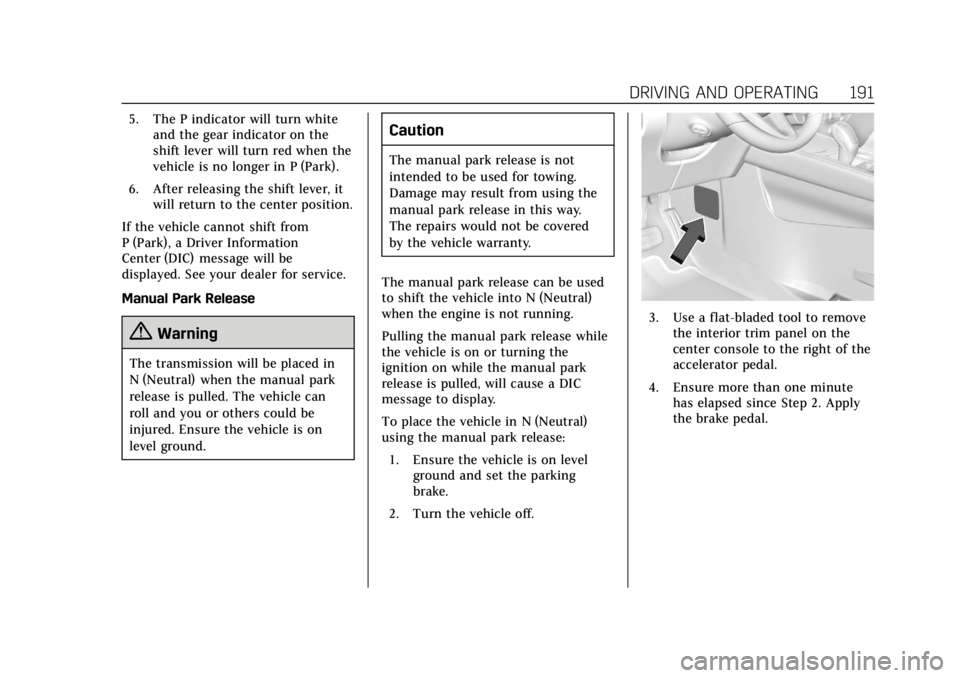
3. Use a flat-bladed tool to remove the interior trim panel on the
center console to the right of the
accelerator pedal.
4. Ensure more than one minute has elapsed since Step 2. Apply
the brake pedal.
Page 199 of 381

Cadillac XT4 Owner Manual (GMNA-Localizing-U.S./Canada/Mexico-
12017481) - 2019 - CRC - 11/5/18
DRIVING AND OPERATING 195
{Warning
It is dangerous to get out of the
vehicle if the transmission is not in
P (Park) with the parking brake set.
The vehicle can roll.
Do not leave the vehicle when the
engine is running. If the engine has
been left running, the vehicle can
move suddenly. You or others could
be injured. To be sure the vehicle
will not move, even when on fairly
level ground, always set the parking
brake and place the transmission
into P (Park). SeeShifting Into Park
0 190, Driving Characteristics and
Towing Tips 0240 and Electric
Parking Brake 0201.
This vehicle is equipped with an
electronically controlled transmission.
The shift lock release button is
designed to prevent inadvertent
shifting out of P (Park) unless the
ignition is on, the brake pedal is
applied, and the shift lock release
button is pressed.
When the vehicle is stopped, press
ENGINE START/STOP to turn off the
vehicle. The transmission will shift to
P (Park) automatically unless the
vehicle is in N (Neutral), See “Car
Wash Mode ”following. The vehicle will not shift into P (Park)
if it is moving too fast. Stop the
vehicle and shift into P (Park).
To shift in and out of P (Park), see
Shifting Into Park
0190 and Shifting
out of Park 0190.
Service Shift Lever Message
If the message SERVICE SHIFTER SEE
OWNER’S MANUAL appears in the
Driver Information Center (DIC), the
shift lever needs service. Have the
vehicle serviced as soon as possible.
If the vehicle is automatically shifting
into P (Park), check to see if the
P (Park) button on top of the shift
lever is stuck. To operate the vehicle,
hold the shift lever in the desired gear,
R (Reverse) or D (Drive), until vehicle
speed exceeds 15 km/h (10 mph), then
release the shift lever.
R : Use this gear to back up.
If the vehicle is shifted from either
R (Reverse) to D (Drive) or M (Manual
Mode), or M (Manual Mode) or
D (Drive) to R (Reverse) while the
speed is too high, the vehicle will shift
to N (Neutral). Reduce the vehicle
speed and try the shift again.