driver seat adjustment CADILLAC XT4 2019 Owner's Manual
[x] Cancel search | Manufacturer: CADILLAC, Model Year: 2019, Model line: XT4, Model: CADILLAC XT4 2019Pages: 381, PDF Size: 6.4 MB
Page 9 of 381
Cadillac XT4 Owner Manual (GMNA-Localizing-U.S./Canada/Mexico-
12017481) - 2019 - CRC - 11/5/18
IN BRIEF 5
In Brief
Instrument Panel
Instrument Panel Overview . . . . . . . . . 6
Initial Drive Information
Initial Drive Information . . . . . . . . . . . 8
Stop/Start System . . . . . . . . . . . . . . . . . . . 8
Remote Keyless Entry (RKE)System . . . . . . . . . . . . . . . . . . . . . . . . . . . . . 8
Remote Vehicle Start . . . . . . . . . . . . . . . 9
Door Locks . . . . . . . . . . . . . . . . . . . . . . . . . . 9
Liftgate . . . . . . . . . . . . . . . . . . . . . . . . . . . . . 10
Windows . . . . . . . . . . . . . . . . . . . . . . . . . . . 10
Seat Adjustment . . . . . . . . . . . . . . . . . . . 11
Memory Features . . . . . . . . . . . . . . . . . . 11
Heated and Ventilated Seats . . . . . . 12
Head Restraint Adjustment . . . . . . . 12
Seat Belts . . . . . . . . . . . . . . . . . . . . . . . . . . . 13
Passenger Sensing System . . . . . . . . 13
Mirror Adjustment . . . . . . . . . . . . . . . . 13
Steering Wheel Adjustment . . . . . . . 14
Interior Lighting . . . . . . . . . . . . . . . . . . . 15
Exterior Lighting . . . . . . . . . . . . . . . . . . . 15
Windshield Wiper/Washer . . . . . . . . 16
Climate Controls . . . . . . . . . . . . . . . . . . . 18
Transmission . . . . . . . . . . . . . . . . . . . . . . . 19
Vehicle Features
Infotainment System . . . . . . . . . . . . . . 19
Steering Wheel Controls . . . . . . . . . . 19
Cruise Control . . . . . . . . . . . . . . . . . . . . . 19
Driver Information Center (DIC) . . . . . . . . . . . . . . . . . . . . . . 20
Forward Collision Alert (FCA) System . . . . . . . . . . . . . . . . . . . . . . . . . . . . 20
Forward Automatic Braking (FAB) . . . . . . . . . . . . . . . . . . . . 20
Front Pedestrian Braking (FPB) System . . . . . . . . . . . . . . . . . . . . . . . . . . . . 21
Lane Keep Assist (LKA) . . . . . . . . . . . 21
Lane Change Alert (LCA) . . . . . . . . . . 21
Surround Vision . . . . . . . . . . . . . . . . . . . 21
Rear Vision Camera (RVC) . . . . . . . . 22
Rear Cross Traffic Alert (RCTA) System . . . . . . . . . . . . . . . . . . . . . . . . . . . . 22
Park Assist . . . . . . . . . . . . . . . . . . . . . . . . . 22
Automatic Parking Assist (APA) . . . . . . . . . . . . . . . . . . . . . . 22
Reverse Automatic Braking (RAB) . . . . . . . . . . . . . . . . . . . . 22
Power Outlets . . . . . . . . . . . . . . . . . . . . . . 22
Universal Remote System . . . . . . . . . 23
Sunroof . . . . . . . . . . . . . . . . . . . . . . . . . . . . . 23
Performance and Maintenance
Traction Control/Electronic Stability Control . . . . . . . . . . . . . . . . . . 24
Tire Pressure Monitor . . . . . . . . . . . . . 25
Fuel . . . . . . . . . . . . . . . . . . . . . . . . . . . . . . . . . 25
E85 or FlexFuel . . . . . . . . . . . . . . . . . . . . 26
Engine Oil Life System . . . . . . . . . . . . 26
Driving for Better Fuel Economy . . . . . . . . . . . . . . . . . . . . . . . . . . 26
Roadside Service . . . . . . . . . . . . . . . . . . . 27
Page 11 of 381

Cadillac XT4 Owner Manual (GMNA-Localizing-U.S./Canada/Mexico-
12017481) - 2019 - CRC - 11/5/18
IN BRIEF 7
1.Air Vents 0170.
2. Exterior Lamp Controls 0158.
Turn Signal Lever. See Turn and
Lane-Change Signals 0161.
IntelliBeam System Button (If
Equipped). See Exterior Lamp
Controls 0158.
3. Tap Shift Controls. See Manual
Mode 0198 (If Equipped).
4. Instrument Cluster 0126.
Driver Information Center (DIC)
Display. See Driver Information
Center (DIC) 0142.
5. Windshield Wiper/Washer 0118.
Rear Window Wiper/Washer
0 120.
6. ENGINE START/STOP Button. See Ignition Positions 0184.
7. Light Sensor. See Automatic
Headlamp System 0160. 8. Home Button. See the
infotainment manual and
Infotainment 0165.
9. Dual Automatic Climate Control
System 0166.
10. Heated and Ventilated Front Seats
069 (If Equipped).
11. Lane Keep Assist (LKA) 0234 (If
Equipped).
12. Power Outlets 0121.
13. MODE Switch. See Driver Mode
Control 0205.
14. Stop/Start Disable Switch. See Stop/Start System 0187.
15. Traction Control/Electronic
Stability Control 0203.
16. Hazard Warning Flashers 0161.
17. USB Port. See the infotainment manual.
Auxiliary Input Jack. See the
infotainment manual. 18. Infotainment Controls. See the
infotainment manual.
19. Shift Lever. See Automatic
Transmission 0194.
20. Park Assist Button. See Assistance Systems for Parking or
Backing 0219.
Automatic Parking Assist (APA)
Button. See Assistance Systems
for Parking or Backing 0219.
21. Steering Wheel Controls 0117.
Driver Information Center (DIC)
Controls. See Driver Information
Center (DIC) 0142.
22. Horn 0118.
23. Steering Wheel Adjustment 0117
(Out of View).
Page 15 of 381

Cadillac XT4 Owner Manual (GMNA-Localizing-U.S./Canada/Mexico-
12017481) - 2019 - CRC - 11/5/18
IN BRIEF 11
The windows may be temporarily
disabled if they are used repeatedly
within a short time.
SeePower Windows 057
Seat Adjustment
Power Seats
.
Move the seat forward or rearward
by sliding the control forward or
rearward.
. Raise or lower the front part of the
seat cushion by moving the front
of the control up or down. .
Raise or lower the entire seat by
moving the rear of the control up
or down.
See Power Seat Adjustment 064.
Reclining Seatbacks
. Tilt the top of the control
rearward to recline.
. Tilt the top of the control forward
to raise.
See Reclining Seatbacks 065.
Memory Features
If equipped, memory seats allow two
drivers to save and recall their unique
seat positions for driving the vehicle,
and a shared exit position for getting
out of the vehicle. Other feature
positions may also be saved, such as
power mirrors and power steering
wheel, if equipped. Memory positions
are linked to RKE transmitter 1 or 2
for automatic memory recalls.
Before saving, adjust all available
memory feature positions. Turn the
ignition on and then press and release
SET; a beep will sound. Then
immediately press and hold 1, 2,
Page 16 of 381
Cadillac XT4 Owner Manual (GMNA-Localizing-U.S./Canada/Mexico-
12017481) - 2019 - CRC - 11/5/18
12 IN BRIEF
orB(Exit) until two beeps sound.
To manually recall these positions,
press and hold 1, 2, or
Buntil the
saved position is reached.
When Seat Entry Memory is enabled
in vehicle personalization, positions
previously saved to memory buttons
1 and 2 are recalled when the ignition
is changed from off to on or ACC/
ACCESSORY.
When Seat Exit Memory is enabled in
vehicle personalization, the feature
automatically recalls the previously
saved exit position when exiting the
vehicle.
Memory adjustments may not be
available upon delivery or after service
until steps in “Saving Memory
Positions” section are performed. See
Memory Seats 066.
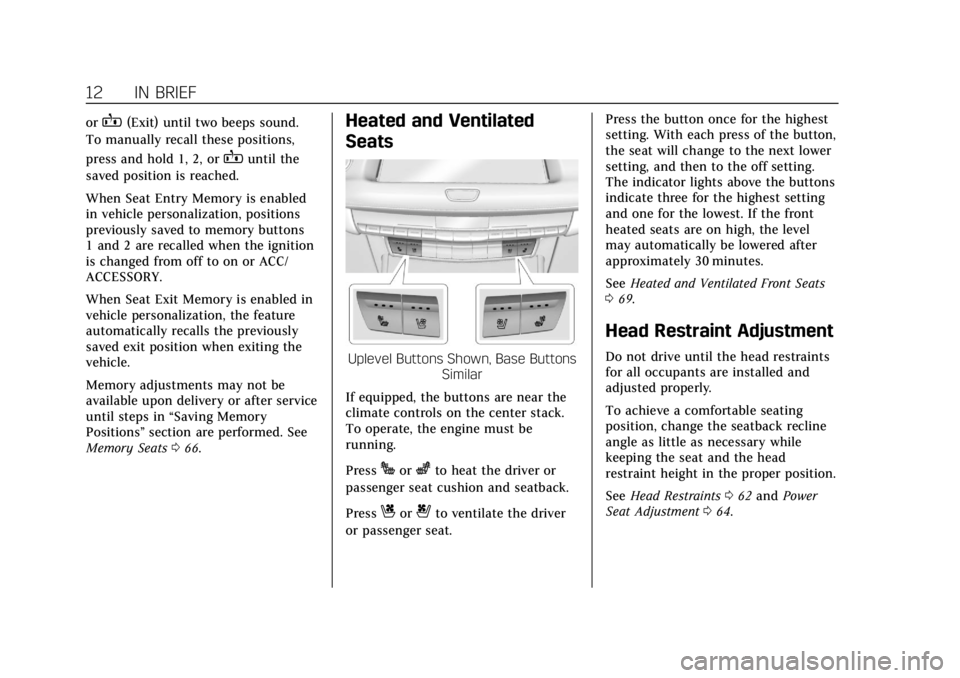
Heated and Ventilated
Seats
Uplevel Buttons Shown, Base Buttons
Similar
If equipped, the buttons are near the
climate controls on the center stack.
To operate, the engine must be
running.
Press
Jorzto heat the driver or
passenger seat cushion and seatback.
Press
Cor{to ventilate the driver
or passenger seat. Press the button once for the highest
setting. With each press of the button,
the seat will change to the next lower
setting, and then to the off setting.
The indicator lights above the buttons
indicate three for the highest setting
and one for the lowest. If the front
heated seats are on high, the level
may automatically be lowered after
approximately 30 minutes.
See
Heated and Ventilated Front Seats
0 69.
Head Restraint Adjustment
Do not drive until the head restraints
for all occupants are installed and
adjusted properly.
To achieve a comfortable seating
position, change the seatback recline
angle as little as necessary while
keeping the seat and the head
restraint height in the proper position.
See Head Restraints 062 and Power
Seat Adjustment 064.
Page 17 of 381
Cadillac XT4 Owner Manual (GMNA-Localizing-U.S./Canada/Mexico-
12017481) - 2019 - CRC - 11/5/18
IN BRIEF 13
Seat Belts
Refer to the following sections for
important information on how to use
seat belts properly:
.Seat Belts 073
. How to Wear Seat Belts Properly
074
. Lap-Shoulder Belt 076
. Lower Anchors and Tethers for
Children (LATCH System) 099
Passenger Sensing System
The passenger sensing system turns
off the front outboard passenger
frontal airbag and knee airbag under
certain conditions. No other airbag is
affected by the passenger sensing
system. See Passenger Sensing System
0 87.
The passenger airbag status indicator
will light on the overhead console
when the vehicle is started. See
Passenger Airbag Status Indicator
0 132.
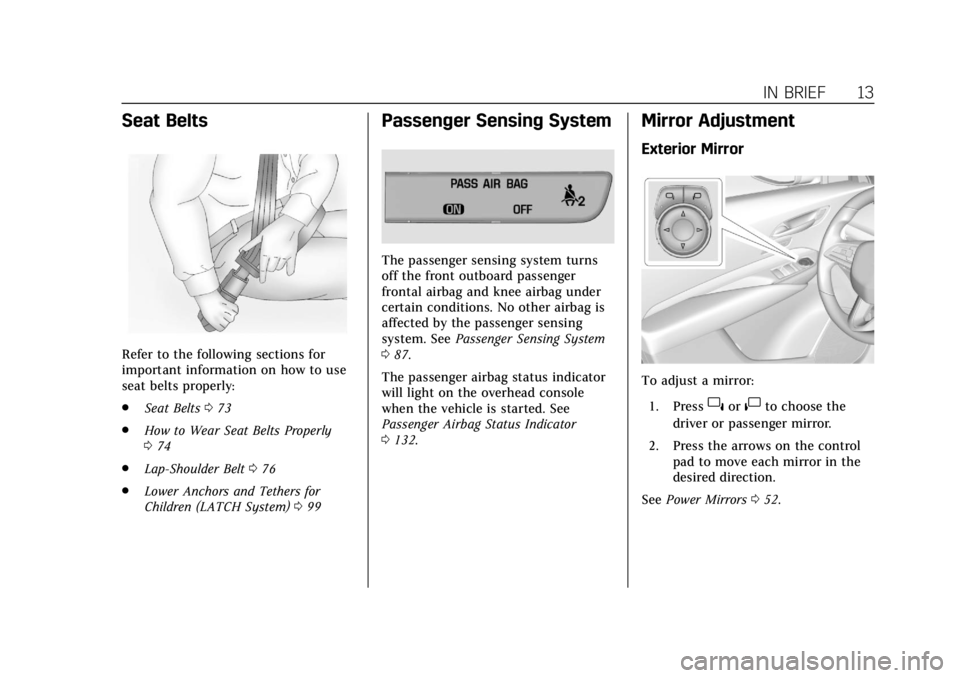
Mirror Adjustment
Exterior Mirror
To adjust a mirror:
1. Press
}or|to choose the
driver or passenger mirror.
2. Press the arrows on the control pad to move each mirror in the
desired direction.
See Power Mirrors 052.
Page 68 of 381
Cadillac XT4 Owner Manual (GMNA-Localizing-U.S./Canada/Mexico-
12017481) - 2019 - CRC - 11/5/18
64 SEATS AND RESTRAINTS
Front Seats
Power Seat Adjustment
{Warning
You can lose control of the vehicle
if you try to adjust a driver seat
while the vehicle is moving. Adjust
the driver seat only when the
vehicle is not moving.
{Warning
The power seats will work with the
ignition off. Children could operate
the power seats and be injured.
Never leave children alone in the
vehicle.
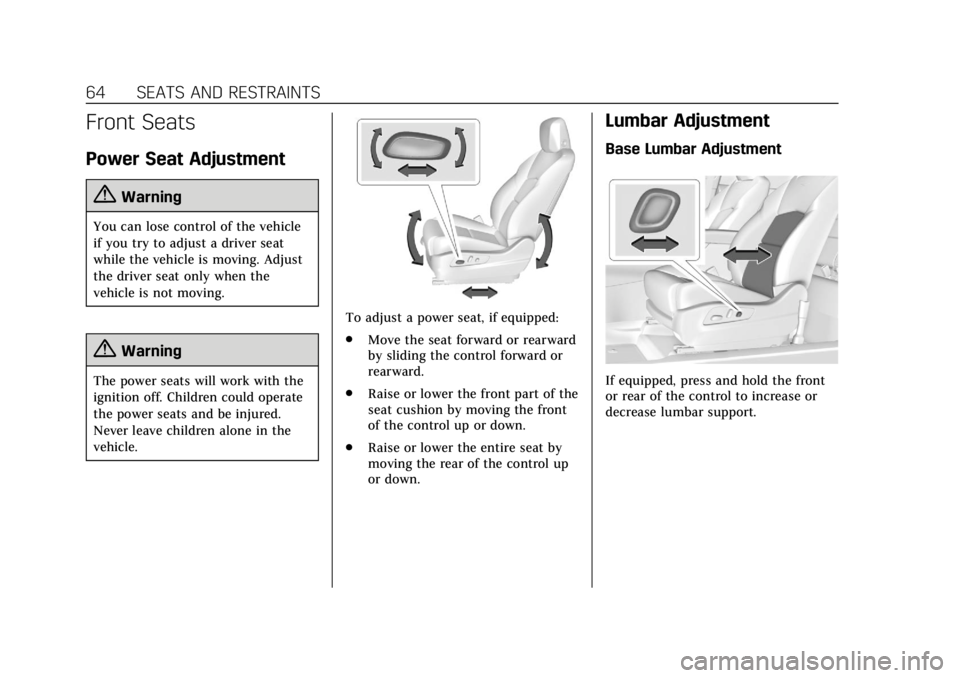
To adjust a power seat, if equipped:
.Move the seat forward or rearward
by sliding the control forward or
rearward.
. Raise or lower the front part of the
seat cushion by moving the front
of the control up or down.
. Raise or lower the entire seat by
moving the rear of the control up
or down.
Lumbar Adjustment
Base Lumbar Adjustment
If equipped, press and hold the front
or rear of the control to increase or
decrease lumbar support.
Page 70 of 381
Cadillac XT4 Owner Manual (GMNA-Localizing-U.S./Canada/Mexico-
12017481) - 2019 - CRC - 11/5/18
66 SEATS AND RESTRAINTS
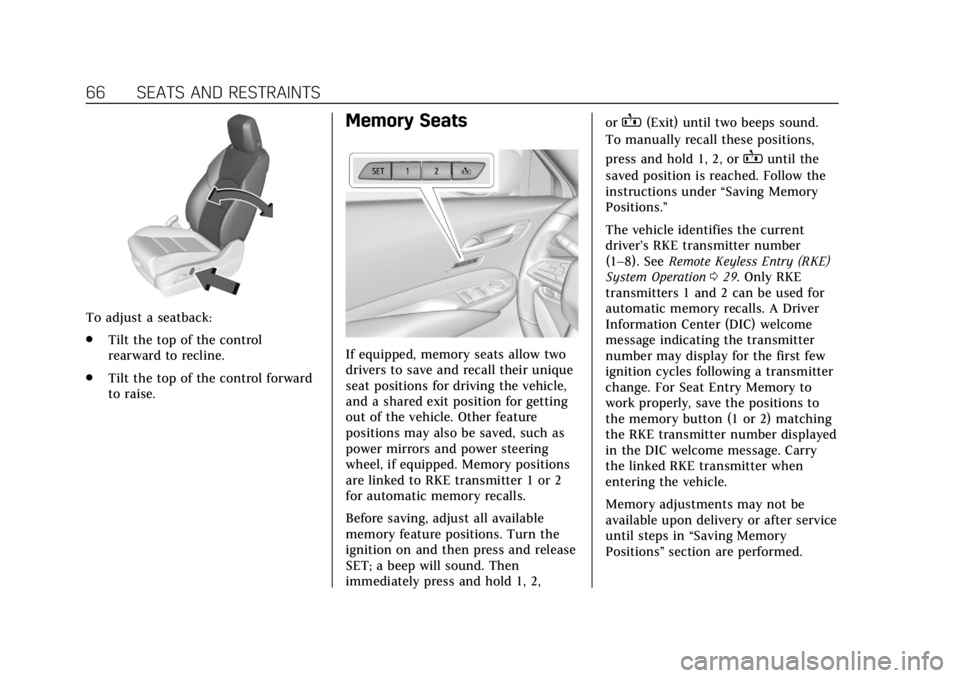
To adjust a seatback:
.Tilt the top of the control
rearward to recline.
. Tilt the top of the control forward
to raise.
Memory Seats
If equipped, memory seats allow two
drivers to save and recall their unique
seat positions for driving the vehicle,
and a shared exit position for getting
out of the vehicle. Other feature
positions may also be saved, such as
power mirrors and power steering
wheel, if equipped. Memory positions
are linked to RKE transmitter 1 or 2
for automatic memory recalls.
Before saving, adjust all available
memory feature positions. Turn the
ignition on and then press and release
SET; a beep will sound. Then
immediately press and hold 1, 2, or
B(Exit) until two beeps sound.
To manually recall these positions,
press and hold 1, 2, or
Buntil the
saved position is reached. Follow the
instructions under “Saving Memory
Positions.”
The vehicle identifies the current
driver’s RKE transmitter number
(1–8). See Remote Keyless Entry (RKE)
System Operation 029. Only RKE
transmitters 1 and 2 can be used for
automatic memory recalls. A Driver
Information Center (DIC) welcome
message indicating the transmitter
number may display for the first few
ignition cycles following a transmitter
change. For Seat Entry Memory to
work properly, save the positions to
the memory button (1 or 2) matching
the RKE transmitter number displayed
in the DIC welcome message. Carry
the linked RKE transmitter when
entering the vehicle.
Memory adjustments may not be
available upon delivery or after service
until steps in “Saving Memory
Positions” section are performed.
Page 82 of 381
Cadillac XT4 Owner Manual (GMNA-Localizing-U.S./Canada/Mexico-
12017481) - 2019 - CRC - 11/5/18
78 SEATS AND RESTRAINTS
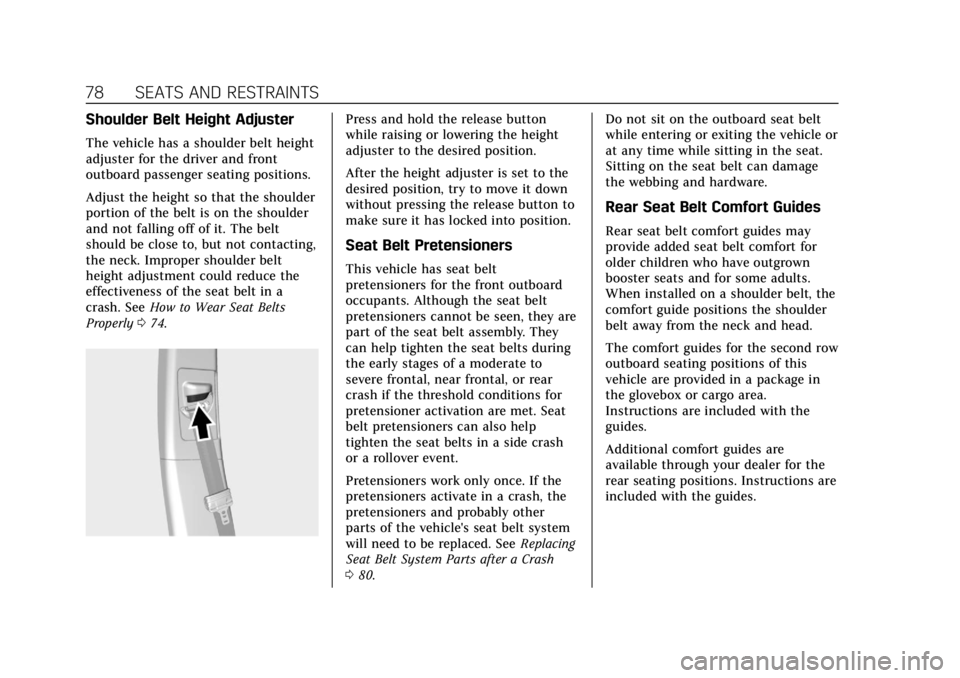
Shoulder Belt Height Adjuster
The vehicle has a shoulder belt height
adjuster for the driver and front
outboard passenger seating positions.
Adjust the height so that the shoulder
portion of the belt is on the shoulder
and not falling off of it. The belt
should be close to, but not contacting,
the neck. Improper shoulder belt
height adjustment could reduce the
effectiveness of the seat belt in a
crash. SeeHow to Wear Seat Belts
Properly 074.
Press and hold the release button
while raising or lowering the height
adjuster to the desired position.
After the height adjuster is set to the
desired position, try to move it down
without pressing the release button to
make sure it has locked into position.
Seat Belt Pretensioners
This vehicle has seat belt
pretensioners for the front outboard
occupants. Although the seat belt
pretensioners cannot be seen, they are
part of the seat belt assembly. They
can help tighten the seat belts during
the early stages of a moderate to
severe frontal, near frontal, or rear
crash if the threshold conditions for
pretensioner activation are met. Seat
belt pretensioners can also help
tighten the seat belts in a side crash
or a rollover event.
Pretensioners work only once. If the
pretensioners activate in a crash, the
pretensioners and probably other
parts of the vehicle's seat belt system
will need to be replaced. See Replacing
Seat Belt System Parts after a Crash
0 80. Do not sit on the outboard seat belt
while entering or exiting the vehicle or
at any time while sitting in the seat.
Sitting on the seat belt can damage
the webbing and hardware.
Rear Seat Belt Comfort Guides
Rear seat belt comfort guides may
provide added seat belt comfort for
older children who have outgrown
booster seats and for some adults.
When installed on a shoulder belt, the
comfort guide positions the shoulder
belt away from the neck and head.
The comfort guides for the second row
outboard seating positions of this
vehicle are provided in a package in
the glovebox or cargo area.
Instructions are included with the
guides.
Additional comfort guides are
available through your dealer for the
rear seating positions. Instructions are
included with the guides.
Page 110 of 381
Cadillac XT4 Owner Manual (GMNA-Localizing-U.S./Canada/Mexico-
12017481) - 2019 - CRC - 11/5/18
106 SEATS AND RESTRAINTS
1. Insert the head restraint postsinto the holes in the top of the
seatback. The notches on the
posts must face the driver side of
the vehicle.
2. Push the head restraint down.
If necessary, press the height
adjustment release button to
further lower the head restraint.
See Head Restraints 062.
3. Try to move the head restraint to make sure that it is locked in
place.
Replacing LATCH System
Parts After a Crash
{Warning
A crash can damage the LATCH
system in the vehicle. A damaged
LATCH system may not properly
secure the child restraint, resulting
in serious injury or even death in a
crash. To help make sure the
LATCH system is working properly
(Continued)
Warning (Continued)
after a crash, see your dealer to
have the system inspected and any
necessary replacements made as
soon as possible.
If the vehicle has the LATCH system
and it was being used during a crash,
new LATCH system parts may be
needed.
New parts and repairs may be
necessary even if the LATCH system
was not being used at the time of the
crash.
Securing Child Restraints
(With the Seat Belt in the
Rear Seat)
When securing a child restraint with
the seat belts in a rear seat position,
study the instructions that came with
the child restraint to make sure it is
compatible with this vehicle.
If the child restraint has the LATCH
system, see Lower Anchors and Tethers
for Children (LATCH System) 099 for how and where to install the child
restraint using LATCH. If a child
restraint is secured in the vehicle
using a seat belt and it uses a top
tether, see
Lower Anchors and Tethers
for Children (LATCH System) 099 for
top tether anchor locations.
Do not secure a child seat in a
position without a top tether anchor if
a national or local law requires that
the top tether be anchored, or if the
instructions that come with the child
restraint say that the top tether must
be anchored.
In Canada, the law requires that
forward-facing child restraints have a
top tether, and that the tether be
attached.
If the child restraint or vehicle seat
position does not have the LATCH
system, you will be using the seat belt
to secure the child restraint. Be sure
to follow the instructions that came
with the child restraint.
If more than one child restraint needs
to be installed in the rear seat, be sure
to read Where to Put the Restraint 098.
Page 120 of 381
Cadillac XT4 Owner Manual (GMNA-Localizing-U.S./Canada/Mexico-
12017481) - 2019 - CRC - 11/5/18
116 INSTRUMENTS AND CONTROLS
Instruments and
Controls
Controls
Steering Wheel Adjustment . . . . . 117
Steering Wheel Controls . . . . . . . . . 117
Heated Steering Wheel . . . . . . . . . . 117
Horn . . . . . . . . . . . . . . . . . . . . . . . . . . . . . . . 118
Windshield Wiper/Washer . . . . . . . 118
Rear Window Wiper/Washer . . . . 120
Compass . . . . . . . . . . . . . . . . . . . . . . . . . . 121
Clock . . . . . . . . . . . . . . . . . . . . . . . . . . . . . . 121
Power Outlets . . . . . . . . . . . . . . . . . . . . . 121
Wireless Charging . . . . . . . . . . . . . . . . 122
Cigarette Lighter . . . . . . . . . . . . . . . . . . 124
Ashtrays . . . . . . . . . . . . . . . . . . . . . . . . . . 125
Warning Lights, Gauges, and
Indicators
Warning Lights, Gauges, andIndicators . . . . . . . . . . . . . . . . . . . . . . . 125
Instrument Cluster . . . . . . . . . . . . . . . 126
Speedometer . . . . . . . . . . . . . . . . . . . . . . 129
Odometer . . . . . . . . . . . . . . . . . . . . . . . . . 129
Trip Odometer . . . . . . . . . . . . . . . . . . . . 129
Tachometer . . . . . . . . . . . . . . . . . . . . . . . 129
Fuel Gauge . . . . . . . . . . . . . . . . . . . . . . . . 129 Engine Coolant Temperature
Gauge . . . . . . . . . . . . . . . . . . . . . . . . . . . . 130
Seat Belt Reminders . . . . . . . . . . . . . . 131
Airbag Readiness Light . . . . . . . . . . 131
Passenger Airbag Status Indicator . . . . . . . . . . . . . . . . . . . . . . . . . 132
Charging System Light . . . . . . . . . . . 133
Malfunction Indicator Lamp (Check Engine Light) . . . . . . . . . . . 133
Brake System Warning Light . . . . 135
Electric Parking Brake Light . . . . . 136
Service Electric Parking Brake Light . . . . . . . . . . . . . . . . . . . . . . . . . . . . . 136
Antilock Brake System (ABS) Warning Light . . . . . . . . . . . . . . . . . . 136
All-Wheel-Drive Light . . . . . . . . . . . . 137
Lane Keep Assist (LKA) Light . . . 137
Vehicle Ahead Indicator . . . . . . . . . 137
Pedestrian Ahead Indicator . . . . . . 137
Traction Off Light . . . . . . . . . . . . . . . . 138
StabiliTrak OFF Light . . . . . . . . . . . . 138
Traction Control System (TCS)/ StabiliTrak Light . . . . . . . . . . . . . . . . 138
Engine Coolant Temperature Warning Light . . . . . . . . . . . . . . . . . . 139
Driver Mode Control Light . . . . . . . 139
Tire Pressure Light . . . . . . . . . . . . . . . 139
Engine Oil Pressure Light . . . . . . . . 140
Low Fuel Warning Light . . . . . . . . . 140
Security Light . . . . . . . . . . . . . . . . . . . . . 140 High-Beam On Light . . . . . . . . . . . . . 141
Lamps On Reminder . . . . . . . . . . . . . 141
Cruise Control Light . . . . . . . . . . . . . . 141
Door Ajar Light . . . . . . . . . . . . . . . . . . . 142
Information Displays
Driver Information
Center (DIC) . . . . . . . . . . . . . . . . . . . . . 142
Head-Up Display (HUD) . . . . . . . . . 145
Vehicle Messages
Vehicle Messages . . . . . . . . . . . . . . . . . 148
Engine Power Messages . . . . . . . . . . 148
Vehicle Speed Messages . . . . . . . . . 149
Vehicle Personalization
Vehicle Personalization . . . . . . . . . . 149
Universal Remote System
Universal Remote System . . . . . . . . 154
Universal Remote System Programming . . . . . . . . . . . . . . . . . . . 154
Universal Remote System Operation . . . . . . . . . . . . . . . . . . . . . . . . 156