open CADILLAC XT4 2020 Manual PDF
[x] Cancel search | Manufacturer: CADILLAC, Model Year: 2020, Model line: XT4, Model: CADILLAC XT4 2020Pages: 372, PDF Size: 6.25 MB
Page 318 of 372
Cadillac XT4 Owner Manual (GMNA-Localizing-U.S./Canada/Mexico-
13527548) - 2020 - CRC - 9/5/19
VEHICLE CARE 317
{Warning
Do not bleach or dye seat belt
webbing. It may severely weaken
the webbing. In a crash, they might
not be able to provide adequate
protection. Clean and rinse seat belt
webbing only with mild soap and
lukewarm water. Allow the webbing
to dry.
Floor Mats
{Warning
If a floor mat is the wrong size or is
not properly installed, it can
interfere with the pedals.
Interference with the pedals can
cause unintended acceleration and/
or increased stopping distance
which can cause a crash and injury.
Make sure the floor mat does not
interfere with the pedals.
Use the following guidelines for
proper floor mat usage. .
The original equipment floor mats
were designed for your vehicle.
If the floor mats need replacing, it
is recommended that certified
floor mats be purchased.
Non-certified floor mats may not
fit properly and may interfere with
the pedals. Always check that the
floor mats do not interfere with
the pedals.
. Do not use a floor mat if the
vehicle is not equipped with a
floor mat retainer on the driver
side floor.
. Use the floor mat with the correct
side up. Do not turn it over.
. Do not place anything on top of
the driver side floor mat.
. Use only a single floor mat on the
driver side.
. Do not place one floor mat on top
of another.
Removing and Replacing the
Floor Mats
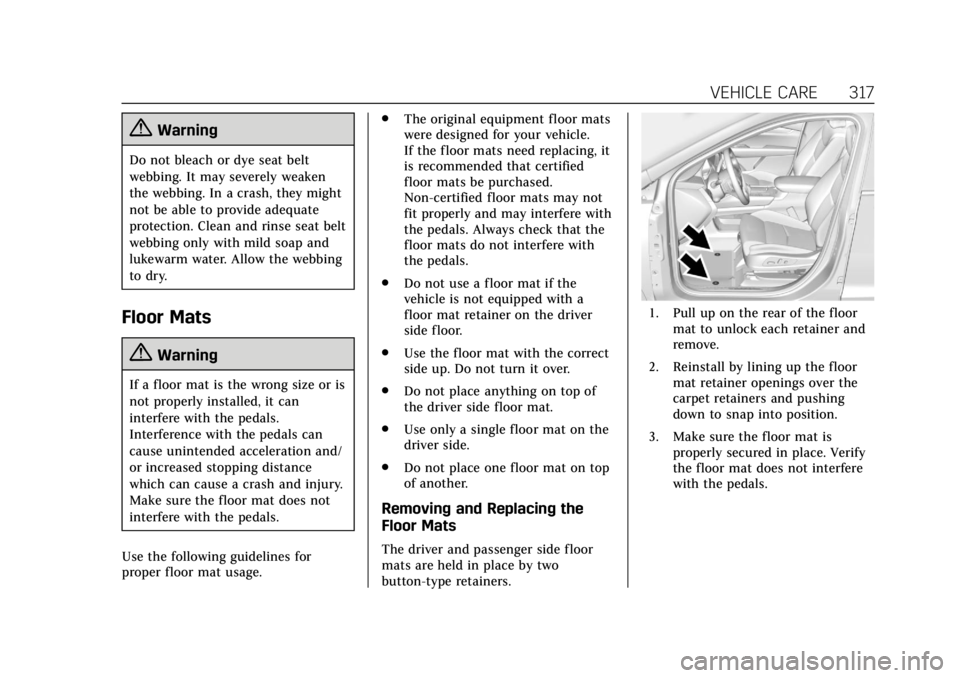
The driver and passenger side floor
mats are held in place by two
button-type retainers.
1. Pull up on the rear of the floor
mat to unlock each retainer and
remove.
2. Reinstall by lining up the floor mat retainer openings over the
carpet retainers and pushing
down to snap into position.
3. Make sure the floor mat is properly secured in place. Verify
the floor mat does not interfere
with the pedals.
Page 322 of 372

Cadillac XT4 Owner Manual (GMNA-Localizing-U.S./Canada/Mexico-
13527548) - 2020 - CRC - 9/5/19
SERVICE AND MAINTENANCE 321
.Check restraint system
components. See Safety System
Check 058.
. Visually inspect fuel system for
damage or leaks.
. Visually inspect exhaust system
and nearby heat shields for loose
or damaged parts.
. Lubricate body components. See
Exterior Care 0310.
. Check starter switch. See Starter
Switch Check 0260.
. Check parking brake and
automatic transmission park
mechanism. See Park Brake and
P (Park) Mechanism Check 0260.
. Check accelerator pedal for
damage, high effort, or binding.
Replace if needed.
. Visually inspect gas strut for signs
of wear, cracks, or other damage.
Check the hold open ability of the
strut. If the hold open is low,
service the gas strut. See Gas
Strut(s) 0262. .
Check tire sealant expiration date,
if equipped. See Tire Sealant and
Compressor Kit 0293.
. Inspect sunroof track and seal,
if equipped. See Sunroof038.
Page 347 of 372

Cadillac XT4 Owner Manual (GMNA-Localizing-U.S./Canada/Mexico-
13527548) - 2020 - CRC - 9/5/19
346 CUSTOMER INFORMATION
rules and with Innovation, Science
and Economic Development (ISED)
Canada's RSP-100 / ICES-GEN.
Operation is subject to the following
two conditions:1. The device may not cause harmful interference.
2. The device must accept any interference received, including
interference that may cause
undesired operation of the
device.
Changes or modifications to any of
these systems by other than an
authorized service facility could void
authorization to use this equipment.Reporting Safety
Defects
Reporting Safety Defects
to the United States
Government
If you believe that your vehicle
has a defect which could cause a
crash or could cause injury or
death, you should immediately
inform the National Highway
Traffic Safety Administration
(NHTSA) in addition to notifying
General Motors.
If NHTSA receives similar
complaints, it may open an
investigation, and if it finds that a
safety defect exists in a group of
vehicles, it may order a recall and
remedy campaign. However,
NHTSA cannot become involved
in individual problems between
you, your dealer, or General
Motors. To contact NHTSA, you may call
the Vehicle Safety Hotline toll-free
at 1-888-327-4236 (TTY:
1-800-424-9153); go to
http://
www.safercar.gov; or write to:
Administrator, NHTSA
1200 New Jersey Avenue, S.E.
Washington, D.C. 20590
You can also obtain other
information about motor vehicle
safety from http://www.safercar.gov
.
Reporting Safety Defects
to the Canadian
Government
If you live in Canada, and you
believe that the vehicle has a
safety defect, notify Transport
Canada immediately, and notify
General Motors of Canada
Company. Call Transport Canada
at 1-800-333-0510; go to:
www.tc.gc.ca/recalls (English)
www.tc.gc.ca/rappels (French)
or write to:
Page 351 of 372
Cadillac XT4 Owner Manual (GMNA-Localizing-U.S./Canada/Mexico-
13527548) - 2020 - CRC - 9/5/19
350 ONSTAR
OnStar
OnStar Overview
OnStar Overview . . . . . . . . . . . . . . . . . . 350
OnStar Services
Emergency . . . . . . . . . . . . . . . . . . . . . . . . 351
Security . . . . . . . . . . . . . . . . . . . . . . . . . . . 351
OnStar Additional Information
OnStar AdditionalInformation . . . . . . . . . . . . . . . . . . . . . 352
OnStar Overview
=Voice Command Button
QBlue OnStar Button
>Red Emergency Button
This vehicle may be equipped with a
comprehensive, in-vehicle system that
can connect to an OnStar Advisor for
Emergency, Security, Navigation,
Connections, and Diagnostics Services.
OnStar services may require a paid
service plan and data plan. OnStar
requires the vehicle battery and
electrical system, cellular service, and
GPS satellite signals to be available
and operating. OnStar acts as a link to
existing emergency service providers.
OnStar may collect information about
you and your vehicle, including
location information. See OnStar User
Terms, Privacy Statement, and
Software Terms for more details including system limitations at
www.onstar.com (U.S.) or
www.onstar.ca (Canada).
The OnStar system status light is next
to the OnStar buttons. If the status
light is:
.
Solid Green: System is ready.
. Flashing Green: On a call.
. Red: Indicates a problem.
. Off: System is off. PressQtwice
to speak with an OnStar Advisor.
Press
Qor call 1-888-4ONSTAR
(1-888-466-7827) to speak to an
Advisor.
Functionality of the Voice Command
button may vary by vehicle and
region.
Press
=to:
. Open the OnStar app on the
infotainment display. See the
infotainment manual for
information on how to use the
OnStar app.
Page 355 of 372

Cadillac XT4 Owner Manual (GMNA-Localizing-U.S./Canada/Mexico-
13527548) - 2020 - CRC - 9/5/19
354 ONSTAR
A temporary loss of GPS can cause
loss of the ability to send a
Turn-by-Turn Navigation route. The
Advisor may give a verbal route or
may ask for a call back after the
vehicle is driven into an open area.
Cellular and GPS Antennas
Cellular reception is required for
OnStar to send remote signals to the
vehicle. Do not place items over or
near the antenna to prevent blocking
cellular and GPS signal reception.
Unable to Connect to OnStar
Message
If there is limited cellular coverage or
the cellular network has reached
maximum capacity, this message may
come on. Press
Qto try the call again
or try again after driving a few miles
into another cellular area.
Vehicle and Power Issues
OnStar services require a vehicle
electrical system, wireless service, and
GPS satellite technologies to be
available and operating for features to function properly. These systems may
not operate if the battery is
discharged or disconnected.
Add-on Electrical Equipment
The OnStar system is integrated into
the electrical architecture of the
vehicle. Do not add any electrical
equipment. See
Add-On Electrical
Equipment 0239. Added electrical
equipment may interfere with the
operation of the OnStar system and
cause it to not operate.
Vehicle Software Updates
OnStar or GM may remotely deliver
software updates or changes to the
vehicle without further notice or
consent. These updates or changes
may enhance or maintain safety,
security, or the operation of the
vehicle or the vehicle systems.
Software updates or changes may
affect or erase data or settings that
are stored in the vehicle, such as
saved navigation destinations or
pre-set radio stations. Neither OnStar
nor GM is responsible for any affected
or erased data or settings. These
updates or changes may also collect personal information. Such collection
is described in the OnStar privacy
statement or separately disclosed at
the time of installation. These updates
or changes may also cause a system to
automatically communicate with GM
servers to collect information about
vehicle system status, identify
whether updates or changes are
available, or deliver updates or
changes. An active OnStar agreement
constitutes consent to these software
updates or changes and agreement
that either OnStar or GM may
remotely deliver them to the vehicle.Privacy
The complete OnStar Privacy
Statement may be found at
www.onstar.com (U.S.),
or www.onstar.ca (Canada). We
recommend that you review it. If you
have any questions, call
1-888-4ONSTAR (1-888-466-7827) or
press
Qto speak with an Advisor.
Users of wireless communications are
cautioned that the privacy of any
information sent via wireless cellular
communications cannot be assured.
Page 356 of 372

Cadillac XT4 Owner Manual (GMNA-Localizing-U.S./Canada/Mexico-
13527548) - 2020 - CRC - 9/5/19
ONSTAR 355
Third parties may unlawfully intercept
or access transmissions and private
communications without consent.
OnStar - Software
Acknowledgements
Certain OnStar components include
libcurl and unzip software and other
third party software. Below are the
notices and licenses associated with
libcurl and unzip and for other third
party software please see http://
opensource.lge.com/index
www.onstar.com/us/en/
libcurl:
COPYRIGHT AND PERMISSION
NOTICE
Copyright (c) 1996 - 2010, Daniel
Stenberg,
All rights reserved.
Permission to use, copy, modify, and
distribute this software for any
purpose with or without fee is hereby
granted, provided that the above
copyright notice and this permission
notice appear in all copies.THE SOFTWARE IS PROVIDED
“AS
IS,” WITHOUT WARRANTY OF ANY
KIND, EXPRESS OR IMPLIED,
INCLUDING BUT NOT LIMITED TO
THE WARRANTIES OF
MERCHANTABILITY, FITNESS FOR A
PARTICULAR PURPOSE AND
NONINFRINGEMENT OF THIRD
PARTY RIGHTS. IN NO EVENT SHALL
THE AUTHORS OR COPYRIGHT
HOLDERS BE LIABLE FOR ANY
CLAIM, DAMAGES OR OTHER
LIABILITY, WHETHER IN AN ACTION
OF CONTRACT, TORT OR
OTHERWISE, ARISING FROM, OUT
OF OR IN CONNECTION WITH THE
SOFTWARE OR THE USE OR OTHER
DEALINGS IN THE SOFTWARE.
Except as contained in this notice, the
name of a copyright holder shall not
be used in advertising or otherwise to
promote the sale, use or other
dealings in this Software without prior
written authorization of the copyright
holder.
unzip:
This is version 2005-Feb-10 of the
Info-ZIP copyright and license. The
definitive version of this document should be available at ftp://
ftp.info-zip.org/pub/infozip/
license.html indefinitely.
Copyright (c) 1990-2005 Info-ZIP. All
rights reserved.
For the purposes of this copyright and
license,
“Info-ZIP” is defined as the
following set of individuals:
Mark Adler, John Bush, Karl Davis,
Harald Denker, Jean-Michel Dubois,
Jean-loup Gailly, Hunter Goatley, Ed
Gordon, Ian Gorman, Chris Herborth,
Dirk Haase, Greg Hartwig, Robert
Heath, Jonathan Hudson, Paul Kienitz,
David Kirschbaum, Johnny Lee, Onno
van der Linden, Igor Mandrichenko,
Steve P. Miller, Sergio Monesi, Keith
Owens, George Petrov, Greg Roelofs,
Kai Uwe Rommel, Steve Salisbury,
Dave Smith, Steven M. Schweda,
Christian Spieler, Cosmin Truta,
Antoine Verheijen, Paul von Behren,
Rich Wales, Mike White.
This software is provided “as is,”
without warranty of any kind, express
or implied. In no event shall Info-ZIP
or its contributors be held liable for
any direct, indirect, incidental, special
Page 358 of 372

Cadillac XT4 Owner Manual (GMNA-Localizing-U.S./Canada/Mexico-
13527548) - 2020 - CRC - 9/5/19
CONNECTED SERVICES 357
Connected Services
Connected Services
Navigation . . . . . . . . . . . . . . . . . . . . . . . . 357
Connections . . . . . . . . . . . . . . . . . . . . . . 358
Diagnostics . . . . . . . . . . . . . . . . . . . . . . . 359
Connected Services
Navigation
Navigation requires a specific OnStar
or connected service plan.
Press
Qto receive Turn-by-Turn
directions or have them sent to the
vehicle’s navigation screen,
if equipped.
Turn-by-Turn Navigation
1. PressQto connect to an
Advisor.
2. Request directions to be downloaded to the vehicle.
3. Follow the voice-guided commands.
Using Voice Commands During a
Planned Route
Functionality of the Voice Command
button, if equipped, may vary by
vehicle and region. For some vehicles,
press
=to open the OnStar app on
the infotainment display. For other
vehicles press
=as follows. Cancel Route
1. Press
=. System responds:
“OnStar ready,” then a tone.
2. Say “Cancel route.” System
responds: “Do you want to cancel
directions?”
3. Say “Yes.”System responds: “OK,
request completed, thank you,
goodbye.”
Route Preview
1. Press
=. System responds:
“OnStar ready,” then a tone.
2. Say “Route preview.” System
responds with the next three
maneuvers.
Repeat
1. Press
=. System responds:
“OnStar ready,” then a tone.
2. Say “Repeat.” System responds
with the last direction given,
then responds with “OnStar
ready,” then a tone.
Page 359 of 372

Cadillac XT4 Owner Manual (GMNA-Localizing-U.S./Canada/Mexico-
13527548) - 2020 - CRC - 9/5/19
358 CONNECTED SERVICES
Get My Destination1. Press
=. System responds:
“OnStar ready,” then a tone.
2. Say “Get my destination.” System
responds with the address and
distance to the destination, then
responds with “OnStar ready,”
then a tone.
Send Destination to Vehicle
Directions can be sent to the vehicle’s
navigation screen, if equipped.
Press
Q, then ask the Advisor to
download directions to the vehicle’s
navigation system, if equipped. After
the call ends, the navigation screen
will provide prompts to begin driving
directions. Routes that are sent to the
navigation screen can only be
canceled through the navigation
system.
See www.onstar.com (U.S.) or
www.onstar.ca (Canada).
Connections
The following services help with
staying connected. For coverage maps, see
www.onstar.com (U.S.) or
www.onstar.ca (Canada).
Ensuring Security
.
Change the default passwords for
the Wi-Fi hotspot and myCadillac
mobile app. Make these passwords
different from each other and use
a combination of letters and
numbers to increase the security.
. Change the default name of the
SSID (Service Set Identifier). This
is your network’s name that is
visible to other wireless devices.
Choose a unique name and avoid
family names or vehicle
descriptions.
Wi-Fi Hotspot (If Equipped)
The vehicle may have a built-in Wi-Fi
hotspot that provides access to the
Internet and web content at 4G LTE
speed. Up to seven mobile devices can
be connected. A data plan is required.
Use the in-vehicle controls only when
it is safe to do so. 1. To retrieve Wi-Fi hotspot
information, press
=to open
the OnStar app on the
infotainment display, then select
Wi-Fi Hotspot. On some vehicles,
touch Wi-Fi or Wi-Fi Settings on
the screen.
2. The Wi-Fi settings will display the Wi-Fi hotspot name (SSID),
password, and on some vehicles,
the connection type (no Internet
connection, 3G, 4G, 4G LTE), and
signal quality (poor, good,
excellent).
3. To change the SSID or password, press
Qor call 1-888-4ONSTAR
to connect with an Advisor. On
some vehicles, the SSID and
password can be changed in the
Wi-Fi Hotspot menu.
After initial set-up, your vehicle’s
Wi-Fi hotspot will connect
automatically to your mobile devices.
Manage data usage by turning Wi-Fi
on or off on your mobile device, by
using the myCadillac mobile app,
or by contacting an OnStar Advisor.
Page 365 of 372

Cadillac XT4 Owner Manual (GMNA-Localizing-U.S./Canada/Mexico-
13527548) - 2020 - CRC - 9/5/19
364 INDEX
Fuel (cont'd)Top Tier . . . . . . . . . . . . . . . . . . . . . . . . . . . 226
Fuses Engine Compartment Fuse
Block . . . . . . . . . . . . . . . . . . . . . . . . . . . . . 266
Fuses and Circuit Breakers . . . . . . . 265
Instrument Panel Fuse Block . . . . 269
G
Garage Door Opener . . . . . . . . . . . . . . . . 136 Programming . . . . . . . . . . . . . . . . . . . . . . 136
Gas Strut(s) . . . . . . . . . . . . . . . . . . . . . . . . . 262
Gauges Engine Coolant Temperature . . . . 112
Fuel . . . . . . . . . . . . . . . . . . . . . . . . . . . . . . . . 112
Odometer . . . . . . . . . . . . . . . . . . . . . . . . . . 111
Speedometer . . . . . . . . . . . . . . . . . . . . . . 111
Tachometer . . . . . . . . . . . . . . . . . . . . . . . 111
Trip Odometer . . . . . . . . . . . . . . . . . . . . 111
Warning Lights and
Indicators . . . . . . . . . . . . . . . . . . . . . . . . 107
Gear Shifting Light . . . . . . . . . . . . . . . . . 118
General Information Service and Maintenance . . . . . . . . 318
Towing . . . . . . . . . . . . . . . . . . . . . . . . . . . . 229
Vehicle Care . . . . . . . . . . . . . . . . . . . . . . . 242
Glove Box . . . . . . . . . . . . . . . . . . . . . . . . . . . . 92 GM Mobility Reimbursement
Program . . . . . . . . . . . . . . . . . . . . . . . . . . . . 339
H
Hazard Warning Flashers . . . . . . . . . . 143
Head Restraints . . . . . . . . . . . . . . . . . . . . . . 41
Head-up Display . . . . . . . . . . . . . . . . . . . . 127
Headlamps
Aiming . . . . . . . . . . . . . . . . . . . . . . . . . . . . . 263
Automatic . . . . . . . . . . . . . . . . . . . . . . . . . 142
Bulb Replacement . . . . . . . . . . . . . . . . 264
Daytime RunningLamps (DRL) . . . . . . . . . . . . . . . . . . . . 142
Flash-to-Pass . . . . . . . . . . . . . . . . . . . . . . 142
High-Beam On Light . . . . . . . . . . . . . . 123
High/Low Beam Changer . . . . . . . . . 142
Lamps On Reminder . . . . . . . . . . . . . . 123
Heated Rear Seats . . . . . . . . . . . . . . . . . . . . . . . . . . . 51
Steering Wheel . . . . . . . . . . . . . . . . . . . . . . 99
Heated and Ventilated Front
Seats . . . . . . . . . . . . . . . . . . . . . . . . . . . . . . . . 48
Heated Mirrors . . . . . . . . . . . . . . . . . . . . . . . 32
Heater Engine . . . . . . . . . . . . . . . . . . . . . . . . . . . . . 176
Heating . . . . . . . . . . . . . . . . . . . . . . . . . . . . . . 148
High-Beam On Light . . . . . . . . . . . . . . . . 123
High-Speed Operation . . . . . . . . . . . . . . 280 Hill and Mountain Roads . . . . . . . . . . 165
Hill Start Assist (HSA) . . . . . . . . . . . . . 191
Hood . . . . . . . . . . . . . . . . . . . . . . . . . . . . . . . . . 244
Horn . . . . . . . . . . . . . . . . . . . . . . . . . . . . . . . . . 100
How to Wear Seat Belts Properly . . . 53
HVAC . . . . . . . . . . . . . . . . . . . . . . . . . . . . . . . . 148
I
Ignition Positions . . . . . . . . . . . . . . . . . . . 172
Immobilizer . . . . . . . . . . . . . . . . . . . . . . . . . . 30
Indicator
Pedestrian Ahead . . . . . . . . . . . . . . . . . 119
Vehicle Ahead . . . . . . . . . . . . . . . . . . . . . 119
Infants and Young Children, Restraints . . . . . . . . . . . . . . . . . . . . . . . . . . . 73
Information Publication Ordering . . . . . . . . . . . . . 345
Infotainment . . . . . . . . . . . . . . . . . . . . . . . . 147
Infotainment System . . . . . . . . . . . . . . . 349
Instrument Cluster . . . . . . . . . . . . . . . . . 108
Instrument Panel Overview . . . . . . . . . . . 5
Interior Rearview Mirrors . . . . . . . . . . . 33
Introduction . . . . . . . . . . . . . . . . . . . . . . . . . . . . 2
J
Jump Starting - North America . . . . 306