Remove seat CADILLAC XT4 2021 User Guide
[x] Cancel search | Manufacturer: CADILLAC, Model Year: 2021, Model line: XT4, Model: CADILLAC XT4 2021Pages: 408, PDF Size: 8.33 MB
Page 84 of 408

Cadillac XT4 Owner Manual (GMNA-Localizing-U.S./Canada/Mexico-
14584367) - 2021 - CRC - 10/14/20
SEATS AND RESTRAINTS 83
5. Pull the shoulder belt all the wayout of the retractor to set the lock.
When the retractor lock is set, the
belt can be tightened but not
pulled out of the retractor.6. To tighten the belt, push down onthe child restraint, pull the
shoulder portion of the belt to
tighten the lap portion of the belt,
and feed the shoulder belt back
into the retractor. When installing
a forward-facing child restraint, it
may be helpful to use your knee to
push down on the child restraint as
you tighten the belt.
Try to pull the belt out of the
retractor to make sure the retractor
is locked. If the retractor is not
locked, repeat Steps 5 and 6.
7. Before placing a child in the child restraint, make sure it is securely
held in place. To check, grasp the child restraint at the seat belt path
and attempt to move it side to side
and back and forth. When the child
restraint is properly installed, there
should be no more than
2.5 cm (1 in) of movement.
If the airbags are off, the off indicator
in the passenger airbag status
indicator will come on and stay on
when the vehicle is started.
If a child restraint has been installed
and the on indicator is lit, see “If the
On Indicator Is Lit for a Child
Restraint ”under Passenger Sensing
System 060.
To remove the child restraint,
unbuckle the vehicle seat belt and let
it return to the stowed position.
Page 86 of 408

Cadillac XT4 Owner Manual (GMNA-Localizing-U.S./Canada/Mexico-
14584367) - 2021 - CRC - 10/14/20
STORAGE 85
Sunglasses Storage
If equipped, sunglasses storage is on
the overhead console. Press the fixed
button on the cover and release to
access.
Armrest Storage
For vehicles with a rear seat armrest,
pull the rear seat armrest forward to
access the cupholders with removable
liner.
Rear Storage
There is storage in the floor of the
rear cargo area. Lift the handle to
access.
Remove the load floor hook from the
holder and hook to the weatherstrip
above.
When done, return the load floor hook
to the holder.
Page 98 of 408

Cadillac XT4 Owner Manual (GMNA-Localizing-U.S./Canada/Mexico-
14584367) - 2021 - CRC - 10/14/20
INSTRUMENTS AND CONTROLS 97
Warning (Continued)
smartphone and charging pad will
become very hot. On the rare
occasion that the charging system
does not detect an object, and the
object gets wedged between the
smartphone and charger, remove
the smartphone and allow the
object to cool before removing it
from the charging pad, to prevent
burns.
To charge a compatible smartphone:1. Remove all objects from the
charging pad. The system may not
charge if there are any objects
between the smartphone and
charging pad.
2. Place the smartphone face up on the
@symbol on the
charging pad.
To maximize the charge rate,
ensure the smartphone is fully
seated and centered in the holder
with nothing under it. A thick
smartphone case may prevent the
wireless charger from working,
or may reduce the charging
performance. See your dealer for
additional information.
3. A green
}next to theVwill
appear on the infotainment display.
This indicates that the smartphone
is properly positioned and charging.
If the
}turns yellow, ensure that
the charging pad is clear of any
objects and that the smartphone is
capable of wireless charging before
re-positioning it. If the
}does not illuminate, the
smartphone may need to be
repositioned. To reposition, turn
the smartphone 180 degrees and
wait three seconds before placing/
aligning it on the pad again.
The smartphone may become
warm during charging. This is
normal. In warmer temperatures,
the speed of charging may be
reduced.
Software Acknowledgements
Certain Wireless Charging Module
product from LG Electronics, Inc.
("LGE") contains the open source
software detailed below. Refer to the
indicated open source licenses (as are
included following this notice) for the
terms and conditions of their use.
Page 105 of 408
Cadillac XT4 Owner Manual (GMNA-Localizing-U.S./Canada/Mexico-
14584367) - 2021 - CRC - 10/14/20
104 INSTRUMENTS AND CONTROLS
If the front passenger seat belt is
buckled, neither the chime nor the
light comes on.
The front passenger seat belt reminder
light and chime may come on if an
object is put on the seat such as a
briefcase, handbag, grocery bag,
laptop, or other electronic device. To
turn off the reminder light and/or
chime, remove the object from the
seat or buckle the seat belt.
Airbag Readiness Light
This light shows if there is an
electrical problem with the airbag
system. The system check includes
the airbag sensor(s), the passenger
sensing system, the pretensioners, the
airbag modules, the wiring, and the
crash sensing and diagnostic module.
For more information on the airbag
system, seeAirbag System 054.
The airbag readiness light comes on
for several seconds when the vehicle is
started. If the light does not come on
then, have it fixed immediately.
{Warning
If the airbag readiness light stays
on after the vehicle is started or
comes on while driving, it means
the airbag system might not be
working properly. The airbags in the
vehicle might not inflate in a crash,
or they could even inflate without a
crash. To help avoid injury, have
the vehicle serviced right away.
If there is a problem with the airbag
system, a Driver Information Center
(DIC) message may also come on.
Passenger Airbag Status
Indicator
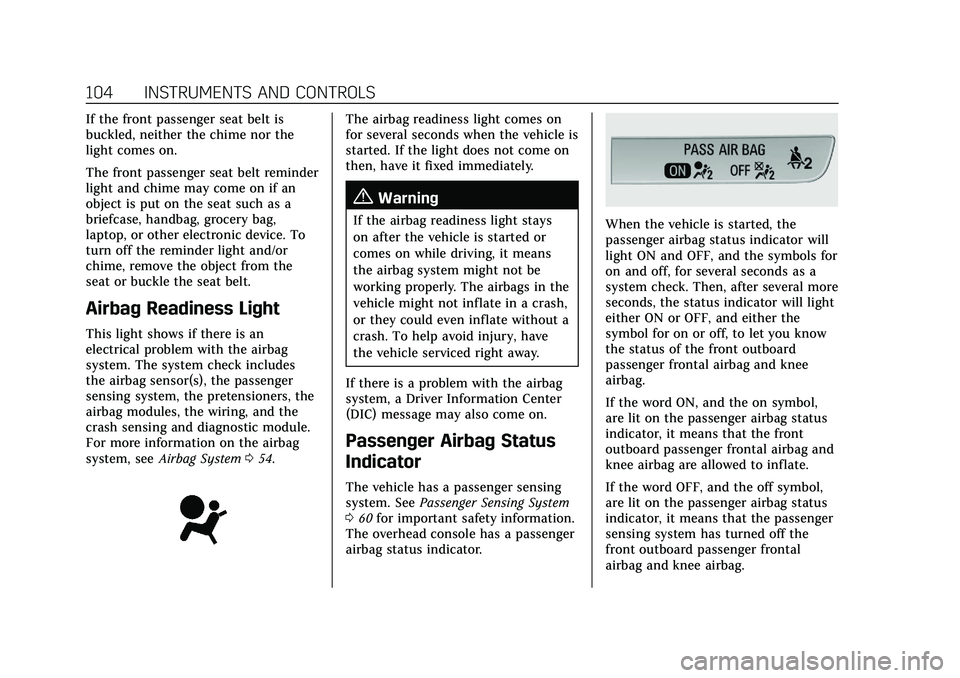
The vehicle has a passenger sensing
system. See Passenger Sensing System
0 60 for important safety information.
The overhead console has a passenger
airbag status indicator.
When the vehicle is started, the
passenger airbag status indicator will
light ON and OFF, and the symbols for
on and off, for several seconds as a
system check. Then, after several more
seconds, the status indicator will light
either ON or OFF, and either the
symbol for on or off, to let you know
the status of the front outboard
passenger frontal airbag and knee
airbag.
If the word ON, and the on symbol,
are lit on the passenger airbag status
indicator, it means that the front
outboard passenger frontal airbag and
knee airbag are allowed to inflate.
If the word OFF, and the off symbol,
are lit on the passenger airbag status
indicator, it means that the passenger
sensing system has turned off the
front outboard passenger frontal
airbag and knee airbag.
Page 122 of 408
Cadillac XT4 Owner Manual (GMNA-Localizing-U.S./Canada/Mexico-
14584367) - 2021 - CRC - 10/14/20
INSTRUMENTS AND CONTROLS 121
3. Touch to select the desired featuresetting.
4. Touch
9orRto turn a feature off
or on.
5. Touch
zto go to the top level of
the Settings menu.
The menu may contain the following:
Rear Seat Reminder
This allows for a chime and a message
when the rear door has been opened
before or during operation of the
vehicle.
Touch Off or On.
Climate and Air Quality
Touch and the following may display:
.Auto Fan Speed
.Auto Cooled Seats
.Auto Heated Seats
.Auto Defog
.Auto Rear Defog
.Ionizer Auto Fan Speed
This setting specifies the amount of
airf low when the climate control fan
setting is Auto Fan.
Touch Low, Medium, or High.
Auto Cooled Seats
This setting automatically turns on
and regulates the ventilated seats
when the cabin temperature is warm.
See
Heated and Ventilated Front Seats
0 43.
Touch Off or On.
Auto Heated Seats
This setting automatically turns on
and regulates the heated seats when
the cabin temperature is cool. The
auto heated seats can be turned off by
using the heated seat buttons on the
center stack. See Heated and Ventilated
Front Seats 043.
Touch Off or On.
Auto Defog
This setting automatically turns the
front defogger on when the engine is
started.
Touch Off or On. Auto Rear Defog
This setting automatically turns the
rear defogger on when the engine is
started.
Touch Off or On.
Ionizer
If equipped and on, this feature helps
to clean the air inside the vehicle and
remove contaminants such as pollen,
odors, and dust. See
Dual Automatic
Climate Control System 0197.
Touch Off or On.
Collision / Detection Systems
Touch and the following may display:
.Alert Type
.Forward Collision System
.Front Pedestrian Detection
.Rear Pedestrian Detection
.Adaptive Cruise Go Notifier
.Lane Change Alert
.Rear Camera Park Assist Symbols
.Rear Cross Traffic Alert
Page 187 of 408
Cadillac XT4 Owner Manual (GMNA-Localizing-U.S./Canada/Mexico-
14584367) - 2021 - CRC - 10/14/20
186 INFOTAINMENT SYSTEM
Set Audio Volume Limit :Allows a
maximum radio volume to be set. Use
the arrows to choose the maximum
allowable level for the audio volume.
Teen Driver Speed Limiter : Limits
the maximum speed of the vehicle.
When the speed limiter is turned on
and the vehicle is started with a Teen
Driver key, the DIC displays a message
that the top speed is limited.
On certain vehicles, when the Speed
Limiter is turned ON, the vehicle’s
maximum acceleration will be limited.
The DIC will display a message that
the acceleration is limited.
Teen Driver Speed Warning : Allows
the speed warning to be turned on or
off. Touch Set Teen Driver Speed
Warning to set the warning speed.
Set Teen Driver Speed Warning :
Displays a warning in the DIC when
exceeding a selectable speed. Choose
the desired speed warning level. The
speed warning does not limit the
speed of the vehicle.
SiriusXM Explicit Content Filter (if
equipped) : Allows the SiriusXM
Explicit Content Filter to be turned ON or OFF. When ON, the teen driver
will not be able to listen to SiriusXM
stations that contain explicit content,
and the Explicit Content Filter
selection in the Audio Settings will be
unavailable for change.
When Teen Driver is Active:
.If equipped with Buckle to Drive,
shifting out of P (Park) will be
prevented if the driver seat belt, and
in some vehicles the front passenger
seat belt, is not buckled.
.The radio will mute when the driver
seat belt, and in some vehicles the
front passenger seat belt, is not
buckled. The audio from any device
paired to the vehicle will also be
muted.
.An object placed on the front
passenger seat, such as a briefcase,
handbag, grocery bag, laptop,
or other electronic device, could
cause the passenger sensing system
to falsely sense an unbuckled front
passenger and mute the radio.
If this happens, remove the object
from the seat. See
Passenger Sensing
System 060.
.Some safety systems, such as
Forward Collision Alert, if equipped,
cannot be turned off.
.The gap setting for the Forward
Collision Alert and Adaptive Cruise
Control, if equipped, cannot be
changed.
.When trying to change a safety
feature that is not configurable in
Teen Driver, the DIC displays a
message indicating that Teen Driver
is active and the action is not
available.
.Super Cruise, if equipped, is not
available.
.Enhanced Low Fuel Warning (if
equipped) –When the vehicle is low
on fuel, the low fuel light on the
instrument cluster flashes and the
DIC low fuel warning cannot be
dismissed.
.Do not tow a trailer.
Report Card
The vehicle owner must secure the
driver’s consent to record certain
vehicle data when the vehicle is driven
with a registered Teen Driver key.
There is one Report Card per vehicle.
Page 201 of 408

Cadillac XT4 Owner Manual (GMNA-Localizing-U.S./Canada/Mexico-
14584367) - 2021 - CRC - 10/14/20
200 CLIMATE CONTROLS
@:Press to turn on recirculation.
An indicator light comes on. Air is
recirculated to quickly cool the inside
of the vehicle or to reduce the entry of
outside air and odors.
Auto Defog : The climate control
system may have a sensor to
automatically detect high humidity
inside the vehicle. When high
humidity is detected, the climate
control system may adjust to outside
air supply and turn on the air
conditioner. The fan speed may
slightly increase to help prevent
fogging. If the climate control system
does not detect possible window
fogging, it returns to normal
operation.
Ionizer : If equipped with an ionizer,
this feature helps to clean the air
inside the vehicle and remove
contaminants such as pollen, odors,
and dust. If the climate control
system is on and the ionizer is
enabled, the ionizer status indicator
will be lit on the climate control
display.Rear Window Defogger
K: Press to turn the rear window
defogger on or off. An indicator light
on the button comes on to show that
the rear window defogger is on.
The defogger can be turned off by
turning the ignition to off or ACC/
ACCESSORY.
The rear window defogger can be set
to automatic operation. When auto
rear defog is selected, the rear window
defogger turns on automatically when
the interior temperature is cold and
the outside temperature is about 7 °C
(44 °F) and below. The auto rear
defogger turns off automatically.
If equipped, the heated outside
mirrors turn on when the rear window
defogger button is on and help to
clear fog or frost from the surface of
the mirror. See Heated Mirrors029.
Caution
Do not try to clear frost or other
material from the inside of the
front windshield and rear window
with a razor blade or anything else
(Continued)
Caution (Continued)
that is sharp. This may damage the
rear window defogger grid and
affect the radio's ability to pick up
stations clearly. The repairs would
not be covered by the vehicle
warranty.
Remote Start Climate Control
Operation : If equipped with remote
start, the climate control system may
run when the vehicle is started
remotely. If equipped with heated or
ventilated seats or a heated steering
wheel, these features may come on
during a remote start. See Remote
Vehicle Start 014, Heated and
Ventilated Front Seats 043, and Heated
Steering Wheel 091.
Page 257 of 408
Cadillac XT4 Owner Manual (GMNA-Localizing-U.S./Canada/Mexico-
14584367) - 2021 - CRC - 10/14/20
256 DRIVING AND OPERATING
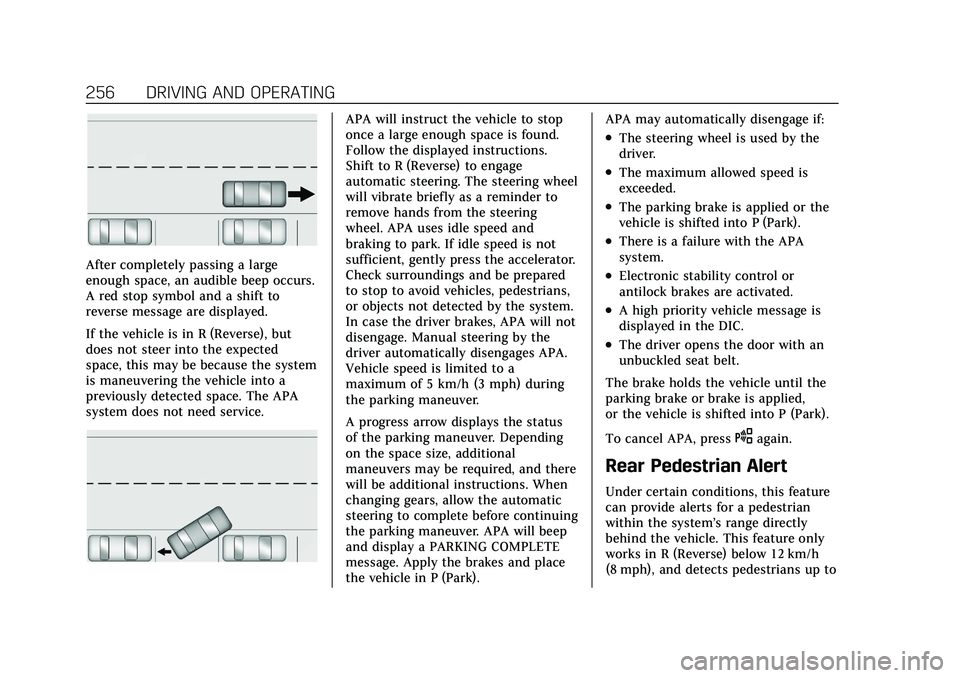
After completely passing a large
enough space, an audible beep occurs.
A red stop symbol and a shift to
reverse message are displayed.
If the vehicle is in R (Reverse), but
does not steer into the expected
space, this may be because the system
is maneuvering the vehicle into a
previously detected space. The APA
system does not need service.
APA will instruct the vehicle to stop
once a large enough space is found.
Follow the displayed instructions.
Shift to R (Reverse) to engage
automatic steering. The steering wheel
will vibrate briefly as a reminder to
remove hands from the steering
wheel. APA uses idle speed and
braking to park. If idle speed is not
sufficient, gently press the accelerator.
Check surroundings and be prepared
to stop to avoid vehicles, pedestrians,
or objects not detected by the system.
In case the driver brakes, APA will not
disengage. Manual steering by the
driver automatically disengages APA.
Vehicle speed is limited to a
maximum of 5 km/h (3 mph) during
the parking maneuver.
A progress arrow displays the status
of the parking maneuver. Depending
on the space size, additional
maneuvers may be required, and there
will be additional instructions. When
changing gears, allow the automatic
steering to complete before continuing
the parking maneuver. APA will beep
and display a PARKING COMPLETE
message. Apply the brakes and place
the vehicle in P (Park).APA may automatically disengage if:
.The steering wheel is used by the
driver.
.The maximum allowed speed is
exceeded.
.The parking brake is applied or the
vehicle is shifted into P (Park).
.There is a failure with the APA
system.
.Electronic stability control or
antilock brakes are activated.
.A high priority vehicle message is
displayed in the DIC.
.The driver opens the door with an
unbuckled seat belt.
The brake holds the vehicle until the
parking brake or brake is applied,
or the vehicle is shifted into P (Park).
To cancel APA, press
Oagain.
Rear Pedestrian Alert
Under certain conditions, this feature
can provide alerts for a pedestrian
within the system’s range directly
behind the vehicle. This feature only
works in R (Reverse) below 12 km/h
(8 mph), and detects pedestrians up to
Page 308 of 408
Cadillac XT4 Owner Manual (GMNA-Localizing-U.S./Canada/Mexico-
14584367) - 2021 - CRC - 10/14/20
VEHICLE CARE 307
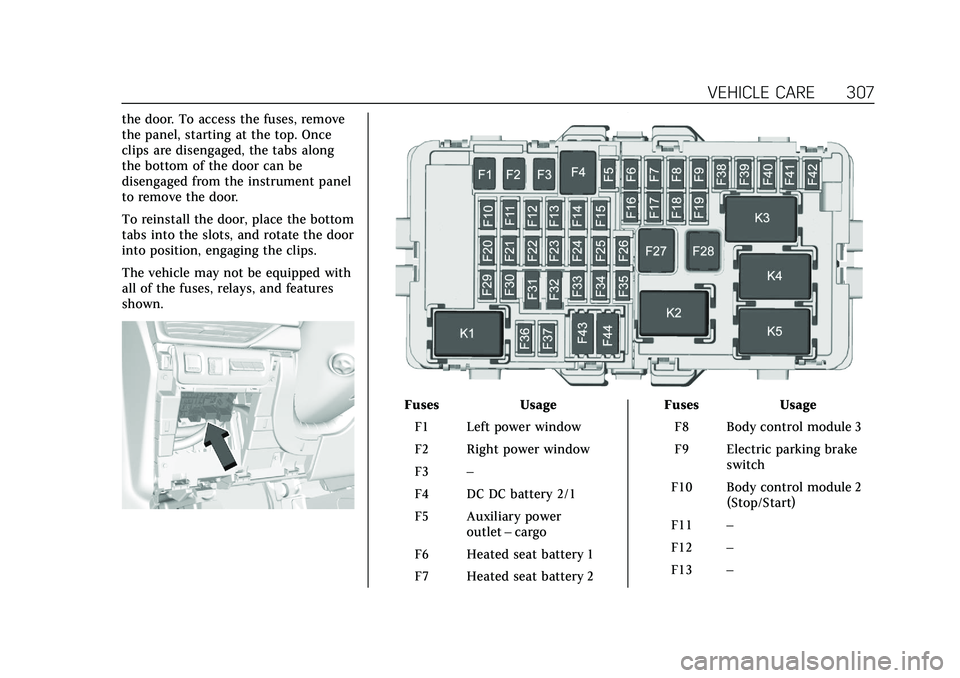
the door. To access the fuses, remove
the panel, starting at the top. Once
clips are disengaged, the tabs along
the bottom of the door can be
disengaged from the instrument panel
to remove the door.
To reinstall the door, place the bottom
tabs into the slots, and rotate the door
into position, engaging the clips.
The vehicle may not be equipped with
all of the fuses, relays, and features
shown.
FusesUsage
F1 Left power window
F2 Right power window
F3 –
F4 DC DC battery 2/1
F5 Auxiliary power outlet–cargo
F6 Heated seat battery 1
F7 Heated seat battery 2 Fuses
Usage
F8 Body control module 3
F9 Electric parking brake switch
F10 Body control module 2 (Stop/Start)
F11 –
F12 –
F13 –
Page 355 of 408

Cadillac XT4 Owner Manual (GMNA-Localizing-U.S./Canada/Mexico-
14584367) - 2021 - CRC - 10/14/20
354 VEHICLE CARE
After cleaning, use a paper towel to
blot excess moisture.
Cleaning High Gloss Surfaces
and Vehicle Information and
Radio Displays
Use a microfiber cloth on high gloss
surfaces or vehicle displays. First, use
a soft bristle brush to remove dirt that
can scratch the surface. Then gently
clean by rubbing with a microfiber
cloth. Never use window cleaners or
solvents. Periodically hand wash the
microfiber cloth separately, using mild
soap. Do not use bleach or fabric
softener. Rinse thoroughly and air dry
before next use.
Caution
Do not attach a device with a
suction cup to the display. This may
cause damage and would not be
covered by the vehicle warranty.
Instrument Panel, Leather, Vinyl,
Other Plastic Surfaces, Low
Gloss Paint Surfaces, and
Natural Open Pore Wood
Surfaces
Use a soft microfiber cloth dampened
with water to remove dust and loose
dirt. For a more thorough cleaning,
use a soft microfiber cloth dampened
with a mild soap solution.
Caution
Soaking or saturating leather,
especially perforated leather, as well
as other interior surfaces, may
cause permanent damage. Wipe
excess moisture from these surfaces
after cleaning and allow them to
dry naturally. Never use heat,
steam, or spot removers. Do not use
cleaners that contain silicone or
wax-based products. Cleaners
containing these solvents can
permanently change the appearance
and feel of leather or soft trim, and
are not recommended.Do not use cleaners that increase
gloss, especially on the instrument
panel. Reflected glare can decrease
visibility through the windshield
under certain conditions.
Caution
Use of air fresheners may cause
permanent damage to plastics and
painted surfaces. If an air freshener
comes in contact with any plastic
or painted surface in the vehicle,
blot immediately and clean with a
soft cloth dampened with a mild
soap solution. Damage caused by
air fresheners would not be covered
by the vehicle warranty.
Cargo Cover and
Convenience Net
If equipped, wash with warm water
and mild detergent. Do not use
chlorine bleach. Rinse with cold water,
and then dry completely.
Care of Seat Belts
Keep belts clean and dry.