door lock CADILLAC XT4 2024 Owner's Manual
[x] Cancel search | Manufacturer: CADILLAC, Model Year: 2024, Model line: XT4, Model: CADILLAC XT4 2024Pages: 373, PDF Size: 8.01 MB
Page 45 of 373
Cadillac XT4 Owner Manual (GMNA-Localizing-U.S./Canada/Mexico-
17180837) - 2024 - CRC - 2/28/23
44 Seats and Restraints
seat; for example, if a child entered the
vehicle through the rear door and left the
vehicle without the vehicle being shut off.
The feature can be turned on or off. Select
Settings > Vehicle > Rear Seat Reminder >
ON or OFF.
Manually Folding the Seatbacks
{Warning
Folding a rear seat with the seat belts
still fastened may cause damage to the
seat or the seat belts. Always unbuckle
the seat belts and return them to their
normal stowed position before folding a
rear seat.
1. Place the front seatbacks in the upright position. See Reclining Seatbacks 038.
2. Lower the rear head restraint. See Head
Restraints 035.
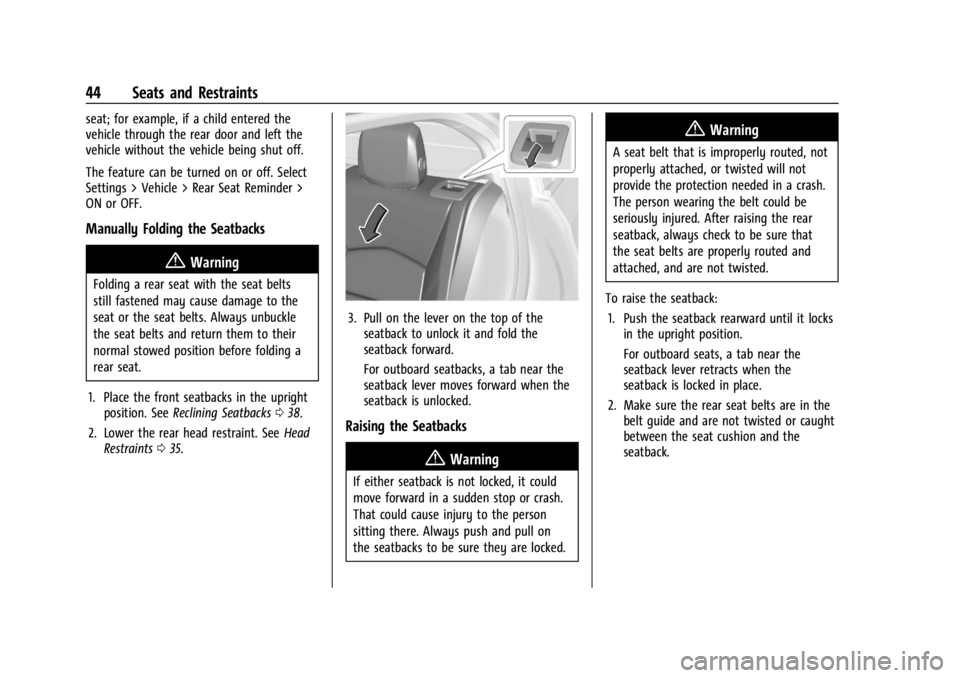
3. Pull on the lever on the top of the
seatback to unlock it and fold the
seatback forward.
For outboard seatbacks, a tab near the
seatback lever moves forward when the
seatback is unlocked.
Raising the Seatbacks
{Warning
If either seatback is not locked, it could
move forward in a sudden stop or crash.
That could cause injury to the person
sitting there. Always push and pull on
the seatbacks to be sure they are locked.
{Warning
A seat belt that is improperly routed, not
properly attached, or twisted will not
provide the protection needed in a crash.
The person wearing the belt could be
seriously injured. After raising the rear
seatback, always check to be sure that
the seat belts are properly routed and
attached, and are not twisted.
To raise the seatback: 1. Push the seatback rearward until it locks in the upright position.
For outboard seats, a tab near the
seatback lever retracts when the
seatback is locked in place.
2. Make sure the rear seat belts are in the belt guide and are not twisted or caught
between the seat cushion and the
seatback.
Page 51 of 373

Cadillac XT4 Owner Manual (GMNA-Localizing-U.S./Canada/Mexico-
17180837) - 2024 - CRC - 2/28/23
50 Seats and Restraints
4. If equipped with a shoulder belt heightadjuster, move it to the height that is
right for you. See “Shoulder Belt Height
Adjuster” later in this section for
instructions on use and important safety
information.
5. To make the lap part tight, pull up on
the shoulder belt.
To unlatch the belt, push the release
pushbutton on the buckle. The belt should
return to its stowed position.
Always stow the seat belt slowly. If the seat
belt webbing returns quickly to the stowed
position, the retractor may lock and cannot
be pulled out. If this happens, pull the seat
belt straight out firmly to unlock the
webbing, and then release it. If the webbing
is still locked in the retractor, see your
dealer.
Before a door is closed, be sure the seat belt
is out of the way. If a door is slammed
against a seat belt, damage can occur to
both the seat belt and the vehicle.
Shoulder Belt Height Adjuster
The vehicle has a shoulder belt height
adjuster for the driver and front outboard
passenger seating positions.
Adjust the height so that the shoulder
portion of the belt is on the shoulder and
not falling off of it. The belt should be close
to, but not contacting, the neck. Improper
shoulder belt height adjustment could
reduce the effectiveness of the seat belt in a
crash. See How to Wear Seat Belts Properly
0 47.
Press and hold the release button while
raising or lowering the height adjuster to
the desired position.
Page 56 of 373

Cadillac XT4 Owner Manual (GMNA-Localizing-U.S./Canada/Mexico-
17180837) - 2024 - CRC - 2/28/23
Seats and Restraints 55
Driver Side Shown, Passenger Side Similar
The driver and front outboard passenger
seat-mounted side impact airbags are in the
side of the seatbacks closest to the door.Driver Side Shown, Passenger Side Similar
The roof-rail airbags for the driver, front
outboard passenger, and second row
outboard passengers are in the ceiling above
the side windows.
{Warning
If something is between an occupant and
an airbag, the airbag might not inflate
properly or it might force the object into
that person causing severe injury or even
death. The path of an inflating airbag
must be kept clear. Do not put anything
between an occupant and an airbag, and (Continued)
Warning (Continued)
do not attach or put anything on the
steering wheel hub or on or near any
other airbag covering.
Do not use seat accessories that block the
inflation path of a seat-mounted side
impact airbag.
Never secure anything to the roof of a
vehicle with roof-rail airbags by routing a
rope or tie‐down through any door or
window opening. If you do, the path of
an inflating roof-rail airbag will be
blocked.
When Should an Airbag Inflate?
This vehicle is equipped with airbags. See
Airbag System053. Airbags are designed to
inflate if the impact exceeds the specific
airbag system's deployment threshold.
Deployment thresholds are used to predict
how severe a crash is likely to be in time
for the airbags to inflate and help restrain
the occupants. The vehicle has electronic
sensors that help the airbag system
determine the severity of the impact.
Deployment thresholds can vary with
specific vehicle design.
Page 58 of 373
Cadillac XT4 Owner Manual (GMNA-Localizing-U.S./Canada/Mexico-
17180837) - 2024 - CRC - 2/28/23
Seats and Restraints 57
designed to help reduce the risk of full or
partial ejection in rollover events, although
no system can prevent all such ejections.
But airbags would not help in many types
of collisions, primarily because the
occupant's motion is not toward those
airbags. SeeWhen Should an Airbag Inflate?
0 55.
Airbags should never be regarded as
anything more than a supplement to seat
belts.
What Will You See after an
Airbag Inflates?
After frontal, knee, and seat-mounted side
impact airbags inflate, they quickly deflate,
so quickly that some people may not even
realize the airbags inflated. Roof-rail airbags
may still be at least partially inflated for
some time after they inflate. Some
components of the airbag module may be
hot for several minutes. For location of the
airbags, see Where Are the Airbags? 054.
The parts of the airbag that come into
contact with you may be warm, but not too
hot to touch. There may be some smoke and dust coming from the vents in the
deflated airbags. Airbag inflation does not
prevent people from leaving the vehicle.
{Warning
When an airbag inflates, there may be
dust in the air. This dust could cause
breathing problems for people with a
history of asthma or other breathing
trouble. To avoid this, everyone in the
vehicle should get out as soon as it is
safe to do so. If you have breathing
problems but cannot get out of the
vehicle after an airbag inflates, then get
fresh air by opening a window or a door.
If you experience breathing problems
following an airbag deployment, you
should seek medical attention.
The vehicle has a feature that may
automatically unlock the doors, turn on the
interior lamps and hazard warning flashers,
and shut off the fuel system after the
airbags inflate. The feature may also
activate, without airbag inflation, after an
event that exceeds a predetermined
threshold. After turning the vehicle off and
then on again, the fuel system will return to
normal operation; the doors can be locked, the interior lamps can be turned off, and
the hazard warning flashers can be turned
off using the controls for those features.
If any of these systems are damaged in the
crash they may not operate as normal.{Warning
A crash severe enough to inflate the
airbags may have also damaged
important functions in the vehicle, such
as the fuel system, brake and steering
systems, etc. Even if the vehicle appears
to be drivable after a moderate crash,
there may be concealed damage that
could make it difficult to safely operate
the vehicle.
Use caution if you should attempt to
restart the engine after a crash has
occurred.
In many crashes severe enough to inflate
the airbag, windshields are broken by
vehicle deformation. Additional windshield
breakage may also occur from the front
outboard passenger airbag.
.Airbags are designed to inflate only once.
After an airbag inflates, you will need
some new parts for the airbag system.
If you do not get them, the airbag
Page 87 of 373

Cadillac XT4 Owner Manual (GMNA-Localizing-U.S./Canada/Mexico-
17180837) - 2024 - CRC - 2/28/23
86 Instruments and Controls
Instruments and Controls
Controls
Steering Wheel Adjustment . . . . . . . . . . . . 87
Heated Steering Wheel . . . . . . . . . . . . . . . . . 87
Horn . . . . . . . . . . . . . . . . . . . . . . . . . . . . . . . . . . . 88
Windshield Wiper/Washer . . . . . . . . . . . . . 88
Rear Window Wiper/Washer . . . . . . . . . . . 90
Compass . . . . . . . . . . . . . . . . . . . . . . . . . . . . . . . . 91
Clock . . . . . . . . . . . . . . . . . . . . . . . . . . . . . . . . . . . 91
Power Outlets . . . . . . . . . . . . . . . . . . . . . . . . . . 91
Wireless Charging . . . . . . . . . . . . . . . . . . . . . . 91
Warning Lights, Gauges, and Indicators
Warning Lights, Gauges, andIndicators . . . . . . . . . . . . . . . . . . . . . . . . . . . . . 94
Instrument Cluster . . . . . . . . . . . . . . . . . . . . . 94
Speedometer . . . . . . . . . . . . . . . . . . . . . . . . . . . 96
Odometer . . . . . . . . . . . . . . . . . . . . . . . . . . . . . . 96
Trip Odometer . . . . . . . . . . . . . . . . . . . . . . . . . 96
Tachometer . . . . . . . . . . . . . . . . . . . . . . . . . . . . 96
Fuel Gauge . . . . . . . . . . . . . . . . . . . . . . . . . . . . . 97
Speed Limiter Indicator . . . . . . . . . . . . . . . . . 97
Engine Oil Pressure Gauge . . . . . . . . . . . . . 98
Engine Oil Temperature Gauge . . . . . . . . . 99
Engine Coolant Temperature Gauge . . . . 99
Seat Belt Reminders . . . . . . . . . . . . . . . . . . . 100
Airbag Readiness Light . . . . . . . . . . . . . . . . . 101
Passenger Airbag Status Indicator . . . . . . 101
Charging System Light . . . . . . . . . . . . . . . . 102 Malfunction Indicator Lamp (Check
Engine Light) . . . . . . . . . . . . . . . . . . . . . . . . 102
Brake System Warning Light . . . . . . . . . . 104
Electric Parking Brake Light . . . . . . . . . . . . 104
Service Electric Parking Brake Light . . . . 104
Antilock Brake System (ABS) Warning Light . . . . . . . . . . . . . . . . . . . . . . . . . . . . . . . . . 105
Gear Shifting Light . . . . . . . . . . . . . . . . . . . . 105
Performance Shifting Light . . . . . . . . . . . . 105
All-Wheel-Drive Light . . . . . . . . . . . . . . . . . . 105
Lane Keep Assist (LKA) Light . . . . . . . . . . . 106
Automatic Emergency Braking (AEB) Disabled Light . . . . . . . . . . . . . . . . . . . . . . . 106
Vehicle Ahead Indicator . . . . . . . . . . . . . . . 106
Pedestrian Ahead Indicator . . . . . . . . . . . . 106
Traction Off Light . . . . . . . . . . . . . . . . . . . . . . 107
Traction Control System (TCS)/Electronic Stability Control Light . . . . . . . . . . . . . . . 107
Electronic Stability Control (ESC) Off Light . . . . . . . . . . . . . . . . . . . . . . . . . . . . . . . . . 107
Engine Coolant Temperature Warning Light . . . . . . . . . . . . . . . . . . . . . . . . . . . . . . . . . 108
Driver Mode Control Light . . . . . . . . . . . . . 108
Tire Pressure Light . . . . . . . . . . . . . . . . . . . . 108
Engine Oil Pressure Light . . . . . . . . . . . . . . 109
Low Fuel Warning Light . . . . . . . . . . . . . . . 109
Auto Stop Indicator . . . . . . . . . . . . . . . . . . . . 110
Security Light . . . . . . . . . . . . . . . . . . . . . . . . . . 110
High-Beam On Light . . . . . . . . . . . . . . . . . . . 110 Adaptive Forward Lighting (AFL)
Light . . . . . . . . . . . . . . . . . . . . . . . . . . . . . . . . . 110
Lamps On Reminder . . . . . . . . . . . . . . . . . . . 110
Cruise Control Light . . . . . . . . . . . . . . . . . . . . 111
Adaptive Cruise Control Light . . . . . . . . . . . 111
Super Cruise Light . . . . . . . . . . . . . . . . . . . . . . 111
Door Ajar Light . . . . . . . . . . . . . . . . . . . . . . . . . 111
Information Displays
Driver Information Center (DIC) . . . . . . . . 111
Vehicle Status . . . . . . . . . . . . . . . . . . . . . . . . . . 113
Head-Up Display (HUD) . . . . . . . . . . . . . . . . 115
Vehicle Messages
Vehicle Messages . . . . . . . . . . . . . . . . . . . . . . 118
Engine Power Messages . . . . . . . . . . . . . . . 118
Vehicle Speed Messages . . . . . . . . . . . . . . . 118
Universal Remote System
Universal Remote System . . . . . . . . . . . . . . 119
Universal Remote System Programming . . . . . . . . . . . . . . . . . . . . . . . . 119
Universal Remote System Operation . . . 121
Page 90 of 373

Cadillac XT4 Owner Manual (GMNA-Localizing-U.S./Canada/Mexico-
17180837) - 2024 - CRC - 2/28/23
Instruments and Controls 89
windshield wiper lever is released, additional
wipes may occur depending on how long
the windshield washer has been activated.
SeeWasher Fluid 0272 for information on
filling the windshield washer fluid reservoir.
{Warning
In freezing weather, do not use the
washer until the windshield is warmed.
Otherwise the washer fluid can form ice
on the windshield, blocking your vision.
{Warning
Before driving the vehicle, always clear
snow and ice from the hood, windshield,
washer nozzles, roof, and rear of the
vehicle, including all lamps and windows.
Reduced visibility from snow and ice
buildup could lead to a crash.
Clear snow and ice from the wiper blades
and windshield before using them. If frozen
to the windshield, carefully loosen or thaw
them. Damaged blades should be replaced.
See Wiper Blade Replacement 0275.
Heavy snow or ice can overload the wiper
motor. See Electrical System Overload 0279. Wiper Parking
If the ignition is turned off while the wipers
are on LO, HI, or AUTO with Rainsense
turned off, they will immediately stop.
If the windshield wiper lever is then moved
to OFF before the driver door is opened or
within 10 minutes, the wipers will restart
and move to the base of the windshield.
If the ignition is turned off while the wipers
are performing wipes due to windshield
washing or Rainsense, the wipers continue
to run until they reach the base of the
windshield.Rainsense
If equipped with Rainsense and the feature
is turned on, a sensor near the top center of
the windshield detects the amount of water
on the windshield and controls the
frequency of the windshield wiper based on
the current sensitivity setting.
Keep this area of the windshield clear of
debris to allow for best system performance.
AUTO :
Move the windshield wiper lever to
AUTO. Turn the band on the wiper lever to
adjust the sensitivity.
.Turn the band up for more sensitivity to
moisture.
.Turn the band down for less sensitivity to
moisture.
.Move the windshield wiper lever out of
the AUTO position to deactivate
Rainsense.
To turn the Rainsense feature on or off,
select Settings > Vehicle > Comfort and
Convenience > Rainsense Wipers > Select ON
or OFF.
Wiper Arm Assembly Protection
When using an automatic car wash, move
the windshield wiper lever to OFF. This
disables the automatic Rainsense windshield
wipers.
Page 125 of 373

Cadillac XT4 Owner Manual (GMNA-Localizing-U.S./Canada/Mexico-
17180837) - 2024 - CRC - 2/28/23
124 Lighting
The headlamp high-beam alters according to
the traffic situation, preventing high beam
light from glaring towards oncoming or
preceding traffic. This gives the best light
distribution without glaring other road
users.
The Adaptive Headlight system remains on
until one of the following situations occurs:
.The system detects a preceding vehicle’s
taillamps.
.The vehicle speed drops below
approximately 20 km/h (12 mph).
The high beams may not turn off
automatically if the system cannot detect
another vehicle lamps because of any of the
following:
.The other vehicle’s lamps are missing,
damaged, obstructed from view,
or otherwise undetected.
.The other vehicle’s lamps are covered
with dirt, snow, and/or road spray.
.The other vehicle’s lamps cannot be
detected due to dense exhaust, smoke,
fog, snow, road spray, mist, or other
airborne obstructions.
.The vehicle windshield is dirty, cracked,
or obstructed by something that blocks
the view of the light sensor.
.The vehicle is loaded in a way that the
front end points upward, causing the light
sensor to aim high and not detect
headlamps and taillamps.
.The vehicle is being driven on winding or
hilly roads.
The Adaptive Headlight system may need to
be disabled if any of the above conditions
exist.
Do not use the Adaptive Headlight System
in dense exhaust, smoke, fog, snow, road
spray, mist, or other airborne obstructions.
Exterior Lamps Off Reminder
A warning chime sounds if the driver door is
opened while the ignition is off and the
exterior lamps are on.
Headlamp High/Low-Beam
Changer
3: Push the turn signal lever away from
you and release, to turn the high beams on.
To return to low beams, push the lever
again or pull it toward you and release.
This indicator light turns on in the
instrument cluster when the high-beam
headlamps are on.
Flash-to-Pass
To flash the high beams, pull the turn signal
lever toward you, and release.
Daytime Running Lamps (DRL)
DRL can make it easier for others to see the
front of your vehicle during the day. Fully
functional DRL are required on all vehicles
first sold in Canada.
The dedicated DRL will come on when all of
the following conditions are met:
.The ignition is on.
.The exterior lamp control is in AUTO.
.The light sensor determines it is daytime.
.The parking brake is released or the
vehicle is not in P (Park).
Page 151 of 373
Cadillac XT4 Owner Manual (GMNA-Localizing-U.S./Canada/Mexico-
17180837) - 2024 - CRC - 2/28/23
150 Infotainment System
Features are subject to change. For further
information on how to set up Android Auto
and Apple CarPlay in the vehicle, visit your
brand website. SeeOnline Account0342 for
details.
CarPlay will not support Fast Connect on
iPhones with iOS versions older than 14.0.
Android Auto is provided by Google and is
subject to Google’s terms and privacy policy.
Apple CarPlay is provided by Apple and is
subject to Apple’s terms and privacy policy.
Data plan rates apply. For Android Auto
support and to see if your phone is
compatible, see https:/www.android.com/
auto/compatability. For Apple CarPlay
support and to see if your phone is
compatible, see www.apple.com/ios/
carplay/. Apple or Google may change or
suspend availability at any time. Google,
Android, Android Auto, Google Maps, and
other marks are trademarks of Google LLC.
Apple CarPlay is a trademark of Apple Inc.
Press
{on the center stack to exit Android
Auto or Apple CarPlay. To enter back into
Android Auto or Apple CarPlay, press and
hold
{on the center stack.
Settings
To access the Settings menus:
1. Touch Settings on the Home Page on the infotainment display.
2. Touch the desired category to display a list of available options.
3. Touch to select the desired feature setting.
4. Touch the options on the infotainment display to change a setting.
5. Touch
Sto go back.
The Settings menu may contain the
following:
Connections
The menu may contain the following:
Phones
Allows connecting to a different cell phone
or mobile device source, disconnect a cell
phone or media device, or delete a cell
phone or media device.
Wi-Fi Networks
Shows connected and available Wi-Fi
networks. Wi-Fi Hotspot
Allows adjustment of different Wi-Fi
features.
Vehicle-to-Phone Sharing
Trusted Device
Allows for setting a phone as your trusted
device to establish a secure communication
channel between your phone and vehicle
that enables convenient features like instant
profile unlocking and account sign in. When
nearby, your trusted device is recognized
automatically via a unique Bluetooth
connection. Requires MyBrand app.
Vehicle
The menu may contain the following:
Teen Driver
See
Teen Driver 0152.
Rear Seat Reminder
Allows for a chime and a message when the
rear door has been opened before or during
operation of the vehicle.
Page 152 of 373

Cadillac XT4 Owner Manual (GMNA-Localizing-U.S./Canada/Mexico-
17180837) - 2024 - CRC - 2/28/23
Infotainment System 151
Buckle to Drive
This feature can prevent shifting out of Park
when the driver, and if applicable the front
passenger, seat belt is not buckled. See
Buckle To Drive046.
Climate and Air Quality
Adjusts different climate settings.
Collision/Detection Systems
Adjusts different driver assistance system
settings.
Comfort and Convenience
Adjusts different comfort and convenience
settings.
Lighting
Adjusts different lighting settings.
Power Door Locks
Adjusts different door lock settings.
Remote Lock, Unlock, and Start
Adjusts different remote lock settings.
Seating Position
Adjusts different seating position settings.Apps and Permissions
Shows a list of installed apps and the
permissions used.
Date / Time
Allows setting of the clock.
Display
Allows adjustment of the infotainment
display.
Sounds
Allows adjustment of the infotainment
system sounds.
Profiles and Accounts
Modifies the infotainment system’s profiles
and provides access to the accounts assigned
to the currently active profile.
Privacy
This menu allows adjustment of the
infotainment privacy settings.
Storage
This menu shows the storage info on the
infotainment system.
Security
This menu allows adjustment of the
infotainment security settings.
System
The menu may contain the following:
Language
This will set the display language used on
the infotainment display.
Keyboard & speech
Touch to change keyboard and speech
settings.
Units
Touch to change units settings.
Quick Startup
This allows your infotainment system to
quickly resume its last session.
Reset Options
Touch to change reset settings.
About
Touch to view the infotainment system
software information.
Legal Information
Touch to view legal and license information.
Page 185 of 373

Cadillac XT4 Owner Manual (GMNA-Localizing-U.S./Canada/Mexico-
17180837) - 2024 - CRC - 2/28/23
184 Driving and Operating
.N will illuminate in red.
2. After releasing the shift lever, it will return to the center position.
To shift out of N (Neutral): 1. Bring the vehicle to a complete stop.
2. Shift to the desired gear. If shifting from N (Neutral) to R (Reverse), press the shift
lock release button.
3. After releasing the shift lever, it will return to the center position.
Car Wash Mode
This vehicle includes a Car Wash Mode that
allows the vehicle to remain in N (Neutral)
for use in automatic car washes.
Car Wash Mode (Engine Off –Driver in
Vehicle)
To place the vehicle in N (Neutral) with the
engine off and the vehicle occupied:
1. Drive to the entrance of the car wash.
2. Apply the brake pedal.
3. Shift to N (Neutral).
4. Turn off the engine and release the brake pedal.
5. The indicator should continue to show N. If it does not, repeat Steps 2–4. 6. The vehicle is now ready for the
car wash.
Car Wash Mode (Engine Off –Driver out of
Vehicle)
To place the vehicle in N (Neutral) with the
engine off and the vehicle unoccupied:
1. Drive to the entrance of the car wash.
2. Apply the brake pedal.
3. Open the door.
4. Shift to N (Neutral).
5. Turn off the engine and release the brake pedal.
6. The indicator should continue to show N. If it does not, repeat Steps 2–5.
7. Exit the vehicle and close the door. The vehicle is now ready for the car wash.
8. The vehicle may automatically shift to P (Park) upon re-entry.
Car Wash Mode (Engine On –Driver in
Vehicle)
To place the vehicle in N (Neutral) with the
engine on and the vehicle occupied:
1. Drive to the entrance of the car wash.
2. Apply the brake pedal.
3. Shift to N (Neutral). 4. Release the brake pedal. The vehicle is
now ready for the car wash.
Car Wash Mode (Engine On –Driver out of
Vehicle)
To place the vehicle in N (Neutral) with the
engine on and the vehicle unoccupied:
1. Drive to the entrance of the car wash.
2. Apply the brake pedal.
3. Open the door.
4. Shift to N (Neutral), then release the brake pedal.
5. The indicator should continue to show N. If it does not, repeat Steps 2–4.
6. Exit the vehicle and close the door. The vehicle is now ready for the car wash.
7. The vehicle may automatically shift to P (Park) upon re-entry.
Caution
A transmission hot message may display
if the automatic transmission fluid is too
hot. Driving under this condition can
damage the vehicle. Stop and idle the
engine to cool the automatic
(Continued)