Lane change warning CADILLAC XT5 2017 1.G User Guide
[x] Cancel search | Manufacturer: CADILLAC, Model Year: 2017, Model line: XT5, Model: CADILLAC XT5 2017 1.GPages: 339, PDF Size: 2.75 MB
Page 226 of 339
Cadillac XT5 Owner Manual (GMNA-Localizing-MidEast-10260744) - 2017 -
crc - 1/14/16
226 Driving and Operating
into a previously detected space.
The APA system does not need
service.
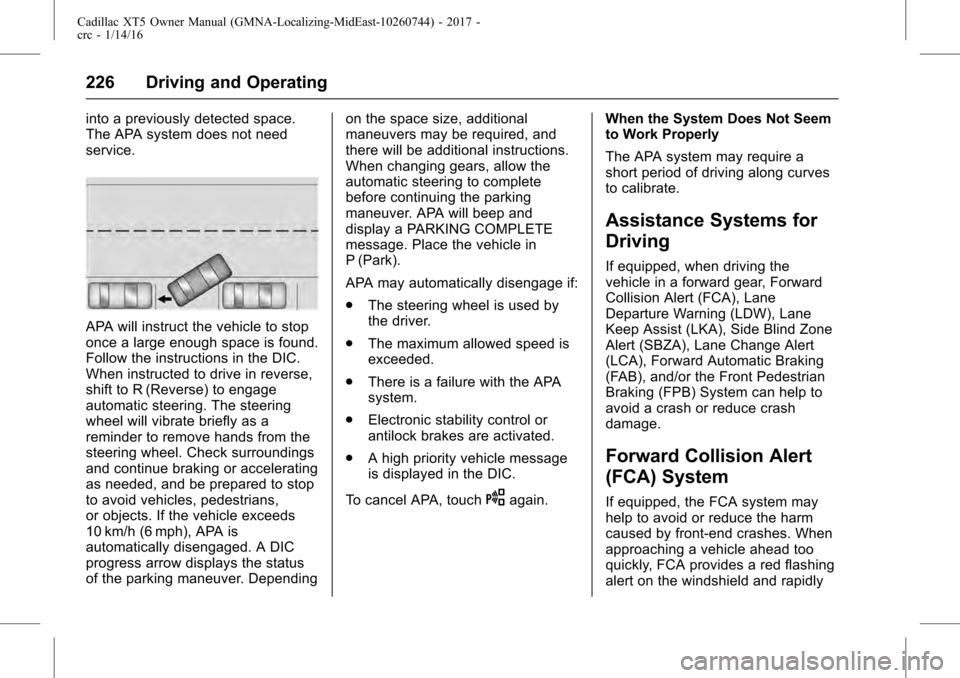
APA will instruct the vehicle to stop
once a large enough space is found.
Follow the instructions in the DIC.
When instructed to drive in reverse,
shift to R (Reverse) to engage
automatic steering. The steering
wheel will vibrate briefly as a
reminder to remove hands from the
steering wheel. Check surroundings
and continue braking or accelerating
as needed, and be prepared to stop
to avoid vehicles, pedestrians,
or objects. If the vehicle exceeds
10 km/h (6 mph), APA is
automatically disengaged. A DIC
progress arrow displays the status
of the parking maneuver. Dependingon the space size, additional
maneuvers may be required, and
there will be additional instructions.
When changing gears, allow the
automatic steering to complete
before continuing the parking
maneuver. APA will beep and
display a PARKING COMPLETE
message. Place the vehicle in
P (Park).
APA may automatically disengage if:
.
The steering wheel is used by
the driver.
. The maximum allowed speed is
exceeded.
. There is a failure with the APA
system.
. Electronic stability control or
antilock brakes are activated.
. A high priority vehicle message
is displayed in the DIC.
To cancel APA, touch
Oagain. When the System Does Not Seem
to Work Properly
The APA system may require a
short period of driving along curves
to calibrate.
Assistance Systems for
Driving
If equipped, when driving the
vehicle in a forward gear, Forward
Collision Alert (FCA), Lane
Departure Warning (LDW), Lane
Keep Assist (LKA), Side Blind Zone
Alert (SBZA), Lane Change Alert
(LCA), Forward Automatic Braking
(FAB), and/or the Front Pedestrian
Braking (FPB) System can help to
avoid a crash or reduce crash
damage.
Forward Collision Alert
(FCA) System
If equipped, the FCA system may
help to avoid or reduce the harm
caused by front-end crashes. When
approaching a vehicle ahead too
quickly, FCA provides a red flashing
alert on the windshield and rapidly
Page 229 of 339
Cadillac XT5 Owner Manual (GMNA-Localizing-MidEast-10260744) - 2017 -
crc - 1/14/16
Driving and Operating 229
the alert timing. The range of
selectable alert timings may not be
appropriate for all drivers and
driving conditions.
If your vehicle is equipped with
Adaptive Cruise Control (ACC),
changing the FCA timing setting
automatically changes the following
gap setting (Far, Medium, or Near).
Unnecessary Alerts
FCA may provide unnecessary
alerts for turning vehicles, vehicles
in other lanes, objects that are not
vehicles, or shadows. These alerts
are normal operation and the
vehicle does not need service.
Cleaning the System
If the FCA system does not seem to
operate properly, cleaning the
outside of the windshield in front of
the rearview mirror, and cleaning the
front of the vehicle where radar
sensors are located, may correct
the issue.
Forward Automatic
Braking (FAB)
If the vehicle has Forward Collision
Alert (FCA), it also has FAB, which
includes Intelligent Brake
Assist (IBA). When the system
detects a vehicle ahead in your path
that is traveling in the same
direction that you may be about to
crash into, it can provide a boost to
braking or automatically brake the
vehicle. This can help avoid or
lessen the severity of crashes when
driving in a forward gear. Depending
on the situation, the vehicle may
automatically brake moderately or
hard. This forward automatic
braking can only occur if a vehicle is
detected. This is shown by the FCA
vehicle ahead indicator being lit.
SeeForward Collision Alert (FCA)
System 0226.
The system works when driving in a
forward gear between 8 km/h
(5 mph) and 80 km/h (50 mph),
or on vehicles with Adaptive Cruise
Control (ACC), above 4 km/h
(2 mph). It can detect vehicles up to
approximately 60 m (197 ft).
{Warning
FAB is an emergency crash
preparation feature and is not
designed to avoid crashes. Do
not rely on FAB to brake the
vehicle. FAB will not brake
outside of its operating speed
range and only responds to
detected vehicles.
FAB may not: . Detect a vehicle ahead on
winding or hilly roads.
. Detect all vehicles,
especially vehicles with a
trailer, tractors, muddy
vehicles, etc.
. Detect a vehicle when
weather limits visibility, such
as in fog, rain, or snow.
. Detect a vehicle ahead if it
is partially blocked by
pedestrians or other objects.
(Continued)
Page 233 of 339
Cadillac XT5 Owner Manual (GMNA-Localizing-MidEast-10260744) - 2017 -
crc - 1/14/16
Driving and Operating 233
Side Blind Zone
Alert (SBZA)
If equipped, the SBZA system is a
lane-changing aid that assists
drivers with avoiding crashes that
occur with moving vehicles in the
side blind zone (or spot) areas.
When the vehicle is in a forward
gear, the left or right side mirror
display will light up if a moving
vehicle is detected in that blind
zone. If the turn signal is activated
and a vehicle is also detected on
the same side, the display will flash
as an extra warning not to change
lanes. Since this system is part of
the Lane Change Alert (LCA)
system, read the entire LCA section
before using this feature.
Lane Change Alert (LCA)
If equipped, the LCA system is a
lane-changing aid that assists
drivers with avoiding lane change
crashes that occur with moving
vehicles in the side blind zone (or
spot) areas or with vehicles rapidly
approaching these areas from
behind. The LCA warning displaywill light up in the corresponding
outside side mirror and will flash if
the turn signal is on.
{Warning
LCA does not alert the driver to
vehicles outside of the system
detection zones, pedestrians,
bicyclists, or animals. It may not
provide alerts when changing
lanes under all driving conditions.
Failure to use proper care when
changing lanes may result in
injury, death, or vehicle damage.
Before making a lane change,
always check mirrors, glance over
your shoulder, and use the turn
signals.
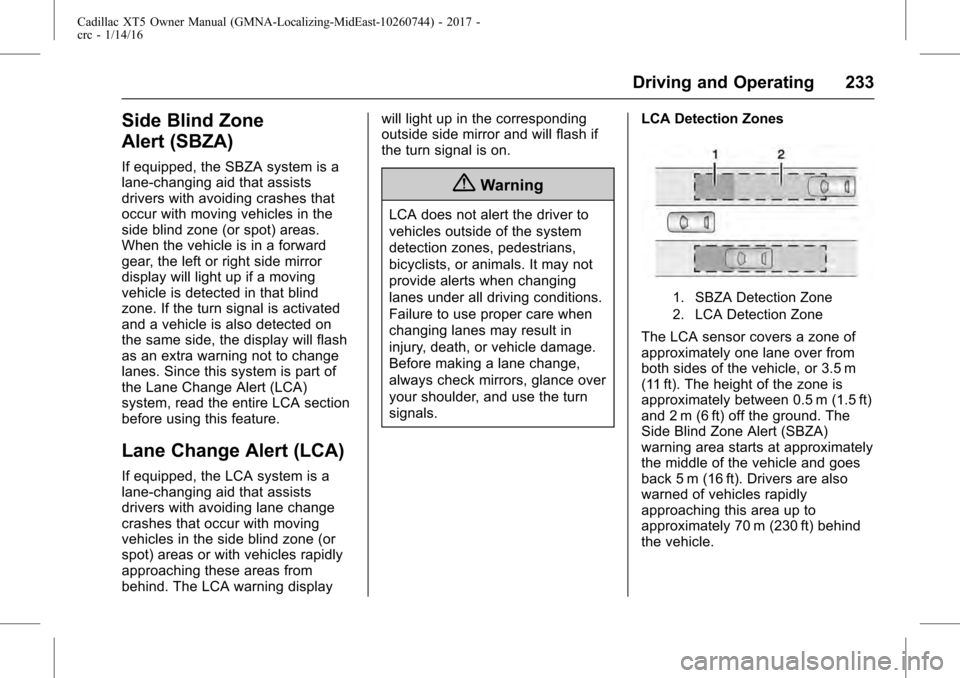
LCA Detection Zones
1. SBZA Detection Zone
2. LCA Detection Zone
The LCA sensor covers a zone of
approximately one lane over from
both sides of the vehicle, or 3.5 m
(11 ft). The height of the zone is
approximately between 0.5 m (1.5 ft)
and 2 m (6 ft) off the ground. The
Side Blind Zone Alert (SBZA)
warning area starts at approximately
the middle of the vehicle and goes
back 5 m (16 ft). Drivers are also
warned of vehicles rapidly
approaching this area up to
approximately 70 m (230 ft) behind
the vehicle.
Page 234 of 339
Cadillac XT5 Owner Manual (GMNA-Localizing-MidEast-10260744) - 2017 -
crc - 1/14/16
234 Driving and Operating
How the System Works
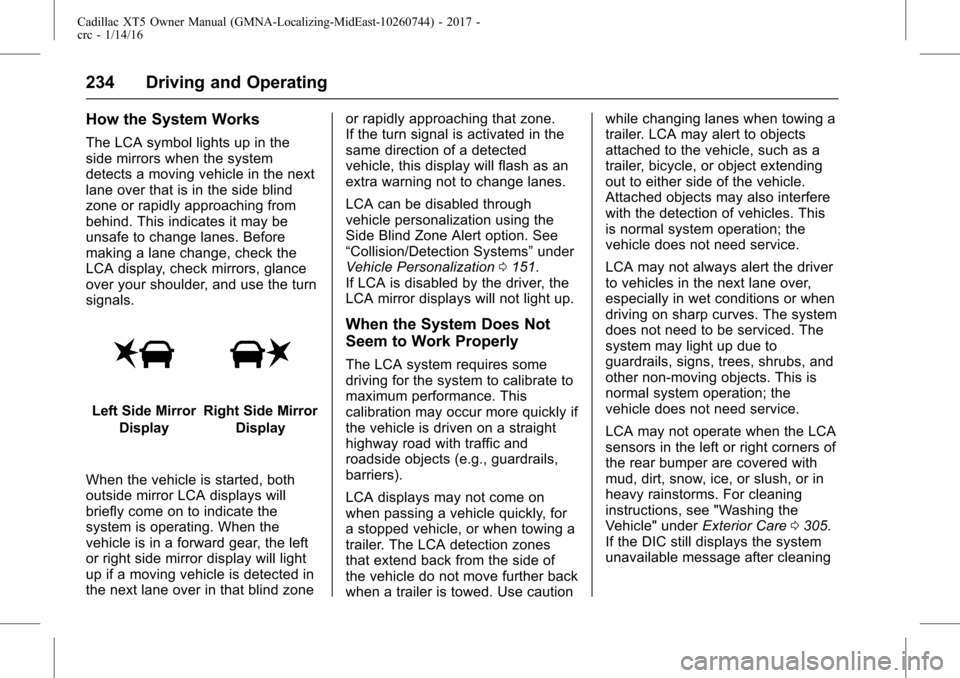
The LCA symbol lights up in the
side mirrors when the system
detects a moving vehicle in the next
lane over that is in the side blind
zone or rapidly approaching from
behind. This indicates it may be
unsafe to change lanes. Before
making a lane change, check the
LCA display, check mirrors, glance
over your shoulder, and use the turn
signals.
Left Side MirrorDisplayRight Side Mirror Display
When the vehicle is started, both
outside mirror LCA displays will
briefly come on to indicate the
system is operating. When the
vehicle is in a forward gear, the left
or right side mirror display will light
up if a moving vehicle is detected in
the next lane over in that blind zone or rapidly approaching that zone.
If the turn signal is activated in the
same direction of a detected
vehicle, this display will flash as an
extra warning not to change lanes.
LCA can be disabled through
vehicle personalization using the
Side Blind Zone Alert option. See
“Collision/Detection Systems”
under
Vehicle Personalization 0151.
If LCA is disabled by the driver, the
LCA mirror displays will not light up.
When the System Does Not
Seem to Work Properly
The LCA system requires some
driving for the system to calibrate to
maximum performance. This
calibration may occur more quickly if
the vehicle is driven on a straight
highway road with traffic and
roadside objects (e.g., guardrails,
barriers).
LCA displays may not come on
when passing a vehicle quickly, for
a stopped vehicle, or when towing a
trailer. The LCA detection zones
that extend back from the side of
the vehicle do not move further back
when a trailer is towed. Use caution while changing lanes when towing a
trailer. LCA may alert to objects
attached to the vehicle, such as a
trailer, bicycle, or object extending
out to either side of the vehicle.
Attached objects may also interfere
with the detection of vehicles. This
is normal system operation; the
vehicle does not need service.
LCA may not always alert the driver
to vehicles in the next lane over,
especially in wet conditions or when
driving on sharp curves. The system
does not need to be serviced. The
system may light up due to
guardrails, signs, trees, shrubs, and
other non-moving objects. This is
normal system operation; the
vehicle does not need service.
LCA may not operate when the LCA
sensors in the left or right corners of
the rear bumper are covered with
mud, dirt, snow, ice, or slush, or in
heavy rainstorms. For cleaning
instructions, see "Washing the
Vehicle" under
Exterior Care0305.
If the DIC still displays the system
unavailable message after cleaning
Page 236 of 339
Cadillac XT5 Owner Manual (GMNA-Localizing-MidEast-10260744) - 2017 -
crc - 1/14/16
236 Driving and Operating
Warning (Continued)
occur. Always keep the
windshield, headlamps, and
camera sensors clean and in
good repair. Do not use LKA in
bad weather conditions.
{Warning
Using LKA while towing a trailer
or on slippery roads could cause
loss of control of the vehicle and
a crash. Turn the system off.
How the System Works
The LKA camera sensor is on the
windshield ahead of the rearview
mirror.
To turn LKA on and off, press
A
on the steering wheel.
When on,
Ais green if LKA is
available to assist and provide LDW
alerts. It may assist by gently
turning the steering wheel and display
Aas amber if the vehicle
approaches a detected lane marking
without using a turn signal in that
direction. It may also provide an
LDW alert by flashing
Aamber
as the lane marking is crossed.
Additionally, there will be three
beeps, or the driver seat will pulse
three times, on the right or left,
depending on the lane departure
direction.
The LKA system does not
continuously steer the vehicle.
If LKA does not detect active driver
steering, an alert and chime may be
provided. Move the steering wheel
to dismiss.
When the System Does Not
Seem to Work Properly
The system performance may be
affected by:
. Close vehicles ahead.
. Sudden lighting changes, such
as when driving through tunnels.
. Banked roads.
. Roads with poor lane markings,
such as two-lane roads. If the LKA system is not functioning
properly when lane markings are
clearly visible, cleaning the
windshield may help.
LKA assistance and/or LDW alerts
may occur due to tar marks,
shadows, cracks in the road,
temporary or construction lane
markings, or other road
imperfections. This is normal system
operation; the vehicle does not need
service. Turn LKA off if these
conditions continue.
Page 330 of 339

Cadillac XT5 Owner Manual (GMNA-Localizing-MidEast-10260744) - 2017 -
crc - 1/14/16
330 Index
IndexA
Accessories andModifications . . . . . . . . . . . . . . . . . . 250
Accessory Power . . . . . . . . . . . . . . . 195
Adaptive Cruise Control . . . . . . . . 212
Add-On Electrical Equipment . . . 248
Adjustments Lumbar, Front Seats . . . . . . . . . . . . 56
Thigh Support . . . . . . . . . . . . . . . . . . 56
Air Cleaner/Filter, Engine . . . . . . . 256
Air Filter, Passenger
Compartment . . . . . . . . . . . . . . . . . 178
Air Vents . . . . . . . . . . . . . . . . . . . . . . . 178
Airbag System Check . . . . . . . . . . . . . . . . . . . . . . . . . . 82
How Does an AirbagRestrain? . . . . . . . . . . . . . . . . . . . . . 76
Passenger Sensing System . . . . 77
What Makes an Airbag Inflate? . . . . . . . . . . . . . . . . . . . . . . . . 76
What Will You See after an Airbag Inflates? . . . . . . . . . . . . . . . 76
When Should an Airbag Inflate? . . . . . . . . . . . . . . . . . . . . . . . . 75
Where Are the Airbags? . . . . . . . . 73
Airbags Adding Equipment to theVehicle . . . . . . . . . . . . . . . . . . . . . . . . 82 Airbags (cont'd)
Passenger Status Indicator . . . 126
Readiness Light . . . . . . . . . . . . . . 125
Servicing Airbag-Equipped
Vehicles . . . . . . . . . . . . . . . . . . . . . . . 81
System Check . . . . . . . . . . . . . . . . . . 72
Alarm Vehicle Security . . . . . . . . . . . . . . . . 41
Alert
Lane Change . . . . . . . . . . . . . . . . . 233
Side Blind Zone (SBZA) . . . . . . 233
All-Season Tires . . . . . . . . . . . . . . . . 280
All-Wheel Drive . . . . . . . . . . . . 202, 266
Antilock Brake System (ABS) . . . 203 Warning Light . . . . . . . . . . . . . . . . . 130
Appearance Care Exterior . . . . . . . . . . . . . . . . . . . . . . . 305
Interior . . . . . . . . . . . . . . . . . . . . . . . . 310
Armrest Rear Seat . . . . . . . . . . . . . . . . . . . . . . 62
Armrest Storage . . . . . . . . . . . . . . . . 101
Ashtrays . . . . . . . . . . . . . . . . . . . . . . . . 116
Assistance Systems for Driving . . . . . . . . . . . . . . . . . . . . . . . . 226
Assistance Systems for Parking and Backing . . . . . . . . . . 220
Automatic Dimming Mirrors . . . . . . . . . . . . . . . . 45
Page 334 of 339

Cadillac XT5 Owner Manual (GMNA-Localizing-MidEast-10260744) - 2017 -
crc - 1/14/16
334 Index
H
Halogen Bulbs . . . . . . . . . . . . . . . . . . 268
Hazard Warning Flashers . . . . . . . 166
Head Restraints . . . . . . . . . . . . . . . . . 53
Head-up Display . . . . . . . . . . . . . . . . 137
Headlamps . . . . . . . . . . . . . . . . . . . . . 269Aiming . . . . . . . . . . . . . . . . . . . . . . . . 268
Automatic . . . . . . . . . . . . . . . . . . . . . 165
Bulb Replacement . . . . . . . . . . . . 268
Daytime RunningLamps (DRL) . . . . . . . . . . . . . . . . 165
Flash-to-Pass . . . . . . . . . . . . . . . . . 165
High-Beam On Light . . . . . . . . . . 134
High/Low Beam Changer . . . . . 165
Lamps On Reminder . . . . . . . . . 134
Heated Rear Seats . . . . . . . . . . . . . . . . . . . . . 63
Steering Wheel . . . . . . . . . . . . . . . 109
Heated and Ventilated Front
Seats . . . . . . . . . . . . . . . . . . . . . . . . . . 59
Heated Mirrors . . . . . . . . . . . . . . . . . . . 45
High-Beam On Light . . . . . . . . . . . . 134
High-Speed Operation . . . . . . . . . . 283
Hill and Mountain Roads . . . . . . . . 185
Hill Start Assist (HSA) . . . . . . . . . . 206
Hood . . . . . . . . . . . . . . . . . . . . . . . . . . . 251 Horn . . . . . . . . . . . . . . . . . . . . . . . . . . . . 110
How to Wear Safety Belts
Properly . . . . . . . . . . . . . . . . . . . . . . . . 65
I
Ignition Positions . . . . . . . . . . . . . . . 191
IndicatorPedestrian Ahead . . . . . . . . . . . . 131
Vehicle Ahead . . . . . . . . . . . . . . . . 131
Infants and Young Children, Restraints . . . . . . . . . . . . . . . . . . . . . . 85
Infotainment . . . . . . . . . . . . . . . . . . . . 170
Infotainment System . . . . . . . . . . . . 329
Instrument Cluster . . . . . . . . . 117, 119
Instrument Panel Overview . . . . . . . 6
Interior Rearview Mirrors . . . . . . . . . 46
Introduction . . . . . . . . . . . . . . . . . . . . . . . 2
J
Jump Starting . . . . . . . . . . . . . . . . . . . 301
K
Key and Lock Messages . . . . . . . . 144
Keyless Entry
Remote (RKE) System . . . . . . . . . 26
Keys . . . . . . . . . . . . . . . . . . . . . . . . . . . . . 25
L
Lamps Cornering . . . . . . . . . . . . . . . . . . . . . 167
Courtesy . . . . . . . . . . . . . . . . . . . . . . 168
Daytime Running (DRL) . . . . . . 165
Dome . . . . . . . . . . . . . . . . . . . . . . . . . 168
Exterior Controls . . . . . . . . . . . . . . 163
Exterior Lamps OffReminder . . . . . . . . . . . . . . . . . . . 165
Exterior Lighting Battery
Saver . . . . . . . . . . . . . . . . . . . . . . . 169
License Plate . . . . . . . . . . . . . . . . . 270
Malfunction Indicator . . . . . . . . . 127
Messages . . . . . . . . . . . . . . . . . . . . 144
On Reminder . . . . . . . . . . . . . . . . . 134
Reading . . . . . . . . . . . . . . . . . . . . . . 168
Lane Change Alert (LCA) . . . . . . . 233
Lane Departure Warning (LDW) . . . . . . . . . . . . . . . . 235
Lane Keep Assist (LKA) . . . . . . . . 235
Lane Keep Assist Light . . . . . . . . . 130
Lap-Shoulder Belt . . . . . . . . . . . . . . . 66
LATCH System Replacing Parts after a
Crash . . . . . . . . . . . . . . . . . . . . . . . . . 95
LATCH, Lower Anchors and Tethers for Children . . . . . . . . . . . . 90
LED Lighting . . . . . . . . . . . . . . . . . . . . 268
Page 339 of 339

Cadillac XT5 Owner Manual (GMNA-Localizing-MidEast-10260744) - 2017 -
crc - 1/14/16
Index 339
Transmission (cont'd)Messages . . . . . . . . . . . . . . . . . . . . 150
Trip Odometer . . . . . . . . . . . . . . . . . . 121
Turn and Lane-Change Signals . . . . . . . . . . . . . . . . . . . . . . . . 167
U
Universal Remote SystemOperation . . . . . . . . . . . . . . . . . . . . . 162
Programming . . . . . . . . . . . . . . . . . 159
V
VehicleAlarm System . . . . . . . . . . . . . . . . . . 41
Control . . . . . . . . . . . . . . . . . . . . . . . 182
Identification Number (VIN) . . . 325
Load Limits . . . . . . . . . . . . . . . . . . . 187
Messages . . . . . . . . . . . . . . . . . . . . 140
Personalization . . . . . . . . . . . . . . . 151
Reminder Messages . . . . . . . . . . 150
Remote Start . . . . . . . . . . . . . . . . . . . 31
Security . . . . . . . . . . . . . . . . . . . . . . . . 41
Speed Messages . . . . . . . . . . . . . 151
Towing . . . . . . . . . . . . . . . . . . . . . . . . 303
Vehicle Ahead Indicator . . . . . . . . 131
Vehicle Care Tire Pressure . . . . . . . . . . . . . . . . . 282
Vehicle Data Recording and Privacy . . . . . . . . . . . . . . . . . . . . . . . . 328 Ventilation, Air . . . . . . . . . . . . . . . . . . 178
Visors . . . . . . . . . . . . . . . . . . . . . . . . . . . 50
Voltmeter Gauge . . . . . . . . . . . . . . . 124
W
Warning
Brake System Light . . . . . . . . . . . 129
Caution and Danger . . . . . . . . . . . . . 2
Lane Departure (LDW) . . . . . . . 235
Warning Lights, Gauges, and Indicators . . . . . . . . . . . . . . . . . . . . . 116
Warnings
Hazard Flashers . . . . . . . . . . . . . . 166
Washer Fluid . . . . . . . . . . . . . . . . . . . 262 Messages . . . . . . . . . . . . . . . . . . . . 151
Wheels Alignment and Tire Balance . . 291
Different Size . . . . . . . . . . . . . . . . . 291
Replacement . . . . . . . . . . . . . . . . . 291
When It Is Time for New Tires . . . . . . . . . . . . . . . . . . . . . . . . . . 289
Where to Put the Restraint . . . . . . 89
Windows . . . . . . . . . . . . . . . . . . . . . . . . 48 Power . . . . . . . . . . . . . . . . . . . . . . . . . . 48
Windshield Replacement . . . . . . . . . . . . . . . . . 268
Wiper/Washer . . . . . . . . . . . . . . . . .110
Winter Driving . . . . . . . . . . . . . . . . . . . . . . . . 185 Winter Tires . . . . . . . . . . . . . . . . . . . . 281
Wiper Blade Replacement . . . . . . 266
Wipers
Rear Washer . . . . . . . . . . . . . . . . . .112
Wireless Charging . . . . . . . . . . . . . . 114