Setting seat CADILLAC XT5 2017 1.G User Guide
[x] Cancel search | Manufacturer: CADILLAC, Model Year: 2017, Model line: XT5, Model: CADILLAC XT5 2017 1.GPages: 339, PDF Size: 2.75 MB
Page 175 of 339
Cadillac XT5 Owner Manual (GMNA-Localizing-MidEast-10260744) - 2017 -
crc - 1/14/16
Climate Controls 175
Caution (Continued)
defogger grid and affect the
radio's ability to pick up stations
clearly. The repairs would not be
covered by the vehicle warranty.
Driver and Passenger Heated and
Ventilated Seats (If Equipped) :
Press
Jorzto heat the driver or
passenger seat cushion and
seatback.
Press
Ior+to heat the driver or
passenger seatback only.
Press
Cor{to ventilate the driver
or passenger seat. See Heated and
Ventilated Front Seats 059.
Auto Heated and Ventilated
Seats : When the vehicle is on, this
feature will automatically activate
the heated or ventilated seats at the
level required by the vehicle's
interior temperature. The active
high, medium, low, or off heated
seat level will be indicated by the
manual heated seat buttons on the
center stack. Use the manual heated or ventilated seat buttons on
the center stack to turn auto heated
or ventilated seats off. See
Heated
and Ventilated Front Seats 059 and
Vehicle Personalization 0151.
Remote Start Climate Control
Operation : If equipped with the
remote start feature, the climate
control system may run when the
vehicle is started remotely. The
system uses the driver ’s previous
settings to heat or cool the inside of
the vehicle. The rear defog may
come on during remote start based
on cold ambient conditions. The
rear defog indicator light does not
come on during a remote start.
If equipped with heated or ventilated
seats, they may come on during a
remote start. See Remote Vehicle
Start 031 and Heated and
Ventilated Front Seats 059.
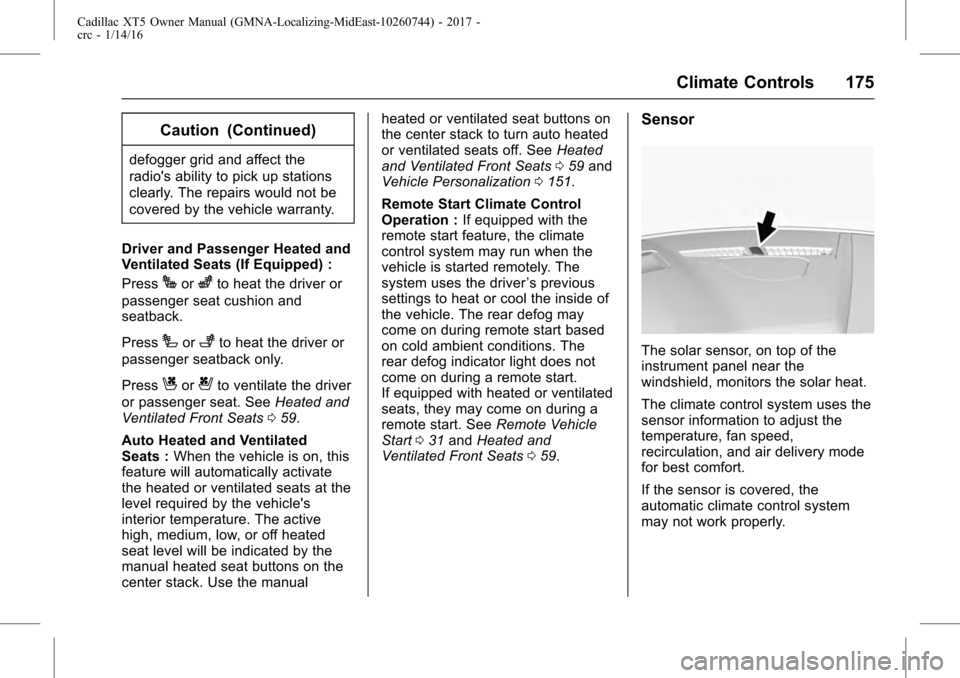
Sensor
The solar sensor, on top of the
instrument panel near the
windshield, monitors the solar heat.
The climate control system uses the
sensor information to adjust the
temperature, fan speed,
recirculation, and air delivery mode
for best comfort.
If the sensor is covered, the
automatic climate control system
may not work properly.
Page 176 of 339
Cadillac XT5 Owner Manual (GMNA-Localizing-MidEast-10260744) - 2017 -
crc - 1/14/16
176 Climate Controls
Rear Climate Control System
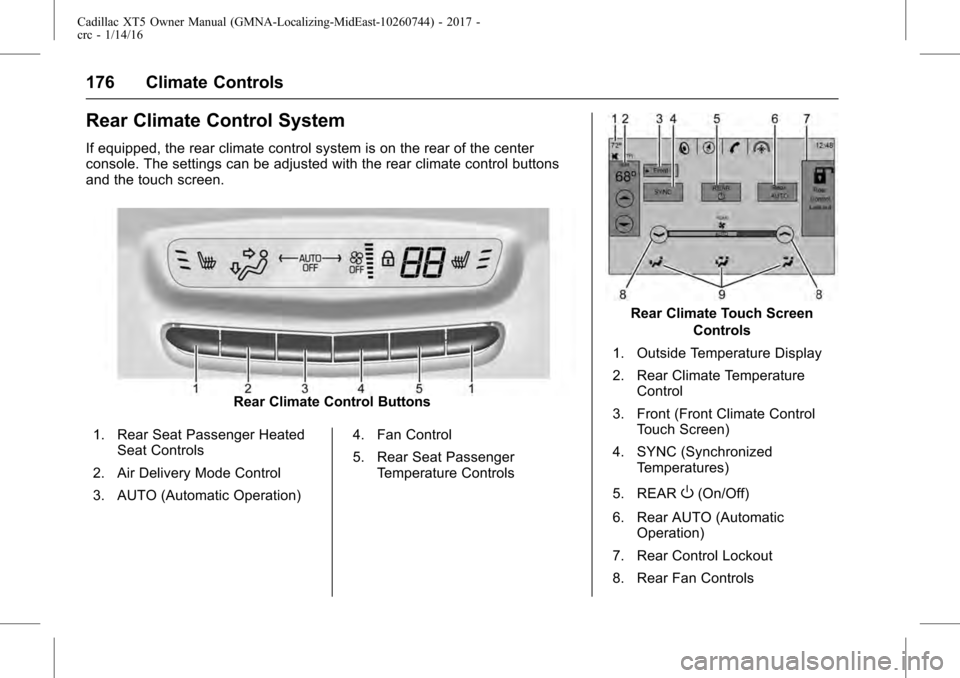
If equipped, the rear climate control system is on the rear of the center
console. The settings can be adjusted with the rear climate control buttons
and the touch screen.
Rear Climate Control Buttons
1. Rear Seat Passenger Heated Seat Controls
2. Air Delivery Mode Control
3. AUTO (Automatic Operation) 4. Fan Control
5. Rear Seat Passenger
Temperature Controls
Rear Climate Touch Screen
Controls
1. Outside Temperature Display
2. Rear Climate Temperature Control
3. Front (Front Climate Control Touch Screen)
4. SYNC (Synchronized Temperatures)
5. REAR
O(On/Off)
6. Rear AUTO (Automatic Operation)
7. Rear Control Lockout
8. Rear Fan Controls
Page 177 of 339
Cadillac XT5 Owner Manual (GMNA-Localizing-MidEast-10260744) - 2017 -
crc - 1/14/16
Climate Controls 177
9. Air Delivery Mode Control
Rear : Touch Rear on the front
climate control touch screen to open
the rear climate control screen. The
rear climate control settings can
now be adjusted from the front
passenger area.
REAR
O: Touch REAROon the
touch screen to turn the rear climate
control on or off.
SYNC : Touch SYNC on the touch
screen to match the rear climate
control temperature to the front
climate control driver temperature.
The SYNC button will be lit.
Rear Control Lockout : Touch to
lock or unlock control of the rear
climate control system from the rear
seat passengers. When locked, the
rear climate control can only be
adjusted from the front seat.
Automatic Operation
AUTO : Press to turn on or off. The
air delivery is controlled
automatically. The AUTO indicator
appears on the display. If the air delivery mode or fan speed is
manually adjusted, this cancels full
automatic operation.
Manual Operation
]:
Press the rear fan control up or
down to increase or decrease the
airflow to the rear panel outlets. The
rear climate airflow can also be
adjusted by touching
ªor«on
the front climate touch screen.
Temperature Controls : Press up
or down to adjust the rear
passenger temperature. The rear
passenger temperature can also be
adjusted by touching
Qfor warmer
air or
Rfor cooler air on the rear
climate touch screen.
Air Delivery Mode Control : Press
up or down to select the desired air
delivery mode. The air delivery
mode can also be changed by
touching
[,\, orYon the rear
climate touch screen. This changes
the direction of the airflow in the
rear seating area. If the rear floor air delivery mode is
selected, the rear fan speed
indicator will change when adjusted,
but the airflow amount directed to
the floor will not. This is normal
operation for the system.
To activate the rear floor air delivery
mode, touch
[on the front climate
control touch screen.
Page 181 of 339
Cadillac XT5 Owner Manual (GMNA-Localizing-MidEast-10260744) - 2017 -
crc - 1/14/16
Driving and Operating 181
Conversions and Add-Ons
Add-On ElectricalEquipment . . . . . . . . . . . . . . . . . . 248Driving Information
Distracted Driving
Distraction comes in many forms
and can take your focus from the
task of driving. Exercise good
judgment and do not let other
activities divert your attention away
from the road. Many local
governments have enacted laws
regarding driver distraction. Become
familiar with the local laws in
your area.
To avoid distracted driving, always
keep your eyes on the road, hands
on the wheel, and mind on the drive.
. Do not use a phone in
demanding driving situations.
Use a hands-free method to
place or receive necessary
phone calls.
. Watch the road. Do not read,
take notes, or look up
information on phones or other
electronic devices.
. Designate a front seat
passenger to handle potential
distractions. .
Become familiar with vehicle
features before driving, such as
programming favorite radio
stations and adjusting climate
control and seat settings.
Program all trip information into
any navigation device prior to
driving.
. Wait until the vehicle is parked
to retrieve items that have fallen
to the floor.
. Stop or park the vehicle to tend
to children.
. Keep pets in an appropriate
carrier or restraint.
. Avoid stressful conversations
while driving, whether with a
passenger or on a cell phone.
{Warning
Taking your eyes off the road too
long or too often could cause a
crash resulting in injury or death.
Focus your attention on driving.
Page 215 of 339
Cadillac XT5 Owner Manual (GMNA-Localizing-MidEast-10260744) - 2017 -
crc - 1/14/16
Driving and Operating 215
The speedometer reading can be
displayed in either English or metric
units. SeeInstrument Cluster
(Uplevel Cluster) 0119 or
Instrument Cluster (Base Cluster)
0 117. The increment value used
depends on the units displayed.
Selecting the Follow Distance Gap
When a slower moving vehicle is
detected ahead within the selected
following gap, ACC will adjust the
vehicle's speed and attempt to
maintain the follow distance gap
selected.
Press
[on the steering wheel to
adjust the following gap. Each press
cycles the gap button through three
settings: Far, Medium, or Near.
When pressed, the current gap
setting displays briefly on the
instrument cluster and HUD. The
gap setting will be maintained until it
is changed.
Since each gap setting corresponds
to a following time (Far, Medium,
or Near), the following distance will
vary based on vehicle speed. The
faster the vehicle speed, the further back your vehicle will follow a
vehicle detected ahead. Consider
traffic and weather conditions when
selecting the following gap. The
range of selectable gaps may not be
appropriate for all drivers and
driving conditions.
Changing the gap setting
automatically changes the alert
timing sensitivity (Far, Medium,
or Near) for the Forward Collision
Alert (FCA) feature. See
Forward
Collision Alert (FCA) System 0226.
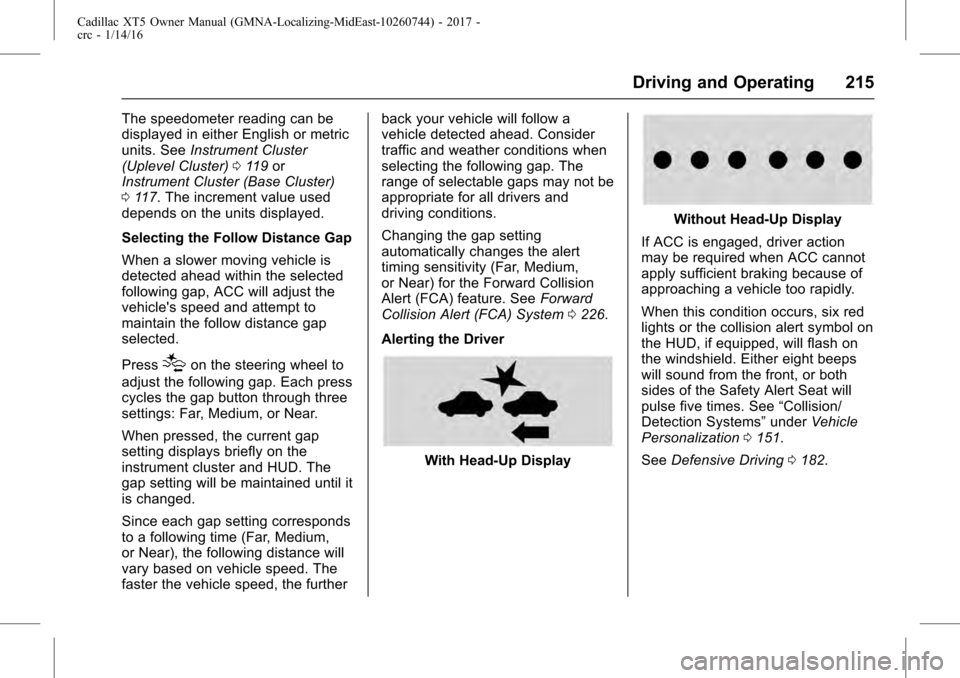
Alerting the Driver
With Head-Up Display
Without Head-Up Display
If ACC is engaged, driver action
may be required when ACC cannot
apply sufficient braking because of
approaching a vehicle too rapidly.
When this condition occurs, six red
lights or the collision alert symbol on
the HUD, if equipped, will flash on
the windshield. Either eight beeps
will sound from the front, or both
sides of the Safety Alert Seat will
pulse five times. See “Collision/
Detection Systems” underVehicle
Personalization 0151.
See Defensive Driving 0182.
Page 228 of 339

Cadillac XT5 Owner Manual (GMNA-Localizing-MidEast-10260744) - 2017 -
crc - 1/14/16
228 Driving and Operating
Collision Alert
With Head-Up Display
Without Head-Up DisplayWhen your vehicle approaches
another detected vehicle too rapidly,
the red FCA display will flash on the
windshield. Also, eight rapid
high-pitched beeps will sound from
the front, or both sides of the Safety
Alert Seat will pulse five times.
When this Collision Alert occurs, the
brake system may prepare for driver
braking to occur more rapidly which
can cause a brief, mild deceleration.
Continue to apply the brake pedal
as needed. Cruise control may be
disengaged when the Collision Alert
occurs.
Tailgating Alert
The vehicle ahead indicator will
display amber when you are
following a vehicle ahead much too
closely.
Selecting the Alert Timing
The Collision Alert control is on the
steering wheel. Press
[to set the
FCA timing to Far, Medium, or Near,
or on some vehicles, Off. The first
button press shows the current
setting on the DIC. Additional button
presses will change this setting. The
chosen setting will remain until it is
changed and will affect the timing of
both the Collision Alert and the
Tailgating Alert features. The timing
of both alerts will vary based on
vehicle speed. The faster the
vehicle speed, the farther away the
alert will occur. Consider traffic and
weather conditions when selecting
Page 328 of 339
Cadillac XT5 Owner Manual (GMNA-Localizing-MidEast-10260744) - 2017 -
crc - 1/14/16
328 Customer Information
Customer
Information
Vehicle Data Recording and
Privacy
Vehicle Data Recording andPrivacy . . . . . . . . . . . . . . . . . . . . . . 328
Event Data Recorders . . . . . . . . 328
Infotainment System . . . . . . . . . . 329
Vehicle Data
Recording and
Privacy
The vehicle has a number of
computers that record information
about the vehicle’s performance and
how it is driven. For example, the
vehicle uses computer modules to
monitor and control engine and
transmission performance, to
monitor the conditions for airbag
deployment and deploy them in a
crash, and, if equipped, to provide
antilock braking to help the driver
control the vehicle. These modules
may store data to help the dealer
technician service the vehicle.
Some modules may also store data
about how the vehicle is operated,
such as rate of fuel consumption or
average speed. These modules may
retain personal preferences, such as
radio presets, seat positions, and
temperature settings.
Event Data Recorders
This vehicle is equipped with an
event data recorder (EDR). The
main purpose of an EDR is to
record, in certain crash or near
crash-like situations, such as an
airbag deployment or hitting a road
obstacle, data that will assist in
understanding how a vehicle's
systems performed. The EDR is
designed to record data related to
vehicle dynamics and safety
systems for a short period of time,
typically 30 seconds or less. The
EDR in this vehicle is designed to
record such data as:
. How various systems in your
vehicle were operating.
. Whether or not the driver and
passenger safety belts were
buckled/fastened;
. How far (if at all) the driver was
depressing the accelerator and/
or brake pedal; and
. How fast the vehicle was
traveling.