Information CADILLAC XT5 2017 1.G Owner's Manual
[x] Cancel search | Manufacturer: CADILLAC, Model Year: 2017, Model line: XT5, Model: CADILLAC XT5 2017 1.GPages: 339, PDF Size: 2.75 MB
Page 88 of 339
Cadillac XT5 Owner Manual (GMNA-Localizing-MidEast-10260744) - 2017 -
crc - 1/14/16
88 Seats and Restraints
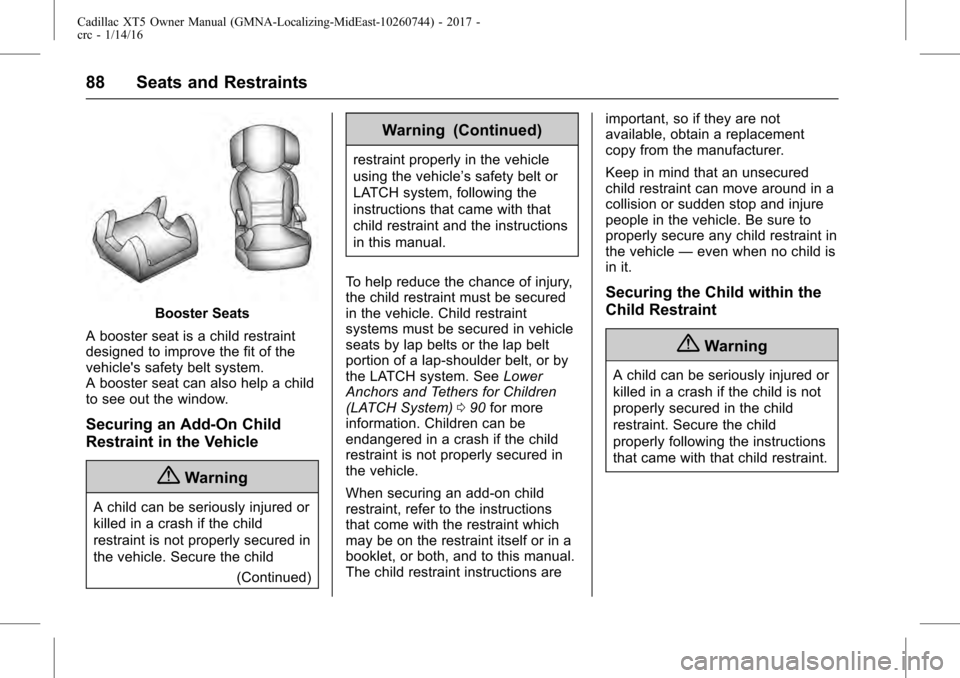
Booster Seats
A booster seat is a child restraint
designed to improve the fit of the
vehicle's safety belt system.
A booster seat can also help a child
to see out the window.
Securing an Add-On Child
Restraint in the Vehicle
{Warning
A child can be seriously injured or
killed in a crash if the child
restraint is not properly secured in
the vehicle. Secure the child (Continued)
Warning (Continued)
restraint properly in the vehicle
using the vehicle’s safety belt or
LATCH system, following the
instructions that came with that
child restraint and the instructions
in this manual.
To help reduce the chance of injury,
the child restraint must be secured
in the vehicle. Child restraint
systems must be secured in vehicle
seats by lap belts or the lap belt
portion of a lap-shoulder belt, or by
the LATCH system. See Lower
Anchors and Tethers for Children
(LATCH System) 090 for more
information. Children can be
endangered in a crash if the child
restraint is not properly secured in
the vehicle.
When securing an add-on child
restraint, refer to the instructions
that come with the restraint which
may be on the restraint itself or in a
booklet, or both, and to this manual.
The child restraint instructions are important, so if they are not
available, obtain a replacement
copy from the manufacturer.
Keep in mind that an unsecured
child restraint can move around in a
collision or sudden stop and injure
people in the vehicle. Be sure to
properly secure any child restraint in
the vehicle
—even when no child is
in it.
Securing the Child within the
Child Restraint
{Warning
A child can be seriously injured or
killed in a crash if the child is not
properly secured in the child
restraint. Secure the child
properly following the instructions
that came with that child restraint.
Page 89 of 339
Cadillac XT5 Owner Manual (GMNA-Localizing-MidEast-10260744) - 2017 -
crc - 1/14/16
Seats and Restraints 89
Where to Put the
Restraint
According to accident statistics,
children and infants are safer when
properly restrained in an appropriate
child restraint secured in a rear
seating position.
Whenever possible, children aged
12 and under should be secured in
a rear seating position.
Never put a rear-facing child
restraint in the front. This is because
the risk to the rear-facing child is so
great if the airbag deploys.
{Warning
A child in a rear-facing child
restraint can be seriously injured
or killed if the front passenger
airbag inflates. This is because
the back of the rear-facing child
restraint would be very close to
the inflating airbag. A child in a
forward-facing child restraint can
be seriously injured or killed if the(Continued)
Warning (Continued)
front passenger airbag inflates
and the passenger seat is in a
forward position.
Even if the passenger sensing
system has turned off the front
passenger frontal airbag, no
system is fail-safe. No one can
guarantee that an airbag will not
deploy under some unusual
circumstance, even though it is
turned off.
Secure rear-facing child restraints
in a rear seat, even if the airbag
is off. If you secure a
forward-facing child restraint in
the front seat, always move the
front passenger seat as far back
as it will go. It is better to secure
the child restraint in a rear seat.
SeePassenger Sensing System
0 77 for additional information. When securing a child restraint in a
rear seating position, study the
instructions that came with the child
restraint to make sure it is
compatible with this vehicle.
Child restraints and booster seats
vary considerably in size, and some
may fit in certain seating positions
better than others.
Depending on where you place the
child restraint and the size of the
child restraint, you may not be able
to access adjacent safety belts or
LATCH anchors for additional
passengers or child restraints.
Adjacent seating positions should
not be used if the child restraint
prevents access to or interferes with
the routing of the safety belt.
Wherever a child restraint is
installed, be sure to follow the
instructions that came with the child
restraint system and secure the
child restraint system properly.
Keep in mind that an unsecured
child restraint can move around in a
collision or sudden stop and injure
people in the vehicle. Be sure to
Page 92 of 339
Cadillac XT5 Owner Manual (GMNA-Localizing-MidEast-10260744) - 2017 -
crc - 1/14/16
92 Seats and Restraints
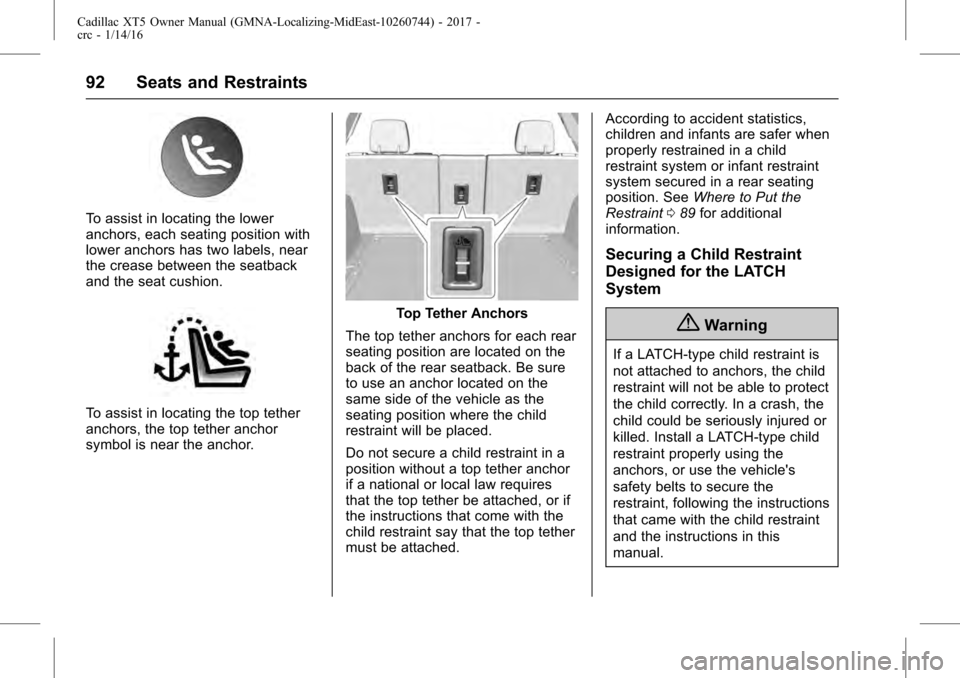
To assist in locating the lower
anchors, each seating position with
lower anchors has two labels, near
the crease between the seatback
and the seat cushion.
To assist in locating the top tether
anchors, the top tether anchor
symbol is near the anchor.
Top Tether Anchors
The top tether anchors for each rear
seating position are located on the
back of the rear seatback. Be sure
to use an anchor located on the
same side of the vehicle as the
seating position where the child
restraint will be placed.
Do not secure a child restraint in a
position without a top tether anchor
if a national or local law requires
that the top tether be attached, or if
the instructions that come with the
child restraint say that the top tether
must be attached. According to accident statistics,
children and infants are safer when
properly restrained in a child
restraint system or infant restraint
system secured in a rear seating
position. See
Where to Put the
Restraint 089 for additional
information.
Securing a Child Restraint
Designed for the LATCH
System
{Warning
If a LATCH-type child restraint is
not attached to anchors, the child
restraint will not be able to protect
the child correctly. In a crash, the
child could be seriously injured or
killed. Install a LATCH-type child
restraint properly using the
anchors, or use the vehicle's
safety belts to secure the
restraint, following the instructions
that came with the child restraint
and the instructions in this
manual.
Page 97 of 339
Cadillac XT5 Owner Manual (GMNA-Localizing-MidEast-10260744) - 2017 -
crc - 1/14/16
Seats and Restraints 97
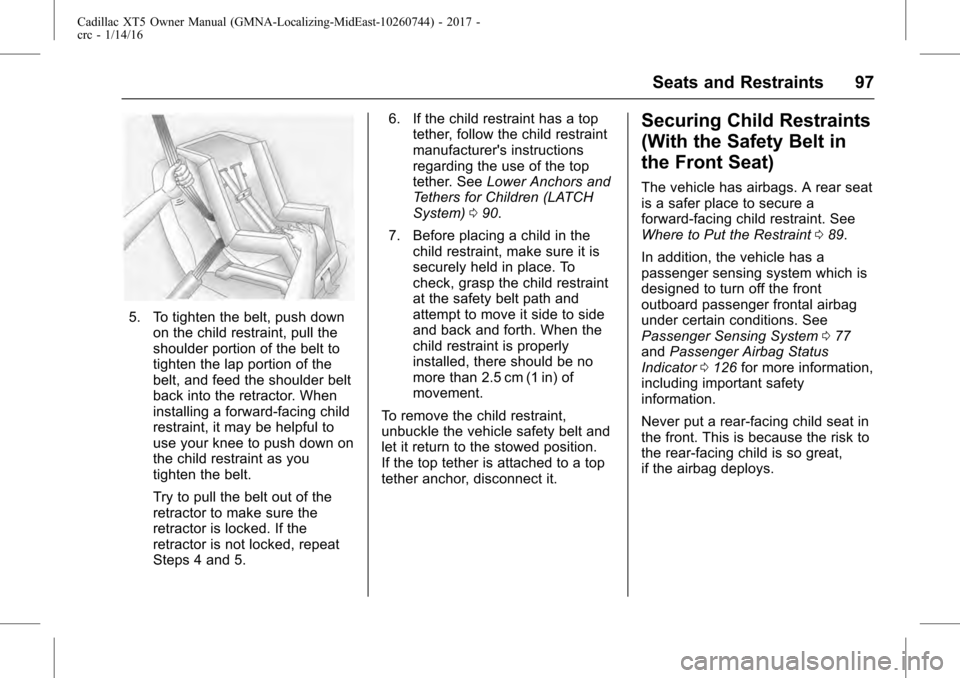
5. To tighten the belt, push downon the child restraint, pull the
shoulder portion of the belt to
tighten the lap portion of the
belt, and feed the shoulder belt
back into the retractor. When
installing a forward-facing child
restraint, it may be helpful to
use your knee to push down on
the child restraint as you
tighten the belt.
Try to pull the belt out of the
retractor to make sure the
retractor is locked. If the
retractor is not locked, repeat
Steps 4 and 5. 6. If the child restraint has a top
tether, follow the child restraint
manufacturer's instructions
regarding the use of the top
tether. See Lower Anchors and
Tethers for Children (LATCH
System) 090.
7. Before placing a child in the child restraint, make sure it is
securely held in place. To
check, grasp the child restraint
at the safety belt path and
attempt to move it side to side
and back and forth. When the
child restraint is properly
installed, there should be no
more than 2.5 cm (1 in) of
movement.
To remove the child restraint,
unbuckle the vehicle safety belt and
let it return to the stowed position.
If the top tether is attached to a top
tether anchor, disconnect it.
Securing Child Restraints
(With the Safety Belt in
the Front Seat)
The vehicle has airbags. A rear seat
is a safer place to secure a
forward-facing child restraint. See
Where to Put the Restraint 089.
In addition, the vehicle has a
passenger sensing system which is
designed to turn off the front
outboard passenger frontal airbag
under certain conditions. See
Passenger Sensing System 077
and Passenger Airbag Status
Indicator 0126 for more information,
including important safety
information.
Never put a rear-facing child seat in
the front. This is because the risk to
the rear-facing child is so great,
if the airbag deploys.
Page 98 of 339
Cadillac XT5 Owner Manual (GMNA-Localizing-MidEast-10260744) - 2017 -
crc - 1/14/16
98 Seats and Restraints
{Warning
A child in a rear-facing child
restraint can be seriously injured
or killed if the front outboard
passenger frontal airbag inflates.
This is because the back of the
rear-facing child restraint would
be very close to the inflating
airbag. A child in a forward-facing
child restraint can be seriously
injured or killed if the front
outboard passenger frontal airbag
inflates and the passenger seat is
in a forward position.
Even if the passenger sensing
system has turned off the front
outboard passenger frontal
airbag, no system is fail-safe. No
one can guarantee that an airbag
will not deploy under some
unusual circumstance, even
though it is turned off.
Secure rear-facing child restraints
in a rear seat, even if the airbag
is off. If you secure a(Continued)
Warning (Continued)
forward-facing child restraint in
the front outboard passenger
seat, always move the seat as far
back as it will go. It is better to
secure the child restraint in a
rear seat.
SeePassenger Sensing System
0 77 for additional information.
If the child restraint uses a top
tether, see Lower Anchors and
Tethers for Children (LATCH
System) 090 for top tether anchor
locations.
Do not secure a child seat in a
position without a top tether anchor
if a national or local law requires
that the top tether be anchored, or if
the instructions that come with the
child restraint say that the top strap
must be anchored.
When using the lap-shoulder belt to
secure the child restraint in this
position, follow the instructions that
came with the child restraint and the
following instructions: 1. Move the seat as far back as it
will go before securing the
forward-facing child restraint.
Move the seat upward or the
seatback to an upright position,
if needed, to get a tight
installation of the child
restraint.
When the passenger sensing
system has turned off the front
outboard passenger frontal
airbag, the off indicator on the
passenger airbag status
indicator should light and stay
lit when the vehicle is started.
See Passenger Airbag Status
Indicator 0126.
2. Put the child restraint on the seat.
3. Pick up the latch plate, and run the lap and shoulder portions
of the vehicle's safety belt
through or around the restraint.
The child restraint instructions
will show you how.
Page 100 of 339
Cadillac XT5 Owner Manual (GMNA-Localizing-MidEast-10260744) - 2017 -
crc - 1/14/16
100 Seats and Restraints
7. Before placing a child in thechild restraint, make sure it is
securely held in place. Refer to
your child restraint
manufacturer instructions.
If the airbag is off, the off indicator in
the passenger airbag status
indicator will come on and stay on
when the vehicle is started.
If a child restraint has been installed
and the on indicator is lit, see “If the
On Indicator is Lit for a Child
Restraint” underPassenger Sensing
System 077 for more information.
To remove the child restraint,
unbuckle the vehicle safety belt and
let it return to the stowed position.
Page 107 of 339
Cadillac XT5 Owner Manual (GMNA-Localizing-MidEast-10260744) - 2017 -
crc - 1/14/16
Storage 107
of gravity higher. Avoid high speeds,
sudden starts, sharp turns, sudden
braking, or abrupt maneuvers;
otherwise it may result in loss of
control. If driving for a long distance,
on rough roads, or at high speeds,
occasionally stop the vehicle to
make sure the cargo remains in its
place. Do not exceed the maximum
vehicle capacity when loading the
vehicle. For more information on
vehicle capacity and loading, see
Vehicle Load Limits0187.
Page 108 of 339
Cadillac XT5 Owner Manual (GMNA-Localizing-MidEast-10260744) - 2017 -
crc - 1/14/16
108 Instruments and Controls
Instruments and
Controls
Controls
Steering Wheel Adjustment . . . 109
Steering Wheel Controls . . . . . . 109
Heated Steering Wheel . . . . . . . 109
Horn . . . . . . . . . . . . . . . . . . . . . . . . . . 110
Windshield Wiper/Washer . . . . 110
Rear Window Wiper/Washer . . . . . . . . . . . . . . . . . . . . . . 112
Clock . . . . . . . . . . . . . . . . . . . . . . . . . 113
Power Outlets . . . . . . . . . . . . . . . . 114
Wireless Charging . . . . . . . . . . . . 114
Cigarette Lighter . . . . . . . . . . . . . . 115
Ashtrays . . . . . . . . . . . . . . . . . . . . . . 116
Warning Lights, Gauges, and
Indicators
Warning Lights, Gauges, and Indicators . . . . . . . . . . . . . . . . . . . 116
Instrument Cluster (Base Cluster) . . . . . . . . . . . . . . . . . . . . . 117
Instrument Cluster (Uplevel Cluster) . . . . . . . . . . . . . . . . . . . . . 119
Speedometer . . . . . . . . . . . . . . . . . 121
Odometer . . . . . . . . . . . . . . . . . . . . . 121
Trip Odometer . . . . . . . . . . . . . . . . 121
Tachometer . . . . . . . . . . . . . . . . . . . 121 Fuel Gauge . . . . . . . . . . . . . . . . . . . 121
Engine Oil Pressure
Gauge . . . . . . . . . . . . . . . . . . . . . . 122
Engine Coolant Temperature Gauge . . . . . . . . . . . . . . . . . . . . . . 123
Voltmeter Gauge (Uplevel Cluster) . . . . . . . . . . . . . . . . . . . . . 124
Safety Belt Reminders . . . . . . . . 125
Airbag Readiness Light . . . . . . . 125
Passenger Airbag Status Indicator . . . . . . . . . . . . . . . . . . . . 126
Charging System Light . . . . . . . 126
Malfunction Indicator Lamp (Check Engine Light) . . . . . . . . 127
Brake System Warning Light . . . . . . . . . . . . . . . . . . . . . . . . 129
Electric Parking Brake Light . . . . . . . . . . . . . . . . . . . . . . . . 129
Service Electric Parking Brake Light . . . . . . . . . . . . . . . . . . . . . . . . 129
Antilock Brake System (ABS) Warning Light . . . . . . . . . . . . . . . 130
Lane Keep Assist (LKA) Light . . . . . . . . . . . . . . . . . . . . . . . . 130
Vehicle Ahead Indicator . . . . . . 131
Pedestrian Ahead Indicator . . . 131
Traction Off Light . . . . . . . . . . . . . 131
StabiliTrak
®OFF Light . . . . . . . . 131
Traction Control System (TCS)/ StabiliTrak
®Light . . . . . . . . . . . 132 Engine Coolant Temperature
Warning Light . . . . . . . . . . . . . . . 132
Tire Pressure Light . . . . . . . . . . . 132
Engine Oil Pressure Light . . . . 133
Low Fuel Warning Light . . . . . . 133
Security Light . . . . . . . . . . . . . . . . . 134
High-Beam On Light . . . . . . . . . . 134
Lamps On Reminder . . . . . . . . . 134
Cruise Control Light . . . . . . . . . . 134
Door Ajar Light . . . . . . . . . . . . . . . 135
Information Displays
Driver Information Center (DIC) . . . . . . . . . . . . . . . . 135
Head-Up Display (HUD) . . . . . . 137
Vehicle Messages
Vehicle Messages . . . . . . . . . . . . 140
Battery Voltage and Charging Messages . . . . . . . . . . . . . . . . . . . 141
Brake System Messages . . . . . 141
Cruise Control Messages . . . . . 142
Door Ajar Messages . . . . . . . . . . 142
Engine Cooling System Messages . . . . . . . . . . . . . . . . . . . 142
Engine Oil Messages . . . . . . . . . 143
Engine Power Messages . . . . . 143
Fuel System Messages . . . . . . . 144
Key and Lock Messages . . . . . 144
Lamp Messages . . . . . . . . . . . . . . 144
Page 111 of 339
Cadillac XT5 Owner Manual (GMNA-Localizing-MidEast-10260744) - 2017 -
crc - 1/14/16
Instruments and Controls 111
f:Pull the windshield wiper
lever toward you to spray windshield
washer fluid and activate the wipers.
The wipers will continue until the
lever is released or the maximum
wash time is reached. When the
windshield wiper lever is released,
additional wipes may occur
depending on how long the
windshield washer has been
activated. See Washer Fluid0262
for information on filling the
windshield washer fluid reservoir.
Clear snow and ice from the wiper
blades and windshield before using
them. If frozen to the windshield,
carefully loosen or thaw them.
Damaged blades should be
replaced. See Wiper Blade
Replacement 0266.
Heavy snow or ice can overload the
wiper motor. See Electrical System
Overload 0271.
Wiper Parking
If the ignition is put in OFF while the
wipers are on LO, HI, or AUTO with
Rainsense turned off, they will
immediately stop. If the windshield wiper lever is then
moved to OFF before the driver
door is opened or within 10 minutes,
the wipers will restart and move to
the base of the windshield.
If the ignition is put in OFF while the
wipers are performing wipes due to
windshield washing or Rainsense,
the wipers continue to run until they
reach the base of the windshield.
Rainsense™
If equipped with Rainsense and the
feature is turned on, a sensor near
the top center of the windshield
detects the amount of water on the
windshield and controls the
frequency of the windshield wiper
based on the current sensitivity
setting.
Keep this area of the windshield
clear of debris to allow for best
system performance.
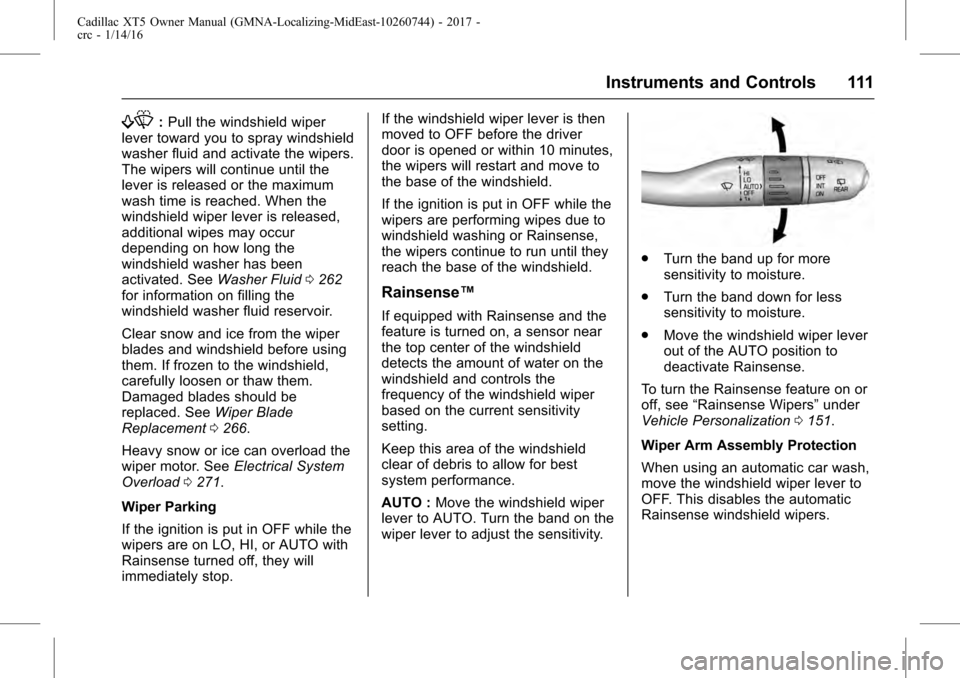
AUTO :
Move the windshield wiper
lever to AUTO. Turn the band on the
wiper lever to adjust the sensitivity.
. Turn the band up for more
sensitivity to moisture.
. Turn the band down for less
sensitivity to moisture.
. Move the windshield wiper lever
out of the AUTO position to
deactivate Rainsense.
To turn the Rainsense feature on or
off, see “Rainsense Wipers” under
Vehicle Personalization 0151.
Wiper Arm Assembly Protection
When using an automatic car wash,
move the windshield wiper lever to
OFF. This disables the automatic
Rainsense windshield wipers.
Page 113 of 339
Cadillac XT5 Owner Manual (GMNA-Localizing-MidEast-10260744) - 2017 -
crc - 1/14/16
Instruments and Controls 113
windshield wiper is performing low
or high speed wipes. If the rear
wiper control is off, the transmission
is in R (Reverse), and the front
windshield wiper is performing
interval wipes, then the rear wiper
automatically performs interval
wipes.
This feature can be turned on or off.
SeeVehicle Personalization 0151.
The windshield washer reservoir is
used for the windshield, rear
window, and rear mirror camera,
if equipped. See Rear Camera
Mirror 046. Check the fluid level in
the reservoir if either washer is not
working. See Washer Fluid 0262.
Clock
The infotainment system controls
are used to access the time and
date settings through the menu
system. See “Home Page” in the
infotainment manual for information
about how to use the menu system.
Setting the Clock
Time
To set the time:
1. From the Home Page, touch the SETTINGS screen button,
then touch Time and Date.
2. Touch Set Time, then touch + or−to increase or decrease
hours or minutes, and change
AM or PM.
3. Touch 12-24 Hr for a 12 or 24 hour clock.
4. Touch
[Back to go back to the
previous menu.
Date
To set the date: 1. Touch the SETTINGS screen button, then touch Time
and Date.
2. Touch Set Date, then touch + or−to increase or decrease
month, day, or year.
3. Touch
[Back to go back to the
previous menu. Auto Set
When on, the time and date will
automatically update.
To set auto set:
1. Touch the SETTINGS screen button, then touch Time
and Date.
2. Touch Set Time or Set Date.
3. Touch Auto Set, then select On-Cell Network or Off-Manual
to manually set the time
and date.
4. Touch
[Back to go back to the
previous menu.
If auto set is on, the time displayed
on the clock may not update
immediately when driving into a new
time zone.
Clock Display
When on, the digital clock will
display on the infotainment screen.
To set the clock display: 1. Touch the SETTINGS screen button, then touch Time
and Date.