Vent CADILLAC XT5 2017 1.G Service Manual
[x] Cancel search | Manufacturer: CADILLAC, Model Year: 2017, Model line: XT5, Model: CADILLAC XT5 2017 1.GPages: 339, PDF Size: 2.75 MB
Page 202 of 339
Cadillac XT5 Owner Manual (GMNA-Localizing-MidEast-10260744) - 2017 -
crc - 1/14/16
202 Driving and Operating
3. To exit, pull back on the shiftlever a second time. The D in
the shift pattern will illuminate
in red, and the M will switch to
white.
With the transmission in D (Drive)
and not in Permanent Tap Shift
Mode, the Tap Shift controls will
activate a temporary tap manual
shift mode, allowing the
transmission to be manually shifted.
Automatic shifts return after no
manual shifts have been done for
seven to 10 seconds. The
Temporary Tap Shift Mode can also
be deactivated by holding the right
upshift control briefly.
While using Tap Shift, the vehicle
will have firmer, quicker shifting.
This can be used for sport driving or
when climbing or descending hills,
to stay in gear longer, or to
downshift for more power or engine
braking.
The transmission will only allow
shifting into gears appropriate for
the vehicle speed and engine
revolutions per minute (rpm). The
transmission will not automatically shift to the next lower gear if the
engine rpm is too high, nor to the
next higher gear when the maximum
engine rpm is reached.
If shifting is prevented for any
reason, a SHIFT DENIED message
will be displayed in the instrument
cluster. See
Transmission
Messages 0150.
When accelerating the vehicle from
a stop in snowy and icy conditions,
it is suggested to shift into second
gear. A higher gear allows the
vehicle to gain more traction on
slippery surfaces.Drive Systems
All-Wheel Drive
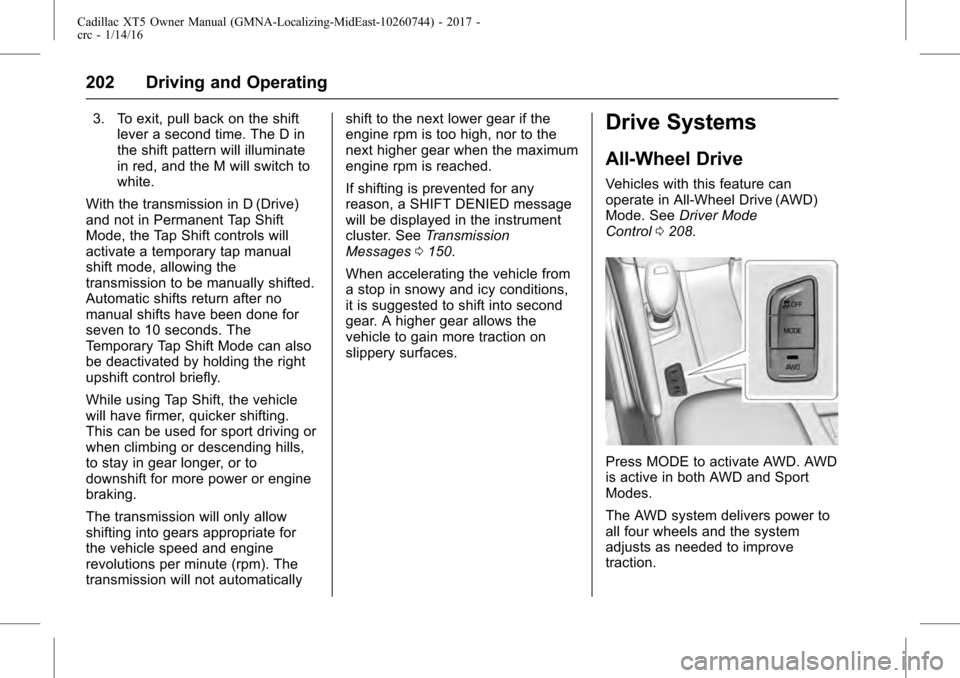
Vehicles with this feature can
operate in All-Wheel Drive (AWD)
Mode. See Driver Mode
Control 0208.
Press MODE to activate AWD. AWD
is active in both AWD and Sport
Modes.
The AWD system delivers power to
all four wheels and the system
adjusts as needed to improve
traction.
Page 203 of 339
Cadillac XT5 Owner Manual (GMNA-Localizing-MidEast-10260744) - 2017 -
crc - 1/14/16
Driving and Operating 203
The AWD Mode will stay selected
until the mode is changed. If the
vehicle is placed in Sport Mode, see
Driver Mode Control0208.
Sport Mode is canceled with each
ignition cycle. See Driver Mode
Control 0208.
When operated in Tour Mode, the
vehicle will deliver power to the front
wheels only and may provide better
fuel economy.
If Tour Mode is selected see Driver
Mode Control 0208.Brakes
Antilock Brake
System (ABS)
This vehicle has ABS, an advanced
electronic braking system that helps
prevent a braking skid.
When the vehicle begins to drive
away, ABS checks itself.
A momentary motor or clicking noise
might be heard while this test is
going on, and it might even be
noticed that the brake pedal moves
a little. This is normal.
If there is a problem with ABS, this
warning light stays on. See Antilock
Brake System (ABS) Warning
Light 0130.
If driving safely on a wet road and it
becomes necessary to slam on the
brakes and continue braking to avoid a sudden obstacle, a
computer senses the wheels are
slowing down. If one of the wheels
is about to stop rolling, the computer
will separately work the brakes at
each wheel.
ABS can change the brake pressure
to each wheel, as required, faster
than any driver could. This can help
you steer around the obstacle while
braking hard.
As the brakes are applied, the
computer keeps receiving updates
on wheel speed and controls
braking pressure accordingly.
Remember: ABS does not change
the time needed to get a foot up to
the brake pedal or always decrease
stopping distance. If you get too
close to the vehicle in front of you,
there will not be enough time to
apply the brakes if that vehicle
suddenly slows or stops. Always
leave enough room up ahead to
stop, even with ABS.
Page 204 of 339
Cadillac XT5 Owner Manual (GMNA-Localizing-MidEast-10260744) - 2017 -
crc - 1/14/16
204 Driving and Operating
Using ABS
Do not pump the brakes. Just hold
the brake pedal down firmly and let
ABS work. You may hear the ABS
pump or motor operating and feel
the brake pedal pulsate. This is
normal.
Braking in Emergencies
ABS allows you to steer and brake
at the same time. In many
emergencies, steering can help
more than even the very best
braking.
Electric Parking Brake
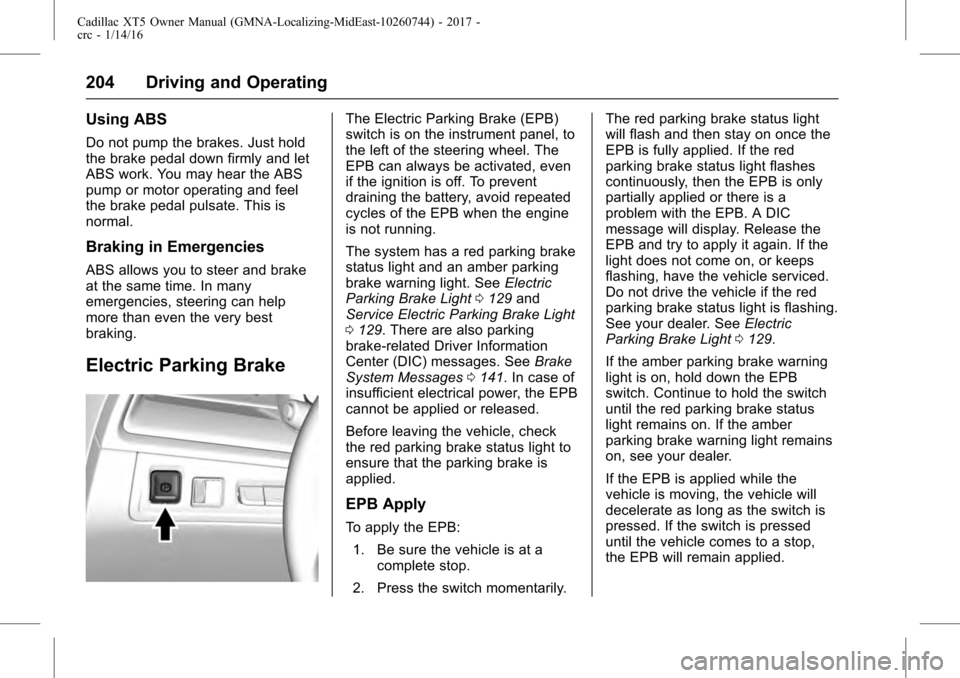
The Electric Parking Brake (EPB)
switch is on the instrument panel, to
the left of the steering wheel. The
EPB can always be activated, even
if the ignition is off. To prevent
draining the battery, avoid repeated
cycles of the EPB when the engine
is not running.
The system has a red parking brake
status light and an amber parking
brake warning light. SeeElectric
Parking Brake Light 0129 and
Service Electric Parking Brake Light
0 129. There are also parking
brake-related Driver Information
Center (DIC) messages. See Brake
System Messages 0141. In case of
insufficient electrical power, the EPB
cannot be applied or released.
Before leaving the vehicle, check
the red parking brake status light to
ensure that the parking brake is
applied.
EPB Apply
To apply the EPB:
1. Be sure the vehicle is at a complete stop.
2. Press the switch momentarily. The red parking brake status light
will flash and then stay on once the
EPB is fully applied. If the red
parking brake status light flashes
continuously, then the EPB is only
partially applied or there is a
problem with the EPB. A DIC
message will display. Release the
EPB and try to apply it again. If the
light does not come on, or keeps
flashing, have the vehicle serviced.
Do not drive the vehicle if the red
parking brake status light is flashing.
See your dealer. See
Electric
Parking Brake Light 0129.
If the amber parking brake warning
light is on, hold down the EPB
switch. Continue to hold the switch
until the red parking brake status
light remains on. If the amber
parking brake warning light remains
on, see your dealer.
If the EPB is applied while the
vehicle is moving, the vehicle will
decelerate as long as the switch is
pressed. If the switch is pressed
until the vehicle comes to a stop,
the EPB will remain applied.
Page 205 of 339
Cadillac XT5 Owner Manual (GMNA-Localizing-MidEast-10260744) - 2017 -
crc - 1/14/16
Driving and Operating 205
The EPB applies automatically
when shifting to P (Park) on a steep
incline. The EPB releases as soon
as the vehicle is shifted out of
P (Park) and the vehicle
accelerates.
If the EPB fails to apply, the rear
wheels should be blocked to
prevent vehicle movement.
EPB Release
To release the EPB:1. Place the ignition in ACC/ ACCESSORY or ON/RUN.
2. Apply and hold the brake pedal.
3. Press the EPB switch momentarily.
The EPB is released when the red
parking brake status light is off.
If the amber parking brake warning
light is on, release the EPB by
pressing and holding the EPB
switch. Continue to hold the switch
until the red parking brake status
light is off. If either light stays on
after release is attempted, see your
dealer.
Caution
Driving with the parking brake on
can overheat the brake system
and cause premature wear or
damage to brake system parts.
Make sure that the parking brake
is fully released and the brake
warning light is off before driving.
Automatic EPB Release
Avoid rapid acceleration when the
EPB is applied, to preserve parking
brake lining life.
The EPB will automatically release
when the engine is running, the
transmission is placed into gear,
and an attempt is made to drive
away by pressing the accelerator
pedal.
If parking on a hill, or if the vehicle
is pulling a trailer, see Driving
Characteristics and Towing
Tips 0239.
Brake Assist
The Brake Assist feature is
designed to assist the driver in
stopping or decreasing vehicle
speed in emergency driving
conditions. This feature uses the
stability system hydraulic brake
control module to supplement the
power brake system under
conditions where the driver has
quickly and forcefully applied the
brake pedal in an attempt to quickly
stop or slow down the vehicle. The
stability system hydraulic brake
control module increases brake
pressure at each corner of the
vehicle until the ABS activates.
Minor brake pedal pulsation or
pedal movement during this time is
normal and the driver should
continue to apply the brake pedal as
the driving situation dictates. The
Brake Assist feature will
automatically disengage when the
brake pedal is released or brake
pedal pressure is quickly
decreased.
Page 206 of 339
Cadillac XT5 Owner Manual (GMNA-Localizing-MidEast-10260744) - 2017 -
crc - 1/14/16
206 Driving and Operating
Hill Start Assist (HSA)
This vehicle has an HSA feature,
which may be useful when the
vehicle is stopped on a grade
sufficient enough to activate HSA.
This feature is designed to prevent
the vehicle from rolling, either
forward or rearward, during vehicle
drive off. After the driver completely
stops and holds the vehicle in a
complete standstill on a grade, HSA
will be automatically activated.
During the transition period between
when the driver releases the brake
pedal and starts to accelerate to
drive off on a grade, HSA holds the
braking pressure for a maximum of
two seconds to ensure that there is
no rolling. The brakes will
automatically release when the
accelerator pedal is applied within
the two-second window. It will not
activate if the vehicle is in a drive
gear and facing downhill, or if the
vehicle is facing uphill and in
R (Reverse).
Ride Control Systems
Traction Control/
Electronic Stability
Control
System Operation
The vehicle has a Traction Control
System (TCS) and StabiliTrak®, an
electronic stability control system.
These systems help limit wheel spin
and assist the driver in maintaining
control, especially on slippery road
conditions.
TCS activates if it senses that any
of the drive wheels are spinning or
beginning to lose traction. On an
All-Wheel Drive (AWD) vehicle in
AWD or Sport Mode, the system will
operate if it senses that any of the
wheels are spinning or beginning to
lose traction. When this happens,
TCS applies the brakes to the
spinning wheels and reduces
engine power to limit wheel spin.
StabiliTrak activates when the
system senses a discrepancy
between the intended path and the direction the vehicle is actually
traveling. StabiliTrak selectively
applies braking pressure at any one
of the vehicle's brakes to help steer
the vehicle in the direction which
you are steering.
If cruise control is being used and
traction control or StabiliTrak begins
to limit wheel spin, cruise control will
disengage. Cruise control may be
turned back on when road
conditions allow. TCS and
StabiliTrak will automatically turn on
when cruise control is set.
Both systems come on
automatically when the vehicle is
started and begins to move. The
systems may be heard or felt while
they are operating or while
performing diagnostic checks. This
is normal and does not mean there
is a problem with the vehicle.
It is recommended to leave both
systems on for normal driving
conditions, but it may be necessary
to turn TCS off if the vehicle gets
stuck in sand, mud, ice, or snow.
Page 222 of 339
Cadillac XT5 Owner Manual (GMNA-Localizing-MidEast-10260744) - 2017 -
crc - 1/14/16
222 Driving and Operating
shifting from R (Reverse) to a
forward gear, when the vehicle is
moving forward slower than 8 km/h
(5 mph), or by pressing CAMERA in
the display. If equipped, the front
view camera also displays when the
Front Parking Assist system detects
an object within 30 cm (12 in).
{Warning
The camera(s) do not display
children, pedestrians, bicyclists,
crossing traffic, animals, or any
other object outside of the
cameras’field of view, below the
bumper, or under the vehicle.
Shown distances may be different
from actual distances. Do not
drive or park the vehicle using
only these camera(s). Always
check behind and around the
vehicle before driving. Failure to
use proper care may result in
injury, death, or vehicle damage. Parking Assist
With RPA, and if equipped with FPA,
as the vehicle moves at speeds of
less than 8 km/h (5 mph) the
sensors on the bumpers may detect
objects up to 2.5 m (8 ft) behind and
1.2 m (4 ft) in front of the vehicle
within a zone 25 cm (10 in) high off
the ground and below bumper level.
These detection distances may be
shorter during warmer or humid
weather. Blocked sensors will not
detect objects and can also cause
false detections. Keep the sensors
clean of mud, dirt, snow, ice, and
slush; and clean sensors after a car
wash in freezing temperatures.
{Warning
The Parking Assist system does
not detect children, pedestrians,
bicyclists, animals, or objects
located below the bumper or that
are too close or too far from the
vehicle. It is not available at
speeds greater than 8 km/h
(5 mph). To prevent injury, death,
(Continued)
Warning (Continued)
or vehicle damage, even with
parking assist, always check the
area around the vehicle and
check all mirrors before moving
forward or backing.
The instrument cluster may have a
parking assist display with bars that
show“distance to object” and object
location information for the Parking
Assist system. As the object gets
closer, more bars light up and the
bars change color from yellow to
amber to red. An obstacle is also
indicated by audible beeps. The
Page 223 of 339
Cadillac XT5 Owner Manual (GMNA-Localizing-MidEast-10260744) - 2017 -
crc - 1/14/16
Driving and Operating 223
interval between the beeps
becomes shorter as the vehicle gets
closer to the obstacle.
When an object is first detected in
the rear, both sides of the Safety
Alert Seat will pulse two times.
When an object is very close
(<0.6 m (2 ft) in the vehicle rear,
or <0.3 m (1 ft) in the vehicle front),
a continuous tone will sound from
the front or rear depending on
object location, or both sides of the
Safety Alert Seat will pulse five
times. Beeps for FPA are higher
pitched than for RPA.
Backing Warning and Reverse
Automatic Braking (RAB)
Vehicles with Adaptive Cruise
Control (ACC) have the Backing
Warning System and Reverse
Automatic Braking (RAB) system.
When in R (Reverse), Backing
Warning alerts of rear objects at
vehicle speeds greater than 8 km/h
(5 mph), and RAB may
automatically brake hard at speeds
between 1–32 km/h (0.5–20 mph).The Backing Warning System will
beep once from the rear when an
object is first detected, or pulse
twice on both sides of the Safety
Alert Seat. When the system
detects a potential crash, beeps will
be heard from the rear, or five
pulses will be felt on both sides of
the Safety Alert Seat. There may
also be a brief, sharp application of
the brakes.
{Warning
The Backing Warning System
only operates at speeds greater
than 8 km/h (5 mph). It does not
detect children, pedestrians,
bicyclists, animals, or objects
below the bumper or that are too
close or too far from the vehicle.
In some situations, such as at
higher backing speeds, there may
not be enough time for the short,
sharp application of the vehicle
brake system to occur. To prevent
injury, death, or vehicle damage,
even with the Backing Warning
(Continued)
Warning (Continued)
System, always check the area
around the vehicle and check all
mirrors before backing.
When the vehicle is in R (Reverse),
if the system detects the vehicle is
backing too fast to avoid a crash
with a detected object behind your
vehicle in your path, it may
automatically brake hard to a stop to
help avoid or reduce the harm
caused by a backing crash.
{Warning
RAB may not avoid many types of
backing crashes. Do not wait for
the automatic braking to apply.
This system is not designed to
replace driver braking and only
works in R (Reverse) when an
object is detected directly behind
the vehicle. It may not brake or
stop in time to avoid a crash.
It will not brake for objects when (Continued)
Page 224 of 339
Cadillac XT5 Owner Manual (GMNA-Localizing-MidEast-10260744) - 2017 -
crc - 1/14/16
224 Driving and Operating
Warning (Continued)
the vehicle is moving at very low
speeds. It does not detect
children, pedestrians, bicyclists,
animals, or objects below the
bumper or that are too close or
too far from the vehicle. To
prevent injury, death, or vehicle
damage, even with RAB, always
check the area around the vehicle
before and while backing.
Pressing the brake pedal after the
vehicle comes to a stop will release
RAB. If the brake pedal is not
pressed soon after the stop, the
Electric Parking Brake (EPB) may
be set. When it is safe, press the
accelerator pedal firmly at any time
to override RAB.
{Warning
There may be instances where
unexpected or undesired
automatic braking occurs. If this (Continued)
Warning (Continued)
happens, either press the brake
pedal or firmly press the
accelerator pedal to release the
brakes from the RAB system.
Before releasing the brakes,
check the RVC screen and check
the area around the vehicle to
make sure it is safe to proceed.
Rear Cross Traffic Alert (RCTA)
If equipped, RCTA displays a red
warning triangle with a left or right
pointing arrow on the RVC screen to
warn of traffic coming from the left
or right. This system detects objects
coming from up to 20 m (65 ft) from
the left or right side of the vehicle.
When an object is detected, either
three beeps sound from the left or
right or three Safety Alert Seat
pulses occur on the left or right side,
depending on the direction of the
detected vehicle.
Use caution while backing up when
towing a trailer, as the RCTA
detection zones that extend out from the back of the vehicle do not
move further back when a trailer is
towed.
Turning the Features On or Off
TouchXon the center stack to
turn on or off the Front and Rear
Parking Assist, Reverse Automatic
Braking (RAB), Rear Cross Traffic
Alert (RCTA), and the Backing
Warning System at the same time.
The indicator light next to the button
comes on when the features are on
and turns off when the features
have been disabled.
Turn off parking assist, RCTA, and
RAB when towing a trailer.
To turn the RPA symbols or
guidance lines (on some models) on
or off, see “Rear Camera” under
Vehicle Personalization 0151.
RCTA can also be turned on or off
through vehicle personalization. See
“Collision/Detection Systems” under
Vehicle Personalization 0151.
Page 237 of 339
Cadillac XT5 Owner Manual (GMNA-Localizing-MidEast-10260744) - 2017 -
crc - 1/14/16
Driving and Operating 237
Fuel
Use the recommended fuel for
proper vehicle maintenance.
Use unleaded petrol with a posted
octane rating of 91 RON or higher,
otherwise an audible knocking noise
may be heard. If heavy knocking is
heard when using gasoline rated at
91 RON or higher, the engine needs
service.
Caution
Do not use fuels with any of the
following conditions; doing so
may damage the vehicle and void
its warranty:. Fuel with any amount of
methanol, methylal, and
aniline. These fuels can
corrode metal fuel system
parts or damage plastic and
rubber parts.
. Fuel containing metals such
as methylcyclopentadienyl
manganese tricarbonyl
(Continued)
Caution (Continued)
(MMT), which can damage
the emissions control
system and spark plugs.
. Fuel with a posted octane
rating of less than the
recommended fuel. Using
this fuel will lower fuel
economy and performance,
and may decrease the life of
the emissions catalyst.
Fuel Additives
Gasoline should contain detergent
additives that help prevent engine
and fuel system deposits from
forming. Clean fuel injectors and
intake valves will allow the emission
control system to work properly.
Some gasoline does not contain
sufficient quantities of additives to
keep fuel injectors and intake valves
clean. To make up for this lack of
detergency, consult your dealer for
the GM approved additive
treatment. Add this additive to the fuel tank at every engine oil change
or every 15 000 km (9,000 mi),
whichever occurs first.
Filling the Tank
{Warning
Fuel vapors and fuel fires burn
violently and can cause injury or
death.
. To help avoid injuries to you
and others, read and follow
all the instructions on the
fuel pump island.
. Turn off the engine when
refueling.
. Keep sparks, flames, and
smoking materials away
from fuel.
. Do not leave the fuel pump
unattended.
. Do not use a cell phone
while refueling.
. Do not reenter the vehicle
while pumping fuel.
(Continued)
Page 240 of 339
Cadillac XT5 Owner Manual (GMNA-Localizing-MidEast-10260744) - 2017 -
crc - 1/14/16
240 Driving and Operating
.Do not tow a trailer during the
first 800 km (500 mi), to prevent
damage to the engine, axle,
or other parts.
. Then, during the first 800 km
(500 mi) of trailer towing, do not
drive over 80 km/h (50 mph) and
do not make starts at full throttle.
. The vehicle can tow in D (Drive).
Use a lower gear if the
transmission shifts too often.
. Do not use Adaptive Cruise
Control when towing.
. The Forward Automatic Braking
System should be set to Off
when towing. See Forward
Automatic Braking (FAB) 0229.
. Turn off Parking Assist and Rear
Cross Traffic Alert when towing.
. Turn off Lane Keep Assist (LKA).
See Lane Keep Assist
(LKA) 0235.{Warning
When towing a trailer, exhaust
gases may collect at the rear of
the vehicle and enter if the
liftgate, trunk/hatch, or rear-most
window is open.
When towing a trailer:
. Do not drive with the
liftgate, trunk/hatch,
or rear-most window open.
. Fully open the air outlets on
or under the instrument
panel.
. Also adjust the climate
control system to a setting
that brings in only outside
air. See “Climate Control
Systems” in the Index.
For information about carbon
monoxide, see Engine
Exhaust 0197.
Towing a trailer requires a certain
amount of experience. The
combination you are driving is
longer and not as responsive as the vehicle itself. Get acquainted with
the handling and braking of the rig
before setting out for the open road.
Before starting, check all trailer hitch
parts and attachments, safety
chains, electrical connectors, lamps,
tires, and mirrors. If the trailer has
electric brakes, start the
combination moving and then apply
the trailer brake controller by hand
to be sure the brakes work.
During the trip, check occasionally
to be sure that the load is secure
and the lamps and any trailer
brakes still work.
Towing with a Stability Control
System
When towing, the sound of the
stability control system might be
heard. The system is reacting to the
vehicle movement caused by the
trailer, which mainly occurs during
cornering. This is normal when
towing heavier trailers.