control CADILLAC XT5 2018 User Guide
[x] Cancel search | Manufacturer: CADILLAC, Model Year: 2018, Model line: XT5, Model: CADILLAC XT5 2018Pages: 380, PDF Size: 6.21 MB
Page 16 of 380
Cadillac XT5 Owner Manual (GMNA-Localizing-U.S./Canada/Mexico-
11349110) - 2018 - CRC - 9/28/17
IN BRIEF 15
indicator light will turn off. The dome
lamps will come on when doors are
opened.
+ON/OFF : Press to turn the dome
lamps on manually.
Reading Lamps
There are front and rear reading
lamps on the overhead console and
over the rear passenger doors. These
lamps come on automatically when
any door is opened.
To manually turn the reading lamps
on or off:
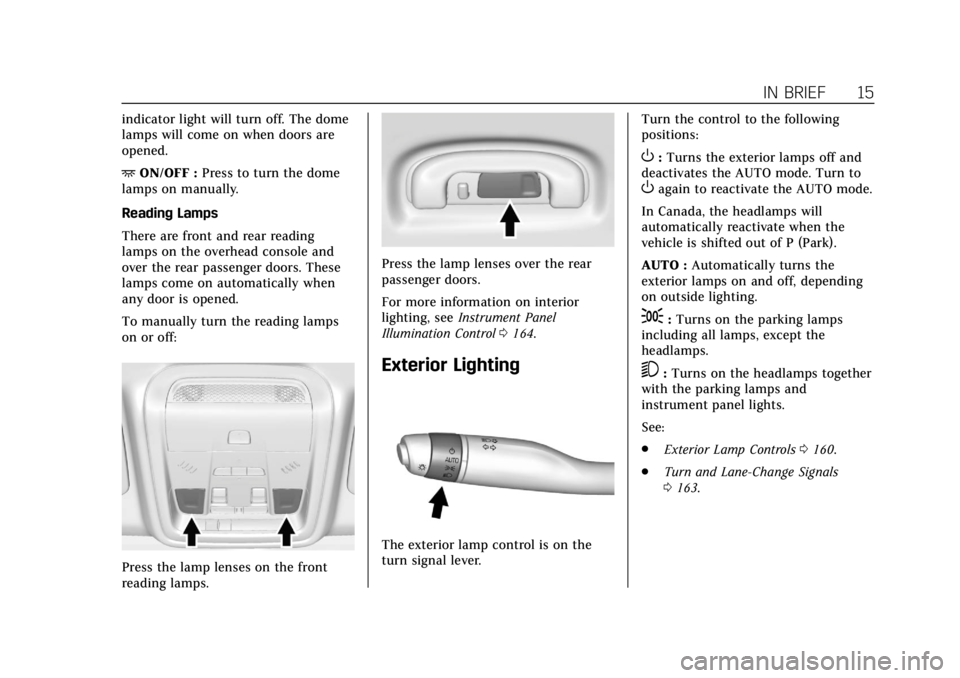
Press the lamp lenses on the front
reading lamps.
Press the lamp lenses over the rear
passenger doors.
For more information on interior
lighting, see Instrument Panel
Illumination Control 0164.
Exterior Lighting
The exterior lamp control is on the
turn signal lever. Turn the control to the following
positions:
O:
Turns the exterior lamps off and
deactivates the AUTO mode. Turn to
Oagain to reactivate the AUTO mode.
In Canada, the headlamps will
automatically reactivate when the
vehicle is shifted out of P (Park).
AUTO : Automatically turns the
exterior lamps on and off, depending
on outside lighting.
;: Turns on the parking lamps
including all lamps, except the
headlamps.
5: Turns on the headlamps together
with the parking lamps and
instrument panel lights.
See:
. Exterior Lamp Controls 0160.
. Turn and Lane-Change Signals
0163.
Page 18 of 380
Cadillac XT5 Owner Manual (GMNA-Localizing-U.S./Canada/Mexico-
11349110) - 2018 - CRC - 9/28/17
IN BRIEF 17
INT :If equipped with Intermittent
wipers only, move the windshield
wiper lever to INT. Turn the band up
for more frequent wipes or down for
less frequent wipes.
OFF : Use to turn the wipers off.
1X : For a single wipe, briefly move
the lever down. For several wipes, hold
the lever down.
f: Pull the lever toward you to
spray windshield washer fluid and
activate the wipers.
See Windshield Wiper/Washer 0114
and Rear Window Wiper/Washer 0117.
Climate Controls
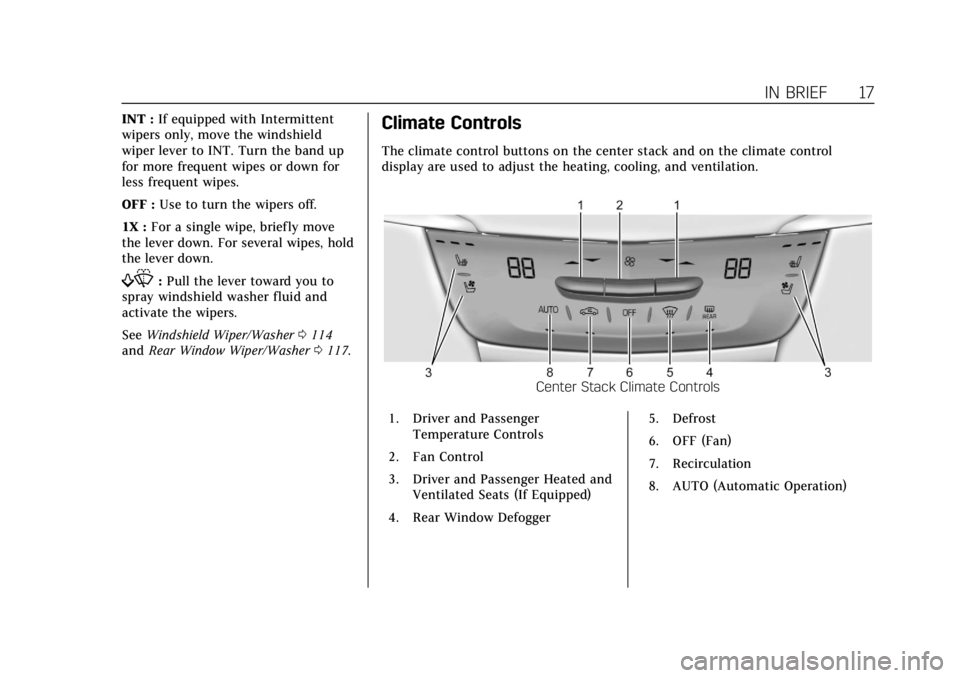
The climate control buttons on the center stack and on the climate control
display are used to adjust the heating, cooling, and ventilation.
Center Stack Climate Controls
1. Driver and Passenger Temperature Controls
2. Fan Control
3. Driver and Passenger Heated and Ventilated Seats (If Equipped)
4. Rear Window Defogger 5. Defrost
6. OFF (Fan)
7. Recirculation
8. AUTO (Automatic Operation)
Page 19 of 380
Cadillac XT5 Owner Manual (GMNA-Localizing-U.S./Canada/Mexico-
11349110) - 2018 - CRC - 9/28/17
18 IN BRIEF
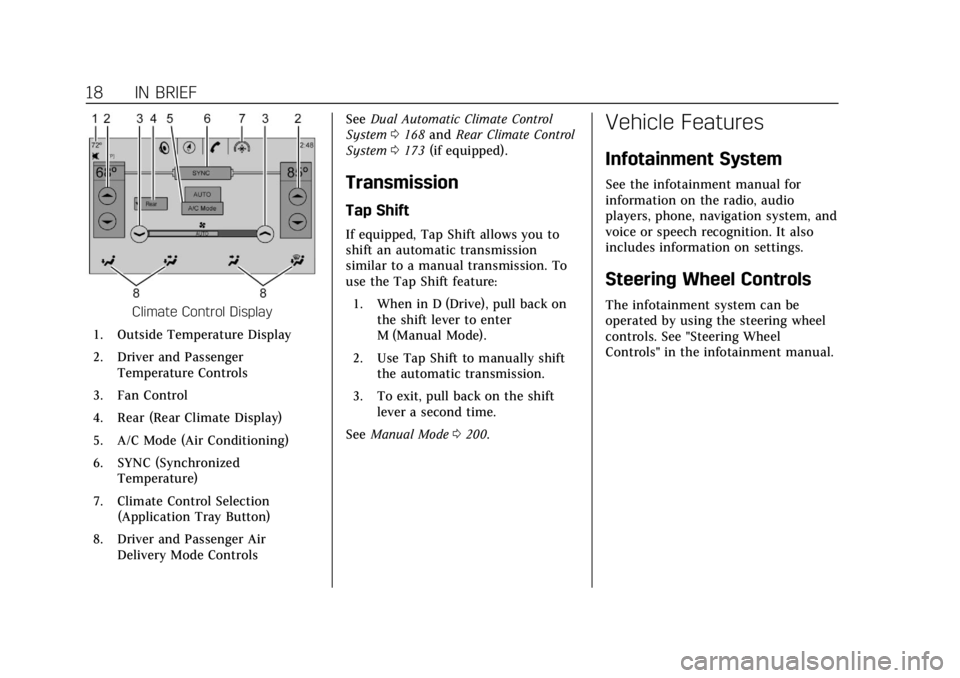
Climate Control Display
1. Outside Temperature Display
2. Driver and Passenger Temperature Controls
3. Fan Control
4. Rear (Rear Climate Display)
5. A/C Mode (Air Conditioning)
6. SYNC (Synchronized Temperature)
7. Climate Control Selection (Application Tray Button)
8. Driver and Passenger Air Delivery Mode Controls See
Dual Automatic Climate Control
System 0168 and Rear Climate Control
System 0173 (if equipped).
Transmission
Tap Shift
If equipped, Tap Shift allows you to
shift an automatic transmission
similar to a manual transmission. To
use the Tap Shift feature:
1. When in D (Drive), pull back on the shift lever to enter
M (Manual Mode).
2. Use Tap Shift to manually shift the automatic transmission.
3. To exit, pull back on the shift lever a second time.
See Manual Mode 0200.
Vehicle Features
Infotainment System
See the infotainment manual for
information on the radio, audio
players, phone, navigation system, and
voice or speech recognition. It also
includes information on settings.
Steering Wheel Controls
The infotainment system can be
operated by using the steering wheel
controls. See "Steering Wheel
Controls" in the infotainment manual.
Page 20 of 380
Cadillac XT5 Owner Manual (GMNA-Localizing-U.S./Canada/Mexico-
11349110) - 2018 - CRC - 9/28/17
IN BRIEF 19
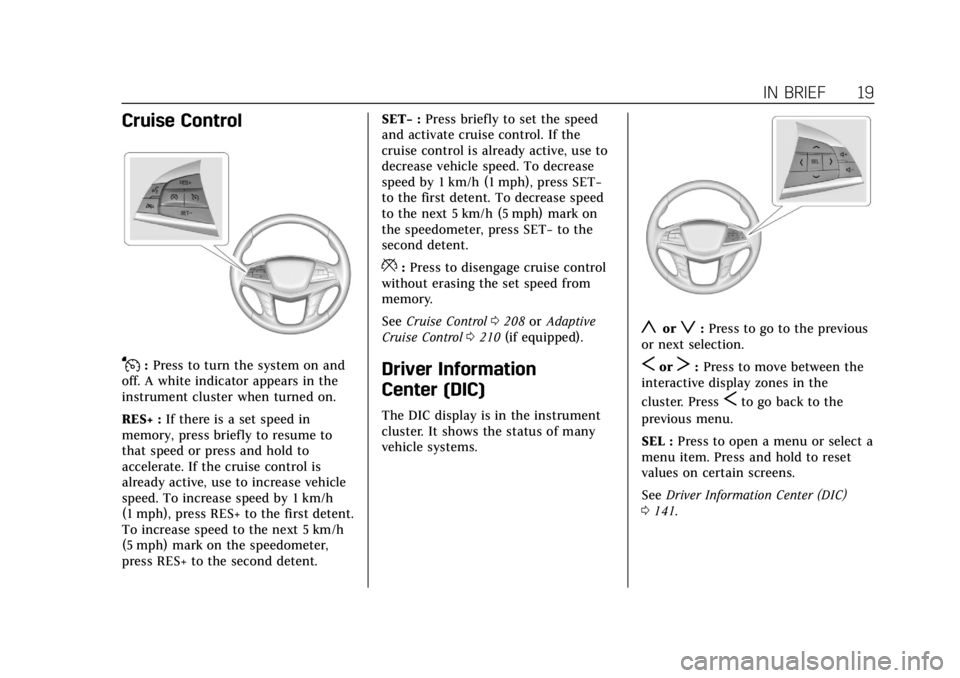
Cruise Control
J:Press to turn the system on and
off. A white indicator appears in the
instrument cluster when turned on.
RES+ : If there is a set speed in
memory, press briefly to resume to
that speed or press and hold to
accelerate. If the cruise control is
already active, use to increase vehicle
speed. To increase speed by 1 km/h
(1 mph), press RES+ to the first detent.
To increase speed to the next 5 km/h
(5 mph) mark on the speedometer,
press RES+ to the second detent. SET−
:Press briefly to set the speed
and activate cruise control. If the
cruise control is already active, use to
decrease vehicle speed. To decrease
speed by 1 km/h (1 mph), press SET−
to the first detent. To decrease speed
to the next 5 km/h (5 mph) mark on
the speedometer, press SET− to the
second detent.
*: Press to disengage cruise control
without erasing the set speed from
memory.
See Cruise Control 0208 orAdaptive
Cruise Control 0210 (if equipped).
Driver Information
Center (DIC)
The DIC display is in the instrument
cluster. It shows the status of many
vehicle systems.
yorz:Press to go to the previous
or next selection.
SorT: Press to move between the
interactive display zones in the
cluster. Press
Sto go back to the
previous menu.
SEL : Press to open a menu or select a
menu item. Press and hold to reset
values on certain screens.
See Driver Information Center (DIC)
0 141.
Page 23 of 380
Cadillac XT5 Owner Manual (GMNA-Localizing-U.S./Canada/Mexico-
11349110) - 2018 - CRC - 9/28/17
22 IN BRIEF
Reverse Automatic
Braking (RAB)
If the vehicle has Adaptive Cruise
Control (ACC) it also has the RAB
system, which is designed to help
avoid or reduce the harm caused by
backing crashes when the vehicle is
shifted into R (Reverse). If the system
detects the vehicle is backing too fast
to avoid a crash with a detected object
behind your vehicle in your path, it
may automatically brake hard to
a stop.
SeeAssistance Systems for Parking or
Backing 0220.
Power Outlets
The accessory power outlets can be
used to plug in electrical equipment,
such as a cell phone or MP3 player.
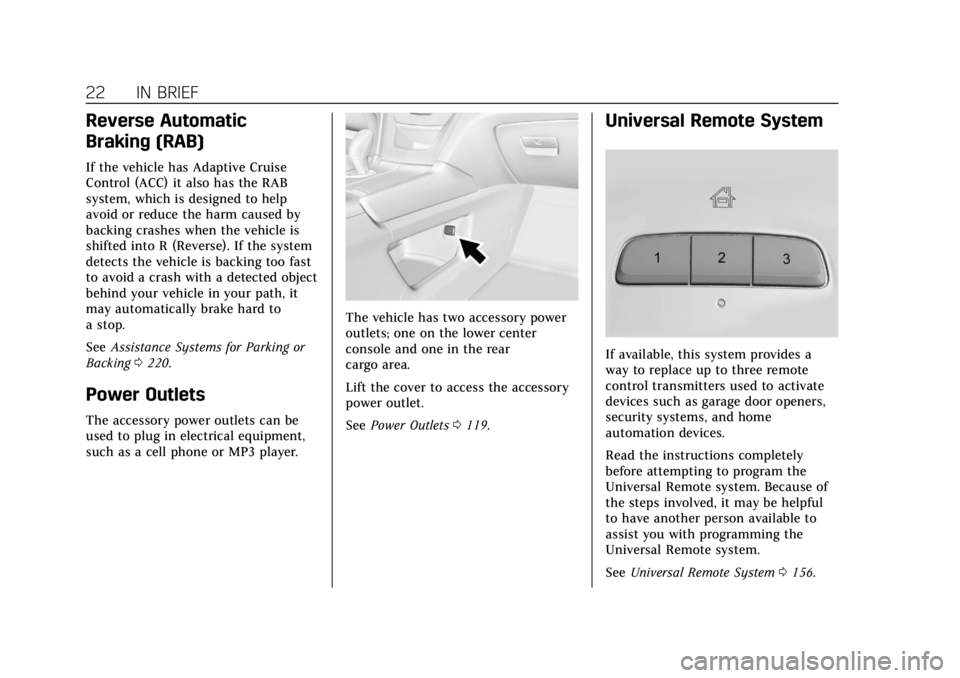
The vehicle has two accessory power
outlets; one on the lower center
console and one in the rear
cargo area.
Lift the cover to access the accessory
power outlet.
See Power Outlets 0119.
Universal Remote System
If available, this system provides a
way to replace up to three remote
control transmitters used to activate
devices such as garage door openers,
security systems, and home
automation devices.
Read the instructions completely
before attempting to program the
Universal Remote system. Because of
the steps involved, it may be helpful
to have another person available to
assist you with programming the
Universal Remote system.
See Universal Remote System 0156.
Page 24 of 380
Cadillac XT5 Owner Manual (GMNA-Localizing-U.S./Canada/Mexico-
11349110) - 2018 - CRC - 9/28/17
IN BRIEF 23
Sunroof
If equipped, the ignition must be on
or in ACC/ACCESSORY, or Retained
Accessory Power (RAP), must be
active to operate the sunroof.
SeeIgnition Positions 0188 and
Retained Accessory Power (RAP) 0193.
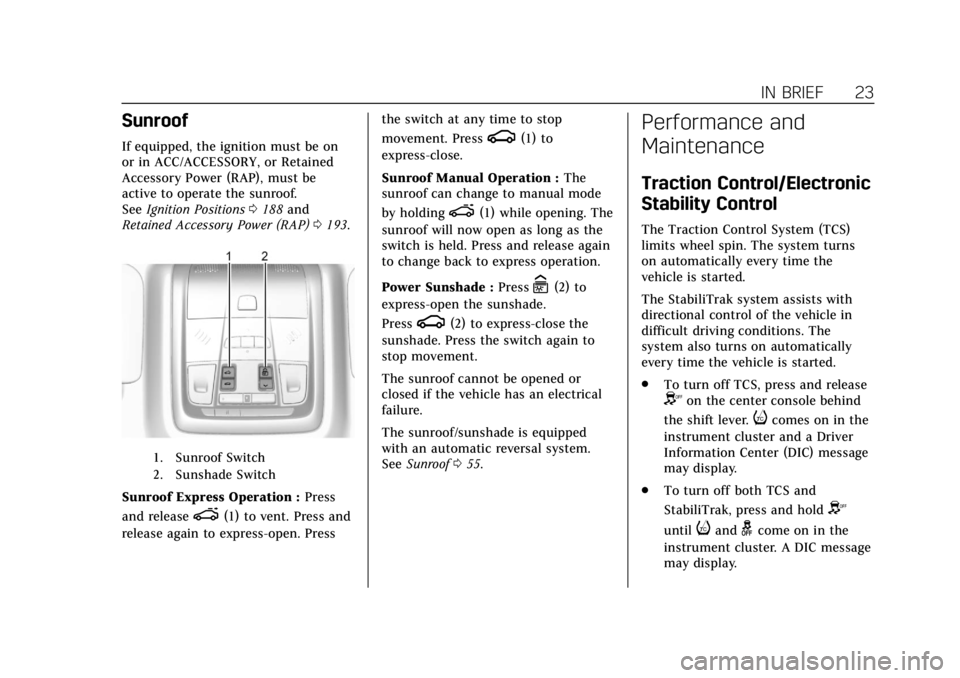
1. Sunroof Switch
2. Sunshade Switch
Sunroof Express Operation : Press
and release
e(1) to vent. Press and
release again to express-open. Press the switch at any time to stop
movement. Press
g(1) to
express-close.
Sunroof Manual Operation : The
sunroof can change to manual mode
by holding
e(1) while opening. The
sunroof will now open as long as the
switch is held. Press and release again
to change back to express operation.
Power Sunshade : Press
C(2) to
express-open the sunshade.
Press
g(2) to express-close the
sunshade. Press the switch again to
stop movement.
The sunroof cannot be opened or
closed if the vehicle has an electrical
failure.
The sunroof/sunshade is equipped
with an automatic reversal system.
See Sunroof 055.
Performance and
Maintenance
Traction Control/Electronic
Stability Control
The Traction Control System (TCS)
limits wheel spin. The system turns
on automatically every time the
vehicle is started.
The StabiliTrak system assists with
directional control of the vehicle in
difficult driving conditions. The
system also turns on automatically
every time the vehicle is started.
.
To turn off TCS, press and release
Yon the center console behind
the shift lever.
icomes on in the
instrument cluster and a Driver
Information Center (DIC) message
may display.
. To turn off both TCS and
StabiliTrak, press and hold
Y
untiliandgcome on in the
instrument cluster. A DIC message
may display.
Page 25 of 380
Cadillac XT5 Owner Manual (GMNA-Localizing-U.S./Canada/Mexico-
11349110) - 2018 - CRC - 9/28/17
24 IN BRIEF
.Press and releaseYagain to turn
on both systems.
See Traction Control/Electronic Stability
Control 0205.
Tire Pressure Monitor
This vehicle may have a Tire Pressure
Monitor System (TPMS).
The low tire pressure warning light
alerts to a significant loss in pressure
of one of the vehicle's tires. If the
warning light comes on, stop as soon
as possible and inflate the tires to the
recommended pressure shown on the
Tire and Loading Information label.
See Vehicle Load Limits 0184. The
warning light will remain on until the
tire pressure is corrected. The low tire pressure warning light
may come on in cool weather when
the vehicle is first started, and then
turn off as the vehicle is driven. This
may be an early indicator that the tire
pressures are getting low and the tires
need to be inflated to the proper
pressure.
The TPMS does not replace normal
monthly tire maintenance. Maintain
the correct tire pressures.
See
Tire Pressure Monitor System
0 288.
Tire Fill Alert (If Equipped)
This feature provides visual and
audible alerts outside the vehicle to
help when inflating an underinflated
tire to the recommended cold tire
pressure. See “Tire Fill Alert (If
Equipped)” underTire Pressure Monitor
Operation 0289.
Fuel
Regular Fuel
Use only unleaded gasoline rated
87 octane or higher in your vehicle.
Do not use gasoline with an octane
rating lower as it may result in vehicle
damage and lower fuel economy. See
Fuel 0236.
Page 26 of 380
Cadillac XT5 Owner Manual (GMNA-Localizing-U.S./Canada/Mexico-
11349110) - 2018 - CRC - 9/28/17
IN BRIEF 25
E85 or FlexFuel
No E85 or FlexFuel
Gasoline-ethanol fuel blends greater
than E15 (15% ethanol by volume),
such as E85, cannot be used in this
vehicle.
Engine Oil Life System
The engine oil life system calculates
engine oil life based on vehicle use
and displays the CHANGE ENGINE
OIL SOON message when it is time to
change the engine oil and filter. The
oil life system should be reset to 100%
only following an oil change.Resetting the Oil Life System
1. Using the DIC controls on the right side of the steering wheel,
display REMAINING OIL LIFE on
the DIC. See Driver Information
Center (DIC) 0141. When
remaining oil life is low, the
CHANGE ENGINE OIL SOON
message will appear on the
display.
2. Press and hold SEL to clear the CHANGE ENGINE OIL SOON
message and reset the oil life
at 100%.
Be careful not to reset the oil life
display accidentally at any time
other than after the oil is
changed. It cannot be reset
accurately until the next oil
change.
The oil life system can also be reset as
follows: 1. Display REMAINING OIL LIFE on the DIC. See Driver Information
Center (DIC) 0141. 2. Fully press and release the
accelerator pedal three times
within five seconds.
If the CHANGE ENGINE OIL
SOON message is not on, the
system is reset.
See Engine Oil Life System 0256.
Driving for Better Fuel
Economy
Driving habits can affect fuel mileage.
Here are some driving tips to get the
best fuel economy possible.
.
On AWD vehicles, use Tour Mode
when conditions permit.
. Avoid fast starts and accelerate
smoothly.
. Brake gradually and avoid abrupt
stops.
. Avoid idling the engine for long
periods of time.
. When road and weather
conditions are appropriate, use
cruise control.
Page 28 of 380
Cadillac XT5 Owner Manual (GMNA-Localizing-U.S./Canada/Mexico-
11349110) - 2018 - CRC - 9/28/17
KEYS, DOORS, AND WINDOWS 27
Keys, Doors, and
Windows
Keys and Locks
Keys . . . . . . . . . . . . . . . . . . . . . . . . . . . . . . . . 27
Remote Keyless Entry (RKE)System . . . . . . . . . . . . . . . . . . . . . . . . . . . . 28
Remote Keyless Entry (RKE) System Operation . . . . . . . . . . . . . . . . 28
Remote Vehicle Start . . . . . . . . . . . . . . 35
Door Locks . . . . . . . . . . . . . . . . . . . . . . . . . 36
Power Door Locks . . . . . . . . . . . . . . . . . 39
Delayed Locking . . . . . . . . . . . . . . . . . . . 39
Automatic Door Locks . . . . . . . . . . . . 39
Lockout Protection . . . . . . . . . . . . . . . . 39
Safety Locks . . . . . . . . . . . . . . . . . . . . . . . . 40
Doors
Liftgate . . . . . . . . . . . . . . . . . . . . . . . . . . . . . 41
Vehicle Security
Vehicle Security . . . . . . . . . . . . . . . . . . . . 46
Vehicle Alarm System . . . . . . . . . . . . . 46
Immobilizer . . . . . . . . . . . . . . . . . . . . . . . . 48
Immobilizer Operation . . . . . . . . . . . . 48
Exterior Mirrors
Convex Mirrors . . . . . . . . . . . . . . . . . . . . 49
Power Mirrors . . . . . . . . . . . . . . . . . . . . . . 49 Folding Mirrors . . . . . . . . . . . . . . . . . . . . 49
Heated Mirrors . . . . . . . . . . . . . . . . . . . . . 50
Automatic Dimming Mirror . . . . . . . 50
Reverse Tilt Mirrors . . . . . . . . . . . . . . . 50
Interior Mirrors
Interior Rearview Mirrors . . . . . . . . . 51
Manual Rearview Mirror . . . . . . . . . . 51
Automatic Dimming Rearview
Mirror . . . . . . . . . . . . . . . . . . . . . . . . . . . . . 51
Rear Camera Mirror . . . . . . . . . . . . . . . 51
Windows
Windows . . . . . . . . . . . . . . . . . . . . . . . . . . . 53
Power Windows . . . . . . . . . . . . . . . . . . . . 53
Sun Visors . . . . . . . . . . . . . . . . . . . . . . . . . . 55
Roof
Sunroof . . . . . . . . . . . . . . . . . . . . . . . . . . . . . 55
Keys and Locks
Keys
{Warning
Leaving children in a vehicle with a
Remote Keyless Entry (RKE)
transmitter is dangerous and
children or others could be
seriously injured or killed. They
could operate the power windows
or other controls or make the
vehicle move. The windows will
function with the RKE transmitter
in the vehicle, and children or
others could be caught in the path
of a closing window. Do not leave
children in a vehicle with an RKE
transmitter.
Page 36 of 380
Cadillac XT5 Owner Manual (GMNA-Localizing-U.S./Canada/Mexico-
11349110) - 2018 - CRC - 9/28/17
KEYS, DOORS, AND WINDOWS 35
Remote Vehicle Start
This feature allows the engine to be
started from outside of the vehicle.
/:This button is on the RKE
transmitter for remote start.
The climate control system will use
the previous settings during a remote
start. The rear defog may come on
during remote start based on cold
ambient conditions. The rear fog
indicator light does not come on
during remote start.
If the vehicle has auto heated or
ventilated seats they may come on
during a remote start. See Heated and
Ventilated Front Seats 064.
Laws in some local communities may
restrict the use of remote starters. For
example, some laws may require a
person using remote start to have the
vehicle in view. Check local
regulations for any requirements.
Other conditions can affect the
performance of the transmitter. See
Remote Keyless Entry (RKE) System
0 28. Starting the Engine Using Remote
Start
1. Press and release
Qon the RKE
transmitter.
2. Immediately press and hold
/
for at least four seconds or until
the turn signal lamps flash. The
turn signal lamps flashing
confirms the request to remote
start the vehicle has been
received.
During the remote start the
doors will be locked and the
parking lamps will remain on as
long as the engine is running.
The engine will shut off after
10 minutes unless a time
extension is done or the ignition
is turned on.
3. With the RKE transmitter in the vehicle, press the brake pedal
and start the vehicle to drive.
Extending Engine Run Time
The engine run time can also be
extended by another 10 minutes,
if during the first 10 minutes Steps 1 and 2 are repeated while the
engine is still running. An extension
can be requested 30 seconds after
starting. This provides a total of
20 minutes.
The remote start can only be
extended once.
When the remote start is extended,
the second 10-minute period is added
on to the first 10 minutes for a total
of 20 minutes.
A maximum of two remote starts, or a
remote start with an extension, are
allowed between ignition cycles.
The ignition must be turned on and
then off before the remote start
procedure can be used again.
Canceling a Remote Start
To cancel a remote start, do any of
the following:
.
Press and hold
/until the
parking lamps turn off.
. Turn on the hazard warning
flashers.
. Turn the vehicle on and then off.