open back CADILLAC XT5 2018 User Guide
[x] Cancel search | Manufacturer: CADILLAC, Model Year: 2018, Model line: XT5, Model: CADILLAC XT5 2018Pages: 380, PDF Size: 6.21 MB
Page 81 of 380
Cadillac XT5 Owner Manual (GMNA-Localizing-U.S./Canada/Mexico-
11349110) - 2018 - CRC - 10/2/17
80 SEATS AND RESTRAINTS
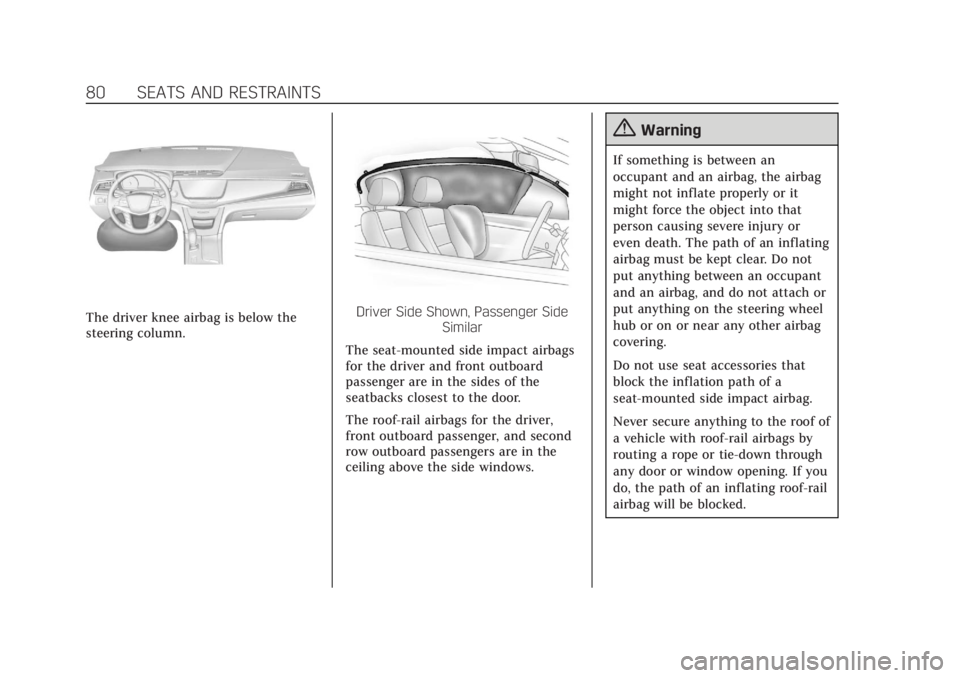
The driver knee airbag is below the
steering column.Driver Side Shown, Passenger SideSimilar
The seat-mounted side impact airbags
for the driver and front outboard
passenger are in the sides of the
seatbacks closest to the door.
The roof-rail airbags for the driver,
front outboard passenger, and second
row outboard passengers are in the
ceiling above the side windows.
{Warning
If something is between an
occupant and an airbag, the airbag
might not inflate properly or it
might force the object into that
person causing severe injury or
even death. The path of an inflating
airbag must be kept clear. Do not
put anything between an occupant
and an airbag, and do not attach or
put anything on the steering wheel
hub or on or near any other airbag
covering.
Do not use seat accessories that
block the inflation path of a
seat-mounted side impact airbag.
Never secure anything to the roof of
a vehicle with roof-rail airbags by
routing a rope or tie‐down through
any door or window opening. If you
do, the path of an inflating roof-rail
airbag will be blocked.
Page 109 of 380
Cadillac XT5 Owner Manual (GMNA-Localizing-U.S./Canada/Mexico-
11349110) - 2018 - CRC - 9/28/17
108 STORAGE
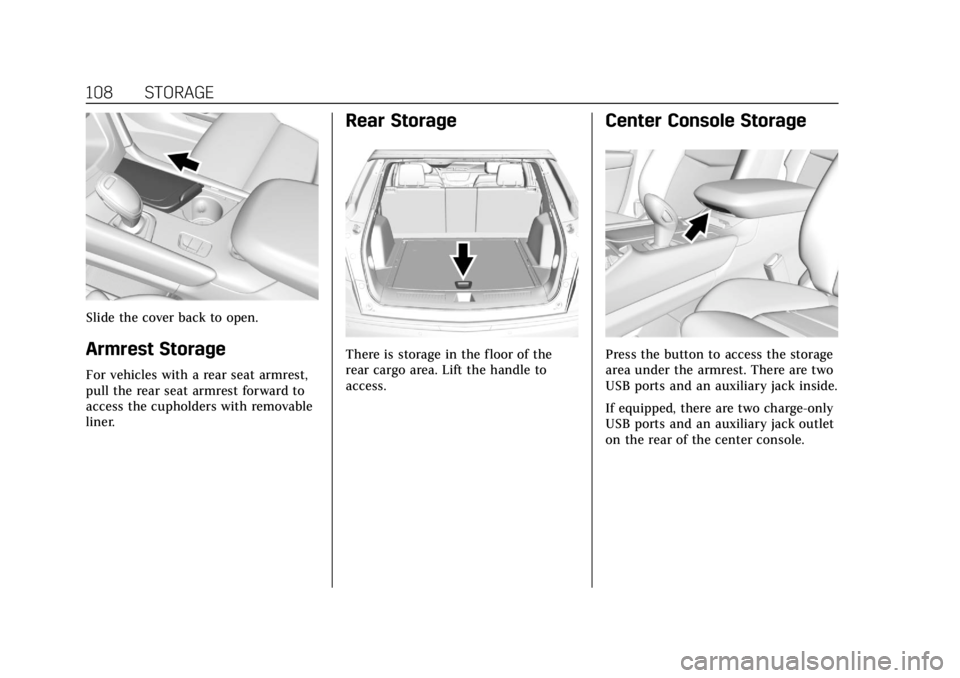
Slide the cover back to open.
Armrest Storage
For vehicles with a rear seat armrest,
pull the rear seat armrest forward to
access the cupholders with removable
liner.
Rear Storage
There is storage in the floor of the
rear cargo area. Lift the handle to
access.
Center Console Storage
Press the button to access the storage
area under the armrest. There are two
USB ports and an auxiliary jack inside.
If equipped, there are two charge-only
USB ports and an auxiliary jack outlet
on the rear of the center console.
Page 119 of 380
Cadillac XT5 Owner Manual (GMNA-Localizing-U.S./Canada/Mexico-
11349110) - 2018 - CRC - 9/28/17
118 INSTRUMENTS AND CONTROLS
signal from the GPS satellites. When
the compass display shows CAL, drive
the vehicle for a short distance in an
open area where it can receive a GPS
signal. The compass system will
automatically determine when a GPS
signal is restored and provide a
heading again.
Clock
The infotainment system controls are
used to access the time and date
settings through the menu system.
See“Home Page ”in the infotainment
manual for information about how to
use the menu system.
Setting the Clock
Time
To set the time:
1. From the Home Page, touch SETTINGS, then touch Time
and Date.
2. Touch Set Time, then touch + or −to increase or decrease hours
or minutes, and change AM
or PM. 3. Touch 12-24 Hr for a 12 or
24 hour clock.
4. Touch
[Back to go back to the
previous menu.
Date
To set the date: 1. From the Home Page, touch SETTINGS, then touch Time
and Date.
2. Touch Set Date, then touch + or −to increase or decrease month,
day, or year.
3. Touch
[Back to go back to the
previous menu.
Auto Set
When on, the time and date will
automatically update.
To set auto set: 1. From the Home Page, touch SETTINGS, then touch Time
and Date.
2. Touch Set Time or Set Date. 3. Touch Auto Set, then select
On-Cell Network or Off-Manual
to manually set the time
and date.
4. Touch
[Back to go back to the
previous menu.
If auto set is on, the time displayed on
the clock may not update immediately
when driving into a new time zone.
In some regions, auto set may require
an active OnStar service plan,
if available.
Clock Display
When on, the digital clock will display
on the infotainment screen.
To set the clock display: 1. From the Home Page, touch SETTINGS, then touch Time
and Date.
2. Touch Clock Display, then select Off or On.
3. Touch
[Back to go back to the
previous menu.
Page 122 of 380
Cadillac XT5 Owner Manual (GMNA-Localizing-U.S./Canada/Mexico-
11349110) - 2018 - CRC - 9/28/17
INSTRUMENTS AND CONTROLS 121
[email protected]. This offer is
valid for three (3) years from the date
on which you purchased the product.
Freescale-WCT library
Copyright (c) 2012-2014 Freescale
Semiconductor, Inc.. All rights
reserved.1. Redistributions of source code must retain the above copyright
notice, this list of conditions and
the following disclaimer.
2. Redistributions in binary form must reproduce the above
copyright notice, this list of
conditions and the following
disclaimer in the documentation
and/or other materials provided
with the distribution.
3. Neither the name of the copyright holder nor the names
of its contributors may be used
to endorse or promote products
derived from this software
without specific prior written
permission. THIS SOFTWARE IS PROVIDED BY
THE COPYRIGHT HOLDERS AND
CONTRIBUTORS "AS IS" AND ANY
EXPRESS OR IMPLIED WARRANTIES,
INCLUDING, BUT NOT LIMITED TO,
THE IMPLIED WARRANTIES OF
MERCHANTABILITY AND FITNESS
FOR A PARTICULAR PURPOSE ARE
DISCLAIMED. IN NO EVENT SHALL
THE COPYRIGHT HOLDER OR
CONTRIBUTORS BE LIABLE FOR ANY
DIRECT, INDIRECT, INCIDENTAL,
SPECIAL, EXEMPLARY, OR
CONSEQUENTIAL DAMAGES
(INCLUDING, BUT NOT LIMITED TO,
PROCUREMENT OF SUBSTITUTE
GOODS OR SERVICES; LOSS OF USE,
DATA, OR PROFITS; OR BUSINESS
INTERRUPTION) HOWEVER CAUSED
AND ON ANY THEORY OF LIABILITY,
WHETHER IN CONTRACT, STRICT
LIABILITY, OR TORT (INCLUDING
NEGLIGENCE OR OTHERWISE)
ARISING IN ANY WAY OUT OF THE
USE OF THIS SOFTWARE, EVEN IF
ADVISED OF THE POSSIBILITY OF
SUCH DAMAGE.Cigarette Lighter
If equipped with a cigarette lighter, it
is in the center console near the
cupholders. Press on the access door
to open it and use the lighter.
To use the cigarette lighter, push it in,
and let go. When it is ready, it will
pop back out by itself.
Caution
Holding a cigarette lighter in while
it is heating does not let the lighter
back away from the heating
element when it is hot. Damage
from overheating can occur to the
lighter or heating element, or a fuse
could be blown. Do not hold a
cigarette lighter in while it is
heating.
Page 142 of 380

Cadillac XT5 Owner Manual (GMNA-Localizing-U.S./Canada/Mexico-
11349110) - 2018 - CRC - 9/28/17
INSTRUMENTS AND CONTROLS 141
Cruise Control Light
The cruise control light is white when
the cruise control is on and ready, and
turns green when the cruise control is
set and active. SeeCruise Control
0 208.
Adaptive Cruise Control Light
This light comes on when Adaptive
Cruise Control (if equipped) is active.
See Adaptive Cruise Control 0210.
Door Ajar Light
For vehicles equipped with this light,
it comes on when a door is open or
not securely latched. Before driving,
check that all doors are properly
closed.
Information Displays
Driver Information
Center (DIC)
The DIC is displayed in the
instrument cluster. It shows the status
of many vehicle systems.
yorz:Press to go to the previous
or next selection.
SorT: Press to move between the
interactive display zones in the
cluster. Press
Sto go back to the
previous menu.
Page 150 of 380
Cadillac XT5 Owner Manual (GMNA-Localizing-U.S./Canada/Mexico-
11349110) - 2018 - CRC - 9/28/17
INSTRUMENTS AND CONTROLS 149
Rear Seat Reminder
This allows for a chime and a message
when the rear door has been opened
before or during operation of the
vehicle.
Select Off or On.
Language
Select Language, then select from the
available language(s).
The selected language will display on
the system, and voice recognition will
reflect the selected language.
Teen Driver
See“Teen Driver” under“Settings ”in
the infotainment manual.
Valet Mode
This will lock the infotainment system
and steering wheel controls. It may
also limit access to vehicle storage
locations, if equipped.
To enable valet mode:
1. Enter a four-digit code on the keypad. 2. Select Enter to go to the
confirmation screen.
3. Re-enter the four-digit code.
Select Lock or Unlock to lock or
unlock the system. Touch Back to go
back to the previous menu.
Radio
Touch and the following may display:
. Manage Favorites
. Number of Favorites Shown
. Audible Touch Feedback
. Bose Audio Pilot
. Maximum Start Up Volume
Manage Favorites
This allows favorites to be edited. See
“Manage Favorites ”in “Settings” under
“Radio ”in the infotainment manual.
Number of Favorites Shown
Select to set the number of favorites
to display.
Select the desired number or select
Auto and the infotainment system will
automatically adjust the number of
favorites shown. Audible Touch Feedback
This allows Audible Touch Feedback
to be turned on or off.
Select Off or On.
Bose Audio Pilot
This feature adjusts the volume based
on the noise in the vehicle. See
“Bose
AudioPilot Noise Compensation
Technology” under“Infotainment
System Settings” in the infotainment
manual.
Select Off or On.
Maximum Start Up Volume
This feature sets the maximum
startup volume. If the vehicle is
started and the volume is greater than
this level, the volume is adjusted to
this level.
To set the maximum startup volume,
touch + or −to increase or decrease.
Vehicle
Select and the following may display:
.
Climate and Air Quality
. Collision/Detection Systems
Page 165 of 380
Cadillac XT5 Owner Manual (GMNA-Localizing-U.S./Canada/Mexico-
11349110) - 2018 - CRC - 9/28/17
164 LIGHTING
The turn and lane-change signal can
be turned off manually by moving the
lever back to its original position.
If after signaling a turn or lane
change, the arrow flashes rapidly or
does not come on, a signal bulb may
be burned out.
Replace any burned out bulbs. If a
bulb is not burned out, check the fuse.
SeeFuses and Circuit Breakers 0272.
Cornering Lamps
If equipped with cornering lamps, they
automatically come on when all of the
following occur:
.
The low-beam headlamps are on.
. The turn signals are activated or
the steering wheel is at a
calibrated angle.
. The vehicle speed is below the
calibrated speed.
Interior Lighting
Instrument Panel
Illumination Control
The brightness of the instrument
panel lighting and steering wheel
controls can be adjusted.
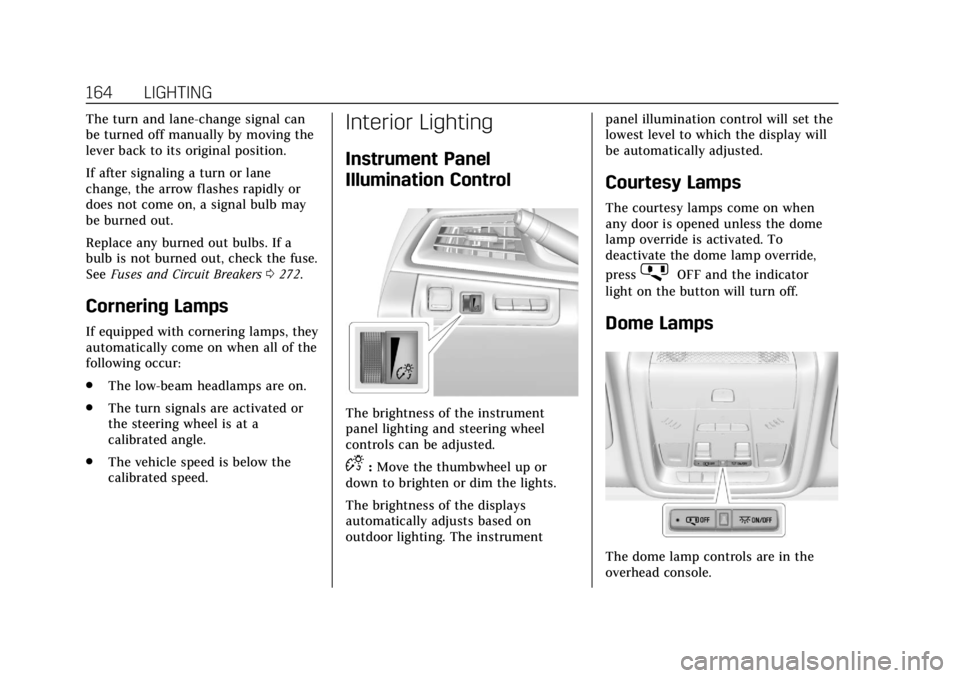
D:Move the thumbwheel up or
down to brighten or dim the lights.
The brightness of the displays
automatically adjusts based on
outdoor lighting. The instrument panel illumination control will set the
lowest level to which the display will
be automatically adjusted.
Courtesy Lamps
The courtesy lamps come on when
any door is opened unless the dome
lamp override is activated. To
deactivate the dome lamp override,
press
jOFF and the indicator
light on the button will turn off.
Dome Lamps
The dome lamp controls are in the
overhead console.
Page 167 of 380

Cadillac XT5 Owner Manual (GMNA-Localizing-U.S./Canada/Mexico-
11349110) - 2018 - CRC - 9/28/17
166 LIGHTING
door is opened after the ignition is
turned off. The dome lamp comes on
after the ignition is turned off. The
exterior lamps and dome lamp remain
on for a set amount of time, then
automatically turn off.
The exterior lamps turn off
immediately by turning the exterior
lamp control off.
This feature can be changed. See
Vehicle Personalization0148.
Battery Power Protection
The battery saver feature is designed
to protect the vehicle's battery.
If some interior lamps are left on and
the ignition is turned off, the battery
rundown protection system
automatically turns the lamp off after
some time.
Exterior Lighting Battery
Saver
The exterior lamps turn off about
10 minutes after the ignition is turned
off, if the parking lamps or headlamps
have been manually left on. This protects against draining the battery.
To restart the 10-minute timer, turn
the exterior lamp control to the off
position and then back to the parking
lamp or headlamp position.
To keep the lamps on for more than
10 minutes, the ignition must be on or
in ACC/ACCESSORY.
Page 206 of 380
Cadillac XT5 Owner Manual (GMNA-Localizing-U.S./Canada/Mexico-
11349110) - 2018 - CRC - 9/28/17
DRIVING AND OPERATING 205
stationary for up to two seconds after
the brake pedal is released. When
Extended Hold is selected, the vehicle
is held stationary for up to
five minutes after the brake pedal is
released. In either case, override the
hold feature by pressing the
accelerator pedal and attempting to
drive away.
If Standard Hold is selected, it will
hold the vehicle for two seconds
unless the driver door is opened or
the driver seat belt is unbuckled after
releasing the brake pedal. If Extended
Hold is selected, it will hold the
vehicle for five minutes unless the
driver door is opened and the driver
seat belt is unbuckled prior to
releasing the brake pedal. When
deactivated after five minutes, or if it
is deactivated when the driver seat
belt is unlatched or the driver door is
opened, the Electric Parking Brake will
engage to prevent vehicle movement.Ride Control Systems
Traction Control/Electronic
Stability Control
System Operation
The vehicle has a Traction Control
System (TCS) and StabiliTrak, an
electronic stability control system.
These systems help limit wheel spin
and assist the driver in maintaining
control, especially on slippery road
conditions.
TCS activates if it senses that any of
the drive wheels are spinning or
beginning to lose traction. On an
All-Wheel Drive (AWD) vehicle in
AWD or Sport Mode, the system will
operate if it senses that any of the
wheels are spinning or beginning to
lose traction. When this happens, TCS
applies the brakes to the spinning
wheels and reduces engine power to
limit wheel spin.
StabiliTrak activates when the system
senses a discrepancy between the
intended path and the direction the
vehicle is actually traveling.StabiliTrak selectively applies braking
pressure at any one of the vehicle's
brakes to help steer the vehicle in the
direction which you are steering.
If cruise control is being used and
traction control or StabiliTrak begins
to limit wheel spin, cruise control will
disengage. Cruise control may be
turned back on when road conditions
allow. TCS and StabiliTrak will
automatically turn on when cruise
control is set.
Both systems come on automatically
when the vehicle is started and begins
to move. The systems may be heard or
felt while they are operating or while
performing diagnostic checks. This is
normal and does not mean there is a
problem with the vehicle.
It is recommended to leave both
systems on for normal driving
conditions, but it may be necessary to
turn TCS off if the vehicle gets stuck
in sand, mud, ice, or snow. See
If the
Vehicle Is Stuck 0184 and “Turning
the Systems Off and On ”later in this
section.
Page 242 of 380
Cadillac XT5 Owner Manual (GMNA-Localizing-U.S./Canada/Mexico-
11349110) - 2018 - CRC - 9/28/17
DRIVING AND OPERATING 241
{Warning
When towing a trailer, exhaust
gases may collect at the rear of the
vehicle and enter if the liftgate,
trunk/hatch, or rear-most window
is open.
When towing a trailer:. Do not drive with the liftgate,
trunk/hatch, or rear-most
window open.
. Fully open the air outlets on
or under the instrument
panel.
. Also adjust the climate
control system to a setting
that brings in only outside air.
See “Climate Control Systems ”
in the Index.
For information about carbon
monoxide, see Engine Exhaust
0 195.
Towing a trailer requires a certain
amount of experience. The
combination you are driving is longer and not as responsive as the vehicle
itself. Get acquainted with the
handling and braking of the rig before
setting out for the open road.
Before starting, check all trailer hitch
parts and attachments, safety chains,
electrical connectors, lamps, tires, and
mirrors. If the trailer has electric
brakes, start the combination moving
and then apply the trailer brake
controller by hand to be sure the
brakes work.
During the trip, check occasionally to
be sure that the load is secure and the
lamps and any trailer brakes
still work.
Towing with a Stability Control
System
When towing, the sound of the
stability control system might be
heard. The system is reacting to the
vehicle movement caused by the
trailer, which mainly occurs during
cornering. This is normal when towing
heavier trailers.
Following Distance
Stay at least twice as far behind the
vehicle ahead as you would when
driving the vehicle without a trailer.
This can help to avoid situations that
require heavy braking and sudden
turns.
Passing
More passing distance is needed when
towing a trailer. Because the rig is
longer, it is necessary to go farther
beyond the passed vehicle before
returning to the lane.
Backing Up
Hold the bottom of the steering wheel
with one hand. To move the trailer to
the left, move your hand to the left.
To move the trailer to the right, move
your hand to the right. Always back
up slowly and, if possible, have
someone guide you.